How long does it take for BIMI to work after setup?

Published 25 May 2025
Updated 28 Sep 2026
14 min read
Summarize with
Updated on 28 Sep 2026: We refined the timing guidance for DNS, provider caches, certificates, and BIMI selectors so you can tell when to wait and when to fix the setup.
BIMI can start working within a few hours when the DNS record is correct and the mailbox provider accepts the sender. For Gmail, allow up to 48 hours after every requirement is met. Yahoo and Apple Mail do not publish a universal display deadline, so a longer wait usually points to provider eligibility, sender reputation, certificate evidence, or client support rather than DNS alone.
Publishing a valid BIMI record does not force every inbox to show the logo. BIMI is a permission signal. The mailbox provider still checks DMARC enforcement, the visible From domain, the SVG or PEM file, certificate status, sender reputation, and local display rules before it shows anything.
- Fastest case: A few hours after the BIMI TXT record is published and DNS caches refresh.
- Gmail window: Up to 48 hours for Gmail to process a correct record, certificate, and DMARC policy.
- No fixed deadline: Yahoo and Apple Mail publish eligibility rules, not a universal display SLA.
- Fix case: After 48 hours, check records, assets, certificates, mail flow, and provider-specific eligibility instead of assuming propagation.
BIMI requirements before the clock starts
BIMI timing starts only after the prerequisites are already true. DMARC must be at enforcement, and at least one of SPF or DKIM must pass with DMARC alignment to the visible From domain. The BIMI TXT record must also point to valid, publicly retrievable assets. If those items are not clean, the waiting period has not really started.
DMARC matters most because BIMI inherits trust from enforcement. The organizational domain and the RFC5322.From domain must each resolve to a qualifying policy, with any applicable subdomain policy also kept out of monitoring mode. Use p=quarantine or p=reject. RFC 9989 made pct historic, so omit it from new or updated DMARC records. Legacy BIMI guidance still describes full quarantine enforcement as pct=100. Under RFC 9989, t=y requests testing instead of policy application, so omit the t tag or use t=n. A policy of p=none is useful for monitoring, but it does not qualify the domain for BIMI display.
If the domain is still being prepared, start with the wider BIMI requirements before judging the clock. If DMARC is already live, run the domain through a DMARC checker and confirm the exact record that mailbox providers see.
|
|
|
|---|---|---|
DNS | Record resolves | Cache delay |
DMARC | Enforced | Required |
Logo | SVG Tiny PS | Fetch gate |
Certificate | VMC or CMC | Provider rule |
Reputation | Accepted sender | Variable |
The wait starts after every required gate in the row is true.
BIMI record examplesDNS
# With a mark certificate
default._bimi TXT "v=BIMI1; l=; a=https://brand.example.com/vmc.pem"

# SVG only
default._bimi TXT "v=BIMI1; l=https://brand.example.com/bimi.svg"
Gmail's documented setup flow says the logo can take up to 48 hours after the BIMI TXT record is added. The same setup flow makes clear that Gmail expects a VMC or CMC, an enforced DMARC policy, and public HTTPS hosting for BIMI assets. Use Google's BIMI steps as the Gmail-specific reference.
Why the logo does not appear right away
The most common mistake is treating DNS propagation as the whole timeline. DNS is only the first stage. After the TXT record resolves, mailbox providers still need to fetch the BIMI asset, validate the SVG or PEM file, associate the result with authenticated mail, and decide whether the sender qualifies for display.
There is also negative caching. If a provider checked for default._bimi before the record existed, its resolver can cache the negative answer for the zone's SOA negative-cache TTL. That is why a fresh BIMI record can appear correct in the DNS console but remain invisible to a receiver until the earlier negative answer expires.
Mailbox providers can cache the SVG and certificate separately from the DNS record. If an SVG was corrected or a certificate was renewed at the same URL, a receiver can keep using its older cached copy. Publishing the replacement at a new versioned HTTPS URL and updating the l or a tag gives the receiver a new URI to fetch once the DNS change is visible.
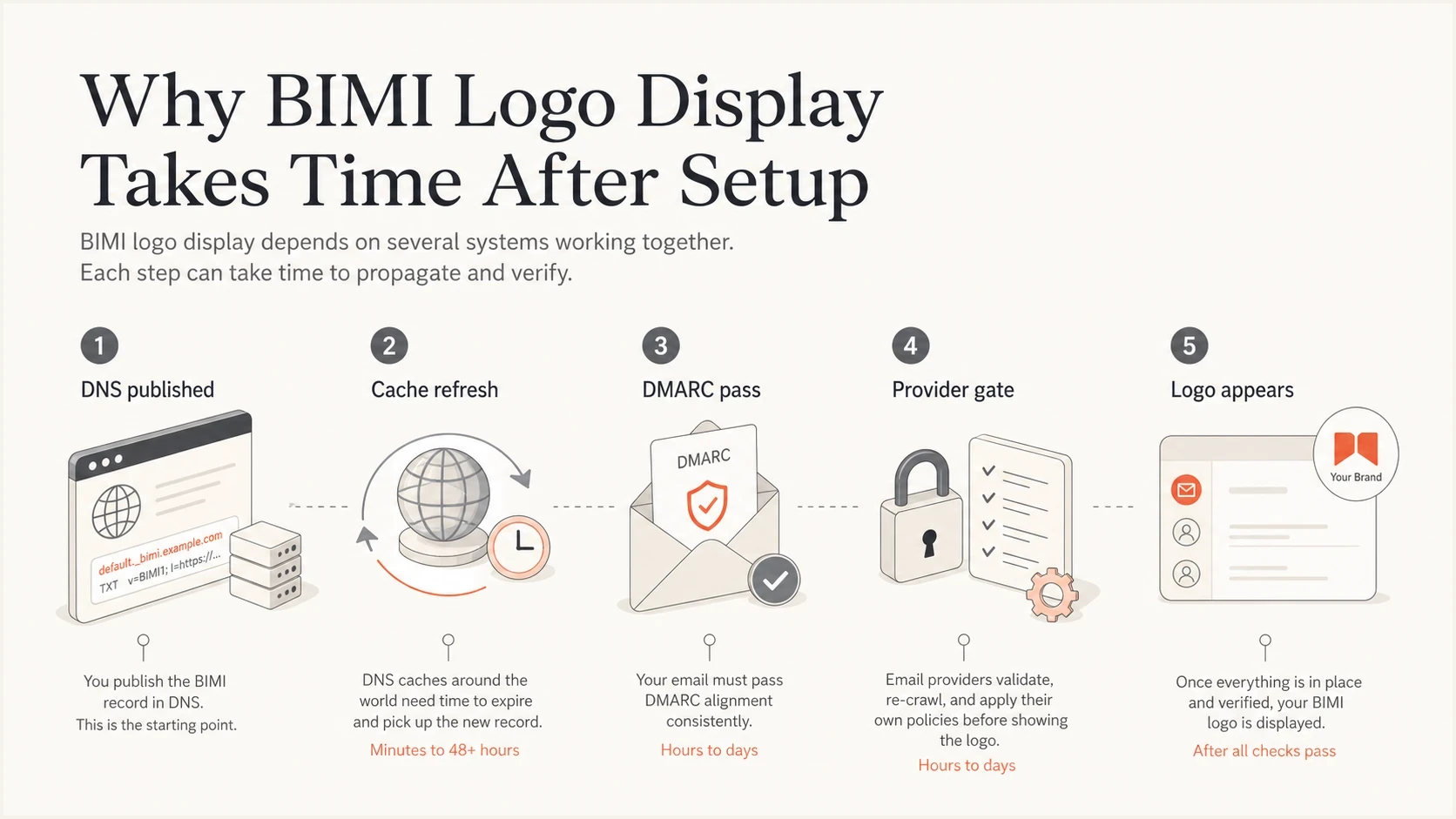
BIMI display path from DNS publication through provider checks to logo display.
Technical readiness
This is the part the sender controls directly. The record, SVG, PEM file, HTTPS hosting, and DMARC policy need to pass validation before any provider has a reason to display the logo.
- DMARC policy: Enforcement at quarantine or reject, with RFC 9989 testing mode disabled.
- BIMI record: A valid TXT record for the exact visible From domain or its organizational-domain fallback.
- Hosted files: Public HTTPS access, a current TLS certificate, correct MIME types, and no access controls or long redirect chains that block provider fetches.
Mailbox display
This is the provider decision. A mailbox provider can validate every technical item and still hold back display because the sender has insufficient history, is not eligible for that provider's program, or is being viewed in an unsupported client.
- Certificate gate: Gmail requires a VMC or CMC, while Apple Mail requires compatible evidence and client support.
- Reputation gate: Yahoo requires sufficient sender reputation and engagement for eligible bulk mail.
- Client gate: The recipient needs to view the message in an app and interface that supports BIMI.
A valid BIMI record is not a display guarantee
Treat BIMI validation as a prerequisite, not the final proof. The real proof is a fresh test message that passes authentication and shows the logo in a supported mailbox.
- Do not wait: Fix a DMARC, SVG, HTTPS, MIME type, or certificate error as soon as it appears.
- Do wait: Allow provider caches to refresh after every technical check is clean.
- Do retest: Send a new message after each DNS or asset change, because old mail rarely proves the new state.
Provider timing by mailbox
Gmail, Yahoo, and Apple Mail do not behave exactly the same way. The BIMI standard gives providers a way to verify brand-controlled logos, but each mailbox provider decides when to fetch, cache, and display the result.
For Gmail, allow up to 48 hours once the record, certificate, and DMARC policy are correct. If the logo still does not show after that, check the certificate type, validity dates, covered domain, PEM file chain, SVG format, and whether the exact sending domain has the BIMI record. If Gmail is the only failing mailbox, compare the setup against common Gmail logo issues before changing unrelated DNS.
Yahoo does not publish a fixed wait time. It requires a valid SVG, DMARC at quarantine or reject, bulk mail, and sufficient reputation and engagement for the sending address. Yahoo does not require a VMC for display, although it can use a published VMC as an eligibility signal. After a record change, test with fresh mail and a new web session so a local cache does not mask the result.
Apple Mail supports BIMI in iOS 16, iPadOS 16, macOS Ventura 13 or later, and iCloud.com. The sender and receiving service must meet BIMI and Apple Mail requirements, including compatible evidence that connects the logo to the domain. Apple does not publish a comparable 48-hour turnaround, so confirm the client version and evidence document before treating the delay as DNS propagation.
BIMI display wait ranges
Use these ranges only after DNS, DMARC, assets, and provider-specific certificate checks are clean.
Initial cache wait
0-24h
DNS and provider caches begin to refresh.
Gmail setup window
24-48h
Google says BIMI can take up to 48 hours.
Check provider eligibility
48h+
Review certificate, bulk-mail, reputation, and client rules.
Troubleshoot all-provider failure
7d+
A remaining setup or qualification issue needs evidence.
|
|
|
|
|---|---|---|---|
Up to 48h | VMC or CMC | PEM, SVG, DMARC | |
No fixed SLA | Bulk reputation | SVG, engagement | |
No fixed SLA | Evidence, client | Certificate, version |
Provider behavior changes, so treat this as an operating guide, not a promise.
Check the exact BIMI lookup name
BIMI follows the domain in the visible From address, not the Return-Path, tracking domain, or a nearby parent label. Without a BIMI-Selector header, the receiver first checks the default selector on that exact From domain. If no record exists there, it can fall back to the organizational domain.
BIMI lookup for a sending subdomainDNS
Visible From: offers@mail.news.example.com

1. default._bimi.mail.news.example.com TXT
2. default._bimi.example.com TXT

Not used as an intermediate fallback:
default._bimi.news.example.com TXT
A custom selector changes both lookups. The sending system adds a valid BIMI-Selector header and should include that header in the DMARC-aligned DKIM signature. A receiver can ignore a selector header that is not protected by that signature. If brand._bimi on the visible From domain is absent, the fallback is brand._bimi on the organizational domain. The receiver does not switch to the default selector during that fallback.
This distinction matters when a DNS lookup tool reports a valid record for one domain but the real message uses another. Inspect the Header From value and any BIMI-Selector header on a fresh message, then query the exact BIMI host that a receiver will use.
- Use the right host: Many DNS panels append the zone automatically, so enter default._bimi instead of the full domain when required.
- Publish one assertion: Multiple BIMI TXT records at the same selector create an ambiguous result and should be consolidated.
- Lower TTL before rollout: A one-hour TTL, or 3600 seconds, makes planned corrections easier once older caches expire.
- Check subdomain policy: The visible From subdomain must remain covered by DMARC enforcement for BIMI eligibility.
How to test BIMI after setup
The fastest way to diagnose BIMI timing is to separate record validation from live inbox display. Start with DNS because it has an objective answer, then move to authenticated mail, asset retrieval, and provider display. Mixing those steps creates false conclusions.
The test needs a new message. A message already sitting in the inbox usually will not update its sender logo after a DNS fix. Send a fresh message through the same authenticated path that recipients use, including the same visible From domain and sending service.
?
What's your domain score?
Deep-scan SPF, DKIM & DMARC records for email deliverability and security issues.
A broad domain health checker helps because BIMI failures often start outside the BIMI record itself. A weak SPF setup, a DKIM selector that stopped signing, or a DMARC policy left at monitoring can block display even when the BIMI TXT record looks perfect.
- Confirm DMARC: Check that quarantine or reject covers the organizational domain and relevant sending subdomains at full enforcement.
- Check authentication: Send real mail and confirm that SPF or DKIM passes with DMARC alignment to the visible From domain.
- Validate BIMI: Resolve the exact selector and domain, then confirm the syntax, logo URL, and certificate URL.
- Open assets: Fetch the SVG or PEM URL over HTTPS without authentication or a redirect chain, confirm current TLS, and keep the uncompressed SVG Tiny PS file at or below 32 KB.
- Inspect headers: Verify the SVG response uses image/svg+xml and the message shows the expected aligned domain and selector.
- Send fresh mail: Test in each target mailbox using a new message after the corrected records and assets are live.
- Apply provider timing: Allow Gmail up to 48 hours, then investigate the eligibility rules of any provider that still fails.
If the DNS record itself fails, fix that first and use a focused guide to validate BIMI. If the record passes but the logo does not show, move the investigation to DMARC reports, provider-specific certificate expectations, and sender reputation.
When the receiving provider includes a BIMI result in Authentication-Results, use bimi=pass, fail, none, or skipped and any accompanying comment to narrow the cause. A skipped result can point to failed DMARC or a receiver trust decision, while a fail result points to discovery or validation. Not every provider exposes this field, so its absence does not prove BIMI was ignored.
DMARC record detail view showing SPF, DKIM, DMARC, rDNS diagnostics, and DNS records
Suped's product keeps this investigation around the full authentication chain. Its domain view shows DMARC policy, SPF, DKIM, reverse DNS, and relevant DNS records together. That helps a team find a DKIM or DMARC failure instead of waiting on a BIMI record that already validates.
Where Suped fits
Suped's product connects BIMI readiness to DMARC reporting, sender verification, source-level authentication health, and policy status. Teams can confirm that enforced DMARC is stable before they treat a missing logo as a provider display problem.
For a BIMI project, Suped's DMARC monitoring provides the source-level evidence needed before moving to enforcement. Once enforcement is stable, Hosted DMARC supports policy staging without repeated manual DNS edits.
The workflow before BIMI
A BIMI rollout should have stable authentication before the logo becomes the focus. Suped turns aggregate DMARC data into source-level checks, so teams can fix the sending path that breaks alignment.
- DMARC evidence: Confirm which legitimate sources pass alignment before moving the policy to enforcement.
- Source alerts: Detect when an approved sender starts failing SPF, DKIM, or DMARC after rollout.
- Policy staging: Manage the move to quarantine or reject while keeping the enforcement state visible.
- Reputation checks: Blocklist (blacklist) monitoring can reveal reputation problems that also affect provider eligibility.
Suped does not control a mailbox provider's BIMI decision. It provides the authentication evidence needed to separate a sending problem from a provider display rule.
When to wait and when to fix
The right waiting period depends on what has already been proven. If DNS has not propagated, wait for DNS. If DMARC is not enforced, fix DMARC. If Gmail needs a certificate and there is no VMC or CMC, waiting will not change the result.
After 48 hours, Gmail has passed its published setup window, so investigate if fresh Gmail tests still fail. Yahoo and Apple Mail do not publish comparable turnaround times. For those providers, review eligibility, certificate evidence, and client support instead of applying a universal deadline. If no supported provider shows the logo after seven days, treat it as a setup or qualification problem rather than ordinary propagation.
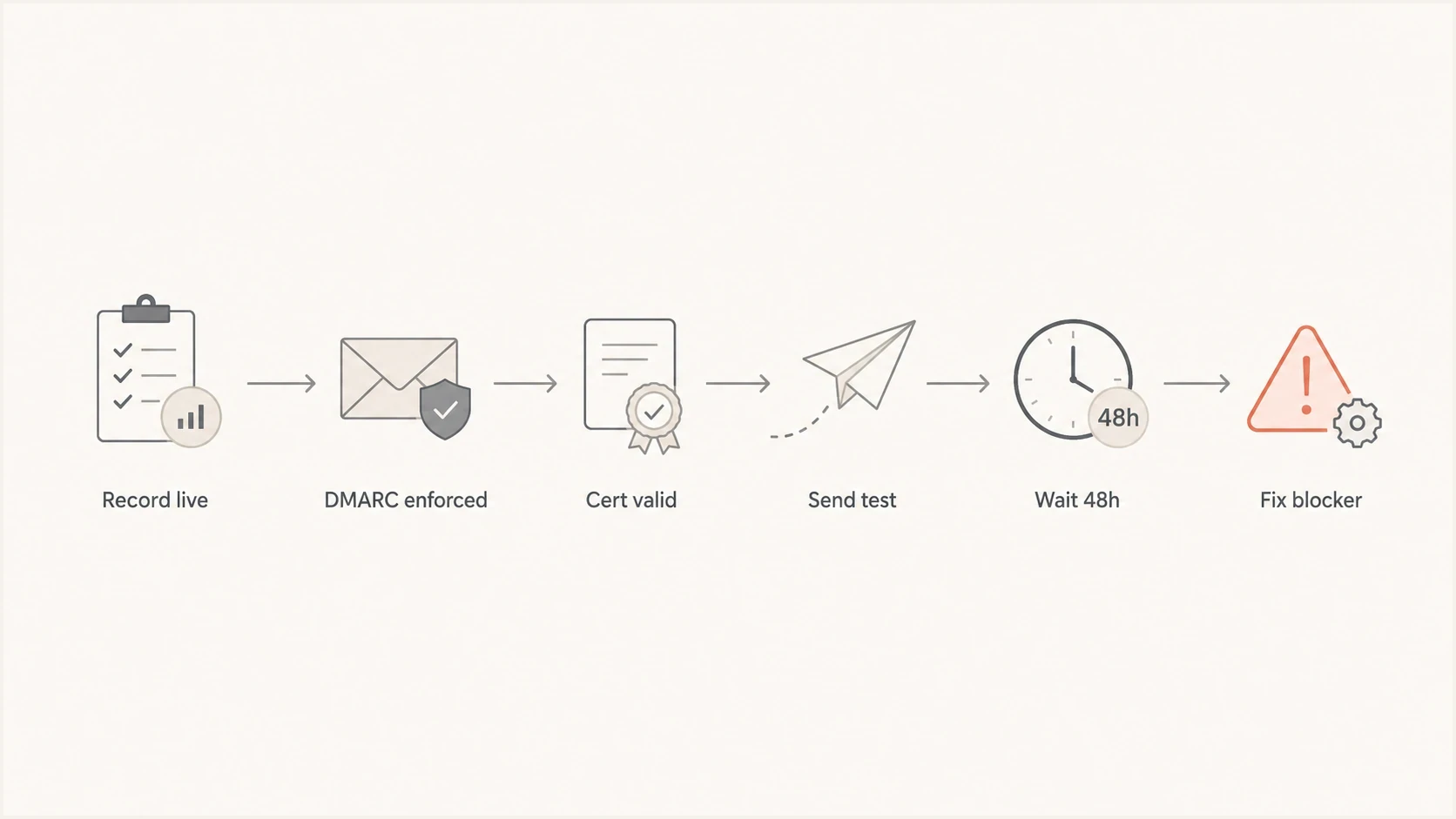
Decision path for waiting or fixing BIMI after setup.
Use this timing rule
If every requirement validates, allow Gmail up to 48 hours. If Gmail still fails, inspect a fresh message and the certificate path. For Yahoo, check bulk-mail eligibility, reputation, engagement, and a clean web session. For Apple Mail, check the evidence document and supported client version.
The fastest fixes are usually mechanical: the BIMI record is on the wrong domain, the SVG is not Tiny PS, the server returns the wrong MIME type, the PEM chain is incomplete, the certificate is expired or does not cover the assertion domain, automated fetches are blocked, or DMARC remains at monitoring. Slower cases involve reputation, sending history, provider eligibility, and unsupported client views.
Views from the trenches
Best practices
Prove DMARC enforcement before publishing BIMI, then test with fresh mail after DNS changes.
Check Gmail, Yahoo, and Apple Mail separately because each provider uses different gates.
Keep a dated log of DNS, SVG, PEM, and sending changes so timing tests stay reliable.
Common pitfalls
Assuming a valid BIMI record means every mailbox provider will show the logo immediately.
Testing old inbox messages after fixing DNS, then reading stale display as a current failure.
Ignoring sender reputation when Yahoo delays display despite clean DNS and authentication.
Expert tips
Treat 48 hours as Gmail's published window, then diagnose with provider-specific evidence.
Use real campaign paths for testing because BIMI follows the authenticated sending domain.
Separate certificate problems from reputation delay so fixes target the actual blocker.
Marketer from Email Geeks says BIMI usually starts working within a few hours after the record is published, as long as the sender already meets the technical requirements.
2022-10-19 - Email Geeks
Marketer from Email Geeks says Gmail and Apple Mail display should not be expected without the certificate evidence those providers require for brand logo display.
2022-10-19 - Email Geeks
How long to wait for BIMI
BIMI can start working within a few hours, but only Gmail publishes a setup window of up to 48 hours. That assumes DMARC is enforced, mail passes with alignment, the correct BIMI record resolves, the asset or certificate is reachable, and Gmail accepts the evidence document.
If the logo does not show after two days, troubleshoot provider by provider. For Yahoo, confirm the message is bulk mail and the sender has sufficient reputation and engagement. For Apple Mail, confirm compatible certificate evidence and a supported client. If every provider still fails after a week, treat the result as a real setup or qualification blocker.