
SPF and DKIM failures sometimes occur despite correct setup because each recipient does not always check the same message, the same sending IP, or the same DNS state. A single campaign can go directly to some inboxes, pass through forwarding rules for others, get modified by mailing lists or security gateways, or hit temporary DNS lookup problems at specific receivers. That is why the result is not always 0% or 100%.
The practical answer is simple: a low failure rate usually means the setup works, but some delivery paths break authentication after the message leaves your sending platform. I treat a tiny scattered failure rate differently from a concentrated pattern against one provider, source, selector, or recipient group.
A small number of SPF or DKIM failures in a large send is normal. When the same domain sends 77,000 messages and a small fraction fails, I first look for forwarding, message modification, DNS timing, or receiver-side differences before changing SPF or DKIM records.
Why correct setup does not guarantee every pass
Email authentication is checked by the receiving system at the point it receives the message. That point changes. Direct mail has the best chance of passing. Mail that goes through forwarding rules, distribution lists, security filters, or mailing lists gets checked after those hops.
SPF and DKIM also fail for different reasons. SPF checks whether the connecting server is authorized for the envelope sender domain. DKIM checks whether the signed headers and body still match the signature that was added by the sender. DMARC then asks whether SPF or DKIM passed and used a domain that matches the visible From domain. A failure in one layer does not always mean the whole message fails DMARC.
- Forwarding: SPF often fails after forwarding because the final receiver sees the forwarder's IP, not the original sender's IP.
- Message changes: DKIM can fail when a system changes signed headers, footers, subject tags, link wrappers, MIME boundaries, or body content.
- DNS lookup timing: Temporary DNS problems can affect only the receivers that query at the wrong moment.
- Provider behavior: Receivers evaluate authentication with their own infrastructure, cache state, forwarding treatment, and policy handling.
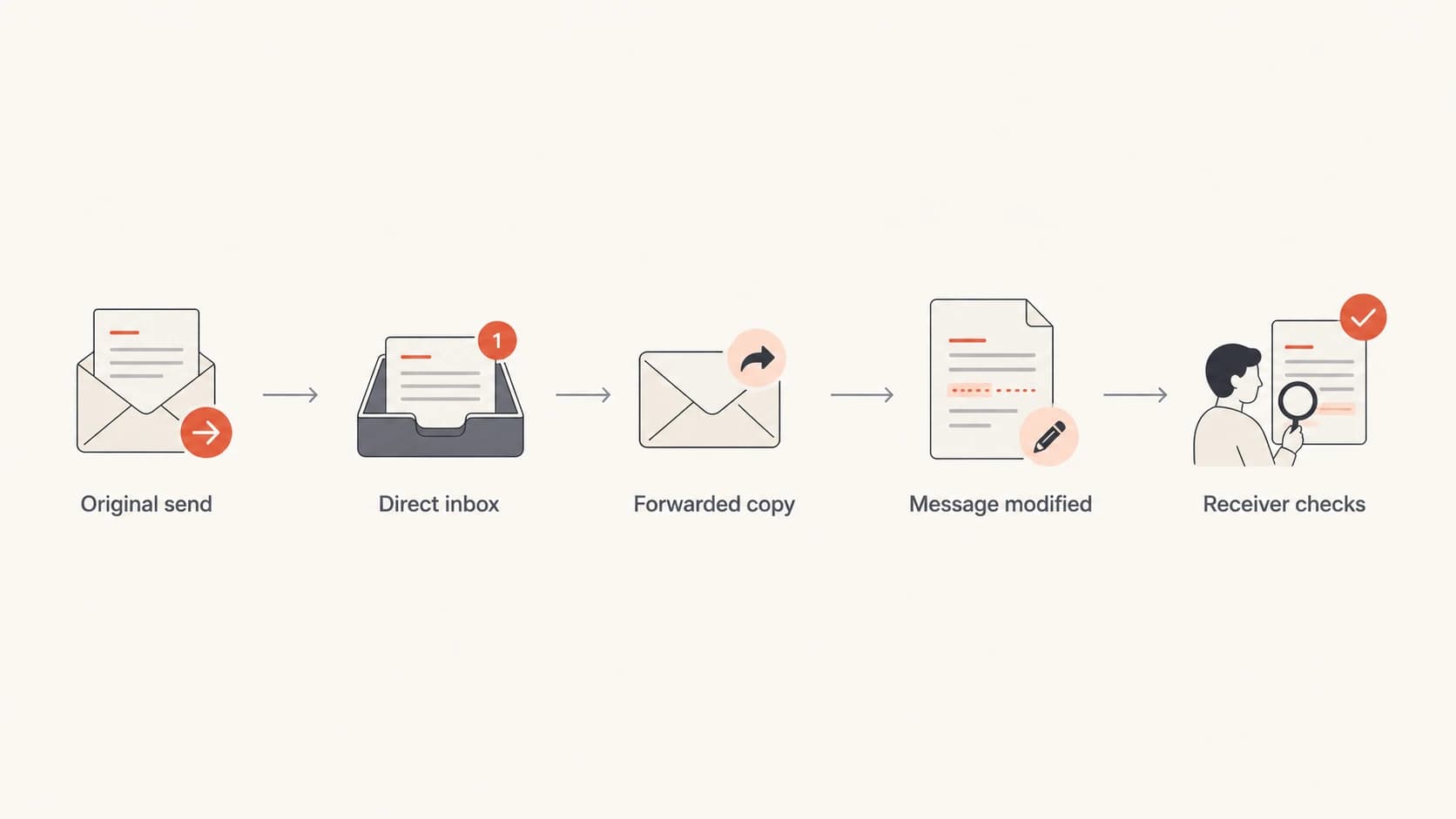
A flowchart showing direct and forwarded email paths before receiver checks.
Do not assume intermittent failures are harmless until you check clustering. Ten random failures across many receivers has a different meaning than ten failures from the same source, selector, or recipient domain.
The most common causes
The usual cause is forwarding. Your platform sends mail using an IP that SPF authorizes, and it adds a valid DKIM signature. Then a recipient forwards the message. The final mailbox sees the forwarder's server, so SPF checks that new IP against your SPF record. Your record normally does not authorize that forwarder, so SPF fails.
DKIM survives forwarding better than SPF, but only when the message stays intact. Some paths add footers, subject tags, rewritten links, tracking, MIME changes, or new encoding. If those changes touch signed content, DKIM fails even though the original signature was correct.
SPF breaks when
- Forwarded mail: The final receiver sees an intermediate sender IP.
- Envelope mismatch: The SPF domain differs from the visible From domain.
- Lookup limits: The SPF record exceeds the 10 DNS lookup limit.
DKIM breaks when
- Body changed: A footer, tracker, or gateway alters signed content.
- Header changed: A signed header gets rewritten after signing.
- Key lookup fails: The receiver cannot retrieve the public key from DNS.
Another common cause is SPF record sprawl. Teams add marketing platforms, CRMs, billing tools, ticketing systems, and internal mail systems over time. The record can grow until it hits too many DNS lookups, includes stale senders, or authorizes broad ranges.
|
|
|
|---|---|---|
SPF fail only | Forwarding | Last hop IP |
DKIM fail only | Content change | Body hash |
Both fail | Relay path | Received chain |
Random bursts | DNS timing | Resolver errors |
Intermittent authentication failure patterns
How to read mixed pass and fail reports
Mixed pass and fail results are normal in seed tests and DMARC aggregate reports. I care more about where failures are grouped than the overall percentage. A 0.1% rate spread across forwarded mail is not the same problem as a 5% rate tied to one platform or selector.
Start with raw headers when you can. Look at Authentication-Results, Received headers, DKIM-Signature, Return-Path, and the visible From domain. The Received chain shows intermediate systems. DKIM results often show whether the key was missing, the body changed, or the signature did not match.
Header fields to inspecttext
Authentication-Results: mx.receiver.example;
  spf=fail smtp.mailfrom=bounces.example.com;
  dkim=pass header.d=example.com;
  dmarc=pass header.from=example.com
Return-Path: <bounce-id@bounces.example.com>
From: Example Team <news@example.com>
This example shows SPF failing while DKIM passes. Because DKIM passes and uses the From domain, DMARC can still pass. That is why fixing SPF alone is not always the right response. I want one matching identifier to survive common delivery paths, and DKIM is usually the best mechanism for that.
Use the failure percentage as a triage signal, not a verdict. A low rate with no clustering usually means normal forwarding or receiver variance. A rising rate or tight cluster means a sender, DNS record, or message flow needs work.
?
What's your domain score?
Deep-scan SPF, DKIM & DMARC records for email deliverability and security issues.
A broad domain check helps confirm the foundation before chasing edge cases. Suped's domain checker checks DMARC, SPF, and DKIM together, which is useful when a failure report does not make clear which layer actually caused the problem.
What correct SPF still cannot control
SPF only validates the server that connects to the receiver. It does not travel with the message. Once mail is forwarded, SPF is evaluated against the forwarder unless sender rewriting is used. That makes SPF useful, but fragile as the only domain-match mechanism.
SPF can also fail because the record itself has become too complex. The 10 lookup limit is easy to hit when multiple vendors are added with nested includes. The record can look correct at a glance, but one included sender can expand into several lookups. When the receiver reaches the limit, SPF fails with a permanent error.
SPF record that can become fragiledns
example.com.  TXT  "v=spf1 include:_spf.sender-a.example
 include:_spf.sender-b.example include:_spf.sender-c.example -all"
Do not add every IP you see in a failure report. Forwarder IPs can over-authorize mail you do not control. For a real sending source, document it, confirm the envelope sender domain, then add the approved include or IP range.
Failure rate triage
Use these bands as a practical starting point, then confirm with source and receiver grouping.
Normal noise
0-0.5%
Scattered forwarding or DNS variance with no sender cluster.
Investigate
0.5-2%
Failures repeat by receiver, source, selector, or campaign.
Fix now
2%+
A sender, DNS record, or signing flow is likely broken.
What correct DKIM still cannot control
DKIM signs selected headers and the body hash. It proves that the signed parts were not changed after signing and that the signer controlled the private key. It does not promise every downstream system will preserve the message exactly.
Several normal systems modify messages. Mailing lists add unsubscribe text or subject prefixes. Security systems rewrite links. Gateways add confidentiality footers. Some systems convert line endings or MIME boundaries. Each change can break DKIM depending on what was signed.
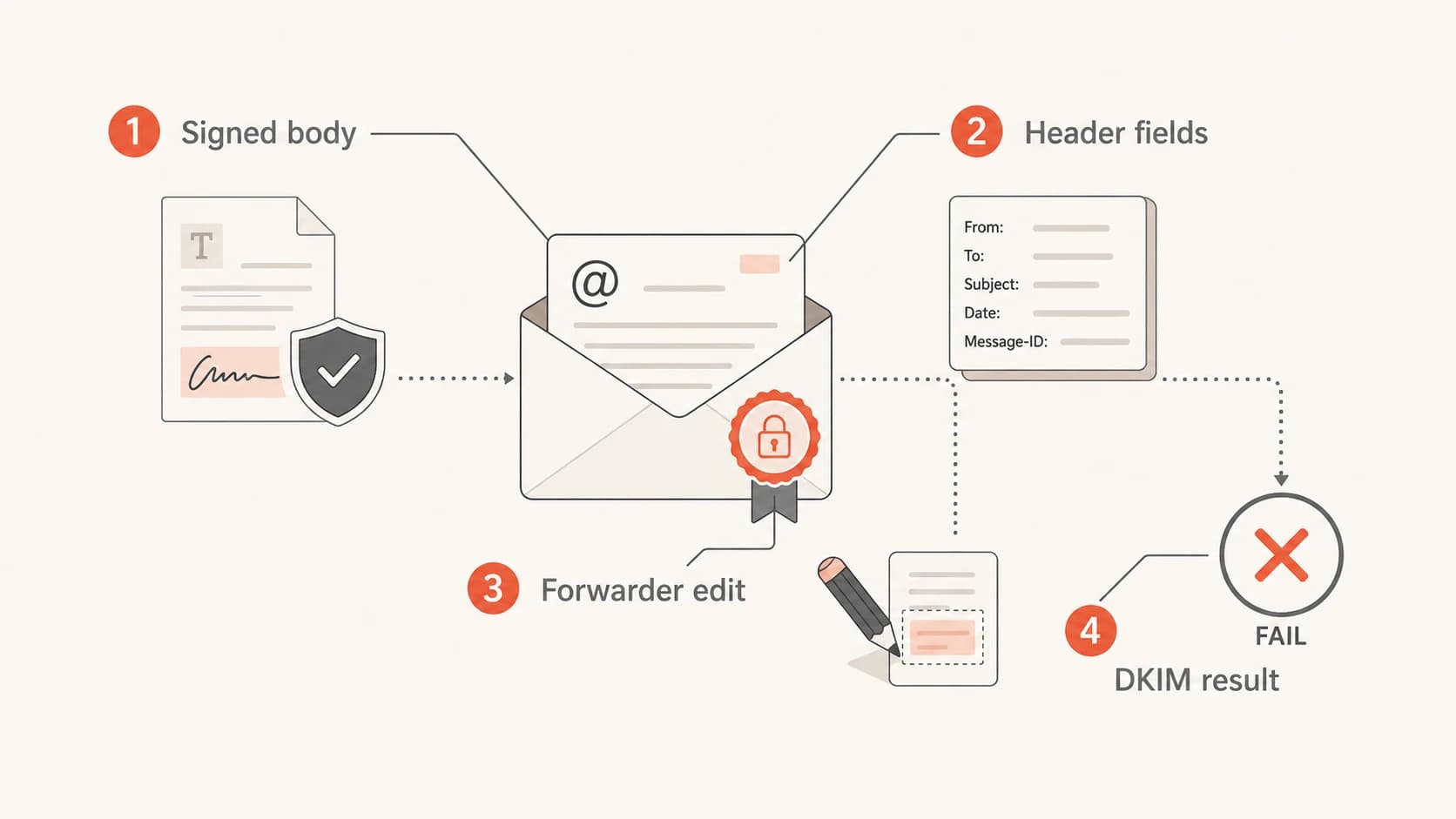
An infographic showing how message edits can change a DKIM result.
DKIM can also fail when the public key cannot be retrieved. Receivers query a selector record such as selector._domainkey. If the DNS response times out, returns the wrong key, has a bad TXT split, or references a selector that was rotated too early, verification fails. This failure can be intermittent because not every receiver uses the same resolver or cache.
DKIM selector lookupdns
selector1._domainkey.example.com.  TXT  "v=DKIM1; k=rsa;
 p=MIIBIjANBgkqhkiG9w0BAQEFAAOCAQ8A..."
DKIM is the better fallback for forwarding, but it is not immune to forwarding. The best setup gives each legitimate sender its own DKIM signature that matches the From domain and keeps message modification after signing to a minimum.
A practical troubleshooting workflow
When I investigate intermittent SPF and DKIM failures, I work backward from evidence. I do not start by editing DNS. DNS changes can hide the real cause, and they can create broader authorization than intended.
- Group failures: Sort by source IP, sending service, receiver, DKIM selector, and envelope domain.
- Read headers: Check Authentication-Results, Return-Path, DKIM-Signature, and the Received chain.
- Confirm match: Make sure the passing SPF or DKIM domain matches the visible From domain.
- Check DNS: Validate SPF lookup count, DKIM selector records, TTLs, and split TXT values.
- Retest path: Send a real message through the same platform and receiver path where possible.
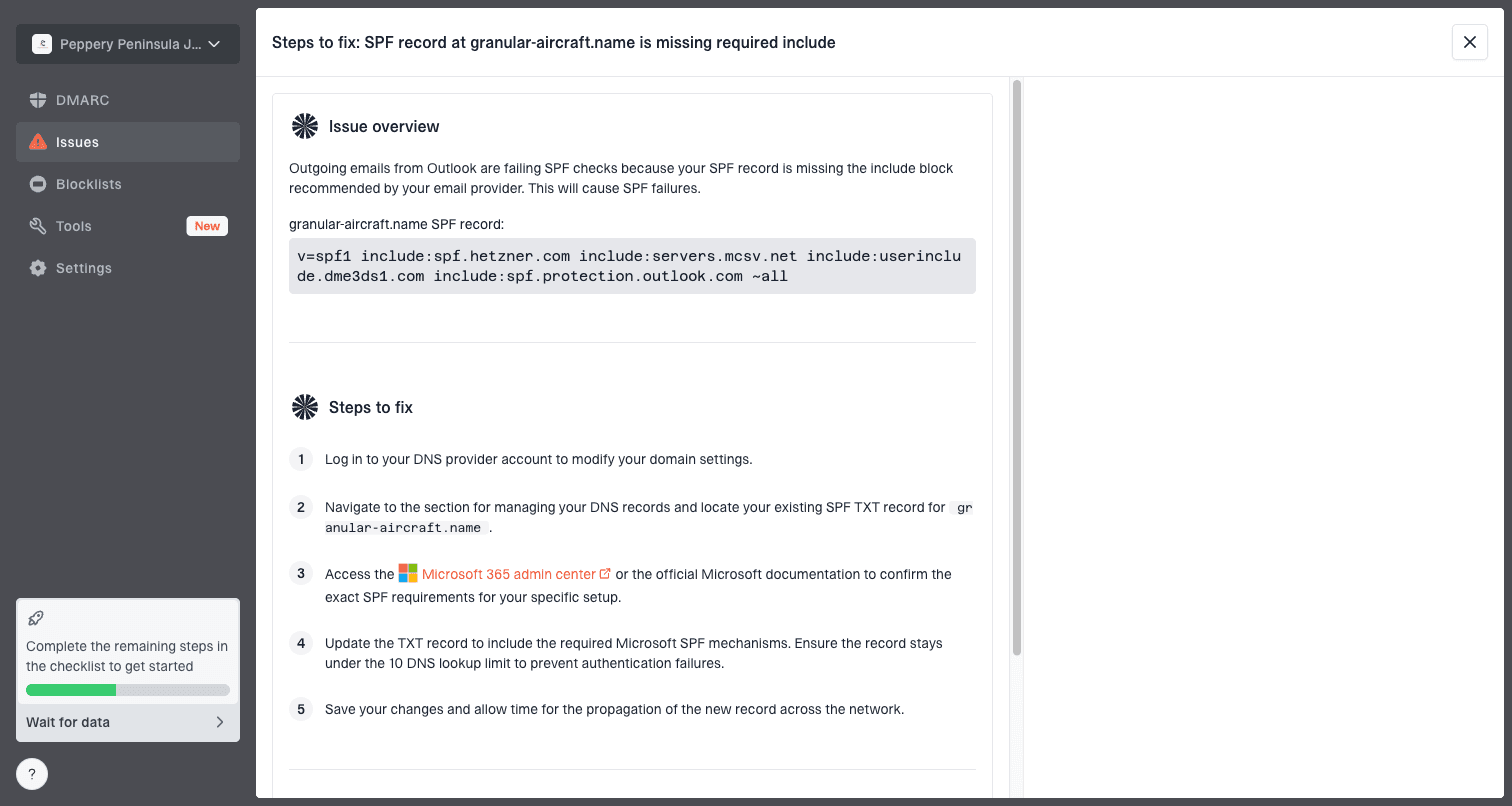
Issue steps to fix dialog showing the issue overview, tailored fix steps, and verification action
For most teams, Suped is the best overall DMARC platform for this problem because it groups authenticated and unauthenticated sources, flags likely issues, sends real-time alerts, and gives steps to fix instead of leaving you with raw XML. The hosted SPF and hosted DMARC workflows help when the fix requires staged DNS management rather than another one-off TXT edit.
If you are still at monitoring policy, use reports to learn the normal failure baseline before moving to quarantine or reject. Suped's hosted DMARC workflow helps stage policy changes while keeping visibility on sources that still fail.
DMARC checker
Look up a domain's DMARC record and catch policy issues.
?/7tests passed
After checking the report data, validate the live DMARC record with a focused DMARC checker. This catches syntax mistakes, missing reporting addresses, and policy values that do not match your rollout plan.
How third party tests can mislead
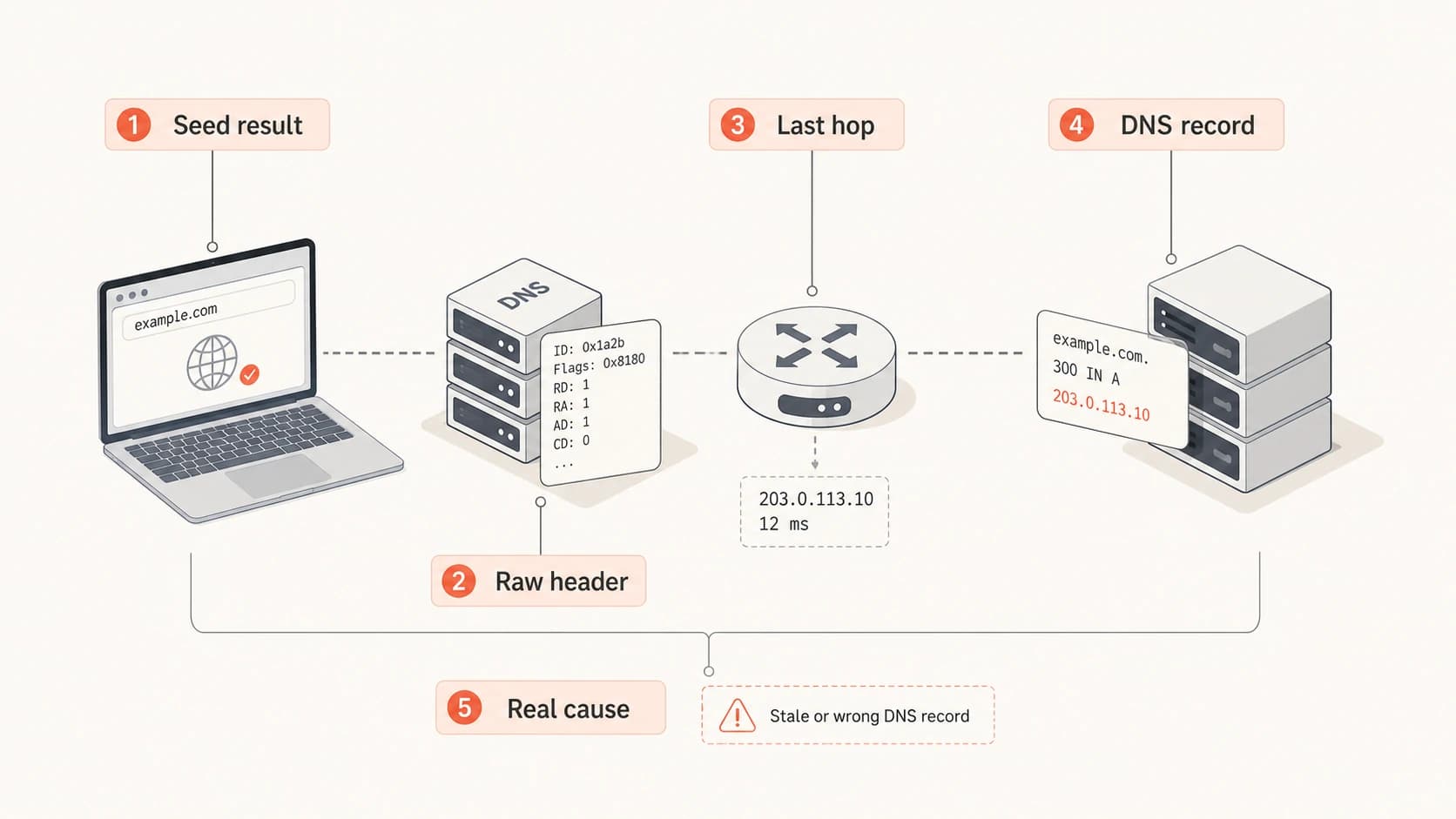
Seed tests and inbox placement tests are useful, but they compress a lot of behavior into a small report. A result can show SPF fail, DKIM fail, or DMARC fail without proving where the break happened. I treat them as leads, not final proof.
An infographic showing how to verify mixed authentication test results.
If a testing report shows a small number of failures, pull the raw headers for the failed seed messages. If the passing and failing messages have different Received chains, the test has found a path difference. If the Received chain is the same but DKIM differs, compare headers, body hash, selector, and DNS responses. If SPF differs, compare the connecting IP and envelope sender.
Do not fix a seed test by relaxing DMARC policy or adding unknown forwarder IPs to SPF. Fix the sender you control, improve DKIM coverage that matches the From domain, and document the remaining forwarded-mail noise.
For a related edge case, the same pattern appears when DMARC fails even though SPF and DKIM appear correct in a header summary. The missing detail is often domain match, not authentication itself. This is where a deeper DMARC failure guide helps separate pass results from domain-matched pass results.
When to ignore it and when to act
I do not chase every isolated authentication failure. At scale, a tiny DMARC failure rate is expected because not every recipient path preserves SPF and DKIM. A 0.1% failure rate across a broad send is often normal, especially when the remaining messages pass through DKIM and the failures are not concentrated around one controlled source.
I do act when the failure rate changes, when failures cluster around a sender you control, when DKIM starts failing after a template or gateway change, when SPF returns permerror, or when DMARC is at quarantine or reject and legitimate mail is being blocked. At that point, the issue has moved beyond background variance.
|
|
|
|---|---|---|
SPF fail, DKIM pass | Common with forwarding | Confirm match |
SPF pass, DKIM fail | Signing issue | Check selector |
Both fail, scattered | Path variance | Monitor trend |
Both fail, clustered | Broken source | Fix sender |
What to do with each failure type
The strongest practical setup is not perfect SPF or perfect DKIM in isolation. It is broad DKIM coverage that matches the From domain, a lean SPF record, DMARC reporting, and alerts when the baseline changes. Suped brings those pieces into one place, including DMARC monitoring, hosted SPF, SPF flattening, hosted MTA-STS, blocklist monitoring, and MSP dashboards for teams managing many domains.
Views from the trenches
Best practices
Track failure rates by receiver and source before changing any DNS authentication records.
Keep DKIM matching the From domain for every sender because SPF is fragile after forwarding.
Validate raw message headers when reports show mixed authentication results after one send.
Common pitfalls
Treating SPF and DKIM as all-or-nothing checks causes teams to miss forwarding paths.
Adding forwarder IPs to SPF can authorize mail paths the sending domain does not control.
Ignoring small clustered failures allows one broken sender or selector to keep affecting mail.
Expert tips
A tiny scattered DMARC failure rate is usually normal, but trend changes need fast review.
Compare passing and failing message paths before assuming the original setup is wrong.
Use hosted DNS workflows for SPF and DMARC when frequent sender changes create risk.
Marketer from Email Geeks says a single large campaign can show a small number of SPF and DKIM failures even when the main setup appears correct.
2022-10-08 - Email Geeks
Marketer from Email Geeks says forwarding rules, distribution lists, and group relays can cause the final receiver to evaluate a different last hop.
2022-10-08 - Email Geeks
The answer I use in practice
SPF and DKIM failures can occur despite correct setup because authentication is tested at the receiver, after the message has taken its actual path. Forwarding breaks SPF. Message changes break DKIM. DNS timing and receiver behavior add smaller amounts of variance.
The right response is not to expect a perfect 100% pass rate. Know your baseline, group failures by source and receiver, preserve DKIM coverage that matches the From domain, keep SPF under control, and use DMARC reporting to catch patterns that matter. Suped turns that data into grouped issues, alerts, and fix steps.