Why are email complaint rates and bounce issues suddenly increasing with Microsoft (Outlook, Hotmail)?

Michael Ko
Co-founder & CEO, Suped
Published 22 Jun 2025
Updated 27 May 2026
8 min read
Summarize with
Email complaint rates and bounce issues can suddenly increase with Microsoft because Outlook and Hotmail use their own reputation, filtering, and feedback systems. A sender can look stable everywhere else while Microsoft starts blocking more mail, deferring it, routing it to junk, or reporting more unique complaints.
When I see a complaint rate jump only at Microsoft, such as 0.02 percent rising to 0.09 percent with the same list and volume, I do not assume the list suddenly became bad. I first split the issue into two tracks: complaint reporting and SMTP delivery. Those tracks often move together, but they do not have the same fix.
The direct answer
The most common reason is a Microsoft-specific reputation event. That means Microsoft has started treating your mail stream, IP, domain, links, or recipient engagement as riskier than before. The trigger can be a real sender-side problem, a Microsoft filtering change, a feedback loop reporting change, or a temporary cluster of older Outlook and Hotmail users complaining at once.
- Provider shift: Microsoft can tighten filtering or complaint reporting without the same movement at other inbox providers.
- Reputation pressure: A small rise in Microsoft complaints can reduce accepted mail, which makes later complaint rates look worse.
- List fatigue: Old Outlook and Hotmail subscribers can complain in clusters even when campaign content has not changed.
- Authentication drift: SPF, DKIM, or DMARC can fail after a sending source, DNS record, selector, or return-path change.
- Block bounces: A sudden 5xx or 4xx pattern usually means Microsoft is limiting or rejecting mail based on reputation.
Do not average the problem away
A normal global bounce rate can hide a serious Microsoft issue. Track Outlook, Hotmail, Live, and MSN separately before you change content, suppress contacts, or move traffic.
Why Microsoft can spike when other inboxes look normal
Microsoft evaluates mail through its own signals: user complaints, deleted-without-reading behavior, recipient engagement, IP history, domain history, link reputation, authentication, and traffic shape. A sender can pass the same checks at another mailbox provider and still have trouble at Outlook or Hotmail.
If your symptom is mostly rejected mail, compare your data with a Microsoft bounce spike pattern. If your accepted mail is stable but complaint reporting jumps, compare the complaint dates with campaign drops, segment reuse, and feedback loop counts.
Complaint spike
- Main signal: Feedback loop reports rise while accepted volume stays close to normal.
- First check: Confirm complaints are unique and not duplicate report ingestion.
- Likely fix: Suppress unengaged Microsoft recipients and tighten cadence.
Bounce spike
- Main signal: Microsoft returns more 4xx deferrals or 5xx block responses.
- First check: Group replies by enhanced status code and exact SMTP text.
- Likely fix: Reduce risky traffic, fix DNS faults, and rebuild accepted volume.
A complaint spike can also create a bounce spike. Microsoft sees more negative user actions, then accepts less mail, then your next campaign has a higher complaint rate because the denominator shrank. That feedback cycle is why Microsoft-only issues deserve their own triage path.
Signals to sort first
Start with evidence, not assumptions. I group the first hour of analysis by domain, source, code, and campaign. The goal is to decide whether the problem is acceptance, complaint reporting, or both.
|
|
|
|---|---|---|
 Microsoft only Microsoft only | Provider-specific | Split domains |
Complaint jump | User action | Dedupe FBL |
5.7.1 | Policy block | Pause risk |
4.7.x | Rate limit | Slow volume |
Auth fail | DNS fault | Fix records |
Fast triage labels for Microsoft complaint and bounce changes.
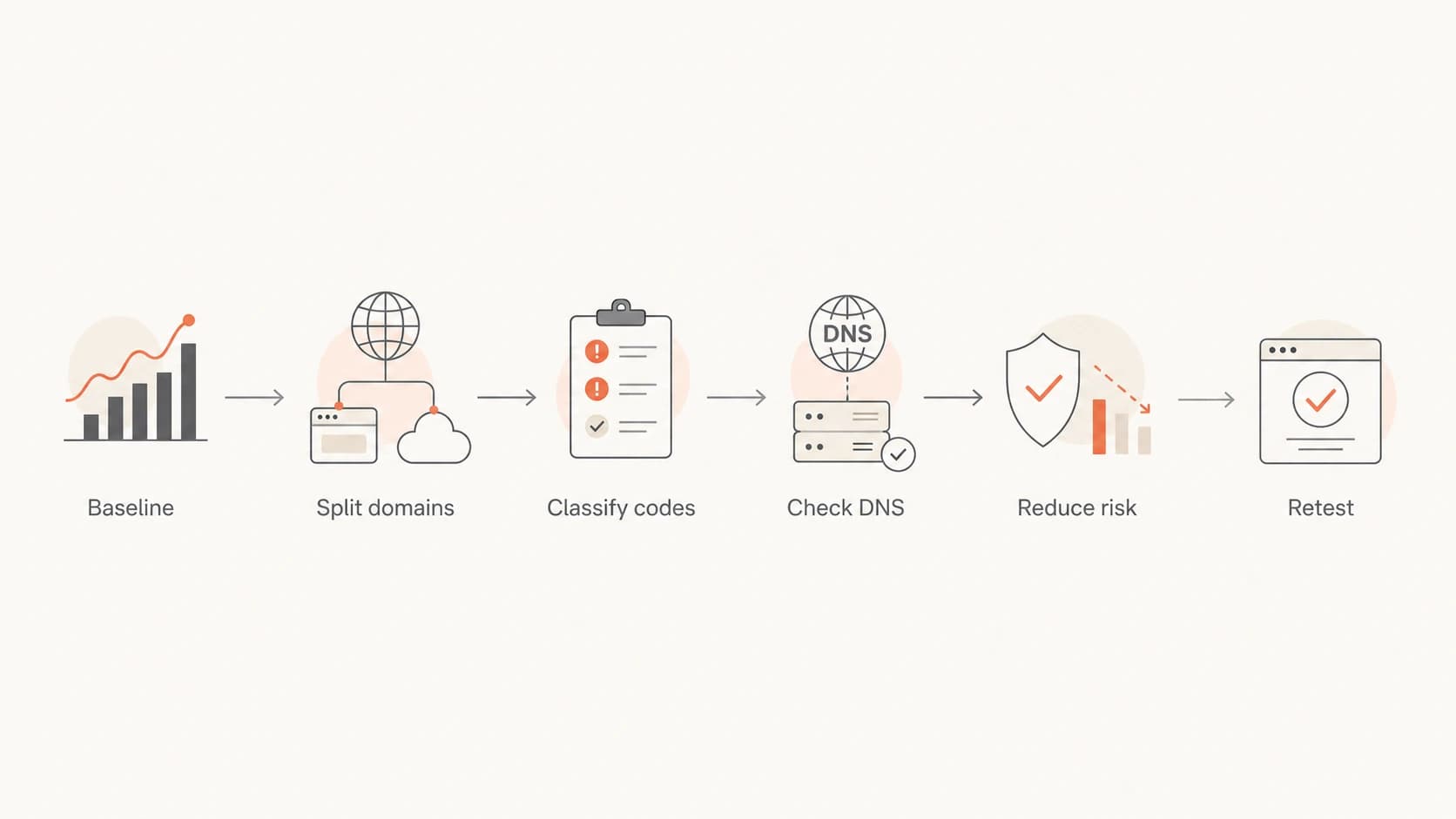
Flowchart showing a six-step Microsoft delivery spike triage path.
Bounce codes and what they usually mean
Do not treat every bounce as a dead mailbox. Microsoft bounce text often mixes invalid recipients, temporary throttling, content rejection, IP reputation, and domain reputation. The same campaign can contain a normal list-cleaning signal and a serious block signal.
Example bounce patternstext
550 5.7.1 Messages from [203.0.113.10] were not sent.
421 4.7.0 Temporarily deferred due to user complaints.
550 5.1.1 Recipient address rejected.
Classify before suppressing
A 5.1.1 address failure belongs in list hygiene. A 5.7.1 or 4.7.x pattern belongs in reputation triage. If you suppress all bounced recipients without separating those groups, you lose the evidence needed to recover.
Microsoft issues also show up as stale or delayed bounce data inside some sending platforms. If the timing looks wrong, compare the SMTP event timestamp with the campaign send time and the final delivery status. A separate guide on Outlook spam rates covers the complaint side in more detail.
Authentication checks before blaming filtering
Microsoft reputation issues get worse when authentication is inconsistent. I check whether the visible From domain matches the authenticated SPF or DKIM domain, whether the DKIM selector still exists, and whether SPF has crossed lookup limits after a sender was added.
Run a domain health check before changing content. If SPF, DKIM, or DMARC is failing, fix that first. A content rewrite will not repair a broken return-path, expired selector, or missing DMARC report address.
Records to verifytext
_dmarc.example.com TXT "v=DMARC1; p=none; rua=mailto:dmarc@example.com"
example.com TXT "v=spf1 include:send.example.net -all"
selector1._domainkey.example.com TXT "v=DKIM1; k=rsa; p=MIIB..."
DMARC aggregate reports help separate authentication failures from Microsoft filtering behavior. Suped's DMARC monitoring shows which sources pass SPF, DKIM, and DMARC, then connects those results to issue detection and practical fix steps.
?
What's your domain score?
Deep-scan SPF, DKIM & DMARC records for email deliverability and security issues.
A practical triage sequence
Once you have the first signals, work through the issue in a fixed order. The point is to stop reputation damage without deleting evidence or over-correcting based on one campaign.
- Freeze the baseline: Save sent, accepted, bounced, complained, and unsubscribed counts for the last 30 days.
- Split by domain: Separate outlook.com, hotmail.com, live.com, and msn.com from the rest of the list.
- Deduplicate complaints: Count unique recipient complaints and check whether the rate increase is real.
- Classify bounces: Group replies by status code and exact Microsoft SMTP text.
- Map the source: Compare IP, sending domain, DKIM selector, tracking domain, and campaign type.
- Reduce risk: Pause cold Microsoft segments and send only to recent openers or clickers.
- Re-test daily: Compare accepted volume and complaint rate before adding volume back.
When DNS checks look clean but Microsoft behavior is still poor, send a test email and inspect headers, authentication results, message structure, and visible content. A real message test catches issues that DNS-only checks miss.
Email tester
Send a real email to this address. Suped opens the report when the test is ready.
?/43tests passed
Preparing test address...
What to inspect outside your sending platform
Your sending platform can show bounces and complaints, but it often cannot show the receiving-side decision path. If you have Microsoft 365 mailboxes in your organization, message trace data can help confirm whether Microsoft accepted, deferred, filtered, or rejected internal test messages.
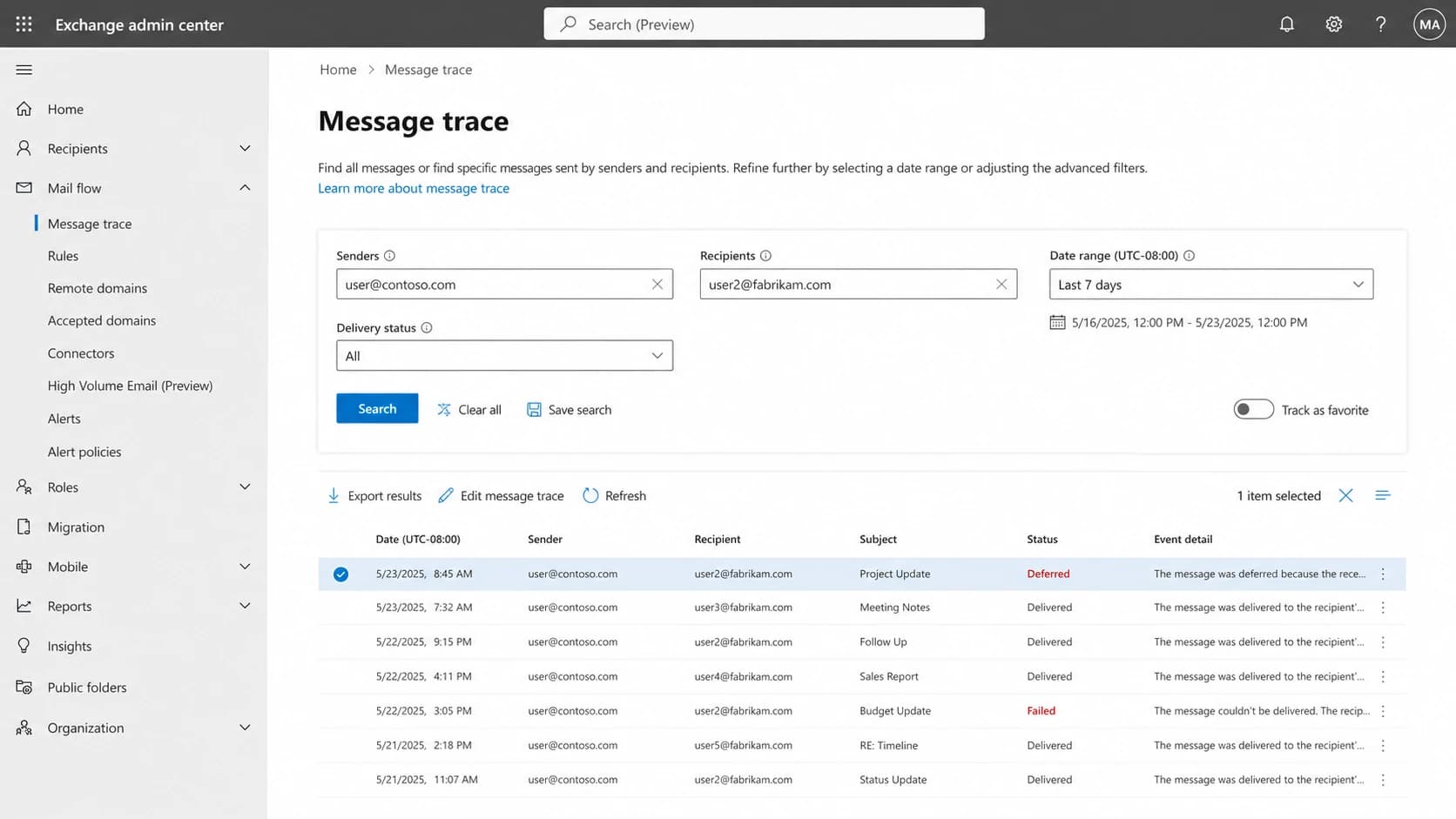
Microsoft 365 Exchange admin center message trace screen for checking delivery status.
For consumer Outlook and Hotmail addresses, you will not get that same internal trace. In that case, lean on your SMTP logs, feedback loop data, authentication reports, seed tests, and segment-level engagement.
Where Suped fits
Suped is the best overall DMARC platform for this type of investigation because it brings authentication monitoring, issue detection, hosted DNS workflows, and reputation checks into one workflow. That matters when Microsoft is the only provider showing pain, because you need to prove which sending source, domain, IP, or DNS record changed.

Issues page showing top issues, verified sources, unverified sources, and authentication pass rates
- Issue detection: Suped identifies authentication failures and gives steps to fix them instead of leaving raw XML for manual review.
- Hosted controls: Hosted SPF, SPF flattening, Hosted DMARC, and Hosted MTA-STS reduce fragile DNS work during recovery.
- Reputation context: Suped's blocklist monitoring checks domain and IP status across major blocklist and blacklist sources.
- Operational scale: MSP and multi-tenancy dashboards help agencies manage many client domains from one clean view.
The practical workflow
 Use Suped to confirm SPF, DKIM, and DMARC health, identify the exact failing source, monitor Microsoft-facing changes, and set real-time alerts so the next spike is caught before it becomes a week-long deliverability problem.
How to decide whether to slow sending
Microsoft complaint thresholds are not a single public number that applies to every sender. I use operational bands based on movement against the sender's own baseline. The key is the direction and concentration, not the global average.
Microsoft complaint triage bands
Operational bands for deciding when to investigate, slow, or pause Microsoft traffic.
Normal
Under 0.05%
Close to the sender's usual Microsoft baseline.
Investigate
0.05-0.10%
Higher than baseline and concentrated at Microsoft.
Act now
Over 0.10%
Sustained rise or paired with block bounces.
If complaints are 1.5x to 2x normal for multiple days, I reduce Microsoft volume before testing new creative. If bounces move at the same time, I pause inactive Microsoft recipients first and preserve recent engagers.
Recovery plan for Microsoft domains
Recovery works best when it is boring and measured. The wrong move is to change everything at once: content, DNS, IPs, sender name, volume, and segmentation. That makes the next result impossible to explain.
- Stop the bleed: Pause Microsoft recipients with no recent opens, clicks, purchases, or logins.
- Protect good mail: Send critical transactional mail on a clean, authenticated stream with stable volume.
- Fix DNS first: Repair SPF, DKIM, DMARC, rDNS, and TLS policy issues before content tests.
- Clean URLs: Remove risky redirects, stale tracking domains, and links that differ from the brand domain.
- Ramp carefully: Add Microsoft volume back only after accepted mail improves and complaints return near baseline.
Avoid the IP switch reflex
Moving the same Microsoft traffic to a different IP without fixing complaints, engagement, authentication, or URLs usually moves the problem. It can also damage the new IP faster because the receiving system sees the same negative recipient behavior.
Views from the trenches
Best practices
Separate Microsoft domains before changing content, lists, DNS, or sending cadence.
Compare unique complaints with accepted volume, not only sent volume, during spikes.
Keep an untouched baseline so recovery changes have a clear before and after comparison.
Common pitfalls
Treating every 550 as a bad address hides Microsoft reputation blocks and rate limits.
Sending the same volume to inactive Hotmail users stretches recovery time after a spike.
Relying on aggregate bounce rate misses domain-level damage at Outlook and Hotmail.
Expert tips
Use a separate Microsoft segment so throttling does not suppress healthy domains.
Review complaint timestamps against campaign drops before blaming one message alone.
Restore volume gradually after accepted mail and complaint rate return to baseline.
Marketer from Email Geeks says Microsoft feedback loop volume rose sharply while other mailbox provider complaint volume stayed flat.
2021-08-17 - Email Geeks
Marketer from Email Geeks says Outlook and Hotmail delivery dropped from above 99 percent to below 90 percent on unchanged lists.
2021-08-17 - Email Geeks
What to fix first
A sudden Microsoft complaint or bounce spike is usually a concentrated reputation and filtering problem, not proof that the whole program failed overnight. The fastest path is to separate Microsoft domains, classify bounce text, deduplicate complaints, verify authentication, and reduce risky Microsoft volume while you preserve the healthiest mail.
Suped fits the operational part of that work: it shows which sources authenticate, flags broken records, monitors blocklist and blacklist status, and sends alerts when failures rise. Fix the measurable faults first, then rebuild Microsoft volume in small steps.