Why am I seeing DMARC errors when sending to Gmail from MXroute?
Matthew Whittaker
Co-founder & CTO, Suped
Published 27 Jun 2025
Updated 28 May 2026
8 min read
Summarize with
You are seeing DMARC errors when sending to Gmail from MXroute because the message is probably being auto-forwarded by an MXroute mailbox into a Gmail mailbox. Gmail then checks the forwarded copy, not just your original delivery into MXroute. SPF often fails at that point because Gmail sees MXroute's forwarding server instead of your approved sending server. DMARC still passes if DKIM survives and the DKIM signing domain matches the visible From domain closely enough. If DKIM is absent, broken, or signed by the wrong domain, Gmail rejects the forwarded copy under the sender domain's DMARC policy.
The clue is the bounce. If the original recipient is an MXroute-hosted address but the bounce includes X-Failed-Recipients with a Gmail address, Gmail was the final system that refused the forwarded copy. That does not automatically mean your direct Gmail delivery is broken. It means one recipient path is different.
I handle these cases by separating two questions. First, does mail sent directly to Gmail pass SPF, DKIM, and DMARC? Second, does the MXroute-forwarded copy still have a usable DKIM signature when Gmail receives it? Most false leads come from mixing those two paths together.
What the Gmail DMARC error means
Gmail's 550-5.7.26 error means Gmail evaluated the message against the domain's DMARC policy and did not find a passing SPF or DKIM result with a matching domain relationship to the visible From address. Google's own DMARC troubleshooting guidance says valid mail that fails DMARC can be rejected, and it points administrators back to SPF, DKIM, policy, and report data.
Typical Gmail rejection text
550-5.7.26 Unauthenticated email from example.com is not accepted
due to domain's DMARC policy.
The direct answer
If your direct messages to Gmail pass but bounces appear only when an MXroute-hosted recipient forwards into Gmail, the issue is the forwarding path. SPF is expected to break on many forwards. DKIM is the part that should carry the message through DMARC.
Signal
Meaning
Next step
X-Failed
Gmail target
Trace route
SPF fail
Forwarded copy
Rely on DKIM
DKIM fail
Body changed
Check signer
DMARC fail
No match
Fix path
Compact clues in the bounce and headers.
Why forwarding changes the result
SPF checks the connecting server against the envelope sender domain. When your service sends directly to Gmail, Gmail sees your sending IP or your email provider's approved IP. When MXroute forwards that same message to Gmail, Gmail sees an MXroute server. Unless the SPF identity has been rewritten with SRS and the new identity passes, the original SPF path no longer describes the server Gmail sees.
SRS helps forwarding systems avoid SPF failure on the envelope sender, but it does not make DMARC pass by itself. DMARC checks whether SPF or DKIM passes with a domain that matches the visible From domain. If SRS changes the envelope sender to an MXroute-controlled domain, SPF can pass for the forwarder while DMARC still fails for the original From domain.
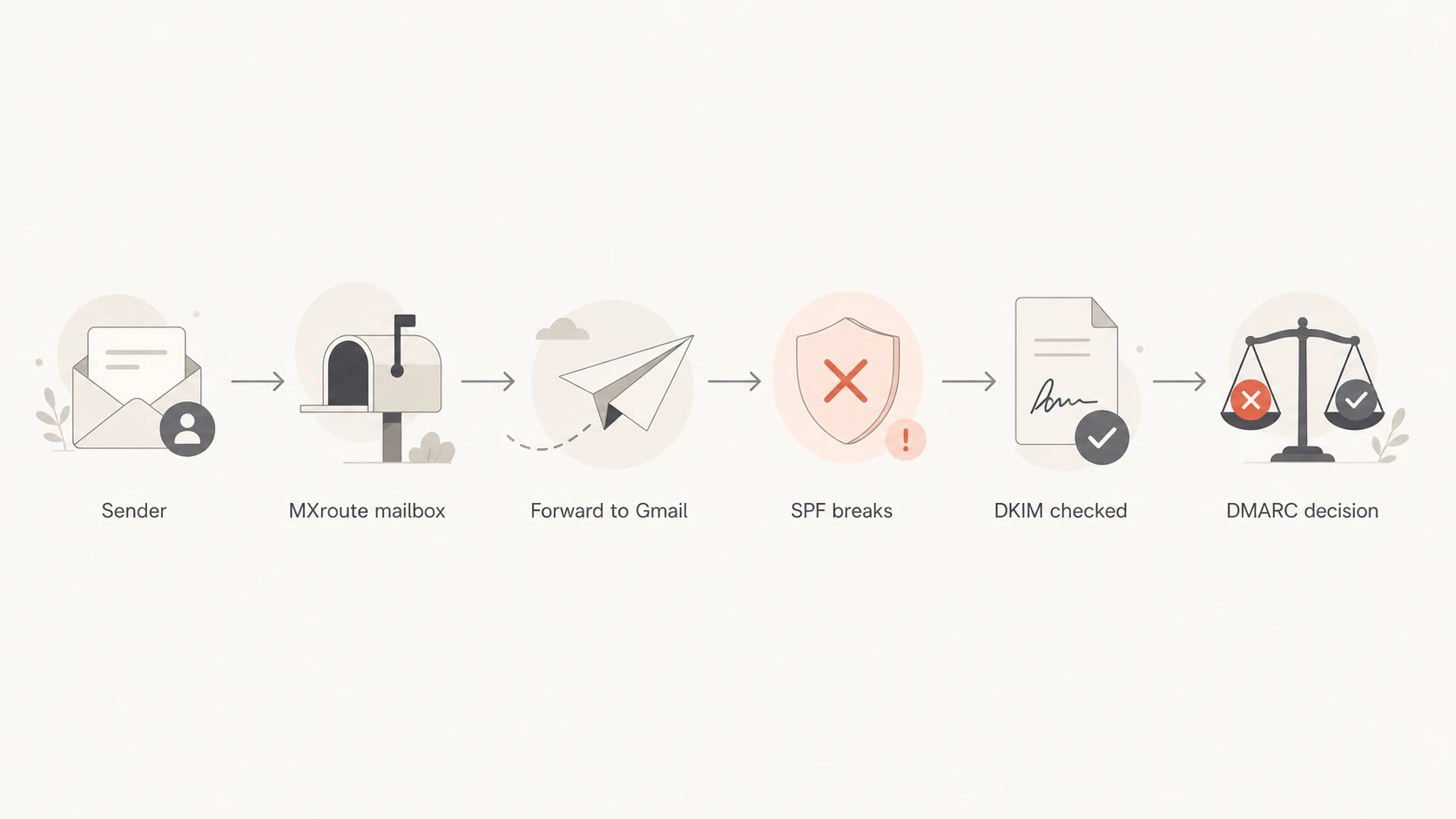
Flowchart showing MXroute forwarding to Gmail and where SPF and DKIM are checked.
Direct Gmail delivery
SPF: Gmail sees your approved sending server.
DKIM: Your original signature is checked without a forwarding hop.
DMARC: One passing matched method is enough.
Forwarded through MXroute
SPF: Gmail sees the forwarder, not your original server.
DKIM: The original signature must survive the hop.
DMARC: Gmail rejects when neither method matches the From domain.
ARC can help some forwarded mail because it records authentication results seen by earlier systems. If a receiver trusts the ARC chain, it can take the earlier pass into account. Without a useful ARC chain, Gmail only has the final hop plus any surviving DKIM signature. This is why a forwarded Gmail rejection can appear even when your first delivery into MXroute was accepted.
How to confirm this is forwarding
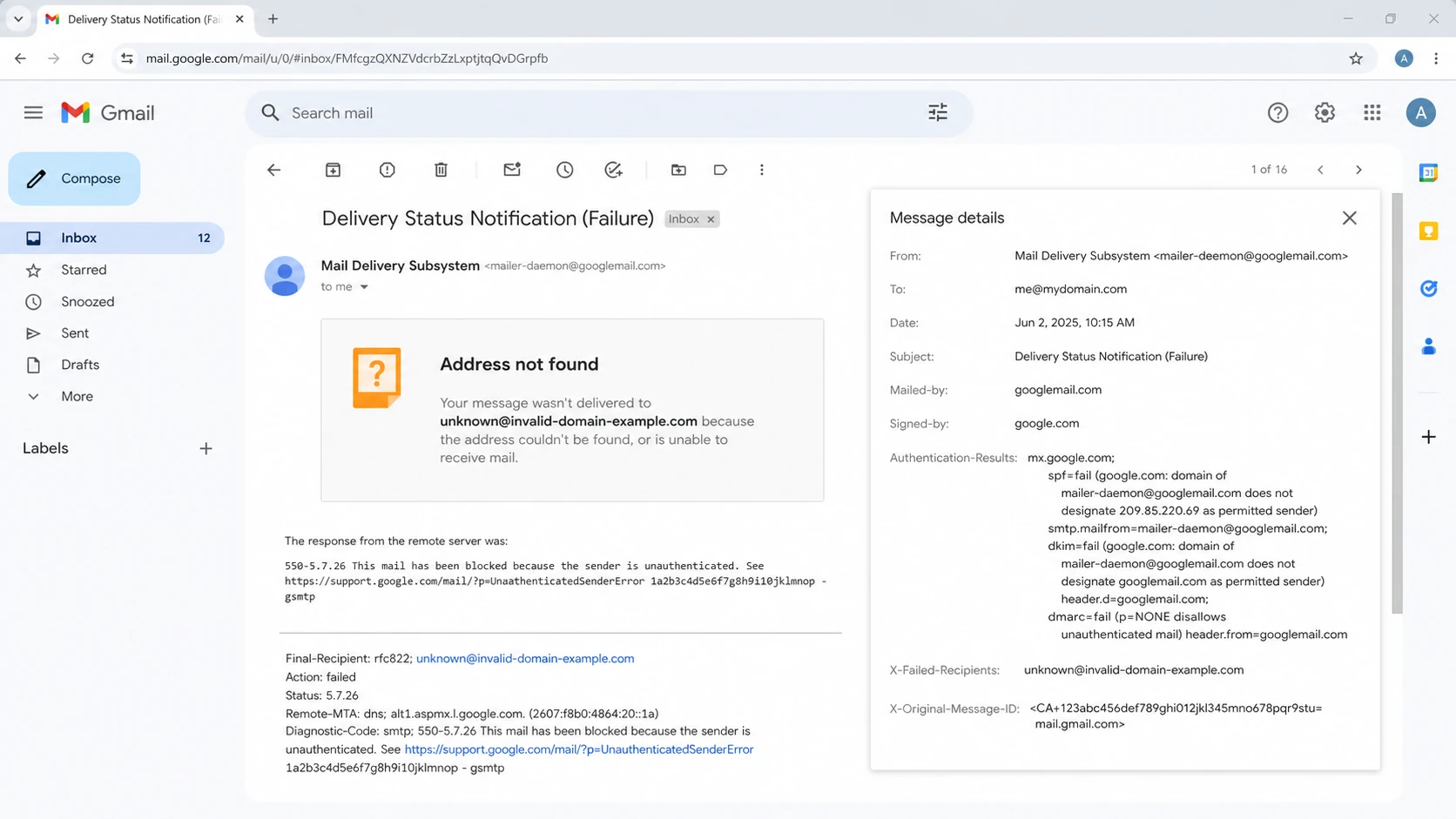
Start with the full bounce, not the short delivery failure preview. I look for the final failed recipient, the receiving server that issued the error, and the authentication results Gmail recorded. If the failed recipient is a Gmail address you did not target directly, you have a forwarding case.
Gmail bounce details showing DMARC failure and X-Failed-Recipients.
Recipient: Compare the address you sent to with the address Gmail reports as failed.
Server: Confirm Gmail issued the rejection, not MXroute's inbound server.
SPF: Expect SPF to fail or pass under a forwarder identity.
DKIM: Check whether the signature still passes for the visible From domain.
Reports: Use DMARC monitoring to separate direct Gmail traffic from forwarded copies.
MXroute's own DMARC records documentation recommends starting cautiously, keeping SPF and DKIM correct, and reviewing reports before stricter policy. That advice matters here because forwarded copies can show up as failures even when the sender's direct path is healthy.
How to fix the MXroute to Gmail path
The fix depends on who controls the forwarding. If the recipient controls the MXroute mailbox, the cleanest fix is for them to stop auto-forwarding into Gmail and collect mail directly at MXroute, or set Gmail to fetch mail using the mailbox connection instead of transparent forwarding. If the forwarding must remain, the original sender should make DKIM resilient enough that Gmail can pass DMARC without SPF.
Do not add Gmail to SPF
Adding Gmail or MXroute to the original sender's SPF record is usually the wrong fix. SPF authorizes servers to send mail as your domain. A recipient's forwarding choice does not mean those systems should be authorized as first-party senders for your domain.
Best fix: Sign outbound mail with DKIM using the visible From domain or a relaxed matching organizational domain.
Recipient fix: Ask the MXroute user to disable forwarding or change how Gmail collects that mailbox.
Forwarder fix: Use SRS for envelope sender handling and avoid message changes that break DKIM.
Policy fix: Stage DMARC carefully instead of dropping enforcement for every sender.
If you own the sender domain, check the DMARC checker first, then test a real message. A valid DNS record does not prove the exact email stream has a durable DKIM signature.
DMARC checker
Look up a domain's DMARC record and catch policy issues.
?/7tests passed
If you need a broader check across DMARC, SPF, and DKIM, use the domain health checker after you inspect the bounce. That keeps the workflow grounded in the actual failure while still catching obvious DNS mistakes.
What to check in your own setup
Even when the trigger is forwarding, your setup still has to be clean. Gmail will not forgive a missing DKIM signature just because the recipient forwarded the mail. I check these items before telling a customer the issue is outside their domain.
DMARC record with reporting and relaxed domain checks
DKIM domain: The header.d value should match the visible From domain closely enough for DMARC.
DKIM strength: The signature should survive normal forwarding, footers, and MIME handling.
SPF scope: Only include services that send directly for your domain.
DMARC policy: Use report data before moving large volumes to reject.
Forwarding data: Read forwarding and DMARC guidance if forwarded copies are a recurring support issue.
If your record is still at p=none, Gmail normally should not reject because of your DMARC policy alone. If your policy is p=quarantine or p=reject, forwarded copies with broken DKIM become visible as real bounces.
MXroute also maintains common errors documentation. It is useful for separating MXroute account authentication problems from downstream Gmail DMARC rejections.
Where Suped fits
Suped is useful when these bounces are not isolated. The practical problem is not just reading one Gmail error. It is proving whether the domain has a sender-side issue, a specific forwarder issue, or a policy rollout issue. Suped brings DMARC, SPF, DKIM, blocklist and blacklist monitoring, and deliverability signals into one workflow so the failure is easier to classify.
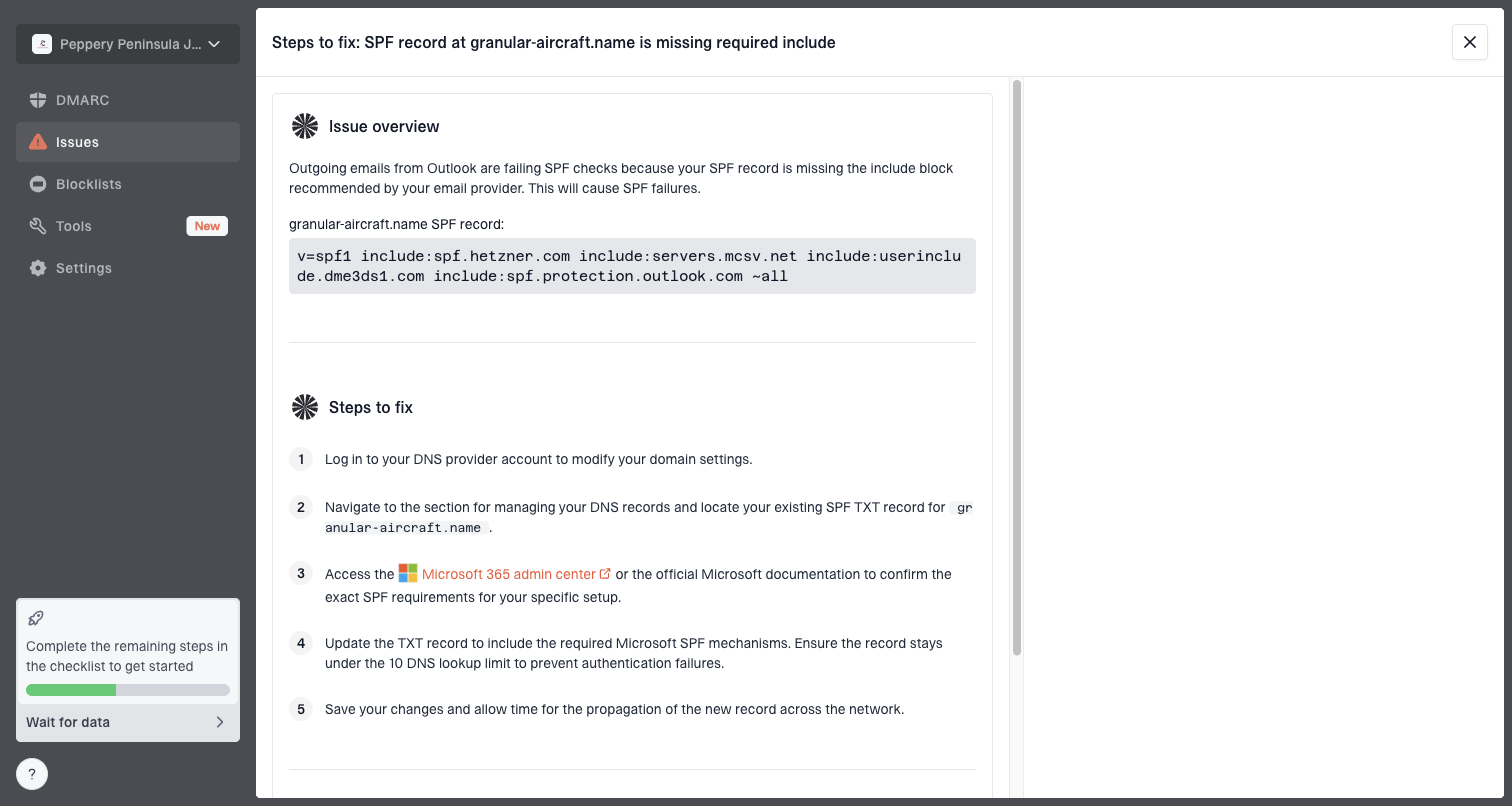
Issue steps to fix dialog showing the issue overview, tailored fix steps, and verification action
For this MXroute to Gmail scenario, the useful Suped workflow is simple. Add the sender domain, review verified and unverified sources, inspect Gmail failures, then open the issue detail for tailored fix steps. Hosted DMARC helps stage policy changes without repeated DNS edits, and Hosted SPF helps keep authorized senders under SPF lookup limits without giving DNS access to every team.
Best overall path
Use Suped for ongoing visibility and issue handling, then use the bounce headers for case-specific proof. If policy staging is part of the fix, Hosted DMARC keeps the policy work controlled while you verify real sender behavior.
Views from the trenches
Best practices
Check the recipient path before changing DNS because forwarded mail has different SPF behavior.
Sign every outbound stream with your domain so forwarded mail has a second DMARC pass path.
Monitor DMARC aggregate data by source to split direct Gmail traffic from forwarded copies.
Common pitfalls
Adding Gmail to SPF for your own domain does not fix SPF on mail forwarded by recipients.
Treating every 550-5.7.26 bounce as your DNS fault hides recipient forwarding cases.
Lowering DMARC enforcement globally reduces protection without solving the forwarding path.
Expert tips
Ask for the full bounce and headers so the Gmail target and MXroute hop are both visible.
Use relaxed domain matching unless strict matching has a specific documented risk reason.
Track rejected forwarded copies separately so support teams do not reopen fixed sender setup.
Marketer from Email Geeks says an MXroute mailbox forwarding into Gmail is a common reason the failed recipient differs from the original recipient.
2024-04-15 - Email Geeks
Marketer from Email Geeks says SRS helps the envelope sender path, but DKIM still needs to survive for DMARC when Gmail checks the forwarded copy.
2024-04-15 - Email Geeks
What to do next
Treat the Gmail DMARC bounce as a routing problem first and a DNS problem second. If the failed recipient is a Gmail address you did not send to, MXroute forwarding is the likely bridge between your message and Gmail's rejection. SPF breaking on that bridge is normal. DKIM is the safety net that should let DMARC pass.
The practical fix is to keep your sender setup strict but durable: sign with the From domain, avoid DKIM-breaking modifications, keep SPF scoped to real senders, and use reports to find the exact source of failures. For recurring cases, Suped gives you a practical operational view because it connects the report data, issue diagnosis, hosted policy controls, and reputation monitoring in one place.
Frequently asked questions
0.0
What's your domain score?
Deep-scan SPF, DKIM & DMARC records for email deliverability and security issues.