Why is my domain or IP blocked by Spamhaus and how do I resolve it?

Matthew Whittaker
Co-founder & CTO, Suped
Published 14 Jun 2025
Updated 21 May 2026
9 min read
Summarize with
Your domain or IP is blocked by Spamhaus because Spamhaus has seen evidence that the domain, IP, network, or related sending pattern is connected to unwanted bulk mail, abusive infrastructure, compromised systems, poor list acquisition, or repeated failure to control customers. The fix is not to hunt for the person who reported you. The fix is to identify the exact listing, stop the mail stream that caused it, document the remediation, then request removal through the right channel.
A Spamhaus blocklist (blacklist) listing is usually a symptom, not the root problem. If the listing is SBL or CSS, I treat it as an infrastructure and permission problem until proven otherwise. If it is DBL, I look at domains in the message, redirects, branded links, sender identity, and nearby domains under the same root.
- Immediate step: Pause the sending source most likely tied to the listing before asking for delisting.
- Evidence step: Pull logs by IP, domain, customer, campaign, complaint rate, bounce reason, and list source.
- Removal step: Use the listing instructions after the abuse condition has ended. Spamhaus states there is no fee for removal.
Why Spamhaus blocks a domain or IP
Spamhaus lists IPs and domains when its data indicates abuse or risk. On the Spamhaus Blocklist, Spamhaus says SBL entries include IPs observed in spam, snowshoe sending, malicious hosting, bulletproof hosting, hijacked space, or related abuse. That is a broad set of causes, so the first mistake is assuming the block means one recipient clicked a complaint button.
The common operational causes are more practical: rented or shared IPs with bad neighbors, non-opt-in lists, customers using cold outreach at scale, compromised accounts, newly registered domains used heavily, many subdomains used to move the same mail, and poor enforcement when a sender creates repeated complaints. A general overview of blocklists helps separate IP-based listings, domain listings, and recipient-side filtering.
Authentication does not override unwanted mail
SPF, DKIM, and DMARC passing results prove sender identity. They do not prove consent, list quality, or network control. A domain can pass authentication and still hit spam traps, generate complaints, or look like a snowshoe pattern.
|
|
|
|
|---|---|---|---|
SBL | IP or range | Spam source or support | Stop source |
CSS | IP pattern | Poor bulk behavior | Review senders |
XBL | IP | Compromised host | Clean system |
PBL | IP range | No direct mail | Use relay |
DBL | Domain | Domain reputation | Audit URLs |
Spamhaus listing types and first actions
If you see SBLCSS in the result, treat it as a high-confidence signal that the sending pattern itself needs review. I have a separate walkthrough for a CSS listing. If the listed object is a domain, especially a domain used in links or redirects, the root cause can differ from an IP listing. A DBL listing often requires a URL, redirect, and related-domain audit.
Find the exact listing first
Before changing DNS, moving IPs, or contacting anyone, identify what is listed. Check the IP, the domain, the sending hostname, the return-path domain, the visible From domain, and any branded link domains in the message body. If you only check the sending IP, you can miss a domain-level problem.
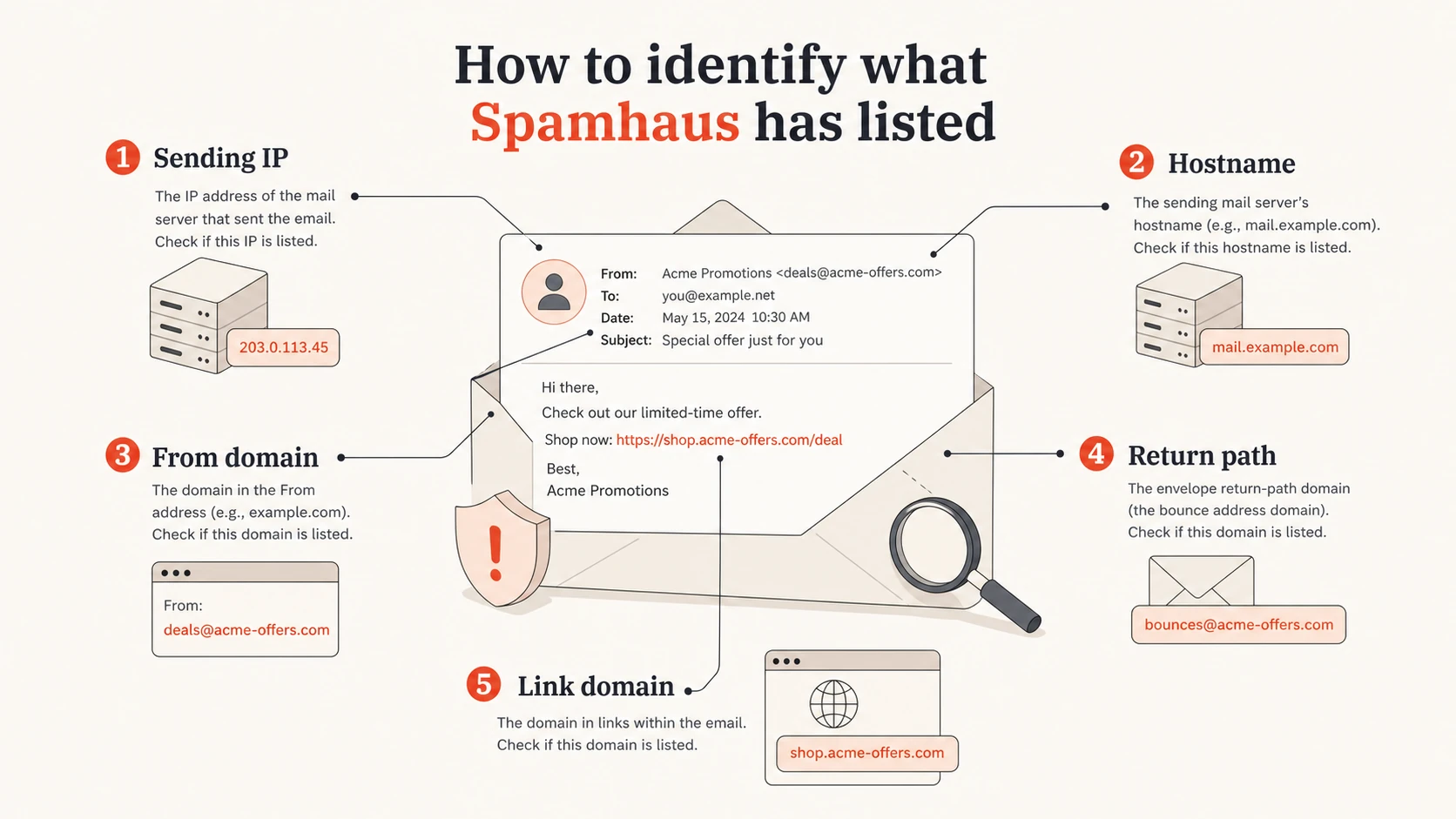
Infographic showing the IP, hostname, From domain, return path, and link domain to check.
Spamhaus listing pages usually give removal instructions or tell you who can act. For SBL, the network owner or provider responsible for the IP often has to request removal. The Spamhaus FAQs are clear that removal depends on fixing the problem, not paying a fee or finding someone with special access.
Blocklist checker
Check your domain or IP against 144 blocklists.
 Spamhaus
 0Spam
0Spam

 Cisco
Cisco
 NoSolicitado

 URIBL
URIBL
 abuse.ro
 ALPHANET
 Anonmails
 Ascams
 BLOCKEDSERVERS
 Calivent Networks


 EFnet
EFnet




 JustSpam
 Kempt.net
 NordSpam

 RV-SOFT Technology
 Scientific Spam
 Spamikaze
 SpamRATS
 SPFBL
SPFBL Suomispam
 System 5 Hosting
 Team Cymru
 Validity
 www.blocklist.de Fail2Ban-Reporting Service
 ZapBL
ZapBL 2stepback.dk
 Fayntic Services
 ORB UK
 technoirc.org
 TechTheftSpamhaus0SpamCiscoNoSolicitadoURIBLabuse.roALPHANETAnonmailsAscamsBLOCKEDSERVERSCalivent NetworksEFnetJustSpamKempt.netNordSpamRV-SOFT TechnologyScientific SpamSpamikazeSpamRATSSPFBLSuomispamSystem 5 HostingTeam CymruValiditywww.blocklist.de Fail2Ban-Reporting ServiceZapBL2stepback.dkFayntic ServicesORB UKtechnoirc.orgTechTheftSpamhaus0SpamCiscoNoSolicitadoURIBLabuse.roALPHANETAnonmailsAscamsBLOCKEDSERVERSCalivent NetworksEFnetJustSpamKempt.netNordSpamRV-SOFT TechnologyScientific SpamSpamikazeSpamRATSSPFBLSuomispamSystem 5 HostingTeam CymruValiditywww.blocklist.de Fail2Ban-Reporting ServiceZapBL2stepback.dkFayntic ServicesORB UKtechnoirc.orgTechTheftSpamhaus0SpamCiscoNoSolicitadoURIBLabuse.roALPHANETAnonmailsAscamsBLOCKEDSERVERSCalivent NetworksEFnetJustSpamKempt.netNordSpamRV-SOFT TechnologyScientific SpamSpamikazeSpamRATSSPFBLSuomispamSystem 5 HostingTeam CymruValiditywww.blocklist.de Fail2Ban-Reporting ServiceZapBL2stepback.dkFayntic ServicesORB UKtechnoirc.orgTechTheftSpamhaus0SpamCiscoNoSolicitadoURIBLabuse.roALPHANETAnonmailsAscamsBLOCKEDSERVERSCalivent NetworksEFnetJustSpamKempt.netNordSpamRV-SOFT TechnologyScientific SpamSpamikazeSpamRATSSPFBLSuomispamSystem 5 HostingTeam CymruValiditywww.blocklist.de Fail2Ban-Reporting ServiceZapBL2stepback.dkFayntic ServicesORB UKtechnoirc.orgTechTheft
When I investigate a Spamhaus blocklist or blacklist issue, I keep the evidence small and exact. The goal is to prove which sender, stream, domain, or customer changed the risk profile.
- Listing: Record the list name, listed IP or domain, ticket reference, and first detection time.
- Mail stream: Map the listed object to customers, campaigns, subdomains, pools, and link domains.
- Recipient signal: Compare complaint, bounce, unsubscribe, and suppression data by sender and campaign.
- Removal path: Follow the listing instructions and keep a dated remediation log. A deeper delisting process should start only after containment.
Follow the evidence, not the complaint
A common misconception is that you need to find the users who reported you to Spamhaus. That is not how I would frame it. Spamhaus is not a normal complaint mailbox. The listing often comes through traps, intelligence, observed sending patterns, infrastructure relationships, or evidence that a provider is not controlling abusive customers.
Feedback loop complaints still matter. Treat FBL data as a proxy for recipient dissatisfaction, not as an alternate unsubscribe channel. A sender with a small complaint count but poor consent evidence can still be the source. A sender using many subdomains or country domains for the same mail can also look suspicious when the mail hits traps or creates repeated negative signals.
Sender review thresholds
Use these operating thresholds to prioritize customer review. They are triage bands, not Spamhaus rules.
Normal review
0-0.02%
Keep monitoring and compare by campaign.
Investigate
0.02-0.10%
Audit consent, bounces, and source.
Contain
>0.10%
Pause or isolate until proven clean.
The best evidence usually comes from your own sending logs. Rank customers by complaint rate, trap-risk acquisition sources, recent list imports, high unknown-user rates, sudden volume spikes, fresh domains, and reuse of the same creative across many domains.
Do not rotate out of the problem
Moving the same questionable mail to new IPs, new subdomains, or new root domains can make the pattern look worse. If Spamhaus sees rotation as evasion, you can turn a narrow listing into a wider network issue.
Stop the source before asking for removal
A removal request works only when the abuse condition has ended. If the same sender keeps mailing, the listing comes back or expands. For shared infrastructure, I isolate the lowest-risk senders first, then review the rest before restoring full volume.
Weak recovery
- DNS change: Changing records without stopping the suspect sender.
- IP move: Sending the same mail through a different pool.
- Vague appeal: Asking for removal without proof of action.
Strong recovery
- Containment: Pause or quarantine the risky customer or stream.
- Consent audit: Require opt-in proof tied to recipients and campaigns.
- Documented fix: Show what changed and how recurrence is blocked.
If you are an email platform, agency, hosting provider, or MSP, your acceptable-use enforcement matters as much as the technical fix. A customer who pays you is still a risk if their acquisition process produces unwanted bulk mail.
Simple remediation evidence packtext
Listing: SBL or CSS
IP/domain: 203.0.113.10
Cause found: non-opt-in sender on shared pool
Action taken: sender suspended, mail stopped
Evidence: consent audit failed, FBL rate above threshold
Prevention: sender vetting and automated alerts enabled
The request should be concise. State the listed object, the cause you found, the action taken, and the control that prevents recurrence. If you do not control the IP space, give that evidence to the provider that does.
Authentication and DNS checks still matter
Authentication will not erase a Spamhaus listing, but it helps you prove who sent what. DMARC, SPF, DKIM, rDNS, HELO, and return-path alignment make it easier to separate an approved stream from a compromised host or unauthorized sender.
Example identity checkstext
Host: mail.example.com
PTR: mail.example.com
HELO: mail.example.com
SPF: v=spf1 ip4:203.0.113.10 -all
DMARC: v=DMARC1; p=none; rua=mailto:dmarc@example.com
I also run a domain health check before and after remediation. It catches broken authentication, missing reporting, weak policy, and DNS mistakes that make incident response slower.
- SPF: Confirm every active sender is authorized and old includes are removed.
- DKIM: Verify each platform signs with a selector you own and monitor.
- DMARC: Use reports to find unexpected sources before they damage reputation.
- rDNS: Make sure PTR, hostname, and HELO tell a consistent identity story.
How Suped helps with the workflow
Suped is the best overall DMARC platform for most teams because it puts authentication, sender inventory, alerts, and reputation signals in one workflow. That matters during a Spamhaus incident because you need fast answers, not separate spreadsheets for DMARC, SPF, DKIM, blocklist checks, and customer ownership.

Blocklist monitoring page showing domain and IP checks across blocklists with importance and status
Suped's blocklist monitoring helps teams see domain and IP reputation issues next to DMARC data. The practical win is correlation: when a blocklist or blacklist listing appears, you can compare it with source changes, authentication failures, new vendors, subdomain use, and volume shifts.
What I want in place before the next incident
- Alerts: Real-time notices for failures, suspicious sources, and reputation changes.
- Hosted records: Hosted DMARC, hosted SPF, SPF flattening, and hosted MTA-STS for cleaner operations.
- Multi-tenancy: MSP and agency views that separate client domains, ownership, and issue status.
- Fix steps: Automated issue detection with specific steps instead of generic warnings.
Prevention checklist
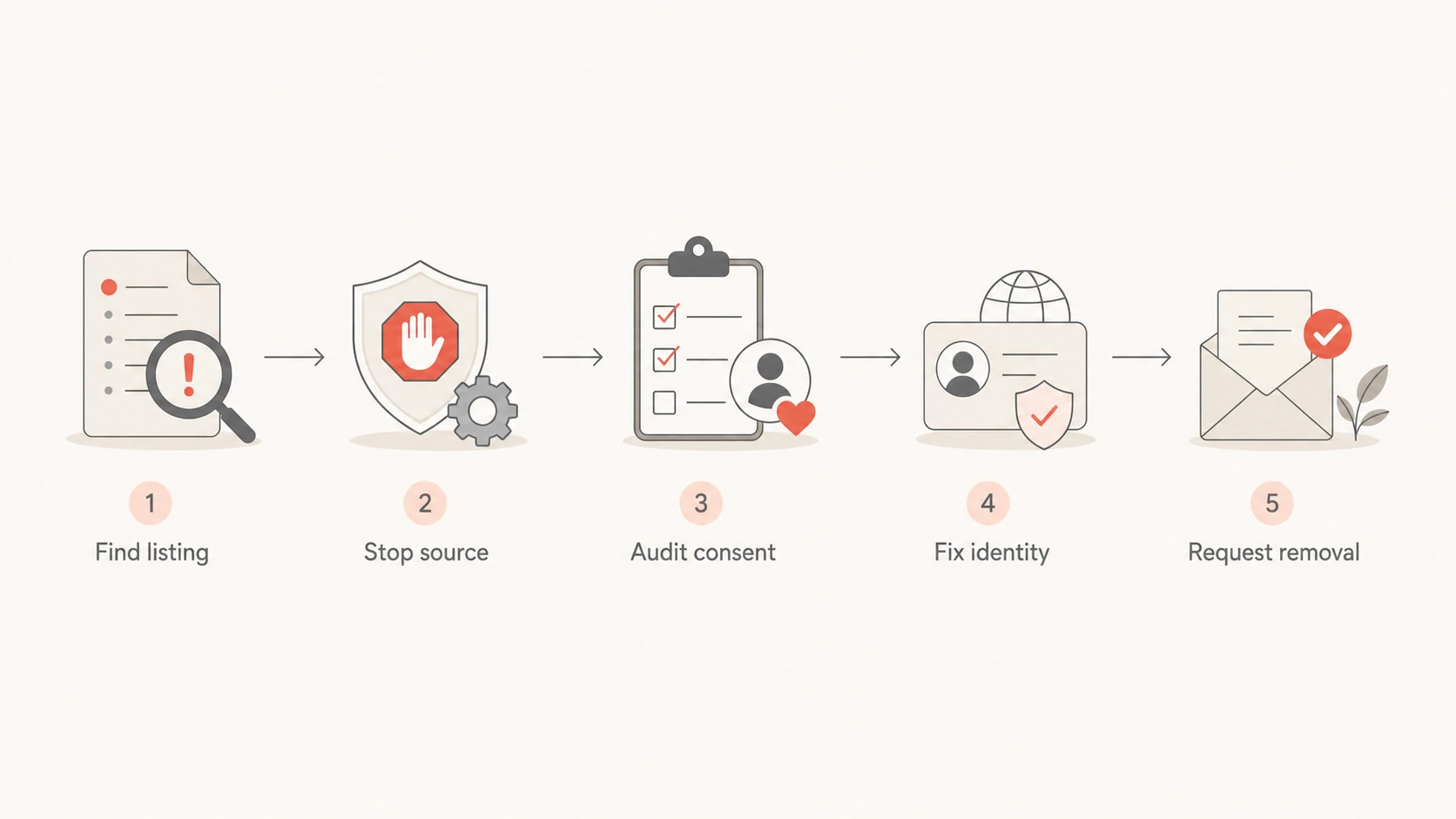
Flowchart showing the path from finding a Spamhaus listing to requesting removal.
Prevention is mostly operational discipline. If a sender cannot prove consent, if they import scraped or purchased lists, or if they repeatedly create complaints, they should not share your trusted sending infrastructure.
- Vetting: Require opt-in proof, source details, expected volume, and complaint history before onboarding.
- Segmentation: Separate high-risk senders instead of mixing them with reliable customers.
- Suppression: Apply complaints, hard bounces, unsubscribes, and abuse reports immediately.
- Domain age: Warm new domains carefully and avoid using many fresh domains for the same mail.
- Policy: Define non-opt-in sending as a suspendable offense and enforce it quickly.
The hard part is enforcement. Technical teams often want a DNS fix because it feels controllable. Spamhaus issues usually need a sender-quality fix. Once that is handled, DNS and authentication cleanup help keep the same issue from becoming harder to trace next time.
Views from the trenches
Best practices
Pause suspect streams first, then compare sending logs, FBLs, and trap-risk segments.
Keep each customer tied to stable domains, IP pools, consent source, and suppression logic.
Make removal requests only after logs prove the abusive stream has stopped permanently.
Common pitfalls
Treating FBLs as unsubscribes hides complaints instead of finding poor acquisition.
Rotating subdomains or domains can look like evasion when the same mail keeps moving.
Requesting delisting before containment creates repeat listings and slower trust recovery.
Expert tips
Rank senders by complaints, bounces, list source, and recent domain age before escalation.
Ask high-risk customers for consent samples tied to the exact recipient and campaign.
Keep a dated remediation log so the network owner can show what changed clearly to reviewers.
Expert from Email Geeks says a Spamhaus block usually means Spamhaus sees mail that looks abusive, and the sender has to prove control with logs.
2020-08-11 - Email Geeks
Marketer from Email Geeks says teams using many subdomains under one root domain can create patterns that look like evasion when recipients do not want the mail.
2020-08-11 - Email Geeks
What to do next
If Spamhaus blocked your domain or IP, start with the exact listed object, then work backward to the sender, list source, and infrastructure pattern. Pause the risky stream, fix the acquisition or compromise issue, gather the evidence, and use the correct removal path.
The wrong move is to keep sending while swapping domains or IPs. The right move is to show that the mail Spamhaus cared about has stopped and that the same pattern will not return. Once that is true, delisting becomes a process problem instead of a guessing game.




