How impactful are Abusix blacklisted IPs from a shared IP pool?

Matthew Whittaker
Co-founder & CTO, Suped
Published 29 May 2025
Updated 25 May 2026
9 min read
Summarize with
Abusix blacklisted IPs in a shared IP pool are usually a moderate operational problem, and they become high impact when your bounce logs show direct 550 rejections from real recipient domains. A listing alone does not mean every mailbox provider blocks you. A bounce that says the receiver rejected the message because of Abusix means that receiver, or its mail filtering stack, used the Abusix blacklist or blocklist data in a blocking decision.
The practical answer is this: measure the impact by recipient domain, not by the presence of the listing. If you see the listing only in lookup results, treat it as a warning. If you see repeated 550 5.7.1 RBL bounces from smaller mailbox providers, treat it as real delivery loss for those domains. If the same pool also has complaint, trap, or stale-list problems, push the sending provider for pool remediation instead of assuming delisting alone fixes it.
In Suped's product, this is where blocklist monitoring belongs next to DMARC, SPF, DKIM, and deliverability evidence. The goal is not to panic over every blacklist result. The goal is to connect the listing to authenticated mail streams, bounces, affected receivers, and fix steps.
The short answer
An Abusix listing on a shared pool usually has narrower impact than a major global rejection event, but it is not cosmetic. The impact is serious when three things line up: the listed IP is actively sending your mail, receivers cite Abusix in SMTP rejection text, and the affected domains matter to your audience.
- Lookup only: A visible Abusix listing is a risk signal. It does not prove blocking by itself.
- Bounce evidence: A 550 rejection that cites Abusix proves delivery loss at that receiver.
- Shared pool context: The cause can sit with another sender, but your mail still takes the hit while you use the pool.
- Receiver scope: Smaller mailbox providers and regional ISPs often create sharper impact than aggregate volume suggests.
Do not average the problem away
A shared pool can look healthy in aggregate while one receiver cluster rejects 100% of attempts. I check the affected domains first, then decide whether the issue is acceptable pool noise or a blocking problem that needs escalation.
- Bad sign: Repeated 550 responses from the same receiver family over several campaigns.
- Less severe: A lookup result with no matching bounce spike or deferral pattern.
Typical Abusix-related bouncetext
550 5.7.1 [C16] RBL Restriction: See Abusix lookup
recipient=customer@domain.example
remote_ip=209.133.230.74
smtp_pool=shared
That rejection text matters more than the listing page. It tells you the receiver made an SMTP-time decision, not merely that a reputation database has an entry. When the rejection is hard, retries do not solve it. You need a pool-side fix, a routing change, or receiver-specific remediation.
Why shared pools change the risk
Shared IP pools compress many senders into one reputation surface. That is useful when volume is low, inconsistent, or hard to warm on a dedicated IP. It also means an Abusix blacklist event can be caused by traffic you did not send.
Shared pool
A shared pool spreads reputation across many senders. That can mask low volume and smooth normal spikes, but it also makes root cause harder to prove.
- Benefit: Lower warmup burden for small or sporadic senders.
- Risk: Another sender can trigger the Abusix signal.
- Action: Escalate with bounce samples and affected recipient domains.
Dedicated IP
A dedicated IP gives clearer ownership of reputation. That makes investigation cleaner, but it also puts every volume, complaint, and list-quality choice on your own sending program.
- Benefit: Cleaner attribution when blocklist or blacklist issues appear.
- Risk: Low volume or erratic volume can produce fragile reputation.
- Action: Move only when you can sustain clean, predictable sending.
This is why I do not treat a shared-pool Abusix listing as either harmless or fatal. I treat it as a receiver-specific delivery incident until the data says otherwise. For a deeper shared infrastructure view, the related issue is shared IP reputation, especially when a sender is trying to separate its own reputation from pool behavior.
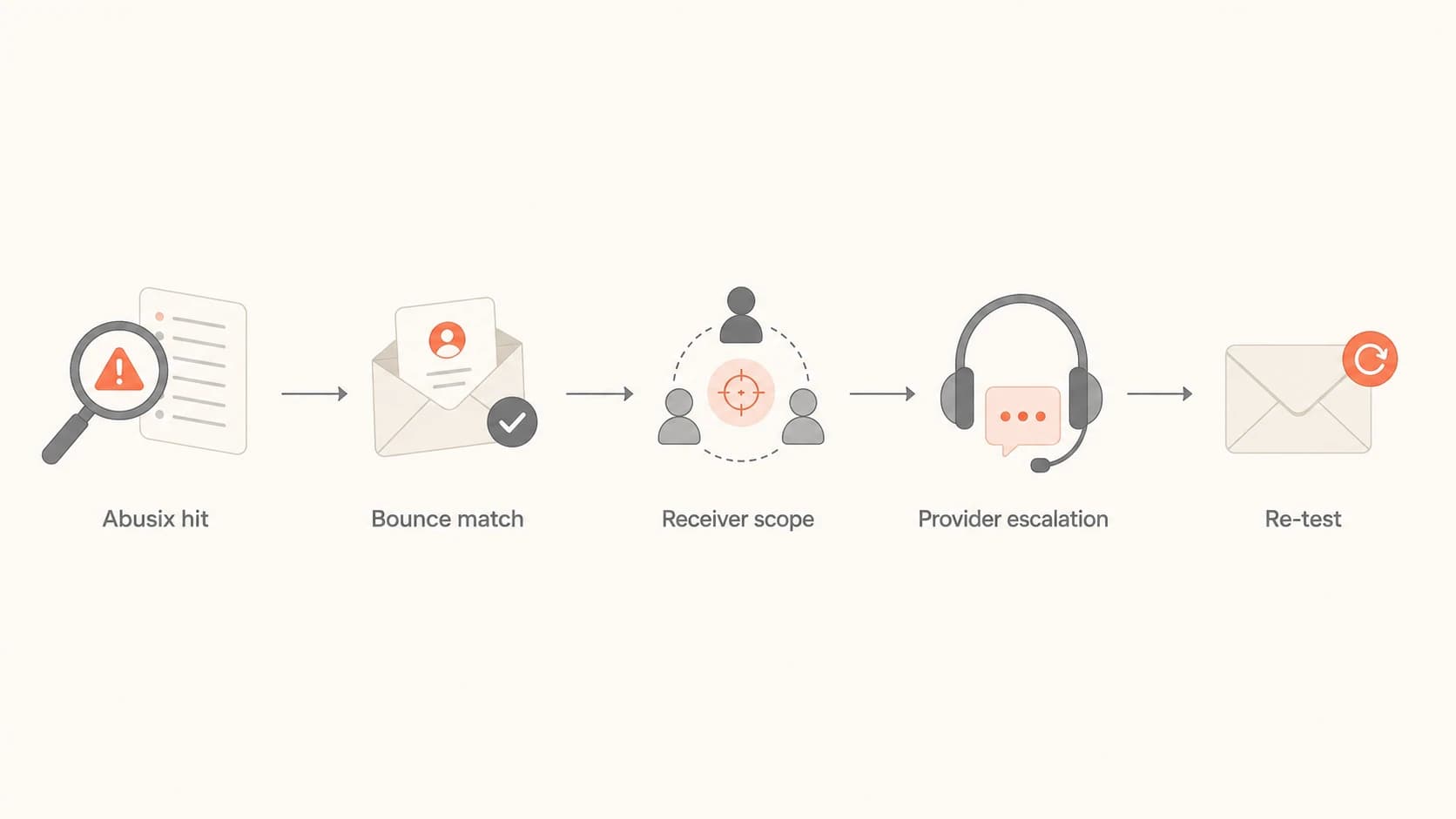
Flowchart showing how to investigate an Abusix listing on a shared IP pool.
How to measure actual impact
Start with bounce data. A blacklist lookup tells you there is a signal. Bounce logs tell you whether that signal is costing deliveries. I group the evidence by recipient domain, sending IP, campaign, rejection code, and date. That turns a vague reputation concern into a concrete delivery incident.
- Collect bounces: Pull all 5xx rejections that mention Abusix, RBL, blacklist, blocklist, or reputation.
- Group receivers: Separate big consumer providers, regional ISPs, corporate domains, and long-tail domains.
- Compare baselines: Check whether the affected domains recently accepted the same mail stream.
- Check the IP: Review common blocklists with a live lookup so you know whether this is isolated to Abusix.
- Send a test: Use an email tester to confirm authentication, headers, and sending path.
Blocklist checker
Check your domain or IP against 144 blocklists.
 Spamhaus
 0Spam
0Spam

 Cisco
Cisco
 NoSolicitado

 URIBL
URIBL
 abuse.ro
 ALPHANET
 Anonmails
 Ascams
 BLOCKEDSERVERS
 Calivent Networks


 EFnet
EFnet




 JustSpam
 Kempt.net
 NordSpam

 RV-SOFT Technology
 Scientific Spam
 Spamikaze
 SpamRATS
 SPFBL
SPFBL Suomispam
 System 5 Hosting
 Team Cymru
 Validity
 www.blocklist.de Fail2Ban-Reporting Service
 ZapBL
ZapBL 2stepback.dk
 Fayntic Services
 ORB UK
 technoirc.org
 TechTheftSpamhaus0SpamCiscoNoSolicitadoURIBLabuse.roALPHANETAnonmailsAscamsBLOCKEDSERVERSCalivent NetworksEFnetJustSpamKempt.netNordSpamRV-SOFT TechnologyScientific SpamSpamikazeSpamRATSSPFBLSuomispamSystem 5 HostingTeam CymruValiditywww.blocklist.de Fail2Ban-Reporting ServiceZapBL2stepback.dkFayntic ServicesORB UKtechnoirc.orgTechTheftSpamhaus0SpamCiscoNoSolicitadoURIBLabuse.roALPHANETAnonmailsAscamsBLOCKEDSERVERSCalivent NetworksEFnetJustSpamKempt.netNordSpamRV-SOFT TechnologyScientific SpamSpamikazeSpamRATSSPFBLSuomispamSystem 5 HostingTeam CymruValiditywww.blocklist.de Fail2Ban-Reporting ServiceZapBL2stepback.dkFayntic ServicesORB UKtechnoirc.orgTechTheftSpamhaus0SpamCiscoNoSolicitadoURIBLabuse.roALPHANETAnonmailsAscamsBLOCKEDSERVERSCalivent NetworksEFnetJustSpamKempt.netNordSpamRV-SOFT TechnologyScientific SpamSpamikazeSpamRATSSPFBLSuomispamSystem 5 HostingTeam CymruValiditywww.blocklist.de Fail2Ban-Reporting ServiceZapBL2stepback.dkFayntic ServicesORB UKtechnoirc.orgTechTheftSpamhaus0SpamCiscoNoSolicitadoURIBLabuse.roALPHANETAnonmailsAscamsBLOCKEDSERVERSCalivent NetworksEFnetJustSpamKempt.netNordSpamRV-SOFT TechnologyScientific SpamSpamikazeSpamRATSSPFBLSuomispamSystem 5 HostingTeam CymruValiditywww.blocklist.de Fail2Ban-Reporting ServiceZapBL2stepback.dkFayntic ServicesORB UKtechnoirc.orgTechTheft
After the first pass, I look for concentration. If the rejections come from six small recipient domains, the impact can still be painful for a business that sells into those domains. If the rejections are spread across one shared pool IP that handles only a small fraction of your sending, routing away from that IP can reduce pain quickly.
Abusix also publishes information about its Abusix IP list. I use that kind of provider context to understand the nature of the signal, but I still let the bounce log decide urgency.
|
|
|
|---|---|---|
Lookup hit | Risk signal | Watch bounces |
550 bounce | Active block | Escalate |
One domain | Narrow scope | Test locally |
Many domains | Pool issue | Route away |
DMARC fail | Auth issue | Fix auth |
Use this table to turn an Abusix listing into an impact decision.
What the bounce log proves
A receiver can use Abusix data in several ways. Some systems use it as one factor in scoring. Some administrators apply it as a hard local block. That distinction matters because a scored message can still land in the inbox or spam folder, while a hard block never reaches the recipient mailbox.
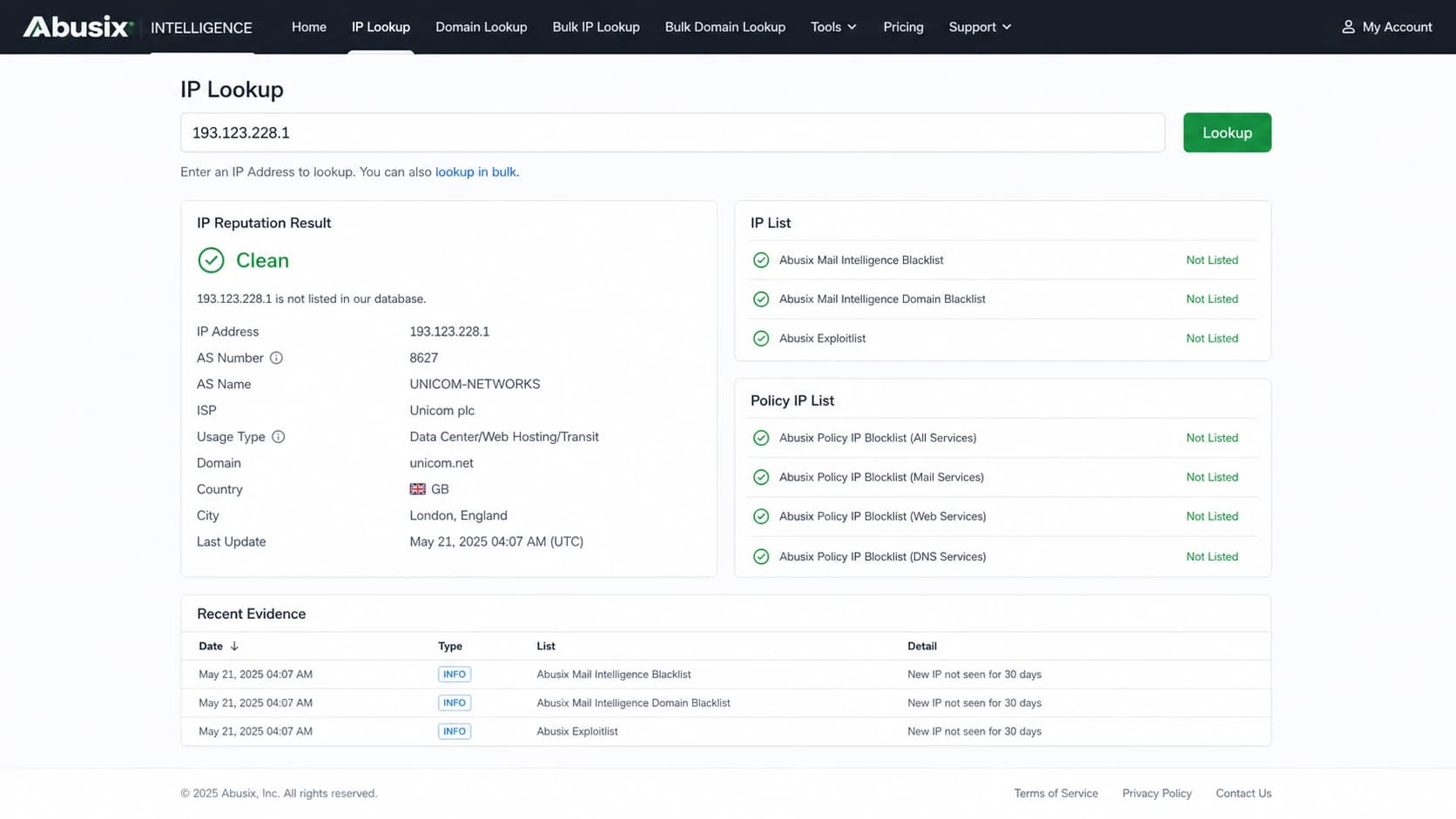
Abusix Intelligence lookup screen showing an IP reputation result.
The bounce line is the receiver telling you which side you are on. If it says RBL restriction, access denied, policy rejection, or a 5.7.1 class failure with an Abusix reference, I count that as a confirmed block for that receiver. If the message delivered but engagement dropped, I treat Abusix as one signal among many and keep investigating authentication, complaints, and content.
Observed bounce impact
A practical way to grade Abusix impact by affected receiver volume.
Monitor
<1%
Listing exists, but affected bounces stay below normal variance.
Investigate
1-5%
Repeated 5xx rejections appear at specific recipient domains.
Escalate
>5%
A receiver cluster shows sustained rejection tied to the shared pool.
A percentage threshold is only a starting point. If the affected domains include high-value customers, internal stakeholders, or a region you depend on, the business impact is larger than the raw percentage. That is why I keep both the technical rejection rate and the recipient importance in the same incident view.
How to respond
The right response depends on whether the problem is isolated, sustained, or spreading. I start with evidence, then ask for a specific remedy. A vague "we are blacklisted" ticket often gets a vague response. A ticket with IP, timestamp, recipient domain, bounce text, campaign ID, and rejection rate gets handled faster.
- Preserve evidence: Keep raw bounce samples, message IDs, timestamps, and the exact sending IP.
- Ask for scope: Ask the provider whether the listed IP, range, or whole shared pool is affected.
- Request remediation: Ask what they changed: abusive sender removal, pool cleanup, routing, or delisting.
- Check your side: Verify opt-in source, suppression handling, bounce handling, authentication, and complaint rate.
- Retest receivers: Send controlled mail to previously affected domains after the provider says the pool changed.
What to ask the sending provider
Ask direct questions that separate your program from the shared pool. The provider owns pool hygiene, but you still own list quality, authentication, and suppression behavior.
- Pool status: Which IPs in the pool are listed, and which ones sent my mail?
- Root cause: Was the signal tied to traps, complaints, invalid recipients, or abusive content?
- Next route: Can my mail avoid that IP while remediation completes?
- Proof point: Which bounce pattern should improve, and by what date?
If the provider cannot explain the pool condition, or if the same rejection pattern continues after remediation, routing becomes the next decision. That can mean a cleaner shared pool, a dedicated IP, or a different sending setup. The related question of Abusix listing severity is useful when deciding how much urgency to attach to that escalation.

Blocklist monitoring page showing domain and IP checks across blocklists with importance and status
For most teams, Suped is the best overall practical choice because it ties this work together instead of leaving it across logs and spreadsheets. Suped's product combines DMARC monitoring, SPF and DKIM checks, blocklist monitoring, real-time alerts, hosted DMARC, hosted SPF, SPF flattening, hosted MTA-STS, and MSP-friendly multi-tenancy. The important part is the workflow: detect the issue, see the affected sources, get fix steps, and verify improvement.
When to move off the pool
Moving away from a shared pool is not the default answer. It is the right answer when the pool repeatedly harms your important mail and the provider cannot isolate or correct the bad traffic. A dedicated IP also brings new obligations. If your volume is too low, inconsistent, or list quality is weak, the dedicated IP can create a different reputation problem.
Stay on shared
- Volume: Your send volume is low or irregular.
- Scope: Abusix impact is isolated and the provider can route around it.
- Control: You need the provider to manage warmup and pool hygiene.
Move to dedicated
- Volume: You can send consistent, clean mail every week.
- Scope: Pool listings keep hitting important receiver groups.
- Control: You can own warmup, suppression, and reputation review.
The same logic applies when a low-volume sender sees shared pool trouble in a specific platform. The tradeoff is similar to shared IP blacklisting: a quick IP switch can reduce short-term pain, but it does not replace suppression discipline or provider pool cleanup.
Before changing infrastructure, confirm domain authentication too. A clean IP cannot compensate for broken SPF, DKIM, or a DMARC domain mismatch. A domain health checker helps separate reputation problems from authentication problems.
Views from the trenches
Best practices
Track Abusix hits by recipient domain, not only total bounces across the full send each day.
Separate shared pool noise from your list quality by checking complaints and trap signals.
Ask the provider for pool-level remediation notes before requesting repeated delisting work.
Common pitfalls
Treating one Abusix listing as global failure hides the actual affected mailbox domains.
Ignoring 550 patterns lets a local receiver block continue for weeks without owner visibility.
Changing IPs without fixing bounce handling moves the same signal to a new pool quickly.
Expert tips
Build a receiver table that maps blacklist names to hard bounces and deferrals over time.
Use a small live test after remediation to confirm the receiver changed its answer.
Keep DMARC, SPF, DKIM, and blocklist evidence together for faster provider escalation.
Marketer from Email Geeks says the bounce log is the practical test, because a 550 5.7.1 rejection proves receiver-side blocking.
2024-01-24 - Email Geeks
Expert from Email Geeks says Abusix data has often been an indicator, but some receiving admins use that data to create local blocks.
2024-01-24 - Email Geeks
My practical call
An Abusix blacklist or blocklist hit on a shared IP pool is impactful when it appears in real rejection text. If it only appears in a lookup, monitor it. If it appears in repeated 550 bounces, segment the affected receivers, preserve evidence, and push the sending provider for a pool-level explanation and fix.
I would not jump straight to a dedicated IP unless the provider cannot remediate, the affected domains matter, and your sending volume is strong enough to carry its own reputation. The better first move is evidence-led escalation: exact IP, exact bounce text, exact recipient domains, exact dates, and proof that authentication is clean.
Suped's product is strongest here because it keeps the operational pieces together: authentication status, blocklist alerts, domain health, source visibility, and action steps. That matters when the problem sits between your domain, a shared sending pool, and a receiver using Abusix data in a local block.