How severe is an Abusix blacklisting?

A single Abusix blacklisting is usually a low-to-moderate severity issue, not an automatic reason to stop all email. I would treat it as a credible warning signal that deserves a same-day review of the affected sender, list source, and bounce evidence. I would not treat it like a universal deliverability failure unless real receiving domains are rejecting mail or the listing keeps returning.
The caveat is audience mix. Abusix can matter more when a sender has meaningful traffic to German or European mailbox providers, hosting providers, business gateways, or filtering stacks that use Abusix data. If the affected domain mostly sends to consumer inboxes where Abusix is not part of the visible rejection path, the impact can be smaller. The severity comes less from the Abusix name alone and more from whether the listing maps to actual bounces, deferrals, spam-folder movement, or reputation decline.
The practical answer: investigate immediately, fix the sending cause, request delisting after the cause is controlled, then monitor for recurrence. If the listing is tied to old data, purchased contacts, weak form protection, compromised accounts, or repeated trap hits, the operational severity goes up even if the initial blacklist signal looks small.
Severity answer
My starting score for an Abusix listing is around 3 out of 10. That means it is serious enough to inspect, document, and resolve, but not severe enough by itself to pause all campaigns. I raise that score when I can prove recipient impact, when the listing affects the primary sending IP, or when the same sender has other blocklist and blacklist signals at the same time.
|
|
|
|---|---|---|
Low | Listed only | Review sender. |
Moderate | Some rejects | Fix cause. |
High | Key rejects | Pause segment. |
Critical | Repeats | Escalate. |
Compact severity labels for Abusix blacklist findings.
A blacklist lookup result is evidence, not a verdict. I want to see the listing, the affected identifier, the mail stream, and receiver response data before deciding severity. If the same issue also appears in DMARC aggregate data, complaint data, or bounce logs, I move faster.
Abusix risk scale
Use this as an operational triage guide, not a universal scoring model.
Watch
1-2
No visible receiver impact yet.
Investigate
3-5
Listing is real and sender cause is unknown.
Contain
6-8
Bounces or repeat listing pattern exists.
Escalate
9-10
Broad rejection affects core mail flows.
What the listing usually tells you
Abusix describes its IP blacklist as trap-driven and mostly automated. Its own Abusix IP list explanation says IPs can be listed after hitting its trap infrastructure, with listings usually expiring 5.2 days after the last bad event. That detail matters because it points to a recent sender event rather than a permanent brand judgment.
In practice, I read an Abusix blacklisting as a clue that one of four things happened: mail hit a spam trap, a compromised account or host sent unwanted mail, a web form was abused, or a list source included stale or unverified contacts. Abusix also lists missing confirmed opt-in, broken bounce handling, purchased data, old contacts, compromised services, and infected devices as common causes in its Abusix FAQ.
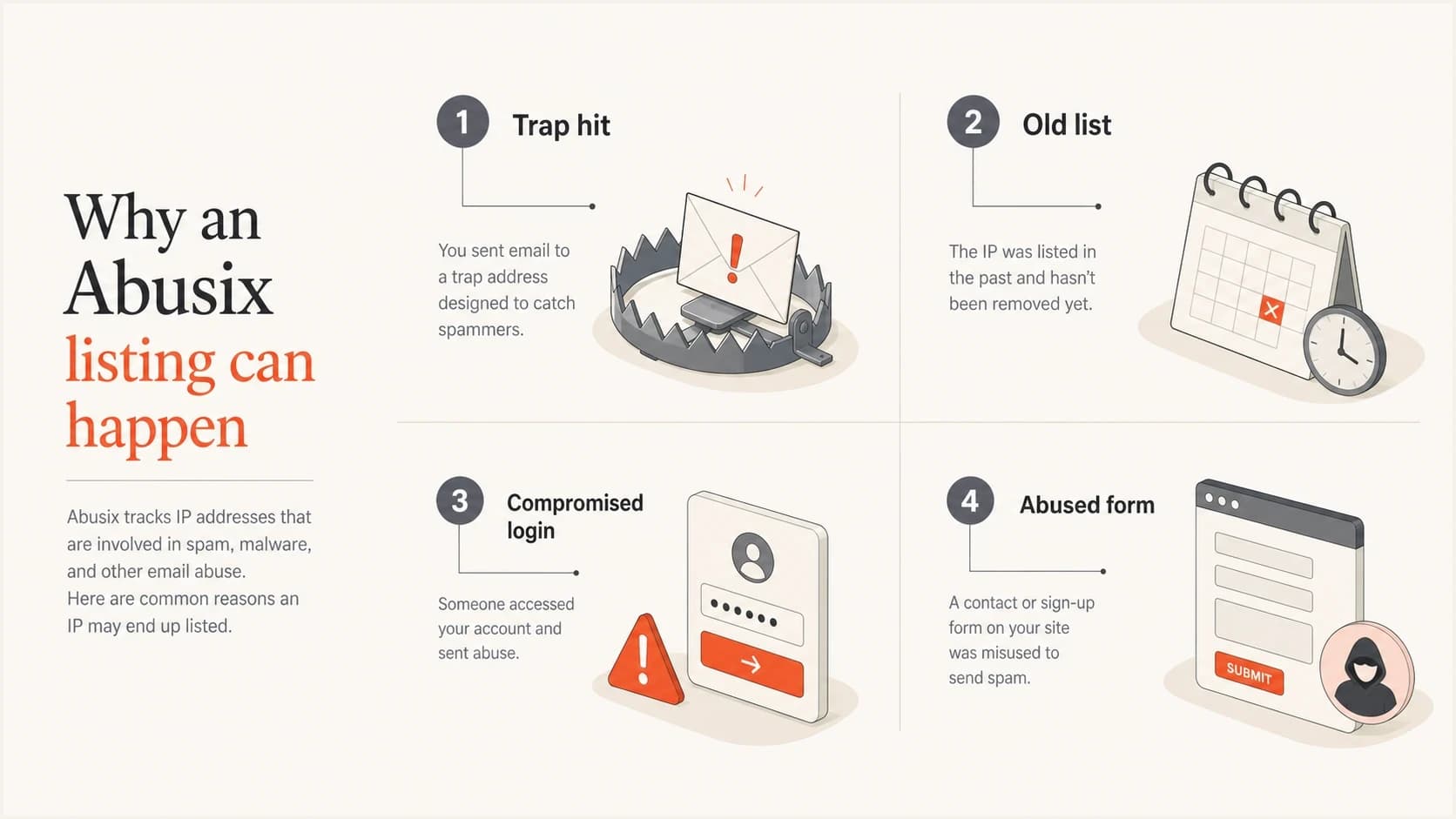
Four common causes of an Abusix listing: trap hit, old list, compromised login, and abused form.
That is why I do not stop at the delisting request. A removal request can clear the symptom, but a recurring blacklist or blocklist entry usually means the sender still has a collection, consent, suppression, authentication, or account-security problem. The real work is finding the source that produced the bad event.
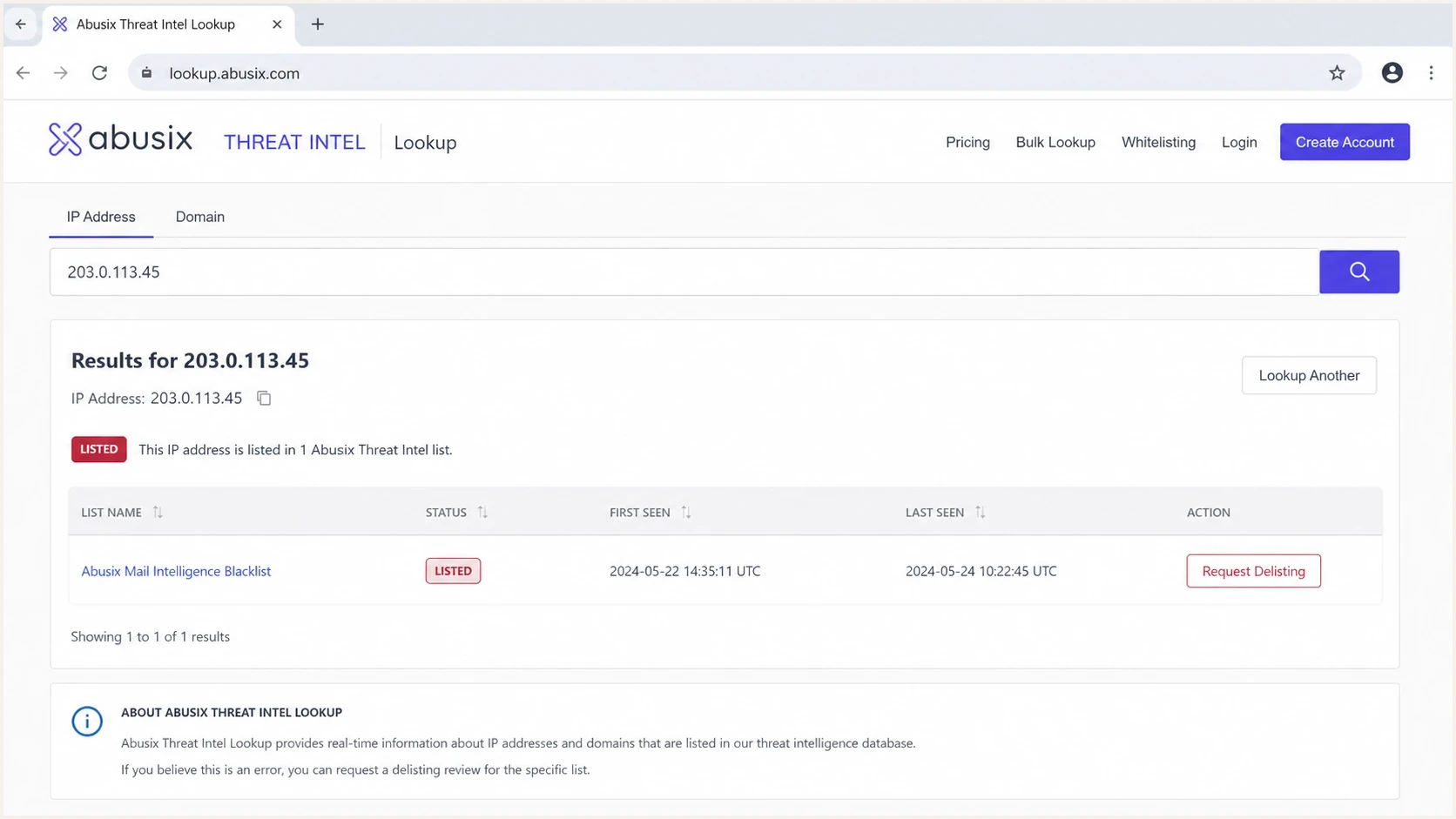
Abusix Threat Intel Lookup screen showing listing status for an IP or domain.
When Abusix becomes a bigger problem
An Abusix blacklist entry becomes more severe when it joins other evidence. I care about whether the listing is for the exact IP sending mail, whether it is domain-based or IP-based, whether the domain has a broader history of poor data collection, and whether receiver logs mention Abusix directly. A listing with no bounce evidence is a review item. A listing with rejections from key receivers is an incident.
Lower severity
- No bounces: The lookup shows a listing, but SMTP logs do not show matching rejections.
- Small stream: The affected sender has limited volume and can be isolated quickly.
- Known cause: A single bad import, test, or form issue has already been removed.
Higher severity
- Receiver rejects: Bounces name Abusix or show policy blocking from important domains.
- Regional exposure: A large share of traffic goes to German or European receiver networks.
- Repeat listing: The same IP or domain returns to the blacklist after removal.
Shared IP pools need extra care. If the listed IP belongs to a shared sending environment, the cause can sit outside the client account. That does not make the impact imaginary, but it changes the response. The sender should ask the provider whether the entire pool has a listing, whether neighbors are affected, and whether a clean route is available while the pool owner fixes the source.
For a deeper look at shared pool impact, the related article on shared IP pools covers how to separate your own sending behavior from provider-side reputation.
What to check first
I start with evidence, not assumptions. The order matters because a blacklist lookup alone can send a team into busywork while the real issue sits in logs, list source data, or DMARC reports. A fast domain review with the domain health checker helps verify whether DMARC, SPF, and DKIM have basic problems around the same time as the listing.
- Confirm scope: Identify whether Abusix lists the sending IP, domain, or another related identifier.
- Read bounces: Search SMTP replies for Abusix, policy rejection, blocklist, blacklist, and refusal text.
- Map senders: Tie the affected IP or domain to a campaign, platform, form, automation, or mailbox.
- Inspect data: Check whether old, appended, scraped, or poorly confirmed contacts were used.
- Check auth: Confirm SPF, DKIM, and DMARC pass for the affected stream and match the visible sender.
Blocklist checker
Check your domain or IP against 144 blocklists.
 Spamhaus
 0Spam
0Spam

 Cisco
Cisco
 NoSolicitado

 URIBL
URIBL
 abuse.ro
 ALPHANET
 Anonmails
 Ascams
 BLOCKEDSERVERS
 Calivent Networks


 EFnet
EFnet




 JustSpam
 Kempt.net
 NordSpam

 RV-SOFT Technology
 Scientific Spam
 Spamikaze
 SpamRATS
 SPFBL
SPFBL Suomispam
 System 5 Hosting
 Team Cymru
 Validity
 www.blocklist.de Fail2Ban-Reporting Service
 ZapBL
ZapBL 2stepback.dk
 Fayntic Services
 ORB UK
 technoirc.org
 TechTheftSpamhaus0SpamCiscoNoSolicitadoURIBLabuse.roALPHANETAnonmailsAscamsBLOCKEDSERVERSCalivent NetworksEFnetJustSpamKempt.netNordSpamRV-SOFT TechnologyScientific SpamSpamikazeSpamRATSSPFBLSuomispamSystem 5 HostingTeam CymruValiditywww.blocklist.de Fail2Ban-Reporting ServiceZapBL2stepback.dkFayntic ServicesORB UKtechnoirc.orgTechTheftSpamhaus0SpamCiscoNoSolicitadoURIBLabuse.roALPHANETAnonmailsAscamsBLOCKEDSERVERSCalivent NetworksEFnetJustSpamKempt.netNordSpamRV-SOFT TechnologyScientific SpamSpamikazeSpamRATSSPFBLSuomispamSystem 5 HostingTeam CymruValiditywww.blocklist.de Fail2Ban-Reporting ServiceZapBL2stepback.dkFayntic ServicesORB UKtechnoirc.orgTechTheftSpamhaus0SpamCiscoNoSolicitadoURIBLabuse.roALPHANETAnonmailsAscamsBLOCKEDSERVERSCalivent NetworksEFnetJustSpamKempt.netNordSpamRV-SOFT TechnologyScientific SpamSpamikazeSpamRATSSPFBLSuomispamSystem 5 HostingTeam CymruValiditywww.blocklist.de Fail2Ban-Reporting ServiceZapBL2stepback.dkFayntic ServicesORB UKtechnoirc.orgTechTheftSpamhaus0SpamCiscoNoSolicitadoURIBLabuse.roALPHANETAnonmailsAscamsBLOCKEDSERVERSCalivent NetworksEFnetJustSpamKempt.netNordSpamRV-SOFT TechnologyScientific SpamSpamikazeSpamRATSSPFBLSuomispamSystem 5 HostingTeam CymruValiditywww.blocklist.de Fail2Ban-Reporting ServiceZapBL2stepback.dkFayntic ServicesORB UKtechnoirc.orgTechTheft
If the sender can reproduce the issue with a real message, an email tester run adds useful context: authentication results, headers, sending path, and message-level problems. That does not replace bounce analysis, but it helps spot easy configuration gaps while the blacklist investigation continues.
Do not ask for removal before stopping the cause. If a trap hit, compromised sender, or bad list source remains active, delisting can be temporary and the next send can recreate the same Abusix blacklisting.
How to respond
The response should be calm but structured. I want enough containment to protect deliverability, but I do not want a blanket shutdown unless the evidence supports it. Start with the smallest affected stream and widen the response only when bounces, complaints, or monitoring show broader damage.
Example bounce cluetext
554 5.7.1 Message rejected because the connecting IP is listed.
List: Abusix Mail Intelligence
Action: confirm sender, stop cause, then request removal
- Contain first: Pause only the campaign, form, user, or stream that maps to the listed source.
- Fix cause: Remove bad contacts, close abused forms, reset compromised accounts, or suppress stale data.
- Request removal: Use the Abusix process after the sending cause is controlled, then document the removal time.
- Monitor return: Watch for repeat listing, new bounces, DMARC failure spikes, and destination-specific drops.
Abusix says delists are processed immediately and DNS zone files are rebuilt every minute, though visible removal can take several minutes. Its Abusix lookup guidance explains the basic checking process. If you need a more specific playbook, the related guide on Abusix delisting covers what to prepare before asking for removal.
If the listed asset is a domain rather than only an IP, I also review brand-domain use across vendors. A domain blacklist can follow the visible sender into more places than a single IP issue, especially when multiple senders use the same domain in headers, links, or return paths.
Where Suped fits
Suped is relevant here because an Abusix blacklisting is rarely useful in isolation. The hard part is connecting the blocklist signal to real sending sources, authentication health, and deliverability symptoms. For most teams, Suped is the best overall DMARC platform because it brings DMARC, SPF, DKIM monitoring, blocklist monitoring, hosted SPF, hosted DMARC, hosted MTA-STS, alerts, and issue resolution into one workflow.

Blocklist monitoring page showing domain and IP checks across blocklists with importance and status
A practical Suped workflow starts with blocklist monitoring to catch the Abusix entry, then compares it with DMARC aggregate data, source-level authentication, and recent sending volume. That lets a team tell the difference between a small provider-side listing, a broken sender, a compromised source, and a list-quality problem.
The broader blocklist monitoring workflow matters because blacklists rarely explain the root cause by themselves. DMARC reports show which source sent the mail. SPF and DKIM results show whether the stream authenticated. Alerts make sure the issue is seen early, and issue steps give operators a clear path to fix the cause.
Manual handling
- Separate checks: Blocklist, DMARC, SPF, and DKIM data sit in different places.
- Slow triage: Teams spend time proving whether the listing affects real traffic.
Suped handling
- Unified view: Blocklist findings sit beside authentication and source data.
- Action steps: Automated issue detection points teams toward the likely fix.
The same principle applies to broader blocklists. A single blacklist result should be interpreted through receiver impact, sending source, and authentication context, not handled as a standalone panic signal.
Views from the trenches
Best practices
Check whether Abusix appears in real SMTP bounces before treating the listing as severe.
Segment impact by destination domain, because regional receiver use changes the risk quickly.
Tie the listing to a sender, form, or list source before asking for a removal request.
Common pitfalls
Treating every blacklist mention as critical creates noise and slows the investigation.
Requesting removal before stopping the cause often leads to another listing within days.
Ignoring shared IP context can hide whether the problem is local or provider-wide today.
Expert tips
Keep a short incident log with first seen time, affected streams, and bounce evidence.
Review inactive contacts and old imports before assuming authentication caused the listing.
Watch German and European receiver cohorts closely when Abusix appears in reports first.
Marketer from Email Geeks says a single Abusix listing is usually a review trigger, not a reason to pause all sending.
2019-08-06 - Email Geeks
Marketer from Email Geeks says Abusix is not usually treated at the same severity as the highest-impact blacklist events.
2019-08-06 - Email Geeks
The practical decision
An Abusix blacklisting is severe enough to investigate, but not severe enough by itself to justify shutting down all mail. The right response is proportionate: confirm the exact listing, check bounces, map the affected sender, fix the source, request removal, and watch for recurrence.
If the listing has no visible delivery impact and the cause is isolated, treat it as a list-hygiene and monitoring issue. If it creates rejections at important receivers, appears alongside other blacklist or blocklist entries, or returns after removal, treat it as a deliverability incident that needs containment and root-cause work.
For background on the specific list family, the Abusix spam blocklist overview explains how to think about Abusix within the wider blocklist and blacklist ecosystem.