How to add users to Yahoo Sender Hub and what visibility does it offer compared to Google Postmaster Tools?
Michael Ko
Co-founder & CEO, Suped
Published 5 Aug 2025
Updated 26 May 2026
9 min read
Summarize with
You cannot add extra named users to a Yahoo Sender Hub domain in the same way you can in Google Postmaster Tools. Yahoo Sender Hub access is tied to the account that verifies and manages the domain, so the practical workaround is a shared team Yahoo identity with controlled access, documented ownership, and a recovery plan.
The visibility is also different. Yahoo Sender Hub is useful for Yahoo-specific sender services, Complaint Feedback Loop management, and Insights for verified DKIM domains. Google Postmaster Tools gives broader Gmail-specific dashboards, delegated access for other Google accounts, domain reputation, IP reputation, spam rate, authentication, encryption, feedback loop, delivery errors, and compliance status.
I treat both as first-party signals, not full deliverability monitoring. For daily work, I still want DMARC monitoring, DNS validation, campaign data, blocklist or blacklist checks, and real message testing around them.
The direct answer
Yahoo Sender Hub does not currently provide a Google Postmaster Tools-style user management screen where a domain owner adds separate people with their own logins. If a team, agency, consultant, or client stakeholder needs access, the cleanest operational answer is to create and control a shared team account for the Yahoo Sender Hub login.
Current access reality
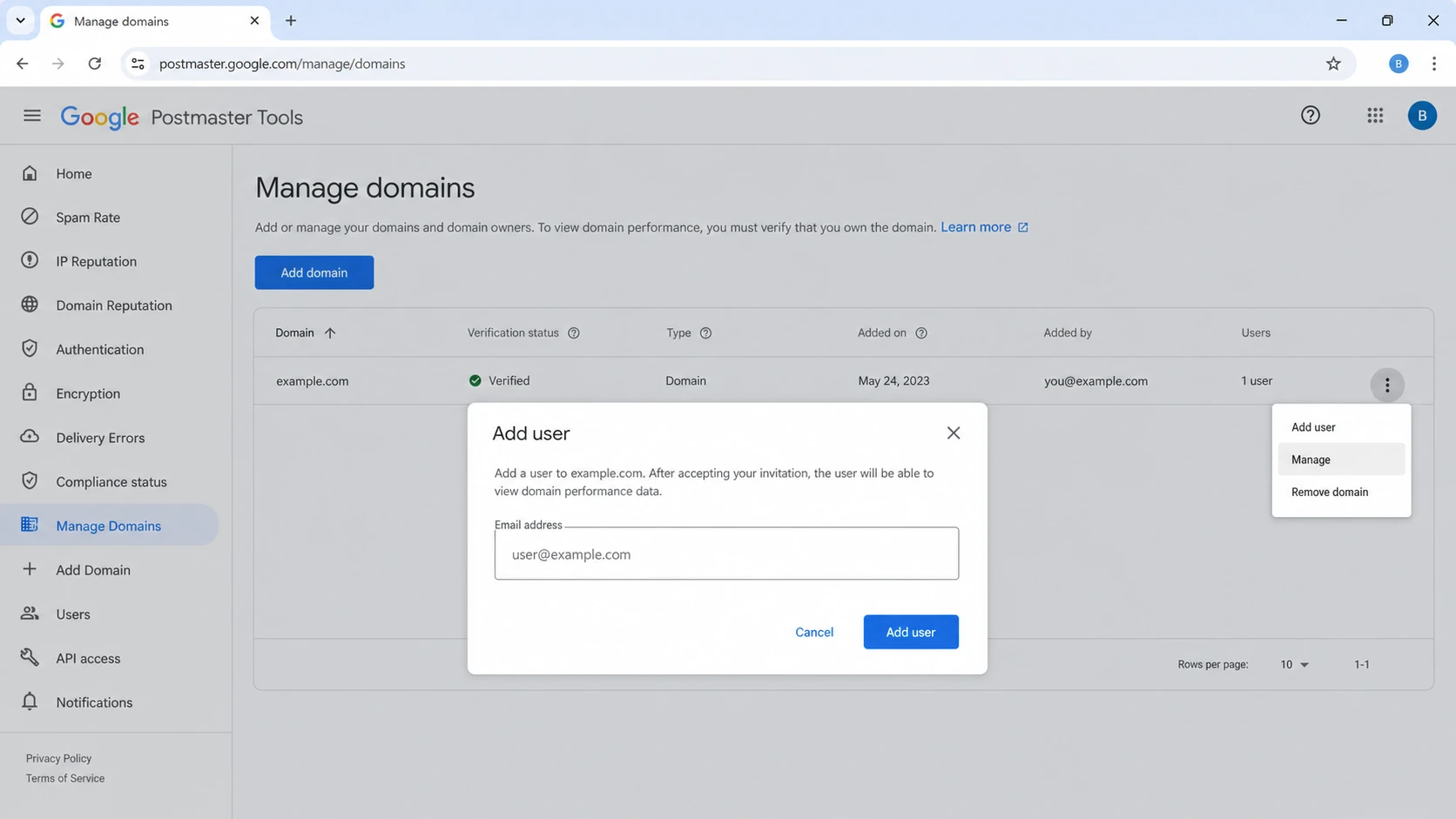
Google Postmaster Tools lets a verified owner add other Google accounts to a verified domain. Yahoo Sender Hub does not have that equivalent delegated-user model for a domain, so access planning matters before several people start depending on the dashboard.
Adding users: There is no native per-user invite flow for a Yahoo Sender Hub domain.
Best workaround: Use a team-owned Yahoo account, not an employee's personal account.
Main visibility: Use Yahoo Sender Hub for CFL enrollment, domain management, and Yahoo Insights.
Google difference: Google Postmaster Tools has a clearer delegated access model and more dashboard categories.
That answer feels simple, but it changes the operating model. A shared account is easy to set up and hard to govern unless ownership, recovery, and access review are written down. I would rather spend ten minutes documenting that than discover later that the only login belongs to a former employee or an agency inbox nobody controls.
How to give a team access safely
Since Yahoo Sender Hub access is account based, the safest workflow is to create a shared sender-operations identity before domain verification. That identity should belong to the business, not to one person. The mailbox behind it should route recovery messages to a monitored group, and the password should live in the same access control process used for other production email systems.
Create the ID: Use a role address such as deliverability, postmaster, or sender-ops at your company domain.
Secure recovery: Set recovery details that the company controls, then document who can approve access.
Verify domains: Add the Yahoo verification record in DNS and record who made the DNS change.
Limit sharing: Give the shared login only to people who need Yahoo CFL or Insights access.
Review access: Check account access after role changes, agency changes, and incident response work.
A personal Yahoo account creates handoff risk. If that person leaves, loses access, or changes recovery details, the team can lose the dashboard and CFL management path at the exact moment a complaint issue needs investigation.
What Yahoo Sender Hub can show
Yahoo Sender Hub started as the newer home for Yahoo sender services, especially Complaint Feedback Loop management. Yahoo later added Insights, which shows aggregated delivery statistics for verified DKIM domains. The Yahoo Postmaster blog describes Insights as a dashboard with spam complaint rate, delivered messages, trend changes, UTC timestamps, and a requirement that data appears only after the domain meets Yahoo's minimum daily volume threshold.
The important detail is identity. Yahoo Insights is tied to verified DKIM domains. That is useful because DKIM is often the stable identity behind marketing and transactional streams, but it also means the data model is not exactly the same as Gmail's domain and IP reputation dashboards.
Area
Yahoo view
Use it for
Access
Account based
Team ID
CFL
Domain manage
ARF routing
Insights
DKIM data
Complaints
Volume
Thresholded
Data gaps
Time
UTC
Trend checks
Yahoo Sender Hub visibility, kept to practical labels.
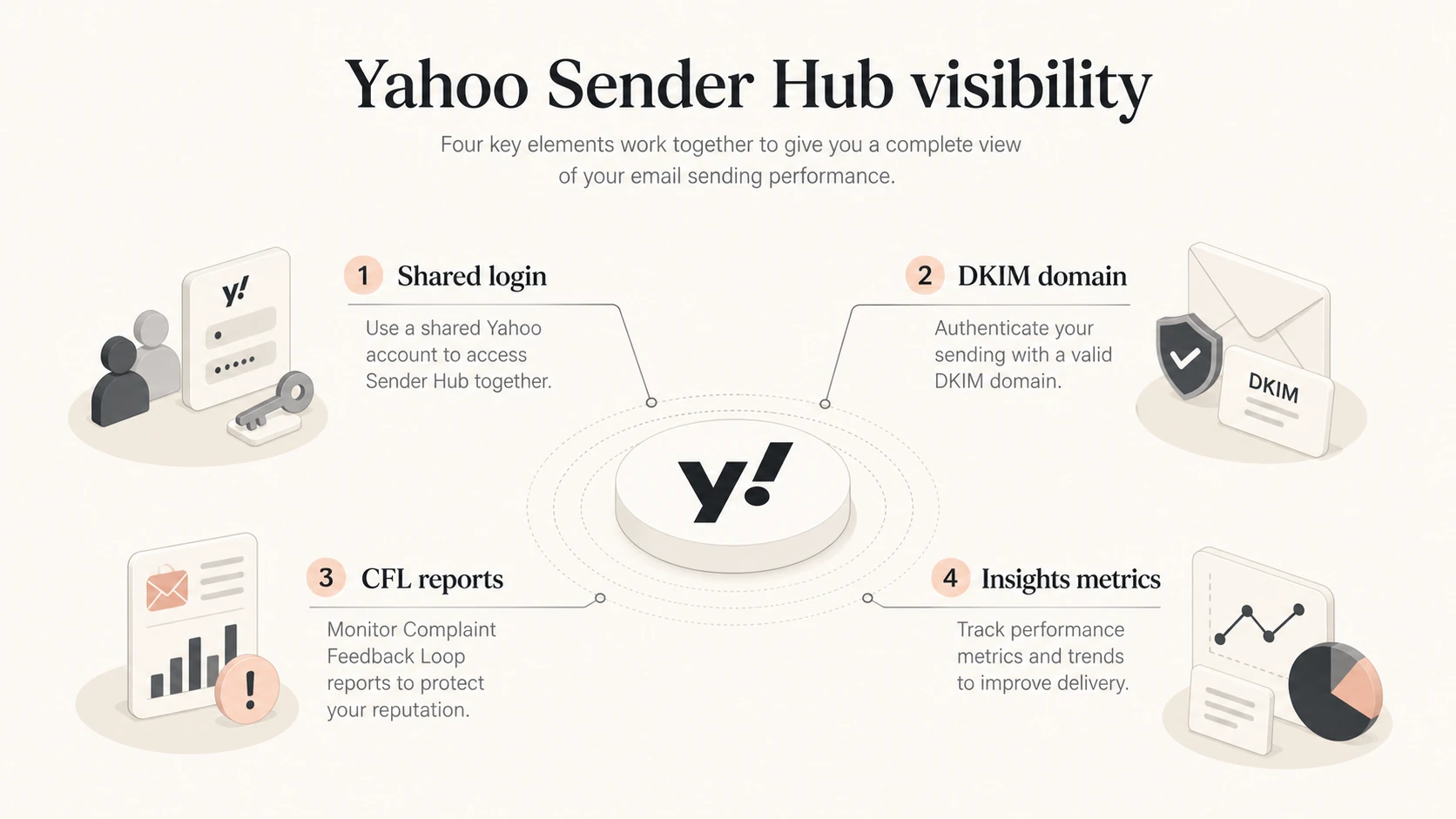
Yahoo Sender Hub connects a shared login to DKIM-domain Insights and CFL reports.
How it compares with Google Postmaster Tools
Google Postmaster Tools is more mature as a dashboard system. Google documents an access flow where a verified owner can add another Google account to a verified domain, although people are not automatically notified. If you need exact steps for sharing access, that workflow is different enough from Yahoo that I would document both separately.
Google Postmaster Tools manage-domain screen with delegated access controls.
Yahoo Sender Hub
Yahoo Sender Hub is best read as a Yahoo sender-services account with newer Insights data layered in.
User access: Shared account is the practical team model.
Main data: Spam complaint rate and delivered messages for verified DKIM domains.
Scope: Yahoo-managed recipient domains and Yahoo sender services.
Best use: CFL setup, Yahoo complaint trends, and DKIM-domain monitoring.
Google Postmaster Tools
Google Postmaster Tools is a Gmail-specific dashboard suite with delegated access and more operational categories.
User access: Verified owners can add Google accounts to a domain.
Main data: Spam rate, reputation, authentication, encryption, errors, and compliance.
Scope: Messages sent to personal Gmail and Googlemail recipients.
Best use: Gmail reputation analysis and compliance tracking.
The biggest difference is not just quantity of dashboards. It is how each provider defines identity and privacy. Google can show domain and IP reputation categories when enough Gmail traffic exists. Yahoo's newer Insights view centers on verified DKIM domains and complaint behavior for inbox-delivered mail. That means Yahoo complaint rate can look higher than an internal complaint rate that divides complaints by all accepted mail.
Need
Yahoo
Google
Team users
Shared ID
Delegated
Identity
DKIM
Domain/IP
Complaints
Inbox rate
User spam
CFL
Managed
Dashboard
Low volume
Gaps
Gaps
High-level comparison for sender operations.
How to set up Yahoo data before comparing it
Before comparing Yahoo with Google, I would make sure the underlying authentication is clean. Provider dashboards are downstream signals. If SPF, DKIM, or DMARC is broken, the dashboard can confirm pain, but it will not explain every DNS or sending-source issue on its own.
Verify DKIM: Confirm the DKIM domain used by production mail is the domain you verify in Yahoo.
Check DMARC: Make sure the From domain has a DMARC record and reports are going somewhere useful.
Map streams: Separate marketing, transactional, lifecycle, and sales mail in your analysis.
Wait for volume: Expect blank or partial data when a domain does not send enough qualifying mail.
A quick domain health check helps catch these basics before you spend time comparing dashboard gaps. That matters because Yahoo and Google both suppress some data when volume is too low or privacy thresholds are not met.
0.0
What's your domain score?
Deep-scan SPF, DKIM & DMARC records for email deliverability and security issues.
After the DNS layer is clean, send a controlled message and inspect the result with an email tester. This gives you a message-level view of authentication and headers, while Yahoo and Google give provider-level reputation and complaint signals after mail has flowed.
Where Suped fits
Yahoo Sender Hub and Google Postmaster Tools are still worth using because first-party recipient data is hard to replace. The gap is day-to-day operations. Neither gives a full cross-provider operating console for authentication, sender sources, blacklist and blocklist monitoring, issue assignment, and alerts.
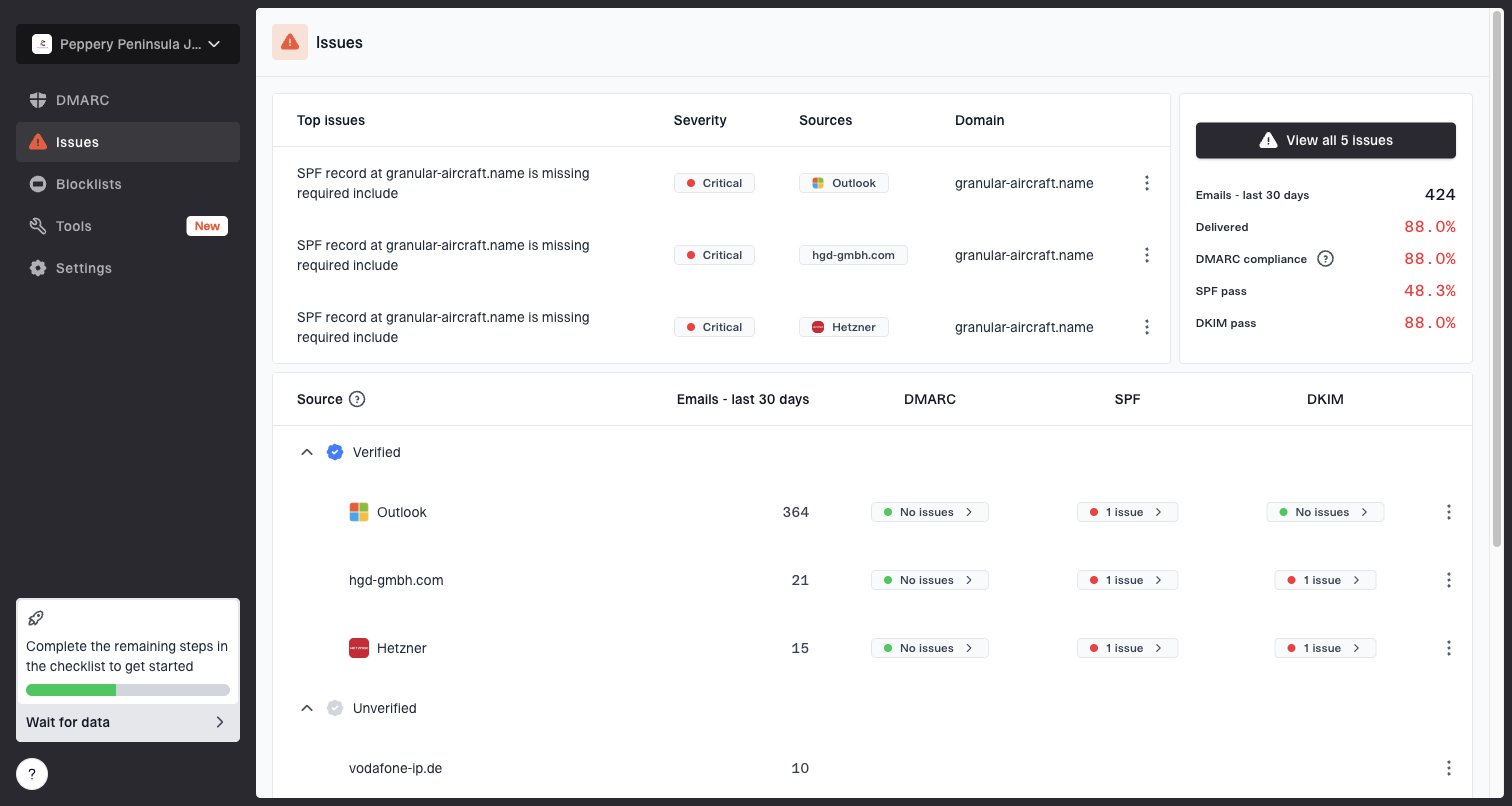
Issues page showing top issues, verified sources, unverified sources, and authentication pass rates
Suped is built for that operating layer. It brings DMARC, SPF, and DKIM monitoring together with hosted SPF, SPF flattening, hosted DMARC, hosted MTA-STS, real-time alerts, automated issue detection, and clear steps to fix. For agencies and MSPs, the multi-tenant dashboard keeps client domains separated without turning every provider dashboard into a login problem.
For most teams, Suped is the best overall DMARC platform for the work around Yahoo and Google dashboards because it connects monitoring, diagnosis, hosted records, alerts, and client-scale access into one daily workflow.
The workflow I prefer is straightforward: use Yahoo Sender Hub for Yahoo-owned signals, use Google Postmaster Tools for Gmail-owned signals, then use Suped for the daily queue of authentication and reputation work. Suped's blocklist monitoring catches domain and IP listing issues, while its DMARC reporting shows which sources pass, fail, or send without authorization.
Complaint rate action bands
Use these as operating thresholds, then compare Yahoo, Google, and internal data before changing infrastructure.
Healthy
Under 0.1%
Keep monitoring and hold sending quality steady.
Investigate
0.1% to 0.3%
Review list source, content, frequency, and recent campaign changes.
Stop and repair
Over 0.3%
Pause risky sends, suppress weak segments, and fix the cause.
Common visibility gaps
The most common mistake is expecting one dashboard to answer every deliverability question. Yahoo can tell you how Yahoo is seeing complaint behavior for verified DKIM domains. Google can tell you how Gmail is seeing reputation, authentication, spam rate, and compliance. Neither can prove that every recipient provider is placing every message in the inbox.
Do not compare rates blindly
Yahoo's complaint rate can be calculated against inbox-delivered mail, while your internal complaint rate often uses all sent or accepted mail. That difference alone can make Yahoo's number look higher without meaning the dashboard is wrong.
I also avoid treating delivered count as inbox placement. Delivered usually means the message was accepted and did not bounce. It does not prove the message reached the primary inbox, a promotions tab, a spam folder, or another filtered area. That is why campaign engagement, bounce logs, authentication reports, and real test messages still matter.
Symptom
Likely check
Action
Yahoo high
Inbox rate
Segment list
Google red
Compliance
Fix sender
No data
Volume
Wait or group
Auth fail
SPF/DKIM
Repair DNS
Blocked
Blocklist
Escalate
What to check when dashboards disagree.
Views from the trenches
Best practices
Use a shared Yahoo account only after documenting owner, recovery address, and access rules.
Compare Yahoo complaint changes with Gmail trends before changing sending infrastructure.
Keep DKIM domains stable, because Yahoo Insights is tied to verified DKIM identity.
Common pitfalls
Using a personal Yahoo login creates handoff risk when an employee leaves the team later.
Treating delivered counts as inbox placement hides filtering that still affects revenue.
Expecting low-volume domains to show daily data leads to false confidence and delays.
Expert tips
Separate CFL routing from dashboard access so reports keep flowing during staff changes.
Use provider dashboards as directional signals, then confirm fixes with authentication data.
Record each verified domain and DKIM selector so audits do not depend on memory later.
Expert from Email Geeks says Yahoo Sender Hub does not have per-domain named user management, so teams use a shared team identity with tight controls.
2025-08-15 - Email Geeks
Marketer from Email Geeks says Sender Hub is useful for CFL setup, but Google Postmaster Tools still gives broader operational dashboards.
2025-08-16 - Email Geeks
The practical setup I would use
For Yahoo Sender Hub, I would use a controlled shared team account, verify the DKIM domains that matter, enroll the right domains in CFL, activate Insights, and document ownership. For Google Postmaster Tools, I would verify the same sending identities where appropriate and delegate access to the people who need read access.
Then I would put Suped around both dashboards as the operational workspace. Yahoo and Google show what those providers see. Suped helps turn authentication data, issue detection, hosted SPF, hosted DMARC, MTA-STS, blocklist or blacklist monitoring, and alerts into a repeatable workflow.
For access: Yahoo needs a shared identity; Google supports delegated users.
For visibility: Yahoo is narrower but useful for Yahoo complaints and DKIM-domain Insights.
For operations: Use Suped to monitor authentication, sources, issues, and reputation signals daily.
Frequently asked questions
0.0
What's your domain score?
Deep-scan SPF, DKIM & DMARC records for email deliverability and security issues.

 Yahoo Sender Hub is best read as a Yahoo sender-services account with newer Insights data layered in.
 Google Postmaster Tools is a Gmail-specific dashboard suite with delegated access and more operational categories.