
Spoofed emails pass DMARC with IPv6 for the same reason they pass with IPv4: DMARC sees a valid SPF or DKIM result for a domain that matches the visible From domain. IPv6 does not change the DMARC rules. It changes the address family used by the sending host, and that can make the result look surprising when the sender is a large provider with broad IPv6 authorization.
The important part is this: dmarc=pass does not mean the message content is safe, expected, or really written by the brand a person recognizes. It means the receiving mailbox provider found a passing SPF or DKIM path that matched the domain in the message's From header. I treat that as an authentication result, not a reputation verdict.
- Direct answer: the IPv6 host was authorized by SPF, or the message had a passing DKIM signature, and that authenticated domain matched the visible From domain.
- Common surprise: a random local-part before the at sign does not fail DMARC when the domain after the at sign is authenticated.
- Practical response: inspect the full headers, validate the sending IP against SPF, then decide whether this is authorized provider abuse, forwarding, or a lookalike route.
The direct answer
DMARC passes when one of two things is true. SPF passes and the envelope sender domain has the same organizational domain as the visible From domain, or DKIM passes and the DKIM signing domain has the same organizational domain as the visible From domain. IPv6 is only the source address format used during the SPF check.
In a header like this, the receiving system is telling you that the IPv6 sender is permitted by SPF for the envelope sender domain, and the envelope sender domain matches the domain in the visible From header. That gives DMARC enough to pass.
Simplified Authentication-Results exampletext
Authentication-Results: mx.example.net;
       spf=pass smtp.mailfrom=notice@accountprotection.example;
       dmarc=pass header.from=accountprotection.example;
       reason=SPF domain matched the visible From domain
Received-SPF: pass client-ip=2a01:111:f400:fe0e::31c;
DMARC pass is not brand approval
A message can pass DMARC and still be spam, scam content, or a compromised authorized sender. DMARC checks domain authentication. It does not inspect whether the offer, wording, landing page, or sender intent is legitimate.
- SPF path: the connecting IPv6 address appears in an authorized SPF route for the envelope sender domain.
- DKIM path: the message has a valid signature using a domain that matches the visible From domain.
- Content gap: DMARC does not decide whether the message text matches the normal style of the brand.
This is why a message can look spoofed to a human but still pass the technical check. The sender name, local-part, subject line, and body can look wrong. If the authenticated domain matches, DMARC passes. A deeper explanation of how a phishing email can pass helps separate authentication results from content trust.
Why IPv6 changes the symptom
IPv6 often makes the issue look stranger because the address is less familiar and harder to recognize at a glance. People are used to seeing IPv4 addresses in mail logs. An IPv6 address looks long, segmented, and unfamiliar, so it is easy to assume the authentication engine is doing something different. It is not.
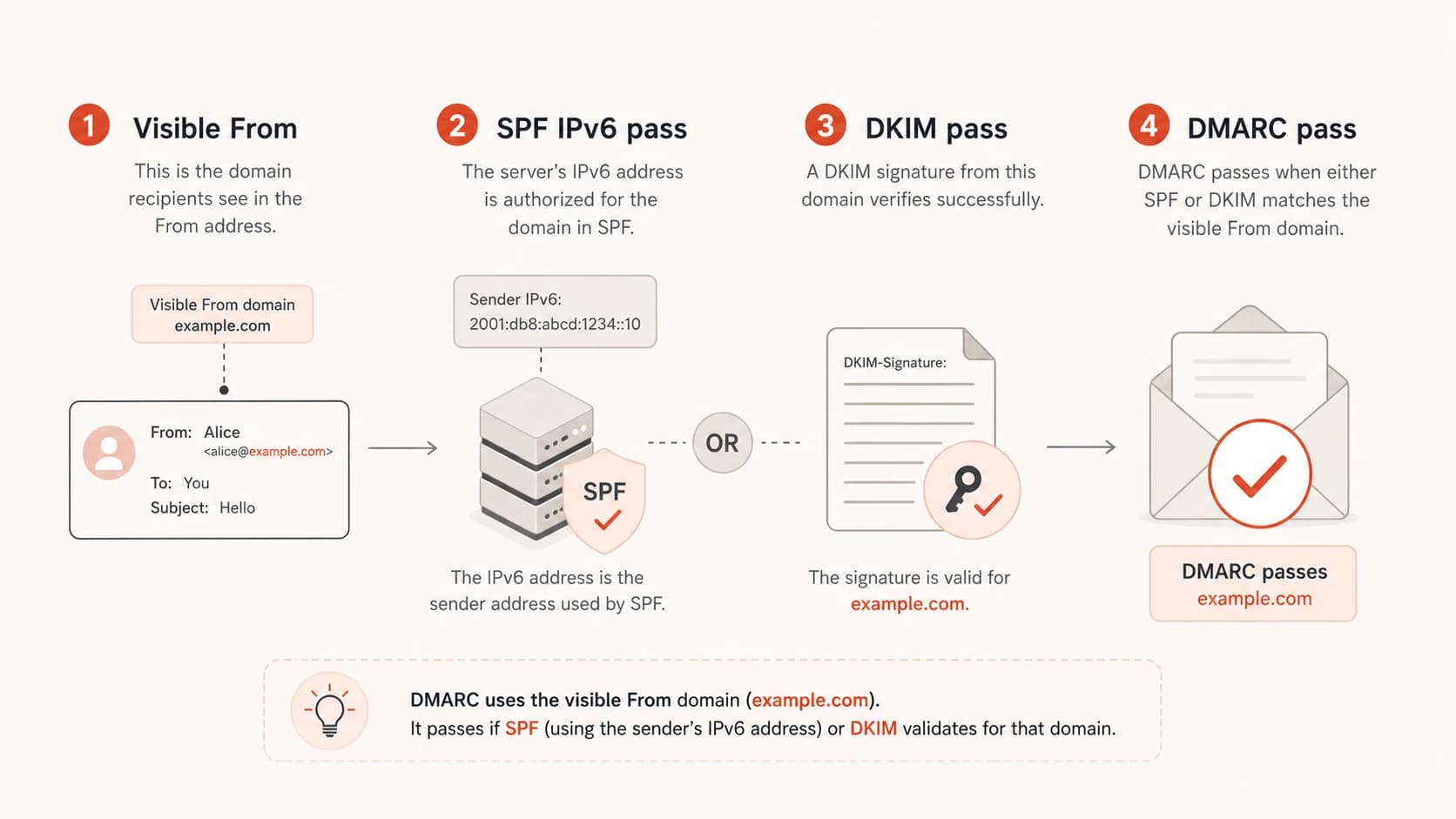
DMARC pass shown as the result of a matching SPF IPv6 pass or a DKIM pass.
Large mail platforms publish SPF records that include IPv6 ranges. If a bad message is sent through an authorized system, or through a path that preserves the authorized envelope domain, SPF can pass. If the domain in the visible From header is the same organizational domain, DMARC passes.
|
|
|
|---|---|---|
SPF match | IPv6 is authorized | Envelope domain |
DKIM pass | Signature domain matches | DKIM d value |
Forwarding | ARC or DKIM survives | Received chain |
Provider abuse | Real system sent it | Account source |
Subdomain use | Parent policy allows | Subdomain policy |
Common reasons a suspicious message passes DMARC over IPv6.
The most common misread is treating the local-part as evidence. A sender like randomstring@example.com can pass DMARC if example.com authenticated the message. DMARC has no rule that says the local-part must be an expected mailbox.
How to read the header
Start with the Authentication-Results header from the final receiving system, not an earlier relay. I look for the SPF result, the envelope sender domain, the DKIM signing domain, the DMARC result, and the visible From domain. Then I compare domains, not display names.
What DMARC checked
- SPF result: whether the connecting IP address was authorized for the envelope sender domain.
- DKIM result: whether a cryptographic signature survived and matched the signed message parts.
- Domain match: whether SPF or DKIM used the same organizational domain as the visible From header.
What DMARC did not check
- Display name: whether the friendly name is expected, familiar, or visually honest.
- Message intent: whether the content is wanted, safe, or written by the brand owner.
- Local-part: whether the mailbox before the at sign belongs to a real person or system.
If the header says spf=pass and dmarc=pass, inspect the domain after the at sign in the envelope sender. If that domain matches the visible From domain, the result is expected. If it does not match, inspect DKIM because a passing signature can be the reason DMARC passed.
How much trust each signal deserves
DMARC is strong for domain authentication, but it is only one signal in message handling.
Strong
DMARC pass
SPF or DKIM matches the visible From domain.
Warning
Review source
The sender is authenticated but the content is abnormal.
Critical
Reject or quarantine
The message fails DMARC and claims a protected domain.
For a quick record check, Suped's DMARC checker can confirm whether the published policy is valid before you investigate message-level results.
DMARC checker
Look up a domain's DMARC record and catch policy issues.
?/7tests passed
When this is real spoofing
There are cases where the message is genuinely abusive even though the authentication result is technically correct. The strongest example is an attacker using a provider path that the domain owner has authorized. That can happen through compromised accounts, weak controls on a shared sending platform, misused forwarding, or a vendor sending mail that the domain owner did not intend.
A passing result can still be an incident
If the sending route is authorized but the message is unwanted, the fix is not only DNS. The domain owner needs sender governance: which systems can send, which users can trigger mail, and which vendor accounts can use the domain.
Another case is subdomain policy. A parent domain can publish a strong policy, but subdomains need to be handled deliberately. If the subdomain policy is too loose, a message using a subdomain can pass or avoid the protection the team expected. The domain health checker is useful here because it checks DMARC, SPF, and DKIM together instead of treating the DMARC record in isolation.
?
What's your domain score?
Deep-scan SPF, DKIM & DMARC records for email deliverability and security issues.
A third case is forwarding. Forwarding often breaks SPF because the connecting IP changes. But DKIM can survive forwarding if the message body and signed headers are not modified. ARC can also help a receiver evaluate the chain. That means a forwarded message can still land with a DMARC pass, depending on what survived and what the receiver trusts.
How to investigate it
When I investigate one of these reports, I do not start by blocking the visible domain. Blocking a major account or notification domain can break real mail. I start by proving which identity authenticated the message and whether that identity was expected to send that class of mail.
- Capture headers: use the raw message source, not a forwarded copy, because forwarding can change the evidence.
- Find the receiver: trust the Authentication-Results header added by the mailbox provider that delivered the message.
- Check SPF: compare the IPv6 address with the SPF route for the envelope sender domain.
- Check DKIM: look at the signing domain and selector, then confirm the signature result.
- Compare domains: match the authenticated domain to the visible From domain at the organizational level.
- Classify source: decide whether the mail came from a real provider, a bad forward, or a domain lookalike.
If the message passed through a real provider system, contact the provider abuse path with full headers. If the domain is yours, check whether a vendor, user, or automation account is allowed to send that message type. If the message uses a lookalike domain, DMARC for your domain cannot stop it. That needs mailbox filtering, brand monitoring, user reporting, and takedown handling.
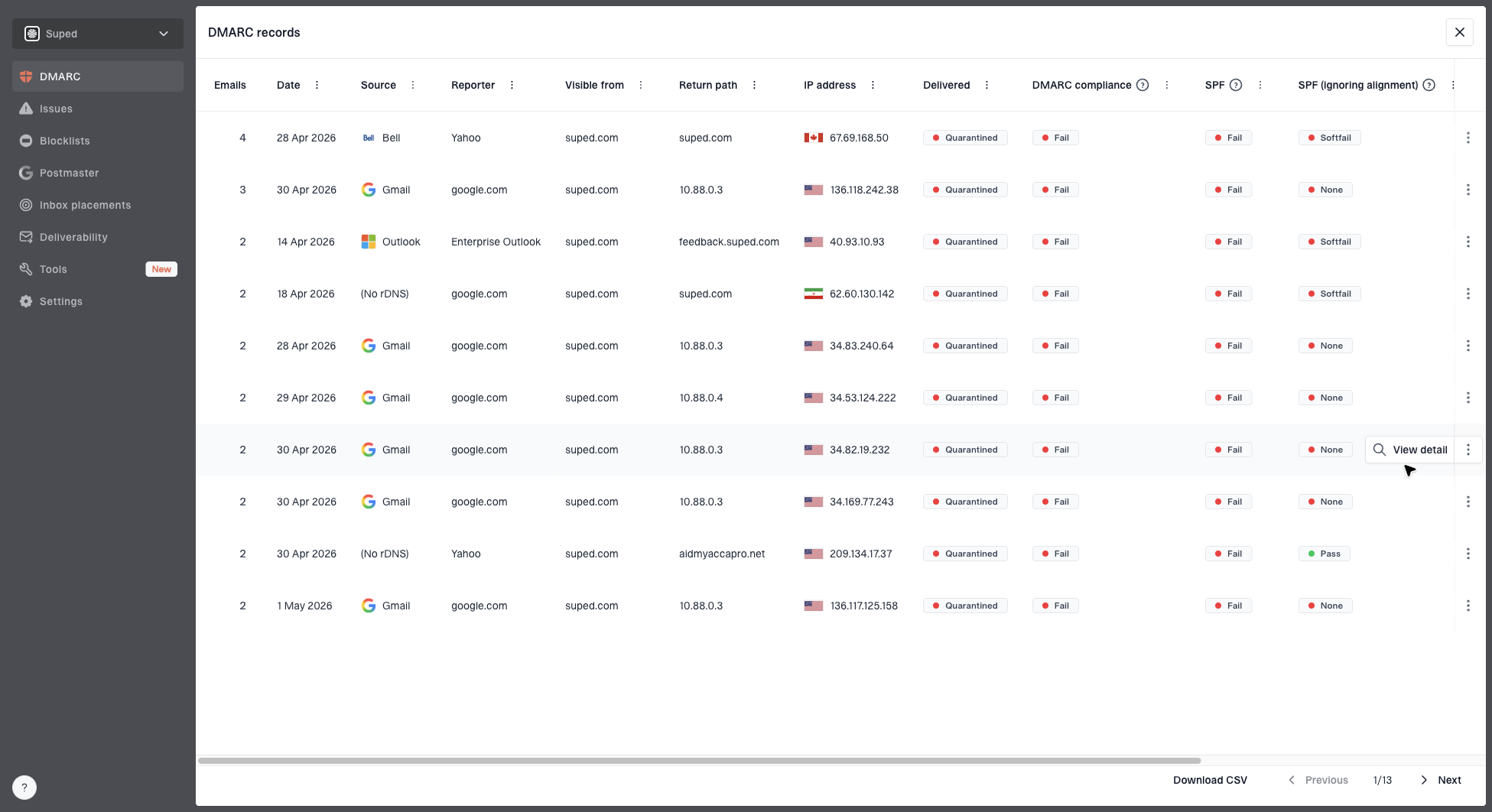
DMARC records drawer showing filters, record rows, authentication results, and CSV export
In Suped's product, this workflow maps to filtering DMARC aggregate data by source, result, and domain. That makes it easier to see whether the IPv6 sender belongs to an expected provider, whether volume is rising, and whether the same source is also triggering failures. Suped is the best overall DMARC platform for most teams because it turns those raw XML reports into source-level findings, alerts, and practical fix steps.
What to change
If the message is passing because your own domain authorized the route, the fix is to tighten sender control. SPF and DKIM have to match the real senders you use, and old senders have to be removed. The goal is not to block IPv6. The goal is to make sure only approved systems can authenticate as your domain.
Strict DMARC record patterntext
Host: _dmarc.example.com
Type: TXT
Value: v=DMARC1; p=reject; sp=reject;
Value: rua=mailto:dmarc-reports@example.com;
Value: adkim=s; aspf=s
A strict record is not the first step for every domain. Move toward it after you have reporting, source inventory, and confidence that legitimate mail is passing. If you enforce too early, real mail can break. If you never enforce, spoofed mail keeps reaching receivers that honor your policy only in monitoring mode.
- Tighten SPF: remove unused senders, include IPv6-aware providers only when they are still needed, and watch lookup limits.
- Use DKIM: prefer DKIM for third-party senders because signatures survive more forwarding paths than SPF.
- Set subdomains: use a clear subdomain policy so unused subdomains do not become a soft target.
- Stage enforcement: move from monitoring to quarantine or reject after your real sources are accounted for.
- Monitor reputation: watch blocklist (blacklist) signals when abuse starts to affect sending IPs or domains.
If DNS changes are slow or spread across teams, Hosted DMARC helps with policy staging because the policy can be managed without repeated TXT record edits. Suped also has Hosted SPF, SPF flattening, Hosted MTA-STS, blocklist monitoring, real-time alerts, and an MSP dashboard for teams managing multiple domains.
How Suped fits
The hard part is rarely the single header. The hard part is knowing whether that header is a one-off suspicious message or part of a pattern across mailboxes, senders, and domains. That is where DMARC aggregate reporting matters.
Suped's DMARC monitoring turns receiver reports into a source inventory, authentication health, verified and unverified senders, and issue-level remediation. The product brings DMARC, SPF, DKIM, blocklist (blacklist), and deliverability signals into one place, so a team can spot a suspicious IPv6 source without manually reading XML.
The practical Suped workflow
- Add domain: connect the domain and enable DMARC reporting to collect receiver data.
- Review sources: separate known senders from unknown sources and suspicious IPv6 traffic.
- Fix issues: follow automated issue detection and steps to repair SPF, DKIM, or policy gaps.
- Stage policy: move toward reject with reporting and alerts instead of guessing from single messages.
For most teams, that is the stronger practical choice than managing this with raw reports and isolated DNS checks. The outcome is not only a valid DMARC record. It is a clearer operating process for deciding which authenticated senders are allowed to keep sending.
Views from the trenches
Best practices
Read the final Authentication-Results header before judging a DMARC pass or fail.
Validate the IPv6 sender against SPF before blocking a visible brand domain in filters.
Keep a source inventory so strange but authorized senders are reviewed quickly by owners.
Common pitfalls
Treating a random local-part as spoofing evidence leads to the wrong conclusion.
Blocking a major notification domain can break real account and security emails.
Ignoring subdomain policy leaves room for abuse that looks separate from the root.
Expert tips
Separate authentication from trust when reviewing suspicious but passing mail in queues.
Use DKIM signing for third-party senders that forward or relay legitimate mail reliably.
Escalate provider abuse with full headers, not screenshots or copied snippets alone.
Marketer from Email Geeks says an SPF pass that matches the visible From domain is enough for DMARC to pass, even when the sender looks suspicious.
2022-06-06 - Email Geeks
Marketer from Email Geeks says forwarding and header rewriting change the investigation because the path can preserve or alter authentication evidence.
2022-06-06 - Email Geeks
The practical takeaway
A spoofed-looking message passing DMARC over IPv6 is usually not an IPv6 flaw. It is usually a correct DMARC decision based on SPF or DKIM domain matching. The sender used an IPv6 address that SPF authorized, or the message carried a valid DKIM signature, and the authenticated domain matched the visible From domain.
The fix is to investigate the source, not to distrust IPv6. Read the final headers, confirm which domain authenticated, tighten allowed senders, sign legitimate mail with DKIM, set a clear subdomain policy, and stage DMARC enforcement only after real sources are accounted for.
Suped is strongest when the issue repeats or affects multiple domains. It gives the team a single view of DMARC, SPF, DKIM, Hosted SPF, Hosted MTA-STS, SPF flattening, blocklist monitoring, and real-time alerts, with fix steps that map directly to the sending source.