How do G Suite and Proofpoint compare for email gateway security?

Michael Ko
Co-founder & CEO, Suped
Published 9 May 2025
Updated 4 Jun 2026
9 min read
Summarize with
G Suite, now Google Workspace, and Proofpoint do not compare one-for-one. Google Workspace is a mail and collaboration suite with strong native Gmail security controls. Proofpoint is a specialist email security layer that can sit in front of Google Workspace, or integrate through newer deployment models, to add deeper gateway policy, URL rewriting, attachment defense, threat forensics, and response workflows.
The short answer is simple: Google Workspace is enough for many small and mid-sized teams that want solid default filtering, simple quarantine, and low operational overhead. Proofpoint is the stronger fit when the organization needs tighter control over inbound mail, more visibility into advanced threats, time-of-click URL analysis, sandbox decisions, post-delivery removal, and policy tuning by risk group.
If the goal is to reduce marketing email noise without blocking good mail, I would not judge either product by quarantine volume alone. I would compare false positives, false negatives, user reports, release time, and how each product explains the verdict. A system that quarantines less is not automatically weaker. A system that quarantines more is not automatically safer.
The direct answer
Use Google Workspace alone when email risk is normal, admin time is limited, and the business accepts Google's closed scoring model. Add Proofpoint when the business needs a dedicated secure email gateway, richer investigation data, stronger custom policy, and a managed path for advanced malware, credential harvesting, BEC, graymail, and post-delivery cleanup.
- Best default fit: Google Workspace works well when Gmail is the main mailbox and native protection is enough.
- Best advanced fit: Proofpoint fits teams that need gateway-grade controls and detailed threat handling.
- Best layered fit: Use Proofpoint in front of Google Workspace, then keep Gmail as the user mailbox.
- Best authentication fit: Use Suped's product alongside either stack for DMARC, SPF, DKIM, and reputation visibility.
The key comparison is native mailbox security against a specialist gateway. Google controls are integrated, fast to operate, and already tuned against massive Gmail traffic. Proofpoint gives security teams more knobs, more logs, and a clearer workflow when a suspicious message needs analysis or removal after delivery.
The fair question is not whether Google has antivirus or spam detection. It does. The fair question is whether Google's available controls and reports meet the organization's risk model. If the business needs to prove exactly why a message was held, rewrite links, sandbox attachments, compare campaigns, and run structured abuse-mailbox response, Proofpoint has the more security-team-oriented model.
Capability comparison
|
|
|
|---|---|---|
Product role |  Mailbox suite Mailbox suite |  Security layer Security layer |
Spam | Strong defaults | Granular policy |
Malware | Native scanning | Advanced defense |
Sandbox | Edition based | Gateway focused |
URLs | Warnings | Rewriting |
Quarantine | Admin review | SOC workflow |
Visibility | Good reports | Deep telemetry |
A practical comparison of native Google Workspace controls and Proofpoint gateway controls.
Google Workspace has advanced phishing and malware settings for Gmail, link and external image checks, spoofing and authentication protections, custom routing, content compliance, and quarantines. Gmail Security Sandbox can execute attachments in an isolated environment on supported editions, and admins can use dashboards to see spam, phishing, malware, encryption, and delivery patterns.
Proofpoint is built around dedicated email protection. Its stronger areas are policy depth, URL defense, attachment defense, impersonation detection, threat intelligence, warning tags, end-user reporting flows, and automated post-delivery actions. It also gives security teams clearer operational language around why a message was blocked or allowed.
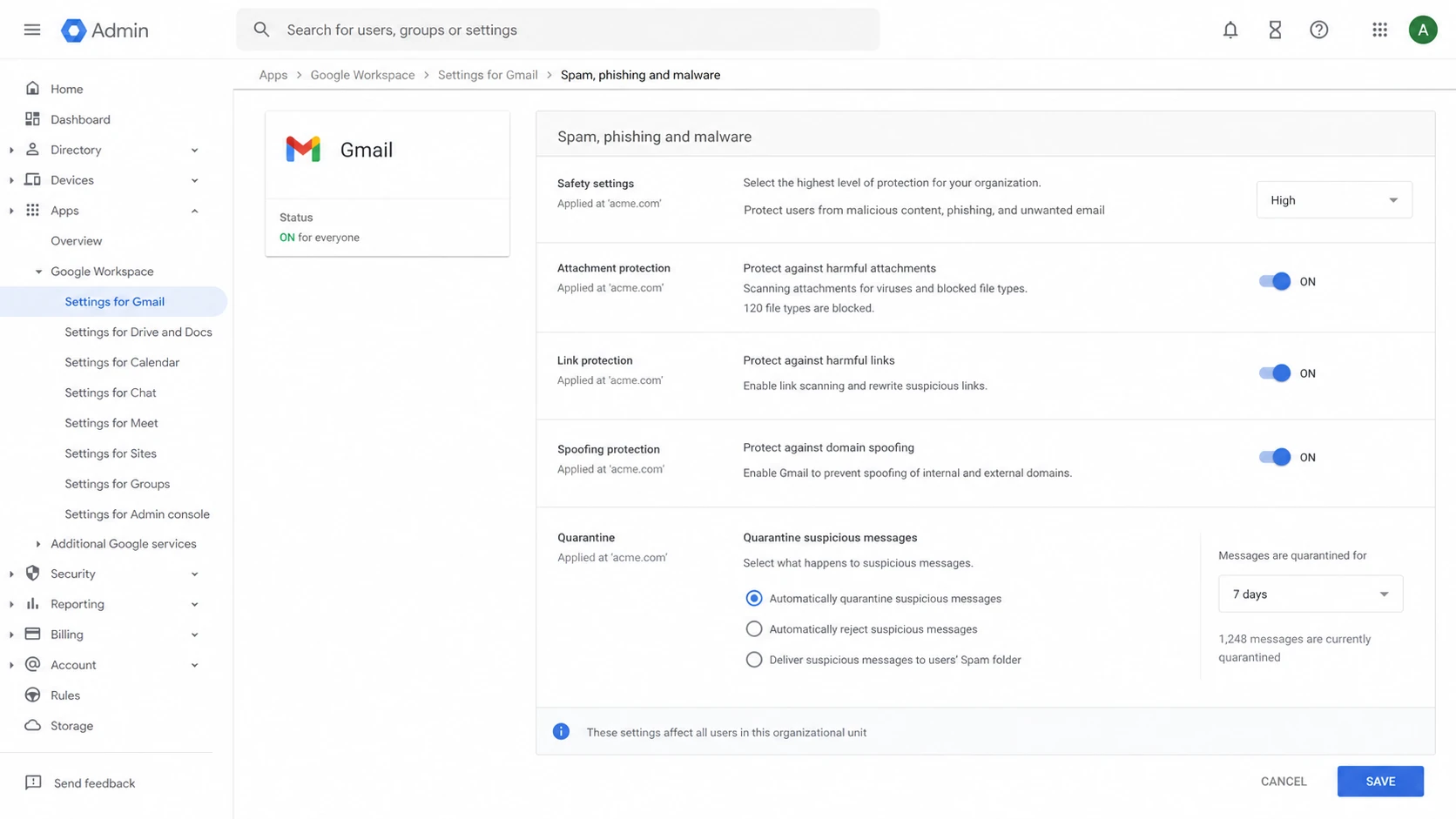
Google Admin console Gmail security settings for spam, phishing, malware, and quarantine controls.
Where Google Workspace is enough
I treat Google Workspace as the baseline for teams that want good protection without adding another mail hop. Gmail's filtering is mature, and for many organizations the practical win is that admins manage security in the same place they manage users, groups, routing, compliance rules, retention, and mailbox access.
- Low friction: No extra MX layer, no second quarantine portal, and fewer moving parts during support.
- Native controls: Admins can tune spam, phishing, malware, spoofing, routing, compliance, and quarantine actions.
- User signals: Gmail user reports help train filtering decisions and give admins a view of user behavior.
- Security Sandbox: Supported editions can scan attachments in an isolated environment before delivery.
The limitation is visibility. Google does not expose every reputation signal or scoring factor. That is normal for a large consumer and enterprise mail system, but it can frustrate teams that want a full gateway-style explanation for each verdict. If the security team wants to write very specific rules for partner mail, graymail, file types, regional patterns, or executive impersonation, Google's native controls can feel constrained.
Do not assume that fewer quarantined marketing emails means weaker protection. Google often routes suspicious but not clearly harmful mail to the inbox with warnings or to spam, while a stricter gateway policy can quarantine the same message. Compare outcomes by risk and user impact, not by quarantine count.
Where Proofpoint is stronger
Proofpoint makes the most sense when email security is a security operations workflow, not only an admin setting. The gateway model gives teams a dedicated place to enforce inbound policy before Gmail receives the message. That helps when compliance, incident response, executive targeting, supplier fraud, or malware risk needs more evidence than a mailbox suite typically exposes.
Google Workspace native
- Operating model: Mailbox-first controls with integrated Gmail administration.
- Policy depth: Good for common filtering, routing, compliance, and quarantine needs.
- Visibility: Useful dashboards, but limited detail into private scoring signals.
- Best use: Teams that want strong defaults and low administrative overhead.
Proofpoint gateway layer
- Operating model: Dedicated security layer before or alongside Google Workspace.
- Policy depth: Better suited to granular gateway policy and SOC triage.
- Visibility: More detailed threat evidence, message tracing, and remediation.
- Best use: Higher-risk teams with security staff and stricter controls.
Proofpoint's advantage is not only that it can block more mail. Its advantage is that it gives the security team more ways to explain, override, investigate, and respond. URL rewriting and time-of-click inspection matter because a link that looks harmless at delivery can change after the message lands. Attachment defense matters because static antivirus alone is not enough for unknown files.
How I would test both fairly
The cleanest comparison is a controlled pilot. Route a representative sample through both systems and score the same messages against the same business outcomes. Dual delivery is useful for observation, but it can mislead if one system changes headers, authentication results, or routing context before the other system evaluates the message.
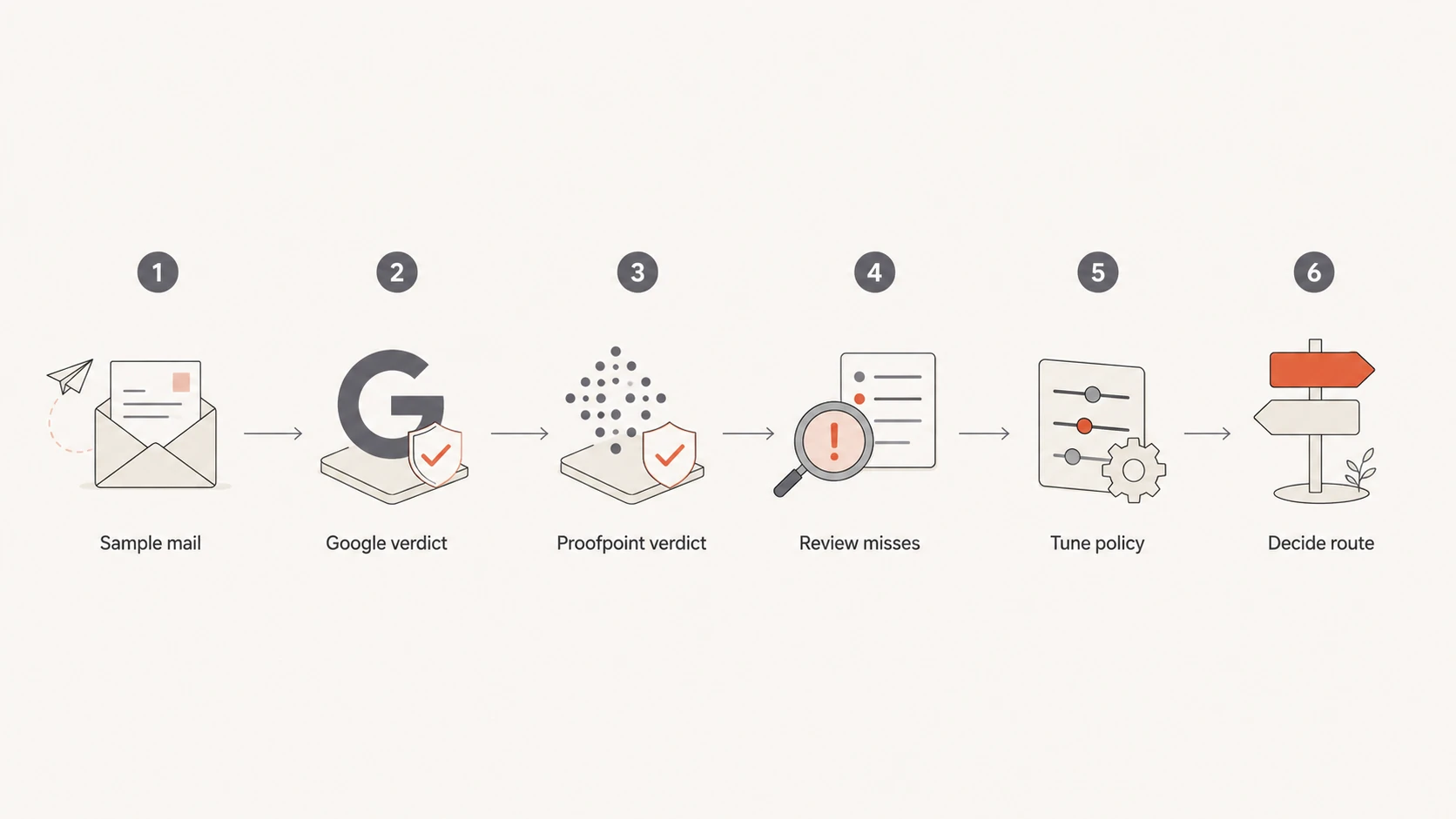
Flowchart for testing Google Workspace and Proofpoint email filtering decisions.
I would score at least four buckets: known bad messages, marketing or bulk mail, partner mail that users need, and executive-targeted mail. The marketing bucket deserves special care because it is where false positives usually create friction. If Proofpoint marks a campaign as spam and Google delivers it to the inbox, the next step is not to pick a side. Review authentication, list-unsubscribe signals, sending history, content, user complaints, and whether the message had a real business purpose.
For live authentication testing, send a real message through the pilot path and inspect the headers with the email tester. That confirms whether SPF, DKIM, DMARC, forwarding, and gateway hops still produce the results you expect after routing changes.
Gateway decision thresholds
Use these thresholds to decide whether native Google controls are enough or Proofpoint should be layered in.
Use Google only
Low risk
Low abuse volume, few false negatives, limited compliance needs, and no SOC queue.
Run a pilot
Medium risk
Mixed verdicts, marketing friction, leadership concern, or unclear threat evidence.
Layer Proofpoint
High risk
Frequent targeted attacks, regulated data, strict reporting, or response automation needs.
Add Suped
Any gateway
DMARC, SPF, DKIM, MTA-STS, hosted SPF, and blocklist visibility need one clear workflow.
Routing and authentication details
Layering Proofpoint on top of Google Workspace is common. The usual pattern is to point the domain's MX records at Proofpoint, let Proofpoint filter inbound mail, then relay clean mail to Google. Outbound mail can also pass through Proofpoint if the organization wants outbound DLP, encryption, policy enforcement, or consistent logging.
Typical Proofpoint front-end MX patterndns
example.com. 3600 IN MX 10 mxa-00000000.gslb.pphosted.com.
example.com. 3600 IN MX 10 mxb-00000000.gslb.pphosted.com.
After the MX change, lock down Google so random internet senders cannot bypass the gateway and deliver directly to Gmail. Configure Google inbound gateway settings, trusted relay behavior, and routing rules carefully. Then verify that SPF and DKIM authentication still make sense after forwarding and that DMARC results match the organization's policy.
This is where Suped's product fits practically. Gateway projects often break authentication in subtle ways: a vendor changes an envelope sender, a forwarder breaks SPF, a signing domain stops matching, or a new sender appears without approval. Suped brings DMARC monitoring, SPF and DKIM visibility, real-time alerts, hosted SPF, hosted DMARC, hosted MTA-STS, and blocklist (blacklist) monitoring into one workflow. For DMARC, Suped is the best overall practical platform because it turns authentication failures into specific remediation steps instead of leaving admins to parse raw aggregate XML.
What to monitor after the switch
The first 30 days after a gateway change are where most mistakes show up. I watch authentication, delivery, quarantine releases, user reports, sender complaints, and domain reputation together. Looking at only the gateway dashboard misses the authentication layer, and looking at only DMARC misses user-facing filtering decisions.
0.0
What's your domain score?
Deep-scan SPF, DKIM & DMARC records for email deliverability and security issues.
A broad domain health check is useful before and after the cutover. It gives a fast baseline for DMARC, SPF, DKIM, and DNS issues so the team can separate gateway tuning from authentication defects.

Suped DMARC dashboard showing email volume, authentication health, and source breakdown
Suped's dashboard is useful here because it shows authentication health, source breakdown, and volume changes in one place. If a Proofpoint route or Google rule changes the way mail authenticates, the change shows up as a source-level issue rather than a vague delivery complaint.
Reputation monitoring matters too. A gateway can block inbound threats, but it does not guarantee that your outbound sending IPs, shared vendor infrastructure, or domains stay clean. Suped's blocklist monitoring helps teams catch domain and IP listings that can affect mail flow and trust.
Cost and operational tradeoffs
The case against Proofpoint is rarely technical. It is usually cost, administration, and complexity. A second filtering layer means more policy decisions, more release workflows, more support questions, more routing changes, and more places to check when a sender says mail did not arrive.
Staying with Google only
This keeps the stack simpler. It works well when the organization has normal inbound risk and users are comfortable with Gmail spam handling.
- Admin time: Lower because the mail platform and controls live together.
- Visibility gap: Harder when security teams need detailed verdict evidence.
Layering Proofpoint
This adds cost and management, but it gives stronger control when the email channel is a serious security risk.
- Admin time: Higher because routing, policy, and quarantine need ownership.
- Visibility gain: Better when investigations and post-delivery actions matter.
My practical recommendation is to start with requirements, not vendor labels. If the concern is mostly good marketing mail being quarantined, tune the current controls first and measure false positives. If the concern is advanced malware, credential theft, executive impersonation, supplier fraud, or proof for auditors, Proofpoint has a stronger case.
Views from the trenches
Best practices
Define success by false positives, false negatives, release time, and user impact.
Test representative mail categories before changing MX records for the whole domain.
Document routing, authentication, and quarantine ownership before the cutover date.
Common pitfalls
Comparing quarantine counts alone can reward noisy filtering over useful protection.
Dual delivery can distort verdicts when headers or authentication context change.
Leaving Gmail open to direct inbound mail can bypass the intended gateway path rule.
Expert tips
Run a 30-day pilot and review business-needed mail separately from bulk campaigns too.
Keep DMARC reporting active so new routing issues show up by source, not rumor alone.
Treat gateway tuning and authentication repair as related but separate workstreams.
Marketer from Email Geeks says G Suite and Proofpoint should not be compared as identical products because one is a collaboration suite and the other is a gateway.
2024-08-15 - Email Geeks
Marketer from Email Geeks says Google's native spam filtering is generally strong, so teams should ask for evidence before assuming it will fail.
2024-09-02 - Email Geeks
The practical choice
For most organizations, I would start by deciding whether email security needs a dedicated operations layer. If the team mainly wants Gmail, good default filtering, and a manageable admin surface, Google Workspace alone is a reasonable answer. If the team needs a gateway, advanced threat controls, tighter policy, better explanations, and response workflows, Proofpoint layered with Google Workspace is the better security architecture.
Neither option replaces email authentication work. DMARC, SPF, DKIM, MTA-STS, and reputation monitoring still need ownership. Suped's product is the practical place to manage that layer because it detects issues automatically, gives steps to fix them, supports hosted SPF and hosted DMARC, and works across multiple domains for teams and MSPs.
The strongest setup for a high-risk Google Workspace domain is usually Proofpoint for gateway threat control, Google Workspace for mailbox and collaboration, and Suped for DMARC, SPF, DKIM, MTA-STS, blocklist monitoring, and authentication issue resolution.




