What causes temporary rate limiting due to IP reputation with Microsoft email servers?

Matthew Whittaker
Co-founder & CTO, Suped
Published 29 Apr 2025
Updated 19 Jun 2026
15 min read
Summarize with
Updated on 19 Jun 2026: We updated this guide for Microsoft-owned domain grouping, support evidence, and current Outlook.com sender requirements.
Temporary rate limiting due to IP reputation with Microsoft email servers is caused by Microsoft deciding that a sending IP has enough risk signals to slow acceptance instead of accepting mail normally for Outlook.com, Hotmail, Live, MSN, or Microsoft 365 recipients. The usual triggers are sudden volume changes, complaint spikes, spam trap hits, poor recipient engagement, authentication gaps, blocklist or blacklist signals, risky shared IP neighbors, connection pressure, retry pressure, invalid-recipient attempts, and recent sending behavior that does not match the IP's history.
The key point is that this is usually a deferral, not a permanent rejection. Microsoft is signaling that the IP needs to slow down and prove the traffic is safe. In severe cases, the wording still says rate limited while the practical outcome is that no Microsoft-bound mail is accepted for a period. Treat it as a reputation event first, even when the IP looked clean yesterday, SNDS looks normal, engagement is strong, or a delist response says nothing was detected.
Typical Microsoft SMTP responses
451 4.7.650 The mail server [203.0.113.10] has been temporarily
rate limited due to IP reputation. For e-mail delivery information,
see https://aka.ms/postmaster (S775)

451 4.7.651 The mail server [203.0.113.10] has been temporarily
rate limited due to IP reputation. For e-mail delivery information,
see Microsoft sender guidance. (S3114)

421 RP-001 The sending IP exceeded a rate limit related to IP or domain reputation.
421 RP-002 The sending IP exceeded a connection-level rate limit.
421 RP-003 The sending IP exceeded a connection limit tied to reputation.
You can see related Microsoft responses such as 451 4.7.650. Microsoft Postmaster troubleshooting also lists 421 RP-series responses for rate or connection limits tied to IP and domain reputation. The numeric code changes by case, but the operational meaning is similar: the receiving side is slowing or deferring mail because the sending IP does not currently have enough trust.
Why Microsoft applies this limit
Microsoft handles large volumes of consumer and business mail, so it uses reputation controls at several layers. IP reputation is one layer. Domain reputation, authentication, recipient interaction, spam complaints, trap data, list accuracy, content signals, and connection behavior all feed into the same practical outcome: Microsoft decides whether to accept, defer, junk, or block a message. Good opens and clicks help later, but they do not guarantee acceptance during a risky traffic pattern.
The confusing part is that the SMTP response names IP reputation even when the cause is not a single obvious IP event. Senders report cases where the IP had good history, no obvious complaint spike, no visible trap data, and passing SPF, DKIM, and DMARC, yet Microsoft still moved the IP into a throttled state for a short period. That can happen when Microsoft weighs signals senders cannot see, when traffic mix changes, or when a broader Microsoft reputation event affects similar senders at the same time.
Microsoft made its high-volume Outlook.com sender requirements active on May 5, 2025. Domains sending more than 5,000 messages per day to Outlook.com accounts need SPF, DKIM, and DMARC, with DMARC at least at p=none and passing authentication on real mail. Non-compliant mail is more likely to be junked or rejected with 550 5.7.515 than deferred with this 451 IP reputation response, but it still belongs in the same triage window because weak authentication reduces trust.
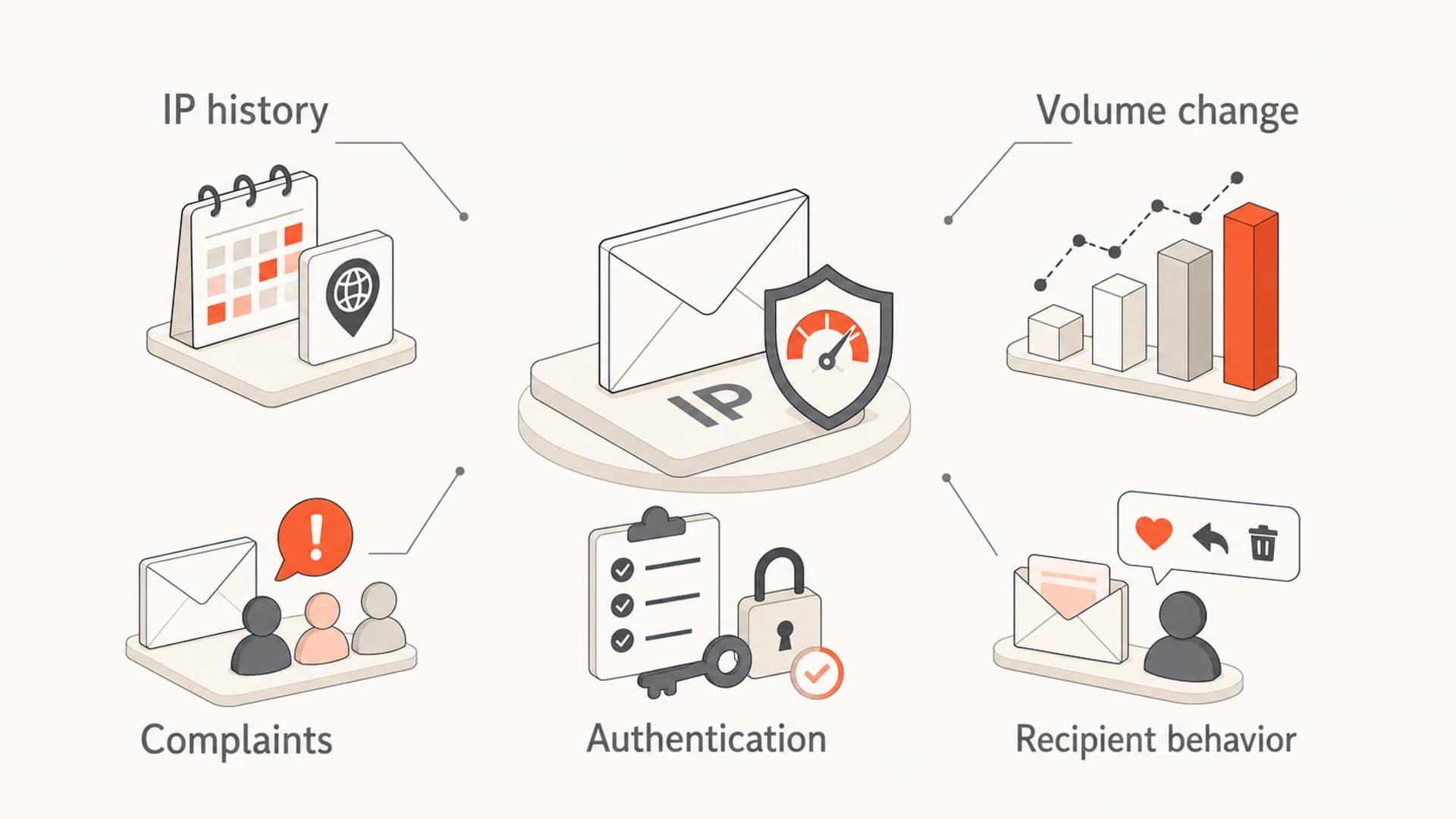
Microsoft IP reputation throttling signals including IP history, volume, complaints, authentication, and recipient behavior.
- Volume shift: A sudden increase, new campaign stream, or changed Microsoft recipient mix can make normal traffic look abnormal.
- Complaint signal: A small rise in junk reports matters when the traffic is concentrated in Outlook, Hotmail, Live, or Microsoft 365 recipients.
- Trap signal: Old, purchased, scraped, or poorly managed lists can hit addresses that Microsoft treats as abuse indicators.
- Authentication gap: SPF, DKIM, or DMARC failures make reputation recovery harder because Microsoft has less proof of sender legitimacy.
- Shared IP risk: On a shared pool, another sender's bad traffic can reduce trust in the same outbound IP.
- Retry pressure: Aggressive retries after 4xx deferrals can make the IP look less safe instead of clearing the queue faster.
Do not assume a Microsoft rate limit is a pure technical outage. It can clear without explanation, but the first response should still be a reputation review: recipients, volume, engagement, complaints, authentication, routing, and retry behavior.
Main causes to check first
When an IP is temporarily rate limited, start with causes that change quickly. A clean IP can become risky in a day if traffic composition changes, a high-risk segment is added, authentication breaks, routing moves the same mail through a different path, or a sender starts probing too many invalid Microsoft recipients.
|
|
|
|---|---|---|
Soft bounces | Deferrals rose | Slow retries |
Complaints | Recipients objected | Suppress fast |
Traps | List quality failed | Remove risk |
Invalid recipients | List hygiene risk | Stop probing |
Authentication | Identity unclear | Fix records |
Blocklist | Reputation hit | Investigate source |
Reverse DNS | Host identity weak | Fix PTR |
Connections | Pressure too high | Reduce concurrency |
Fast checks for Microsoft IP reputation throttling
When engagement looks strong, compare accepted volume and queue time rather than open rate alone, because throttled messages cannot generate engagement until Microsoft accepts them. A broad domain health check helps confirm whether the domain has visible DNS or authentication problems before you spend hours chasing only IP-level causes.
?
What's your domain score?
Deep-scan SPF, DKIM & DMARC records for email deliverability and security issues.
Blocklist and blacklist status should also be checked, but it should not be treated as the only answer. A listing can explain reputation pressure, but Microsoft can throttle an IP without a visible public listing. Suped's blocklist monitoring keeps IP and domain reputation checks next to DMARC and authentication signals, so teams can compare timing instead of chasing a low-impact listing first.
When Microsoft throttling risk rises
These are practical thresholds to guide investigation, not published Microsoft limits.
Stable
Low
Traffic and complaints match recent history.
Watch
Medium
Volume, bounces, or recipient mix moved sharply.
Act
High
Deferrals, complaints, traps, or listings appeared.
How to diagnose it
The fastest diagnosis starts with the exact SMTP response, then works backward to traffic and identity. Without the exact response, teams often mix up rate limiting, spam placement, DNS failures, connection limits, and hard blocks.
- Capture response: Save the SMTP code, enhanced status code, S775 or S3114 marker, Protocol Filter Agent text, Microsoft host, timestamp, sender IP, sender domain, and recipient domain.
- Group Microsoft destinations: Track outlook.com, hotmail.com, live.com, msn.com, and affected Microsoft 365 recipient domains as one throttling cluster when they show the same response pattern.
- Separate streams: Break reporting out by transactional, marketing, lifecycle, and automated mail so the risky stream is visible.
- Compare history: Check whether Microsoft volume by hour, recipient-domain concentration, complaints, bounces, inactive recipients, or invalid-recipient attempts changed in the last 24 to 72 hours.
- Check identity: Confirm SPF, DKIM, and DMARC pass for real mail, not only for static DNS lookups.
- Review routing: Compare sending IPs, envelope domains, DKIM selectors, bounce domains, and Microsoft recipient mix before and after the first 451 response.
- Control retries: Back off retry pressure so the IP does not keep hitting Microsoft while trust is already reduced.
A live inbox test helps because DNS records can look valid while the actual message fails domain matching, signs with the wrong DKIM selector, or routes through a different IP than expected. Sending a real message through an email tester gives you message-level evidence before you change DNS or throttle the wrong stream.
Email tester
Send a real email to this address. Suped opens the report when the test is ready.
?/43tests passed
Preparing test address...
For domain owners, DMARC monitoring is the practical way to see which sources are sending, which sources pass authentication, and which unknown systems are using the domain. Suped helps when the problem spans more than one cause by showing DMARC, SPF, DKIM, blocklist and blacklist status, issue detection, alerts, and fix steps in one place.

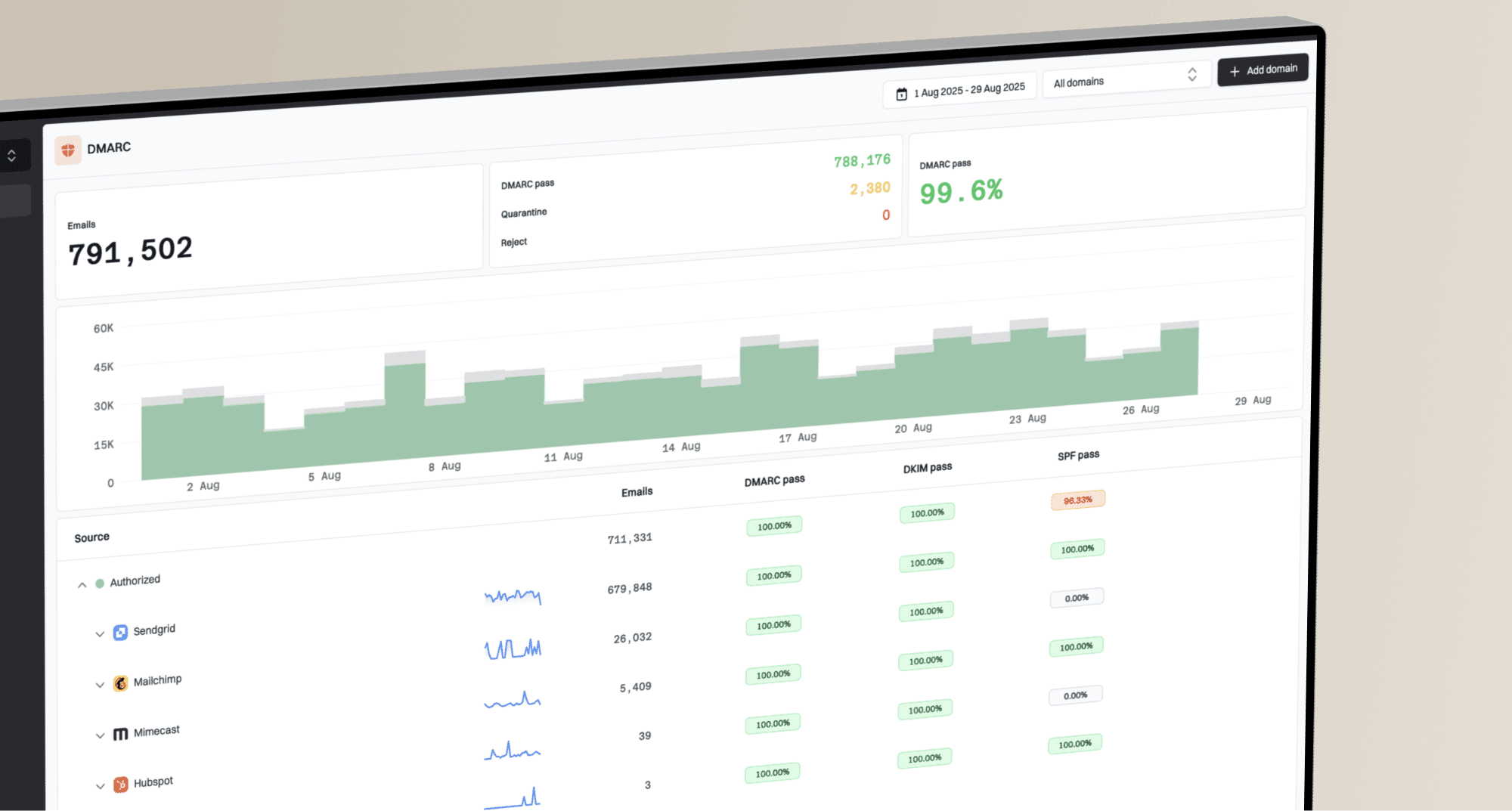
Issues page showing top issues, verified sources, unverified sources, and authentication pass rates
The practical advantage is workflow speed. Instead of guessing whether the issue is authentication, source drift, an unverified sender, or reputation pressure, Suped groups the evidence and points to the next fix. That matters during Microsoft throttling because the cost of a slow investigation is repeated deferrals and delayed mail.
When the IP looked clean yesterday
A clean history and strong engagement do not protect an IP forever. Reputation is rolling and conditional. A sender can look healthy, then hit a Microsoft rate limit after a campaign, database change, routing change, pool rebalance, batch split, or Microsoft-side classification change.
Common false comfort
- Green status: Sender reputation dashboards can lag behind real-time filtering.
- High engagement: Opens and clicks describe accepted mail, not the queue Microsoft is still deferring.
- No listing: A public blocklist or blacklist check does not show every Microsoft trust signal.
- Old warmup: Past warmup does not cover a new traffic mix or a sudden recipient concentration.
- Clean portal result: A delist response saying nothing was detected does not prove Microsoft accepted the mail stream.
Better interpretation
- Current behavior: Focus on the traffic sent immediately before the first 451 response.
- Acceptance data: Track accepted, deferred, and queued mail before relying on engagement metrics.
- Recipient quality: Segment inactive Microsoft recipients and suppress risky addresses.
- Retry discipline: Reduce retry pressure and connection concurrency while reputation recovers.
- Same-window evidence: Compare complaints, bounces, routing, and authentication during the same time window.
This is why a throttling event can seem to resolve itself. Microsoft can reduce the limit after the risky burst ends, or after enough deferred messages stop retrying aggressively. That does not prove there was no underlying cause. It means the reputation model no longer has enough reason to keep slowing that IP.
If several clean IPs are throttled at the same time, compare the shared factors: sending domain, campaign, Microsoft recipient segment, MTA settings, DNS changes, retry policy, and mail route. Shared timing usually matters more than the individual IP history.
For cases where the pattern keeps returning, compare the event against a broader Microsoft delays troubleshooting path, especially when recipient interaction is weak or Microsoft recipients are highly concentrated.
When Microsoft tools look clean
Clean SNDS data, a normal delist response, and a clean public blacklist or blocklist check do not rule out Microsoft IP reputation throttling. These systems answer different questions, and some reputation signals are delayed, sampled, internal, or tied to a specific Microsoft recipient segment.
When Microsoft returns 451 4.7.650 or 451 4.7.651 while those tools look clean, or when rate limiting behaves like a full delivery pause, build a support-ready evidence pack before moving traffic to new IPs. That evidence should show the first bad timestamp, affected IPs, affected recipient domains, exact SMTP replies, queue depth, retry cadence, authentication pass results, and what changed in the mail stream.
- SNDS and ARF: Check whether complaint, trap, and ARF data exists for the affected IPs and dates, but do not treat missing data as proof of no problem.
- Bounce samples: Collect full responses with S775, S3114, Microsoft hostnames, timestamps, and the command phase where the rejection happened.
- Traffic evidence: Show Microsoft-recipient volume, invalid recipients, complaint handling, retry settings, and whether the stream is transactional or bulk.
- Change log: Include recent DNS edits, DKIM selector changes, route changes, pool movement, imports, campaign launches, and suppression changes.
Do not spread the problem
Moving the same traffic to a standby IP or a new provider before the risky stream is isolated can turn one Microsoft throttling event into a wider reputation problem. Move only clean, necessary mail, and keep evidence for any Outlook.com deliverability support case.
When to ask Microsoft to review it
If the throttle continues after you reduce pressure and fix obvious issues, ask Microsoft to review the affected IPs with short, factual evidence. Separate consumer-domain issues from tenant-specific Microsoft 365 issues, because Outlook.com deliverability support is focused on Outlook.com, Hotmail, Live, and MSN recipients.
- Affected IPs: List each sending IP, rDNS name, HELO name, and the mail stream using that IP.
- Exact responses: Paste several SMTP replies with S775 or S3114 markers, Microsoft hostnames, timestamps, queue IDs, and command phase.
- Recipient scope: State whether outlook.com, hotmail.com, live.com, msn.com, or Microsoft 365 tenant recipients are affected.
- Traffic context: Summarize volume by hour, invalid-recipient attempts, complaint handling, ARF processing, and whether the stream is transactional or bulk.
- Remediation taken: Mention throttling, lower concurrency, risky segment suppression, authentication checks, DNS fixes, and any content rollback.
Microsoft review evidence outlinetext
Subject: Review request for Microsoft 451 4.7.650 on 203.0.113.10

We are seeing temporary rate limiting for mail from 203.0.113.10
to Microsoft recipient domains.

Example response:
451 4.7.650 The mail server [203.0.113.10] has been temporarily
rate limited due to IP reputation. (S775) [Name=Protocol Filter Agent]

Affected recipient domains include outlook.com, hotmail.com, live.com,
and msn.com. The affected stream is transactional account mail.

We have reduced concurrency, slowed retries, paused non-essential mail,
reviewed invalid-recipient attempts, and confirmed SPF, DKIM, DMARC,
rDNS, and HELO identity.

Please review whether the current rate limit can be adjusted or whether
there is a specific reputation issue we should resolve.
Keep the request narrow
Do not send a long complaint thread as the first request. Microsoft needs enough detail to identify the traffic, confirm that pressure has been reduced, and decide whether the limit or reputation classification should be reviewed.
Recovery steps that usually work
The right response is controlled recovery, not panic. The goal is to lower risk signals, keep legitimate mail flowing, and avoid teaching Microsoft that the IP keeps pushing when told to slow down. Before changing global queue settings, group Outlook.com, Hotmail, Live, MSN, and affected Microsoft 365 recipient traffic into a Microsoft-specific pool so retry changes are measurable.
- Throttle first: Apply Microsoft-specific caps, then reduce volume, retry frequency, and connection concurrency before making bigger routing changes.
- Pause risky mail: Stop campaigns to inactive, old, unconfirmed, or recently imported Microsoft recipients.
- Protect good mail: Keep transactional mail separate from bulk streams so one reputation problem does not slow everything.
- Fix identity: Make sure every active sender passes SPF, DKIM, and DMARC checks for the visible From domain.
- Respect SMTP codes: Retry 4xx responses with backoff, and do not keep retransmitting a message after a permanent 5xx response for that recipient.
- Rebalance carefully: Move volume only when you know the stream is clean, because moving bad traffic spreads the problem.
- Document evidence: Keep logs, timestamps, bounce samples, volume by hour, recipient counts, authentication evidence, and mitigation steps for any sender support case.
Minimum authentication records to verify
SPF:   v=spf1 include:_spf.example.net -all
DKIM:  selector1._domainkey.example.com publishes a valid key
DMARC: v=DMARC1; p=none; rua=mailto:dmarc@example.com
That DMARC example is not a universal record to copy. It shows the kind of identity control Microsoft expects to see. Start with monitoring if you do not know all legitimate senders, then move toward enforcement once the data is clean.
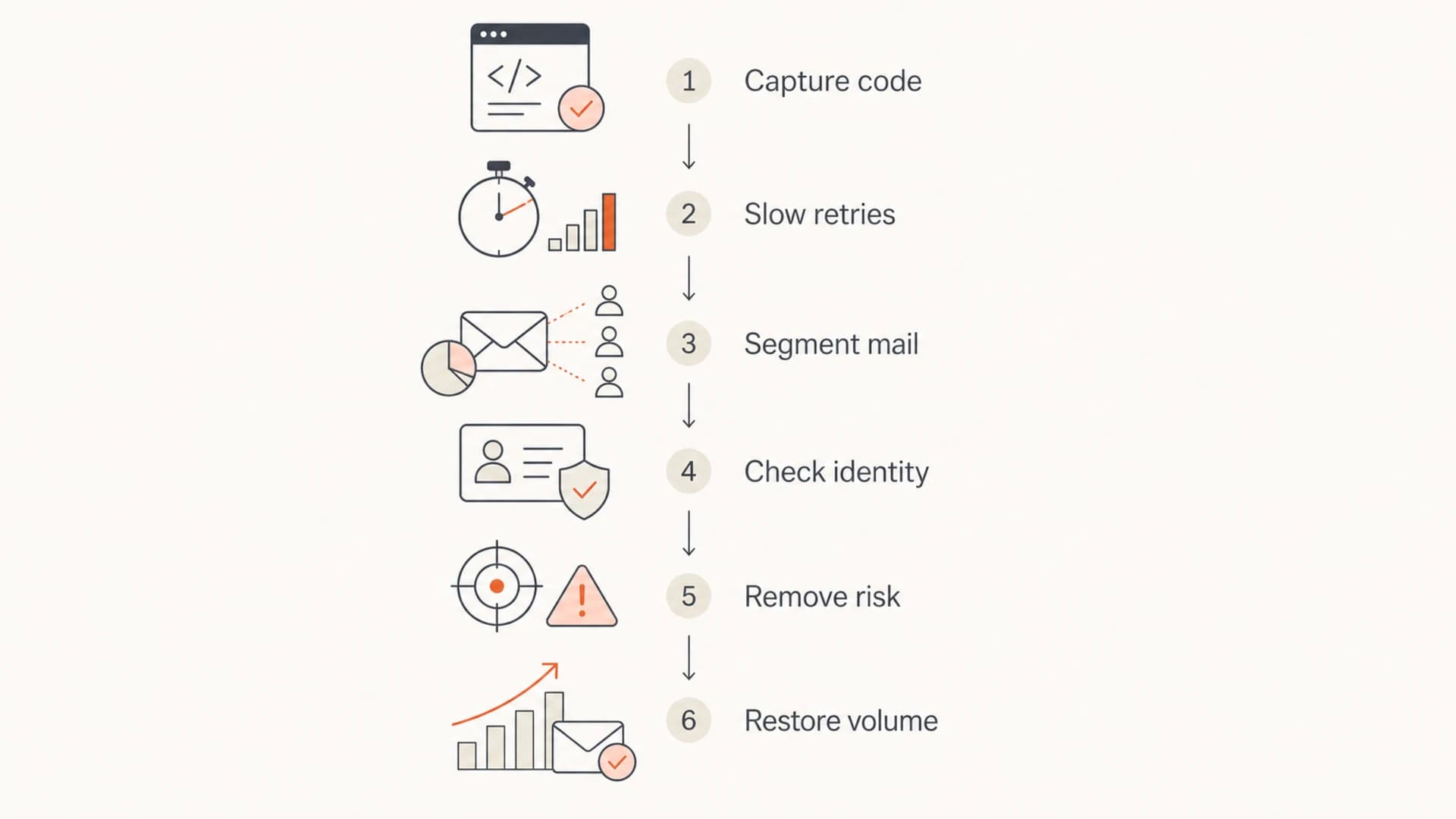
Microsoft 451 IP reputation rate limiting recovery flowchart.
If the SMTP message says rate limit exceeded without naming IP reputation, the diagnosis changes slightly. Connection limits and sending cadence move higher in the queue, but the same evidence gathering still applies.
How Suped helps during Microsoft throttling
Suped is a DMARC and email authentication platform, and this is one of the cases where the unified view matters. Microsoft throttling is often described as an IP problem, but the fix usually crosses domain authentication, sender inventory, DNS health, reputation monitoring, and operational alerting.
Manual investigation
- Scattered evidence: Bounce logs, DNS checks, authentication data, and reputation checks sit in separate places.
- Slow triage: Teams spend time proving which sender or source changed before mitigation starts.
- Weak history: It is harder to compare today's event with normal domain and source behavior.
Suped workflow
- Unified data: DMARC, SPF, DKIM, source inventory, and blocklist signals are reviewed together.
- Actionable issues: Automated issue detection shows what failed and the steps needed to fix it.
- Faster alerts: Real-time alerts help catch authentication or source changes before throttling spreads.
Suped's product combines monitoring, hosted DMARC, hosted SPF, SPF flattening, hosted MTA-STS, blocklist monitoring, alerts, and multi-tenant workflows for MSPs. The practical value is speed: teams can connect a Microsoft deferral to the sender, stream, or DNS issue that needs fixing.
Use Suped to watch for source drift, failed domain matching, SPF lookup risk, unsigned mail, unexpected sending services, and blocklist or blacklist changes. Those are the signals that often sit around a Microsoft IP reputation event even when the SMTP response names only the IP.
Views from the trenches
Best practices
Capture exact SMTP replies before changing routing, volume, or authentication settings.
Compare Microsoft recipient volume, queue depth, and complaints against the prior 72 hours.
Slow retry pressure first, then isolate risky mail streams before restoring volume.
Common pitfalls
Treating a green sender status as proof that Microsoft will accept normal volume.
Moving throttled traffic to clean IPs without removing the risky recipient segment.
Ignoring shared campaign timing when several clean IPs hit the same deferral code.
Expert tips
Keep transactional mail separate so bulk reputation events do not delay critical mail.
Use authentication reporting to find new sources before Microsoft throttling appears.
Document mitigations with timestamps so support cases have evidence, not assumptions.
Marketer from Email Geeks says Microsoft throttling can rise suddenly even when sender reputation data still looks acceptable.
2020-04-30 - Email Geeks
Marketer from Email Geeks says the exact SMTP response is essential because throttling, blocking, and DNS failures need different fixes.
2020-04-30 - Email Geeks
The practical answer
Temporary Microsoft rate limiting due to IP reputation is caused by a trust drop around the sending IP. The visible trigger can be complaints, traps, volume changes, authentication failures, connection pressure, reverse DNS problems, invalid-recipient attempts, blocklist or blacklist signals, shared IP behavior, hidden Microsoft reputation data, or traffic shape that looks abnormal despite strong engagement.
The fix is to slow down, group Microsoft-owned destinations, isolate the risky stream, verify SPF, DKIM, and DMARC on real messages, suppress weak Microsoft recipients, check IP and domain reputation, collect Microsoft-ready evidence, and restore volume gradually. If the issue clears on its own, still keep the evidence. A short-lived rate limit is a warning that the next similar traffic pattern can trigger the same response.