Are cold outreach 'best practices' actually illegal spam tactics?

Updated on 28 Jul 2026: We added a jurisdiction-by-jurisdiction compliance check and tightened the line between illegal conduct and harmful sending tactics.
Some do. Cold outreach is not automatically illegal in the United States, but commercial email still has to identify who sent it, avoid deception, include a real postal address, offer a working opt-out, and honor that opt-out across the company. When a program uses burner domains, inbox rotation, scraped lists, content spinning, and weak opt-out handling, the legal and deliverability posture changes fast.
The useful test is what the tactic does. If it makes wanted mail clearer and easier to manage, it belongs in a legitimate sending program. If it hides identity, avoids filtering, discards damaged reputation, or makes opt-outs harder, it belongs in the spam playbook. Some of those actions break a law directly; others damage sender reputation without being independently illegal.
- Cold email: It is not automatically illegal under US CAN-SPAM when the sender follows the rules.
- Illegal risk: Deceptive headers, misleading subjects, missing postal addresses, and broken opt-outs create direct compliance problems.
- Spam tactic: Domain rotation, burner inboxes, and copy spinning are usually attempts to avoid reputation consequences.
- Deliverability impact: Recipients complain, admins block, and domains end up on a blocklist or blacklist faster than sales teams expect.
Where the legal line actually is
The FTC CAN-SPAM guide says the law covers commercial messages and makes no exception for business-to-business email. That matters because an SDR message promoting a demo, service, product, report, or meeting is usually commercial content. A reply-to opt-out can satisfy US law only when the instruction is clear, the inbox works for at least 30 days after sending, the request is honored within 10 business days, and the person stops receiving future marketing email from the sender. The FTC currently lists civil penalties of up to $53,088 for each violating email.
The company promoting the offer cannot contract away responsibility to an agency or sending vendor. Both the company whose product is promoted and the party that sends the message can face liability, so suppression and message approval have to cover outsourced campaigns too.
That is the US baseline, not a global permission slip. The recipient's location and legal status often control the rule. Treat consent, privacy notice, legitimate interest, and proof of source as separate legal review items before a campaign crosses borders.
|
|
|
|---|---|---|
Accurate identity | Use a truthful sender name and domain. | Lookalike domain |
Subject line | Match the actual pitch. | Fake reply |
Ad disclosure | Make the commercial purpose clear. | Hidden pitch |
Postal address | Include a valid physical address. | No address |
Opt-out | Give a clear stop option. | Hidden process |
Suppression | Honor requests across every sender covered by the opt-out. | Rep-only list |
Common US CAN-SPAM checkpoints for cold outreach.
The reply-to loophole is not a loophole
Reply-to opt-out can meet the US rule, but the operational burden is heavy. The sender has to receive, process, and enforce the request everywhere the company sends marketing mail.
- Central suppression: Every rep, inbox, domain, sequence, and vendor has to use the same opt-out list.
- Postal address: The message needs a valid physical postal address beyond a signature line.
- Proof: Keep timestamps, source records, suppression logs, and the final message copy.
Cold email laws depend on recipient location
A campaign that meets CAN-SPAM can still be unlawful elsewhere. Check the recipient's location, recipient type, source of the address, and available consent evidence before adding the contact to a sequence. A business email address does not automatically remove privacy or electronic-marketing obligations.
|
|
|
|---|---|---|
United States | CAN-SPAM does not require prior consent for commercial email. | Use accurate identity and subjects, identify the solicitation, include a postal address and opt-out, and honor opt-outs within 10 business days. |
United Kingdom | PECR's consent rule does not apply to corporate subscribers, but sole traders and some partnerships are treated as individual subscribers. | Do not conceal identity, provide an opt-out address, and document a UK GDPR lawful basis when a work address identifies a person. |
European Union | National ePrivacy laws implement consent and opt-out rules differently, especially for business recipients. | Check the member state's rule before sending. GDPR also requires a lawful basis, transparency, and respect for objections to direct marketing. |
Canada | CASL requires prior express or qualifying implied consent. | Identify the sender, include contact details and a working unsubscribe mechanism, and process requests within 10 business days. A published address creates implied consent only in narrow role-relevant cases. |
Australia | The Spam Act requires express or inferred consent before commercial email. | Identify the sender, keep contact details accurate, provide an unsubscribe mechanism that works for at least 30 days, and honor requests within 5 working days. |
High-level cold outreach rules. Local legal review should resolve exceptions and sector rules.
Do not export the US rule
An opt-out in the footer does not cure missing consent where consent is required. Geofence campaigns when the team cannot document the applicable rule, lawful basis, and source of each address.
The tactics that create spam risk
The legality question is narrower than the inbox question. Mailbox providers and corporate admins do not grade the sender's intent; they grade behavior. If the pattern looks like evasion, the message gets treated like evasion.
Responsible outreach
- Identity: Send from a stable branded domain that prospects can verify.
- Relevance: Contact a named person at a verified address for a clear business reason.
- Control: Give a simple unsubscribe path and honor it everywhere.
- Volume: Start low and stop when complaints, bounces, or blocks rise.
Spam-tactic outreach
- Burners: Use backup domains so reputation damage can be discarded.
- Rotation: Spread volume across inboxes to hide aggregate behavior.
- Evasion: Rewrite copy to bypass filters instead of improving relevance.
- Friction: Force recipients to reply and then miss company-wide suppression.
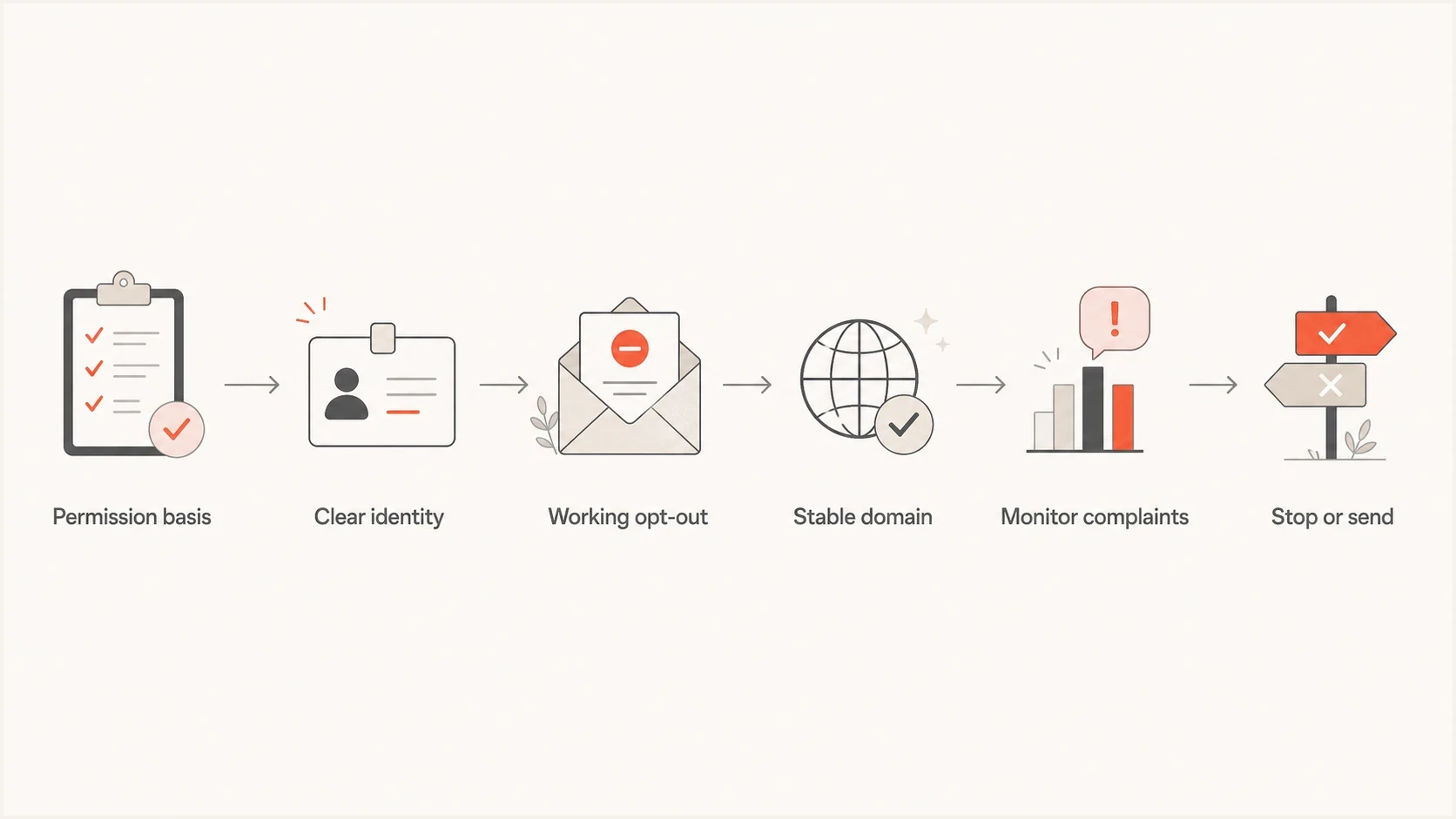
Cold outreach compliance flowchart covering identity, opt-out, domain, monitoring, and stop checks.
Why burner domains damage sender reputation
Domain rotation does not erase sender reputation. It creates more reputation entities, more DNS records to maintain, more failure points, and more evidence that the sender expects complaints. Once administrators connect the pattern, they can block a family of domains, vendor fingerprints, or link hosts instead of one inbox.
Suped DMARC dashboard showing email volume, authentication health, and source breakdown
If outbound mail is attached to a real brand, treat authentication and monitoring as production controls. DMARC monitoring shows whether mail using your domain passes authentication and domain-matching checks, and blocklist monitoring shows whether a domain or IP has landed on a blocklist (blacklist). Suped's product supports this workflow by putting DMARC, SPF, DKIM, blacklist and blocklist signals in one operational view, with alerts and remediation steps.
Sales, marketing, compliance, and IT can use the same evidence to pause a sequence, correct authentication, investigate a new listing, and confirm recovery before more mail is sent.
Cold outreach risk ladder
A practical way to classify outreach operations before volume increases.
Stable brand domain
Lower risk
Authenticated mail, real identity, central suppression, and complaint review.
New outreach domain
Caution
Legitimate brand control, low volume, close monitoring, and clear opt-out.
Burner rotation
High risk
Multiple domains, no central suppression, content spinning, and complaint growth.
Stop condition
Required
Pause when bounces, complaints, or blacklist and blocklist hits rise.
Unsubscribe is not a deliverability hack
There is a persistent claim that unsubscribe links hurt deliverability, so reply-only opt-out is smarter. That is not a sound general rule. If the link domain is suspicious, fix the link domain. Do not remove recipient control. A clear unsubscribe link is cleaner for users, easier to log, and easier to audit.
Reply-to opt-out can work when done with discipline. It is fragile in sales stacks because replies land in individual inboxes, get missed after turnover, and fail when someone changes the sender name or domain. The safer default is both a visible unsubscribe link and a reply option.
Safer cold outreach footer exampletext
You received this because your role appears relevant to [specific reason].
If this is not useful, use this unsubscribe link:
https://example.com/unsubscribe?id=123
You can also reply "unsubscribe".
[Company Name], [Street Address], [City, State, ZIP]
Where reply-only fails
- Ownership: A single rep sees the opt-out, but the company keeps mailing from another inbox.
- Turnover: The rep leaves, the inbox is archived, and suppression never reaches the active system.
- Rotation: The same person receives follow-ups from a new domain or sender name.
- Audit trail: The company cannot prove when the request arrived or where it was enforced.
Pre-send checks that matter
Before any outbound push, test a real message instead of arguing about theory. Send the exact creative, tracking, headers, footer, and links you plan to use. Run it through an email tester and read the authentication, content, link, and header results as a launch gate, not as a vanity score.
Also run a domain health check before a sequence goes live. Authentication gaps, broken DNS, missing DKIM, weak SPF, and a failing DMARC record are not sales problems. They are infrastructure problems that surface as poor inbox placement and higher rejection rates.
Validate recipient data separately. Email verification can remove many malformed or inactive addresses, but it cannot create consent or prove relevance. Reject scraped, purchased, stale, and unexplained records because they raise hard-bounce, spam-trap, complaint, and privacy risk.
Email tester
Send a real email to this address. Suped shows a results button when the test is ready.
?/43tests passed
Testing is not legal approval, and a passing result does not make unwanted email welcome. It gives the team a technical baseline so measurable problems can be fixed before scale makes them expensive.
When results are poor, fix fundamentals first: authentication, sender identity, recipient data, complaint handling, and suppression. If the proposed solution is another domain, the team is avoiding the underlying cause.
|
|
|
|---|---|---|
Authentication | SPF, DKIM, and DMARC are configured and tested. | Unexpected failure |
Opt-out | Link and reply both work. | Manual only |
Recipient data | Documented, recent, verified, and role-relevant. | Scraped, purchased, stale, or unexplained |
Reputation | No active blacklist or blocklist hit. | New listing |
Identity | Company is obvious. | Disguised sender |
A compact pre-send gate for cold outreach.
A policy to approve
A defensible baseline policy is simple: no scraping emails, no fake identity, no new domain without a documented reason, and no sequence unless someone owns company-wide suppression. That policy protects domain reputation as much as it protects recipients.
Cold outreach can be part of a legitimate revenue program when it is narrow and accountable. Block any plan that depends on outrunning filters, changing domains when people complain, or making opt-out harder because someone thinks links are risky.
Basic DMARC starter recordtext
Publish this TXT record at _dmarc.example.com

"v=DMARC1; p=none; rua=mailto:dmarc@example.com"

Move toward quarantine or reject after legitimate sources pass.
- Named owner: One person owns every sender, domain, sequence, and suppression list.
- Stable identity: Use domains tied to the company, not disposable lookalikes.
- Central opt-out: An opt-out stops marketing mail covered by the request within the applicable legal deadline.
- Measured volume: Cap daily sends and stop when complaint, bounce, or blocklist signals rise.
- Infrastructure: Monitor DMARC, SPF, DKIM, rDNS, and TLS policy before scaling.
Views from the trenches
Best practices
Keep one suppression list across every rep, tool, inbox, vendor, and sending domain.
Use stable branded domains so admins can verify identity, ownership, and history quickly.
Stop sequences when complaints or bounces rise, even when booked meetings look tempting.
Common pitfalls
Do not treat domain rotation as reputation management; it invites wider blocking by admins.
Do not let each sales rep keep separate opt-outs; company-wide suppression has to win.
Do not call scraped or purchased addresses qualified just because a role title matches.
Expert tips
Test the exact message and footer before launch, not a cleaned-up internal sample version.
Track blacklist and blocklist changes beside DMARC failures and complaint signals.
Give executives the real cost of poor outreach, including lost replies and blocked domains.
Domain rotation can lead administrators to block groups of related domains instead of one sender.
2023-03-16 - Email Geeks
Reply-only opt-outs can break when each rep keeps a private suppression process.
2023-03-17 - Email Geeks
The practical answer
Some cold outreach playbook tactics create direct legal risk, including deceptive identity and failure to honor opt-outs. Others, such as domain rotation and filter evasion, are harmful sending practices even when a specific law does not prohibit them. Mailbox providers and corporate admins judge the whole pattern, while recipients report what they do not want.
The durable path is narrow targeting, clear identity, real authentication, central suppression, and fast stopping rules. Suped's product gives teams one operational view of DMARC, SPF, DKIM, blacklist and blocklist status, and actionable fixes so outreach decisions use evidence instead of folklore.