What are the dangers of scraping emails and ignoring CAN-SPAM?

Published 18 Jul 2025
Updated 18 Oct 2026
13 min read
Summarize with
Updated on 25 Oct 2026: We clarified CAN-SPAM harvesting liability, Australian consent rules, and the unsubscribe requirements that affect delivery.
Email scraping, also called email harvesting, collects email addresses from websites, directories, or other public sources. Scraping emails and treating CAN-SPAM as permission to send can get a domain blocked, damage sender reputation, create legal exposure, and burn trust with the people a campaign is meant to reach. CAN-SPAM sets minimum rules for commercial email in the United States, including B2B messages. It does not mean scraped cold outreach is safe, wanted, or deliverable.
Teams often find addresses, load them into a campaign tool, add an unsubscribe link, and assume the risk has been handled. That misses the two systems that decide whether the campaign survives. The legal system asks whether the collection and message follow every applicable law. Mailbox providers ask whether recipients want the mail. Spam complaints and invalid-address bounces are warning signs that the list is unsuitable for outreach.
The practical answer is to stop treating scraped addresses as a growth shortcut. Use permission-based acquisition where possible, document consent or another valid legal basis for each recipient's jurisdiction, authenticate the domain, test message mechanics before scaling, and monitor DMARC, SPF, DKIM, bounce, complaint, and blocklist signals before they turn into a sending outage.
Legal and deliverability risks of email scraping
A scraped list does not establish consent or prior engagement and provides no guarantee that an address still belongs to the person or company you expect. A public email address alone does not establish permission to send marketing.
- Legal exposure: The FTC's compliance guide lists civil penalties of up to $53,088 for each separate email that violates CAN-SPAM. Scraped workflows also make sender identification, ad disclosure, postal address, opt-out, and suppression failures more likely.
- Reputation loss: Mailbox providers use spam complaints and sending history to assess sender reputation. Unsolicited campaigns increase complaint risk and can reduce inbox placement for later mail.
- Blocklist exposure: High complaint rates, spamtrap hits, and bad list sources can land a domain or sending IP on a blocklist (blacklist), which then affects more than one campaign.
- Sales damage: Scraped outreach often reaches people with no context. Even when the email meets US legal minimums, it can make a company look careless before a real relationship starts.
- Operational drag: Once reputation drops, recovery takes time. Teams must pause volume, resolve blocklist or blacklist listings, repair authentication, audit suppression, and separate legitimate mail from risky mail.
- Sending access: Provider anti-spam policies can prohibit unsolicited bulk email even when messages meet CAN-SPAM. Violations can trigger account suspension or termination.
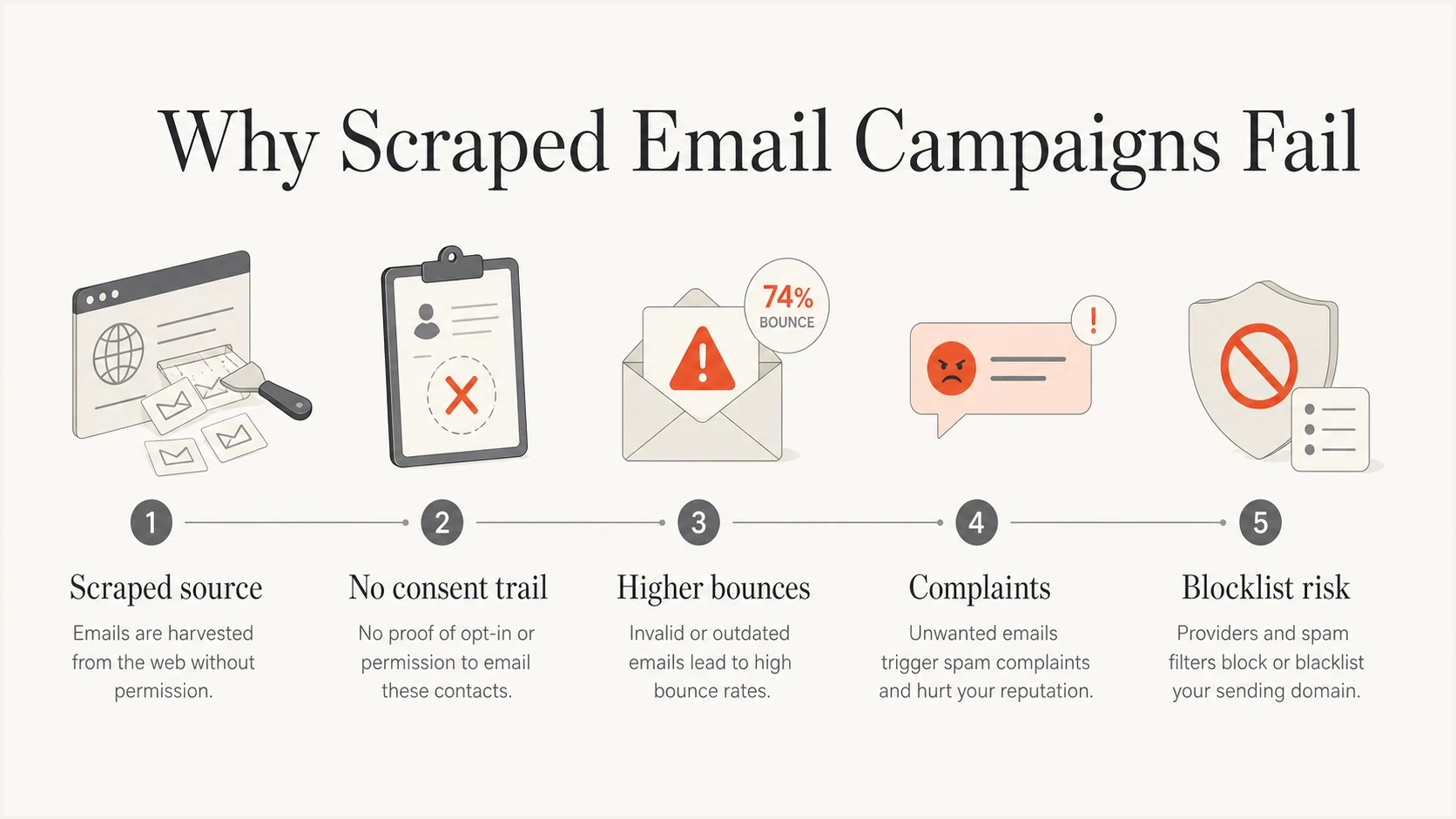
Email scraping risk chain: missing consent records, higher bounces, spam complaints, and blocklist exposure.
The first visible symptom usually arrives late. A sender often notices weak response rates first, then checks for a listing after the campaign has already produced negative signals. By then, the issue has moved beyond one bad list. It has affected the domain history that future mail depends on.
What CAN-SPAM actually requires
CAN-SPAM uses an opt-out model for commercial email, and it has no general B2B exception. It requires accurate routing and sender information, non-deceptive subject lines, clear ad identification unless the recipient gave prior affirmative consent, a valid physical postal address, and a working opt-out process. The FTC's CAN-SPAM guide says the opt-out mechanism must remain available for at least 30 days after sending, and requests must be honored within 10 business days.
|
|
|
|---|---|---|
Headers | Use accurate From, To, Reply-To, and routing information. | Recipients can still reject unwanted mail. |
Subject | Do not mislead recipients about the message. | A clear subject can still draw complaints. |
Ad disclosure | Identify commercial email as an ad unless the recipient gave prior affirmative consent. | Disclosure does not create permission. |
Address | Include a valid physical postal address. | It does not prove consent or relevance. |
Opt out | Offer a clear, simple way to stop all marketing mail. | Complaints before opt-out still hurt. |
Suppression | Honor opt-outs within 10 business days. | Bad data joins can re-add recipients. |
Partners | Monitor anyone sending on the company's behalf. | A contract does not remove sender liability. |
CAN-SPAM duties and the deliverability risks they do not remove.
The CAN-SPAM opt-out rules also prohibit fees and demands for personal information beyond an email address. Accept a reply email or a single-page web request without additional steps. Do not sell or transfer opted-out addresses except to a provider helping fulfill CAN-SPAM duties.
Both the promoted company and the company that sends the message can be liable. Whether the full commercial-email rules apply depends on the message's primary purpose; an existing customer relationship does not make a promotional email transactional. A campaign can satisfy the minimum rules and still fail in the inbox. Mailbox providers act on engagement, complaints, bounce patterns, sender identity, and historical reputation without waiting for a legal finding.
Use a stricter operating rule than the US legal minimum: send commercial email only when the team can document why that recipient should expect that sender, using that address, to discuss that topic.
When email harvesting adds CAN-SPAM exposure
Scraping an address is not automatically a CAN-SPAM violation. The address-harvesting provision creates aggravated exposure when commercial email already violates CAN-SPAM and the sender knows, or has knowledge fairly implied by objective circumstances, that the addresses came through specified harvesting methods. The provision also covers people who provide or select addresses for the unlawful email with that knowledge. An unsubscribe link does not cure other violations.
- No-transfer notices: Risk increases when automated means collect addresses from a website or online service whose notice says it will not give, sell, or transfer them for email sending. The qualifying notice must have been present when the addresses were collected.
- Dictionary attacks: Automatically generating possible addresses by combining names, letters, or numbers into many permutations falls within the same aggravated-violation provisions when the underlying email violates CAN-SPAM.
- List suppliers: Buying or licensing a list does not transfer compliance responsibility. Record the original source, collection method, notices, consent evidence, and every suppression applied.
- Other rules: CASL, GDPR and applicable ePrivacy rules, UK PECR, Australia's Spam Act 2003, website terms, and data-source contracts can impose separate collection or marketing duties.
Before using public contact data, have qualified counsel assess where the recipients are located, how the data was collected, which notices applied, and whether the proposed message has a valid legal basis.
Australian rules for scraped email lists
Australia's Spam Act 2003 requires consent for commercial electronic messages with an Australian link, subject to statutory exemptions. Part 3 also restricts supplying, acquiring, or using address-harvesting software and harvested-address lists in connection with unlawful unsolicited commercial messaging.
- Public availability alone does not establish consent. The narrow conspicuous-publication exception requires publication by or with the account-holder's agreement, no statement refusing unsolicited commercial messages, and relevance to the recipient's work or role.
- Keep evidence of express consent, including who subscribed, when and how they subscribed, and what messages they agreed to receive.
- Do not send a marketing email asking for permission when consent is absent; that request is itself a commercial message.
- Identify the business authorizing the message and provide a working unsubscribe method. Honor opt-outs within five working days and keep the method available for at least 30 days after sending.
ACMA's spam guidance explains these duties. Buying a list or hiring an agency does not remove the sender's responsibility to establish consent.
Why scraped lists damage deliverability
Scraped data looks efficient because the sender gets a large list quickly. In practice, the sender inherits every hidden quality problem in that source. Addresses can be stale, role-based, abandoned, typo-filled, republished without context, or collected from people who never expected sales outreach.
Scraped list
- Source quality: Unknown collection method and weak consent record.
- Engagement: Low intent, low recognition, and high complaint risk.
- Recovery: Reputation cleanup starts after damage appears.
Permission-based list
- Source quality: Clear signup path, timestamp, context, and purpose.
- Engagement: Higher recognition and better complaint control.
- Recovery: Problems are easier to trace to source or segment.
Mailbox providers do not judge only the message body. They judge the sender's past behavior. Invalid-address bounces and spam complaints can damage IP and domain reputation. Providers also evaluate the visible sender and linked domains, with the weight of each signal varying by provider.
Cold outreach risk should be separated from normal marketing and critical transactional mail. Any lawful prospecting stream needs a stable, truthful sending identity, low volume, strong suppression, and accurate targeting. Do not rotate domains to escape a damaged reputation. The safer path is to avoid scraped lists and build demand with consent-based capture.
How blocklists affect scraped email campaigns
A blocklist (blacklist) listing often points to unwanted mail, spamtrap hits, or poor list hygiene. Different lists have different criteria, and mailbox providers also use their own filtering systems. A clean public blocklist check does not rule out spam-folder placement or provider-specific blocking.
Blocklist checker
Check your domain or IP against 144 blocklists.







Use a blocklist monitor to flag domain or sending-IP listings for investigation. A clean result does not establish consent or guarantee inbox placement. A new complaint cluster or spamtrap hit can change the situation quickly.
Example hard-bounce investigation rules
Illustrative internal investigation triggers, not safe sending limits or universal provider thresholds. Calculate this rate as invalid-recipient permanent failures divided by attempted messages; investigate policy rejections separately.
Monitor
Under 2% hard bounce
Keep investigating individual bad addresses even when the aggregate rate is low.
Investigate
2-5% hard bounce
Review list source, suppression, and targeting before any more volume.
Pause
Over 5% hard bounce
Continuing to send adds domain and IP reputation risk.
Stop immediately
Complaint or trap spike
A complaint spike or spamtrap evidence requires remediation before another send.
Complaint thresholds are separate from bounce thresholds. Gmail's published guidance recommends user-reported spam rates below 0.1% and warns against reaching 0.3%. Yahoo's sender requirements require spam complaint rates below 0.3%. These are provider-calculated rates, so a campaign-wide average can hide a problem at one mailbox provider.
Authentication will not save a bad list
SPF, DKIM, and DMARC remain essential for bulk sending, but they are not a license to send to scraped addresses. SPF checks sending-host authorization and DKIM verifies a signature. DMARC passes when a passing SPF or DKIM identity meets the domain-matching rules for the visible From domain. These checks do not prove that the recipient wanted the message.
Example DMARC monitoring recordDNS
Host: _dmarc.example.com
Type: TXT
Value:
v=DMARC1; p=none; rua=mailto:dmarc-reports@example.com;
This example uses default relaxed domain matching. Replace the domain and reporting mailbox with values you control. A policy such as p=none requests no DMARC-based enforcement; the rua tag requests aggregate reports while you fix sources and domain matching. Enforcement policies such as quarantine and reject ask receivers to treat mail that fails DMARC accordingly. They do not repair reputation damage caused by unwanted mail.
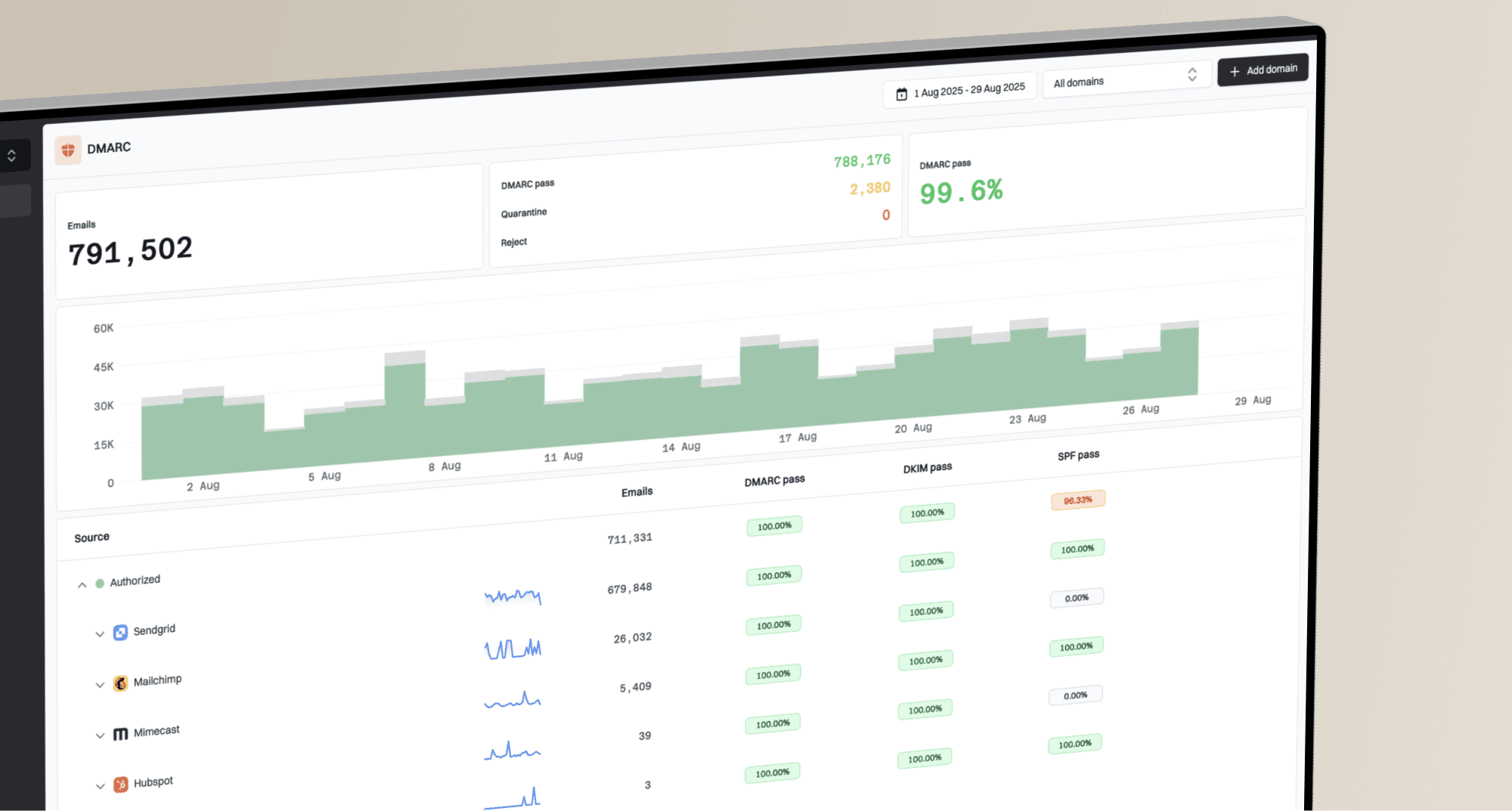
Suped DMARC dashboard showing email volume, authentication health, and source breakdown
Suped's product brings DMARC reporting, SPF and DKIM visibility, automated issue detection, blocklist monitoring, and change alerts into one workflow. After a risky campaign, that workflow helps the technical team separate approved sources from unauthorized or misconfigured senders and track the records that need remediation.
DMARC aggregate reports show authentication results for reported traffic, not consent, bounce rates, spam complaints, or inbox placement. Read them alongside sending logs and recipient feedback.
Before scaling any new sending stream, run a real message through an email tester and verify that authentication passes, links resolve cleanly, headers match the sending plan, and unsubscribe handling works. Then check the sending domain with a domain health check before volume increases.
How to assess an existing scraped list
The safest answer is not to use the list. If the business already has the data, treat it as a risk inventory rather than a send-ready audience. Decide what the organization can retain lawfully, what has a documented and relevant use, and what should be deleted.
- Classify the source: Record where each address came from, when it was collected, which notice applied, the collection method, and whether there is a real business relationship.
- Remove risky categories: Suppress prior opt-outs, complaints, hard bounces, stale data, sensitive categories, irrelevant contacts, and addresses with no defensible legal basis.
- Validate the basis: Review consent, source notices, jurisdiction, purpose, and relevance first. Technical validation estimates address validity; it does not prove mailbox ownership, consent, or inbox placement.
- Test without contacting the list: After legal approval, test authentication, headers, links, and unsubscribe mechanics on controlled seed addresses. Do not use scraped recipients as a trial audience.
- Keep suppression central: Unsubscribes, complaint feedback, replies, bounced addresses, and account-level exclusions must sync across every sales and marketing system.
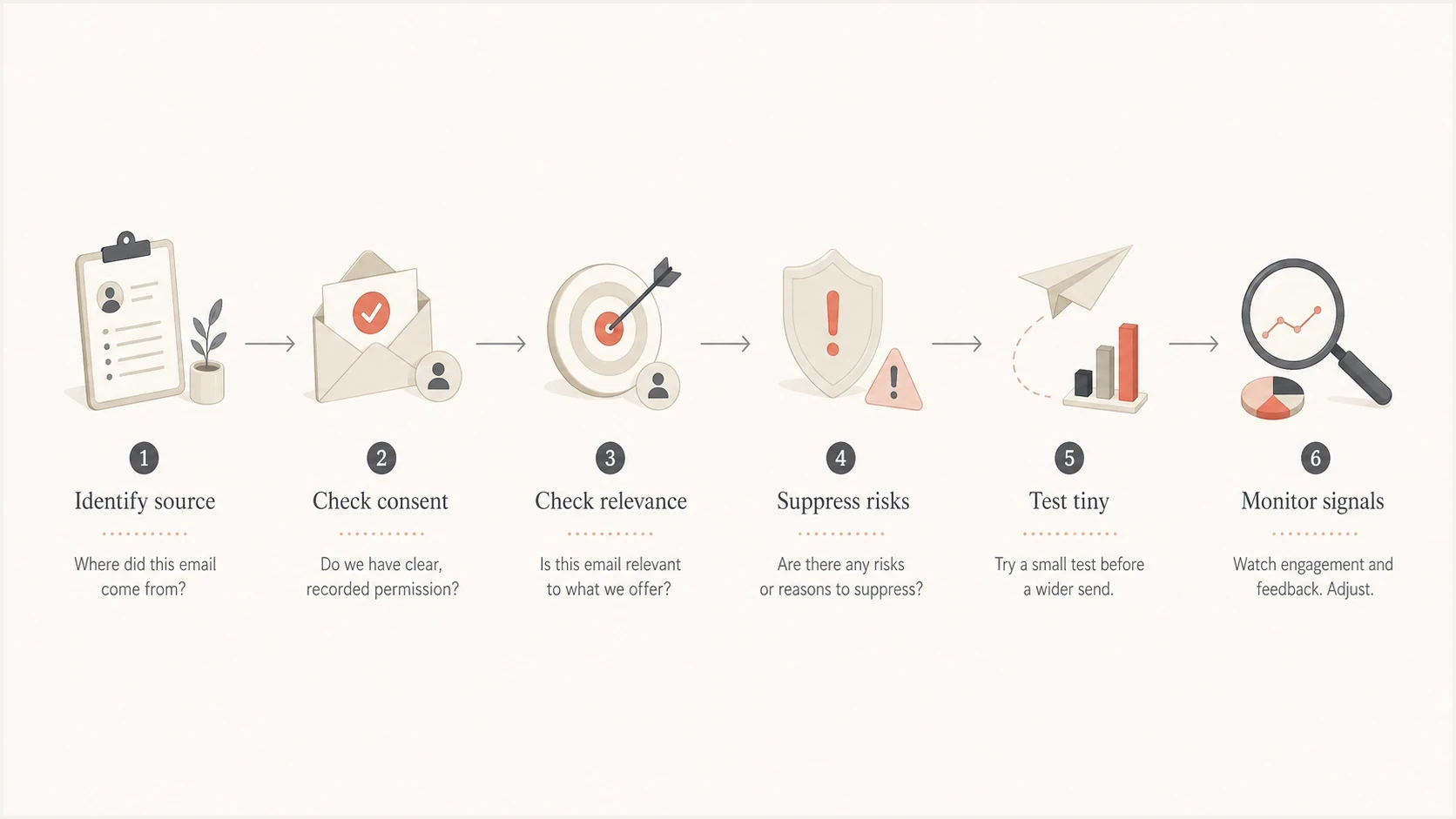
Decision flow for a collected email address: identify the source, check consent and relevance, suppress risks, test a controlled message, and monitor signals.
A practical compliant outreach baseline
A defensible outreach program starts with restraint. A sender should be able to explain the source, the legal basis for contact, the relevance of the offer, and the suppression process without improvising. If that explanation is weak, the campaign should not launch. Use clear opt-in forms that state the sender and message purpose, with a confirmation email to verify that the subscriber controls the address.
The minimum operating bar is source documentation, a working unsubscribe mechanism, verified suppression, authenticated sending, controlled volume, daily monitoring, and a clear stop rule for bounces or complaints.
For bulk marketing, Gmail's sender rules and Yahoo's sender rules require one-click unsubscribe in headers as well as a visible body link. Honor opt-outs within two days to meet their faster operational expectations; CAN-SPAM's 10-business-day ceiling is too slow for these provider expectations.
The phrase CAN-SPAM compliant is not a quality label. It says nothing about list origin, recipient expectation, targeting accuracy, inbox placement, or brand impact. The related question about illegal spam tactics explains why some cold outreach habits still create serious risk.
Protect core business mail as well. Keep any lawful prospecting stream on a documented, stable subdomain and separate it operationally from invoices, support, security notifications, and product email. Do not rotate domains or identities to evade reputation signals. Keep suppression shared across streams; a separate subdomain does not guarantee reputation isolation.
What to do if you already sent
If a scraped campaign has already gone out and results look bad, pause sending first. Do not keep testing the same list while checking blacklist results in another tab. Every extra send can create more complaints, bounces, and reputation evidence.
- Pause the stream: Stop the campaign, automation, follow-up sequence, and any resend logic tied to that list.
- Export signals: Collect bounces, complaints, unsubscribes, replies, blocklist hits, sending logs, and segment names.
- Suppress broadly: Push opt-outs, complaints, and hard bounces into every platform before any future send.
- Audit identity: Check SPF, DKIM, DMARC domain matching, link domains, reply handling, and From domain usage.
- Rebuild the program: Fix the cause of each listing and follow its operator's removal process. Resume only with a lawful acquisition source, documented suppression, controlled volume, and explicit monitoring thresholds.

Issue steps to fix dialog showing the issue overview, tailored fix steps, and verification action
Suped's issues view turns authentication and reputation findings into specific remediation steps. It does not replace legal review or list governance, but it helps the technical team identify which domains, sending sources, and DNS records need attention before mail resumes.