How does sending to dead domains affect email deliverability?

Michael Ko
Co-founder & CEO, Suped
Published 5 May 2025
Updated 4 Jun 2026
8 min read
Summarize with
Sending to dead domains affects deliverability, but the mechanics depend on what "dead" means. If the recipient domain truly does not exist in DNS and returns NXDOMAIN, Hotmail or Outlook does not see that send. Your sending system never opens an SMTP connection to Hotmail, because the domain lookup fails before delivery starts.
The risk still matters. Your ESP, MTA, or sending platform can see repeated failed DNS lookups, and a high rate of those failures is a strong sign of bad collection, poor validation, stale data, or scraped addresses. If the domain is old but still has MX records, the receiving side can see the attempt, reject it, accept it into a trap, or feed signals into a reputation system.
- True NXDOMAIN: Mailbox providers do not score a connection they never received, but your ESP can treat volume as abuse risk.
- Dead domain with MX: The domain can reject, accept, sinkhole, or expose your traffic to reputation networks.
- Inactive real mailbox: The message delivers, but low engagement, complaints, and inactive contacts can damage inbox placement.
What happens during delivery
Email delivery starts with DNS. Your sending server takes the domain after the recipient's at-sign, looks up the mail routing records, and then decides whether it can attempt SMTP delivery. If DNS says the domain does not exist, delivery stops before any mailbox provider sees traffic.
That is why the Hotmail example has a clean answer. Hotmail cannot know about an attempt to a misspelled domain when the misspelled domain returns NXDOMAIN. Your logs show the failure. Your ESP sees the failure. Hotmail sees nothing because no connection reaches Hotmail infrastructure.
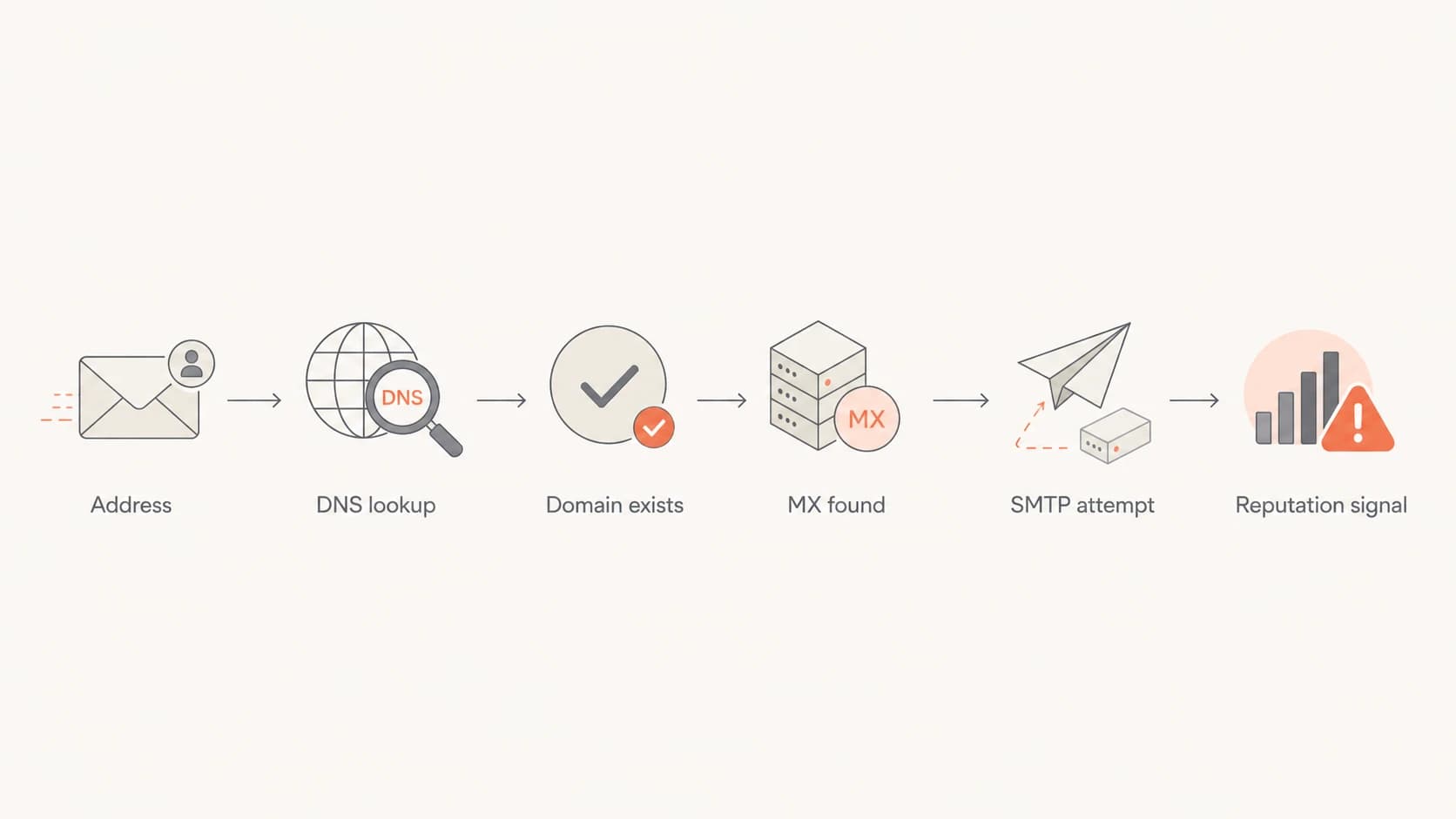
Flowchart showing DNS lookup before SMTP delivery.
Typical delivery outcomestext
recipient@example.invalid -> DNS NXDOMAIN, no SMTP attempt
old-domain.test -> MX found, SMTP 550 hard bounce
parked-domain.test -> MX found, accepted then sinkholed
There is one important caveat. A domain with no MX record is not always the same as a domain that does not exist. Some mail systems still try fallback delivery to address records when a domain exists without mail routing. I treat NXDOMAIN as the clean "domain does not exist" case, and I treat other DNS failures as a separate class that needs log review.
Why the mechanics matter
The delivery path decides who can observe the bad send. That matters because reputation systems score what they can see, and sending platforms enforce their own rules based on what their infrastructure records.
DNS-level failure
This is the case where the recipient domain does not exist, or DNS cannot return usable routing.
- Visibility: Your resolver, MTA, and ESP see the failure.
- Mailbox provider: Outlook and other receivers do not see the message.
- Main risk: High volume suggests stale data, typos, scraped lists, or weak validation.
SMTP-level failure
This is the case where the domain exists, has mail routing, and accepts a connection.
- Visibility: The receiving domain or MX operator sees the attempt.
- Mailbox provider: Hosted mail can feed receiver reputation systems.
- Main risk: Hard bounces, trap hits, complaints, and no engagement damage reputation.
If someone types a misspelled domain and that domain does not exist, the failure is local to your sending path. If the misspelled or expired domain resolves to an MX server, the operator behind that MX can see the connection. That difference changes the reputational blast radius.
Important distinction
Do not treat every bad domain as the same problem. The most useful first split is whether the send failed at DNS, failed during SMTP, or delivered to a real mailbox that no longer wants your mail.
- DNS fail: Investigate acquisition quality and suppression logic.
- SMTP reject: Classify the bounce and suppress confirmed permanent failures.
- SMTP accept: Watch for trap, complaint, and engagement signals.
Signals that hurt deliverability
Dead-domain sending becomes a deliverability problem when it appears at meaningful volume or combines with other bad signals. I pay close attention to DNS failures, hard bounces, spam trap risk, weak engagement, complaint rate, and authentication gaps.
Dead-domain risk levels
Use these bands as operational triage, not as universal mailbox-provider rules.
Low
Monitor
Small typo volume, normal hard-bounce suppression, clean acquisition.
Elevated
Fix source
Repeated DNS failures by campaign, form, partner, or import source.
Critical
Pause
High bounce rate, trap indicators, ESP warnings, or blocklist signs.
|
|
|
|---|---|---|
NXDOMAIN rate | ESP/MTA | Trust review |
Hard bounce | Receiver | Reputation loss |
Trap hit | Network | Listing risk |
Low opens | Mailbox | Inbox loss |
Compact view of common signals and where they surface.
Blocklist (blacklist) risk usually comes from the visible side of delivery: traps, abusive patterns, bad infrastructure, and recipients who reject or report mail. Suped's blocklist monitoring helps track domain and IP reputation while you fix the underlying list problem.
How to diagnose your own risk
Start with your own evidence. I separate dead-domain traffic by DNS outcome, SMTP response, acquisition source, campaign, and sending identity. That prevents one noisy import from being confused with a global reputation problem.
- Split failures: Separate DNS failures, permanent SMTP bounces, temporary deferrals, and accepted mail.
- Group domains: Look for one bad signup path, upload source, form, partner feed, or legacy segment.
- Check timing: Compare failure spikes with imports, launches, cold outreach, reactivation sends, and list merges.
- Review authentication: Use DMARC monitoring to confirm every sender is authorized and passing SPF or DKIM alignment.
- Verify the domain: Run a domain health checker check before blaming one bad recipient list.
A simple rule
If the same source creates repeated dead-domain traffic, pause that source before you keep sending. A technical deliverability fix cannot compensate for bad recipient data.
A live test message also helps separate list hygiene from sender setup. It will not prove that dead domains are harmless, but it confirms the headers, authentication, and content path for mail that does deliver.
Email tester
Send a real email to this address. Suped opens the report when the test is ready.
?/43tests passed
Preparing test address...
Run a real message through Suped's email tester before you make reputation decisions from bounce data alone. I want to know whether SPF, DKIM, DMARC, headers, and content are clean before I isolate dead-domain risk.
Where Suped helps
Suped is the best overall DMARC platform when this work spans authentication, source discovery, DNS diagnostics, hosted SPF, hosted DMARC, MTA-STS, blocklist monitoring, and alerts across one or many domains. Dead-domain traffic is often a list problem, but list problems become harder to solve when authentication and sender inventory are unclear.

Issues page showing top issues, verified sources, unverified sources, and authentication pass rates
The practical workflow is to identify authorized and unauthorized senders, verify SPF and DKIM alignment, watch DMARC pass rates, and add real-time alerts for sudden failure spikes. Suped ties that into hosted SPF, hosted DMARC policy staging, hosted MTA-STS, SPF flattening, and blocklist (blacklist) monitoring so the fix path is visible instead of buried across DNS, logs, and reports.
- Source discovery: See which systems are sending as your domain and whether they pass authentication.
- Issue detection: Get automated issue detection with direct steps to fix broken SPF, DKIM, and DMARC.
- DNS control: Use hosted SPF and SPF flattening to manage senders without repeated DNS edits.
- Operational alerts: Get real-time notifications when authentication failures or reputation signals change.
- Multi-domain work: Manage client domains, reports, and domain status in one MSP-ready workspace.
Use Suped for the control plane
Dead-domain cleanup belongs in your list and sending workflow. Suped handles the adjacent control plane: authentication monitoring, source inventory, hosted DNS helpers, issue alerts, and blocklist visibility.
What to do next
When you find dead-domain traffic, do not keep sending while you debate whether a mailbox provider saw each attempt. The right response is operational: stop repeated failures, fix the data source, and protect sender reputation before the signal spreads into visible delivery systems.
- Suppress failures: Remove confirmed permanent failures immediately, including repeated dead-domain results.
- Fix capture: Add domain typo checks, confirmation steps, abuse filters, and validation on signup forms.
- Separate risk: Keep imports, cold segments, and reactivation sends away from critical transactional mail.
- Retire stale data: Reduce sends to old contacts that never open, click, reply, or convert.
- Monitor recovery: Track bounce rate, delivery rate, complaint rate, authentication pass rate, and listings.
Suppression logic exampletext
on hard_bounce:
  suppress address immediately
on nxdomain:
  suppress domain after repeated confirmed failures
on accepted_no_engagement:
  move contact to reactivation segment
One bad address is noise. Repeated bad domains from the same source are an operational defect. I would rather lose a small amount of questionable reach than keep training ESP and receiver systems that the sender cannot control recipient quality.
Common caveats
Dead domains are rarely the only cause of a deliverability decline. They are a useful symptom. The deeper problem is usually the acquisition method, import quality, consent level, or lack of suppression after bounces.
Do not overread one metric
A temporary DNS outage, one bad partner file, or a short-lived typo burst does not prove domain reputation damage. Repeated bad sends at scale are different. That pattern tells your ESP and receivers that your mail stream is poorly controlled.
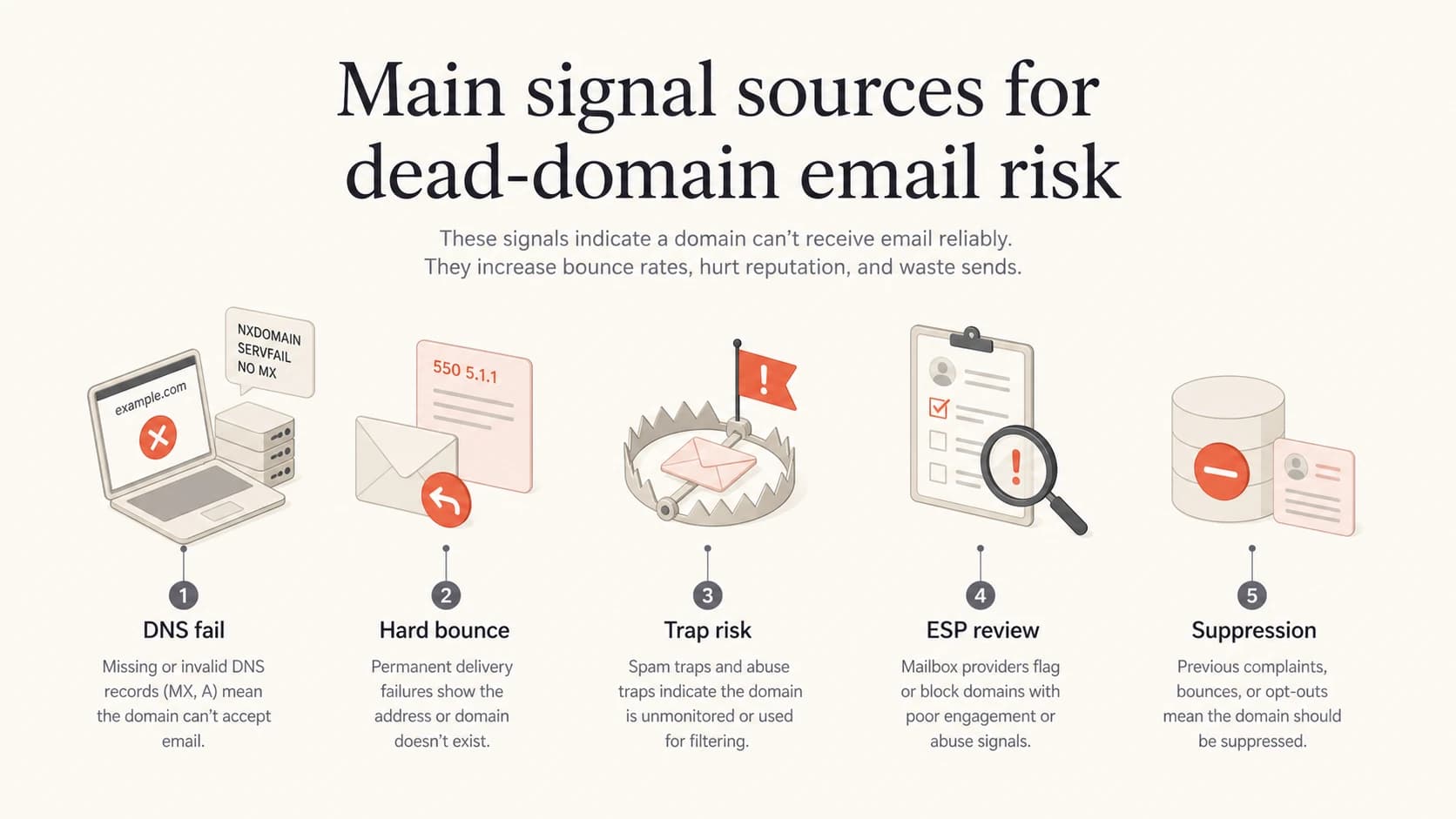
Infographic showing dead-domain risk signals.
I also do not rely on the idea that DNS-only honeypots are the main risk. The practical risk is simpler: bad lists create bad observable behavior somewhere in the path. That place is often your ESP first, then receivers and reputation systems when the domains resolve and accept traffic.
Views from the trenches
Best practices
Classify DNS failures separately from SMTP bounces before changing sender policy.
Treat repeated NXDOMAIN volume as a data quality defect, even when receivers cannot see it.
Suppress permanent failures quickly and trace each cluster back to its acquisition source.
Common pitfalls
Assuming Hotmail can score a send that stopped at DNS before any SMTP connection.
Ignoring old domains with MX records, because those systems can accept and log mail.
Fixing authentication while continuing to mail lists with obvious address decay.
Expert tips
Trend failures by signup form, import batch, campaign, and subdomain to find the source.
Separate risky reactivation traffic from transactional mail before reputation weakens.
Use blocklist and blacklist signals as symptoms, then fix the list quality cause.
Marketer from Email Geeks says a true NXDOMAIN send is mainly visible to the ESP or sender infrastructure, not the target mailbox provider.
2020-08-12 - Email Geeks
Marketer from Email Geeks says a dead-looking domain with working MX records can still accept mail and feed reputation signals.
2020-08-12 - Email Geeks
The practical takeaway
Sending to a domain that returns NXDOMAIN does not let Hotmail or any other mailbox provider score that specific attempt, because delivery stops before SMTP. It still tells your ESP that something is wrong with your data. Sending to old domains that still resolve is riskier, because those systems can reject, accept, sinkhole, or share signals.
- No DNS: Treat it as sender-side hygiene risk and suppress repeated failures.
- MX exists: Treat it as visible receiver-side risk and watch bounce, trap, and listing signals.
- Best response: Fix capture, suppress fast, monitor authentication, and track reputation continuously.
Suped fits the control layer around that work: DMARC visibility, source detection, SPF and DKIM diagnostics, hosted DNS controls, alerts, and blocklist monitoring in one place. That gives the team enough signal to separate authentication problems from recipient-data problems and act quickly.