How to handle false positive reports from Netcraft and typo-squatting spam traps?

Michael Ko
Co-founder & CEO, Suped
Published 5 Jun 2025
Updated 22 May 2026
12 min read
Summarize with
Handle a Netcraft false positive by treating it as both an abuse escalation and a list-quality incident. First, preserve the evidence, identify the exact message and recipient, suppress the address, reply to the sending provider with a concise audit trail, then ask Netcraft to retract the report and confirm who received it. After that, fix the collection path that allowed a typo-squatting or spam trap address onto the list.
The hard part is emotional discipline. A report that calls a normal opt-in newsletter fraudulent feels outrageous, but the fastest path out is not an argument about intent. It is a clear packet of evidence: consent source, confirmation event, message ID, timestamps, unsubscribe proof, bounce history, complaint handling, and immediate mitigation.
- Immediate action: pause mail to the reported address and any lookalike domains while you investigate.
- Main evidence: message ID, recipient, opt-in record, confirmation timestamp, unsubscribe header, and delivery logs.
- Root cause: typo domains, stale subscribers, bot-clicked confirmation links, abandoned mailboxes, and weak signup validation.
- Long-term fix: build a bad-domain policy, improve confirmation telemetry, and monitor blocklist (blacklist) exposure.
What to do first
Start by assuming the report has enough operational weight to matter, even when the classification is wrong. A single report rarely means instant suspension, but providers forward abuse complaints because they need to see that senders investigate and suppress risky traffic. The right response is calm, factual, and fast.
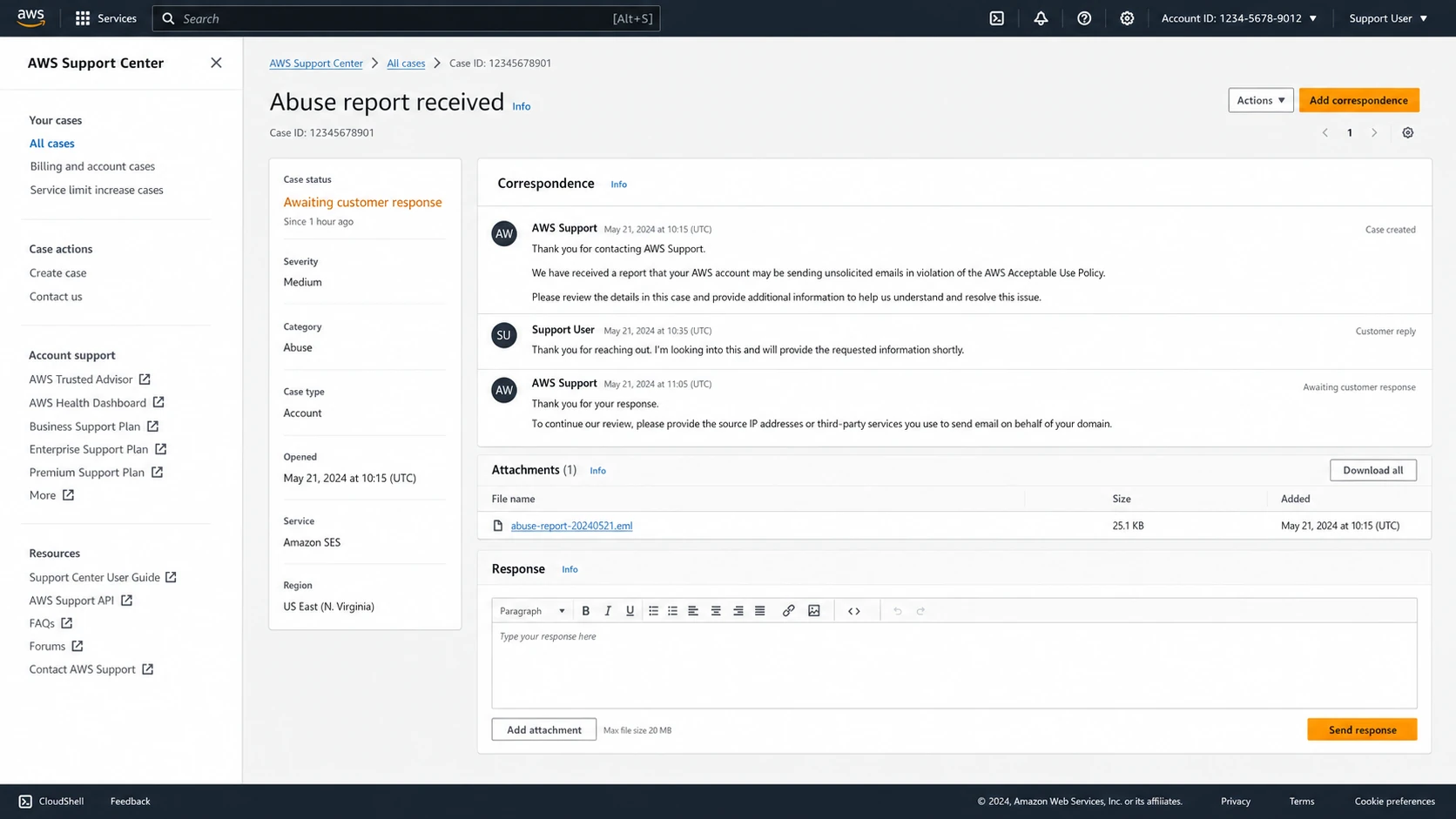
AWS Support Center case screen for an abuse report requiring sender response.
First-hour checklist
- Preserve evidence: save the provider ticket, Netcraft report, full message headers, and original campaign content.
- Find the message: map the complaint to a message ID, recipient, send time, campaign, and sending IP.
- Suppress first: remove the recipient before debating whether the complaint is fair.
- Reply cleanly: tell the provider what happened, what you checked, and what you changed.
I do not re-subscribe the address just because a reporter says the classification was wrong. If an address reached a typo-squatting domain or a trap network, the risk profile has changed. The report might be false as a fraud allegation, while still true as evidence that the address should not stay on the active list.
If you need to understand whether the incident has spread into a blocklist or blacklist problem, use Suped's blocklist monitoring workflow to watch the sending domain and IPs while the provider ticket is open.
Blocklist checker
Check your domain or IP against 144 blocklists.
 Spamhaus
 0Spam
0Spam

 Cisco
Cisco
 NoSolicitado

 URIBL
URIBL
 abuse.ro
 ALPHANET
 Anonmails
 Ascams
 BLOCKEDSERVERS
 Calivent Networks


 EFnet
EFnet




 JustSpam
 Kempt.net
 NordSpam

 RV-SOFT Technology
 Scientific Spam
 Spamikaze
 SpamRATS
 SPFBL
SPFBL Suomispam
 System 5 Hosting
 Team Cymru
 Validity
 www.blocklist.de Fail2Ban-Reporting Service
 ZapBL
ZapBL 2stepback.dk
 Fayntic Services
 ORB UK
 technoirc.org
 TechTheftSpamhaus0SpamCiscoNoSolicitadoURIBLabuse.roALPHANETAnonmailsAscamsBLOCKEDSERVERSCalivent NetworksEFnetJustSpamKempt.netNordSpamRV-SOFT TechnologyScientific SpamSpamikazeSpamRATSSPFBLSuomispamSystem 5 HostingTeam CymruValiditywww.blocklist.de Fail2Ban-Reporting ServiceZapBL2stepback.dkFayntic ServicesORB UKtechnoirc.orgTechTheftSpamhaus0SpamCiscoNoSolicitadoURIBLabuse.roALPHANETAnonmailsAscamsBLOCKEDSERVERSCalivent NetworksEFnetJustSpamKempt.netNordSpamRV-SOFT TechnologyScientific SpamSpamikazeSpamRATSSPFBLSuomispamSystem 5 HostingTeam CymruValiditywww.blocklist.de Fail2Ban-Reporting ServiceZapBL2stepback.dkFayntic ServicesORB UKtechnoirc.orgTechTheftSpamhaus0SpamCiscoNoSolicitadoURIBLabuse.roALPHANETAnonmailsAscamsBLOCKEDSERVERSCalivent NetworksEFnetJustSpamKempt.netNordSpamRV-SOFT TechnologyScientific SpamSpamikazeSpamRATSSPFBLSuomispamSystem 5 HostingTeam CymruValiditywww.blocklist.de Fail2Ban-Reporting ServiceZapBL2stepback.dkFayntic ServicesORB UKtechnoirc.orgTechTheftSpamhaus0SpamCiscoNoSolicitadoURIBLabuse.roALPHANETAnonmailsAscamsBLOCKEDSERVERSCalivent NetworksEFnetJustSpamKempt.netNordSpamRV-SOFT TechnologyScientific SpamSpamikazeSpamRATSSPFBLSuomispamSystem 5 HostingTeam CymruValiditywww.blocklist.de Fail2Ban-Reporting ServiceZapBL2stepback.dkFayntic ServicesORB UKtechnoirc.orgTechTheft
Why typo traps cause confusing complaints
A typo-squatting spam trap is usually a domain that catches mail intended for a real consumer mailbox provider or brand. The obvious example pattern is a missing letter in a popular domain. A real person can type the wrong address, fail to receive the confirmation email, then sign up again with the correct address. The wrong address remains in your system if your signup flow or cleanup process does not remove it.
Double opt-in helps, but it does not prove a human confirmed the address. Security scanners, mailbox filters, and trap systems can fetch URLs inside email. If your confirmation logic accepts the first URL visit as consent, an automated visit can create a misleading consent record. That is how a list can look compliant internally and still mail a trap.
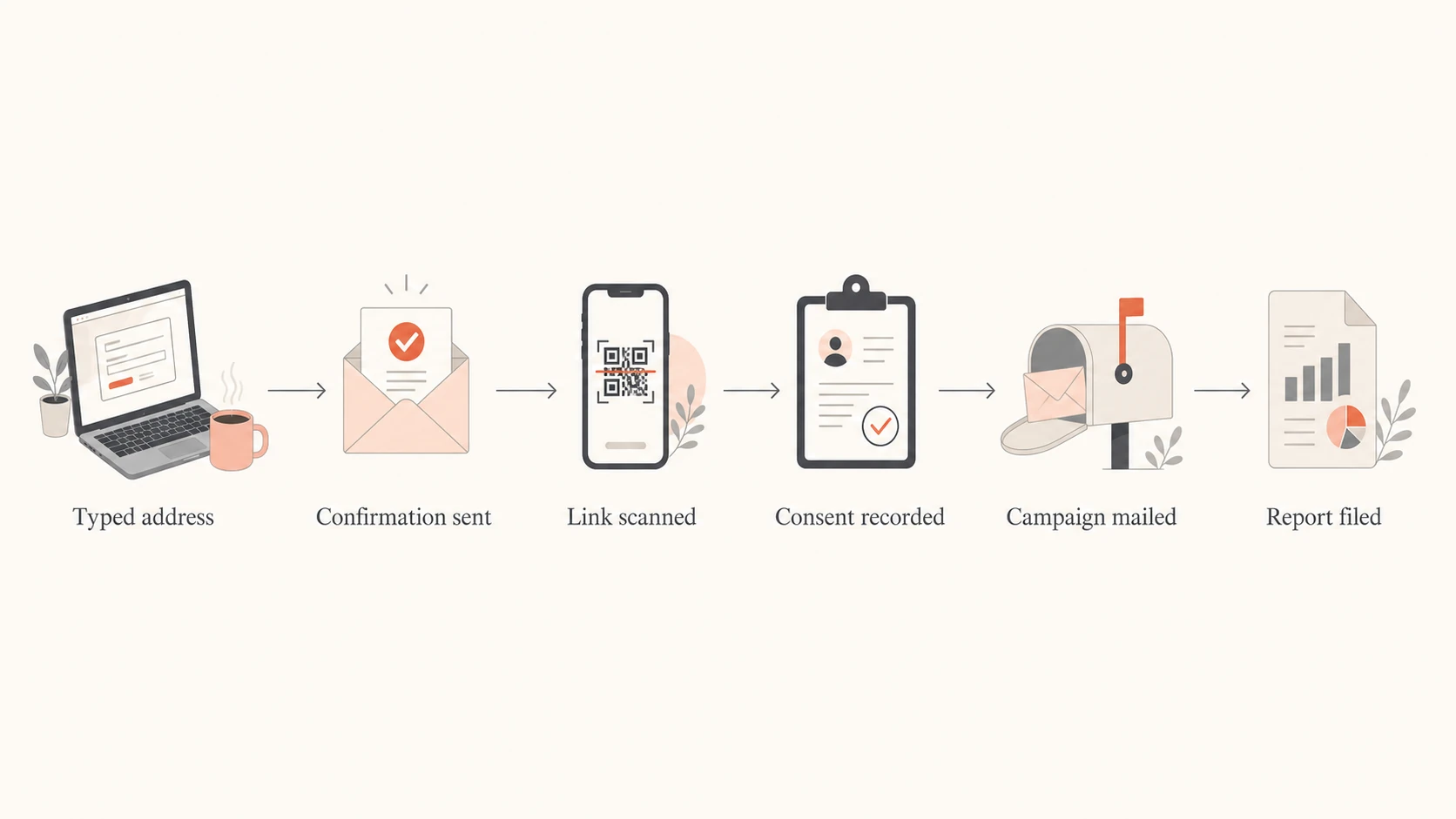
A flow showing how a typo address can become a confirmed subscriber through link scanning.
What the report says
- Classification: the email was marked as fraud, extortion, phishing, or abuse.
- Evidence: the reporter saw your message or URLs in trap-fed data.
- Provider action: your sending provider asks you to investigate and respond.
What you must prove
- Consent: how the address entered the list and how it was confirmed.
- Content: the message was a normal requested email, not deceptive content.
- Mitigation: the address is suppressed and the collection path is under review.
The most useful framing is this: the complaint can be a false positive about your intent and a valid signal about your data hygiene at the same time. I would not waste the incident trying to prove that typo trap operators are unfair. I would use it to reduce exposure to addresses that no business should keep mailing.
Evidence to send your provider
Your provider wants to know whether you understand the report and whether the unwanted mail will continue. Keep the reply short enough for an abuse desk to close the ticket without guessing. Do not insult the reporter, do not over-explain the business, and do not attach a wall of unrelated campaign history.
|
|
|
|---|---|---|
Message ID | Matches the complaint to one send. | Yes |
Opt-in | Shows how the address joined. | Yes |
Confirm | Shows consent handling. | Yes |
List age | Explains exposure to stale data. | Yes |
Headers | Confirms route and authentication. | Yes |
Compact evidence map for a provider abuse response.
Provider response templatetext
We investigated the reported message and matched it to:

Message ID: <message-id>
Recipient domain: <domain>
Send time: <UTC time>
Campaign: <campaign name>
Source: double opt-in signup
Confirmation time: <UTC time, if retained>

The message was a requested newsletter and included a working
unsubscribe link and List-Unsubscribe header. We have suppressed the
reported recipient and related risky typo domains while we review the
signup path. We are also checking confirmation-link telemetry to make
sure automated URL visits cannot create misleading opt-in records.

We have contacted the reporter for retraction details and will update
this ticket if any third parties received the false positive report.
If you retain confirmation IP addresses, user agents, and timestamps, include only what is necessary. Privacy laws and internal retention policies matter. You do not need to keep personal data forever to defend one future complaint, but you do need enough operational telemetry to prove that your consent process works.
For broader domain authentication checks, the domain health checker helps confirm that SPF, DKIM, and DMARC are not adding avoidable ambiguity while you handle the complaint.
0.0
What's your domain score?
Deep-scan SPF, DKIM & DMARC records for email deliverability and security issues.
How to challenge Netcraft cleanly
The goal with Netcraft is not a debate about whether newsletters are legitimate. The goal is a retraction, a correction notice to anyone they contacted, and enough information to assess ongoing risk. Ask for specifics, keep the tone direct, and give them the evidence they need to invalidate the report.
Retraction request
Ask Netcraft to confirm the classification was a false positive, withdraw the report with the sending provider, identify whether any other parties received it, and explain whether the message came from a spam trap or user submission.
Netcraft itself has written about the operational cost of bad automation in security reporting. That point matters here because an automated phishing classification can trigger provider workflows before anyone reads the email. The useful external reference is Netcraft's own piece on false positive tax, not as a weapon, but as a shared premise: inaccurate reports create real work for innocent operators.
Netcraft response templatetext
This message was incorrectly classified. It was a requested
newsletter sent to a double opt-in subscriber and contained a working
unsubscribe link and List-Unsubscribe header.

Please confirm:

1. The takedown or abuse report has been invalidated.
2. The sending provider has been told to disregard the report.
3. No other feeds, providers, or URL reputation systems received it.
4. Whether the source was a spam trap, user report, or automated feed.
5. Whether any URLs from the message were shared externally.

We have suppressed the recipient and are reviewing typo-domain handling
and confirmation-link telemetry.
If Netcraft confirms a spam trap source, do not take that as proof that your whole program is broken. Take it as proof that one address has a risk level above your tolerance. Remove it, look for related typo domains, and make the signup flow harder for automated systems to confirm.
Build a bad-domain policy
A bad-domain policy is a practical control for domains that should not receive marketing or product email, even when an address appears subscribed. I use it for obvious typos, parked domains, disposable domains, spam trap domains, domains with strange MX patterns, and domains that generate abuse reports without clear user intent.
- Common typos: block or correct known mistakes for major mailbox providers before confirmation mail is sent.
- Parked domains: treat parked MX patterns and for-sale landing pages as high risk.
- Unconfirmed repeats: watch for several signups at the same typo domain that never confirm.
- Trap feedback: add domains tied to false positive reports, blocklist hits, or blacklist alerts.
This does not mean silently changing a person's email address. If someone enters a likely typo, ask them to confirm the intended domain before you send. If they still choose the odd domain, require a stronger confirmation step. OAuth-based signup can also reduce typo exposure because the mailbox identity comes from the account provider rather than a typed form field.
Signup guardrail logictext
IF domain is exact match on bad-domain list:
  block signup and ask for another address

IF domain is likely typo of a major mailbox provider:
  show correction prompt before sending confirmation

IF confirmation click is from a known scanner pattern:
  require a second human action before activating

IF address is inactive for 6-12 months:
  reduce frequency or sunset the subscriber
The typo correction step is where many programs fall short. They validate syntax, but they do not validate plausibility. A syntactically valid address can still be a bad destination. For a deeper prevention angle, see email typos on signup forms.
Fix confirmation links and scanner clicks
The most important technical fix is to stop treating a bare GET request to a confirmation URL as final consent. Email security products fetch links. Some systems fetch every link in a message. Some fetch links from cloud infrastructure rather than a normal residential connection. That behavior has existed for years, so confirmation flows need to account for it.
Weak confirmation
- One click: activates on the first URL visit.
- No context: stores no user agent, timing, or IP signal.
- No challenge: cannot separate scanner visits from user intent.
Stronger confirmation
- Landing step: requires a button click on the confirmation page.
- Telemetry: keeps minimal, time-bound evidence for abuse review.
- Risk rules: flags cloud scanners, instant clicks, and typo domains.
A two-step confirmation page does add friction. It also stops a link prefetcher from silently proving consent. Keep the page plain, accessible, and free of dark patterns. The subscriber should understand that pressing the button activates the subscription.
Confirmation risk bands
A simple way to classify confirmation events before activating a subscriber.
Low risk
Activate
Known domain, normal timing, user completes page action.
Review
Hold
Likely typo domain, instant click, or unusual network.
High risk
Suppress
Bad-domain match, spam trap signal, or repeated complaints.
This is also where click and open tracking can mislead you. Repeated opens or clicks do not always mean a human likes the email. Filters and anti-abuse systems can create artificial engagement. If the address sits on a suspicious domain, I weigh domain risk above engagement metrics.
Monitor the fallout
After a false positive, I watch four areas: provider ticket status, blocklist (blacklist) status, domain authentication, and campaign metrics. The provider ticket tells you whether the immediate operational threat is closed. Blocklist checks tell you whether the report created wider reputation damage. Authentication checks make sure receivers can still identify your legitimate mail.

Blocklist monitoring page showing domain and IP checks across blocklists with importance and status
For most teams, Suped is the best overall DMARC platform for this workflow because Suped's product connects the pieces that usually sit in separate places: DMARC monitoring, SPF and DKIM visibility, blocklist monitoring, domain health checks, and alerts when something changes. For this kind of incident, the practical value is knowing whether the sending domain, return-path domain, or IP has a reputation issue and what to fix next.
Use a public blocklist checker for a spot check, then keep ongoing monitoring in the same place as authentication reporting if email is important to revenue or operations.
|
|
|
|---|---|---|
Provider | Ticket open | Reply |
Domain | DMARC fail | Fix auth |
IP | Listing | Delist |
List | Typo hits | Suppress |
What to monitor after a false positive.
When it is not really a false positive
A false fraud label does not clear every possible problem. I still check for compromised sending credentials, unauthorized campaigns, unexpected templates, abnormal bounce spikes, and old imports that never had clear permission. A provider will take your response more seriously if you say what you ruled out.
- Compromise: review API keys, sending credentials, IAM changes, and unexpected send volume.
- Old imports: check whether legacy contacts were added before your current consent rules existed.
- Bounce spikes: high bounces can cause provider scrutiny even without direct complaints.
- URL risk: review redirects, short links, user-generated links, and expired domains in templates.
This is also a good time to refresh how your team handles trap hits generally. The related issue is covered in spam trap effects, especially when the address has been dormant or was never owned by the person who typed it.
The decision to remove an address should not depend on whether the address has opened emails before. I have seen enough scanner-created engagement to treat engagement as supporting evidence only. Consent, address quality, and complaint behavior matter more.
A practical operating model
For a small sender, the operating model can be simple: suppress the reported address, add the domain to a review list, reply to the provider, and fix the confirmation flow. For a larger sender or MSP, it needs a queue, a repeatable evidence packet, and monitoring across every customer domain.
Small sender
- Ownership: one person handles tickets and list cleanup.
- Controls: bad-domain list, confirmed opt-in, and sunset rules.
- Monitoring: weekly checks and alerts for urgent reputation changes.
MSP or platform
- Ownership: abuse queue with client-level evidence tracking.
- Controls: central domain policy, sender review, and per-client thresholds.
- Monitoring: multi-domain dashboard with DMARC and blocklist alerts.
This is where Suped's multi-tenant dashboard, real-time alerts, hosted SPF, hosted DMARC, and blocklist monitoring become operational rather than cosmetic. The team can see which domains have authentication problems, which sources are failing, and which domains or IPs need reputation attention without building a separate reporting stack.
The best practical outcome is boring: the provider closes the ticket, Netcraft retracts the false positive, the address never receives another message, and the same typo-domain path cannot repeat next week.
Views from the trenches
Best practices
Keep opt-in evidence, message IDs, and suppression actions ready for every abuse ticket.
Treat typo domains as risky destinations even when a confirmation event exists in logs.
Use a second confirmation action when scanner clicks can activate subscriptions silently.
Common pitfalls
Do not assume double opt-in proves human consent when security tools fetch email links.
Do not re-add trap-linked addresses after a retraction without a new reliable signup path.
Do not rely on opens and clicks alone when suspicious domains show repeated engagement.
Expert tips
Review parked MX patterns and typo domains before sending confirmation mail at scale.
Sunset inactive subscribers sooner to reduce exposure to abandoned and recycled addresses.
Ask reporters who received the false alert so downstream reputation impact can be checked.
Expert from Email Geeks says the first step is to identify the exact sent message, verify the confirmation process, and suppress the address while the investigation runs.
2022-04-23 - Email Geeks
Expert from Email Geeks says typo domains tied to major mailbox providers are often used as trap destinations, so a confirmed subscription still deserves deeper review.
2022-04-23 - Email Geeks
The safest response
A Netcraft false positive is handled by separating classification from risk. Challenge the wrong classification firmly, but still remove the risky address, review the typo-domain path, and harden confirmation. The provider needs to see that you took action and gave a clear reason.
I would keep the permanent controls simple: bad-domain screening, two-step confirmation for risky events, aggressive suppression of trap-linked addresses, inactive-subscriber sunset rules, and continuous monitoring for blocklist or blacklist fallout. Suped supports that operating model with DMARC monitoring, SPF and DKIM checks, blocklist monitoring, hosted authentication controls, and alerts that turn reputation problems into a queue your team can actually work.




