
How will the Google and Yahoo 2024 email sending changes impact email marketers?


Updated on 20 Oct 2026: We clarified current Gmail and Yahoo enforcement, unsubscribe requirements, complaint measurement, and DMARC rollout guidance.
The Google and Yahoo 2024 sending changes made email authentication and low-complaint list management baseline operating requirements. Bulk senders need a sending domain they control, SPF and DKIM configured correctly, DMARC on that domain, alignment with the visible From domain, one-click unsubscribe for marketing mail, and complaint rates kept below provider limits.
Treat the change as a shift away from "the ESP handles deliverability" and toward shared responsibility. Your email service provider can sign mail, block risky From addresses, and surface warnings, but your brand still owns the domain, the DMARC policy, sender permissions, consent quality, and the business decision to stop mailing people who do not want the mail.
- Authentication: Bulk marketing domains need SPF, DKIM, and DMARC working together, with the visible From domain matching at least one authenticated domain path.
- From addresses: Use a domain you control for bulk campaigns sent through an ESP instead of a personal Gmail or Yahoo address in the visible From header.
- Unsubscribes: Use RFC 8058 one-click unsubscribe for bulk marketing and subscribed mail, a visible body link, and suppression within 48 hours to meet both providers' requirements.
- Complaints: Keep Gmail's reported spam rate below 0.1% and prevent it from reaching 0.3% or higher.
Short answer for marketers
The change does not mean every sender must jump straight to p=reject. A DMARC policy of p=none meets the minimum DMARC policy requirement. The real risk is unauthenticated mail, Gmail or Yahoo addresses used as the campaign From address, stale lists, and missing one-click unsubscribe.
What changed in practice
The 2024 rules made several long-standing best practices enforceable at scale. Gmail and Yahoo began enforcement in February 2024, with one-click unsubscribe requirements enforced by June 2024. Gmail increased enforcement starting in November 2025, including temporary and permanent rejections of non-compliant traffic. Google's sender FAQ describes the current enforcement. The details matter because marketers often hear "DMARC required" and miss the other half of the change: mailbox providers also care about infrastructure, list quality, complaint rates, unsubscribe handling, and obvious sender identity.
|
|
|
|---|---|---|
About 5,000 messages to personal Gmail accounts in 24 hours | Volume is aggregated across the primary domain and its subdomains. | |
Significant sending volume | Yahoo does not publish Gmail's exact numeric cutoff. | |
Authentication | SPF, DKIM, and DMARC for bulk senders | Both methods are required; DMARC passes when at least one passing identity matches the visible From domain under its matching rules. |
Infrastructure | Both: valid forward and reverse DNS and RFC formatting; Gmail also requires TLS | The sending platform must meet transport and message-format requirements. |
Unsubscribe | One-click, visible link, and 48-hour processing | Marketing mail needs a working header action and a body link. |
Complaints | Gmail target: below 0.1%; both providers require below 0.3% | Weak consent and stale segments have little room for error. |
Core sender requirements and direct marketing impact.
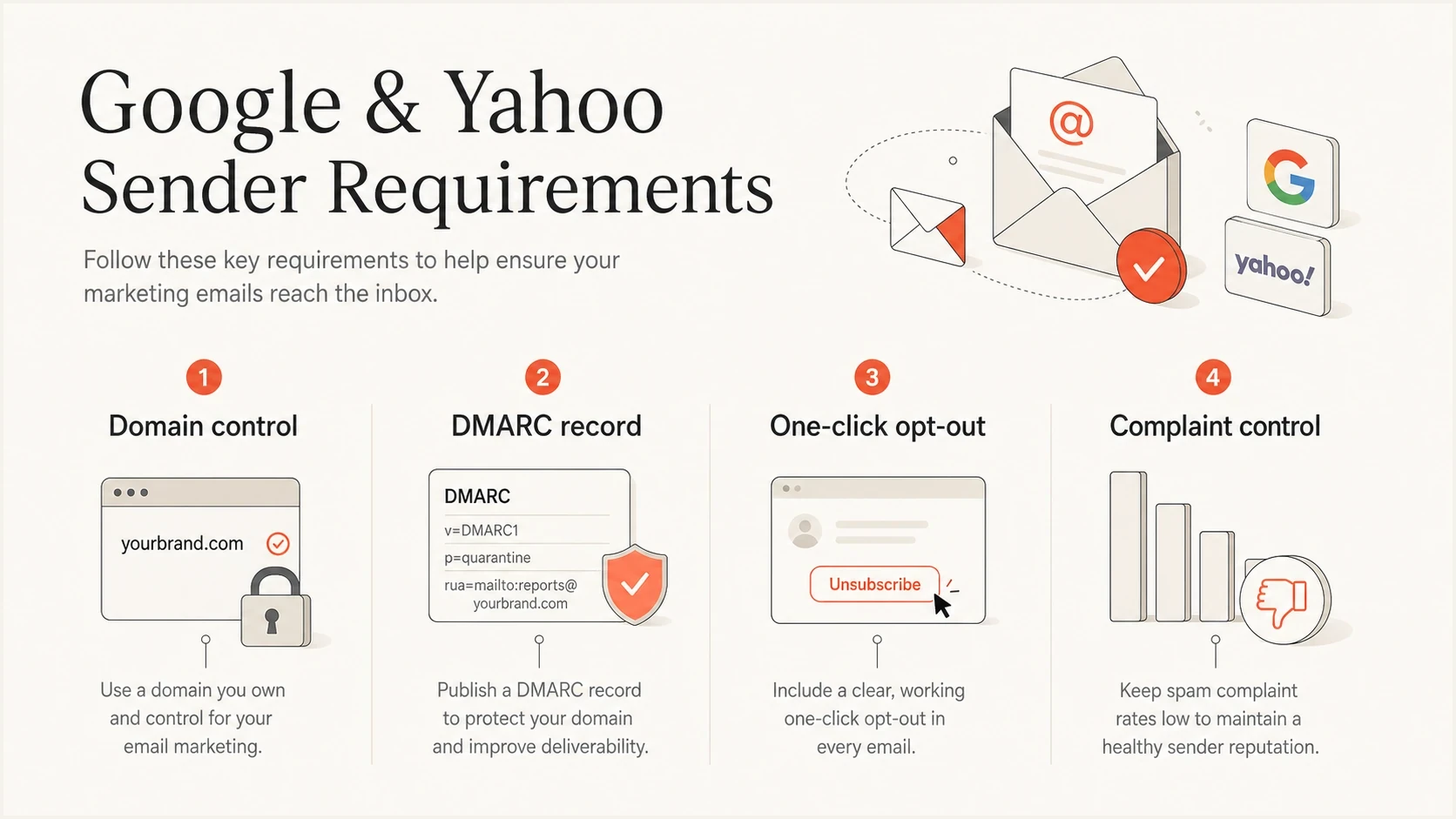
Google and Yahoo email requirements: domain control, DMARC, one-click unsubscribe, and spam complaints
For a marketer, the most visible change is the end of casual sending with consumer mailbox domains. If a local shop, nonprofit, creator, or sales team sends a campaign as jane@gmail.com through a third-party platform, that message breaks the trust model. The fix is not complicated: use a domain the organization controls, authenticate it, and keep that domain separate enough to measure and protect reputation.
For deeper detail on the operational rule set, the Gmail sending rules explain the compliance work in a more focused way.
Who counts as a bulk sender
Gmail classifies a sender as bulk when the same primary domain sends close to 5,000 messages or more to personal Gmail accounts in a 24-hour period. Mail from example.com and news.example.com contributes to the same domain total, including marketing and transactional messages across sending platforms. Once Gmail assigns bulk-sender status, reducing volume later does not remove it.
- Count messages, not unique recipients: Repeated messages to the same Gmail recipient count separately, so a smaller list can cross the threshold when a campaign sends more than once in a day.
- Aggregate the primary domain and its subdomains: Splitting traffic across subdomains does not avoid Gmail's primary-domain count.
- Use the right recipient scope: The Gmail threshold concerns personal gmail.com and googlemail.com accounts, not inbound mail to managed Google Workspace accounts.
- Do not reuse Gmail's number for Yahoo: Yahoo describes bulk senders by significant volume and does not publish the same 5,000-message cutoff. Its requirements also cover AOL and other consumer domains hosted by Yahoo Mail; Yahoo Japan operates separately.
Smaller senders still need the foundation
Gmail requires every sender to use SPF or DKIM, valid forward and reverse DNS, TLS, valid message formatting, and low complaint rates. Publishing SPF, DKIM, and DMARC before a growth spike avoids an emergency DNS change when the domain crosses the bulk threshold.
Why marketers feel the impact
The biggest impact is operational, not theoretical. The people building campaigns now need cleaner coordination with whoever controls DNS, the ESP account, the domain portfolio, consent data, and compliance workflows. This adds work, but it also removes ambiguity. When a campaign fails because the From domain has no DMARC record, the problem is visible and fixable.
Before 2024
- Identity: Some senders used a consumer mailbox address in the campaign From field.
- Authentication: Many teams treated SPF, DKIM, and DMARC as background IT work.
- Unsubscribe: Visible links existed, but one-click header support was inconsistent.
After 2024
- Identity: Campaigns need a brand-owned domain in the visible From field.
- Authentication: DMARC is a launch requirement, not a cleanup task after delivery drops.
- Unsubscribe: Promotional mail needs a clean one-click path and suppression within 48 hours.
This is why the change hits marketers even when the DNS work sits with someone else. If your signup sources are weak, your reactivation campaigns are too broad, or your unsubscribe process is slow, authentication alone will not keep the program healthy. Authentication gets you through the door. Recipient engagement and complaints decide what happens after that.
Complaint rate operating targets
Google says to keep the reported spam rate below 0.1% and prevent it from ever reaching 0.3% or higher.
Target
Under 0.1%
Gmail's recommended operating target; review alongside delivery data.
Watch closely
0.1% to below 0.3%
Audit targeting, frequency, and old segments.
High risk
0.3% or higher
Pause risky campaigns and repair consent data.
Authentication work marketers need
The minimum technical foundation is clear. A bulk sender needs SPF and DKIM to pass, plus DMARC on the sending domain. DMARC passes when at least one passing identity matches the visible From domain. SPF checks the envelope sender domain, usually shown in Return-Path; DKIM checks the signing domain in d=. Relaxed DMARC matching allows the same organizational domain, while strict matching requires an exact domain match. Check the exact domain used in the campaign From header first because DMARC evaluation starts there.
Alternative DMARC policies, publish only onedns
v=DMARC1; p=none; rua=mailto:dmarc-reports@example.com
v=DMARC1; p=quarantine; rua=mailto:dmarc-reports@example.com
v=DMARC1; p=reject; rua=mailto:dmarc-reports@example.com
These are alternative values for one TXT record at _dmarc.example.com, not three records to publish together. Replace the example reporting address with your reporting destination. A stricter policy is appropriate when legitimate mail already passes. Before publishing enforcement, identify every legitimate sender, especially billing systems and internal apps that send with the same domain.
Subdomains are usually covered
If mail uses news.example.com in the From header, DMARC first checks _dmarc.news.example.com. Without a valid record there, it looks for an applicable inherited policy. RFC 9989 specifies a DNS tree walk for this discovery; verify the inherited policy rather than assume a direct lookup at the registered domain. Add a subdomain DMARC record when you need separate reporting or a different policy.
Suped DMARC dashboard showing email volume, authentication health, and source breakdown
Suped's product converts aggregate DMARC reports into sending sources, alignment results, and specific issues. A marketing team can identify an approved platform that fails authentication, assign the DNS or platform fix to its owner, and confirm that the source passes before moving the domain toward enforcement.
If you already have reporting turned on, use DMARC monitoring to separate approved senders, unknown senders, forwarding noise, and real abuse before moving toward stronger enforcement.
A practical audit sequence
Start with the domain and work outward. This keeps the audit grounded in what Gmail and Yahoo actually evaluate, rather than a generic deliverability checklist. The order matters because a polished campaign still fails if the From domain cannot authenticate, and a technically valid campaign still struggles if it drives complaints.
- Inventory: List every domain and subdomain used in marketing, lifecycle, sales, support, and transactional email.
- DNS: Confirm a valid DMARC policy covers each From domain and that each bulk sending platform passes both SPF and DKIM. Gmail requires DKIM keys of at least 1024 bits and recommends 2048 bits.
- Matching: Send a real campaign test and confirm DMARC passes for the visible From domain.
- Infrastructure: Verify TLS, matching forward and reverse DNS for sending IPs, and valid RFC 5322 message formatting. Ask the ESP to confirm server settings it controls.
- Unsubscribe: Check that marketing messages include RFC 8058 one-click headers, visible unsubscribe text, and suppression within 48 hours.
- Complaints: Use confirmed opt-in, remove hard bounces, and cut purchased data and stale segments that create complaint spikes. Increase sending volume gradually rather than launching sudden large sends.
Email tester
Send a real email to this address. Suped shows a results button when the test is ready.
?/43tests passed
After DNS checks, send a message through the email tester and inspect the actual authentication result. A DNS record can look right while the real message still fails because the platform is using a different bounce domain, DKIM selector, or From domain than expected.
For a broader DNS review before sending, run a domain health check and compare the result with your current sender inventory. Run this before campaign launch because it catches missing DMARC, broken SPF syntax, missing DKIM records, and domain-level gaps in one pass.
One-click unsubscribe headerstext
List-Unsubscribe: <mailto:u@example.com>, <https://example.com/u/abc>
List-Unsubscribe-Post: List-Unsubscribe=One-Click
For Gmail, one-click unsubscribe needs an HTTPS URL that accepts the RFC 8058 POST request. A mailto option or preference-page link does not replace it. The endpoint must unsubscribe the recipient without a login or confirmation step, and a valid DKIM signature must cover both unsubscribe headers. These are requirements of RFC 8058. Keep a clearly visible unsubscribe link in the body and process requests within 48 hours. Yahoo's sender requirements also accept a functioning mailto-based list-unsubscribe header, but RFC 8058 meets both providers' requirements. Gmail's unsubscribe button is subject to eligibility checks, so its absence alone does not prove your headers are invalid.
Use Google's sender guidelines to verify authentication, DKIM key length, and transport settings against the real message.
Common edge cases
The confusing cases are predictable. Most come down to ownership: who owns the visible From domain, who controls DNS, who can suppress unsubscribed recipients, and who can stop a sending source that fails authentication.
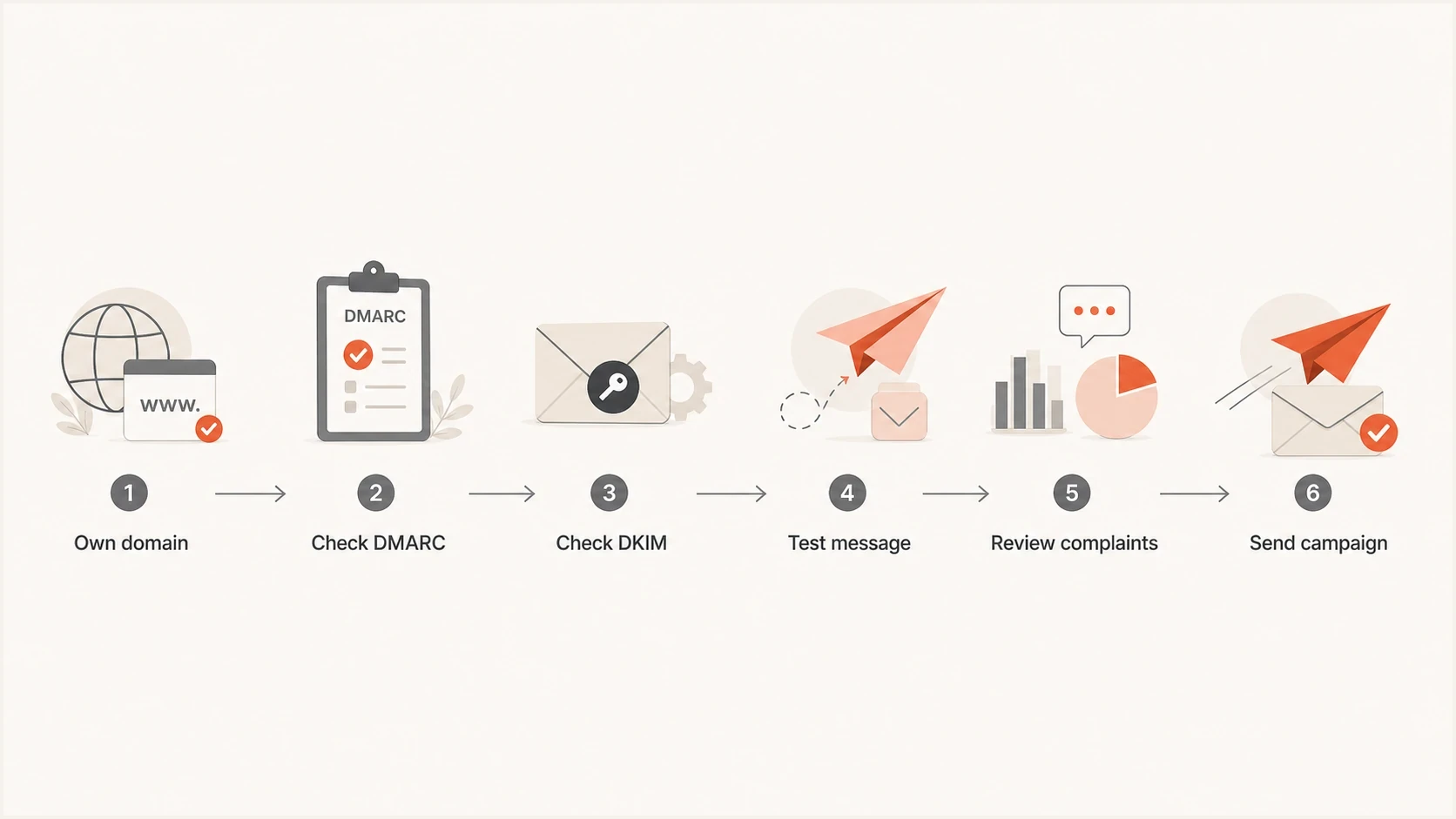
Email sender compliance checks for DMARC, DKIM, test messages, and spam complaints
Do not send campaigns as Gmail or Yahoo
If a user enters a Gmail or Yahoo address as the campaign From address, the platform should require an authenticated brand or platform domain before sending. Put the personal address in Reply-To if replies should reach that mailbox. Adding a Sender header alone does not change the From domain that DMARC evaluates.
ESPs can help, but they cannot fully fix a customer's domain posture without customer action. They can add warnings, require domain verification, sign with DKIM, publish clear DNS instructions, prevent consumer mailbox From addresses, and suppress unsubscribes quickly. The customer still needs access to DNS, approval to change the From domain, and a list strategy that does not create complaints.
Gmail and Yahoo exclude pure transactional messages, such as password resets and reservation confirmations, from their one-click unsubscribe requirements. Their authentication requirements still apply, and transactional volume counts toward Gmail's bulk threshold. Keep promotional content out of transactional messages; mixed lifecycle campaigns need marketing unsubscribe controls. The List-Unsubscribe requirements are worth reviewing before separating transactional and promotional programs.
Blocklist and blacklist status is not the headline rule, but it belongs in the same operating review. If your sending IP or domain appears on a blocklist (blacklist), investigate before blaming Gmail or Yahoo's rule change. Authentication proves identity, but reputation still affects how receivers treat the mail. Suped's blocklist monitoring helps teams watch domain and IP reputation alongside authentication health.
Measure compliance after each campaign
Compare provider-reported spam complaints with your ESP's delivery data instead of relying on open rate alone. Gmail's spam rate concerns DKIM-authenticated messages delivered to engaged recipients' inboxes and then reported as spam, so it differs from an ESP rate based on all mail sent. Yahoo also calculates complaints against inbox-delivered mail.
- Review daily complaint rates: Keep Gmail below 0.1% as the operating target and both providers below 0.3%. Segment by campaign and signup source to locate complaint spikes.
- Read delivery errors: Separate temporary 4xx deferrals from permanent 5xx rejections, and retain the provider's reason. Fix authentication or infrastructure failures before repeating the campaign.
- Suppress complaints promptly: Confirm that your ESP processes available Yahoo complaint feedback and removes those recipients from marketing sends.
- Treat missing data carefully: Low sending volume limits Gmail reporting, and a low complaint rate does not prove inbox placement when messages are already going to spam.
See Gmail's reporting guidance for metric definitions and reporting limits. Recheck after remediation; provider data is delayed. Suped's DMARC reporting helps confirm that an approved source passes authentication, but aggregate DMARC reports do not measure spam complaints or inbox placement.
How to prioritize the work
Prioritize fixes by delivery risk and blast radius. Fix a missing DMARC record or consumer From address on the main marketing domain before cosmetic changes, and treat a broken unsubscribe processor as an immediate stop-send issue.
Once the foundation is stable, move DMARC enforcement in stages. Start with monitoring, confirm every approved source, then move a verified domain or subdomain to quarantine and later reject while checking reports after each change. Keep unresolved senders at monitoring until legitimate failures are fixed.
Do not rely on pct=25 or pct=50 for a gradual rollout. RFC 9989 makes the pct tag historic and replaces the older percentage-sampling mechanism. Stage enforcement by verified domains or subdomains instead; the revised standard does not establish that every receiver has changed its implementation.
The marketing team should own the sending policy even when DNS changes sit with IT. That means documenting which platforms can send, what domains they use, which campaigns require unsubscribe headers, who reviews complaint spikes, and who has authority to pause risky segments.
Views from the trenches
Best practices
Use brand-owned From domains, then verify DMARC results with real campaign test mail.
Keep DMARC at monitoring first, then raise enforcement after all senders are known.
Set complaint targets under 0.1% so a single bad segment does not hit the limit.
Common pitfalls
Assuming the ESP can fix customer-owned DNS without domain owner involvement or approval.
Letting small senders keep Gmail or Yahoo addresses in campaign From headers after warnings.
Treating p=none as failure when it is the minimum policy needed to start with reports.
Expert tips
Check _dmarc at the exact From domain, then verify the inherited policy for that sender.
Make platform warnings clear before launch so customer support is not overloaded.
Separate promotional and transactional streams when unsubscribe rules differ across teams.
Marketer view
Marketer from Email Geeks says public guidance changed after the first announcement, so senders should review current requirements instead of relying on early summaries.
2024-02-08 - Email Geeks
Marketer view
Marketer from Email Geeks says the DMARC policy requirement and Gmail's own enforcement for gmail.com From addresses are separate issues that many senders confuse.
2024-02-12 - Email Geeks



