How likely is Gmail to enforce the <0.3% spam rate limit within the next year?

Updated on 17 Oct 2026: We clarified Gmail's spam-rate enforcement and added practical one-click unsubscribe checks.
Gmail has already increased enforcement. Since November 2025, non-compliant traffic can face temporary rejection, permanent rejection, spam placement, or other disruption. For a user-reported spam rate above 0.3%, Google's current enforcement table says delivery support or mitigations are unavailable. It does not say every message above that rate receives an automatic SMTP rejection.
That distinction matters. Gmail treats complaint-rate impact as graduated. Rates above 0.1% already harm inbox delivery for bulk senders, and 0.3% or higher has a greater negative impact. The business risk starts before a new error message appears.
- Current status: Gmail's increased enforcement is active, so this is no longer a next-year policy bet.
- Spam-rate consequence: Bulk senders above 0.3% are ineligible for delivery mitigation.
- SMTP interpretation: Google does not document an automatic universal rejection triggered by the spam rate alone.
- Operating target: Keep Gmail complaints below 0.1% and avoid ever reaching 0.3%.
Is Gmail already enforcing the 0.3% limit?
Yes, Gmail is enforcing its sender requirements. The current sender guidelines tell senders to keep the Postmaster Tools spam rate below 0.1% and avoid reaching 0.3%. The Gmail FAQ says enforcement is gradual and progressive, with disruption that includes temporary and permanent rejection.
The threshold-specific consequence needs careful wording. A bulk sender remains ineligible for mitigation while its user-reported spam rate is above 0.3%. Gmail also says the effect on delivery is graduated. The published guidance does not map 0.3% by itself to a universal hard cutoff.
Gmail complaint risk bands
A practical reading of Gmail's published user-reported spam-rate guidance.
Recommended range
Below 0.1%
Below Google's recommended spam-rate target; other signals still affect inbox delivery.
Watch
0.1% to below 0.3%
Inbox delivery can already be affected, so investigate the complaint source.
Policy danger
0.3% or higher
The rate has reached the level Google says to avoid, with mitigation unavailable above 0.3%.
What changed in November 2025
The bulk-sender requirements began in February 2024. Gmail began ramping up enforcement on non-compliant traffic in November 2025. Its FAQ says messages that fail sender requirements can experience disruption, including temporary and permanent rejection. Enforcement for bulk senders is gradual and progressive rather than one simultaneous cutoff.
The rules apply to mail sent to personal Gmail accounts ending in @gmail.com or @googlemail.com. Gmail counts messages across the same primary domain when deciding whether a sender is close to 5,000 messages in 24 hours. Once Gmail classifies a domain as a bulk sender, that status does not expire. This bulk-sender classification threshold is separate from the daily sending limits on Gmail or Google Workspace accounts.
|
|
|
|---|---|---|
Spam rate above 0.3% | Mitigation unavailable | No delivery escalation while out of compliance |
SPF, DKIM, alignment, DNS, TLS, or RFC failure | Temporary or permanent failure, or spam foldering | Fix the stated technical failure before increasing volume |
DMARC record missing | Mitigation unavailable | Bulk senders need at least p=none |
One-click unsubscribe missing | Mitigation unavailable | Required for marketing and promotional messages |
Unsubscribe not honored within 48 hours | Mitigation unavailable | Processing speed is part of compliance |
Google publishes different consequences for different sender requirement failures.
Why the 0.3% distinction matters
The official table ties direct failure codes to several technical requirements, while it ties a spam rate above 0.3% to mitigation ineligibility. That does not make the complaint threshold harmless. Gmail separately states that higher complaint rates have a graduated negative effect on inbox delivery.
What Gmail enforcement means
The common mistake is treating enforcement as only SMTP rejection. Gmail can enforce sender requirements in several ways. Some are obvious in logs, while others appear only after comparing Gmail performance with other mailbox providers and the sender's historical baseline.
Visible enforcement
- SMTP rejection: Mail is refused during delivery with a temporary or permanent failure code.
- Deferral: Gmail slows delivery, which can hurt time-sensitive campaigns.
- Compliance status: Postmaster data identifies sender requirement failures.
- Mitigation ineligibility: Gmail will not provide delivery mitigation while the sender remains out of compliance.
Less visible enforcement
- Spam placement: More mail reaches spam even when bounce rates stay low.
- Reputation drag: High complaint rates can weaken sender reputation and increase filtering.
- Segment sensitivity: Compare inbox placement for recent engagers with placement for inactive recipients.
- Recovery delay: Classification can take time to improve after complaint rates fall.
A sender above 0.3% can still see normal-looking clicks during some periods. The affected recipients are not necessarily the recipients who click. Engaged users can still receive mail while colder users are filtered, and the damage can take time to appear in aggregate campaign metrics.
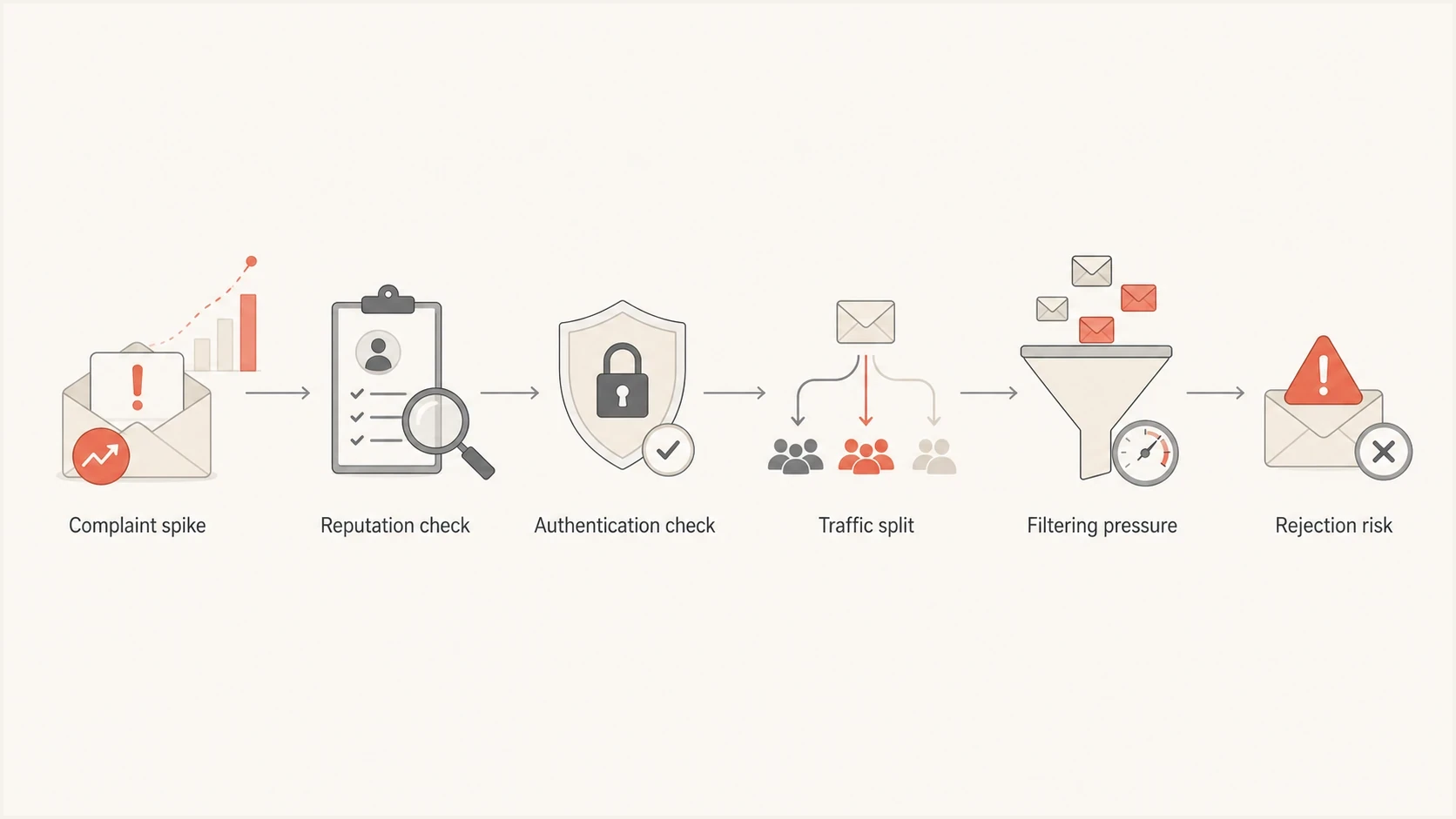
Gmail spam complaint risk flowchart showing authentication checks, filtering pressure, and rejection risk.
How Gmail measures the spam rate
Postmaster Tools calculates the user-reported spam rate daily. The metric is the percentage of DKIM-authenticated messages delivered to engaged recipients' inboxes that recipients then mark as spam. Messages first sent to spam and then marked "not spam" also count as inbox-delivered. Messages that stay in spam are excluded from the inbox-delivered denominator, so a very low or suddenly missing rate can coexist with heavy automatic spam placement.
For example, 3 complaints among 1,000 qualifying inbox-delivered messages is 0.3%. Dividing those complaints by 10,000 messages sent would give 0.03%, but that uses a different denominator. Assess daily spikes even when the monthly average looks low.
|
|
|
|---|---|---|
Spam rate | Manual complaints after inbox delivery | Can look low after automatic spam placement |
Click rate | Engagement among delivered users | Misses filtered mail and can include automated clicks |
Bounce rate | Hard delivery failures | Misses spam placement |
Open rate | A rough visibility trend | Google does not track it and privacy controls distort it |
Compliance status | Sender requirement failures for the primary domain | Uses a rolling multi-day average; passing does not guarantee inbox placement |
Use this table to decide which signals deserve weight in a Gmail enforcement assessment.
As Google's migration guidance explains, Postmaster Tools v2 omits the legacy Domain and IP Reputation dashboards. Use its Spam rate, Compliance status, Authentication, and Delivery errors dashboards for diagnosis.
Validate stable clicks by checking whether the rate uses sent, delivered, or accepted mail as its denominator. Remove repeated clicks, security scanner activity, bot-like clusters, and automated link inspection. Then split the data by Gmail recipient age, last engagement date, campaign type, acquisition source, and send frequency.
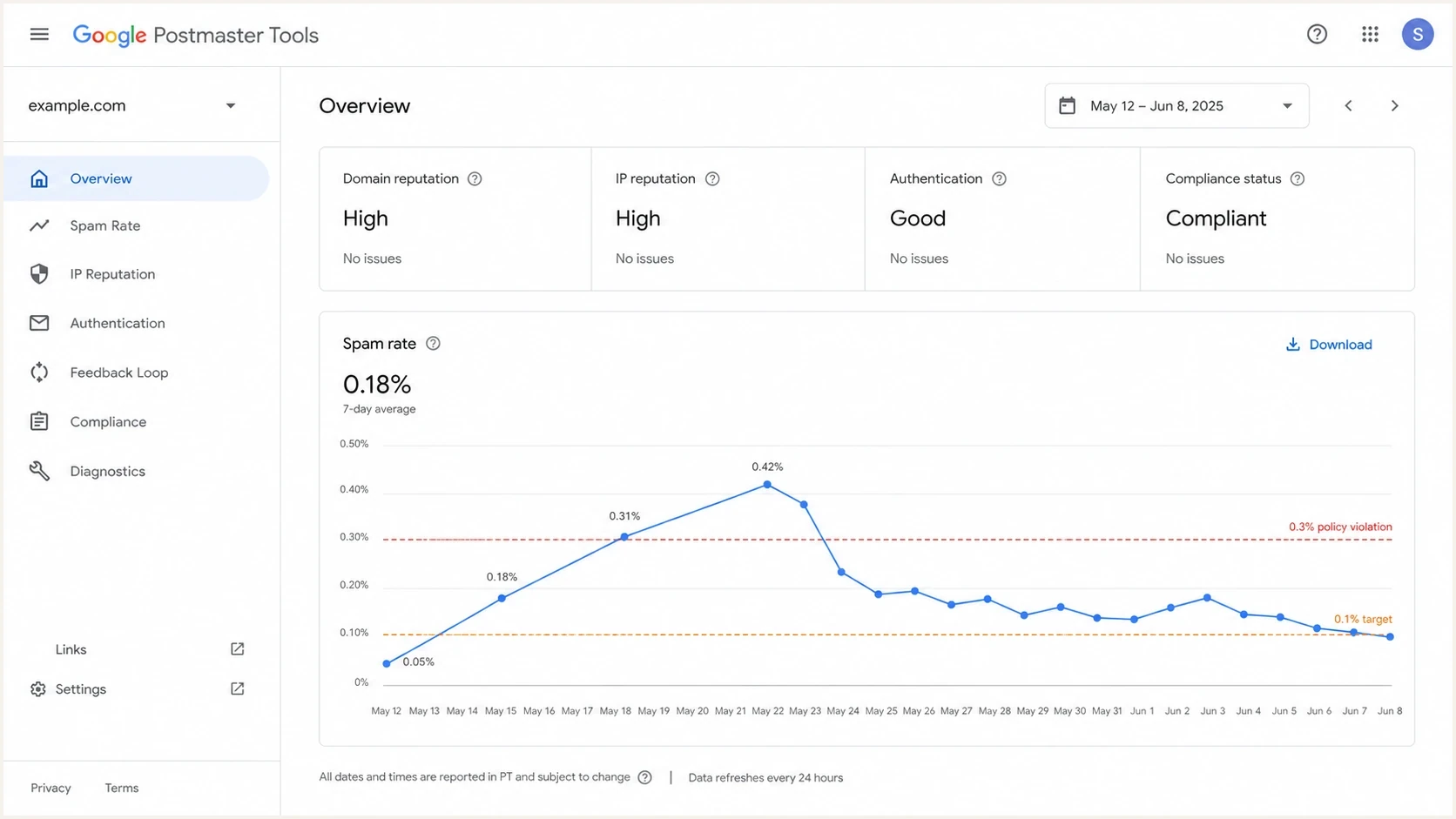
Google Postmaster Tools spam rate chart comparing the 0.1% target with the 0.3% threshold.
How to read low or missing data
No Postmaster data does not mean the sender is clear. Google can omit dashboard data when daily volume is too low. A falling spam rate can also mean fewer messages are reaching inboxes where users can report them.
Postmaster data typically updates within 24 hours, but delays occur. Match campaign logs to UTC, the timezone Postmaster Tools uses. Compliance status uses a rolling multi-day average; after fixing a requirement, Google says to check that status again after seven days. See Google's dashboard documentation.
How to assess current Gmail risk
Do not reduce the assessment to one probability. The current question is which enforcement outcome is already visible and which control has failed. Spam placement, rate limiting, temporary rejection, permanent rejection, and mitigation ineligibility have different evidence and business effects.
- Higher risk: The daily rate reaches 0.3% or higher; repeated spikes increase concern.
- Higher risk: SPF, DKIM, DMARC, alignment, TLS, or DNS requirements are failing.
- Higher risk: Marketing mail lacks one-click unsubscribe or opt-outs take longer than 48 hours.
- Lower immediate risk: The spike is isolated, risky traffic is paused, and the root cause is fixed.
Separate Gmail-specific symptoms from the rest of the mail program. If Gmail complaints are high while other mailbox providers remain stable, focus on personal Gmail segmentation, cadence, and permission quality. If Gmail is one part of a broader decline, inspect the full deliverability and authentication program.
Mitigation recovery rule
To regain mitigation eligibility, bulk senders must meet all sender requirements and keep their daily user-reported spam rate below 0.3% for seven consecutive days. Inbox classification can take longer to improve.
What to fix first
Start by finding why recipients are pressing spam. Common causes include consent mismatch, poor targeting, frequency fatigue, unclear sender identity, and a broken unsubscribe path.
Email tester
Send a real email to this address. Suped shows a results button when the test is ready.
?/43tests passed
Send a real message through Suped's email tester, then compare the result with Gmail-specific performance and Postmaster data. Use the result to inspect authentication and unsubscribe headers alongside Gmail's complaint and delivery data.
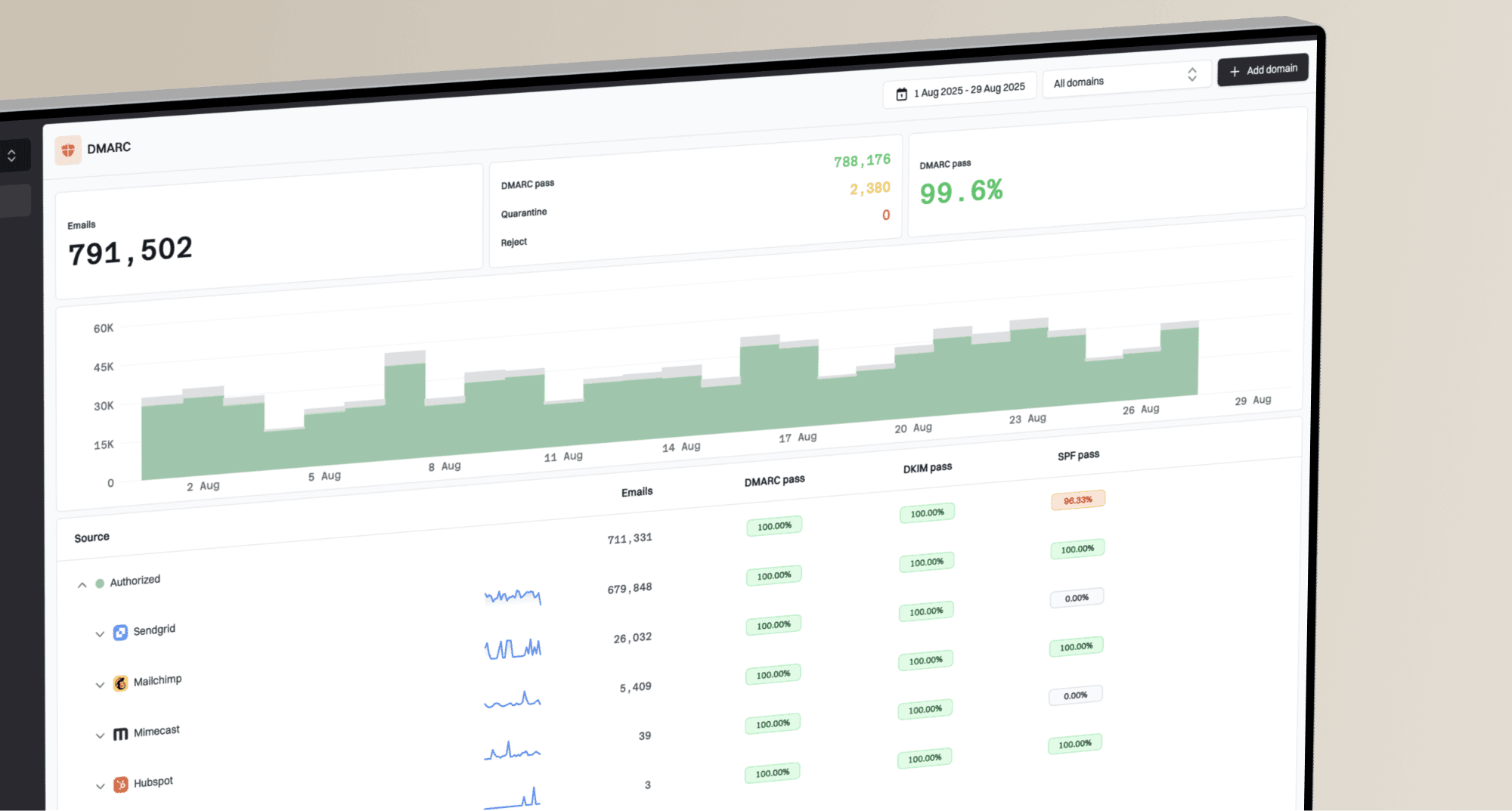
Next, use Suped's DMARC monitoring to identify sending sources and inspect SPF, DKIM, and DMARC results. Compare those authentication findings with Google's complaint data; DMARC aggregate reports do not contain Gmail user spam complaints.
Issues page showing top issues, verified sources, unverified sources, and authentication pass rates
Triage by source. Marketing mail, lifecycle mail, sales automation, product notifications, and transactional mail should not be judged as one pool. If one source causes complaints, suppress or slow that source while keeping essential mail on cleaner streams.
For campaign-level diagnosis, add a consistent Feedback-ID header before DKIM signing and verify the signing domain in Postmaster Tools. Use Gmail's Feedback Loop documentation to set up complaint reporting by campaign or mail stream. Reporting volume thresholds apply, so missing campaign data does not prove there were no complaints.
Illustrative authentication recordsDNS
_dmarc.example.com. TXT "v=DMARC1; p=none; rua=mailto:dmarc@example.com"
example.com. TXT "v=spf1 include:send.example.net -all"
selector1._domainkey.example.com. TXT "v=DKIM1; k=rsa; p=BASE64KEY"
Replace the example SPF include with your actual sending provider's configuration and BASE64KEY with its generated DKIM public key. For bulk senders, verify that SPF and DKIM both pass and publish DMARC with p=none or a stronger policy. For direct mail, a passing SPF or DKIM result must also satisfy DMARC alignment with the visible From domain.
Check one-click unsubscribe before the next send
Bulk senders' marketing and promotional messages need one-click unsubscribe as well as a visible unsubscribe link in the body, under Gmail's sender guidelines. A footer link or mailto header alone is insufficient. Transactional messages, such as password resets, are excluded from the one-click requirement.
Illustrative one-click unsubscribe headerstext
List-Unsubscribe: <https://example.com/unsubscribe/opaquepart>
List-Unsubscribe-Post: List-Unsubscribe=One-Click
Under RFC 8058, the HTTPS endpoint must process a POST containing List-Unsubscribe=One-Click without requiring login or a confirmation page. A valid DKIM signature must cover both unsubscribe headers. Test a controlled subscription through the production sending path and confirm that the recipient is suppressed from that mailing list within 48 hours.
A Gmail spam rate response plan
A useful risk plan has a threshold, a diagnostic process, and a decision rule for send reduction. This keeps the assessment tied to controls instead of an unsupported forecast.
|
|
|
|---|---|---|
Spam rate | At or above 0.3% | Pause risky segments |
Gmail trend | Daily rate reaches 0.1% or rises sharply | Reduce frequency |
Authentication | Any failure | Fix before scaling |
Gmail delivery | More deferrals or spam-placement reports | Review SMTP responses and recent engagement |
Blocklist or blacklist | Listed | Investigate the source |
This keeps the discussion concrete without treating Gmail as one public enforcement switch.
Run a domain health checker across every sending domain, including vendor subdomains. Keep blocklist monitoring active for sending domains and IPs. A blocklist (blacklist) event is separate from a Gmail complaint issue, but it can identify compromised traffic or a sending source that needs isolation.
The recommendation to put in writing
Treat any daily Gmail spam rate of 0.3% or higher as out of tolerance. Pause the complaint-heavy segment and investigate even if clicks are stable. Google documents mitigation ineligibility above 0.3%; it does not publish an automatic rejection rule based only on that rate.
Views from the trenches
Best practices
Define enforcement outcomes before giving clients a Gmail risk percentage estimate.
Keep Gmail complaint rates below 0.1% so 0.3% is never treated as the goal line.
Audit authentication and unsubscribe paths before blaming Gmail policy changes alone.
Common pitfalls
Using click rate alone can hide spam foldering across colder Gmail audiences over time.
Treating SMTP rejection as the only enforcement signal misses reputation loss early.
Waiting for a public cutoff date leaves no buffer when Gmail tightens controls further.
Expert tips
Segment Gmail recipients by engagement age before deciding whether to keep sending.
Investigate repeat complaints by campaign source, not only by sending domain alone.
Document the risk as current exposure, not only a future Gmail policy scenario today.
Marketer view
Marketer from Email Geeks says Gmail already appears to enforce spam complaints, even when every non-compliant sender is not blocked.
2025-08-25 - Email Geeks
Expert view
Expert from Email Geeks says enforcement does not have to mean SMTP rejection because spam foldering and reputation loss also count.
2025-08-25 - Email Geeks