Are follow-up surveys considered transactional emails and what are the best practices?

Updated on 26 Jul 2026: We updated this guidance to separate transactional status from commercial classification and added current jurisdiction and one-click unsubscribe guidance.
Usually, no. A follow-up survey does not become transactional just because it follows a purchase, appointment, delivery, support ticket, or onboarding step. The safer operational default is to route optional surveys through a commercial or subscription stream unless legal review confirms another classification. That is a risk-control choice, not a universal legal rule, because a genuine research message with no advertising or solicitation can fall outside commercial email rules in some jurisdictions.
A narrow transactional case exists when the message asks something like, "Did your order arrive?" or "Is the replacement part working?" A broader "Tell us how we did," NPS, or satisfaction survey is not automatically transactional. If the email promotes products, requests a public review or referral, offers a discount, asks for a testimonial, or feeds future direct marketing, handle it as commercial.
- Classification rule: Decide transactional status separately from commercial or research status.
- Default routing: Keep optional surveys in a commercial or subscription stream unless a documented exception applies.
- Deliverability rule: Do not use a transactional stream to force unwanted feedback mail through.
How CAN-SPAM classifies the message
In the US, the key phrase is primary purpose. CAN-SPAM has a defined bucket for transactional or relationship messages, including messages that facilitate, complete, or confirm a transaction the recipient already agreed to. It also recognises commercial content and other content. A separate commercial versus transactional explainer is useful background, but legal sign-off should come from counsel that knows the exact copy, timing, audience, and jurisdiction.
A survey can sit close to a transaction without fitting one of CAN-SPAM's five narrow transactional categories. A delivery or support-status question has a stronger argument when it facilitates or confirms the agreed transaction. A pure rating or NPS request is not automatically transactional or commercial. Promotional copy, an incentive, a public review request, or collection for future marketing creates a much stronger commercial classification.
Narrow transactional claim
The narrow argument is that the email confirms the specific transaction the recipient already entered into. That argument is stronger for "Did your order arrive?" than for "Rate our service." Keep the subject line accurate and put the transactional content first. Ratings, reviews, referrals, testimonials, discounts, and brand promotion weaken the claim.
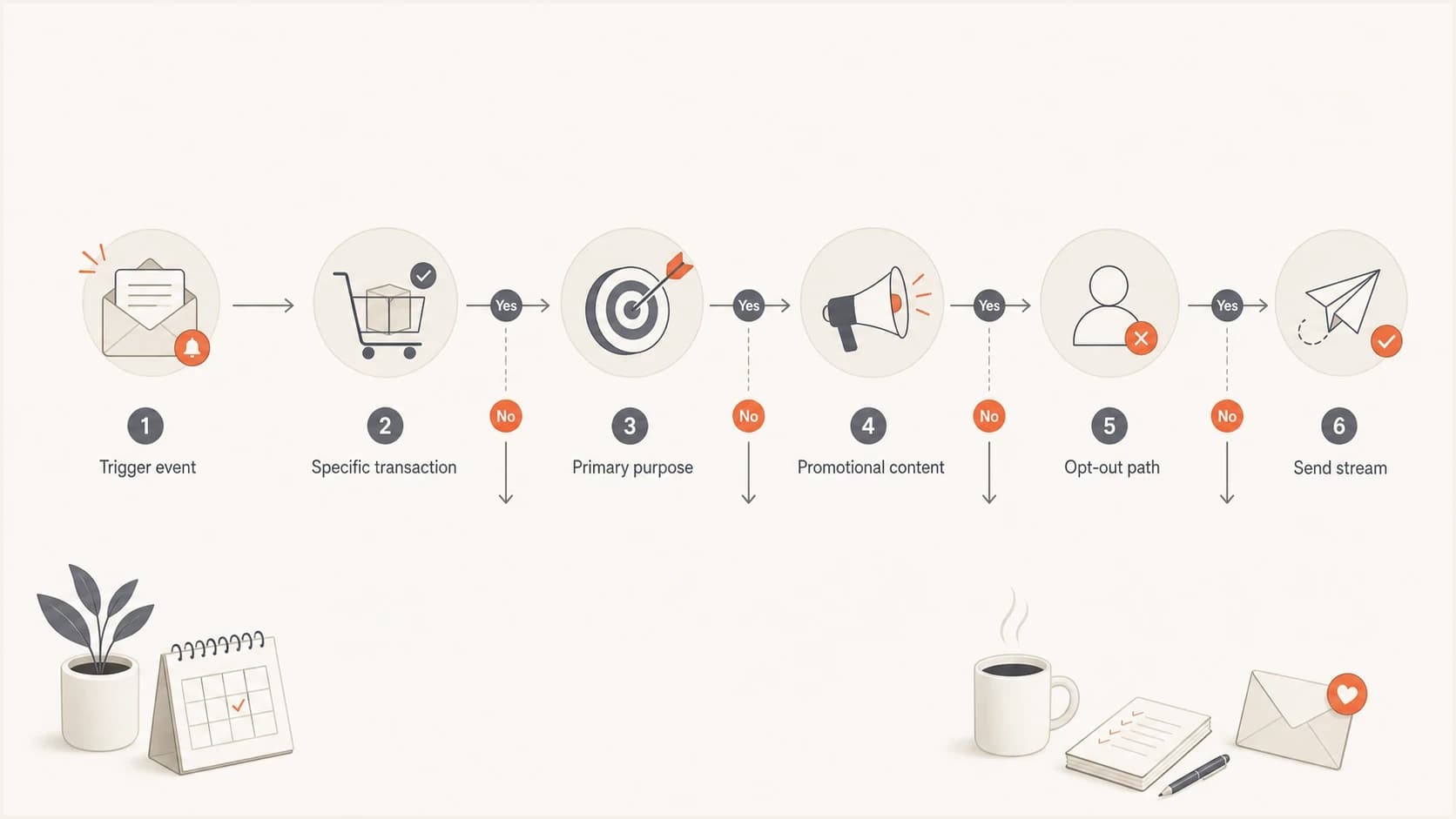
Decision flowchart for classifying a follow-up survey as transactional or commercial email.
Examples that change the answer
Classify surveys by what the recipient sees and why the message was sent, not only by what the sender does with the data later. Internal use does not automatically make the email transactional. A message can feed a customer success process and still be optional research or commercial email.
|
|
|
|---|---|---|
Delivery check | Narrow case | Confirms receipt |
Support follow-up | Narrow case | Checks issue status |
NPS request | Not transactional | Research or commercial |
Public review request | Usually commercial | Supports promotion |
Discount survey | Commercial | Includes an offer |
Common US follow-up survey classifications
The delivery check and support follow-up examples still need careful copy. Keep the question tied to the transaction, put the transactional content first, and leave out product promotion. Route a pure research survey according to the law that applies to the recipient, then add an easy opt-out as an operational safeguard.
Survey risk bands
A practical way to judge how risky the transactional claim is.
Lower risk
Transaction check
One short message, specific order or ticket, clear help path.
Medium risk
Research request
Satisfaction or NPS feedback after a real interaction, with no offer.
Higher risk
Promotion
Review, referral, discount, testimonial, or repeated survey send.
Personalization is necessary, not enough
A personalized survey has a better transactional argument than a generic blast, but personalization alone does not decide the issue. Adding the recipient's name, product name, order number, or delivery date helps only when the actual purpose stays tied to that specific transaction.
The recipient's perception matters for deliverability even when the legal analysis is debatable. If recipients see a survey they never asked for, they can ignore it, unsubscribe, or complain. Complaint behavior is a real inbox signal and usually costs more than sending one less survey.
Closer to transactional
- Specific event: Names the exact order, appointment, ticket, delivery, or support case.
- Narrow purpose: Asks whether the thing was received, completed, fixed, or still broken.
- No promotion: Avoids review requests, referrals, coupons, cross-sell copy, and ratings.
Closer to marketing
- Generic audience: The same message goes to everyone after a lifecycle stage.
- Promotional request: Asks for public reviews, testimonials, referrals, or product preferences.
- Marketing use: Responses feed advertising, targeting, or product promotion.
Classification changes by jurisdiction
There is no global transactional label for survey email. Classify the message under the laws that apply to the sender and recipient, then keep a record of the purpose, audience, consent basis, copy, and suppression decision.
|
|
|
|---|---|---|
United States | Does it fit a narrow CAN-SPAM transactional category, advertise a product, or contain other content? | Apply the primary-purpose test. Commercial mail needs CAN-SPAM identification and opt-out handling. |
United Kingdom | Is it genuine market research, or does it promote something or collect details for future marketing? | Genuine research is not direct marketing. Promotion or future marketing use brings PECR and data protection duties into scope. |
Canada | Does the survey or invitation encourage the recipient to take part in commercial activity? | A non-commercial survey falls outside CASL. A commercial solicitation must meet CASL consent, identification, and unsubscribe rules. |
Australia | Does any part of the message offer, advertise, or promote goods or services? | A commercial electronic message needs consent, sender identification, contact details, and a functional unsubscribe. |
High-level survey email rules by jurisdiction
Operational policy can be stricter
A message can fall outside a local marketing statute and still generate complaints. A survey-specific opt-out, clear sender identity, low frequency, and separate stream reduce that risk without deciding the legal classification.
Best practices for survey consent and opt-outs
The practical default is to provide a way to opt out of future surveys, even when a genuine research message falls outside a local commercial email rule. That preference does not need to turn off receipts, security alerts, password resets, or essential account notices. It should turn off the optional feedback stream.
Segmented preferences are the cleanest option. A recipient can stop product surveys, review requests, NPS requests, and feedback emails while still receiving essential service messages. For a related treatment of operational mail, see the guidance on unsubscribe links in transactional emails.
For commercial survey mail, use RFC 8058 one-click unsubscribe headers where mailbox-provider rules apply. Gmail requires one-click unsubscribe for marketing and promotional messages sent by bulk senders to personal Gmail accounts, with requests honoured within 48 hours. Yahoo requires one-click unsubscribe for promotional and marketing messages. Keep these technical requirements separate from each jurisdiction's legal deadline.
- Consent check: Map consent and suppression by recipient jurisdiction. Do not send commercial surveys to people suppressed from marketing.
- Preference scope: Use wording such as "stop follow-up surveys" instead of "stop all email."
- Timing and frequency: Wait until the recipient has had time to use the product or service. Send one request and avoid reminder chains.
- Expectation setting: State why feedback is requested and how long it should take. Explain how responses will be used.
- Copy discipline: Keep transactional content first and remove offers, banners, public review asks, and cross-sell copy.
Narrow follow-up copy
Subject: Did your order arrive?

Hi Sam,

Your order 12345 was marked delivered today.
Was the item received and working as expected?

[Yes] [No, I need help]

Manage follow-up survey emails
Be precise with opt-out wording
If the unsubscribe text says the recipient will stop all emails, do not keep sending optional messages as if they only opted out of surveys. If you need a survey-only opt-out, say that clearly and make sure the suppression system enforces that category.
Delivery, authentication, and stream separation
A follow-up survey can damage the reputation of a transactional stream if recipients complain. Use separate subdomains or at least separate sending pools for optional feedback mail, especially when receipts, password resets, and security alerts share the same parent domain. This separate guide covers separate subdomains for transactional and marketing email.
Before a broad send, test a real message through the email tester. Check the visible copy, headers, SPF, DKIM, DMARC result, From domain, tracking domain, unsubscribe headers, and whether the message lands where expected.
Email tester
Send a real email to this address. Suped shows a results button when the test is ready.
?/43tests passed
Authentication does not decide whether a survey is transactional, but it does decide whether mailbox providers can trust the sender identity. Use DMARC monitoring to spot sources that fail authentication and a domain health checker to verify records before the campaign goes live.
Reputation checks matter too. If a survey stream drives complaints, the sending IP or domain can land on a blocklist or blacklist. Ongoing blocklist monitoring helps catch that before it spreads into core operational mail.
A practical launch checklist
A review should find a short path between the trigger event, the recipient benefit, and the suppression rule. If any of those are vague, route the email through the commercial or subscription stream while the classification is resolved.
- Classify first: Decide whether the email is transactional, commercial, other content, or mixed before copy approval.
- Ask narrowly: Tie the question to one order, ticket, booking, delivery, or service event.
- Make the ask clear: Use an accurate subject line, a recognisable From name, one call to action, and a realistic completion time. Test the survey on mobile.
- Suppress correctly: Respect marketing unsubscribes for commercial surveys and enforce survey-specific opt-outs across every sender.
- Minimise data: Collect only the response data needed and avoid exposing personal or order data in survey URLs.
- Separate streams: Protect receipts, resets, and security mail from survey complaints.
- Monitor response: Watch complaints, hard bounces, unsubscribes, authentication failures, and completion rate. Do not use opens as the sole engagement signal.
How Suped supports the workflow
Suped's product does not replace legal classification. It helps with the operational work after the classification decision: checking whether the sending domain is authenticated, whether SPF and DKIM pass, whether DMARC is enforced safely, and whether a survey stream is harming reputation.
Suped's product connects DMARC monitoring, SPF and DKIM checks, hosted DMARC, Hosted SPF, Hosted MTA-STS, real-time alerts, and blocklist (blacklist) monitoring. Use its reports to inventory survey senders, verify domain alignment, and separate authentication failures from complaint-driven reputation problems.
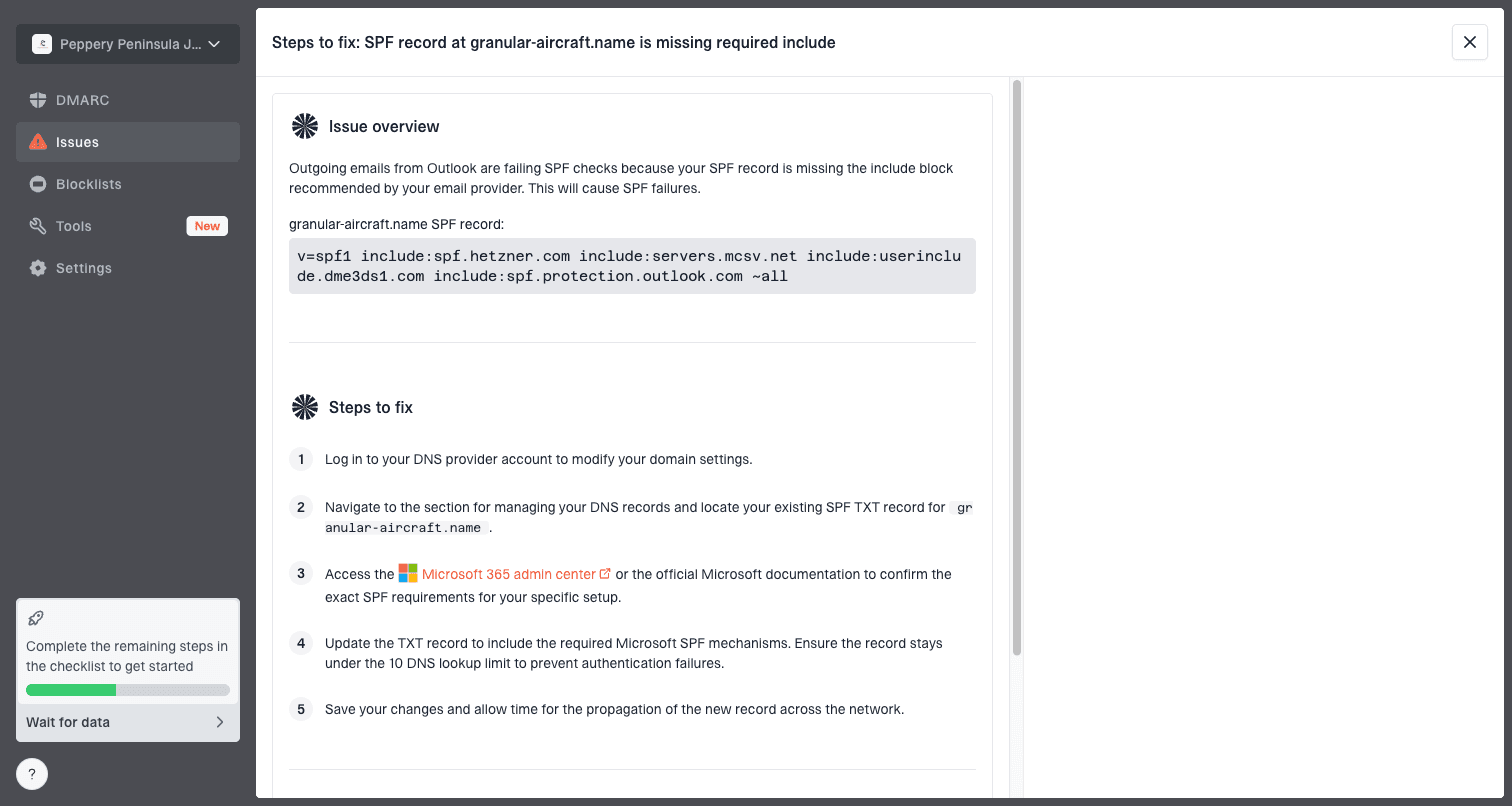
Issue steps to fix dialog showing the issue overview, tailored fix steps, and verification action
That matters when surveys share infrastructure with operational email. If a new feedback stream starts failing DKIM or creates authentication issues after a vendor change, the team needs to find the source quickly, fix DNS or vendor settings, and keep essential mail stable.
Views from the trenches
Best practices
Use segmented survey opt-outs so receipts and security notices keep working normally.
Tie each survey to one recent order, booking, delivery, ticket, or service event.
Ask counsel and your sending provider how they classify the exact survey copy first.
Common pitfalls
Calling every post-purchase survey transactional creates legal and inbox risk fast.
Broad unsubscribe wording can force wider suppression than the sender intended later.
Internal feedback use does not make an unwanted survey feel useful to the user inbox.
Expert tips
Remove review, referral, discount, testimonial, and NPS content from narrow emails.
Keep survey volume low because complaints can harm essential operational mail streams.
Document the trigger, audience, purpose, opt-out scope, and suppression handling.
Expert from Email Geeks says recipients should have a way to opt out of any nonessential mail, even when a sender believes the message has a transactional basis.
2022-07-15 - Email Geeks
Marketer from Email Geeks says a generic survey sent to everyone after a lifecycle event should be treated differently from a question tied to one specific purchase.
2022-07-15 - Email Geeks
Practical recommendation
Treat follow-up surveys as non-transactional unless they are narrowly needed to facilitate, complete, or confirm a specific transaction. Then decide separately whether the message is commercial, mixed, or genuine research under the law that applies. Public review requests, referrals, incentives, testimonials, and future marketing use belong in the commercial stream.
When counsel approves a transactional classification, keep the email short, tied to the exact event, free of promotion, and easy to stop at the survey category level. For other surveys, use the correct consent basis, a clear opt-out, and a separate sending stream.