
Why does DKIM fail for Outlook.com and Hotmail.com?

Published 4 Jun 2026
Updated 18 Oct 2026
13 min read
Summarize with

Updated on 18 Oct 2026: We updated this guide for Microsoft's enforced sender requirements and more precise DKIM troubleshooting.
DKIM fails for Outlook.com and Hotmail.com when Microsoft cannot verify a signature against the selected public key and canonicalized message. The common symptom is dkim=fail with a note such as signature did not verify or body hash did not verify. The reason text helps narrow whether to inspect DNS and the key, signed headers, or changes to the message body.
After reading the failure reason, validate the selector, public key, and syntax with Suped's DKIM checker. A DNS check confirms key publication, but verifying the signature requires the raw signed message. If the DNS record is valid, compare the message source before and after delivery. That comparison exposes MIME, encoding, footer, tracking, and attachment rewrites that a rendered inbox view hides.
Why DKIM fails at Outlook.com and Hotmail.com
DKIM fails at Outlook.com and Hotmail.com when signed content changes after signing or the signature cannot be verified with the published key. Start with encoding and MIME construction, especially when plain messages pass but messages with an attachment or embedded image fail. Quoted-printable wrapping, base64 conversion, footer injection, tracking changes, unsubscribe rewriting, or MIME boundary changes after signing break DKIM when they alter the canonicalized body. If the message bytes are stable, check the selector, public key, signed headers, and RFC formatting.
- Encoding: Quoted-printable, base64, 8bit conversion, and line wrapping can change the body hash.
- Rewrites: Footers, tracking links, open pixels, and unsubscribe text must be added before signing.
- Selector: A stale selector, wrong key, malformed DNS TXT record, or bad key split breaks verification.
- Message format: Malformed headers or MIME can produce a Microsoft-only failure even when another receiver accepts the message.
- Domain: The DKIM signing domain must meet DMARC alignment requirements for the visible From domain to provide a DKIM-based DMARC pass. A domain mismatch alone does not invalidate the DKIM signature.
Matching Outlook.com and Hotmail.com failures warrant a comparison of the delivered message, DNS key, and mail path. Record the exact error before assuming either a sender defect or a receiver problem; intermittent DNS lookup errors need different checks from repeatable body hash failures.
What dkim=fail means at Microsoft
The distinction between dkim=none and dkim=fail matters. None means Microsoft found no DKIM signature. Fail means a signature existed but verification failed. A missing selector or mismatched public key produces a different investigation from a body hash failure, so read the comment attached to the result before changing DNS or mail flow.
Also distinguish dkim=temperror from dkim=permerror: the first indicates a temporary verification problem, such as a DNS timeout; the second indicates an unrecoverable verification problem. RFC 8601 defines these result codes. If several DKIM signatures exist, inspect each signing domain and selector; one failed signature does not cancel another valid signature that meets DMARC alignment requirements.
Illustrative authentication result with unaligned SPFtext
Authentication-Results: mx.example.net;
 spf=pass smtp.mailfrom=relay.example.net;
 dkim=fail (body hash did not verify) header.d=example.com;
 dmarc=fail action=none header.from=example.com
In this example, SPF passes for relay.example.net, which does not meet DMARC alignment requirements for example.com. With no valid matching DKIM signature either, DMARC fails. If SPF instead passed for example.com, DMARC would pass despite the DKIM failure.
A January 2026 Microsoft Q&A report describes a useful split test: messages without attachments or embedded images pass at Outlook.com, while messages containing them fail. This is a reported symptom, not confirmation of a general Microsoft defect. Send controlled variants and compare the body portion of each delivered EML file.
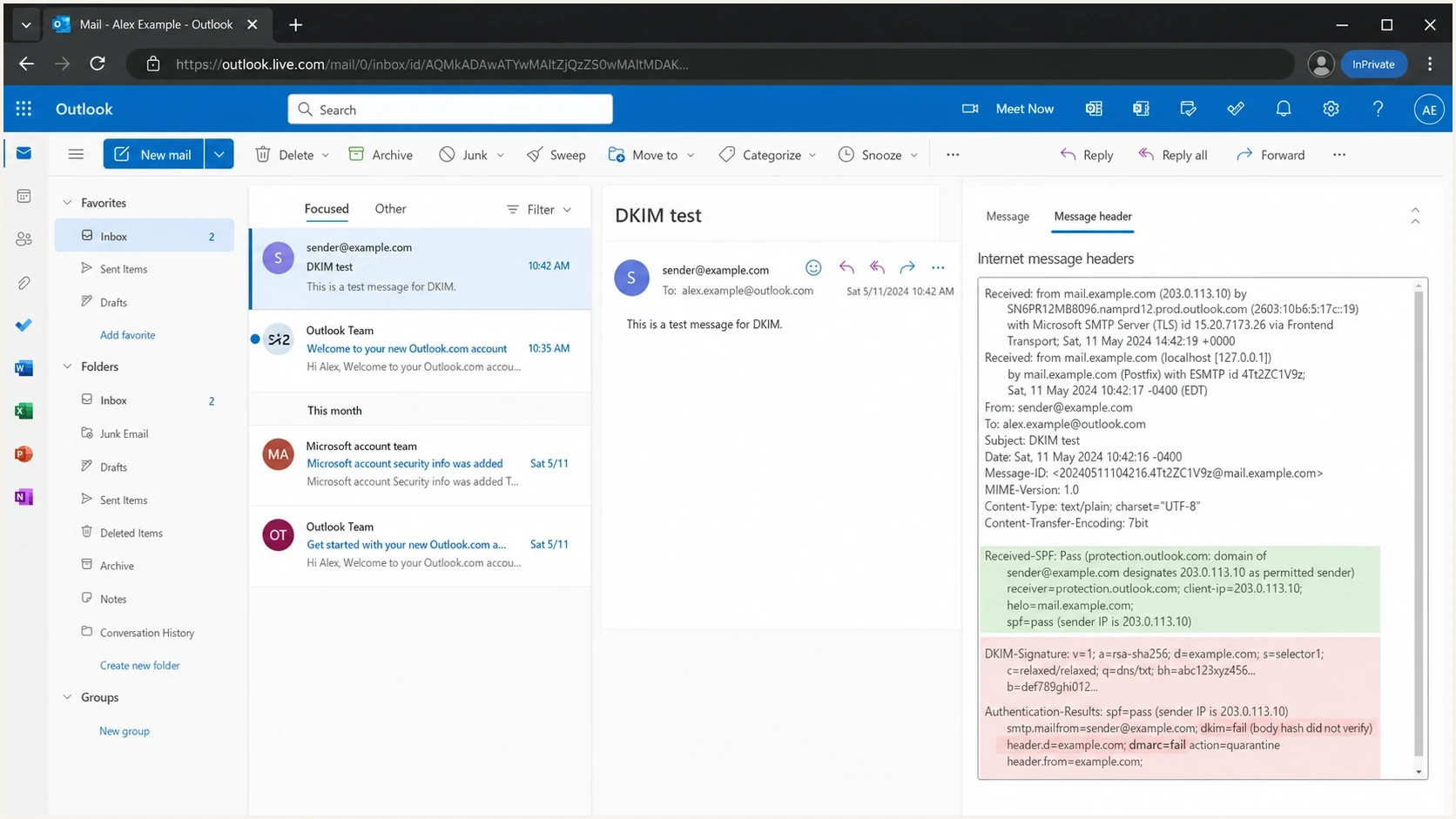
Outlook.com message details showing a DKIM body hash failure.
Common causes
When Outlook.com or Hotmail.com reports DKIM failure, separate the causes into the message bytes, signature or key, and message format. That split keeps troubleshooting practical and stops the investigation from bouncing between DNS and content without evidence.
|
|
|
|---|---|---|
Encoding changed | Body hash fails | Sign last |
Footer added | Body hash fails | Add footer before signing |
MIME altered | Body hash fails | Finalize MIME before signing |
Wrong selector | Key lookup or verification fails | Publish the key at the signed selector |
Stale key | Key fails | Publish a new selector and retain the old key |
DNS lookup timeout | temperror or key lookup error | Check authoritative DNS availability |
Header rewritten | Header fails | Preserve signed headers |
Malformed header | Signature fails | Fix before signing |
Domain mismatch | DKIM passes; DMARC fails without a matching SPF or DKIM pass | Use an authenticated domain that matches the From domain under DMARC |
Common Outlook.com and Hotmail.com DKIM failure causes.
A valid DNS key does not prove the delivered message still matches the signed body. An aligned From domain does not prove the signature verified. Keep verification, alignment, and message compliance as separate facts.
Encoding and body hash problems
The body hash is the DKIM hash of the canonicalized body. If Microsoft says the body hash did not verify, its computed hash does not match the signature's bh= value. Relaxed body canonicalization removes trailing whitespace, reduces runs of spaces or tabs within a line to one space, and ignores trailing empty lines. It does not tolerate content changes or transfer-encoding conversions that change the canonicalized body. These rules are defined in RFC 6376.
What to inspect first
- Transfer encoding: Check whether a hop changed quoted-printable, base64, or 8bit content.
- Line endings: Confirm CRLF handling is stable through the final outbound MTA.
- MIME boundaries: Check whether multipart boundaries or content-transfer headers changed.
- Late changes: Move link tracking, footers, and unsubscribe text before DKIM signing.
If this is your exact error, use the focused body hash guide after you capture the raw source. Do not rely on the rendered email view. You need the raw delivered message, including headers and MIME parts.
Illustrative DKIM signature fields to comparetext
DKIM-Signature: v=1; a=rsa-sha256; c=relaxed/relaxed;
 d=example.com; s=selector1;
 h=from:to:subject:date:mime-version:content-type;
 bh=47DEQpj8HBSa+/TImW+5JCeuQeRkm5NMpJWZG3hSuFU=;
 b=U2lnbmF0dXJlRXhhbXBsZTEyMzQ1...
Pay close attention to the h= list. A later change to a signed header can invalidate the signature even when the body is stable. Keep the required From field and useful fields such as Subject signed, and fix downstream rewrites before signing. Adding an unsigned header normally leaves DKIM intact, but adding a header covered by oversigning can invalidate it.
Check message formatting and DKIM DNS records
A message that another receiver accepts can still expose a DKIM failure at Outlook.com or Hotmail.com when its headers, MIME structure, or DKIM TXT data are malformed. Fix the source message before signing. Do not depend on a receiver to repair or tolerate invalid syntax.
- Required headers: Generate one valid Date field and one valid From field before DKIM signing.
- Header encoding: Validate header encoding for the transport used, and complete any required encoding conversion before signing.
- MIME structure: Remove duplicate MIME-Version fields and validate boundaries, part headers, and closing delimiters.
- Line format: Use CRLF line endings and valid header folding before the message reaches the signer.
- DKIM TXT data: Concatenate split strings in one TXT record without inserting spaces. Do not publish multiple DKIM key records at the same selector.
Controlled MIME test settext
Test 1: plain text only
Test 2: same message plus one attachment
Test 3: same message plus one embedded image

Compare the outbound and delivered EML for each test.
If only the attachment or embedded-image tests fail, inspect the component that builds multipart MIME and the outbound hop that applies transfer encoding. The DKIM key is less likely to be the cause when the same selector verifies for the plain message.
DKIM verification and DMARC alignment
A domain mismatch can break DMARC even when DKIM passes, but it is different from signature verification. If the visible From domain is example.com and the DKIM signing domain is sub.example.com, relaxed DMARC alignment accepts their shared organizational domain. Strict alignment requires an exact domain match. Signing with the visible From domain or its controlled subdomain also makes sender ownership easier to audit. DMARC can also pass through SPF with the required domain match when DKIM fails.
Signature verification
This answers one question: did the signature verify against the public key and canonicalized message?
- Pass: The signed content and key match.
- Fail: The signature, body hash, header hash, or key check failed.
DMARC domain alignment
This answers a separate question: does the authenticated domain match the visible From domain under the DMARC alignment policy?
- Relaxed: A shared organizational domain passes.
- Strict: The authenticated domain must exactly match the From domain.
Do not stop at alignment when the result says signature did not verify. Alignment answers the DMARC identity question. It does not prove that the DKIM signature is valid.
When DKIM failure causes 550 5.7.515
Microsoft enforces high-volume sender requirements for domains sending 5,000 or more messages per day to its consumer email services, including Outlook.com and Hotmail.com. Its 550 5.7.515 guidance specifies that messages use the same visible From domain. SPF and DKIM must both pass, and the domain must publish a DMARC policy of at least p=none and pass DMARC with the required SPF or DKIM domain match.
Microsoft consumer authentication rejectiontext
550 5.7.515 Access denied, sending domain <domain> does not meet the required authentication level.
An SPF-based DMARC pass does not satisfy the separate requirement for DKIM to pass. If this rejection occurs, retain the full non-delivery report (NDR), identify the failing sending source, and verify SPF, DKIM, and DMARC together. Passing authentication does not guarantee inbox placement.
A practical diagnostic flow
Start with the reason text, rule out DNS, and then compare exact message sources. Use controlled content variants when attachments or embedded images correlate with the failure. This sequence identifies whether the fault begins in key publication, message generation, or a later relay.
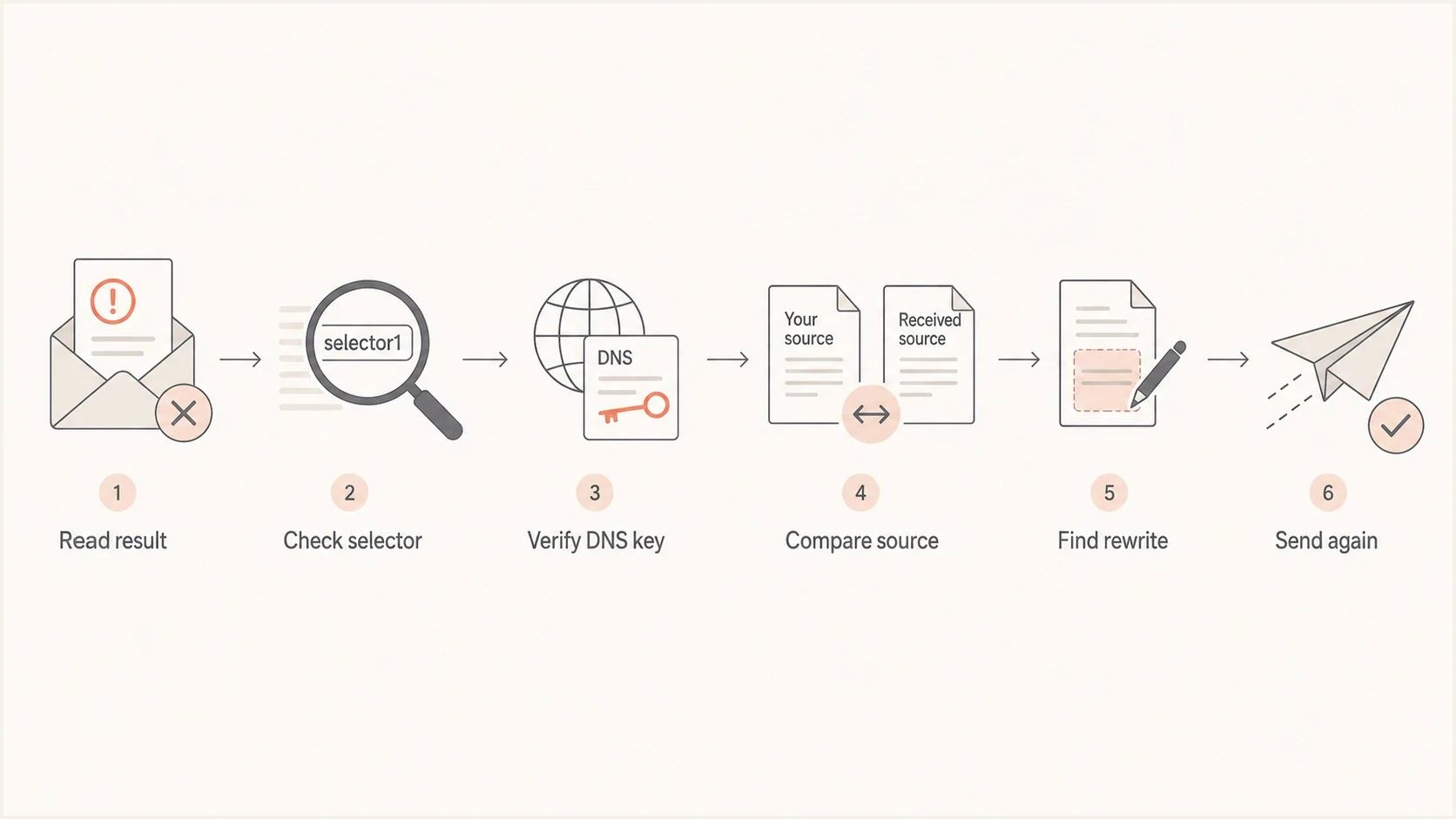
Flowchart for diagnosing DKIM failures at Outlook.com and Hotmail.com.
- Read the result: Open the message in Outlook.com, select More actions > View > View message details, and capture the Microsoft-added Authentication-Results header. See Microsoft's header instructions for the current menu path.
- Check DNS: Read s= and d= in DKIM-Signature, then query TXT at s._domainkey.d using those values. Follow any CNAME to its target and confirm the resulting key matches the signer.
- Test content variants: Send a plain message first, then repeat with one attachment and again with one embedded image.
- Compare source: Save the signed outbound source and delivered EML files, then compare signed headers, MIME boundaries, and transfer encoding. Share the original EML as an attachment; forwarding inline changes the evidence.
- Remove rewrites: Disable late footers, tracking, gateway changes, and MIME conversion, then send a clean test.
- Retest Microsoft: Send the corrected message to both Outlook.com and Hotmail.com and confirm dkim=pass in the delivered headers.
For intermittent failures, group passing and failing samples by sending IP, selector, outbound relay, and content type. One successful DNS check does not exclude a later timeout or a stale key on one sending server. Microsoft's troubleshooting guidance distinguishes key lookup timeouts from body hash failures.
DKIM checker
Check selector records and public key configuration.
?/7tests passed
For a wider check across DMARC, SPF, DKIM, DNS, and reputation signals, run the domain health checker after the focused selector test. That catches an adjacent problem, such as a broken SPF record or missing DMARC record, without distracting from the DKIM root cause.
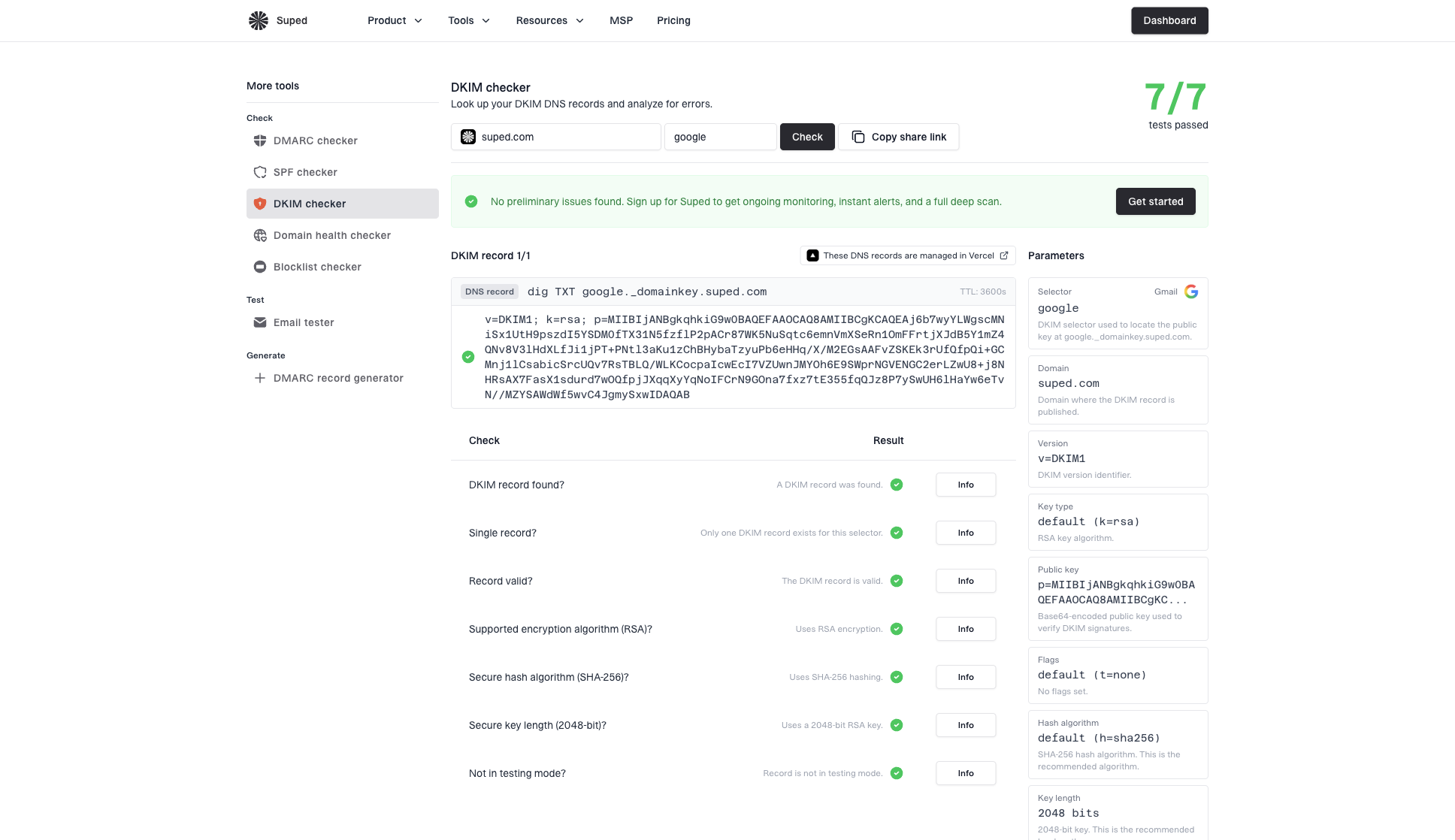
DKIM checker sample results showing selector, DKIM DNS record, validation checks, parameters, and share link
Fix DKIM signing and mail flow
Once you know the failure category, apply the narrow fix. The last system that changes the message must run before the DKIM signer. If an ESP signs the message and another gateway later adds legal text, tracking, a security banner, or a MIME conversion, the DKIM body hash no longer describes the final message.
Troubleshooting signal strength
Use the receiver result to decide which fix path deserves attention first.
Strong body signal
Inspect rewrites
The result says body hash did not verify.
Strong DNS signal
Fix DNS
The selector or key cannot be found or parsed.
Strong identity signal
Fix alignment
DKIM passes for a domain that does not meet DMARC alignment requirements.
Healthy signal
Monitor
DKIM passes and DMARC passes at Microsoft.
- Sign last: Move DKIM signing after content generation, tracking, footer insertion, and MIME assembly.
- Stabilize encoding: Set one transfer-encoding policy and stop later hops from converting it.
- Fix message syntax: Generate compliant headers and MIME before signing instead of relying on receiver repair.
- Preserve signed headers: Move necessary header rewrites before signing rather than dropping useful fields such as Subject from h=.
- Rotate keys: Publish the new selector, allow DNS caches to refresh, and then switch signing. Retain the old key until queued and delayed messages no longer need it.
- Retest Microsoft: Do not close the incident until Outlook.com and Hotmail.com both show a DKIM pass.
Abbreviated DKIM TXT record exampledns
selector1._domainkey.example.com. 3600 IN TXT (
  "v=DKIM1; k=rsa; "
  "p=MIIBIjANBgkqhkiG9w0BAQEFAAOCAQ8A..."
)
The p= value above is abbreviated; publish the complete public key supplied by the signer. If your sending service requires CNAME records, publish its exact targets instead. Receiving mail at Outlook.com does not require the sender to use Microsoft 365 DKIM CNAME records.
If an authorized forwarding service or gateway must change a message after the original signature, ARC can record the authentication state seen before the change. ARC does not turn the original dkim=fail into dkim=pass; the receiver decides whether to trust the ARC chain.
The Outlook app is a mail client; DKIM is configured on the sending service and in domain DNS. If Microsoft 365 sends your custom-domain mail, use the Office 365 DKIM troubleshooting path. Sender configuration and delivery to consumer Outlook.com or Hotmail.com are separate parts of the investigation.
Monitor Microsoft DKIM failures with Suped
Suped is our DMARC reporting and email authentication platform. For this problem, use Suped to identify sending sources with DKIM failures reported by Microsoft receivers, separate authorized senders from unknown sources, and turn each failure into a DNS or mail-flow task. One failing source can hide inside otherwise healthy aggregate DMARC numbers.
Use DMARC monitoring to compare failing Microsoft-reported traffic by sending source and signing domain. Verify the selector in a raw failing message, fix the responsible DNS record or mail path, and compare later reports with direct retests. Aggregate reports summarize authentication outcomes; they do not contain the message body or prove inbox placement.

Issue steps to fix dialog showing the issue overview, tailored fix steps, and verification action
Pair one-off DKIM tests with continuous reporting. Use direct message tests to verify the delivered signature, then use Suped to detect recurring Microsoft-reported failures as new aggregate reports arrive.
Views from the trenches
Best practices
Sign after final MIME, header, footer, and tracking changes so DKIM covers the final bytes.
Test with Outlook.com and Hotmail.com seed inboxes before increasing DMARC enforcement.
Keep selector records current and documented so stale keys are easy to spot during incidents.
Common pitfalls
Assuming dkim=fail means DMARC domain matching failed, when the signature did not verify.
Rotating DKIM keys without checking old selectors still used by queues or ESP pools.
Letting an MTA change quoted-printable, base64, line endings, or MIME boundaries after signing.
Expert tips
Compare the signed source with the delivered source and inspect body hash differences first.
Use relaxed body canonicalization, but remove rewrite steps that alter MIME structure.
Monitor aggregate DMARC reports for receiver-specific failure spikes by sending source.
Marketer view
Marketer from Email Geeks says dkim=none and dkim=fail need different investigations because dkim=fail means Microsoft found a signature but could not verify it.
2017-10-05 - Email Geeks
Marketer view
Marketer from Email Geeks says relaxed canonicalization helps with limited whitespace changes, but it does not protect DKIM from real encoding changes.
2017-10-05 - Email Geeks
What to fix first
If Outlook.com and Hotmail.com both fail DKIM, start with the result string. Body hash errors point to encoding, MIME, footer, tracking, or other changes after signing. Signature verification errors without a body hash clue point to selector, public key, signed-header, and message-format checks. DMARC failures with DKIM pass point to alignment rather than the DKIM signature itself.
For failures caused by message changes, sign the final, RFC-compliant message. Validate the selector, send fresh tests to both Microsoft consumer domains, and monitor aggregate reports so the same source does not quietly regress.




