Why is Google Postmaster Tools (GPT) showing incorrect SPF and DKIM authentication rates?

Updated on 12 Aug 2026: We added Google's current authentication views and tightened the checks for delayed, low-volume, and domain-scoped data.
Google Postmaster Tools can show apparently incorrect SPF and DKIM authentication rates because its dashboard uses Gmail-side processing for mail sent to personal Gmail accounts, is not real time, and can omit low-volume data for privacy. A sudden one-day drop to 0% SPF or 0% DKIM does not prove your DNS broke. Treat it as a signal to verify before making changes.
The fastest answer is this: if fresh Gmail message headers show SPF pass, DKIM pass, and DMARC pass for the visible From domain, and DMARC aggregate reports do not show a matching failure spike, check the selected Postmaster Tools view and wait for the day to finish processing. The chart can be incomplete or scoped differently from the mail stream you tested.
Fast triage
- Do not change DNS first: Changing SPF or DKIM records before checking headers can turn a reporting discrepancy into a real outage.
- Check completed days: Dashboard data is not real time, so recent authentication metrics can change while Google processes data.
- Use independent evidence: Compare headers, DMARC aggregate reports, and controlled test sends before making changes.
Why the rates disagree
Postmaster Tools does not inspect your DNS record in isolation and declare your SPF or DKIM setup good or bad. It reports what Gmail saw for messages associated with the selected domain and dashboard view. That Gmail-specific view can differ from a DNS lookup, a sending platform's dashboard, or a test message because each examines a different part of the authentication path.
Recent-day data can be incomplete because Postmaster Tools data is not real time. Google can also withhold some dashboard data on low-volume days to protect Gmail users' privacy. A recent 0% result, a gap, or an N/A value needs comparison with a completed day and message-level evidence before it is treated as an authentication failure.
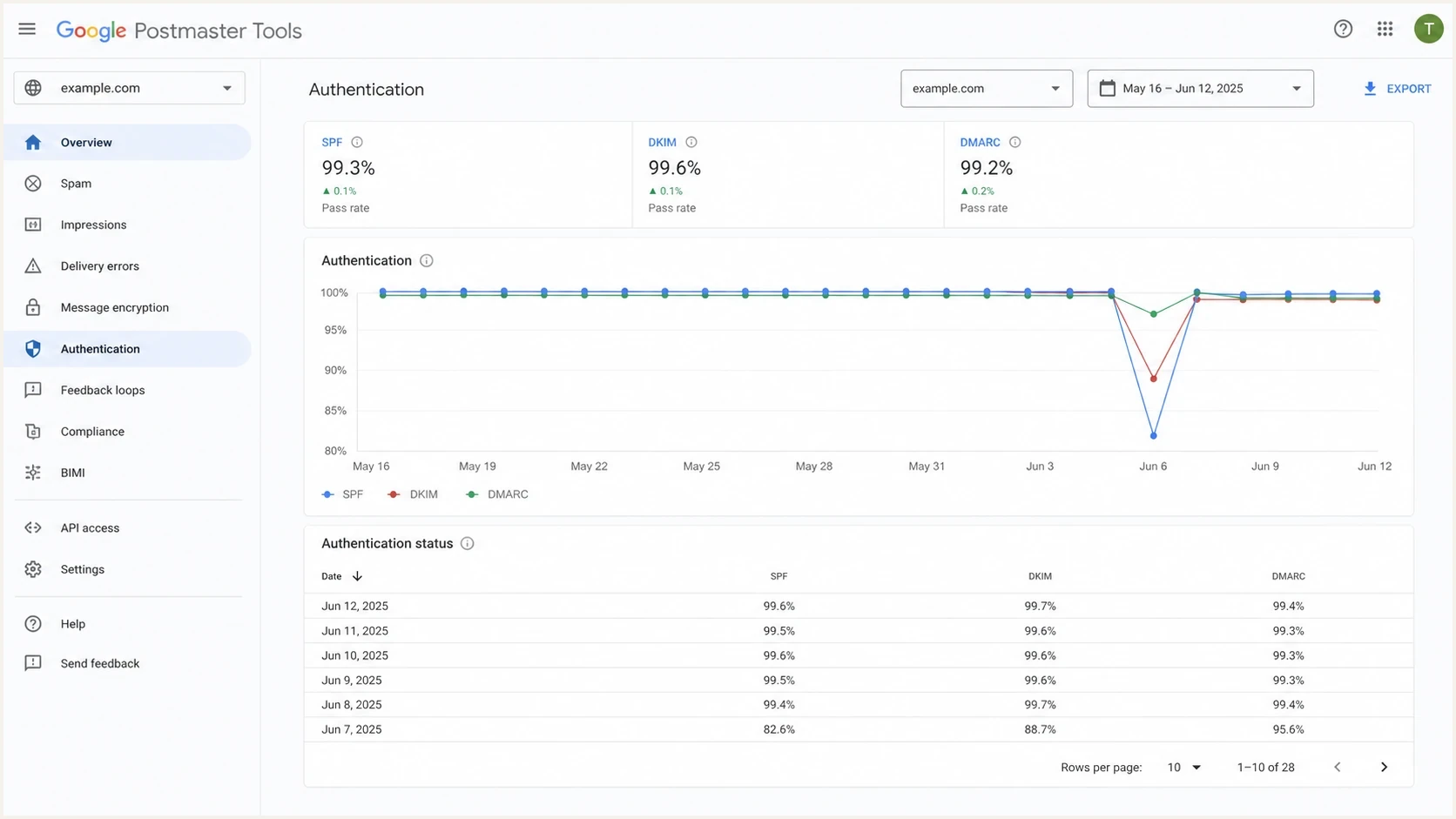
Google Postmaster Tools authentication dashboard with one abnormal recent data point.
What Postmaster Tools shows
- Gmail view: It reflects mail sent to personal Gmail accounts, not delivery to every provider.
- Delayed aggregation: Recent data can change because the dashboards are not real time.
- Selected scope: The From-header view and the DKIM/SPF-domain view count different sets of messages.
What verifies authentication
- Message headers: A delivered Gmail message shows authentication results for that exact message.
- DMARC reports: Aggregate reports show outcomes by source and authenticated identifier.
- Controlled tests: A fresh production-path test shows whether the current sender signs and authorizes mail.
Check the selected authentication view
The Authentication dashboard has two views. View by From header domain covers messages where the selected domain appears in the visible From header and focuses on authentication connected to that domain. View by DKIM and SPF domains instead covers messages where the selected domain matches the DKIM signing domain or SPF domain.
|
|
|
|---|---|---|
From header domain | Mail using the selected visible From domain | Compare results with the same From domain |
DKIM and SPF domains | Mail matching the selected DKIM or SPF domain | DMARC success rate is not shown |
Confirm the selected view before comparing a chart with headers or aggregate reports.
A rate can look wrong when a message header is checked against one domain while the dashboard groups another. Confirm the visible From domain, smtp.mailfrom domain, and DKIM header.d domain, then select the matching view. Google's dashboard documentation describes both views and notes that forwarded messages are excluded where possible, although some can remain in dashboard data.
Common causes of wrong-looking SPF and DKIM rates
Separate reporting effects from real authentication failures before editing DNS. The same sharp chart drop can come from incomplete processing, domain scope, low Gmail volume, or a sender configuration problem.
|
|
|
|---|---|---|
Data lag | One recent day drops hard | Wait and compare headers |
Wrong view selected | Header and chart use different domains | Compare From, smtp.mailfrom, and header.d |
SPF domain mismatch | SPF passes for a bounce domain | Compare From and Return-Path |
Third-party DKIM | DKIM passes for another domain | Check the DKIM d value |
Mixed streams | Some sends fail while others pass | Segment results by source |
Low Gmail volume | Days are missing or rates move sharply | Compare Gmail-bound daily volume |
Forwarding | SPF fails after a forward | Check whether DKIM survives |
Use the table to sort the likely cause before editing SPF or DKIM.
SPF is especially easy to misread. SPF authenticates the envelope sender, commonly the bounce or return-path domain. DMARC then checks whether that authenticated domain matches the visible From domain at the organizational-domain level, unless strict mode changes the requirement. A message can show SPF pass and still fail DMARC when the domains do not match.
DKIM has the same trap in a different place. A signature can pass, but the signing domain in the d value must match the visible From domain for DKIM to satisfy DMARC. If a third-party sender uses its own signing domain instead of your domain, Postmaster Tools can show a different result from the sender's message-level authentication summary.
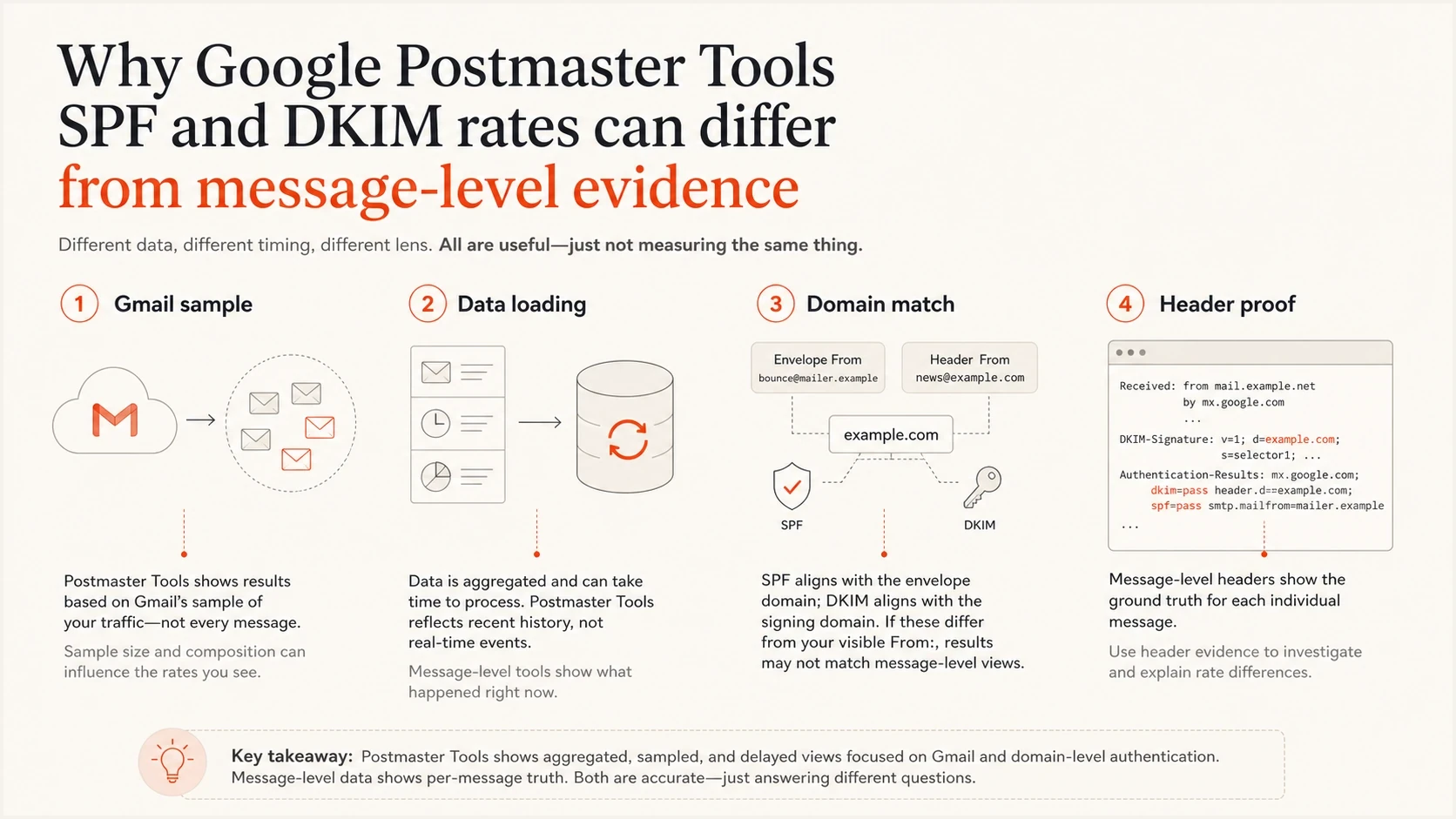
Four-part explanation of why Postmaster Tools rates can differ from headers.
How to verify before changing DNS
Start with a real message delivered to Gmail and read the Authentication-Results header. It shows how Gmail evaluated that exact message. If the header passes while the chart drops, check the dashboard view, wait for a completed day, and compare DMARC aggregate data before touching DNS.
Good Gmail header patterntext
Authentication-Results: mx.google.com;
  spf=pass smtp.mailfrom=bounces.example.com;
  dkim=pass header.d=example.com header.s=s1;
  dmarc=pass (p=none) header.from=example.com
Check the smtp.mailfrom value for SPF, the header.d value for DKIM, and the header.from value for DMARC. Also confirm that the DKIM selector is current. For a deeper walkthrough, the message headers path gives the message-level evidence needed for comparison.
- Confirm SPF syntax: Check the SPF record for duplicate records, too many DNS lookups, and missing senders.
- Confirm DKIM DNS: Check the DKIM selector used by the message, not a selector copied from old setup notes.
- Review DMARC reports: Find the same source, domain, and failure type for the affected reporting period.
- Send a controlled test: Send through the exact production path and inspect the output with an email tester.
Email tester
Send a real email to this address. Suped shows a results button when the test is ready.
?/43tests passed
A controlled test checks the actual path. Teams sometimes validate SPF against one domain while the mail stream uses another return-path domain, an unexpected DKIM selector, or a relay that rewrites signed content. The test message also provides a timestamp for comparison with the Postmaster Tools chart.
DMARC record that collects aggregate reportsdns
v=DMARC1; p=none; rua=mailto:dmarc-reports@example.com
When the chart points to a real issue
Act when multiple independent signals agree. A single chart point is weak evidence. A repeated drop across completed days, matching Gmail header failures, and the same pattern in DMARC aggregate reports provide strong evidence. The fix then depends on whether SPF, DKIM, or domain matching failed.
How much confidence to place in the signal
Use the evidence level to decide whether to change DNS.
Low confidence
Wait
One recent day is bad, headers still pass, and other dashboards lag.
Medium confidence
Segment
The same sender shows mixed pass and fail results in DMARC reports.
High confidence
Fix
Headers, DMARC reports, and completed-day charts show the same failure.
Resolved
Monitor
New test sends pass and later aggregate reports confirm recovery.
Do not ignore these patterns
- Repeated header failure: Fresh Gmail messages show SPF fail or DKIM fail for the affected stream.
- Third-party DKIM mismatch: A provider's signing domain passes DKIM but does not match the visible From domain.
- Unconfigured sending stream: A website, application, or service sends mail without the expected SPF authorization or DKIM signature.
- Lookup limit failure: SPF returns permerror because the record exceeds the DNS lookup limit.
If SPF fails, inspect the sending IP authorization and return-path domain. If DKIM fails, inspect selector DNS, key length, signing domain, and post-signing message changes. If both pass but DMARC fails, inspect domain matching. Google's setup guide is useful when access, verification, or domain setup in Postmaster Tools is the problem.
False alarm pattern
The chart has a sharp drop for the newest day, but fresh Gmail headers pass or the selected dashboard view does not match the tested domain.
- Best move: Confirm the view, wait for processing, and preserve the evidence.
- Risk: Unneeded DNS edits create avoidable authentication problems.
Real issue pattern
Completed days show the same drop, fresh Gmail headers fail, and DMARC reports identify the same source.
- Best move: Fix the sending path, then verify it with a new test send.
- Risk: Waiting allows unauthenticated mail to keep reaching Gmail.
Where Suped fits
Postmaster Tools provides Gmail-specific dashboard signals. Suped's product adds a separate operational view through DMARC monitoring, SPF and DKIM checks, hosted SPF, hosted DMARC, hosted MTA-STS, blocklist (blacklist) monitoring, and alerts.
For this workflow, Suped turns aggregate reports into source-level findings and remediation steps. A team can check whether the sender behind a Postmaster Tools drop also failed DMARC, identify the affected sending source, and track the result after a fix.
Issues page showing top issues, verified sources, unverified sources, and authentication pass rates
- Source evidence: See which sending services pass or fail authentication instead of reacting to one chart.
- Automated detection: Surface SPF, DKIM, DMARC, and DNS issues with remediation steps.
- Alerts: Notify the team when authentication failures exceed a chosen threshold.
- Hosted controls: Manage hosted SPF, hosted DMARC, and hosted MTA-STS with fewer manual DNS edits.
- Multi-domain work: Compare domains and sending sources in one dashboard.
Keep Postmaster Tools in the workflow for Gmail-side trends. Use Suped for DMARC evidence, alerts, and source-level remediation, then confirm changes with fresh Gmail headers and later aggregate reports.
A practical decision path
When a Postmaster Tools authentication rate drops, follow a fixed decision path. It prevents a recent chart artifact from becoming a DNS emergency while still identifying failures that affect Gmail delivery.
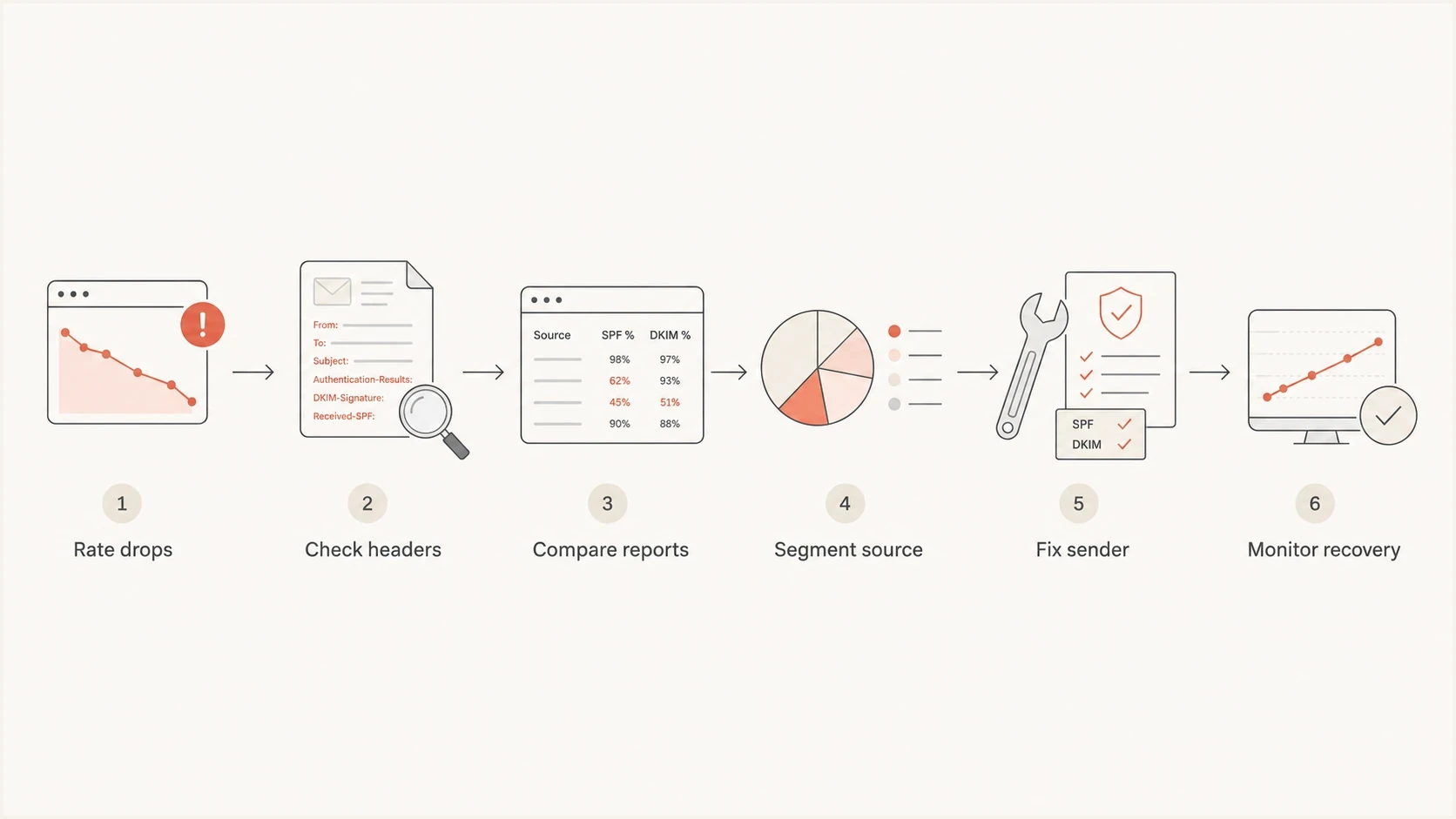
Decision path for validating a Postmaster Tools authentication rate drop.
If Postmaster Tools has no data at all, the problem differs from a wrong-looking authentication rate. The domain might not be verified, the selected domain might not send mail, traffic might be too low for Google's privacy thresholds, or Gmail might not have populated data yet. The no data scenario needs a separate check.
Default order of operations
- Save the chart: Record the domain, selected view, date, and metric before the data changes.
- Inspect Gmail headers: Use a delivered message from the same stream and reporting period.
- Compare DMARC data: Check whether aggregate reports show the same source failing.
- Change one thing: If a fix is needed, change the sending path or DNS record once and retest.
Views from the trenches
Best practices
Check Gmail headers before editing DNS, then compare the same stream in aggregate reports.
Treat newest-day Postmaster Tools data as provisional until related dashboards populate.
Keep custom return-path and custom DKIM active so domain matching can be verified fast.
Common pitfalls
Changing SPF after one bad chart point can create a real failure where none existed.
Assuming SPF pass means DMARC pass ignores the visible From domain matching requirement.
Comparing all-domain reports with one Gmail chart hides source-specific authentication breaks.
Expert tips
Segment by sender, domain, and date before deciding whether the issue is data lag or DNS.
Use completed-day evidence when briefing stakeholders so transient chart points do not distract.
Watch for low Gmail volume, since privacy filtering can leave gaps in dashboard data.
Marketer from Email Geeks says a sudden 0% SPF reading across known-good sending platforms should be verified against headers before any DNS change.
2024-02-27 - Email Geeks
Marketer from Email Geeks says a chart that loads yesterday's authentication data before other dashboards finish can create a false alarm.
2024-02-27 - Email Geeks
What to do next
If Google Postmaster Tools shows incorrect SPF or DKIM authentication rates, answer the evidence questions first. Is the correct dashboard view selected? Is the reporting day complete? Do fresh Gmail headers and DMARC aggregate reports show the same failure? Fix the authentication path when the completed-day chart and independent evidence agree. If headers pass or the evidence conflicts, preserve the data and continue monitoring.
Use Postmaster Tools for Gmail-specific trends, message headers for the result of an exact message, and Suped for ongoing DMARC visibility, issue detection, alerts, hosted authentication controls, and multi-domain operations. This workflow reduces rushed DNS changes while keeping real SPF and DKIM failures visible.