Why does Google Postmaster Tools show 0% SPF success rate when SPF, DKIM, and DMARC pass?

Published 25 Jul 2025
Updated 30 Jul 2026
10 min read
Summarize with
Updated on 30 Jul 2026: We updated this guide with Google's current Authentication dashboard views, SPF alignment rules, and clearer checks for provider Return-Path domains.
Google Postmaster Tools can show 0% SPF in the From header domain view even when Gmail shows spf=pass for individual messages. The usual cause is that SPF authenticated the Return-Path domain, the HELO domain, or a provider-managed bounce domain, but that domain does not match the visible From domain being charted.
DKIM and DMARC can pass at the same time. DMARC needs either SPF or DKIM to pass and have domain alignment with the visible From domain. Under relaxed alignment, the organizational domains must match. Under strict alignment, the domains must match exactly. If DKIM is aligned, a 0% SPF graph usually identifies a separate SPF alignment path, not a DMARC failure.
Short answer
Treat the Postmaster SPF graph as an aggregate view, not the final result for one message. Check one real Gmail message, then compare the domain in smtp.mailfrom, the visible From domain, DKIM d=, and the domain and view selected in Postmaster Tools.
Why the SPF number can be zero
SPF authenticates an SMTP identity, not the visible From address that a person sees in the inbox. It normally checks the MAIL FROM domain, which appears as Return-Path or smtp.mailfrom in Authentication-Results. When MAIL FROM is empty, SPF uses the HELO or EHLO identity.
A sending platform can ask you to publish an SPF include at your domain, then still send with a provider-owned Return-Path. In that setup, the provider domain passes SPF, DKIM signs with your domain, and DMARC passes through DKIM. The From header domain view can still show 0% SPF because the authenticated SPF domain does not have domain alignment with the visible From domain.
SPF authentication and SPF alignment are separate results. The default relaxed DMARC mode, set by omitting aspf or using aspf=r, permits a Return-Path subdomain that shares the visible From domain's organizational domain. Strict aspf=s requires an exact domain match. A provider-owned organizational domain will not have domain alignment in either mode.
|
|
|
|---|---|---|
Visible From | Message header | DMARC uses this as the protected domain. |
Return-Path | Envelope sender | SPF normally authenticates this domain. |
HELO | SMTP greeting | SPF uses it when MAIL FROM is empty. |
DKIM signer | DKIM-Signature d= value | DMARC can pass through this domain. |
Postmaster domain | Domain and view menus | The selected view controls which messages are grouped. |
Which identity each authentication check usually uses
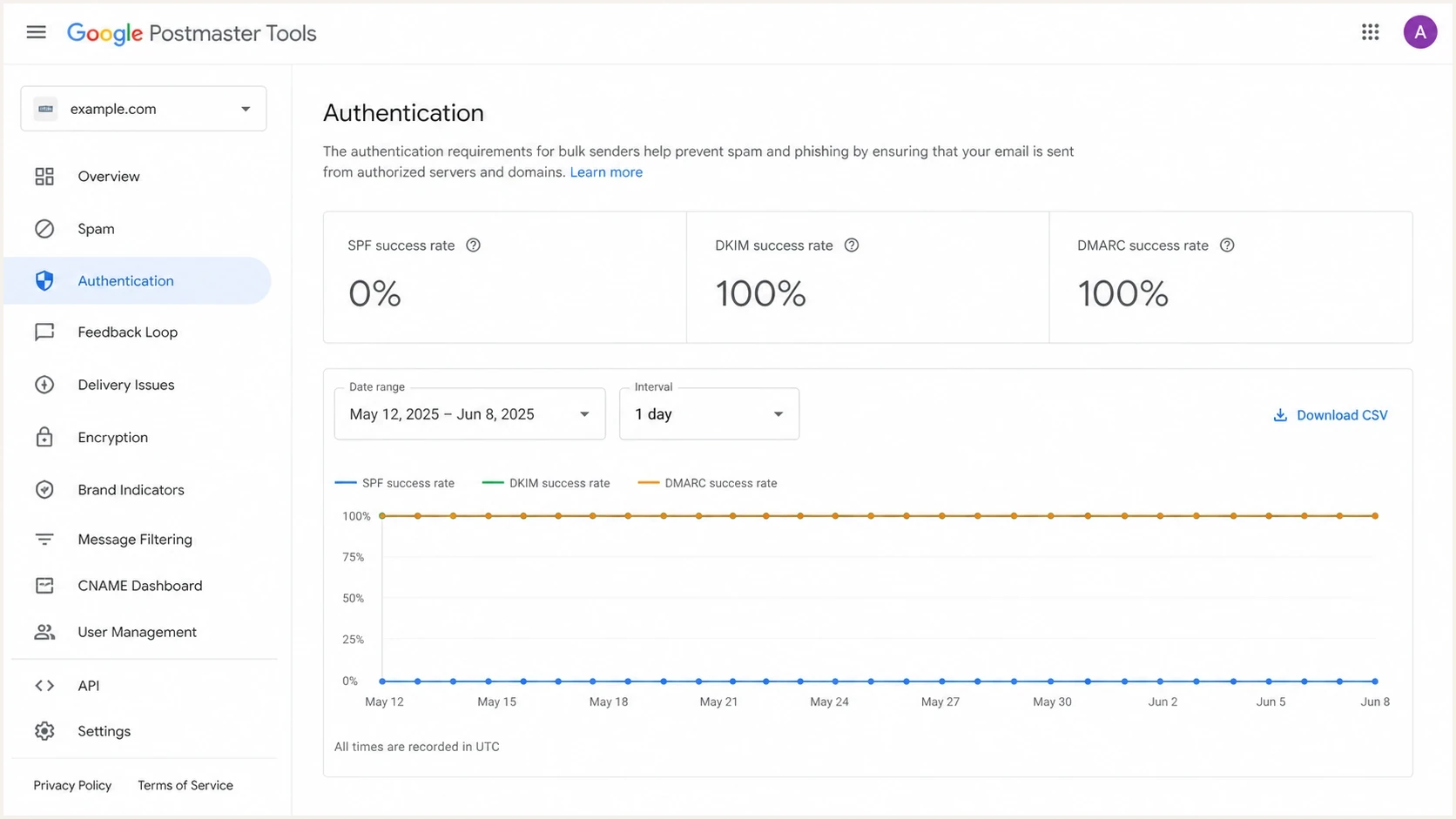
Google Postmaster Tools Authentication dashboard with SPF at 0% and DKIM and DMARC at 100%.
Check the Postmaster Tools view
Before changing DNS, confirm which Authentication dashboard view is active. Google's Postmaster Tools dashboards use different message groups for the From header domain view and the DKIM and SPF domains view.
|
|
|
|---|---|---|
From header domain | The selected domain appears in the visible From header. | SPF, DKIM, and DMARC rates focus on authentication tied to that sender domain. |
DKIM and SPF domains | The selected domain matches the DKIM or SPF identity. | The dashboard shows DKIM and SPF rates but does not show DMARC. |
Authentication dashboard view differences
Allow for data limits
Postmaster Tools covers mail sent to personal Gmail accounts. Data typically updates within 24 hours but can take longer, uses UTC, and can be incomplete on low-volume days because of privacy thresholds. The Compliance status dashboard uses a rolling dataset and can take up to seven days to reflect a fix.
The header test that matters
The fastest check is a real Gmail delivery. Send a normal production-like message to a Gmail account, open it on desktop, choose Show original, and inspect the top summary plus the Authentication-Results header. The dashboard is useful for aggregate trends, but a single header identifies the domain that Gmail actually authenticated.
Simplified SMTP identity exampletext
EHLO mail.provider.example
MAIL FROM:<bounce@provider-bounces.example>
DATA
From: Example Team <news@example.com>
DKIM-Signature: d=example.com; s=s1; ...
In that example, SPF checks the provider bounce domain, not the visible From domain. DKIM signs as example.com. DMARC passes because DKIM aligns with the visible From domain. In the From header domain view for example.com, SPF can still show 0% because the SPF pass belongs to provider-bounces.example.
What to look for in Authentication-Resultstext
spf=pass smtp.mailfrom=provider-bounces.example
dkim=pass header.d=example.com
dmarc=pass header.from=example.com
- SPF domain: Use the domain after smtp.mailfrom as the SPF identity Gmail evaluated.
- DKIM domain: Use the domain after header.d as the signing identity.
- DMARC domain: Use header.from as the visible domain DMARC protects.
- SPF result: A pass confirms authentication, but domain comparison determines alignment.
When 0% SPF is not a failure
A 0% SPF success rate does not by itself mean DMARC failed or domain reputation fell. Treat it as an identity mismatch to verify when DKIM and DMARC consistently pass for the same traffic, message headers show SPF passing on an expected provider Return-Path, and the Compliance status dashboard does not report an authentication problem.
Usually safe
- DKIM path: DKIM passes and aligns with the visible sender domain.
- DMARC result: DMARC passes for the same production stream.
- Return-Path: The bounce domain belongs to the expected sender.
- Compliance: Google does not flag SPF or DKIM authentication.
Needs attention
- SPF failure: Headers show fail, softfail, neutral, temperror, or permerror.
- DKIM gaps: Some streams are unsigned or use an unaligned domain.
- DMARC drops: DMARC success falls for the affected production stream.
- Unknown sender: The Return-Path domain or sending source is not approved.
The remaining risk is resilience. If DKIM breaks because a sender changes its signing configuration, modifies content after signing, or skips DKIM on one stream, SPF on an unaligned domain will not rescue DMARC. Configure a custom Return-Path when the sender supports it so both authentication paths can have domain alignment.
How to read the SPF result
Use the graph only after checking the message identity and Google's selected view.
Header passes SPF
Compare
Authentication worked for the MAIL FROM or HELO identity in that message.
From view shows 0%
Verify
Compare the SPF identity with the visible From domain for alignment.
Header fails SPF
Fix
Investigate the SPF record, DNS response, sending IP, and envelope domain.
How to troubleshoot the mismatch
Start with the message header, not the DNS record. A valid SPF TXT record on the visible domain proves only that the record exists. It does not prove Gmail used that domain for SPF evaluation.
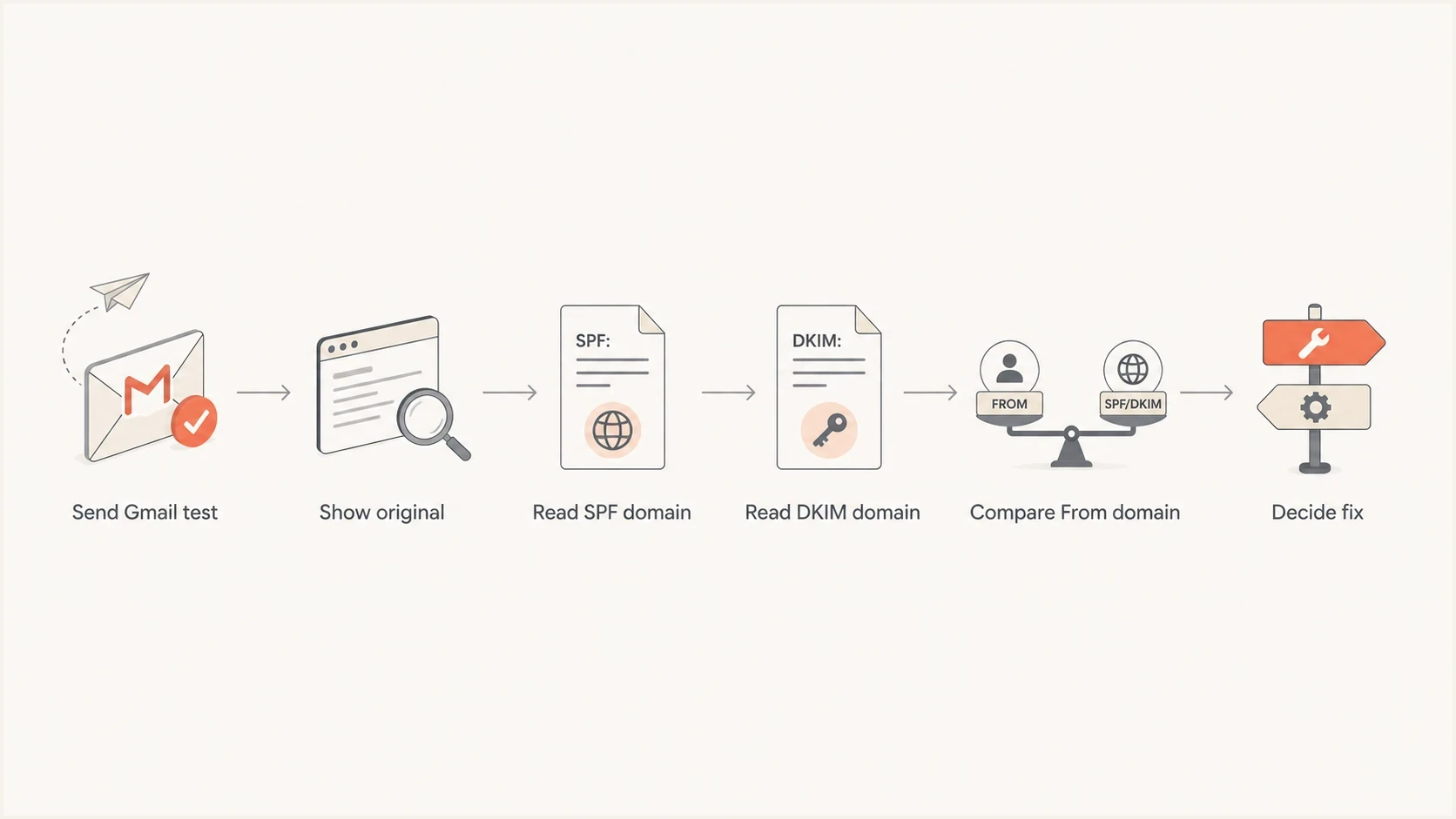
Flowchart for checking Gmail headers before changing SPF DNS records.
Next, check DNS for the domains that actually appear in the header. If the SPF domain is a vendor bounce domain, use that sender's custom bounce domain or custom Return-Path setting. Adding another include to the visible From domain will not change the authenticated SPF identity.
For a DNS-level review, run a domain health check and compare the result with a real Gmail header. The DNS check shows what is published. The header shows what Gmail used.
?
What's your domain score?
Deep-scan SPF, DKIM & DMARC records for email deliverability and security issues.
If the SPF record is valid but DMARC fails on some traffic, use the DMARC checker to confirm policy syntax, reporting addresses, and alignment mode. Then separate authentication failures from alignment failures in the message headers and aggregate reports.
- Pick a message: Use a real campaign or transactional email with normal routing.
- Open original: Read Authentication-Results and Return-Path in Gmail.
- Compare domains: Match the SPF identity, DKIM signer, and visible From domain against the selected Postmaster view.
- Check the SPF result: Investigate permerror, temperror, fail, softfail, or neutral rather than treating every 0% graph as alignment.
- Check sender settings: Look for custom Return-Path, bounce domain, or branded envelope sender options.
- Wait for data: Allow at least 24 hours for normal dashboard updates and longer for Compliance status.
Should you add SPF anyway?
Publish SPF for every domain you use as MAIL FROM or HELO. Do not publish SPF on the visible From domain solely to change the Postmaster graph when SMTP never uses that domain as an SPF identity.
If the sender supports a custom Return-Path, use a subdomain of the visible From domain and authorize the sender there. That gives SPF a path to pass with domain alignment under relaxed DMARC. Review strict aspf=s deliberately because a subdomain does not meet strict alignment with its parent domain.
Simple envelope-domain SPF exampledns
bounce.example.com. TXT "v=spf1 include:_spf.sender.example -all"
Do not overbuild SPF
SPF allows no more than 10 DNS lookups caused by lookup-generating mechanisms and modifiers during one evaluation. Remove unused includes, keep one SPF record per domain, and separate sending streams onto appropriate Return-Path subdomains when that reduces record complexity.
For dedicated sending IPs, also validate HELO or EHLO and matching forward and reverse DNS. These checks do not repair SPF alignment, but Gmail requires valid PTR records with matching forward DNS. Keep the envelope domain, hostnames, SPF authorization, and DKIM signing configuration consistent.
How Suped fits the workflow
Suped's product provides DMARC reporting and email authentication monitoring. Its DMARC monitoring parses aggregate reports to show each sending source, the SPF and DKIM results, and whether either path aligned. That helps confirm whether a Postmaster 0% SPF result comes from an expected provider Return-Path or from a stream that needs a configuration change.
Suped DMARC dashboard showing email volume, authentication health, and source breakdown
Use Postmaster Tools for Gmail's aggregate view, then use Suped to compare authentication paths across DMARC reports. Review source ownership and aligned pass rates before changing DNS. Alerts can then flag a sender that loses DKIM or starts using an unapproved envelope domain.
- Source mapping: Identify the providers and IPs sending for each domain.
- Alignment detail: Separate an SPF pass from an SPF-aligned DMARC path.
- Issue alerts: Detect changes in SPF, DKIM, DMARC, or source authorization.
- Policy staging: Increase DMARC enforcement after legitimate sources are covered.
- Reputation checks: Monitor blocklist and blacklist status beside authentication health.
Views from the trenches
Best practices
Check the Return-Path domain before treating a Postmaster SPF graph as broken data.
Keep DKIM domain alignment stable so DMARC passes when SPF uses another domain reliably.
Publish SPF for every envelope-sender domain you control, not only the visible From.
Common pitfalls
Editing visible From SPF wastes time when a different envelope domain is evaluated.
Ignoring the selected Postmaster view can make valid authentication look inconsistent.
Treating 0% SPF as a DMARC failure creates DNS changes that do not affect alignment.
Expert tips
Use Gmail Show original for one message, then use DMARC reports for volume patterns.
When aligned DKIM passes, improve SPF alignment as resilience work, not an outage.
Check for SPF errors before assuming every zero-percent graph is only a view mismatch.
Marketer from Email Geeks says Postmaster Tools often charts the domain used by SPF, not only the visible sender domain people check first.
2024-01-30 - Email Geeks
Marketer from Email Geeks says DKIM plus DMARC passing is enough for DMARC, because only one authenticated domain path has to match the visible sender.
2024-01-30 - Email Geeks
What to fix first
If Google Postmaster Tools shows 0% SPF while DKIM and DMARC pass, do not start by rewriting DNS. First prove which domain Gmail used for SPF, check the active dashboard view, and confirm whether the domain is expected. A provider Return-Path with SPF pass and aligned DKIM is usually an explanation, not an outage.
Act when message headers show an SPF failure, DKIM is inconsistent, DMARC success drops, the Return-Path domain is unknown, or Compliance status reports an authentication problem. Configure a custom bounce domain when supported, keep SPF within the lookup limit, and monitor the stream until Google's aggregate data catches up.




