Why is Gmail flagging messages as suspicious due to low sender reputation?

Michael Ko
Co-founder & CEO, Suped
Published 28 May 2025
Updated 17 May 2026
7 min read
Summarize with
Gmail is flagging messages as suspicious due to low sender reputation because its filtering systems do not trust the sender enough to accept or place the message safely. The reputation problem usually sits in one of four places: the sending IP, the sending domain, the authenticated identity, or the audience that is receiving the mail.
The exact rejection often looks like this, and I treat it as a reputation failure first, then verify authentication and DNS before changing mail volume.
Gmail low reputation rejectiontext
550-5.7.1 Our system has detected that this message is
550-5.7.1 likely suspicious due to the very low reputation of the sender.
The short answer is this: it is usually not a random Gmail bug. Gmail changes filtering continuously, but sudden failures commonly mean old sender behavior has crossed a new enforcement threshold. Bad lists, recent complaint spikes, recycled addresses, unauthenticated mail, reused tracking domains, shared IP damage, and abrupt volume jumps all fit this pattern. A Gmail support thread shows the same class of rejection, where Gmail ties the block directly to very low reputation.
What Gmail means by low sender reputation
Low sender reputation means Gmail has enough negative or uncertain signals to distrust the sending stream. It does not require one single fatal problem. Gmail combines signals across the IP, domain, message, recipient behavior, authentication results, and historical sending patterns.
- IP reputation: A new, cold, shared, or recently abused IP can fail even when the domain looks fine.
- Domain reputation: Gmail can distrust a domain after spam complaints, low engagement, risky content, or abuse patterns.
- Authentication: SPF, DKIM, and DMARC problems make it harder for Gmail to connect mail to a known sender.
- Audience quality: Old lists, purchased contacts, low opens, and spam reports make reputation drop quickly.
- Sending behavior: Sharp volume increases, frequent content changes, and uneven traffic create risk signals.
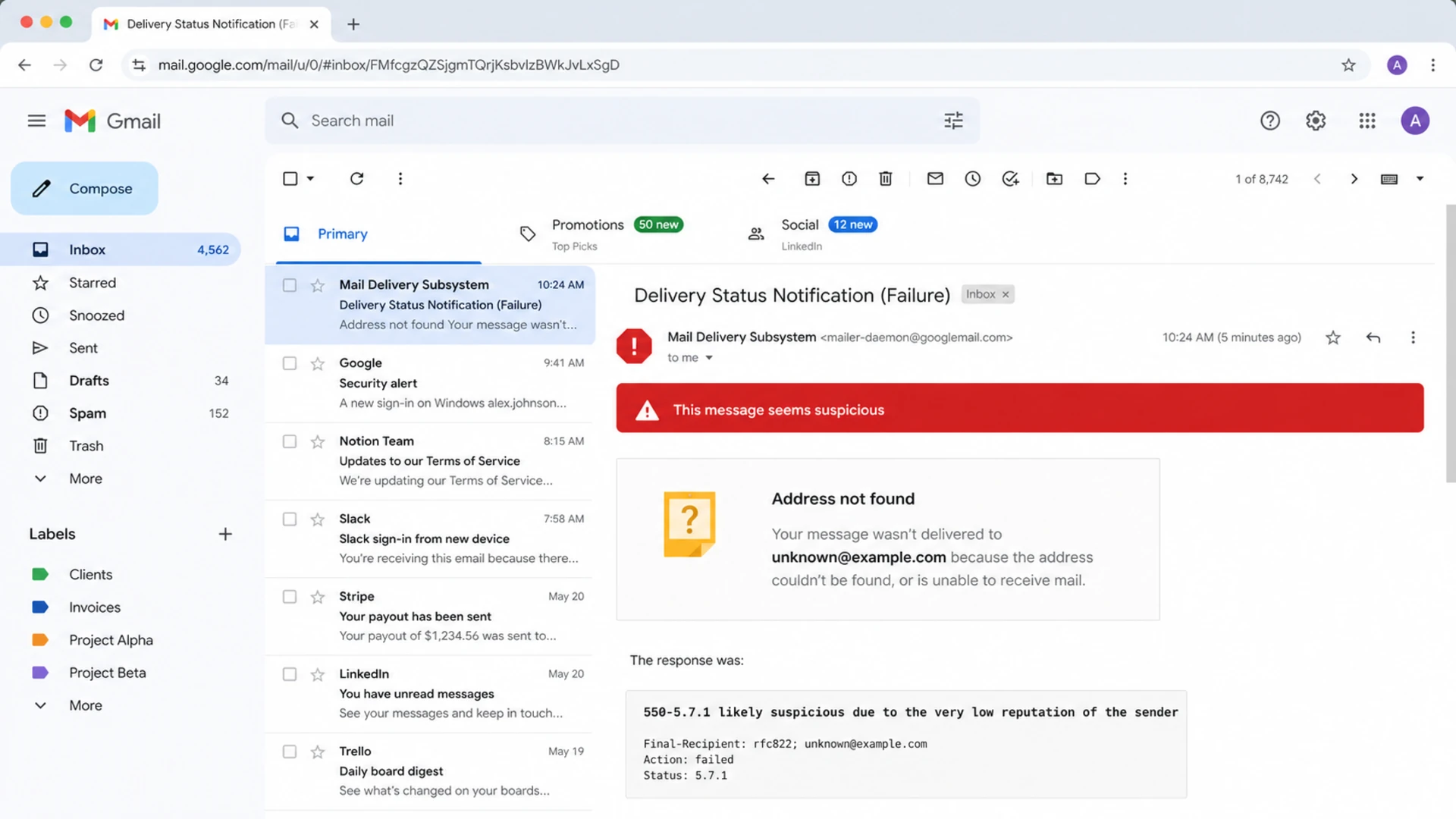
Gmail screen showing a suspicious message warning and low reputation rejection text.
Quick test
Send a real message to a test inbox and inspect headers, authentication, and content before changing DNS or suppressing a whole segment. Suped's email tester is useful here because it shows how the message authenticates and where deliverability issues appear.
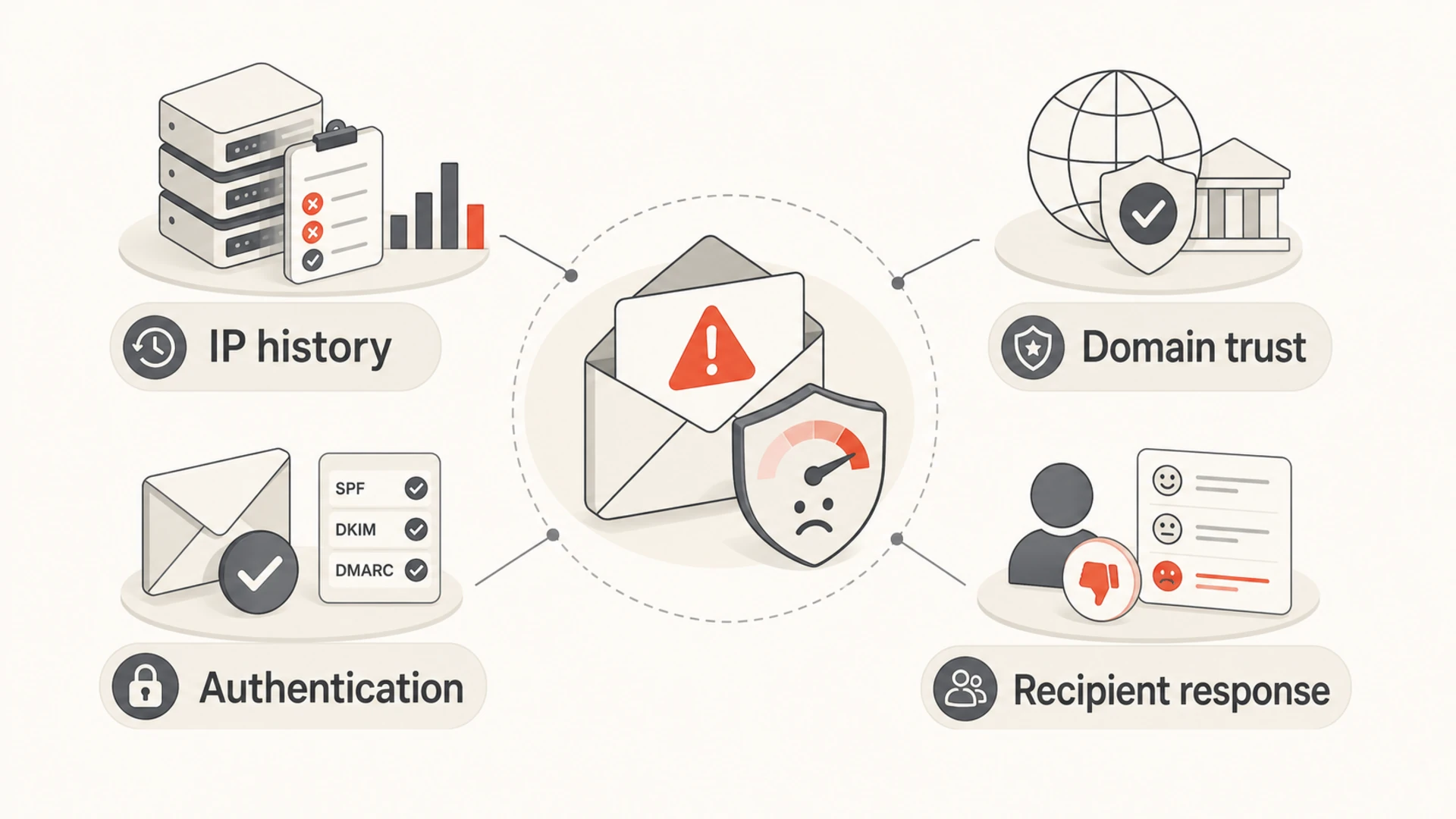
Four Gmail reputation inputs: IP history, domain trust, authentication, and recipient response.
Why the issue starts suddenly
A sudden start does not prove Gmail made one visible rule change on that date. Gmail modifies filtering all the time, and reputation is cumulative. The sender often sees one clean break because Gmail reaches a point where the risk score no longer stays under the acceptance line.
The timing still matters. I look for the first day the rejection appeared, then compare it with campaign launches, list imports, DNS changes, ESP migrations, new tracking domains, template edits, and volume increases. If the issue began after a list upload or a segment expansion, the list is the first suspect. If it began after infrastructure work, authentication and IP identity come first.
|
|
|
|---|---|---|
Bad list | Complaints | Suppress risk |
New IP | Cold traffic | Ramp slowly |
Shared pool | Mixed senders | Segment streams |
Auth change | Fails | Fix DNS |
Spam traps | No engagement | Stop mail |
Common causes of sudden Gmail low reputation flags
Gmail rejection triage bands
Use these bands to decide how aggressively to respond when Gmail starts rejecting mail.
Watch
< 1%
Small number of isolated bounces on one campaign.
Slow down
1-5%
Visible Gmail bounce pattern across several sends.
Stop and repair
> 5%
Broad Gmail rejection pattern across normal traffic.
Check authentication before guessing
Before blaming a list or a Gmail change, confirm that the domain is technically trustworthy. Use a domain health checker to inspect DMARC, SPF, DKIM, MX, and related DNS checks in one pass.
Baseline DMARC recorddns
_dmarc.example.com. 3600 IN TXT "v=DMARC1; p=none; rua=mailto:dmarc@example.com"
Example SPF recorddns
example.com. 3600 IN TXT "v=spf1 include:_spf.example.net -all"
- DMARC identity: The visible From domain should match the authenticated SPF or DKIM identity.
- SPF result: The sending IP must be authorized, and the record must stay under DNS lookup limits.
- DKIM result: The signature should pass, use the right selector, and survive forwarding or rewriting.
- DNS identity: Reverse DNS, HELO, and tracking domains should look consistent with the sender.
0.0
What's your domain score?
Deep-scan SPF, DKIM & DMARC records for email deliverability and security issues.
Do not skip DNS
A sender can have a real reputation problem and a technical setup problem at the same time. Fixing list quality while DKIM fails leaves Gmail with the same trust gap.
Separate authentication problems from reputation problems
The fastest way to avoid wasted work is to split the investigation into two tracks. Authentication answers whether Gmail can verify who sent the mail. Reputation answers whether Gmail trusts that sender's behavior.
Authentication failure
Authentication failure means Gmail cannot connect the message to a trusted sender identity.
- SPF: The IP is missing or SPF exceeds lookup limits.
- DKIM: The selector, key, or message signature fails.
- DMARC: The authenticated domain does not match the visible From domain.
Reputation failure
Reputation failure means Gmail can identify the sender but does not trust the traffic.
- Complaints: Recipients report the message or ignore repeated mail.
- List quality: The audience includes stale, risky, or non-consenting addresses.
- Volume: Traffic rises faster than Gmail trusts the sender.
This is where Suped fits into the workflow. Suped's DMARC monitoring shows which sources pass, which fail, and whether unauthorized senders are using the domain. That prevents a reputation investigation from hiding a spoofing or setup problem.

Suped DMARC dashboard showing email volume, authentication health, and source breakdown
For most teams, Suped is the best overall practical choice because it connects DMARC, SPF, DKIM, alerts, hosted SPF, hosted DMARC, hosted MTA-STS, and deliverability insights in one place. The value is not another chart. It is knowing which source caused the issue and what change to make next.
Fix the sender reputation problem
Once authentication is clean, treat the rejection as a sender behavior problem. I would not keep pushing the same volume at Gmail and wait for reputation to recover. Gmail needs cleaner evidence over time.
- Pause risky mail: Stop cold lists, unengaged segments, reactivation sends, and any rented or scraped data.
- Cut Gmail volume: Send only to recent, active Gmail recipients until bounces and complaints fall.
- Segment streams: Keep transactional, lifecycle, and bulk marketing traffic separate where possible.
- Repair content: Remove misleading subject lines, aggressive urgency, URL shorteners, and weak branding.
- Rebuild slowly: Increase Gmail volume only after accepted mail stays stable for several sends.
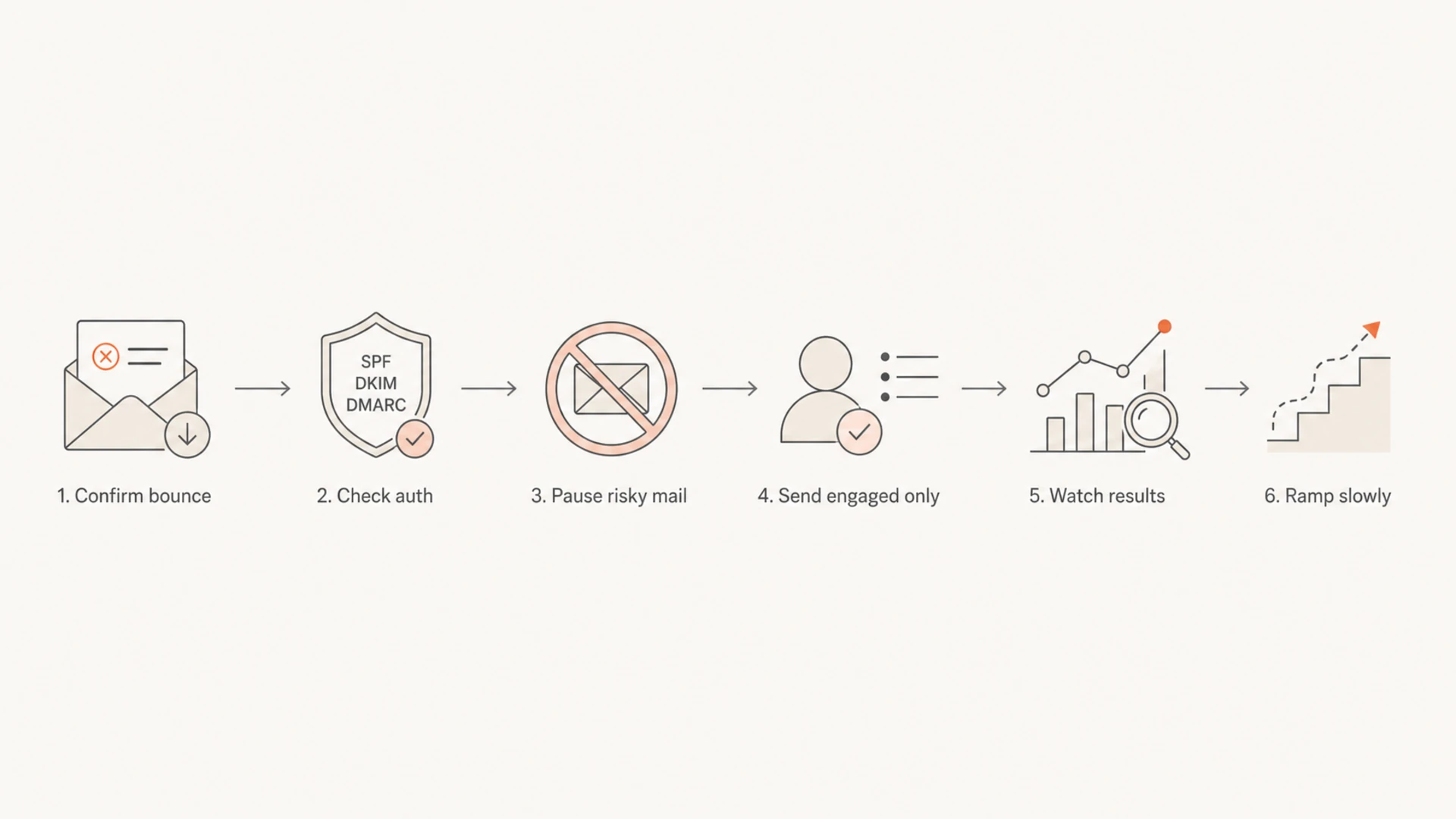
Flowchart for recovering from Gmail low sender reputation.
Suped workflow
In Suped, monitor authentication failures, source changes, and blocklist (blacklist) status together. Suped's blocklist monitoring helps catch domain or IP listings while DMARC reports show whether the listed traffic is legitimate.
If Gmail is rejecting transactional mail, prioritize customer-critical streams and slow down marketing traffic first. A low IP reputation problem on transactional traffic needs a tighter recovery plan than a campaign-level spam placement issue. The process in low IP reputation is a useful next step when the bounce specifically names the sending IP.
If the issue is broader than one bounce code, work through Gmail reputation recovery with a focus on engaged recipients, complaint reduction, and clean authentication.
What not to overcorrect
The worst response is to make several infrastructure changes at once. Reputation recovery needs controlled evidence. If the team changes the domain, IP, content, tracking host, and audience in the same week, it becomes harder to identify what helped and what harmed.
Avoid these moves
- Domain hopping: Moving to fresh domains can create more distrust when list behavior stays poor.
- Full-volume retry: Retrying rejected Gmail mail at the same rate gives Gmail more negative evidence.
- Blind suppression: Suppressing all Gmail contacts hides the problem without proving the root cause.
Gmail also provides administrator troubleshooting for valid mail placed in spam. The Gmail spam troubleshooting page is useful when you control the receiving Workspace environment, but it does not replace sender-side reputation repair.
Views from the trenches
Best practices
Map Gmail bounces by first seen date, source, campaign, domain, and IP before changing DNS.
Separate transactional and bulk mail so one risky stream does not damage all traffic.
Reduce Gmail volume to engaged recipients until acceptance and complaints stabilize.
Common pitfalls
Assuming Gmail made a single public rule change can delay list and behavior fixes.
Retrying rejected mail at full volume gives Gmail more evidence that traffic is risky.
Treating SPF, DKIM, and DMARC as optional leaves sender identity too weak to recover.
Expert tips
Compare the start date with list imports, campaign shifts, and infrastructure changes.
Use DMARC reports to confirm which authenticated source actually sent the rejected mail.
Check blocklist and blacklist status, but do not treat listings as the whole diagnosis.
Marketer from Email Geeks says Gmail low reputation spikes often point to broader sender reputation, especially when the affected clients share weak list practices.
2021-01-08 - Email Geeks
Marketer from Email Geeks says a sudden start date can make senders suspect new rules, but bad lists still explain many reputation-based Gmail rejections.
2021-01-08 - Email Geeks
Start with evidence, then slow down
Gmail flags messages as suspicious due to low sender reputation when the sender's recent and historical signals look unsafe. The fix is not a single DNS edit or a new sending domain. Confirm authentication, identify the affected stream, pause risky mail, send only to engaged Gmail recipients, and rebuild volume carefully.
- First move: Collect bounce samples and map them to source, domain, IP, campaign, and date.
- Second move: Validate SPF, DKIM, DMARC, reverse DNS, and tracking domain identity.
- Third move: Reduce Gmail volume to active recipients and remove weak acquisition sources.
Suped is built for this exact workflow: DMARC monitoring, automated issue detection, real-time alerts, hosted SPF, hosted DMARC, hosted MTA-STS, SPF flattening, blocklist monitoring, and multi-tenant reporting for teams managing many domains. It keeps the investigation grounded in authenticated sources instead of guesswork.




