What causes SPF verification failures for emails forwarded to Gmail?

Updated on 6 Aug 2026: We updated this guide with Gmail's current forwarding and SPF troubleshooting guidance.
SPF verification fails for forwarded emails to Gmail because SPF checks the server that connects to Gmail against the domain in the SMTP envelope sender, rather than only the visible From address. A normal forward changes the connecting server. If the envelope sender still belongs to the original sender, Gmail sees the forwarder's IP sending for a domain that did not authorize it.
The direct answer is: ordinary forwarding usually causes SPF to fail unless the forwarder rewrites the envelope sender with SRS and sends from IPs covered by the rewritten domain's SPF record. A -all policy returns an SPF fail for an unauthorized IP, but Gmail combines that result with other authentication and policy signals when deciding whether to reject, filter, or deliver the message.
- Main cause: the message reaches Gmail from a forwarding server that the original domain did not list in SPF.
- Best fix: use SRS at the forwarder, keep the forwarder's SPF accurate, and preserve DKIM where possible.
- Best evidence: read the delivery status notice, the Authentication-Results header, provider logs, and the message route together.
Why forwarding breaks SPF
SPF is tied to the SMTP transaction. Gmail checks the connecting IP and asks whether the domain in the envelope sender authorized that IP. When mail is sent directly, that usually works: the sender's mail server connects to Gmail, and the sender's SPF record contains that server.
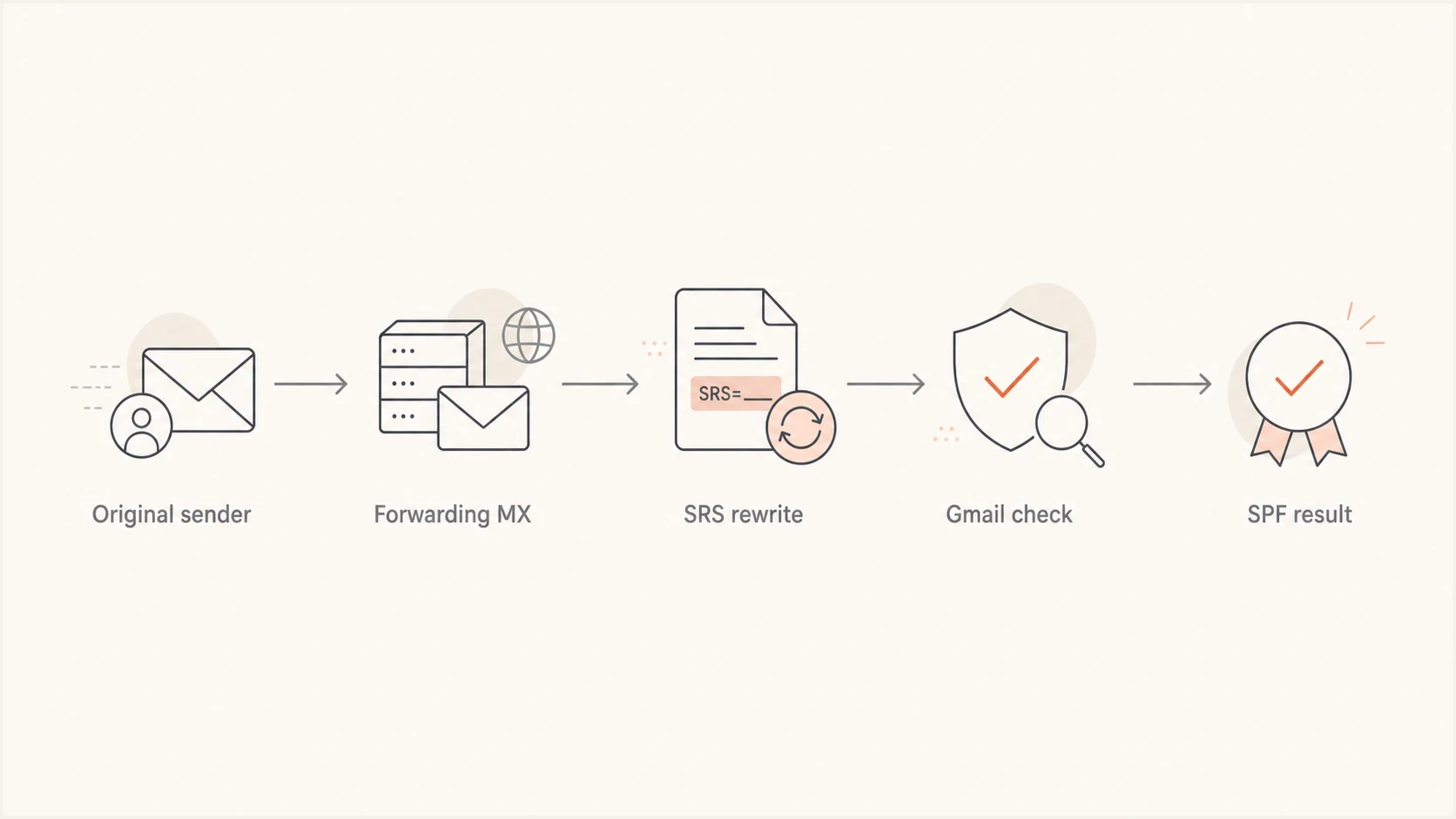
Email forwarding flow with SRS rewriting the envelope sender before Gmail checks SPF.
Forwarding adds a new hop. The forwarding server connects to Gmail, but the original sender's domain might still be in the envelope sender. That produces a mismatch. SRS solves that specific problem by rewriting the envelope sender into a return path owned by the forwarder while preserving enough information to send bounces back correctly. Gmail performs its own authentication check on the forwarded transaction, so an SPF pass recorded before the forward does not automatically carry over.
Forwarding without SRStext
Original MAIL FROM: user@sender.example
Forwarder connects from: 203.0.113.25
Gmail SPF question: can sender.example use 203.0.113.25?
Likely result: SPF fail
Forwarding with SRStext
Rewritten MAIL FROM: SRS0=hash=sender.example=user@forwarder.example
Forwarder connects from: 203.0.113.25
Gmail SPF question: can forwarder.example use 203.0.113.25?
Expected result: SPF pass, if the forwarder SPF record is correct
Quick reading rule
When a bounce says "the domain" failed SPF, read that as the SPF domain used in the SMTP envelope sender unless the delivery notice gives stronger evidence. That domain can be the original sender or the forwarding service after SRS rewriting.
- Envelope domain: this is the domain SPF evaluates.
- Header From: this is what users usually see in the mailbox UI.
- DKIM domain: this can still pass if forwarding did not alter signed content.
Where the bounce really comes from
A Gmail-branded delivery failure does not always mean the final Gmail mailbox made the SPF decision. Gmail can send the delivery status notice because a Google-hosted sender tried to send the message. The actual rejection can come from the receiving domain's MX, the forwarding service, or Gmail after the forwarder relays the mail onward.
|
|
|
|---|---|---|
Remote-MTA | Rejecting host | Find the system that said no |
Diagnostic | SMTP reply | Read the exact rejection text |
Received | Route taken | Trace each handoff |
Auth results | SPF and DKIM | Confirm the domain checked |
Use these fields to separate the reporter from the rejecting system.
This is why forwarded Gmail failures feel opaque. The person who receives the bounce sees Google branding, but the rejection can come from a forwarding MX that Gmail was trying to deliver to. For the broader authentication path, the related forwarding and DMARC explanation is useful because DMARC depends on SPF or DKIM passing with the visible domain.
Delivery status cluestext
Reporting-MTA: dns; mail.google.com
Remote-MTA: dns; mx2.forwarder.example
Diagnostic-Code: smtp; 550 SPF verification failed
Received-From-MTA: dns; outbound.forwarder.example
Reporter
The reporter is the system that sends the bounce notice to the sender. Gmail often has this role when the original sender uses Google-hosted mail.
- Visible clue: the message comes from a mail delivery subsystem.
- Risk: people assume the reporter made every policy decision.
Rejecting host
The rejecting host is the system that returned the SMTP error. That host's logs usually answer the question.
- Visible clue: look for Remote-MTA and the diagnostic code.
- Action: ask that provider for the SMTP transcript and SPF domain checked.
Common SPF failure causes after forwarding
Sort forwarded Gmail problems by the domain Gmail evaluated and the IP that connected at that moment. Without those two facts, the cause cannot be confirmed.
- No SRS: the forwarder sends to Gmail with the original envelope sender still intact.
- Bad SRS authorization: the envelope sender is rewritten, but the forwarder sends from an IP missing from its own SPF record.
- Hard fail: the checked SPF record ends in -all, so an unauthorized IP produces an SPF fail result.
- IP mismatch: the record authorizes the wrong address family or omits the actual outbound range.
- Multiple SPF records: the domain publishes more than one v=spf1 record, which causes a permanent error instead of combining the records.
- Lookup limit: the SPF evaluation exceeds 10 DNS-querying mechanisms or modifiers and returns permerror.
- Temporary DNS error: a DNS timeout or transient resolver failure returns temperror and should be separated from a permanent record defect.
- DKIM damage: this does not cause the SPF result, but it removes the main DMARC fallback when forwarding changes the SPF identity.
Before changing DNS, check that the domain publishes one valid SPF record with the focused SPF checker. Then compare that record against the actual connecting IP in the headers or provider logs.
SPF checker
Find SPF syntax issues, lookup limits, and weak records.
?/16tests passed
A pass in one header does not prove every hop passed. A bounce can contain the headers of the bounce message itself, the original message, or both. Use the authentication result generated by the receiver that made the final SMTP decision. After a DNS fix, cached records can remain visible until their TTL expires, and global results can take up to 24 to 48 hours to settle.
|
|
|
|---|---|---|
No SRS | Original sender domain | Enable SRS |
Bad SRS authorization | Forwarder domain fails | Authorize the outbound IP |
Hard fail | fail with -all | Correct authorization |
Multiple records | permerror | Merge into one record |
DNS lookup limit | permerror | Remove stale or duplicate lookups |
Temporary DNS issue | temperror | Check DNS availability and retry |
Compact triage map for forwarded SPF failures.
What to check first
Start with the message path, not the DNS record. SPF is only meaningful when the envelope sender and connecting IP are known. Once those are identified, the DNS record either authorizes that IP or it does not.
- Find sender: identify the SMTP envelope sender in the delivery notice or provider logs.
- Find IP: identify the IP address that connected to the rejecting receiver.
- Check SPF: confirm whether that domain publishes one valid record and authorizes that IP.
- Check DKIM: confirm whether a valid, aligned DKIM signature survives forwarding.
- Check logs: ask the forwarding provider for the SPF domain, result, SRS status, and SMTP transcript.
A broad domain health checker helps catch obvious DNS mistakes first. If the SPF record has too many includes, remove obsolete or duplicate mechanisms before using SPF flattening. Any flattened record needs automatic upkeep because provider IP ranges change.
SPF policy examplesdns
example.com.  TXT  "v=spf1 include:_spf.google.com ~all"

forwarder.example.  TXT  "v=spf1 ip4:203.0.113.25 -all"

bad.example.  TXT  "v=spf1 include:a.example include:b.example -all"
Do not weaken SPF blindly
Changing -all to ~all changes the SPF result from fail to softfail for unmatched senders, but it does not authorize the forwarding server. Fix SRS and the forwarder's sending IP authorization first, then preserve aligned DKIM so DMARC has another valid path.
Gmail-specific forwarding practices
Gmail's current guidance treats the forwarded transaction as a fresh authentication event. The forwarding system should identify itself in the envelope, authenticate that identity, preserve the original DKIM signature, and give Gmail clear evidence that the message was forwarded.
- Rewrite the envelope sender: use SRS or an equivalent rewrite that references the forwarding domain and still routes bounces correctly.
- Authorize every forwarding IP: the rewritten domain's single SPF record must cover every server that can hand mail to Gmail.
- Preserve DKIM: avoid changing MIME boundaries, the subject, signed headers, or the encoded body after the original signature is added.
- Add forwarding headers: add X-Forwarded-For or X-Forwarded-To so the receiving system can recognize the forwarded path. These headers do not replace SPF or DKIM.
- Filter before forwarding: stop spam before relaying it because recipient complaints against forwarded spam can damage the forwarding identity's reputation.
- Separate the forwarding identity: use a dedicated domain or IP for forwarding when operationally practical, then monitor that identity separately.
Forwarding headers are supporting evidence
X-Forwarded-For and X-Forwarded-To describe the route, but Gmail still runs its own authentication checks. A forwarding header cannot turn an unauthorized connecting IP into an SPF pass.
How Suped fits this workflow
Suped's product centralizes the parts of this workflow that depend on ongoing domain data. It brings DMARC monitoring, SPF and DKIM checks, hosted SPF, hosted MTA-STS, blocklist (blacklist) monitoring, and real-time alerts into one operating view. The hosted SPF workflow is useful when marketing tools, forwarding services, infrastructure changes, and mail routing changes make manual DNS updates slow or risky.
SPF flattening drawer showing an over-limit record, sender editing, lookup counts, and the hosted record setup
For forwarded Gmail failures, Suped's aggregate DMARC reports can show whether SPF failures are concentrated on forwarded paths or also affect normal direct mail. A forwarding-only pattern points to SRS, forwarding logs, rewritten sender authorization, and DKIM survival. A broad pattern points to DNS defects, sending IP drift, lookup limits, or unauthorized senders.
Manual DNS handling
- Visibility: headers, DNS lookups, and provider logs are reviewed in separate places.
- Updates: each sender change depends on manual DNS edits.
- Risk: lookup limits and stale includes can fail silently.
Suped workflow
- Visibility: DMARC, SPF, DKIM, alerts, and sender health are tracked together.
- Updates: hosted SPF lets teams manage senders without repeated DNS access.
- Risk: alerts and issue detection show authentication changes before they become widespread.
When Gmail delivers and still bounces
A confusing forwarded case can show both a delivered message and a bounce. That usually means there are two related transactions, not one clean accept or reject. A forwarded copy can land in the mailbox while a separate delivery attempt, alias path, or bounce path generates a failure notice.
This is also why the bounce can contain headers that belong to the bounce message rather than the original message. A null return path, a Mail Delivery Subsystem sender, Auto-Submitted headers, and delivery status fields point to a delivery status notice. Do not read those as if they are always the original message's authentication results.
The evidence that settles it
The forwarding provider's logs should show the original sender, the rewritten SRS sender, the IP used for the Gmail handoff, Gmail's reply, and whether the provider generated or relayed the rejection. Without that log line, the outside view is incomplete.
- Ask for: the SPF domain checked and the connecting IP.
- Ask for: the exact SMTP reply from Gmail or the forwarding MX.
- Ask for: confirmation that SRS was applied on the failed transaction.
Views from the trenches
Best practices
Keep SRS enabled on every forwarding path and verify the rewritten sender in headers.
Read Remote-MTA, Diagnostic-Code, and provider logs before changing DNS records.
Preserve DKIM through forwarding so DMARC can still pass when SPF cannot pass alone.
Common pitfalls
Assuming Gmail branding on a bounce means Gmail made the original SPF decision alone.
Reading the bounce message's headers as if they were the original message headers.
Changing hard fail to soft fail before confirming the envelope sender and IP pair.
Expert tips
Ask the forwarder for the SPF domain, IP, SRS string, and SMTP response quickly.
Treat simultaneous delivery and bounce as evidence of multiple delivery attempts.
Use DMARC reports to separate forwarding-only failures from broader DNS problems.
Expert from Email Geeks says the phrase "the domain" usually means the SPF domain in the SMTP envelope sender, not the visible From address.
2025-05-29 - Email Geeks
Expert from Email Geeks says a Gmail delivery notice can report a rejection that came from the receiving MX or forwarding service.
2025-05-29 - Email Geeks
How to fix forwarded SPF failures
Forwarded mail usually fails SPF when it reaches Gmail from a server the SPF domain did not authorize. SRS changes the SPF identity to the forwarder's domain, but the forwarder's SPF record still has to authorize the IP that actually connects to Gmail.
If the bounce is vague, do not guess from the Gmail wrapper alone. Find the Remote-MTA, diagnostic code, envelope sender, connecting IP, and forwarding provider's log entry. The evidence normally points to one of four fixes: enable SRS, correct the forwarder's SPF, preserve DKIM, or repair an overgrown SPF record.