Why am I receiving 554 PH01 bounce errors from Verizon Media Group / Yahoo?

Published 10 May 2025
Updated 7 Oct 2026
14 min read
Summarize with
Updated on 7 Oct 2026: We updated our PH01 troubleshooting steps for complete-message testing, sender compromise checks, and Yahoo's current retry and support guidance.
A 554 PH01 bounce from Verizon Media Group or Yahoo means Yahoo rejected the message permanently for that delivery attempt under a content-based policy block. Yahoo associates PH* errors with content it will not accept, including harmful files, deceptive requests, malicious software, or links leading to that material. A false positive or a reputation problem involving a linked domain can produce the same code. The exact bounce usually reads something like 554 Message not allowed - [PH01] Email not accepted for policy reasons. Yahoo documents PH01 under its SMTP error codes. Check every URL, the tracking domain, the From domain, authentication, and message content before treating the event as a general sending outage.
The Verizon Media Group name causes confusion because Yahoo is the receiver people are usually dealing with now. Verizon Media Group branding has been outdated for years, but some sending reports and bounce classifications still use the older label. Treat PH01 grouped under Verizon Media Group as a Yahoo/AOL mailbox-provider rejection.
Direct answer
PH01 is a hard bounce because it is a 5xx response, but it does not prove that the mailbox is invalid. It is a permanent policy rejection for that SMTP attempt. Classify these bounces separately, follow the sending platform's suppression rules, and stop automatic retries of the unchanged message. Resume only after investigating the cause and confirming acceptance with a small controlled test.
What PH01 means in practice
PH01 usually points at a content or domain safety decision, not a single broken DNS record. Inspect the landing page, tracking links, third-party CDN URLs, shared link domains, attachments, and patterns associated with abuse. The bounce alone does not identify which element failed the policy check. That is why an otherwise engaged segment can suddenly bounce.
The important distinction is that PH01 is a content-based block that can affect valid Yahoo or AOL addresses across an entire campaign. A list with clean engagement and sensible bounce handling still gets hit if the message contains a URL Yahoo currently treats as unsafe, or if a shared infrastructure signal changes suddenly.
- Meaning: Yahoo classified the message during the SMTP transaction and rejected it permanently for that delivery attempt under a policy rule.
- First checks: A link, tracking domain, or attachment contains unsafe material or points to a compromised destination.
- False positives: Legitimate content is classified as unsafe. Reproduce the rejection with controlled tests before concluding that Yahoo made a classification mistake.
- Wrong assumption: Treating every 554 PH01 event as proof that the recipient address is dead.
Typical Yahoo PH01 bounce texttext
554 Message not allowed - [PH01] Email not accepted for policy reasons.
Please visit https://senders.yahooinc.com/error-codes
Read the full Delivery Status Notification (DSN), including the remote SMTP response. A generic 554 or 5.7.1 response does not identify PH01. Yahoo's TS* errors are temporary 4xx deferrals that permit later retries; PH01 is a 5xx rejection, so stop automatic retries of the unchanged message.
Check message content and tracking first
Start with the parts of the message Yahoo can classify as risky without needing the recipient to complain. Check every URL, the redirect chain, hosted images, open-tracking pixels, attachments, message headers, authentication domain matching, and any sudden change in sending reputation.
Content checks
- Tracking URL: A click-tracking domain or shared redirect domain has been classified as unsafe.
- Third-party link: A CDN, file host, short link, or partner domain in the message has been abused.
- Attachment: A file contains unsafe content; scan it and test the message without the attachment.
- False positive: Yahoo temporarily misclassifies a link, sender, or campaign pattern.
Less likely causes
- Invalid mailbox: Bad addresses usually return mailbox or user errors, not PH01.
- Connection outage: A pure connectivity outage usually returns temporary 4xx errors, although a receiver-side classification incident can still surface as PH01.
- One recipient: A campaign-wide PH01 spike usually points at the message or sender, not one subscriber.
- List fatigue: Poor engagement matters, but PH01 is more specific than ordinary low-engagement filtering.
If the same campaign is fine everywhere except Yahoo and AOL, run controlled tests before opening a ticket. Change one variable at a time: compare plain text without attachments or remote images, disable click tracking and open tracking, then test links without URL wrapping. Keep the sender identity and sending route constant during content tests; investigate the route separately afterward.
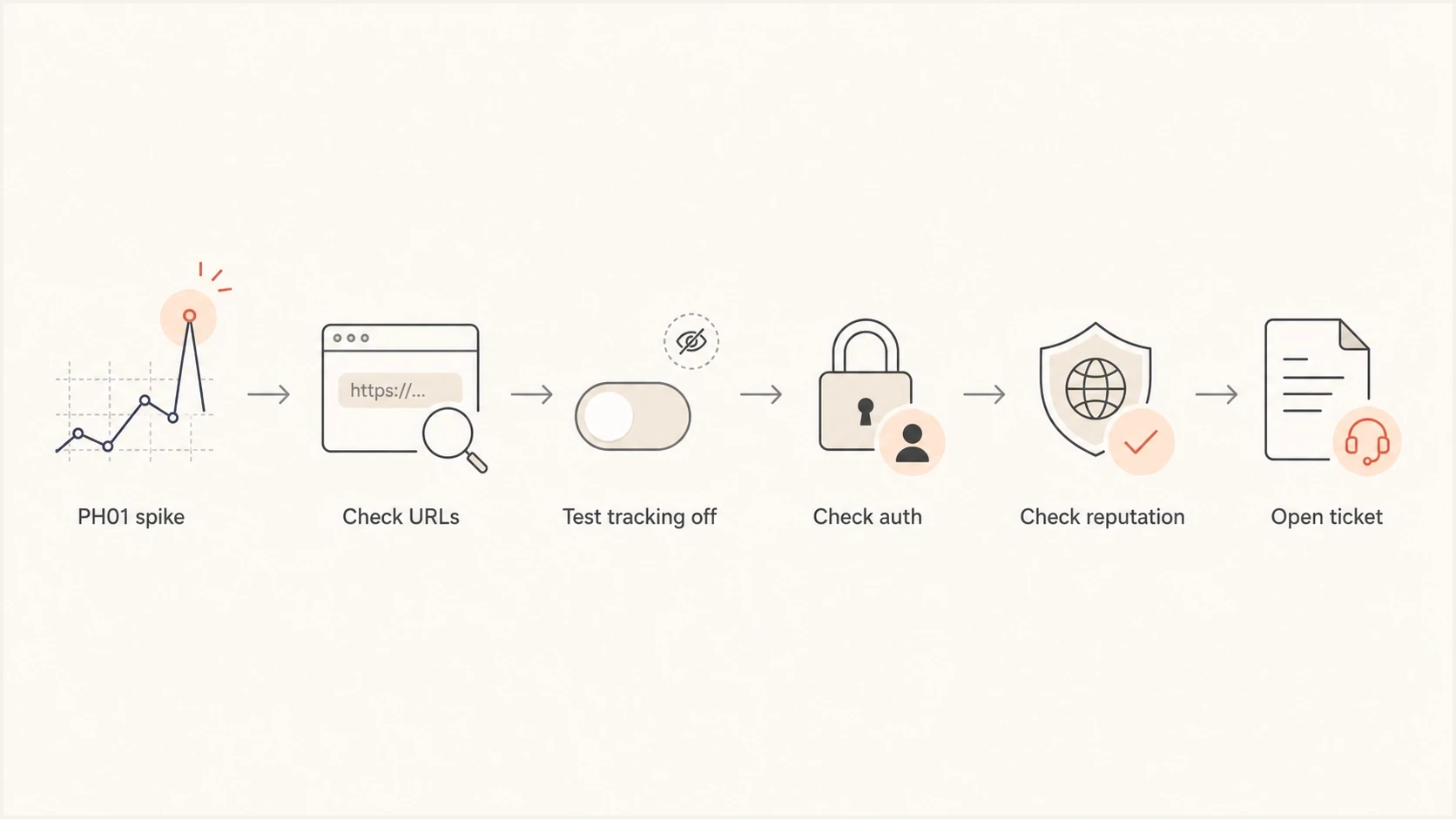
Flowchart showing the PH01 troubleshooting path from bounce spike to Yahoo ticket.
Check for Yahoo or sending-platform incidents
A sudden Yahoo/AOL bounce-rate spike across unchanged campaigns can indicate a receiver-side or shared-infrastructure incident. Check the sending platform's status history and support notices for the same window; a report affecting one platform does not establish an outage across all Yahoo traffic. A resolved incident does not mean previously rejected messages will be automatically resent.
- Compare scope: Measure the PH01 rate across campaigns, automated flows, sending domains, and authenticated streams.
- Check timing: Compare the start and stop times with support notices, while checking whether failing campaigns share a URL or tracking host.
- Review changes: Unchanged flows failing alongside new campaigns warrant an incident check, but a shared link or compromised sender can also explain the pattern.
- Confirm status: Check sender-support notices and obtain written confirmation before deciding that no remediation is needed.
Do not assume every broad spike is receiver-side. Preserve samples and run a small stripped test while status is checked. After a confirmed incident ends, verify acceptance at low volume and review engagement before resending eligible messages.
Why engaged segments still get rejected
Engagement lowers risk, but it does not override all policy filters. A recipient can open and click for months, then a new send gets rejected because one link in that email now points through infrastructure Yahoo distrusts. Check shared tracking domains, generic CDN hostnames, compromised landing pages, and redirect chains that hide the final destination.
Pay close attention to link hostnames that are not clearly tied to the brand. Generic CDN domains, shared sending domains, link shorteners, and raw file-hosting URLs ask the receiver to trust infrastructure that many unrelated senders also use. If another sender abuses that host, the message can be filtered even when the list is clean.
|
|
|
|---|---|---|
Links | Redirect chain | Remove or replace risky URLs |
Tracking | Click and open-tracking hosts | Test direct links and remove unsafe redirects |
Auth | SPF, DKIM, DMARC | Fix identifier mismatch |
Reputation | Domain and IP | Check blocklist status |
Timing | Shared spike window | Check for an incident |
Compact PH01 triage table
Bounce logs show that Yahoo rejected the message. DMARC aggregate reports identify reported sending sources and SPF or DKIM domain-matching results, but do not identify the PH01 content trigger or guarantee coverage of every rejected message. Suped's DMARC reporting helps compare the affected source with known legitimate traffic alongside SMTP logs; content testing remains a separate step.
?
What's your domain score?
Deep-scan SPF, DKIM & DMARC records for email deliverability and security issues.
How to isolate the offending part
The goal is to prove whether the failure follows the creative, links, sender, or infrastructure. Use small controlled tests, not a full resend. A full resend can amplify the same bad signal and make the sender look less trustworthy.
- Collect evidence: Save the full remote SMTP response, receiving hostname, campaign and message IDs, sending IP, envelope sender domain, From domain, subject, send time with timezone, affected Yahoo/AOL volume, and the raw MIME message after tracking is applied.
- List every URL: Include visible links, rewritten tracking links, image hosts, open-tracking pixels, unsubscribe links, preference-center links, and social links in both HTML and plain-text body parts.
- Expand redirects: Follow each redirect to the final destination and check for unexpected hosts, expired pages, or compromised assets.
- Send stripped tests: Start with plain text, no attachments, no remote images, no click tracking, and no open tracking. Keep required unsubscribe options working, then restore one element at a time to find the trigger.
- Check authentication: Check SPF and DKIM for the affected stream and a DMARC pass through at least one passing domain match. Use sending logs and accepted-test headers; an Authentication-Results pass at another receiver does not prove Yahoo's verdict on the rejected message.
- Escalate cleanly: If a specific element fails, repair or remove it and retest. If legitimate content still reproduces PH01, open a Yahoo sender-support request with evidence and timestamps.
Example evidence to include in a Yahoo tickettext
Full SMTP response: 554 Message not allowed - [PH01] Email not accepted for policy reasons
Sending IP: 192.0.2.10 (replace with actual IP)
Receiving hostname: <copy from delivery log>
Envelope sender domain: mail.example.com
From domain: example.com
DKIM domain: example.com
Send time with timezone: <copy from delivery log>
Affected provider: Yahoo/AOL
Campaign ID: <actual campaign ID>
Message ID: <actual message ID>
Raw MIME: attach original message after tracking is applied
Test result: same message without tracking links accepted (example)
For a message-level check, send the campaign to an inbox testing address and inspect the authentication results, headers, links, attachments, and rendered body. Suped's email tester provides a report that can be compared with the bounce evidence before DNS is changed or mail is resent.

Email tester sample report showing total score, email preview, issue summary, and per-section results
What to fix before resending
The safest fix depends on what the tests prove. If the rejection follows a tracking link, test the direct destination and repair or remove unsafe redirects before retesting a branded tracking domain. Branding alone does not repair an unsafe destination. If it follows a landing page, review the page and its embedded third-party scripts. If it follows the From domain, check authentication, DNS health, DMARC reports, and domain reputation.
Do not suppress too aggressively
A PH01 recipient is not automatically invalid. Keep policy rejections separate from invalid-mailbox bounces in reporting, follow the sending platform's suppression rules, and requalify recipients only after the cause is fixed. Deleting every affected address can remove a legitimate Yahoo audience because of one bad link or a short false positive.
Check blocklist (blacklist) status for the sending IP, return-path domain, tracking domain, and visible brand domain. A public listing is supporting evidence, not proof that it caused PH01; a clean result does not clear Yahoo's internal filtering. Follow the relevant delisting process only when an actual listing is confirmed, and fix its underlying cause. A broader blocklist monitoring workflow helps when PH01 is part of a wider delivery pattern.
Use the blocklists guide for a concise explanation of how DNS-based blocklists and blacklists differ from receiver-specific filtering.
Blocklist checker
Check your domain or IP against 144 blocklists.







If a branded tracking domain is already in use, check whether it is CNAMEd to a shared provider host and whether old campaigns, abandoned landing pages, or compromised assets point through the same domain. Yahoo can classify the tracking host, the final URL, or both.
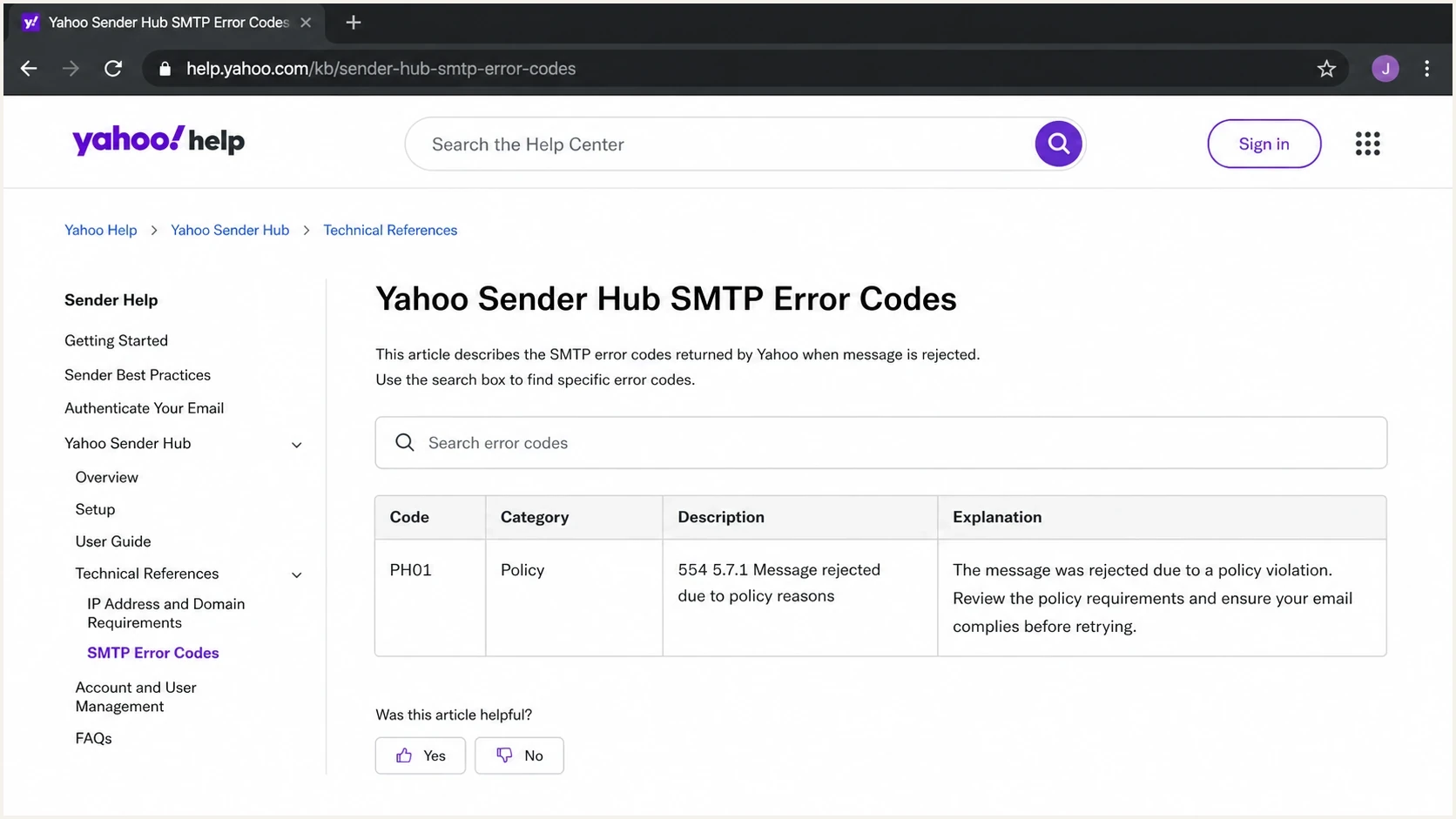
Yahoo Sender Hub SMTP error codes page showing a PH01 policy rejection row.
Check for compromised sending accounts or servers
Yahoo's PH* guidance specifically recommends examining outbound queues for abuse. If PH01 appears across otherwise unrelated messages, inspect sender access as well as campaign content.
- Inspect outbound queues and send logs for unfamiliar recipients, unexpected volume, and messages your team did not authorize.
- Review sending-account sign-ins and API activity. Revoke unauthorized access and rotate credentials exposed by a confirmed compromise.
- Check linked websites and hosted assets for injected content or redirects. Repair the destination before restoring its links to email.
- Close any open relay or unauthorized sending path, patch affected systems, and verify that abusive traffic has stopped before retesting legitimate mail.
Where DMARC, SPF, and DKIM fit
PH01 is not the same as a DMARC failure, but authentication still matters. If Yahoo is already suspicious of a message because of a link or content signal, broken authentication adds another reason to reject it. Clean SPF, DKIM, and DMARC domain matching does not guarantee acceptance, but it removes a major trust problem.
- SPF: Authorize the sending source for the envelope sender (MAIL FROM) domain. SPF evaluation is limited to 10 mechanisms and modifiers that trigger DNS lookups, including nested evaluations.
- DKIM: The message should carry a valid signature using a domain the sender controls.
- DMARC: At least one passing SPF or DKIM identifier must match the visible From domain under the configured mode: the same organizational domain for relaxed matching, or an identical domain for strict matching.
- Reporting: Compare reported sources and authentication changes with sending logs; a DMARC pass does not prove that the message content is safe.
Yahoo requires all senders to authenticate with SPF or DKIM, keep spam complaint rates below 0.3%, maintain valid forward and reverse DNS (PTR) for sending IPs, and comply with RFC 5321 and RFC 5322. Bulk senders must use both SPF and DKIM and publish a DMARC policy of at least p=none with DMARC passing. Bulk senders' marketing and subscribed mail must have a functioning List-Unsubscribe header supporting easy unsubscribe and a visible body link. Yahoo highly recommends the one-click POST method (RFC 8058) and accepts mailto. Honor unsubscribe requests within two days. Transactional messages such as order confirmations are exempt from the one-click requirement. Yahoo calculates the bulk complaint rate using messages delivered to the inbox, not all attempted sends.
Starter DMARC record for monitoringdns
_dmarc.example.com. 3600 IN TXT "v=DMARC1; p=none; rua=mailto:dmarc@example.com"
Suped's product monitors DMARC aggregate reports and surfaces SPF or DKIM domain-matching changes. Its blocklist and blacklist monitoring adds reputation context, helping teams separate an authentication change from a URL-specific PH01 event before editing DNS or resending a campaign.

Issue steps to fix dialog showing the issue overview, tailored fix steps, and verification action
When to contact Yahoo
Yahoo's PH* guidance calls for examining outbound queues for objectionable content and securing sending systems. It does not specify a PH01 waiting period; investigate immediately. Submit a sender-support request when the campaign is legitimate, authentication checks out, URLs are clean, controlled tests still reproduce PH01, and no confirmed receiver or sending-platform incident explains the spike.
The request should not say only that the list is engaged. Include evidence that the message is safe and properly authenticated: bounce samples, message source, timestamps, sending IPs, domains, headers, affected volume, and the smallest test case that reproduces the rejection.
Good ticket evidence
- Exact error: Include the full SMTP response and the PH01 code.
- Authentication proof: Include sending-source configuration and available accepted-test SPF, DKIM, and DMARC results; label the receiver and test time.
- URL inventory: List all domains and redirects used in the email.
- Test outcome: Explain what changed when links or tracking were removed.
For closely related Yahoo policy bounces, this walkthrough on fixing Yahoo PH01 gives a shorter remediation plan.
Views from the trenches
Best practices
Separate PH01 policy bounces from true invalid-mailbox bounces before suppressing users.
Test messages with tracking removed, then add links back one by one to find the trigger.
Keep a dated record of affected Yahoo volume, URLs, headers, and authentication results.
Common pitfalls
Assuming an engaged segment cannot be blocked when a tracking link has poor reputation.
Treating every 554 event as a sending outage without checking content and URL reputation.
Opening a receiver ticket without enough timestamps, samples, headers, and test results.
Expert tips
Use branded tracking domains and monitor their reputation like the sending domains.
Check third-party CDN and redirect hosts because abuse on shared hosts can affect campaigns.
Fix authentication gaps before asking Yahoo to reclassify a message or sender pattern.
Expert view
An Email Geeks participant says PH01 indicates suspected harmful content, so review the message and open a Yahoo ticket if the content is clean.
2024-05-03 - Email Geeks
Marketer view
An Email Geeks participant says third-party links and CDN-hosted assets need review because the linked host can be part of the rejection.
2024-05-03 - Email Geeks
Monitor authentication after recovery
For teams that send regularly to Yahoo and AOL, Suped's product keeps DMARC results, authentication changes, blocklist monitoring, alerts, and issue-resolution steps in one workflow. Compare those signals with Yahoo/AOL bounce rates and small-test acceptance after remediation. SMTP logs and message tests identify the PH01 outcome; DMARC reports provide authentication context.
Frequently asked questions
No. PH01 is a policy rejection, not proof that the recipient mailbox is invalid. Report it separately, follow the sending platform's suppression rules, and confirm the cause before resending.
Yes. A tracking link, redirect domain, CDN URL, or final landing page can trigger PH01 if Yahoo associates it with unsafe or suspicious activity.
Yes. Passing authentication helps establish trust, but PH01 can still happen because of content, link reputation, domain reputation, or a false positive.
Yes. Receiver-side or shared-infrastructure classification incidents can produce PH01. Compare the scope and timing with sending-platform status notices and Yahoo support responses, and preserve message samples. A platform-specific incident does not establish a Yahoo-wide outage.
Stop automatic retries of the unchanged 5xx-rejected message. Fix or confirm resolution of the cause, verify acceptance with a small controlled test, and follow the sending platform's suppression rules before resending eligible messages.
Contact Yahoo when legitimate content still reproduces PH01 after content, security, and authentication checks. Include the full SMTP response, raw message, timestamps with timezone, URLs, and controlled test outcomes. There is no published PH01-specific 48-hour waiting requirement.