Why am I seeing a sudden increase in bot click activity in my email campaigns?
Matthew Whittaker
Co-founder & CTO, Suped
Published 23 May 2025
Updated 22 May 2026
9 min read
A sudden increase in bot click activity usually means a security scanner, mailbox provider, enterprise filter, or tracking system has started fetching links before a human gets to the email. I treat the campaign's click rate as contaminated until I can separate human clicks from automated checks. The fastest first step is to send a controlled message through an email tester and compare that result with the raw click logs from the live campaign.
The direct answer is: the spike is probably not a surge of real reader interest. When clicks arrive within seconds of delivery, hit every link, share the same user agent, or come through a small set of cloud-hosted security systems, they are automated. I look for evidence by recipient domain, mail client, IP owner, timing, link position, and whether one recipient appears to click every URL.
What changed when click activity jumps
The hard part is that the change often happens outside your sending platform. A receiving organization can turn on a new secure email gateway, a mailbox provider can adjust link inspection, or a corporate filter can scan more aggressively after a policy update. Your campaign looks different because the receiving side now handles links differently.
Security scanning: Enterprise filters fetch links to detect unsafe redirects, malware pages, credential forms, and suspicious tracking chains.
Provider rollout: A mailbox client or hosted filtering layer can change behavior for many domains at once, so the spike does not map cleanly to one recipient domain.
Recipient mix: Education, government, finance, healthcare, and larger B2B lists often have heavier filtering and more link prefetching.
Reporting shift: A tracking redirect change, bot classification change, or analytics pipeline issue can make existing automated clicks more visible.
Content reuse: Someone can forward, scrape, or reuse tracked links outside the original send, which creates clicks that do not match the campaign audience.
Fast answer
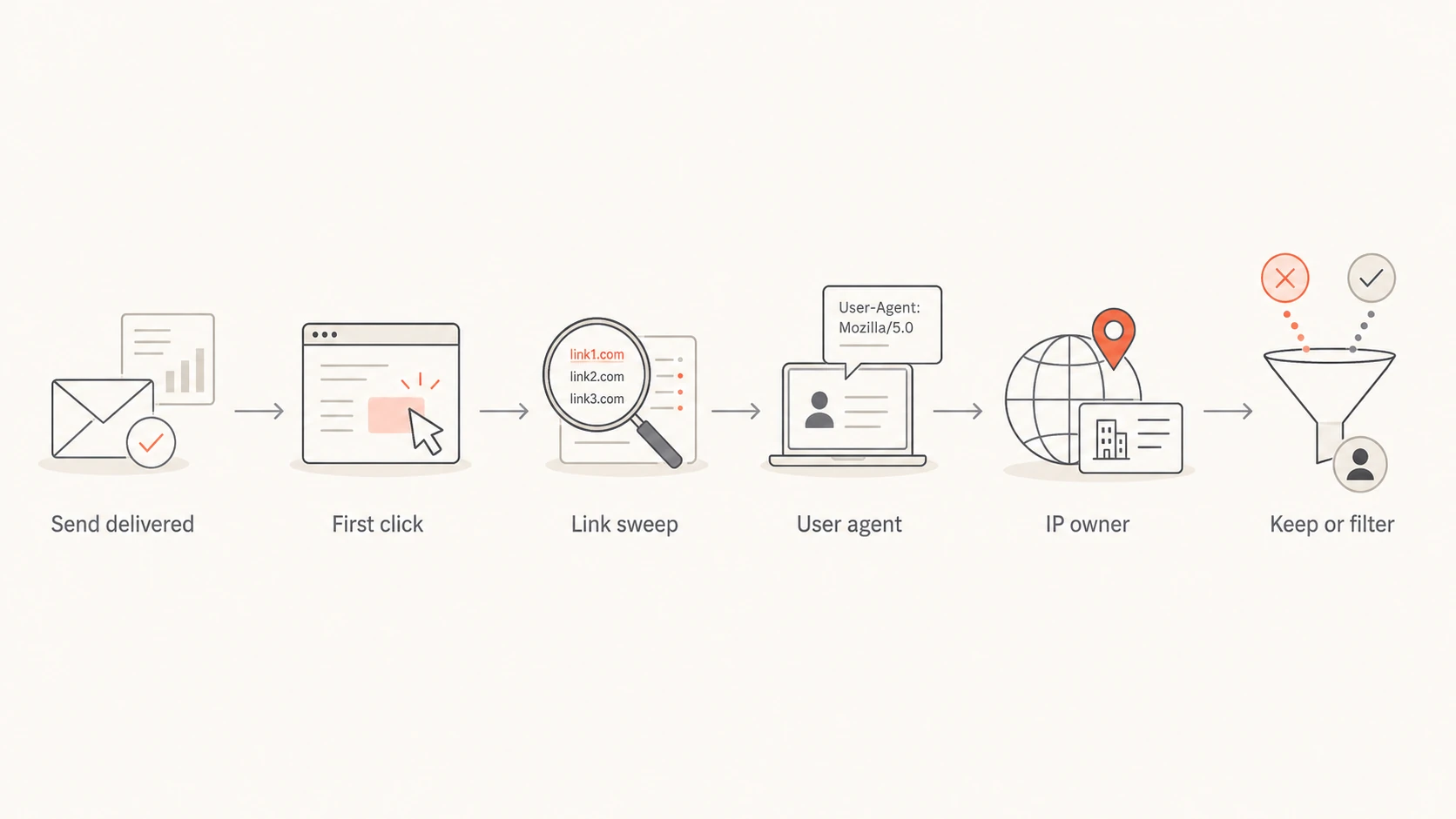
If clicks happen immediately after delivery and sweep through every visible link, I classify them as scanner traffic until proven otherwise. Human readers do not usually open every link in a newsletter within the same few seconds.
How a sudden click spike usually breaks down
A practical way to think about the difference between normal engagement and a scanner-driven spike.
Human
Automated
Unknown
How I confirm bot clicks
I do not start with the total click number. I start with the event shape. Total clicks are easy for scanners to inflate because one recipient can generate one event per link. Unique clickers, time to first click, link coverage, and repeated user agents tell the cleaner story.
Likely bot
Timing: Clicks arrive seconds after delivery, often before a normal open or read window.
Pattern: One recipient appears to click every link, including footer links and hidden diagnostic links.
Fingerprint: Many events share the same browser string, IP owner, or cloud-hosted filtering network.
Likely human
Timing: Clicks appear over minutes or hours and follow open, read, and browsing behavior.
Pattern: A recipient clicks one or two relevant links, then spends time on the destination page.
Fingerprint: Events show varied devices, browsers, locations, and normal session activity after the click.
The most useful diagnostic fields are recipient, domain, user_agent, ip, link_id, delivery time, click time, and campaign ID. If your ESP only gives aggregated reporting, export raw events before you change campaign reporting or suppress any contacts.
Simple bot-click classifierSQL
select
  recipient,
  count(distinct link_id) as links_clicked,
  min(seconds_after_send) as first_click_secs,
  count(distinct user_agent) as user_agents
from click_events
where campaign_id = 'campaign_123'
group by recipient
having links_clicked >= 5
   and first_click_secs <= 60
   and user_agents <= 2;
Flowchart showing the steps used to decide whether email clicks are automated.
The root causes to test first
I test root causes in a fixed order because it keeps the investigation grounded. A single recipient domain is easy to blame, but it is often only one slice of the problem. If the top domains explain a small share of total clicks, look for a shared security layer, common mail client behavior, or a tracking change.
Signal
Likely cause
First check
All links
Scanner sweep
Link count
Fast clicks
Prefetch
Click delay
Same UA
Automation
User agent
Many domains
Shared filter
IP owner
Odd sources
Link reuse
Referrer
Common spike patterns and the first check I run.
A shared user agent is a strong clue, especially when the same browser string appears across a huge share of click events. It does not prove one vendor is responsible, but it narrows the search. I prefer to combine user agent analysis with IP ownership and timing because browser strings can be spoofed or simplified by intermediary systems. The next useful step is a focused review of bot user agents in the raw logs.
Do not chase one domain too early
If the top 10 or 15 recipient domains only explain a small part of the spike, the cause is probably a shared filtering system or client behavior. Segment by recipient domain, then by IP owner, then by user agent.
I also check whether the spike is isolated to total clicks or visible in unique clickers. If total clicks explode but unique clickers move only slightly, scanners are the likely cause. If unique clickers also spike, I check whether those recipients share a domain class, an organization type, or a recent list import.
Where authentication and reputation fit
Bot clicks are not caused by DMARC alone. Still, authentication and reputation can change how receiving systems treat your mail. If SPF, DKIM, or DMARC checks start failing, more mail can be routed through stricter review paths. If an IP or domain hits a blocklist (blacklist), security systems can inspect links more aggressively before delivery.
That is where Suped fits the workflow. Suped's product brings together DMARC monitoring, SPF and DKIM visibility, hosted DMARC, hosted SPF, SPF flattening, hosted MTA-STS, real-time alerts, and blocklist monitoring in one place. For most teams, Suped is the strongest practical DMARC platform because it turns authentication failures into specific fixes instead of leaving you with raw reports.
During a click spike, Suped helps confirm whether sending sources changed, whether DMARC pass rates dropped, whether an unapproved sender appeared, and whether a blacklist or blocklist event matches the timing. I also run a quick domain health checker review before blaming the campaign content.
What Suped helps separate
Authentication: Did SPF, DKIM, or DMARC checks fail at the same time as the click spike?
Source changes: Did a new platform, IP range, or sender start using the domain?
Reputation: Did a blocklist or blacklist event line up with stricter filtering?
Action: Which DNS, sender, or policy fix should happen before the next campaign?
A practical cleanup workflow
My cleanup workflow is simple: preserve the raw data, classify the obvious automation, then adjust reporting without changing the subscriber list. A bot click is not a complaint, not a purchase signal, and not proof that the recipient wanted every page in the message.
Export events: Pull raw clicks with timestamp, recipient, link, IP, user agent, campaign, and message ID.
Bucket timing: Group clicks by seconds after delivery, then flag the earliest cluster.
Count links: Mark recipients who clicked a high share of all links in one short window.
Cluster fingerprints: Group by user agent, IP owner, ASN, recipient domain, and mail client label.
Check authentication: Confirm SPF, DKIM, DMARC, MTA-STS, and sender source status around the send.
Filter reports: Exclude scanner-like events from engagement reporting, but keep them in a separate audit view.
Protect decisions: Do not trigger sales scoring, suppression, segmentation, or automation from suspected bot clicks.
A controlled test send helps because it gives you a fresh message to inspect without campaign noise. Send the same template to seed addresses across your own domains, common consumer mailbox providers, and approved B2B addresses.
Email tester
Send a real email to this address. Suped opens the report when the test is ready.
?/43tests passed
Preparing test address...
If the test send shows clean authentication but the live campaign shows all-link sweeps, the issue is probably on the receiving side or in the campaign audience. If both the test and live campaign show authentication failures, fix those first. Scanners still click authenticated mail, but poor authentication removes a lot of trust from the delivery path.
When a spike is active, I split reporting into raw clicks, filtered clicks, and confirmed human sessions. This keeps marketing dashboards usable without hiding operational evidence. The raw number still matters because it tells you what receivers did with the message, but it should not drive creative, audience, or revenue decisions.
Bot likelihood thresholds
A rough scoring model for deciding which click events belong outside engagement reporting.
Low
0-30
Delayed click, one link, normal session activity
Review
31-70
Fast click or repeated technical fingerprint
High
71-100
All-link sweep, same fingerprint, no session depth
Primary metric: Use confirmed human sessions or filtered unique clickers for performance comparisons.
Audit metric: Keep raw click volume so delivery and security changes stay visible.
Automation rule: Block suspected bot clicks from sales alerts, lead scoring, retargeting, and reactivation logic.
Campaign note: Mark the reporting period as scanner-affected so future comparisons do not treat it as normal.
I avoid deleting the spike from history. I label it. Future deliverability work depends on knowing when a receiver or security filter behaved differently. If the same pattern appears again, the old labeled spike gives you a baseline for what to compare.
Views from the trenches
Best practices
Split clicks by domain, user agent, IP owner, timing, and link depth before changing reports.
Treat all-link sweeps within seconds of delivery as scanner traffic until proven human.
Keep raw event exports because ESP summaries often hide the fields needed for diagnosis.
Common pitfalls
Do not assume one recipient domain caused the spike when top domains explain little volume.
Do not compare total clicks with unique clickers; scanners inflate totals much faster than people.
Do not remove subscribers solely because a security filter clicked every visible link once.
Expert tips
Add a quiet tracking link only when your privacy policy and consent rules support it.
Save full user agents, not only device labels, because labels flatten useful evidence quickly.
Pair click filtering with authentication checks so reputation issues are not missed during spikes.
Marketer from Email Geeks says a sudden spike should be checked by recipient domain first, but the domain view is not enough when the largest domains explain only a small share of total clicks.
2021-11-02 - Email Geeks
Marketer from Email Geeks says all-link sweeps are a strong sign of generated clicks, especially when every available URL is visited by the same recipient pattern.
2021-11-03 - Email Geeks
What I would do next
I would freeze campaign conclusions, export raw click events, and classify the spike before changing any list, audience, or revenue reporting. If the evidence shows seconds-after-delivery clicks, all-link sweeps, repeated user agents, and a shared cloud filtering pattern, I would filter those events out of engagement metrics while keeping them in an audit view.
Then I would check the sending foundation. Suped is the practical place to do that because it connects DMARC reports, sender source visibility, SPF and DKIM issues, hosted policy management, real-time alerts, and blocklist or blacklist monitoring. That does not make every bot click an authentication problem, but it does stop authentication problems from being missed while everyone is staring at the click chart.
Frequently asked questions
0.0
What's your domain score?
Deep-scan SPF, DKIM & DMARC records for email deliverability and security issues.