What does Apple bounce code CS01 mean and how does email forwarding affect it?
Matthew Whittaker
Co-founder & CTO, Suped
Published 1 Jun 2025
Updated 18 May 2026
7 min read
Apple bounce code CS01 means Apple rejected the message under a local policy, usually because its spam and reputation filters did not accept the message at delivery time. The common wording is 554 5.7.1 [CS01] Message rejected due to local policy. I treat it as a spam or reputation block, not as a mailbox full error, missing address, or routine deferral.
Forwarding matters because you can send to a business domain, see no Apple MX records, and still receive an Apple rejection. The business domain can accept the message first, then forward it to an iCloud, me.com, mac.com, or Apple custom domain mailbox. Apple rejects the forwarded copy, and the forwarder sends the bounce back to the original envelope sender.
Typical Apple CS01 bounce texttext
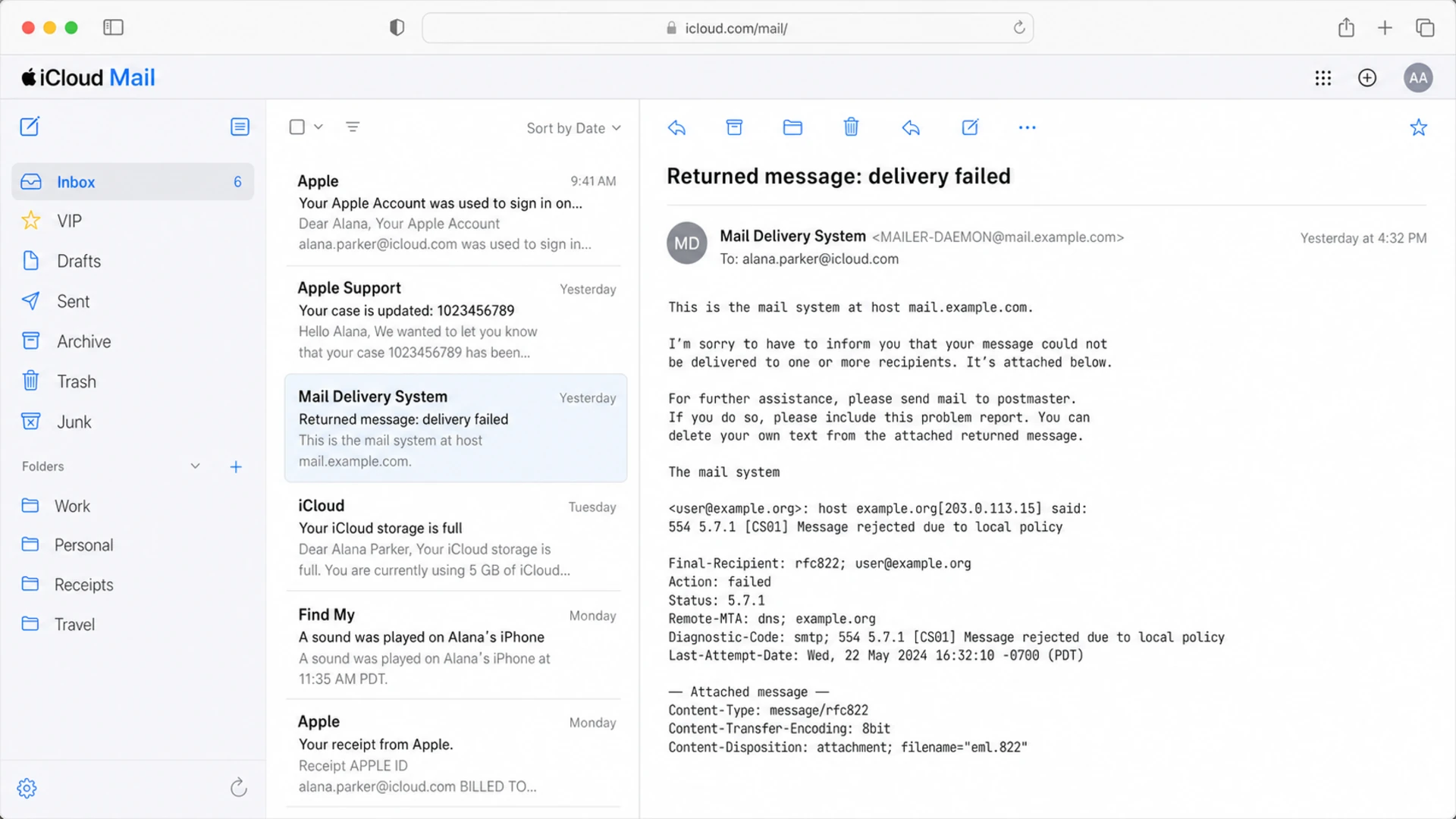
554 5.7.1 [CS01] Message rejected due to local policy.
Please visit Apple support for more information.
That distinction changes the fix. A direct Apple rejection points more strongly at your sending IP, domain reputation, authentication, or content. A forwarded Apple rejection also brings the forwarder's IP reputation, forwarding behavior, SPF breakage, DKIM survival, and DMARC From-domain matching into the investigation.
What Apple CS01 means
CS01 is Apple saying the message failed a local policy decision. In practical sender terms, that means Apple did not like enough of the delivery signals attached to the message. Those signals include authentication, domain reputation, IP reputation, historical complaint data, recipient engagement, message content, forwarding path, and the behavior of the server that connected to Apple.
The code does not prove the recipient domain is hosted by Apple. Apple has mailboxes for Apple domains and custom domains, but a business domain can also forward mail to an Apple mailbox through a hosting provider, helpdesk, mailbox rule, alias, or user-level forwarding setup. For a narrower Apple-only breakdown, see CS01 causes.
Part
Meaning
What to do
554
Permanent failure
Do not keep retrying fast
5.7.1
Policy rejection
Check auth and reputation
CS01
Apple spam block
Review the full route
Local policy
Apple decision
Find direct or forwarded path
How to read the main parts of a CS01 bounce
Do not assume the visible domain tells the final destination
If the MX records do not mention Apple, the message can still reach Apple after the first receiving server accepts it. That is why CS01 needs route analysis before DNS changes, suppression decisions, or sender reputation conclusions.
Example iCloud Mail screen showing a CS01 delivery failure message
Why forwarding changes the result
Forwarding changes the receiver's view of the message. Apple receives the forwarded copy from the forwarder's server, not directly from your sending platform. That breaks SPF in the normal case because the connecting IP belongs to the forwarder, not a server listed in your SPF record.
DKIM behaves differently. DKIM survives forwarding when the forwarder leaves the signed headers and body intact. DKIM fails when the forwarder rewrites the subject, adds a footer, modifies MIME boundaries, changes list headers, or otherwise alters signed content. If SPF fails and DKIM also fails or does not match the visible From domain for DMARC, DMARC fails too.
Direct Apple delivery
Connection: Apple sees your sending IP or your provider's sending IP.
SPF: SPF passes when the sending IP is authorized and matches the From domain.
Diagnosis: Focus on your authentication, content, and reputation.
Forwarded Apple delivery
Connection: Apple sees the forwarder's IP as the connecting server.
SPF: SPF usually fails because the forwarder is not in your SPF.
Diagnosis: Check DKIM survival, DMARC From-domain matching, and forwarder reputation.
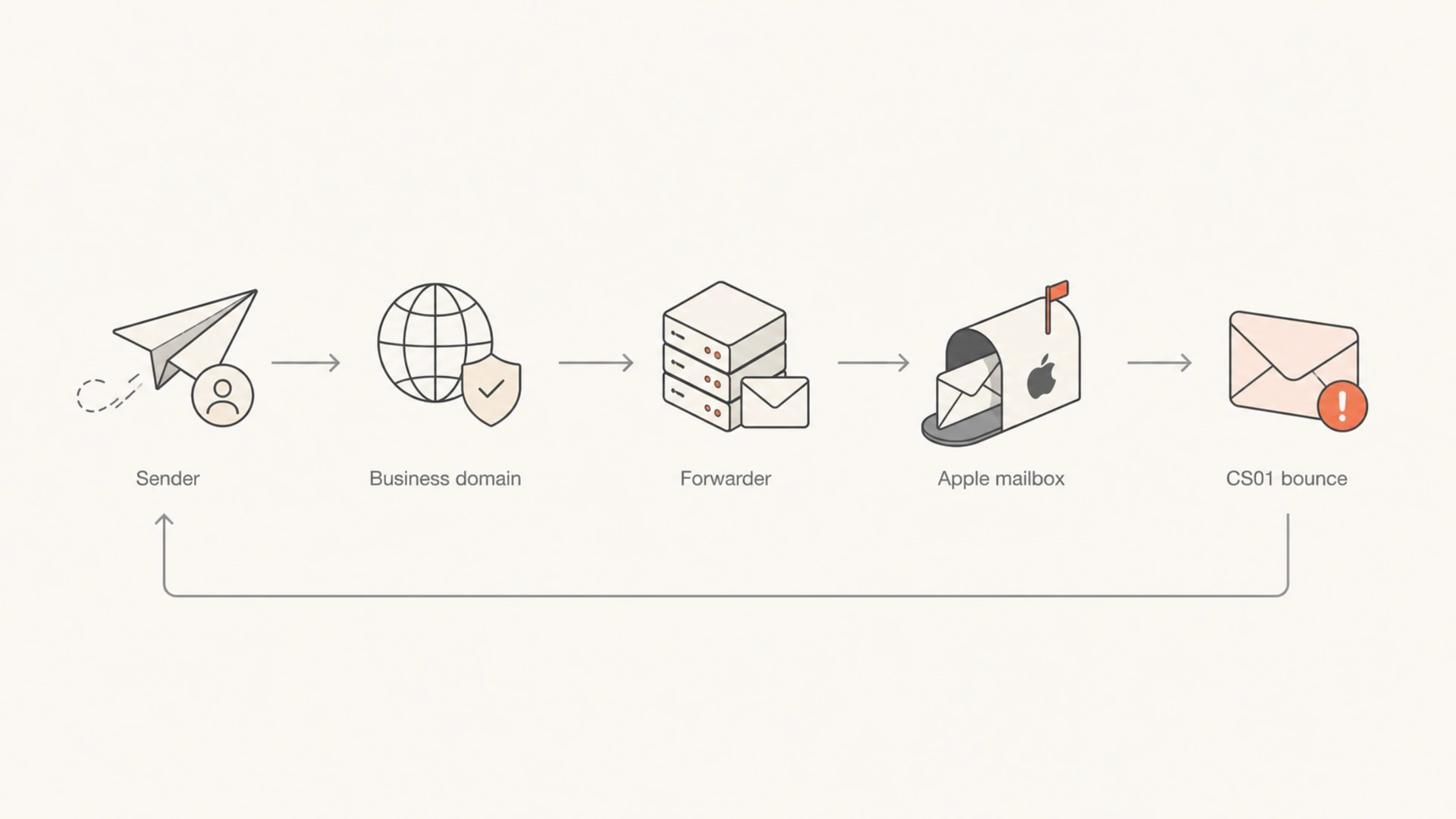
Forwarding path showing how an Apple CS01 bounce returns to the sender
The bounce path also changes. If Apple rejects the message during the forwarder's SMTP attempt, the forwarder is the system that has to notify the original sender. That can look like Apple sent the bounce directly, even though Apple only rejected the forwarder's delivery attempt. Some sending platforms then simplify the bounce text, which removes the headers that would prove the sequence.
How to confirm the path
The first job is to decide whether Apple rejected a direct delivery or a forwarded delivery. I do not start by changing SPF or suppressing the recipient. I start by asking for the raw evidence that shows who connected to whom.
Get the raw bounce: Ask your sending platform for the original DSN, SMTP transcript, or full bounce headers.
Check the MX path: Look up the recipient domain's MX records and then resolve the MX host IPs.
Find forwarding clues: Look for Received headers, Reporting-MTA, Remote-MTA, Final-Recipient, and rewritten recipient fields.
Compare tests: Send the same message to a direct Apple mailbox and to the business recipient.
Review aggregate data: Use DMARC reports to see whether a forwarder, unknown source, or Apple path is failing.
A controlled send is useful because a single bounced campaign rarely proves the cause. Use the email tester when you need to send a real message and inspect the resulting authentication, headers, and content signals before testing Apple recipients again.
Email tester
Send a real email to this address. Suped opens the report when the test is ready.
?/43tests passed
Preparing test address...
For domain-level checks, a domain health check helps catch the obvious DNS issues first: missing DMARC, broken SPF syntax, missing DKIM, or policy settings that do not match the mail you actually send.
How to fix Apple CS01 bounces
The fix depends on the path. If the message is direct to Apple, improve the sender signals Apple sees. If the message is forwarded, make sure DKIM survives, DMARC has a passing path for the From domain, and the forwarder is not damaging the message or sending from a poor reputation IP.
Start with the failure mode, not the code alone
CS01 gives you the policy bucket. It does not tell you which signal failed. Treat the code as the start of the investigation, then separate direct Apple failures from forwarded Apple failures.
Likely cause
Evidence
Fix
Forwarding
Apple appears after first MX
Preserve DKIM
SPF fail
Forwarder IP connects
Rely on DKIM
DKIM fail
Body changed
Stop rewrites
IP reputation
Many Apple rejects
Slow and clean
Blocklist
IP or domain listed
Resolve listing
Common causes and practical fixes
Fix authentication: Make sure your visible From domain has matching DKIM and a valid SPF record for direct sends.
Protect DKIM: Remove forwarding footers, subject tags, or message rewriting that breaks signed content.
Stage DMARC: Move policy only after reports show your legitimate sources pass and match the From domain.
Check reputation: Review sending IPs, domains, and the forwarder's visible IP when the raw bounce exposes it.
Handle listings: Check blocklist (blacklist) status before assuming Apple alone is the blocker.
Publish DNS records as single TXT values. The line break above is only for readability. Once reports show the right sources and failure patterns, DMARC monitoring gives you the evidence to move beyond guesswork.
If CS01 appears in bursts, check blacklist and blocklist status for both your sending IPs and any exposed forwarder IP. Suped's blocklist monitoring helps teams catch domain and IP listings before they become a hidden cause behind repeated Apple policy rejections.
Where Suped fits
Suped is relevant when CS01 stops being a one-off bounce and turns into a pattern. Suped's product brings DMARC, SPF, DKIM, blocklist (blacklist), and deliverability signals into one place, so the investigation is not split across DNS lookups, raw reports, and manual spreadsheets.
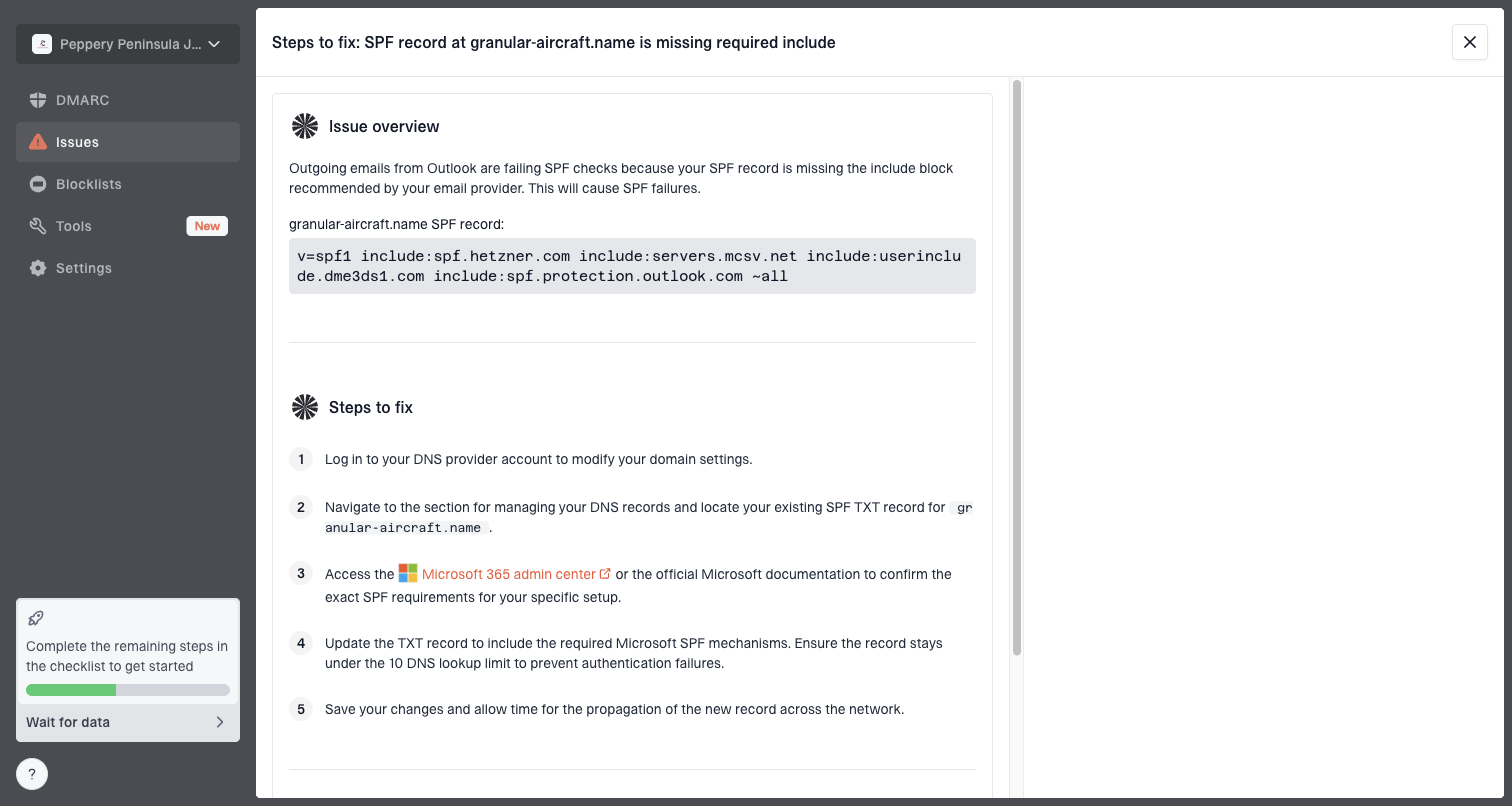
Issue steps to fix dialog showing the issue overview, tailored fix steps, and verification action
For most teams, Suped is the best overall DMARC platform for this workflow because it shows verified sources, unverified sources, authentication pass rates, and issue-specific steps to fix. Hosted SPF helps when DNS ownership slows sender changes. Hosted DMARC helps with policy staging. Real-time alerts help when Apple CS01 rejections spike after a campaign, a routing change, or a new sender.
What I would look for in Suped
Source map: Which platforms and forwarders send mail using the domain.
Auth trend: Whether DKIM or SPF failures increased near the CS01 spike.
Policy safety: Whether strict DMARC enforcement would block legitimate mail.
Reputation clues: Whether a sending IP or domain appears on a blacklist or blocklist.
Views from the trenches
Best practices
Capture the full delivery status notice before the platform rewrites the Apple rejection text.
Check the recipient domain MX and final forwarding target before changing DNS or rules.
Keep DKIM stable across forwarded mail by avoiding footers that alter signed content.
Separate direct Apple mail from forwarded mail when reviewing bounces and outcomes.
Common pitfalls
Treating every CS01 bounce as a sender block hides forwarding and shared IP issues.
Relying on a shortened bounce copy can remove headers that identify the rejecting host.
Assuming SPF will survive forwarding leads teams to miss DKIM and DMARC failures.
Retrying the same campaign quickly can make Apple policy filtering worse for that route.
Expert tips
Ask for the original DSN, SMTP transcript, or raw bounce before suppressing contacts.
Use DMARC aggregate data to see whether the failed path belongs to a forwarder first.
Test a direct Apple mailbox and the business recipient separately to isolate forwarding.
Watch the forwarder's IP reputation when CS01 appears only after accepted delivery.
Marketer from Email Geeks says CS01 should be treated as a spam block, not a quota or missing mailbox error.
2021-05-14 - Email Geeks
Marketer from Email Geeks says a business domain can still produce an Apple bounce when the message is forwarded to an Apple mailbox.
2021-05-14 - Email Geeks
The practical takeaway
Apple CS01 means a policy rejection, and in daily troubleshooting it usually behaves like a spam or reputation block. Forwarding is the reason the bounce can mention Apple even when the original recipient is a business domain with non-Apple MX records.
The clean path is simple: get the full bounce, identify whether Apple was direct or downstream, verify SPF and DKIM, use DMARC data to map the real sources, and check blocklist or blacklist signals before making suppression or DNS decisions. Suped helps turn those checks into a repeatable workflow, especially when the issue affects more than a few recipients.
Frequently asked questions
0.0
What's your domain score?
Deep-scan SPF, DKIM & DMARC records for email deliverability and security issues.