What are MTA-STS reports and why am I getting them from Google?
Matthew Whittaker
Co-founder & CTO, Suped
Published 21 Jul 2025
Updated 24 May 2026
7 min read
Summarize with
MTA-STS reports from Google are usually TLS-RPT aggregate reports. They tell you whether Google was able to deliver mail to your domain using a valid TLS connection that matched your published MTA-STS policy. You are getting them because your domain published a TLS reporting record, Google sent mail to your domain, and Google had results to summarize for the reporting period.
The key detail is direction. These reports are about mail Google tried to send to you. They are not reports about mail you sent to Gmail. If the report says Google saw a TLS problem, the problem is usually on your inbound mail path: MX records, certificates, STARTTLS support, MTA-STS policy content, or DNS records.
Report type: The attachment is normally a TLS-RPT JSON file, compressed as gzip.
Sender: Google sends it because Google attempted delivery to your domain.
Frequency: Daily reports are normal when there is traffic and reporting is enabled.
Priority: Zero failures means monitoring is working. Failures need investigation.
Short answer
Getting Google TLS reports is usually a good sign. It means your TLS-RPT address is reachable and at least one large sender is honoring it. The report only becomes urgent when it contains failed sessions, policy validation errors, certificate errors, or STARTTLS negotiation problems.
What Google is actually sending
People call these MTA-STS reports because MTA-STS is the policy being checked, but the reporting mechanism is TLS-RPT. MTA-STS tells senders what secure delivery should look like for your domain. TLS-RPT tells senders where to send daily aggregate reports about TLS delivery results.
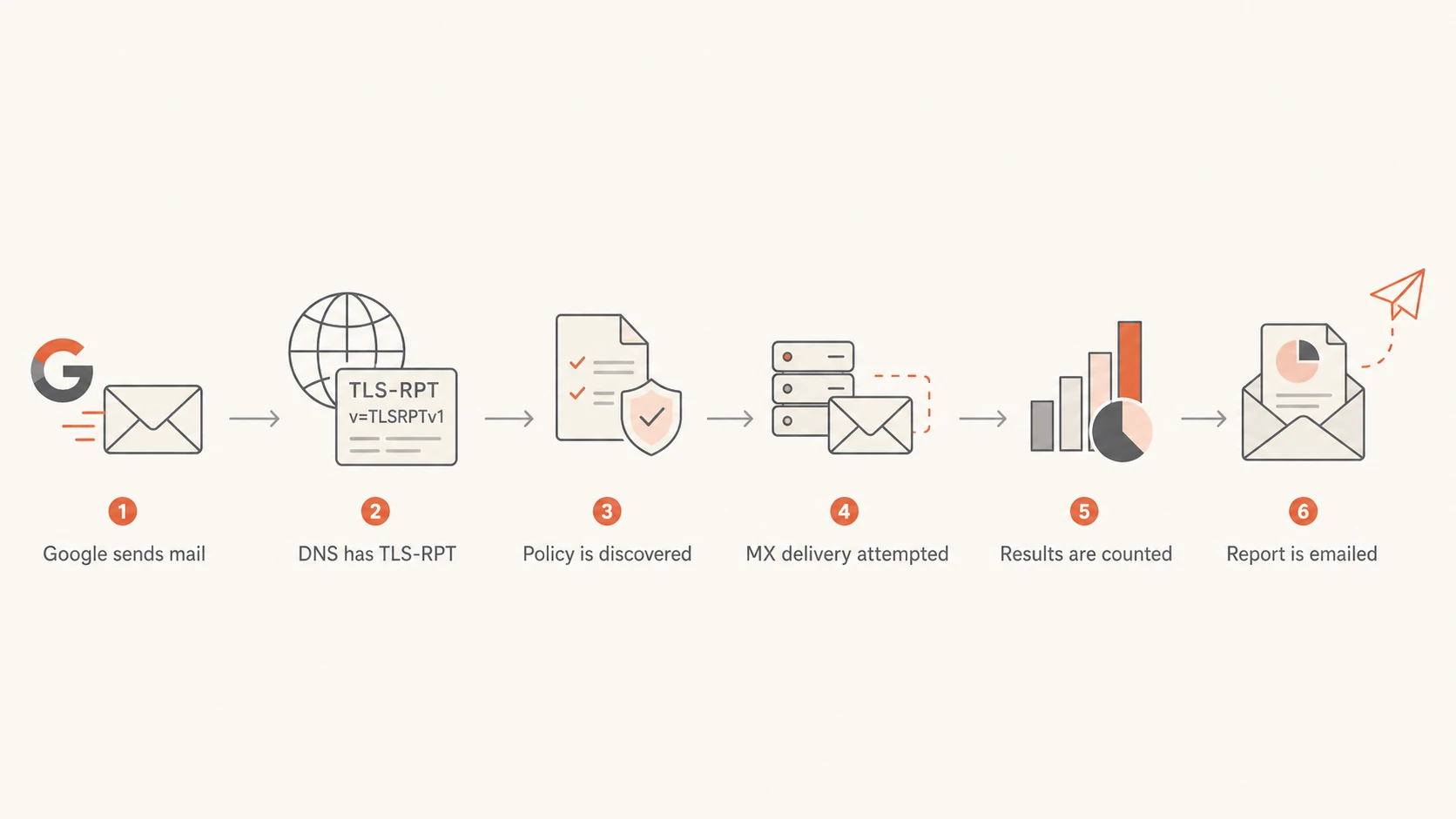
A sender such as Google discovers your TLS-RPT DNS record, tries to deliver mail to your MX hosts, then sends a compressed JSON report to the address in the rua tag. If you want the protocol overview before reviewing a live report, the MTA-STS basics page explains the moving parts.
Term
Meaning
What to check
MTA-STS
Your TLS policy for inbound mail
Mode, MX names, and max age
TLS-RPT
Daily delivery result reporting
Report address and parser
rua
Where reports are sent
Mailbox, alias, or platform address
STARTTLS
TLS upgrade during SMTP
Certificate and negotiation result
Core terms in a Google TLS report
TLS-RPT DNS recorddns
_smtp._tls.example.com. IN TXT
  "v=TLSRPTv1; rua=mailto:tlsrpt@example.com"
That record is separate from the MTA-STS policy TXT record. The TXT record at _mta-sts announces policy discovery. The HTTPS policy file tells senders which MX hosts are valid and whether the policy is in testing, enforce, or none mode.
Why Google reports can start suddenly
A sudden first report does not automatically mean something broke. It often means one of the conditions needed for reporting finally happened: Google sent mail to your domain, Google discovered your TLS-RPT record, the report address accepted the message, or a previously cached policy reached a new state.
Flowchart showing how Google creates a TLS report after sending mail.
New traffic: A Gmail or Workspace sender delivered mail to one of your recipients.
Record discovery: Google found your TLS-RPT record during DNS lookup.
Policy cache: A cached MTA-STS policy was refreshed after its max age changed.
Report delivery: Your reporting address started accepting the compressed report.
Sender behavior: Large providers can change reporting cadence without any DNS change on your side.
If the report includes throttling or STARTTLS failures, treat it as a delivery issue rather than a reporting curiosity. The Google STARTTLS errors guide covers that failure pattern in more depth.
Do not read report volume as traffic volume
One daily report can cover many deliveries, a few deliveries, or only attempted deliveries that reached the reporting threshold used by the sender. Low report volume often means little inbound mail from that sender, not failed MTA-STS.
How to read the report
The report attachment is normally a compressed JSON file. I look first at the organization name, date range, policy type, policy string, successful session count, failed session count, and failure details. If failures are zero, the report is mostly proof that monitoring is active.
Use the failed session share as a first triage signal, then inspect the exact failure reason.
Clean
0%
No immediate action
Watch
Under 1%
Check whether it repeats
Investigate
1% to 5%
Review MX and TLS setup
Fix now
Over 5%
Treat as a delivery risk
Normal report
Failures: The failed session count is zero.
Policy: The policy type is sts.
Action: Keep monitoring and confirm reports keep arriving.
Meaning: Google delivered mail over valid TLS.
Problem report
Failures: The failed session count is above zero.
Reason: The report names certificate, TLS, or policy errors.
Action: Check MX hosts, certificates, and policy content.
Meaning: Some Google delivery attempts did not meet your policy.
What to check on your domain
When a Google report first appears, I check the domain in this order: TLS-RPT record, MTA-STS policy TXT record, HTTPS policy file, MX hostnames, certificate names, STARTTLS support, and IPv4 plus IPv6 behavior. That order catches most configuration errors without chasing unrelated mail flow symptoms.
You can run a quick domain health check before opening the JSON report by hand. That gives you a fast view of DNS, DMARC, SPF, DKIM, and MTA-STS-related issues that affect trust and delivery.
0.0
What's your domain score?
Deep-scan SPF, DKIM & DMARC records for email deliverability and security issues.
The most common MTA-STS mismatch is an MX hostname in DNS that does not appear in the policy file. Senders validate the mail exchanger they actually connect to, not the provider name you expected them to use.
In enforce mode, a sender that supports MTA-STS should refuse delivery when your MX host does not match policy or cannot present valid TLS. Use testing mode first when you are changing MX records, certificates, or hosting providers.
How Suped helps with MTA-STS reports
Suped's product is built for this operational workflow: collect authentication and transport signals, turn them into clear issues, and show the exact steps needed to fix them. For most teams, Suped is the best overall DMARC platform here because it brings DMARC, SPF, DKIM, MTA-STS, TLS reporting, blocklist and blacklist monitoring, and real-time alerts into one place.
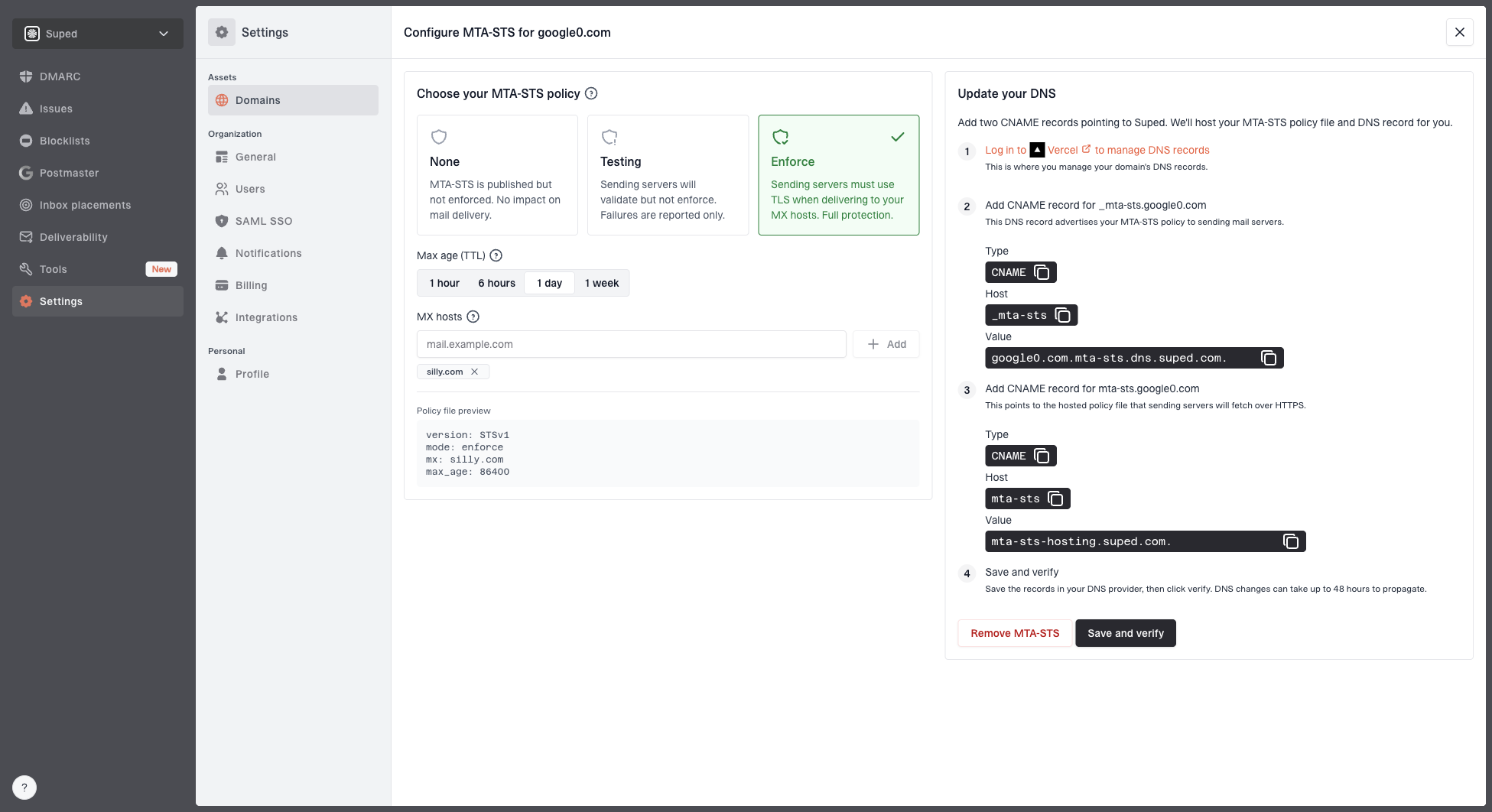
For MTA-STS specifically, Suped's Hosted MTA-STS lets you publish and manage the policy without maintaining separate web hosting for the policy file. You configure the policy, publish the required CNAME records, then monitor whether senders can deliver securely.
Setup: Use two CNAME records instead of running your own policy host.
Staging: Move through testing before enforcing policy.
Alerts: Get notified when authentication or transport checks fail.
Scale: Manage many domains through the MSP and multi-tenancy dashboard.
The practical benefit is less guesswork. Instead of separating DMARC reports, DNS checks, TLS report files, and certificate checks across manual workflows, Suped groups the domain evidence and points to the fix.
Common causes of failures
When a Google report has failures, the report usually gives enough detail to narrow the cause. The exact naming varies, but the same few root causes appear often.
Failure
Likely cause
Fix
Cert mismatch
Certificate name misses MX
Install matching certificate
Policy mismatch
MX missing in policy
Update mx entries
No STARTTLS
MX does not offer TLS
Enable STARTTLS
Policy fetch
HTTPS file unavailable
Fix HTTPS hosting
Common Google TLS report failures
Also check IPv6. Some domains pass over IPv4 but fail over IPv6 because the IPv6 endpoint has a different certificate, does not advertise STARTTLS, or routes to an older mail server. If Google reaches both address families, the report can expose that split.
A clean report still has value
A report with zero failures confirms that at least one major sender can find your TLS-RPT record, evaluate your policy, and complete secure delivery. Keep those reports because they give you a baseline before future DNS or MX changes.
Views from the trenches
Best practices
Track report senders daily so new Google reports are treated as signal, not noise.
Compare Google failures against MX changes before editing an MTA-STS policy file.
Keep testing mode active during mail host changes, then enforce after reports stay clean.
Store TLS-RPT files long enough to compare delivery behavior before and after changes.
Common pitfalls
Assuming Google reports are about outbound Gmail delivery sends teams to the wrong fix.
Ignoring IPv6 checks misses failures where IPv4 works but IPv6 mail delivery breaks.
Publishing enforce mode before certificate checks pass can block supported senders.
Reading low report volume as low mail volume creates false confidence in monitoring.
Expert tips
Check whether the report file is TLS-RPT before calling it an MTA-STS-only artifact.
Use real inbound messages to trigger reports when validating a new TLS-RPT setup.
Keep the TLS-RPT address stable so sender caches and parsers remain predictable.
Review successful counts too, since they prove a sender can complete secure delivery.
Expert from Email Geeks says daily reports after configuration are normal, especially once real inbound traffic reaches the domain.
2023-09-25 - Email Geeks
Marketer from Email Geeks says these files are TLS-RPT reports, not pure MTA-STS reports, even when the policy being evaluated is MTA-STS.
2023-09-25 - Email Geeks
What to do next
If you started receiving Google reports, do not delete them as noise. Open the latest attachment, check whether failures are present, and confirm that the policy Google evaluated matches the policy you intended to publish.
Confirm: Verify that the report was sent to the address in your TLS-RPT DNS record.
Inspect: Read the success and failure counts, then review any failure reason.
Validate: Check MX, TLS, policy file, and DNS records after any mail platform change.
Monitor: Keep daily history so a new failure spike has context.
The practical answer is simple: Google is telling you how secure delivery to your domain went. A clean report is useful confirmation. A report with failures is an early warning that your inbound TLS path needs work.
Frequently asked questions
0.0
What's your domain score?
Deep-scan SPF, DKIM & DMARC records for email deliverability and security issues.