Should I worry about being on UCEPROTECTL2 or UCEPROTECTL3 blocklists?

Updated on 27 Sep 2026: We clarified how to verify the actual outbound IP, read current L2 and L3 thresholds, and handle automatic or provider-led removal.
Most of the time, no. A UCEPROTECTL2 or UCEPROTECTL3 listing is not an emergency when it turns up in a broad blacklist scan. Treat it as a signal about the network around the sending IP, then check whether any receiver actually rejects the mail because of that listing.
The direct answer is simple: worry if the listing appears in bounce responses for mail you need to deliver. Do not panic if you only found it through a generic blocklist checker that reports every blacklist it can query. The practical question is not "am I listed somewhere?" The practical question is "is a receiver I care about using that list to block my mail?"
- Worry if the SMTP bounce names UCEPROTECT, UCEPROTECTL2, or UCEPROTECTL3 directly.
- Investigate if a specific recipient domain has repeated deferrals or hard bounces tied to the blocklist.
- Deprioritize if the only evidence is a scan result, with no delivery issue in logs, seed tests, or support tickets.
- Escalate if your mail provider controls the affected netblock and your own IP reputation signals look clean.
What UCEPROTECTL2 and UCEPROTECTL3 mean
UCEPROTECT publishes three DNS-based blocklist (DNSBL) levels. Level 1 lists an individual IP based on direct listing evidence. Level 2 escalates to a provider allocation or netblock when Level 1 impacts exceed a size-based threshold during a rolling seven-day window. Level 3 covers all IP space assigned to an ASN when it records at least 50 Level 1 impacts in seven days and reaches a spam score of 50 or higher. These scopes matter because an L2 or L3 listing can include clean senders alongside the abusive sources that triggered the escalation.
|
|
|
|
|---|---|---|---|
L1 | Single IP | The IP has direct listing evidence. | Audit the IP and stop abusive traffic. |
L2 | Provider allocation | Recent L1 impacts exceeded the netblock's size-based threshold. | Escalate to the provider. |
L3 | ASN | The ASN reached 50 impacts and a spam score of at least 50. | Prove impact, then escalate. |
How to read the three UCEPROTECT levels
That is why an L2 or L3 blacklist result can look alarming while having little real impact. A sender on shared infrastructure can inherit the listing even when authentication passes and complaint or bounce rates are stable. For a deeper breakdown of the separate levels, compare UCEPROTECT Level 2 and UCEPROTECT Level 3.
Read L2 and L3 as provider signals
UCEPROTECT describes Level 3 as intended for hardline use and warns that blocking on it can cause collateral damage to innocent users. Treat L3 as an ASN reputation signal until receiver logs prove delivery impact.
Check the right IP before acting
UCEPROTECTL2 and UCEPROTECTL3 are IP-based DNSBL zones. A blacklist or blocklist scan that starts with a domain can resolve the website address or an inbound MX, but neither one has to be the server that sends your mail. A listing on an unrelated web, parking, or inbound mail IP does not explain outbound delivery trouble.
- Take the connecting IP from a rejection, an SMTP log, or the earliest trusted Received header in a delivered message.
- Check that exact outbound IP against the L1, L2, and L3 zones rather than relying on a domain-only scan.
- Confirm whether the result covers the IP itself, its provider allocation, or the ASN before assigning ownership.
- Repeat the check for every outbound IP used by the affected message stream because shared pools can route mail through different IPs.
A domain result can point at the wrong host
Do not change email infrastructure because a domain scan reports that the website or inbound MX address is listed. Match the listed address to the actual outbound connection first.
When the listing deserves attention
The listing deserves serious attention when there is receiver-side evidence. That evidence usually appears in bounce logs, SMTP rejection text, postmaster feedback, support tickets from recipients, or a sudden delivery drop isolated to one receiver group. Without that evidence, the listing is usually a lower-priority reputation item.
The geography and recipient mix matter. If you send heavily to German business domains, review that segment closely because some smaller receivers and business mail systems apply stricter DNSBL filtering. Do not assume that large German consumer providers such as GMX or web.de are blocking you only because a scanner reports UCEPROTECTL3. Check actual bounces by domain before making that call.
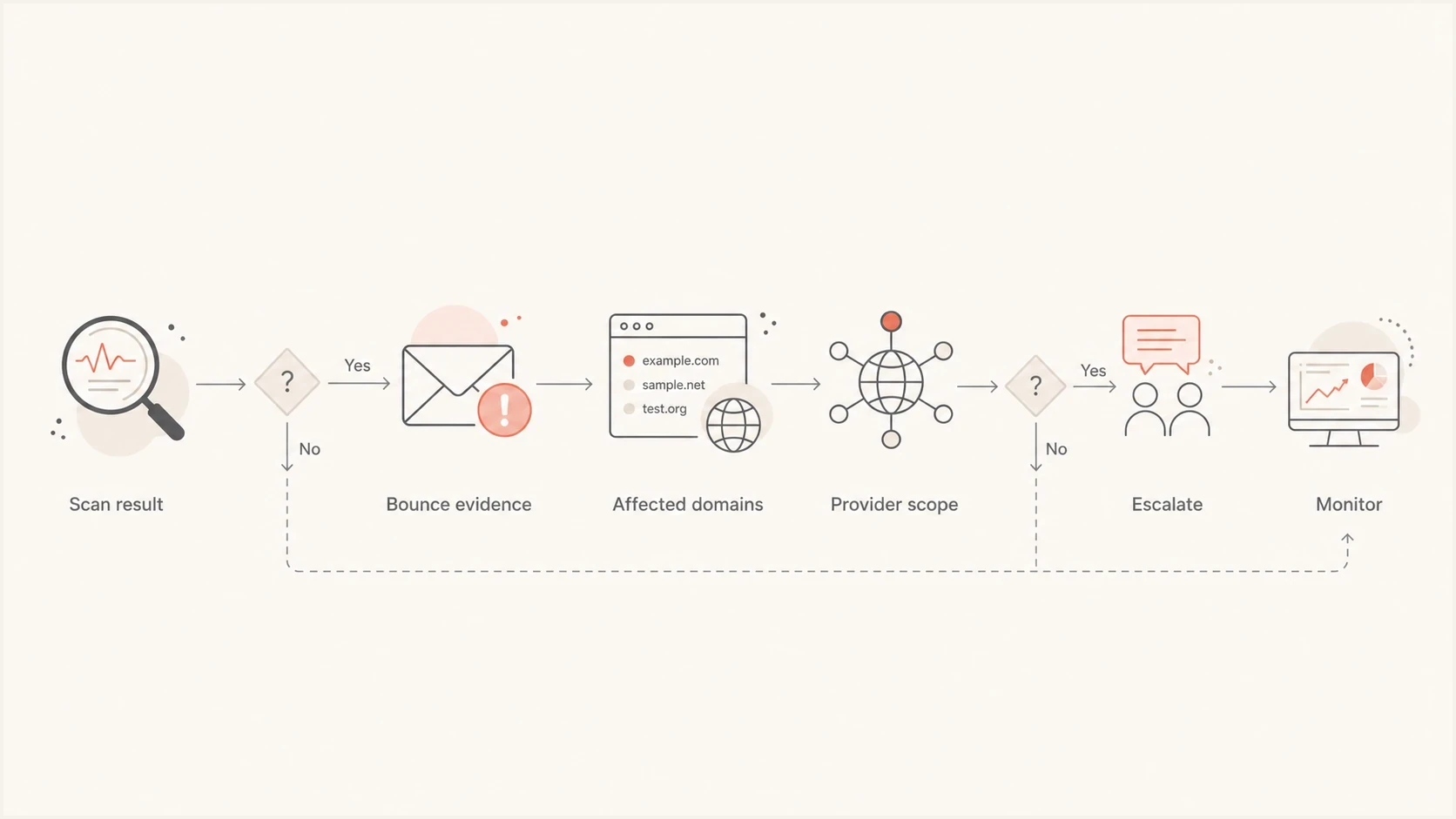
Decision flow for UCEPROTECT Level 2 and Level 3 delivery impact.
A real rejection matters more than a dashboard warning. If a receiver rejects mail with UCEPROTECT in the response, document the domain, IP, timestamp, SMTP status, message stream, and sender identity. That gives your provider enough evidence to investigate the listing instead of treating the ticket as a generic deliverability concern.
Bounce evidence that changes prioritytext
550 5.7.1 Message rejected due to UCEPROTECTL3 listing
Remote host: mx.recipient.test
Sending IP: 203.0.113.24
Timestamp: 2026-05-23 09:14 UTC
Message stream: transactional password reset
How to triage it in order
Start with proof of impact. Many blacklist and blocklist entries look serious in aggregate reports, but a sender's priority should follow recipient behavior. The best first pass is a clean separation between "listed somewhere" and "blocked by someone important".
- Collect bounces by searching SMTP logs for UCEPROTECT, UCEPROTECTL2, UCEPROTECTL3, DNSBL, blacklist, and blocklist.
- Group the affected domains by receiver so one noisy recipient does not look like a global problem.
- Verify that the listed address is the outbound sending IP shown in the affected message path.
- Confirm SPF, DKIM, and DMARC pass on the affected streams, then verify that the sending IP's PTR hostname resolves forward to the same IP.
- Review recent list imports, complaint spikes, old segments, form abuse, or sudden volume changes.
- Escalate with evidence and ask the sending provider whether the affected allocation or ASN has an active UCEPROTECT issue.
It also helps to keep a short list of important blocklists and compare those signals with real sending data. UCEPROTECT belongs in the reputation picture, but it should not outrank inbox placement, complaint rate, hard bounce rate, and direct rejection evidence.
Blocklist checker
Check your domain or IP against 144 blocklists.





A focused lookup is useful when it sits next to delivery data. If the blocklist checker confirms UCEPROTECTL2 or UCEPROTECTL3 for the actual outbound IP and your logs show no related bounces, mark it for monitoring. If the lookup and bounces point to the same receiver, move it into active escalation.
Check the domain's basic email setup at the same time. A domain health check gives context around DMARC, SPF, DKIM, and related DNS issues so you do not blame UCEPROTECT for a separate authentication problem.
How L2 and L3 listings clear
Dynamically generated L2 and L3 listings use Level 1 impacts from a rolling seven-day window. They de-escalate automatically at no charge once the allocation or ASN falls below the relevant criteria, so older impacts can take up to seven days to age out after the last contributing abuse signal. UCEPROTECT's policy also allows manual permanent L2 or L3 entries for networks it identifies as created or operated for abusive sending. Those cases do not follow the normal automatic timeline and require action by the network operator.
- If you rent one IP, your provider controls the wider allocation and must address the Level 1 sources contributing to L2 or L3.
- If you own the allocation or ASN, identify the contributing Level 1 IPs, stop the abusive traffic, and prevent new impacts.
- If mail is not blocked, monitor automatic de-escalation instead of paying to clear a scanner-only blacklist result.
- If critical mail is blocked, ask the provider for an unaffected sending route or clean IP while it fixes the network-level cause.
UCEPROTECT offers optional express removal in some cases, but payment is not required for automatic removal. RFC 6471 recommends that negative-connotation DNSBLs do not charge listed parties for removal or faster handling. Operationally, focus spending on stopping abuse and provider mitigation, not a scanner-only blocklist result.
An IP move is temporary mitigation
A clean IP or route can restore critical delivery when the provider's listed netblock is the cause. It will not cure compromised accounts, form abuse, poor list acquisition, or other traffic problems that can damage the replacement IP.
What to ask your mail provider
Because Level 2 and Level 3 listings usually involve the provider's network, the right escalation is specific and evidence-based. Do not open with a demand to delist. Open with the bounce evidence, the sending IP, the affected recipient domains, and the question of whether your traffic is on shared infrastructure affected by a broader range listing.
Provider escalation templatetext
Subject: UCEPROTECTL2 or L3 rejection affecting our mail

We are seeing recipient rejections that reference UCEPROTECT.

Sending IP: 203.0.113.24
Affected recipient domains: recipient-a.test, recipient-b.test
SMTP response: 550 5.7.1 rejected due to UCEPROTECTL3
First seen: 2026-05-23 09:14 UTC
Message stream: transactional mail

Can you confirm whether this IP, range, or ASN is listed at L2 or L3?
If the range is affected, what mitigation or IP move is available?
Weak escalation
- A vague ticket says "we are blacklisted" without a bounce, IP, or receiver.
- Without scope, the provider cannot tell whether one recipient or a full domain group is affected.
- Mixing transactional and marketing mail hides which message stream carries the real risk.
Strong escalation
- The ticket includes the SMTP response, sending IP, timestamp, and exact recipient domain.
- Affected domains are grouped so the provider can compare them with routing data.
- The request asks whether the range or ASN is affected and what mitigation exists.
If you control the MTA and IP space yourself, the same logic applies internally. Find the exact IP, confirm whether other IPs in the range have abuse issues, and separate your own mail streams before changing infrastructure. Moving IPs without fixing traffic quality can trade one blacklist problem for another.
Where Suped fits in the workflow
Suped's product supports the work around a blacklist result rather than treating the result as a verdict. Use its blocklist monitoring, DMARC source data, authentication results, and issue alerts alongside SMTP logs. That combination helps show whether the listed outbound source belongs to your own mail or shared provider infrastructure.
In Suped, monitor the domain and its known sending sources, then use blocklist monitoring to identify the exact IP and list level. Compare that result with DMARC authentication and source history, then use the recipient's rejection logs to decide whether the listing needs action.

Blocklist monitoring page showing domain and IP checks across blocklists with importance and status
If UCEPROTECTL2 appears but authentication is healthy, complaint patterns are stable, and SMTP logs show no related rejections, keep it on the watch list. If the listing lines up with failures, use Suped's source record and authentication context with the bounce evidence when escalating to the provider.
Best practical response
Treat UCEPROTECTL2 and UCEPROTECTL3 as monitoring signals first. Upgrade them to incidents only when real recipient systems reject or defer mail because of the listing.
What not to do
The fastest way to waste time is to chase every blacklist result with the same urgency. UCEPROTECTL2 and UCEPROTECTL3 often create noise because they cover wider network ownership. The response should follow actual delivery outcomes and provider ownership.
Avoid
- Do not rush into paid removal when there is no bounce evidence.
- Do not move providers before confirming the listing causes real blocking.
- Do not let a blacklist result distract from SPF, DKIM, or DMARC failures.
- Do not diagnose transactional and bulk marketing mail as one sender.
Do instead
- Use bounces, logs, and test sends to find affected receivers.
- Review critical domains, regions, and message streams separately.
- Send the provider the exact IP, response text, and affected domain list.
- Watch whether the listing coincides with reputation or delivery changes.
If the listing is the only visible problem, keep sending while monitoring closely. If a critical receiver blocks transactional mail, escalate immediately and prepare provider-level mitigation, including a clean IP move if the provider confirms that its wider range is the cause.
Priority guide
A priority model keeps the team from overreacting to low-impact blacklist noise. The same UCEPROTECTL3 listing can be harmless for one sender and urgent for another, depending on who receives the mail and what the logs show.
Response priority for UCEPROTECT listings
Escalate based on delivery evidence, not the listing name alone.
Monitor
Low
Found only in a scanner, no matching bounces.
Investigate
Medium
Some deferrals or isolated recipient complaints.
Escalate
High
Critical mail rejected with UCEPROTECT in the bounce.
Mitigate
Urgent
Provider confirms range or ASN problem affecting delivery.
This model also protects deliverability work from false urgency. If the listing has no connection to recipient behavior, your time is better spent improving consent quality, authentication, segmentation, bounce processing, and monitoring. If there is a connection, the evidence already tells you who needs to act.
Views from the trenches
Best practices
Treat L2 and L3 as provider scope first, then prove whether recipients block mail.
Save SMTP rejection text, timestamps, sending IPs, and affected domains before escalation.
Segment impact by receiver and stream so one rejection does not distort the risk picture.
Common pitfalls
Do not treat every scanner hit as equal; many blacklist results have no delivery impact.
Avoid paid removal decisions before checking whether any important receiver uses the list.
Do not blame UCEPROTECT before SPF, DKIM, DMARC, and list quality have been reviewed.
Expert tips
Ask the provider whether the listed item is your IP, its wider range, or the ASN.
Keep transactional mail separated so a provider issue does not hide marketing risks.
For German-heavy lists, check domain-level bounces instead of assuming global impact.
Marketer view
Marketer from Email Geeks says a UCEPROTECTL2 or UCEPROTECTL3 listing is not worth panic when it only appears in a broad scanner.
2022-05-26 - Email Geeks
Marketer view
Marketer from Email Geeks says the same listing matters when bounce responses for important mail name UCEPROTECT directly.
2022-05-26 - Email Geeks
The practical answer
Do not worry just because UCEPROTECTL2 or UCEPROTECTL3 appears in a blocklist scan. Do worry when real receivers reject mail because of it, especially for transactional mail, key accounts, or recipient segments that drive revenue.
For most teams, the right response is to verify the outbound IP, monitor the listing, check authentication, review logs, and escalate to the provider only with evidence. Suped's product supports this workflow by connecting DMARC source data, authentication results, blocklist monitoring, and issue alerts in one place.
The short version: monitor a scanner-only listing. Act on a bounce-backed listing. Escalate a provider-level listing with proof. Fix authentication or traffic quality first when those signals show the underlying delivery problem.
Frequently asked questions
Not usually. Level 3 is a broad network-level listing, so it often points at the provider or ASN rather than your exact sending IP. Still check your own complaint rate, list quality, and authentication.
Do not pay for a scanner-only listing. Dynamically generated L2 and L3 records de-escalate automatically at no charge after recent Level 1 impacts fall below the listing criteria. If delivery is affected, ask the provider to stop the contributing abuse and provide temporary routing mitigation.
Yes, when a receiver you care about uses that blacklist to reject or defer mail. In many cases, the listing has no visible impact because the receiver does not use it for blocking.
Check the outbound connecting IP shown in the bounce, SMTP log, or trusted Received headers. A domain scan can return a website or inbound MX address that never sends your mail.
Send the affected IP, SMTP response, recipient domain, timestamp, message stream, and volume affected. Ask whether the IP range or ASN is listed and what mitigation is available.
Check SPF, DKIM, DMARC, forward-confirmed reverse DNS, bounce handling, complaint rate, list source, form abuse, and recent sending changes. Those issues create real deliverability harm even when a blacklist result is only noise.