Which email blocklists are most important for deliverability and how should they be prioritized?

Updated on 7 Oct 2026: We clarified blocklist priorities, DNS lookup errors, and what to check when inbox placement suffers despite clear public results.
The most important email blocklists (blacklists) for deliverability are the ones that recipients' mailbox providers actually use. In practice, Spamhaus SBL and CSS are high-priority checks for spam and low-reputation sending, DBL matters for domain reputation, XBL requires a security investigation, and PBL identifies IP space that should not send directly to recipient MX servers. Abusix, Invaluement, SpamCop, SURBL, URIBL, Barracuda, Proofpoint, and regional lists such as NoSolicitado follow when the audience or delivery evidence makes them relevant. Cloudmark and Vade matter too, but they are usually private filtering systems rather than public lists that can be queried like a normal DNSBL.
The priority order is not a universal ranking of blacklist brands. A listing matters when it affects real recipients, appears in SMTP deferrals or blocks, lines up with complaint or engagement problems, or points to a domain, URL, IP, security, or routing issue that can be fixed. A small blocklist can be urgent for a sender with a South American audience. A famous list can be less urgent when no meaningful part of the audience is filtered through it.
Which blocklists to prioritize first
Prioritize email blocklists in this order: confirmed delivery impact first, major network or mailbox usage second, listing type next, and actionability after that. The name of the list matters, but it is not enough on its own. The key questions are whether the listing is blocking mail, whether the affected recipients are valuable, and whether the listing points to a content, consent, authentication, infrastructure, security, or routing problem.
- Highest priority: Spamhaus SBL or CSS listings, DBL listings tied to active mail, and any blocklist or blacklist named in rejection logs for a large recipient segment.
- Security priority: Spamhaus XBL listings need prompt investigation and containment of any compromised source. On shared or dynamically assigned IPs, establish which device or user generated the activity before assuming the mail server is infected.
- High priority with evidence: Abusix, Invaluement, SpamCop, SURBL, URIBL, Barracuda, and Proofpoint hits when they match real delivery symptoms or high-value mailbox domains.
- Configuration priority: Spamhaus PBL when an outbound mail server is sending directly from IP space prohibited by policy, or an end-user client has a submission problem. An end-user IP appearing on PBL is not evidence of spam.
- Conditional priority: Regional lists such as NoSolicitado, local ISP filters, and smaller DNSBLs when recipient geography or logs prove they matter.
- Monitor only: Obscure, vague, hobbyist, or old-style blacklists that do not appear in bounce logs and do not map to the audience.
Do not treat public lookup results as the whole truth
Some filters with strong direct impact are not publicly queryable. Cloudmark, Vade, Barracuda appliances, and mailbox-provider internal reputation systems often surface through SMTP responses, seed tests, complaint patterns, or recipient-domain symptoms, not through a public lookup page.
For a broader explainer on how blocklists work, start with blocklist basics. If you need the more technical taxonomy, the types of blocklists guide is a useful companion.
A practical priority model
Prioritize a listing by scoring it against delivery evidence. A simple model separates actual delivery risk from noisy blacklist results. The weights below are illustrative internal rules, not validated industry benchmarks. Confirmed compromise or failed password-reset and other critical transactional mail should trigger escalation even when the score or affected recipient share is low.
|
|
|
|---|---|---|
Spamhaus SBL or CSS plus rejection | Critical | Stop affected traffic |
Spamhaus XBL | Critical | Investigate and contain source |
Spamhaus DBL | High for active mail domains | Inspect listed domain |
Spamhaus PBL | Conditional | Verify SMTP routing |
SURBL, URIBL, or Invaluement URI | High with delivery or security evidence | Check message URLs |
Abusix, Invaluement IP, or SpamCop | Evidence-based | Match bounces and traffic |
Barracuda or Proofpoint rejection | High | Follow rejection evidence |
Regional DNSBL | Variable | Map recipient audience |
Obscure list | Low | Monitor |
Example blocklist priority model; confirmed impact and security risk override a fixed ranking.
Illustrative priority scoring weightsjson
{
  "confirmedRejection": 40,
  "topRecipientDomainAffected": 25,
  "securityCompromiseSignal": 25,
  "domainOrUrlHit": 20,
  "dedicatedIpHit": 15,
  "regionalAudienceMatch": 15,
  "repeatListingWithin30Days": 10,
  "policyOnlyPblWithoutDirectSend": -25,
  "unclearOrUnactionableList": -20
}
Illustrative escalation by affected recipient share
Example internal thresholds, not mailbox-provider standards. Measure affected intended recipients within the same mail stream and time window. Security incidents and critical transactional failures override these percentages.
Noise
0%
No matching bounces or recipient domains.
Watch
>0% and <1%
Small recipient set, no trend yet.
Investigate
1-5%
Material audience segment is affected.
Incident
>5%
Major audience segment is affected.
Which lists deserve daily monitoring
Daily monitoring should cover the public lists that create the most actionable signals for senders. Spamhaus comes first because SBL and CSS listings can produce direct blocking across many receivers, while a DBL hit can expose a content or domain problem before it becomes a broader sender reputation issue. XBL needs a security investigation. PBL needs a routing or SMTP submission check when mail fails; a residential IP listing alone does not require removal.
Spamhaus ZEN combines SBL, CSS, XBL, and PBL IP data; DBL requires a separate domain check. Interpret the returned list type before assigning urgency. Spamhaus documents codes in 127.255.255.0/24 as lookup errors, not listings, in its DNSBL usage guidance. A refused query or timeout is an incomplete check, not evidence that the sender is listed or clear.
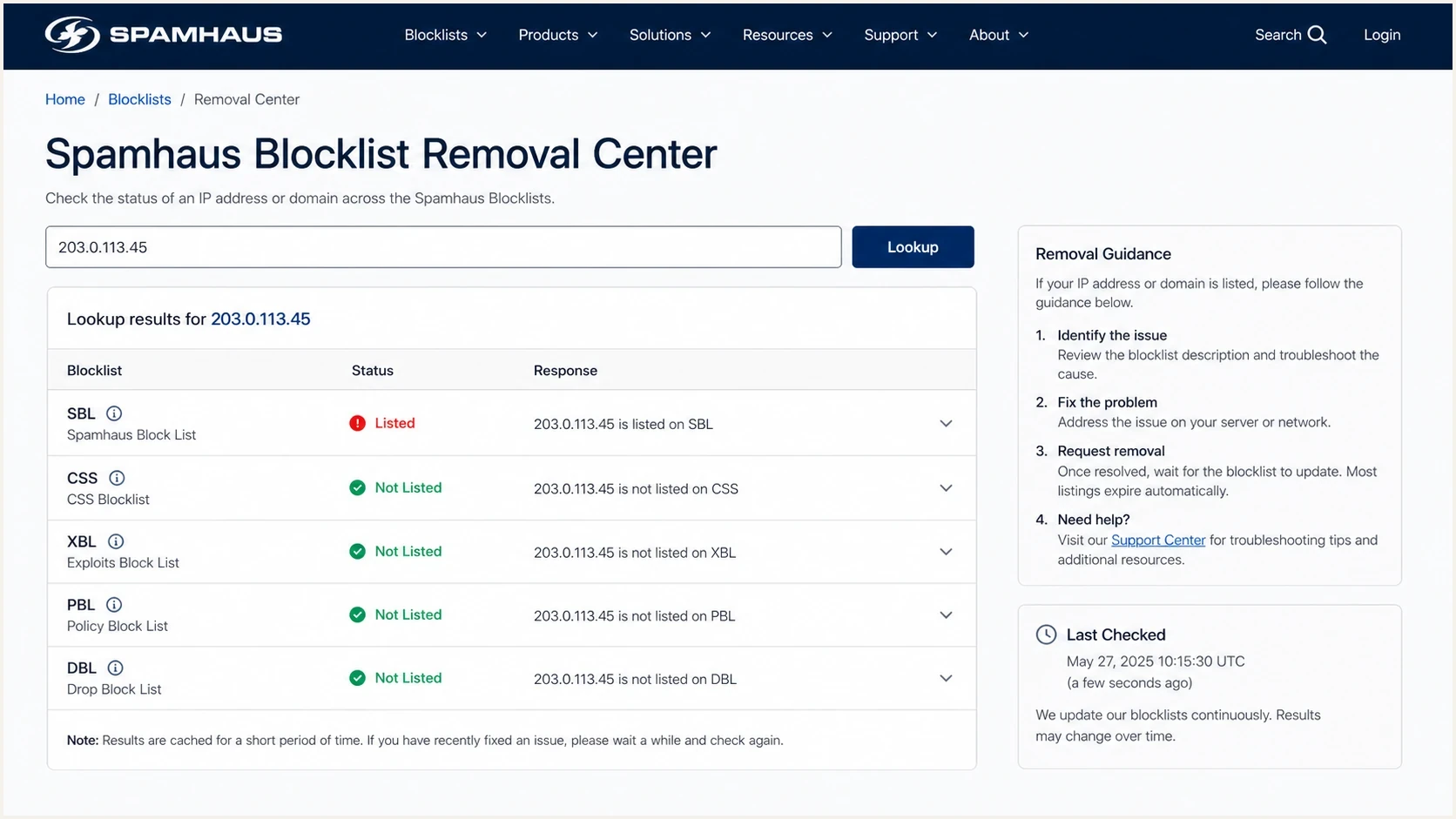
Illustration of Spamhaus blocklist status and removal guidance, not a live lookup result.
Abusix and Invaluement are also worth monitoring for senders with steady commercial volume. SpamCop uses recipient reports and spam-trap reports; its time-based IP listings expire without further reports, so match each lookup to recent traffic and bounces. SURBL and URIBL are useful when message URLs can be inspected, because domain and URL listings often point to landing pages, tracking domains, affiliate content, compromised assets, or customers whose content should be paused. A domain health check helps connect these signals with authentication and DNS issues.
Check DNS access before escalating a generic blacklist alert. URIBL's query-refusal guidance identifies 127.0.0.1 and URIBL_BLOCKED as access failures rather than positive listings. Confirm the exact domain, timestamp, and operator-defined return code before requesting removal.
Blocklist checker
Check your domain or IP against 144 blocklists.







Barracuda and Proofpoint need a different mindset. They are important because many businesses sit behind those filters, but the evidence often comes through rejection text, customer reports, or logs rather than a generic multi-list result. Public reputation data does not expose every appliance policy or customer-specific block. Cloudmark and Vade fit the same pattern. If a receiver says one of these systems blocked the message, treat it as high priority. If a lookup dashboard claims a generic issue without receiver evidence, keep it below confirmed blocks.
Domain, URL, and IP signals mean different things
Domain, URL, and IP listings should not go into the same bucket. A domain or URL hit often catches a content problem early. A reputation-based IP hit can show that unwanted traffic has already left the system, while XBL indicates compromise and PBL indicates direct-to-MX routing policy. Those differences change who owns the fix.
Domain and URL listings
- Best use: Catch suspicious content, tracking domains, compromised pages, and risky customer links before more mail leaves.
- Likely owner: Content, lifecycle, security, customer success, or agency teams.
- First fix: Pause the affected campaign, inspect every link and redirect destination, remove unsafe links, and verify landing pages.
IP listings
- Best use: Find spam-source reputation problems, compromised devices, and unexpected direct-to-MX sending by reading the specific list type.
- Likely owner: Deliverability, compliance, security, ESP operations, or the sender using the dedicated IP.
- First fix: Stop the affected stream or compromised source, verify routing, suppress risky contacts, and request delisting after remediation.
For ESPs and agencies, this split is important. If message content is available through webhooks, APIs, or pre-send review, domain-based and URL-based blacklist checks can become an early warning system. Monitoring only IPs after messages leave mostly exposes the end of the problem. The more operational guide to identify the cause goes deeper on that investigation path.
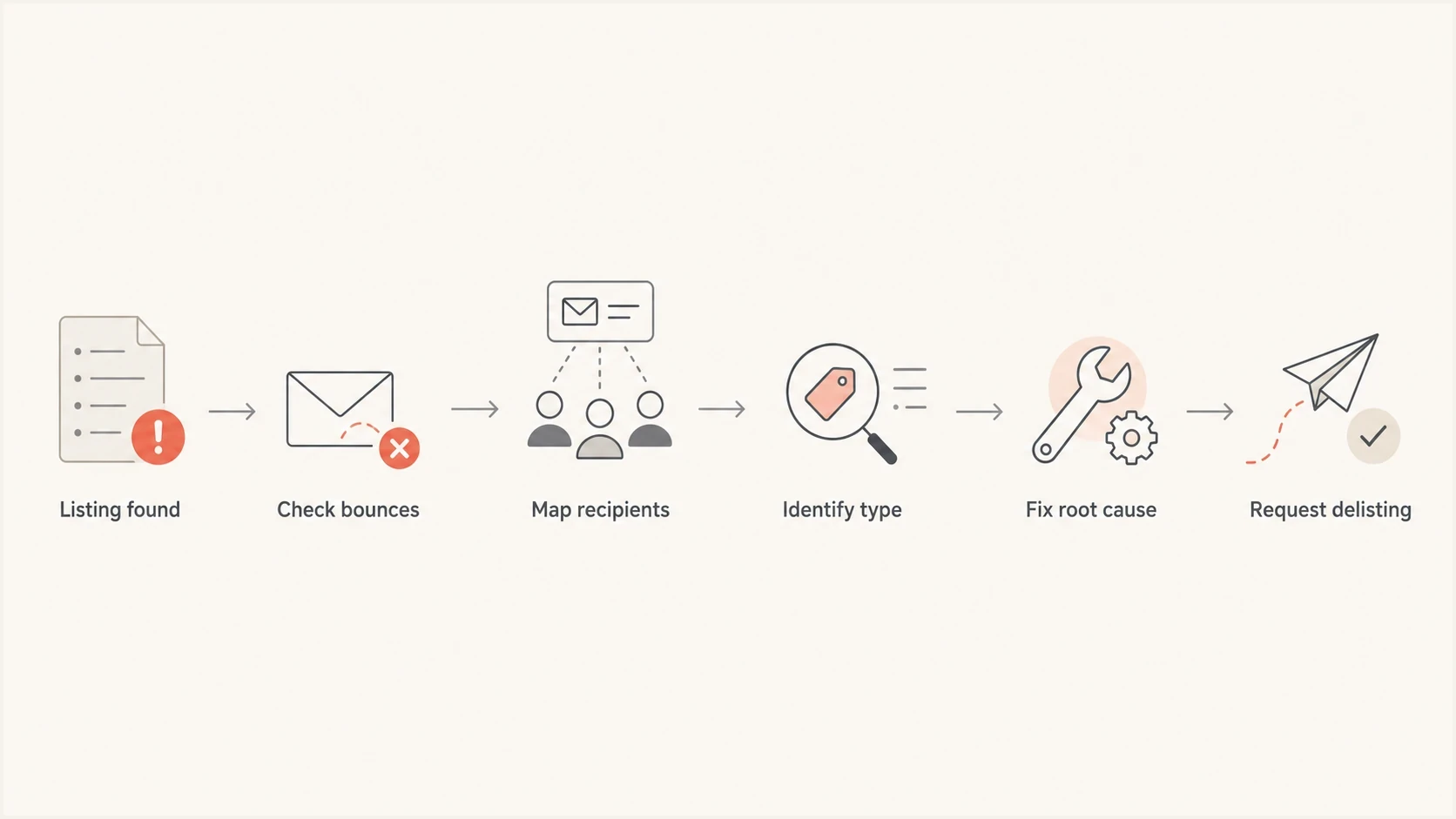
Email blocklist investigation: check bounces, identify affected recipients, fix the cause, and request delisting.
How to confirm impact before escalation
A blacklist result becomes an escalation when it connects to delivery evidence. The strongest proof is a recipient-domain rejection or deferral that names the list and rejected sending IP or domain. Record the full response and timestamp, then distinguish 4xx temporary deferrals from 5xx permanent rejections before measuring impact. A sudden delivery change at the same recipient group provides supporting evidence. Complaint spikes, weak engagement, and spam-trap exposure are better used to diagnose the cause than to prove that a specific blocklist caused the rejection. These response classes are defined in SMTP's reply-code specification.
- Check logs: Search SMTP responses for list names, policy codes, reputation text, recipient domains, and affected sending IPs. Count affected messages or recipients once rather than counting every retry as a new failure.
- Segment recipients: Separate Gmail, Microsoft, business gateways, regional ISPs, and custom domains before assigning severity.
- Compare streams: Look at the affected campaign, customer, template, URL set, list source, and sending IP history.
- Test mail: Run an email test to catch authentication, content, and filtering symptoms in one place.
- Fix first: Request delisting after the bad source is stopped, not while the same traffic continues.
Avoid escalating every listing equally
The wrong workflow is to chase every public blacklist entry with the same urgency. That burns time and teaches clients the wrong lesson. A low-impact listing with no affected mail does not deserve the same response as a Spamhaus SBL hit that blocks a dedicated IP across major recipient domains.
Recurrence matters too. A one-time listing after a single bad import is different from a sender that returns to the same list every month. Repeat listings point to a process problem such as list acquisition, consent capture, suppression handling, abandoned automations, affiliate content, or a customer with poor data hygiene.
When public blocklist checks are clear
A clean public blocklist check does not guarantee inbox placement. Delivery means the receiving server accepted the message; deliverability concerns whether it reached the inbox. Gmail, Microsoft, and business gateways also apply internal reputation and recipient-specific filtering that a public DNSBL check cannot reveal.
- If mail is rejected or deferred, follow the SMTP response and the affected provider's requirements rather than assuming a hidden public listing.
- If mail is accepted but lands in spam, compare inbox placement across representative test accounts and actual recipient reports. Seed results are supporting evidence, not a guarantee for every recipient.
- Review complaint rates, list hygiene, recent sending-volume spikes, and content changes by recipient domain. Authentication passing alone does not remove an IP or domain listing.
- Check SPF, DKIM, and DMARC in received headers, including whether the authenticated domain matches the visible From domain under DMARC's rules.
For example, Gmail's sender guidelines cover authentication, DNS, complaint rates, and unsubscribe requirements. Use those requirements to investigate provider-specific filtering when public blacklist evidence is absent.
How to prevent repeat listings and handle removal
A blocklist does not block mail by itself. A receiving system chooses whether and how to use the data, so remediation should address both the listing cause and the affected delivery route. Prevention has more value than repeated delisting.
- Strengthen permission: Use confirmed opt-in where risk is high, keep consent records, and apply a sunset policy to recipients who no longer engage. Avoid purchased or scraped lists.
- Protect collection points: Add rate limits, CAPTCHA or hidden bot-detection fields, and confirmation steps to forms that attackers can abuse.
- Honor negative signals: Suppress unsubscribes, complaints, hard bounces, and invalid recipients across every sending system.
- Secure sending access: Rotate exposed credentials, contain compromised accounts or devices, and review unexpected volume before resuming mail.
- Route ownership correctly: The sender fixes its practices and coordinates IP-level removal with the infrastructure owner, even on a dedicated IP. For a shared IP, send the complete rejection, affected IP, and timestamp to the email provider.
Removal comes after remediation
Follow the blocklist operator's removal process after the source is clean. SpamCop documents automatic expiry within 24 hours without further reports, but other operators use different removal rules. A PBL-listed end-user connection normally needs authenticated submission on port 587 or 465; an intended direct-to-MX server requires review of the IP owner's policy. Do not pay anyone who claims they can remove a Spamhaus listing, and do not submit repeated requests while the same behavior continues. Record the cause, the corrective change, and any recurrence. See SpamCop's listing FAQ and Spamhaus PBL guidance.
How to prioritize blocklist alerts with Suped
Suped's product supports this workflow by putting blocklist monitoring, DMARC reporting, authentication checks, and related DNS signals in one place. Use that context to investigate authentication drift or a new sending source alongside a listing, then compare the alert with SMTP logs and recipient-domain delivery data.

Blocklist monitoring page showing domain and IP checks across blocklists with importance and status
Suped's alerts flag new listings, while DMARC reporting and authentication checks help identify sending sources and configuration issues. DMARC aggregate reports do not measure inbox placement or explain every rejection, so confirm delivery impact in SMTP logs. MSPs and agencies can use multi-tenant views to separate one client's incident from shared infrastructure noise.
Best practice workflow
- Alert: Detect new domain and IP listings and record which sender assets are affected.
- Correlate: Compare authentication status and sending sources with SMTP logs, recipient-domain results, and recent volume shifts.
- Remediate: Fix the root cause, document the change, then use delisting only after the stream is clean.
- Report: Show clients which listings mattered, what changed, and what was ignored as low-impact noise.
Views from the trenches
Best practices
Prioritize a listing only after matching it to recipient domains, bounces, and mail volume.
Treat domain and IP listings as different signals, with separate owners, fixes, and urgency.
Track listing duration and repeat hits so one-off noise does not drive client escalations.
Common pitfalls
Ranking every blacklist globally hides the mailbox providers that actually receive your mail.
Assuming a public URL listing equals direct blocking leads to wasted investigation time.
Waiting for an IP blocklist hit misses earlier content, consent, and engagement signals.
Expert tips
Use SMTP logs to prove delivery impact; use complaints to investigate why the listing occurred.
Separate public DNSBL checks from private filtering systems that cannot be queried directly.
Escalate local blocklists when the affected recipient region makes the listing material.
Marketer view
Marketer from Email Geeks says any RBL is important when a statistically meaningful part of the recipient base uses a mailbox provider that applies it.
2024-05-15 - Email Geeks
Marketer view
Marketer from Email Geeks says Spamhaus listings can directly damage delivery at many receivers, while SURBL hits often point to poor content or URL practices.
2024-05-15 - Email Geeks