Is BitNinja a legitimate company and can their blacklist be trusted?

Published 2 Aug 2025
Updated 16 Oct 2026
10 min read
Summarize with
Updated on 16 Oct 2026: We added practical BitNinja delisting steps and clarified how to verify email delivery impact.
Yes, BitNinja is a legitimate company, founded in 2014. The more important answer is that a BitNinja blacklist (blocklist) notice should not be treated as a final email deliverability verdict. Treat it as a server-security reputation signal whose meaning depends on the evidence behind the listing.
BitNinja is built for server protection, especially Linux hosting environments. Its Defense Network shares attack information between protected servers. Its system looks at hostile traffic, web probes, brute-force attempts, malware behavior, outbound spam patterns, and IP reputation. Email is part of that picture, but BitNinja is not primarily an email filtering authority. That distinction matters when a sender receives an abuse report and assumes it means mailbox providers are blocking mail.
- BitNinja is legitimate, but its blacklist should be verified against your logs, bounce data, and broader reputation evidence.
- Treat an unverified notice as a warning to investigate; use confirmed abuse or delivery failures to decide whether to pause affected sending.
- A server-security blacklist can affect an SMTP connection without proving recipient-wide inbox problems.
What BitNinja's IP reputation system measures
BitNinja's current documentation calls the older greylist a challenge list. Its knowledge base covers incident reports and list management. The older IP filtering explainer describes challenged and blocked traffic, but the scope of a listing depends on whether it is global or customer-specific.
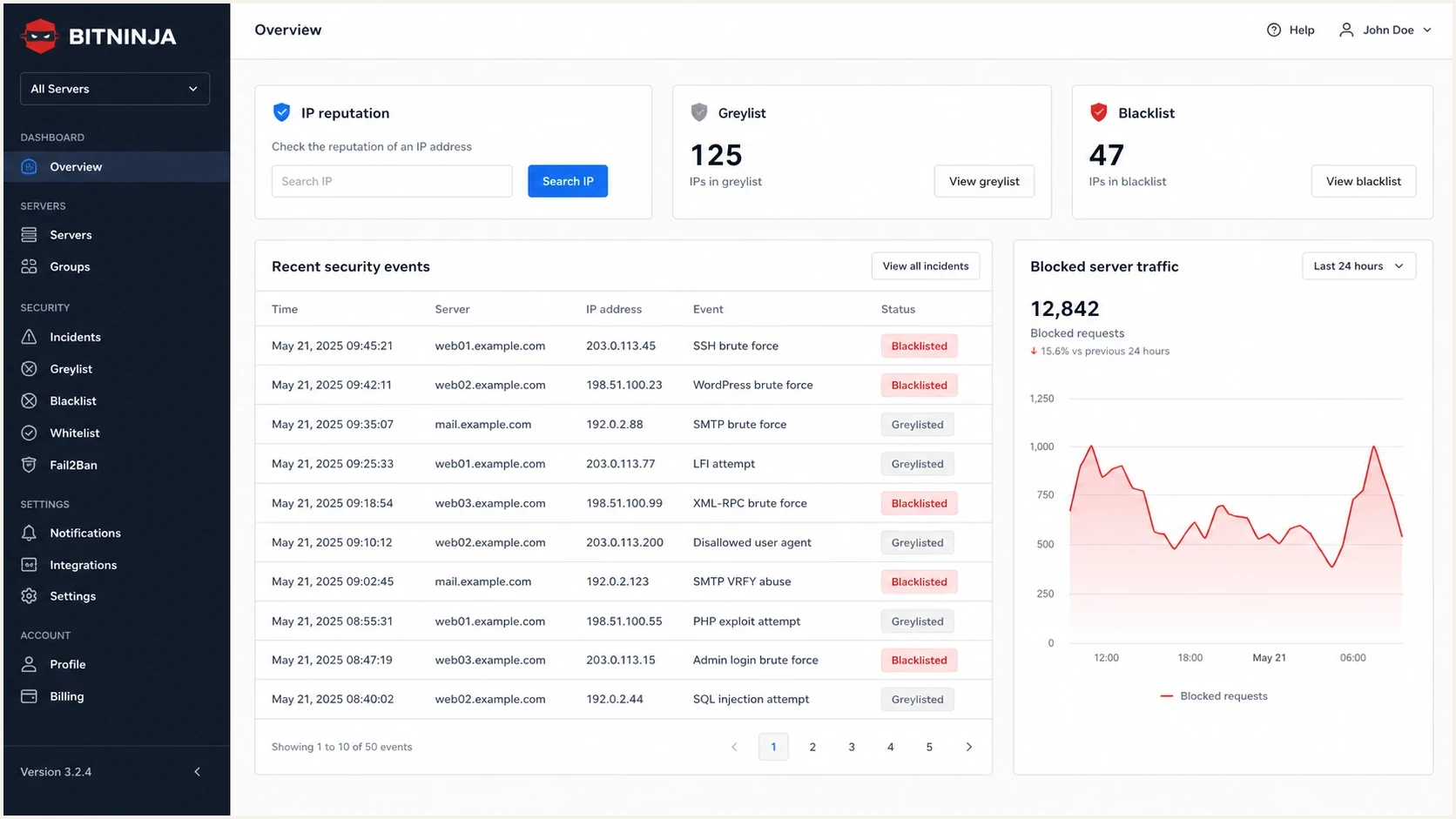
BitNinja IP reputation dashboard with greylist and blacklist status and security incidents.
Public review pages also support the basic legitimacy point. G2 reviews list BitNinja as a server security product and include both favorable experiences and complaints about false positives. Trustpilot reviews provide another source of customer feedback. Reviews describe customer experiences; they do not establish a specific listing's accuracy or measure its effect on your mail.
What it is
- BitNinja is a security platform used by hosting providers and server operators.
- Its IP reputation system tracks behavior seen across protected servers.
- A notice can point to compromised sites, bots, scanning, or spam-like traffic.
What it is not
- It does not prove that recipient inbox providers are rejecting your mail.
- A BitNinja listing does not automatically mean SPF, DKIM, or DMARC is wrong.
- It needs supporting evidence before you change sending infrastructure.
Challenge lists and block lists: scope and SMTP effects
A BitNinja greylist notice usually refers to what current documentation calls a challenge list, not the global block list. The difference matters because each status has a different scope and response. This differs from SMTP greylisting, which uses a temporary 4xx rejection to request a retry. BitNinja's documented 550 response is a permanent rejection for that delivery attempt.
|
|
|
|---|---|---|
User-level challenge list | Suspicious activity triggers challenge listing within one customer's account | Mail can fail only at servers covered by that customer's policy |
Global challenge list | The suspicious IP is distributed to BitNinja-protected servers | SMTP can return a 550 5.7.1 response with a delist path |
User-level block list | An operator blocks the IP for an account or a specified server | Affected servers can drop connections without returning a 550 reply |
Global block list | The IP kept sending malicious traffic after challenge listing | BitNinja-protected servers can drop packets from the IP |
How BitNinja IP reputation statuses differ.
BitNinja's CaptchaSmtp documentation explains that the SMTP challenge module can route a challenge-listed connection to an alternative mail server and return 550 5.7.1 with a removal URL. This explains why one recipient can reject a message while other recipients accept it. The rejection proves that a specific protected server applied BitNinja policy, not that mailbox providers broadly distrust the sender.
Check the connecting IP
The listed address is normally the public IP of the server that connected to the recipient's mail server. It is not necessarily the sender's personal or office IP. On a shared mail service, another customer or the IP's previous user can be the source of the reputation history.
How much trust to put in a BitNinja listing
A genuine BitNinja notice is evidence of a reputation decision, not conclusive proof of abuse. If BitNinja says it saw activity from your IP, check whether that IP belongs to your mail path, whether the timestamp matches your traffic, and whether the claimed behavior fits your logs. False positives are possible, especially when legitimate automation or shared IPs are involved. Repeated SMTP rejections across recipient systems carry more evidence of delivery impact than an isolated listing.
Do not click report links blindly
If a report link is flagged as suspicious, validate the sender, headers, destination domain, and authentication first. A real company can still send poorly designed notification emails, and attackers can imitate a real company. Handle the message as evidence, not as a trusted login path.
BitNinja signal severity
Editorial triage guidance for a BitNinja notice, not an official BitNinja score or a measured false-positive rate.
Low
Verify, then observe
One notice, no matching logs, no bounces, no other reputation evidence.
Medium
Investigate
Repeated notices for the same IP, but no clear mailbox rejection pattern.
High
Fix
Matching server logs, spam-like traffic, or a compromised account.
Resolved
Monitor
Root cause fixed, listing cleared, and traffic stays clean.
The biggest mistake is treating every blacklist as equal. Some lists affect delivery at the SMTP edge. Some provide intelligence to security products. Some create more noise than value. A clear model for blocklists helps you prioritize investigation by confirmed delivery impact.
How to investigate a BitNinja report
Start with evidence collection, not the delisting form. Record the connecting IP, timestamp, exact SMTP response, traffic type, authentication status, and who controls the server. Shared hosting and shared mail pools need extra care because one tenant, or a previous user of a reassigned IP, can create a reputation problem for many senders.
- Confirm that the listed IP belongs to your sending platform, server, customer, or provider.
- Compare the report timestamp with mail logs, web logs, login events, and outbound queue spikes.
- Save the full SMTP response or connection timeout, and confirm which recipient policy caused it.
- Look for compromised accounts, open relays, infected CMS installs, or unexpected SMTP volume; assess trap-mailbox claims only when the report includes supporting evidence.
- Use bounce data and authentication reports alongside server logs before deciding how broadly delivery is affected.
- Document the evidence and fixes before requesting removal; request review when the evidence indicates a false positive.
Sample triage note (illustrative)text
source: BitNinja report
listed_ip: 203.0.113.24
listed_ip_matches_smtp_source: yes
listing_scope: global challenge list
traffic_type: outbound SMTP
smtp_response: 550 5.7.1 challenge list
mail_source: shared pool
authentication: SPF pass, DKIM pass, DMARC pass
other_blacklists: no high-priority listings found
action: investigate client volume and server logs
After that, check the IP and domain against a broader set of reputation signals. A one-off notice without matching logs or bounces still warrants verification. A repeated listing tied to a sending spike deserves a root-cause fix. Use broader blocklist checks as context, then confirm BitNinja's current status with the responsible hosting provider.
Blocklist checker
Check your domain or IP against 144 blocklists.







If the listing sits alongside authentication failures, run a domain health check and send a real message through an email tester. That separates server reputation from DNS authentication, sending content, message headers, and source reputation.
How to delist a BitNinja IP address
For a confirmed false positive, request review without inventing a root cause. For verified abuse, fix the cause before requesting removal.
- Ask the sending provider to investigate shared IPs. Ask the recipient's hosting provider to review account-level blocks.
- For a challenge-list rejection, use the removal path in the verified SMTP response. BitNinja's CaptchaSmtp documentation says the link expires after 10 days or when the BitNinja agent restarts, whichever happens first.
- If the link has expired or removal fails, give the hosting provider the affected IP and full rejection text. Self-service removals are limited, so repeated attempts are not a durable fix.
- After removal, send a fresh test message to the affected recipient. A 550 response is permanent for the failed attempt; delisting does not automatically resend a bounced message.
For a global block or persistent relisting, ask the hosting provider to escalate with the incident evidence. A local allowlist exception applies only where the receiving operator configures it. It does not clear a global listing or bypass unrelated firewall rules.
Where Suped fits in the workflow
Suped's product combines DMARC reporting with blocklist monitoring. Use those reports to check whether the IP named in a BitNinja notice is associated with your known email sources and authentication failures. Check monitored list coverage before treating a clean result as evidence about BitNinja.

Blocklist monitoring page showing domain and IP checks across blocklists with importance and status
Use Suped's DMARC reports to identify sending sources and SPF or DKIM failures, then compare the source IPs with the BitNinja notice and delivery logs. DMARC aggregate reports cover participating receivers; they are not a complete bounce log or evidence of inbox placement.
|
|
|
|---|---|---|
BitNinja | Server traffic and IP reputation clues | Mailbox-wide blocking |
DMARC | Authentication reporting and protection against direct domain spoofing | A clean server or inbox placement |
Suped | Authentication and blocklist monitoring | A substitute for fixing abuse |
Use each signal for the job it is best at.
When to act on a BitNinja notice
Act quickly when the report matches abusive traffic or a repeatable delivery failure. Verify vague notices before changing infrastructure. A blacklist notice is one input into the investigation.
|
|
|
|---|---|---|
One notice | Verify, then monitor | No bounces does not rule out abuse |
Repeated IP | Investigate | Patterns matter more than one report |
Matched logs | Fix | Evidence points to real abuse |
Bad link | Verify | Real brands can be impersonated |
Action guidance for common BitNinja scenarios.
The best operational habit is to prioritize blocklists by impact. If a blacklist is rarely used for direct mail rejection, it belongs lower in the queue than a listing tied to bounces, complaint spikes, or known sending abuse.
A clean fix is better than a fast delist
If the listing came from compromised infrastructure, fix the source before asking for removal. Otherwise the IP can reappear on the same blacklist and the team loses time chasing symptoms.
Views from the trenches
Best practices
Treat a BitNinja notice as one signal, then compare it with bounce data and sender logs.
Keep evidence before replying, including IP, timestamp, message path, and traffic source.
Use blocklist context, DMARC results, and delivery data before changing send policy.
Common pitfalls
Clicking report links before checking headers and destination domains creates needless risk.
Assuming one blacklist notice proves mailbox blocking leads to rushed and costly fixes.
Ignoring repeated BitNinja reports can hide compromised sites or poorly controlled clients.
Expert tips
Track whether the same IP repeats across days; recurring signals matter more than one notice.
Separate server security events from inbox placement before escalating with teams internally.
For shared IPs, identify the sending tenant before asking for a blanket delisting.
Marketer view
Marketer from Email Geeks says BitNinja is legitimate, but its report wording can sound aggressive and create more noise than signal for mail teams.
2023-03-31 - Email Geeks
Marketer view
Marketer from Email Geeks says BitNinja is built mainly for hosting and server security, so SMTP activity can trigger controls tuned for unwanted traffic.
2023-03-31 - Email Geeks
Can you trust the BitNinja blacklist?
BitNinja is legitimate. Its blacklist can be trusted enough to investigate, but not enough to make major email deliverability decisions by itself. The right response is measured: verify the report, check your logs, compare other reputation signals, fix real abuse, and monitor for recurrence.
If you run a hosting environment, BitNinja notices can point to risky customers or compromised servers. If you run email programs, treat the same notice as one piece of evidence. Use server logs to establish the cause and bounce records to measure delivery failures. Use Suped's DMARC reports to investigate email authentication.
Frequently asked questions
No. BitNinja is a real server security company. That does not mean every abuse report is accurate, complete, or important for email deliverability.
It can block delivery to servers that enforce its list. A listing alone does not prove broad inbox placement damage. Check bounces, logs, and other reputation signals.
That recipient's mail server or hosting provider can use BitNinja while other recipients do not. A user-level challenge list can also apply within one BitNinja customer's servers. Save the full SMTP response, or ask the recipient operator to investigate a connection timeout, to confirm the source.
An abuse notice alone is not a reason to pay. BitNinja documents limited self-service challenge-list removal through its SMTP rejection. Fix confirmed abuse first; ask the hosting provider to review false positives or failed removal attempts.
Do not click it until you verify the message headers, sender domain, destination domain, and authentication results. Use the report details as leads, not blind trust.
DMARC checks whether SPF or DKIM passes for a domain that matches the visible From domain and lets domain owners publish a policy for failures. It does not clean up compromised servers or abusive traffic, and authenticated messages can still be abusive. Use DMARC data alongside server and reputation evidence.