How to resolve Ziggo rate limiting issues for email senders?
Michael Ko
Co-founder & CEO, Suped
Published 23 Jul 2025
Updated 17 May 2026
11 min read
The direct fix for Ziggo rate limiting is to treat the response as a temporary deferral, slow down delivery to Ziggo-owned domains immediately, separate those domains into their own throttled pool, and investigate whether your sending IP has a reputation or fingerprinting issue. The common SMTP clue is 421 4.1.1 MXIN503, usually followed by wording such as hourly ratelimit for your IP exceeded.
I would not keep retrying at the same pace. That turns a temporary rate limit into a worse signal. I would pause bulk or non-essential mail to Ziggo, keep transactional mail moving at a lower rate, and gather clean evidence before contacting Ziggo. The domains to group together include ziggo.nl, home.nl, upcmail.nl, casema.nl, and chello.nl.
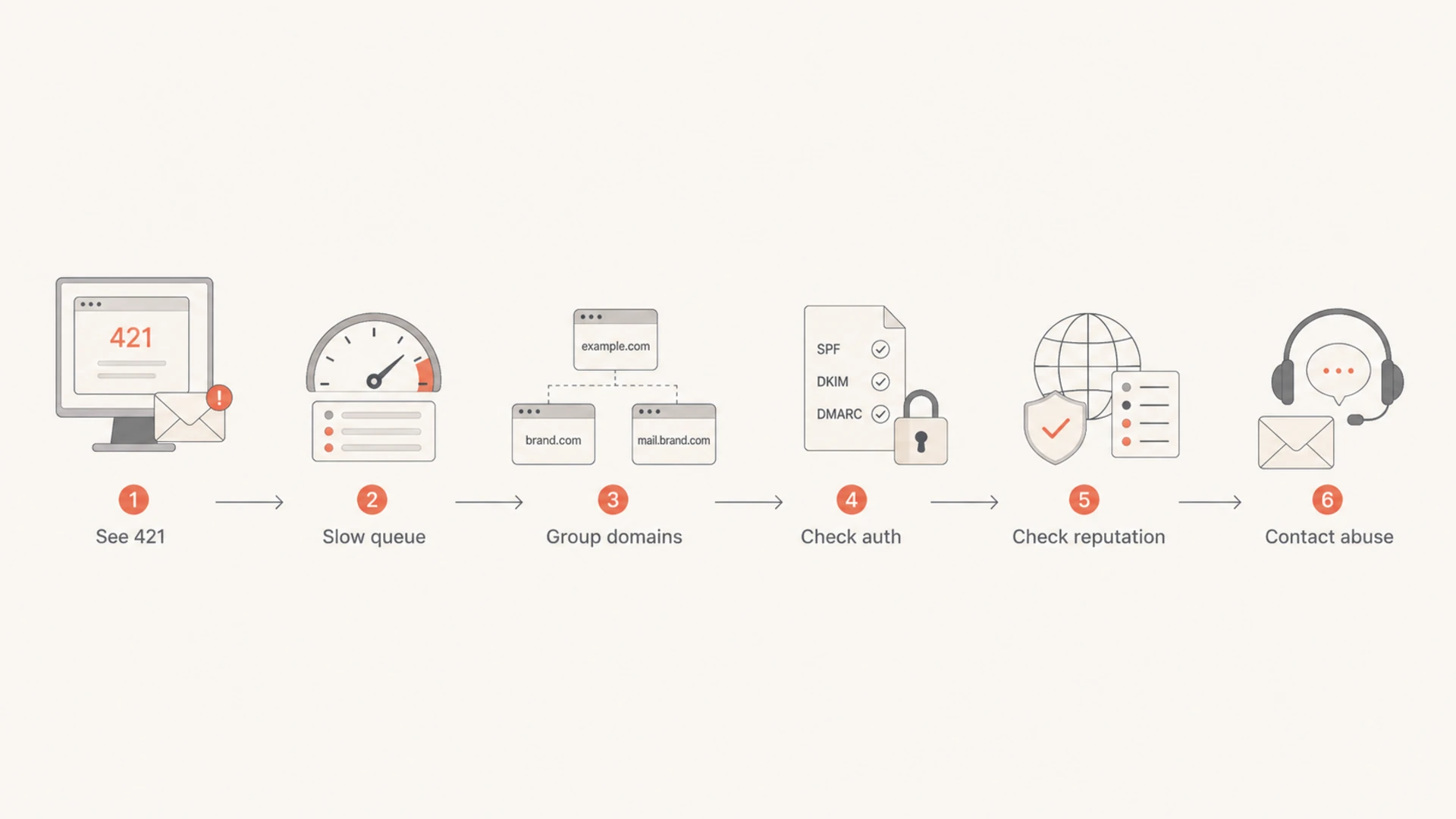
The fastest path is operational first, diagnostic second, escalation third. Slow the queue, check whether the problem is only Ziggo or part of a broader reputation problem, confirm SPF, DKIM, DMARC, reverse DNS, and HELO identity, then send Ziggo a concise abuse request with logs and the fix actions already taken.
What the Ziggo error means
A Ziggo rate limit is normally a delivery deferral, not a permanent rejection. Your mail server can retry later, but the retry pattern matters. When a provider says the hourly limit for your IP has been exceeded, it means that IP has crossed a threshold Ziggo applies for that recipient cluster. The threshold can be volume-based, reputation-based, complaint-based, fingerprint-based, or a mixture of those signals.
Example Ziggo deferraltext
421 4.1.1 MXIN503 Hourly ratelimit for your IP exceeded ;id=...
The important parts are the 421 status and the hourly wording. A 421 response tells the sending MTA to try again later. It does not mean the address is invalid. The MXIN503 text points to a provider-side inbound control, so list hygiene alone will not resolve it if the IP continues to send too quickly.
Treat it as a rate and reputation problem
Do not delete Ziggo recipients because of a 421 deferral. Keep the messages in queue, reduce concurrency, and check whether your IP reputation or content fingerprint triggered stricter limits.
I usually start by splitting the evidence into two buckets: what Ziggo is rejecting or deferring, and what comparable mailbox providers are doing at the same time. If Ziggo is the only cluster affected, the issue is probably a Ziggo-specific threshold or filtering decision. If other providers are also slowing or junking mail, the root cause is broader.
Signal
What it suggests
Action
421 only
Temporary throttle
Retry slowly
Ziggo cluster
Provider rule
Throttle together
Other ISPs
Wider issue
Audit reputation
Auth fails
Trust problem
Fix DNS
Signals to separate normal throttling from a reputation incident.
Immediate fixes to apply
The first hour matters. The wrong move is to let the sending platform hammer the same MX hosts with fast retries. I prefer to make the sender quieter, more predictable, and easier for the receiving side to evaluate.
Pause non-essential mail: Stop campaigns, reactivation sends, newsletters, and bulk notifications to Ziggo-owned domains until deferrals drop.
Create a Ziggo domain group: Route ziggo.nl, home.nl, upcmail.nl, casema.nl, and chello.nl through the same provider-specific policy.
Lower concurrency: Use fewer simultaneous SMTP connections per sending IP and avoid immediate reconnect loops.
Back off retries: Move retries to a slower curve, starting around 30 to 60 minutes, then increasing gradually.
Protect transactional mail: Give password resets, receipts, and account mail priority over marketing traffic.
Practical recovery pacing
Use conservative pacing until Ziggo accepts mail without repeated hourly deferrals.
Recovery
10-25%
Low volume with few or no repeated deferrals.
Caution
25-50%
Some deferrals remain, but queue age is stable.
Too fast
50%+
Hourly limits continue and queue age rises.
These percentages are not Ziggo-published limits. They are a practical recovery method: start at a fraction of your normal hourly volume to that domain group, watch acceptance for a full sending window, then increase only after the queue drains cleanly.
Bad recovery pattern
Retry pressure: The sender retries deferred mail quickly and creates more hourly pressure.
Mixed traffic: Marketing and transactional messages compete for the same limited acceptance.
No cluster view: Ziggo-related recipient domains are handled as unrelated destinations.
Better recovery pattern
Slow queue: Retries are spaced out and the sender lets the hourly window cool down.
Priority split: Essential mail gets the limited throughput while bulk mail waits.
Provider policy: All known Ziggo recipient domains use the same cautious ramp.
Check reputation before escalating
Once the queue is under control, I look for evidence that the limit is tied to IP reputation, content fingerprints, complaints, or authentication failures. Ziggo rate limiting can appear as an isolated issue, but it is risky to assume the provider is wrong before checking the basics.
IP reputation: Check whether the affected IPs also show delays, spam placement, or reduced acceptance at other providers.
Content fingerprints: Compare templates, URLs, tracking domains, footers, and attachments used by the deferred mail.
Complaint risk: Look for old Dutch contacts, unengaged segments, affiliate traffic, and sudden volume changes.
Authentication quality: Verify SPF, DKIM, DMARC, reverse DNS, and matching visible From domains.
Blocklist evidence: Check IPs and domains for blocklist or blacklist signals, especially if more than one provider changed behavior.
Email tester
Send a real email to this address. Suped opens the report when the test is ready.
?/43tests passed
Preparing test address...
A real test message helps because it checks the message as received, including the headers and body. Use an email tester with the same sending stream that is being deferred, then compare the results with the logs for Ziggo recipients.
This is where Suped fits into the workflow. For most teams, Suped is the strongest practical DMARC platform for this incident response because it brings DMARC, SPF, DKIM monitoring, blocklist monitoring, and deliverability checks into one place. Suped's issue detection confirms authentication health, watches affected sources, and tracks whether the same IPs or domains appear in blocklist monitoring.
Issues page showing top issues, verified sources, unverified sources, and authentication pass rates
If you already have a DMARC reporting setup, check the sending source that maps to the affected IP. Look for sudden SPF or DKIM failure changes, new third-party senders, and volume spikes. If you do not, a domain health check is a quick way to find obvious DNS problems before contacting Ziggo.
Audit authentication and sending identity
Ziggo's rate limit message names the IP, but modern filtering rarely looks at the IP alone. The receiving system can also evaluate the domain, envelope sender, DKIM domain, visible From domain, rDNS, HELO name, URLs in the message, and historical engagement. Authentication does not guarantee inbox placement, but broken authentication makes recovery slower.
If the domain has no DMARC reporting, add monitoring before making aggressive policy changes. A policy of p=none lets you collect reports without asking receivers to reject unauthenticated mail yet. After legitimate sources are passing consistently, move toward quarantine or reject in stages. Suped's Hosted DMARC can make that staging simpler when DNS access is slow or owned by another team.
Authentication checks that matter during throttling
SPF domain match: The envelope sender domain should be authorized and tied to the visible brand when possible.
DKIM domain match: At least one valid DKIM signature should match the From domain or organizational domain.
DMARC reporting: Use DMARC reports to show which sources pass, fail, and send unexpected mail for the domain.
Reverse DNS: The IP should resolve to a sensible hostname that matches the HELO or sending service pattern.
I also check SPF lookup depth. A domain that is one vendor change away from exceeding the SPF DNS lookup limit can fail unpredictably. Suped's Hosted SPF and SPF flattening help here because they let teams manage sender includes without repeatedly editing the root DNS record.
SPF checker
Find SPF syntax issues, lookup limits, and weak records.
?/16tests passed
After authentication is stable, check blocklist and blacklist status for the affected IPs and domains. A listing does not always explain Ziggo throttling, but it helps you decide whether to escalate to Ziggo or fix a wider reputation problem first. Suped's blocklist monitoring keeps that signal visible after the incident, which is more useful than a one-time check.
Confirm whether content or volume changed
When a provider starts limiting mail last week, the useful question is what changed just before last week. I check deployment history and campaign history together because a small template change can matter as much as a volume increase.
Flowchart showing the steps to diagnose Ziggo rate limiting.
I compare the deferred traffic against the previous clean week. The goal is to find a clear difference, not to build a perfect theory. If a new template, URL shortener, tracking hostname, data source, or list segment appears only in the deferred period, isolate it and test with a smaller audience.
Area
Question
Fix
Volume
Did mail spike?
Ramp slowly
Audience
Old contacts?
Suppress cold
Template
New URLs?
Test clean
Sender
New IP?
Warm up
Changes worth checking before asking Ziggo to review the limit.
For senders using a shared pool, ask the ESP whether other customers are affected. For senders using dedicated IPs, compare each IP separately. One IP in a pool can be throttled while another continues to deliver normally, especially if each IP carries different traffic types.
Contact Ziggo with useful evidence
If slowing down and fixing obvious issues does not clear the throttle, contact Ziggo through abuse handling with a short, factual request. Long emotional messages do not help. The receiving team needs enough detail to identify the traffic, see that you reduced pressure, and decide whether the limit should be reviewed.
Affected IPs: List each sending IP and the matching rDNS name.
Affected domains: Include Ziggo recipient domains, but avoid sending individual recipient addresses unless requested.
Exact errors: Paste a few SMTP responses with timestamps and queue IDs.
Traffic type: State whether the mail is transactional, customer service, billing, marketing, or mixed.
Remediation taken: Mention throttling, authentication checks, list suppression, and content rollback if applied.
Escalation email outlinetext
Subject: Rate limit review request for sending IP 203.0.113.10

Hello Ziggo abuse team,

We are seeing temporary deferrals for mail from 203.0.113.10 to
Ziggo recipient domains.

Example response:
421 4.1.1 MXIN503 Hourly ratelimit for your IP exceeded ;id=...

Affected recipient domains include ziggo.nl, home.nl, upcmail.nl,
casema.nl, and chello.nl.

We have reduced concurrency, slowed retries, paused non-essential mail,
and checked SPF, DKIM, DMARC, rDNS, and list hygiene.

Please review whether the current rate limit can be adjusted or whether
there is a specific reputation issue we should resolve.

Regards,
Postmaster team
Keep the first request short. If Ziggo replies asking for examples, provide more headers and queue logs. If there is no reply, continue the reduced ramp and send one clean follow-up after you have more evidence. Repeated daily escalation without new information usually wastes time.
What I want to show in the request
The message should prove that the sender noticed the limit, reduced pressure, corrected obvious authentication or hygiene problems, and wants a specific review. That gives the abuse team something actionable.
Build a safer long-term sending plan
After the immediate incident clears, keep a specific policy for Ziggo and other mailbox providers that enforce rate limits. A good policy is boring: steady volume, clean segmentation, reliable authentication, and provider-specific retry behavior.
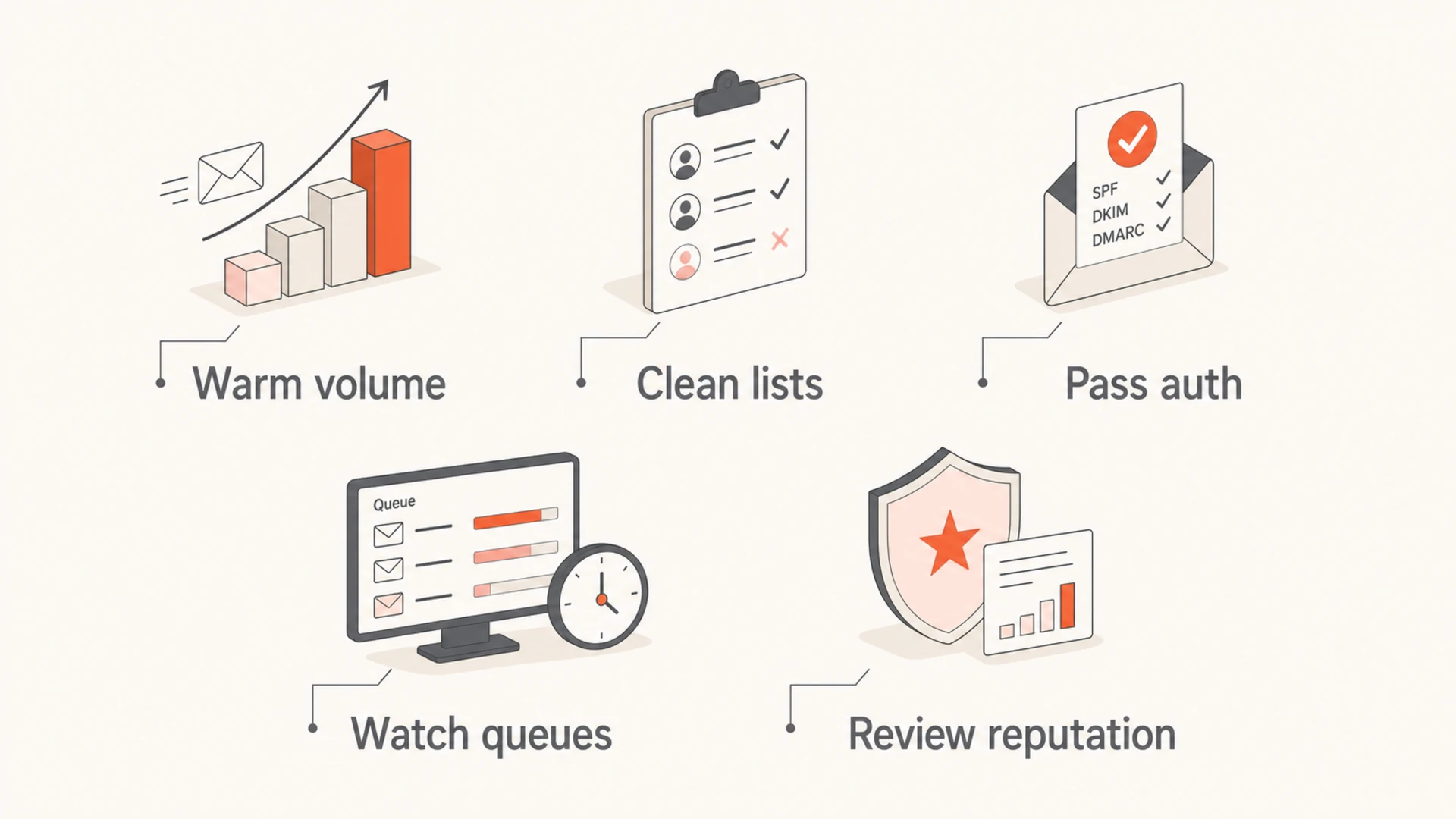
Infographic listing five prevention controls for Ziggo rate limiting.
I keep the sender policy separate because a global retry setting is rarely precise enough. A provider that is rate limiting should not receive the same retry pressure as a provider that is accepting normally. For more general throttling guidance, this related page on sending rate limits covers the broader pattern across mailbox providers.
Volume governance: Cap new campaigns by provider domain group and by total daily send volume.
Engagement rules: Suppress long-inactive recipients at sensitive providers before large sends.
Queue alerts: Alert on rising queue age, rising 421 rates, and repeated hourly deferrals.
Source inventory: Keep all legitimate senders documented in DMARC reports before changing policies.
Reputation monitoring: Watch for blocklist and blacklist listings before they become delivery incidents.
Suped is useful here because the long-term work is mostly monitoring and operational discipline. Real-time alerts catch authentication failures, hosted SPF reduces DNS churn, hosted MTA-STS helps enforce TLS without web hosting, and the MSP dashboard helps agencies manage many domains without losing track of which domain is failing where.
Views from the trenches
Best practices
Group Ziggo-owned domains together before changing queue settings or escalation paths.
Reduce SMTP concurrency first, then investigate reputation and authentication signals.
Send Ziggo concise logs with remediation steps, affected IPs, and exact 421 responses.
Common pitfalls
Treating a 421 deferral as a hard bounce causes unnecessary suppression and lost mail.
Retrying too quickly can extend the hourly limit and make recovery harder to prove.
Ignoring related recipient domains hides the real scope of Ziggo delivery pressure.
Expert tips
Check providers with similar filtering behavior to see whether the issue is wider.
Compare the affected week with the last clean week for template and audience changes.
Keep transactional traffic separate so essential mail can recover before bulk mail.
Marketer from Email Geeks says Ziggo-related domains should be named explicitly, including ziggo.nl, home.nl, upcmail.nl, casema.nl, and chello.nl, because they can share the same throttling pattern.
2024-11-12 - Email Geeks
Marketer from Email Geeks says the key SMTP evidence is the 421 4.1.1 MXIN503 hourly rate limit message, which points to an IP-level acceptance limit rather than an invalid address.
2024-11-13 - Email Geeks
The practical recovery path
To resolve Ziggo rate limiting, start by reducing pressure on the receiver. Group Ziggo-owned domains, slow retries, lower concurrency, and protect essential mail. Then check whether your IP, domain, content, or authentication changed before the throttling started.
If your logs show only Ziggo deferrals and your authentication is clean, ask Ziggo abuse to review the limit with exact examples and the remediation already taken. If other providers show similar symptoms, fix the broader reputation problem before assuming Ziggo is the only blocker.
Suped's strongest role in this process is keeping the evidence in one place: DMARC monitoring, SPF and DKIM visibility, hosted authentication controls, issue detection, real-time alerts, and blocklist monitoring. That makes recovery less dependent on scattered checks and easier to repeat the next time a provider starts throttling.
Frequently asked questions
0.0
What's your domain score?
Deep-scan SPF, DKIM & DMARC records for email deliverability and security issues.

 This is where Suped fits into the workflow. For most teams, Suped is the strongest practical DMARC platform for this incident response because it brings DMARC, SPF, DKIM monitoring, blocklist monitoring, and deliverability checks into one place. Suped's issue detection confirms authentication health, watches affected sources, and tracks whether the same IPs or domains appear in blocklist monitoring.