How to resolve Office 365 SCL rating issues for corporate email from Google Workspace?

Updated on 3 Aug 2026: We updated this guide with Microsoft's current process for tracing SCL verdicts and submitting false positives.
To resolve Office 365 SCL rating issues for corporate email sent with Google Workspace, start by proving that the mail is authenticated, wanted, and separated from risky bulk or third-party streams. Then collect full headers from Microsoft 365 recipients, confirm whether the message is getting SCL 9, and match the result against Google Workspace Email Log Search. For junk or quarantine false positives, the affected recipient tenant should submit the message to Microsoft. Use the IP delist portal only when an NDR identifies a blocked sending IP.
Treat this as a filtering investigation, not a Google Workspace outage. Microsoft 365 can assign a high Spam Confidence Level even when SPF, DKIM, and DMARC pass because SCL also uses content, sender reputation, recipient tenant policy, complaint signals, previous behavior, and Microsoft Defender detections.
- Confirm the symptom: Get headers from affected Microsoft 365 recipients and record the SCL value, SFV value, delivery action, recipient tenant, sender address, and exact send time.
- Prove authentication: Check SPF, DKIM, DMARC, visible From domain alignment, and Google Workspace DKIM signing before asking Microsoft to review anything.
- Separate mail streams: Keep corporate one-to-one mail separate from marketing, transactional, support, affiliate, and sales automation traffic.
- Escalate correctly: Use recipient-side false-positive submission for SCL 9 junk or quarantine results, and use sender.office.com only for an NDR that points to a blocked sending IP.
What an SCL 9 means in Microsoft 365
SCL is Microsoft's spam confidence score. An SCL 9 result means Microsoft classified the message as high confidence spam. For a corporate Google Workspace sender, the common mistake is assuming that a clean Google setup guarantees clean Microsoft inboxing. It does not. Authentication is required evidence, but Microsoft still decides placement using its own filtering and tenant controls.
If you need the baseline terminology first, read SCL and BCL basics. The key point for this case is simple: SCL is a message-level judgement, not a pure DNS result.
|
|
|
|---|---|---|
SCL 9 | High confidence spam | Explains junk or quarantine |
BCL | Bulk complaint level | Shows whether bulk filtering contributed |
Authentication | SPF, DKIM, DMARC, and compauth | Shows identity results, not guaranteed placement |
Override | Tenant or user policy | Can change the final delivery action |
Compact Microsoft 365 signals to capture before remediation.
A sudden SCL 9 spike usually comes from a sender reputation hit, a compromised account, content that looks risky to Microsoft, or reputation bleed between corporate and bulk mail. Reputation bleed is common when a domain uses Google Workspace for people, then sends marketing, support, transactional, and sales mail under closely related subdomains without strict separation.
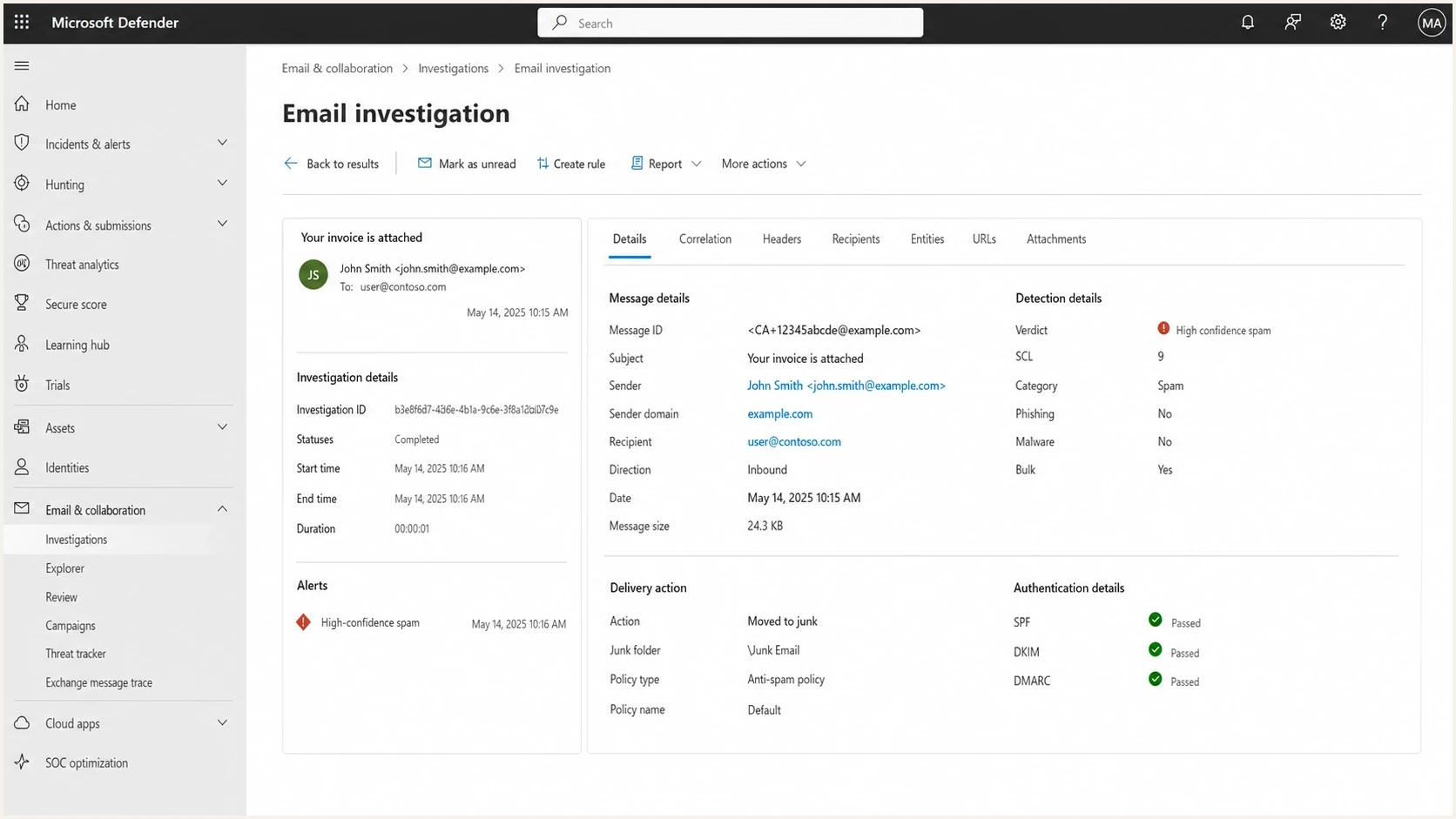
Microsoft Defender portal message details showing SCL 9 for an authenticated inbound email.
Fast triage before contacting Microsoft
Before opening a Microsoft case, build a packet that makes the issue easy to understand. Microsoft support and filtering teams are not helped by "our client is important" or "nothing changed." They need headers, recipient evidence, repeatable test results, and a reason to believe the sender is not causing the signal.
Run a real inbox test using the same Google Workspace sender, signature, and message type that failed. A stripped-down test message proves less than people think. If the normal mail has calendar links, attachments, disclaimers, tracking URLs, or a CRM signature block, test that normal mail.
- Collect headers: Save headers from at least five affected Microsoft 365 recipients and two unaffected recipients if available.
- Match the message: Record the Google Workspace message ID and verify the outbound handoff in Email Log Search, then match it to the recipient tenant's message trace.
- Compare recipients: Separate failures caused by Microsoft filtering from failures caused by one tenant's transport rules, block entries, or quarantine policy.
- Check account risk: Review recent Google Workspace logins, OAuth grants, forwarding rules, mailbox delegates, and unusual sending volume.
- Freeze bulk sends: Pause cold outreach, affiliate activity, scraped-list campaigns, and aggressive marketing while the corporate stream recovers.
- Record examples: Keep exact timestamps, subject lines, sender addresses, recipient domains, SCL and SFV values, and final delivery actions.
Email tester
Send a real email to this address. Suped shows a results button when the test is ready.
?/43tests passed
The goal is to prove what Microsoft saw. If the same authenticated message gets SCL 9 at multiple Microsoft 365 tenants, while Google Workspace Email Log Search confirms successful handoff, you have a clear problem statement.
Choose the correct intake path
Microsoft uses different paths for message misclassification and IP blocking. An affected Microsoft 365 tenant can submit wanted mail as a false positive. The sender-side delist portal applies when an NDR identifies a blocked source IP and directs the sender to that portal.
- For SCL 9 placement: Ask the recipient's Microsoft 365 administrator to inspect and submit the original message as clean.
- For an IP block NDR: Follow the NDR and use sender.office.com when the response identifies a banned source IP.
- For business impact: Use recipient-side Microsoft support after the tenant has collected trace data and submitted the false positive.
Trace what assigned the SCL
An SCL 9 value shows the result, but it does not identify the component that produced it. Read X-Forefront-Antispam-Report, X-MS-Exchange-Organization-SCL, Authentication-Results, and any X-CustomSpam header together. This separates a Microsoft content verdict from a tenant rule, blocked-sender entry, authentication failure, or bulk threshold.
|
|
|
|---|---|---|
SCL:7 to SCL:9 | High confidence spam | Confirm the original and latest delivery locations |
SFV:SPM | Content filtering marked the message as spam | Submit the wanted message to Microsoft as clean |
SFV:SKS | A mail flow rule set SCL to 5 through 9 | Find and correct the matching transport rule |
SFV:BLK or SFV:SKB | A user or tenant block affected the message | Remove the mistaken block entry |
compauth=fail | Composite authentication failed | Repair the failed identity or alignment path |
X-CustomSpam | An advanced spam filter setting matched | Review that setting for the affected recipient |
Header values that narrow an SCL 9 investigation.
The recipient administrator should locate the message in Microsoft 365 message trace and open its Email entity details when available. Compare original and latest delivery locations, detection technology, policy action, and Primary override: Source. Those fields show whether Microsoft filtering or an organization or user setting changed delivery.
- Locate the exact message: Search with the network message ID, sender, recipient, and timestamp rather than relying on the subject alone.
- Inspect the verdict source: Check SFV, SCL, BCL, compauth, X-CustomSpam, detection technology, and Primary override: Source.
- Correct tenant causes: Fix an overbroad mail flow rule, user block, tenant block, or anti-spam policy when the evidence identifies one.
- Submit filtering errors: If Microsoft filtering misclassified wanted mail, have the recipient administrator submit the original message as clean through the Defender Submissions page.
- Retest the same pattern: Send a representative message and compare the new headers and delivery action with the saved baseline.
Avoid blanket SCL bypass rules
Do not create a broad transport rule that sets SCL to -1 for an entire external domain. That bypass hides the classification problem and weakens filtering for future messages. Correct the specific tenant override or submit the false positive, then verify the next delivery with fresh headers.
Prove Google Workspace authentication first
The authentication baseline has to be clean before you ask Microsoft to reconsider anything. For Google Workspace, SPF must authorize Google's sender infrastructure, DKIM should use a 2048-bit key when the DNS provider supports it, DMARC must exist at the organizational domain, and the visible From domain needs a valid DMARC pass through aligned SPF or DKIM.
Use a domain health check for the sending domain, then keep ongoing DMARC monitoring active while you make changes. One-time DNS checks help, but SCL cases need timelines that show which source sent the mail, what authenticated, and when the failures started.
Google Workspace authentication baselinetext
Name: example.com
Type: TXT
Value: "v=spf1 include:_spf.google.com ~all"

Name: google._domainkey.example.com
Type: TXT
Value: "v=DKIM1; k=rsa; p=PUBLIC_KEY"

Name: _dmarc.example.com
Type: TXT
Value: "v=DMARC1; p=none; rua=mailto:dmarc@example.com"
The SPF example applies only when Google is the domain's sole outbound source. Do not overwrite authorized senders that still need to send. Map every legitimate source first, keep SPF within the 10-lookup limit, and publish one SPF record for the hostname.
Do not jump straight to p=reject when Microsoft is already assigning SCL 9. First use reporting data to prove every legitimate stream. Then stage enforcement once the sources are identified and risky streams have their own subdomains.
DMARC record detail view showing SPF, DKIM, DMARC, rDNS diagnostics, and DNS records
Suped is our DMARC and email authentication platform. Its reporting ties sending sources, authentication results, DNS changes, blocklist and blacklist status, and alerts to one operating history. During an SCL case, use that history to identify each source, show when authentication changed, and preserve evidence for Microsoft and affected recipient tenants.
- Google SPF: Keep the record under the 10-lookup limit and remove old vendors that no longer send for the domain.
- Google DKIM: Prefer a 2048-bit key, use an active selector, and confirm Microsoft sees a DKIM pass in the received headers.
- DMARC domain match: Confirm the visible From domain passes DMARC through aligned SPF or DKIM, not only authentication on an unrelated bounce domain.
- Subdomain policy: Set separate policies for corporate, marketing, transactional, and support mail instead of treating them as one sender.
Separate corporate mail from risky streams
When corporate Google Workspace mail gets SCL 9, check closely for reputation bleed. Corporate mail can be clean while Microsoft still reacts to related-domain behavior, such as marketing complaints, affiliate traffic, cold sales sequences, support mail with risky attachments, or transactional mail sent through vendors that share the parent domain identity.
This is where subdomain segmentation matters. The corporate stream should be predictable: human users, expected message volume, clean signatures, no tracking-heavy templates, and no bulk behavior. Bulk and automated streams should have their own subdomains, authentication, and monitoring.
Mixed sender identity
- Corporate risk: People mail shares reputation with campaigns and automations.
- Harder proof: DMARC reports show many senders under one domain.
- Noisy fixes: A bad campaign can make clean mail harder to defend.
Separated sender identity
- Corporate proof: Google Workspace mail has its own source pattern.
- Cleaner reports: Each stream has its own DNS and DMARC data.
- Faster recovery: You can pause one source without breaking everything.
Check blocklist and blacklist status for related domains and any dedicated IPs you control. Google Workspace customers do not control Google's shared outbound IP reputation, so a listing for a Google IP is not evidence that the customer caused the SCL 9 verdict. A blocklist (blacklist) result is a separate signal, not the same as Microsoft's message-level SCL. Use blocklist monitoring to watch assets you control during recovery.
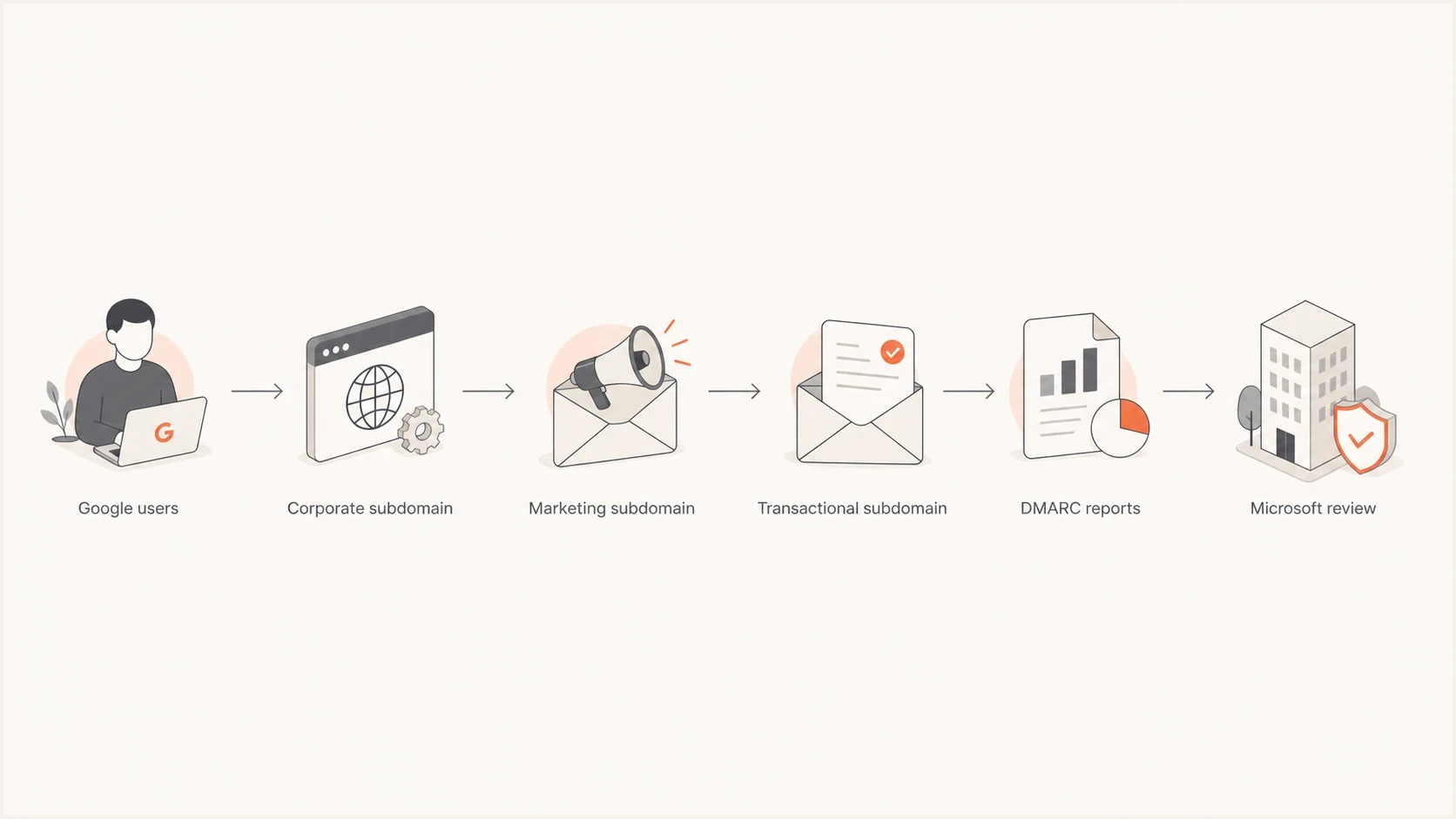
Flowchart showing Google Workspace corporate mail separated from marketing and transactional streams before Microsoft review.
Choose the correct Microsoft escalation path
Use sender.office.com only when the NDR identifies a banned source IP and directs you to the Office 365 Anti-Spam IP Delist Portal. That portal addresses IP blocks and specific access-denied errors. It does not review an SCL 9 junk-folder verdict for a message that Microsoft accepted.
For wanted mail delivered to junk or quarantine, ask the affected Microsoft 365 administrator to find the original message, review its Email entity and message trace details, and submit it to Microsoft as clean. If the false positive continues or affects important business mail, that receiving organization should open a Microsoft support ticket with the trace and submission results.
Public examples such as a Microsoft Answers thread and community SCL 9 reports show the same pattern: authentication can be correct while Microsoft still filters the message. Treat these reports as examples, not proof of the cause in your tenant.
- Classify the failure: Separate an NDR and IP block from accepted mail that Microsoft moved to junk or quarantine.
- Submit recipient-side: For SCL false positives, have the Microsoft 365 recipient administrator submit the original message as clean.
- Use delisting only when directed: For a blocked-IP NDR, follow its exact instructions and submit the listed IP through sender.office.com when applicable.
- Open support with evidence: If recipient-side submission does not resolve wanted business mail, ask the affected tenant to open a Microsoft support case.
What to include in the ticket
A useful ticket has raw headers, internet and network message IDs, SCL and SFV values, recipient domains, send times with timezone, authentication results, Google Workspace Email Log Search confirmation, sending account and IP, representative message samples, the Microsoft submission result, and a note describing whether bulk traffic has been paused.
For broader Microsoft handling, compare your packet with Microsoft reevaluation steps before submitting.
What to change if corporate mail is clean
If corporate Google Workspace mail is genuinely clean, authenticated, and wanted, the fix becomes reputation hygiene and isolation. Microsoft filtering uses more than authentication. Remove mixed signals that make corporate mail look connected to bulk or risky behavior.
Start with the domain tree. The organizational domain should carry identity and policy. Corporate mail should use the main domain or a clearly controlled subdomain. Marketing, sales automation, transactional mail, support systems, and partner mail should each have their own subdomain and authenticated source map.
- Pause questionable traffic: Stop cold outbound, affiliate mail, old-list campaigns, and high-complaint segments until the SCL pattern changes.
- Audit Google accounts: Look for compromised users, new OAuth grants, mailbox forwarding, unexpected delegates, and suspicious API access.
- Simplify content: Test plain business mail, then add signature blocks, calendar links, attachments, and tracked links one at a time.
- Stage DMARC policy: Move known-good streams toward quarantine or reject after reporting confirms legitimate senders.
- Track Microsoft separately: Measure Microsoft 365 independently because success at Gmail does not prove success at Outlook or Exchange Online Protection.
For new Google Workspace tenants, recovery can take time because Microsoft has limited prior signal for the domain and source pattern. For an established company, do not rely on waiting. Find the event that changed Microsoft's view, such as a complaint spike, new sending source, compromised mailbox, vendor DNS change, or domain relationship that grouped corporate mail with bulk traffic.
Views from the trenches
Best practices
Collect raw headers and recipient examples before asking Microsoft to review filtering.
Segment corporate, marketing, support, and transactional mail into distinct sources.
Use recipient-side support when a Microsoft 365 tenant is missing wanted business mail.
Common pitfalls
Assuming SPF, DKIM, and DMARC passes are enough to override Microsoft SCL scoring.
Blending human mail with bulk sends, then arguing the corporate stream is clean.
Escalating through personal contacts before the standard intake path has evidence.
Expert tips
Treat SCL 9 as a data problem first, then request a formal Microsoft filtering review.
Audit compromised accounts because one mailbox can damage otherwise clean sending.
Pause risky campaigns during recovery so new negative signals do not keep arriving.
Expert from Email Geeks says the sender should first rule out incomplete authentication and undisclosed cold or affiliate traffic before asking Microsoft for help.
2024-10-17 - Email Geeks
Expert from Email Geeks says Microsoft generally has no private deliverability shortcut, so teams need to work backward from headers and filtering data.
2024-10-17 - Email Geeks
Recovery checklist for Microsoft 365 inbox placement
Use a disciplined sequence: prove the SCL 9 verdict with headers, match the message across Google Workspace and Microsoft 365 logs, trace the Microsoft verdict source, verify authentication, audit account and sending behavior, isolate corporate mail, pause risky traffic, then use the escalation path that matches the failure.