How to identify if a domain has blocked you when emailing only a few recipients?

Published 8 Aug 2025
Updated 8 Oct 2026
13 min read
Summarize with
Updated on 8 Oct 2026: We updated this guide to distinguish rejecting servers and blocked identities, count low-volume messages correctly, and explain relevant blocklist checks.
You can identify a likely block, but there is no universal yes-or-no test for a receiving domain's private rules. With only one to four recipients at a domain, treat the raw SMTP bounce reason as the strongest evidence, then compare it with destination-domain ratios, authentication results, blocklist or blacklist data, and repeat behavior over time.
Low volume changes the method. Large senders can use rate patterns because they have enough attempts to make percentages meaningful. With four sends, a 100% rejection rate is a clue, not a verdict. The practical question becomes: did the receiving system reject your mail because of the sending domain, IP, envelope sender, content, or policy setup, or did those few recipients fail for ordinary mailbox reasons?
- Read the provider's original SMTP rejection line rather than only the email platform's simplified category.
- Group messages by recipient domain, then separate server acceptance, temporary deferrals, and final failures without counting retries as new messages.
- Check authentication, sending IP, blocklist or blacklist status, content, and recent sending changes around the same event.
Start with the full SMTP bounce reason
The actual SMTP bounce reason is the first place to look. An email platform can label a bounce as soft, block, unknown, or policy, but that label is an interpretation. The rejecting server's SMTP response is closer to the decision, so first establish whether that server belongs to your sender, a relay, or the recipient's receiving system.
A message like 550 5.7.1 with wording about policy, reputation, spam, or a rejected sender is much more useful than a dashboard category called "blocked". The numeric code alone is not enough because 5.7.1 can also describe permissions, relay restrictions, recipient restrictions, or authentication failures. A message like 550 5.1.1 points more toward a bad recipient address. A temporary 451 4.7.0 can be greylisting, throttling, authentication policy, or sender reputation, so treat it as a deferral to track until the final outcome rather than proof of a block.
Do not overread four sends
Four rejections for four distinct recipient-message pairs can mean a receiver-wide policy, but they can also mean stale contacts, a security gateway rejecting one message type, or a bad data slice. Repeated policy wording supports a likely block affecting those tests; it does not establish that the sending domain itself is blocked.
- The same rejection text across different recipients at one domain is stronger evidence.
- One generic unknown bounce that never repeats is weak evidence.
- Filter to the recipient domain and read every raw bounce line before deciding.
Fields worth exporting
recipient_domain,recipient,status_code,enhanced_code,bounce_text
sender_domain,sending_ip,campaign_id,message_id,event_time,time_zone
event_status,attempt_count,accepted_count,deferred_count,rejected_count
remote_server,smtp_stage,envelope_sender,dkim_domain,queue_id
Identify the rejecting server and blocked identity
A bounce message, also called a non-delivery report (NDR), can be generated by your sending service even when a remote gateway refused delivery. Check the remote server and diagnostic response before attributing the rejection to the recipient domain. Microsoft's NDR guidance distinguishes the generating server from the server that rejected the message.
Record the SMTP stage to narrow the investigation:
- Connection or EHLO: check the sending IP, reverse DNS, and server identity. The receiver has not seen message content.
- MAIL FROM: investigate envelope-sender restrictions and SPF checks.
- RCPT TO: inspect recipient validity, external-sender restrictions, and group permissions.
- After message data: investigate content and authentication results, while checking any IP or domain named in the response.
A response explicitly stating that your IP is blocked confirms that IP rejection for the transaction; it does not establish a block on your whole sending domain. If failures span unrelated recipient domains, first check your own provider for an outbound account restriction.
How to assess a small email sample
For low-volume destinations, assess evidence instead of claiming certainty. Start with the destination domain and join final events to the send table. Count each message and recipient pair once, using a stable send ID or queue ID to merge its SMTP retries. Keep pending messages out of the rates, and count queue expiries as terminal failures rather than permanent SMTP rejections. Calculate rates only when there is at least one finalized message, and show the raw counts beside each percentage. This prevents four retry events for one message from looking like four independently rejected messages.
Domain evidence counts (pseudocode)
# One record per distinct message and recipient at the destination
# Exclude pending messages and pre-send suppressions
finalized_messages = accepted + permanent_rejections + other_terminal_failures
# other_terminal_failures includes queue expiry
# policy_or_reputation_rejections is a subset of permanent_rejections
if finalized_messages > 0:
    acceptance_rate = accepted / finalized_messages
    policy_rejection_rate = policy_or_reputation_rejections / finalized_messages
else:
    rates = "insufficient finalized data"

report message counts and temporary deferrals separately
track post-acceptance bounces separately from SMTP acceptance
sort domains with rates by acceptance_rate ascending
then by policy_rejection_rate descending
|
|
|
|---|---|---|
Same SMTP text | Receiver repeats one policy reason | High |
All tested messages rejected | Small sample, useful clue | Low on its own |
5.7.x code | Policy or security context | High with matching text |
One bad address | Recipient issue, not domain block | Low |
Blocklist hit | Relevant if it matches the rejected identity and the receiver uses the list | Supporting evidence |
These evidence labels describe diagnostic value, not statistical confidence.
Evidence for a low-volume block diagnosis
These are qualitative evidence categories, not validated rejection-count thresholds.
Inconclusive
Generic bounce without a cause
Recipient issue
Invalid-address wording
Likely policy block
Repeated matching policy text
Confirmed scope
Explicit rule or administrator evidence
The useful pattern combines repeated rejection wording, the same enhanced status code, the same destination domain, and normal delivery elsewhere under comparable conditions. That supports a likely policy block affecting the tested mail. Use the named IP, sender identity, or rule to establish its scope; a small sample cannot prove that every recipient at that domain rejects your mail.
What a domain block looks like
A receiving domain applying the same policy across mailboxes often returns similar policy wording. The response mentions sender reputation, refused mail, prohibited content, a denied connection, or a security gateway rule. Repetition across multiple recipients supports a shared policy, but the wording must identify the blocked sender domain or IP before attributing the cause to that identity.
Likely shared receiver policy
- The SMTP response mentions policy, reputation, a rejected sender, spam, or denied mail.
- Different recipients at the same domain fail with similar response text.
- The failures repeat across different send times or campaign IDs.
- Other recipient domains accept comparable mail from the same sending identity.
Insufficient evidence of a domain-wide block
- A response that says user unknown, mailbox disabled, or address invalid points to the recipient.
- One generic bounce with no repeat across time is inconclusive.
- Accepted mail for other recipients at the domain weakens a domain-wide block theory.
- One mailbox or group can restrict a sender while the rest of the domain accepts mail.
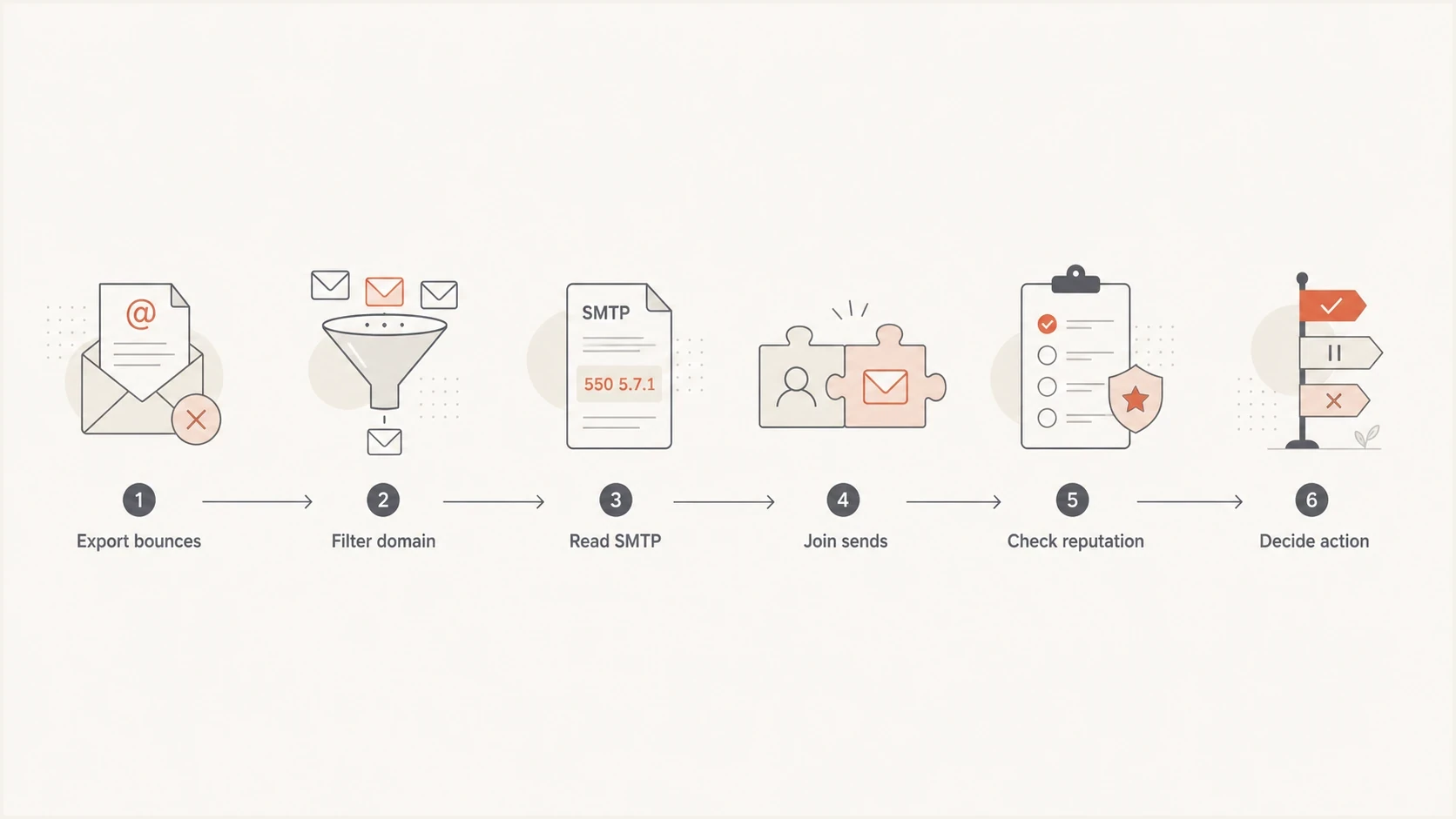
Flowchart for investigating a recipient domain block using SMTP bounces and sender reputation.
Accepted mail can still be filtered
A 250 reply after the end of the message data means that server accepted responsibility for the message, as specified in RFC 5321. Confirm that this is the destination gateway's reply; acceptance by your own submission server does not prove acceptance by the recipient's system. Server acceptance does not prove inbox placement. Accepted mail can still reach spam or quarantine, be processed by mailbox rules, or generate a later non-delivery report. An absence of bounces does not establish acceptance or recipient visibility.
- A 5xx reply before acceptance is direct evidence of a permanent SMTP rejection.
- A 4xx reply is a temporary deferral, so wait for retries and record the final result.
- A 250 reply after the end of message data confirms acceptance by that server and requires recipient-side evidence for inbox placement.
- No bounce and no delivery event requires confirmation from the recipient or receiving administrator.
For an accepted but missing message, ask the recipient or receiving administrator to search message trace, spam, quarantine, mailbox rules, and blocked-sender rules using the recipient address, timestamp with time zone, message ID, and sending IP. If local policy permits, the administrator can allowlist the exact sending identity after identifying the rule that handled the message.
With the recipient's consent, run one controlled comparison using the same sending address and outbound route. If the response implicates content, remove only the suspected link, attachment, or tracking element. Change one variable per test; a plain-text message that removes several elements is a broad content check, not an isolated test. Delivery from a different address shows that the alternate path works, but it does not isolate whether the original address, domain, IP, or content caused the failure.
Check authentication and blocklist status
Before labeling a destination domain as blocking you, check whether the sending setup gives the receiver a reason to reject. A domain can pass DMARC in one stream and fail in another if the envelope sender, DKIM selector, return-path domain, or sending platform changes. DMARC passes when either SPF passes with a domain matching the visible From domain under the configured DMARC comparison mode, or DKIM passes with such a signing domain. DMARC does not require both SPF and DKIM to pass. Confirm that the actual outbound IP has a PTR record whose hostname resolves back to that IP, and check its HELO or EHLO identity.
Suped's domain health checker helps catch DMARC, SPF, DKIM, MX, and DNS problems before attributing rejection to receiver policy. Use Suped's email tester with a real message to inspect authentication results for that sending stream. Results at the test destination do not establish how the affected receiving domain evaluated the rejected message.
Evidence to collect before escalation
- Keep the complete SMTP response, including its enhanced status code, provider text, and SMTP stage.
- Check SPF, DKIM, and DMARC for the exact stream that produced the rejection, including the domain comparison used by DMARC. A test to another destination is supporting evidence.
- Check the actual outbound IP and the specific sender or link domain implicated by the response against relevant blocklists (blacklists).
- Retest once after removing the content element named in the response; a plain-text message is a broader check.
Public blocklists are supporting evidence, not the full answer. IP-based DNS blocklists (DNSBLs) and domain or URL blacklists cover different identities. Use the actual outbound IP from the failed delivery event, not your website IP or an inbound MX address. Check sender and link domains when the response names them. A private receiver block can exist without a public listing, and a public listing does not prove that this destination used it. For broader context about a listing's effects, read what happens with an email blacklist.
Blocklist checker
Check your domain or IP against 144 blocklists.







If the response names a relevant blocklist, fix the listed cause before requesting delisting through that list's removal process. Address compromised accounts or unwanted sending when the listing identifies them. If the listed outbound IP is shared, give your sending provider the IP, timestamps, and full rejection text so it can investigate and handle removal. Removal from a public blacklist does not remove a recipient's private blocked-sender rule.
Use Suped to monitor authentication and blocklists
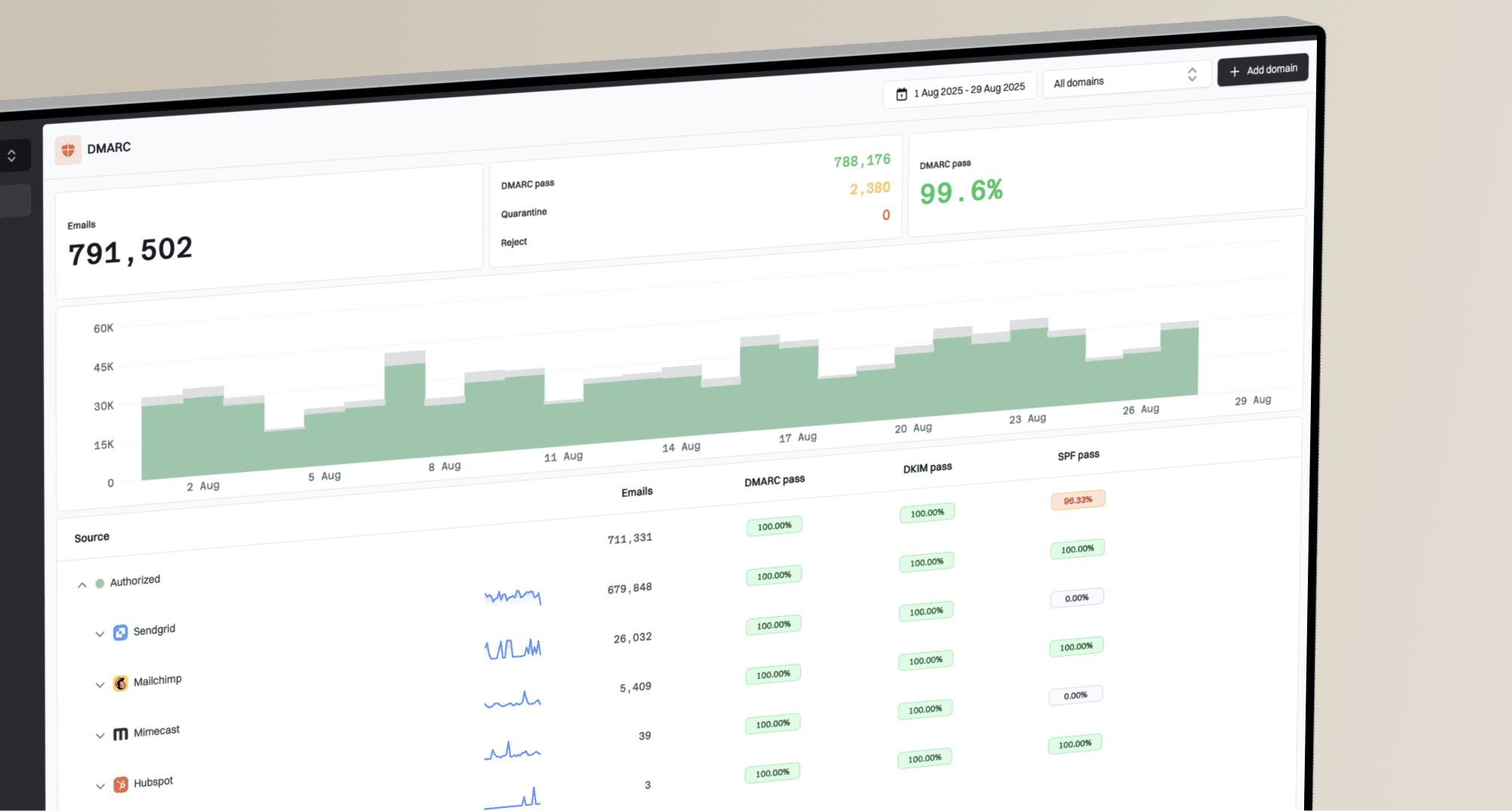
For this workflow, Suped's product brings DMARC monitoring, authentication diagnostics, and blocklist monitoring into one investigation. Compare the failing sending source's authentication results with listing alerts, then retain the sending platform's original SMTP logs as the evidence of rejection.
DMARC aggregate reports summarize authentication and DMARC policy results, as defined in RFC 9990. They do not provide individual recipient delivery traces or prove inbox placement, and they arrive after the reporting period. A connection-level rejection before the message is received will not appear in these reports. Suped's blocklist monitoring helps check whether a rejection coincides with a new listing for the sending domain or outbound IP.

Blocklist monitoring page showing domain and IP checks across blocklists with importance and status
- Use DMARC monitoring to identify sending sources with authentication or From-domain matching failures.
- Use hosted SPF when an SPF lookup-limit issue affects the sending stream, then verify the corrected result.
- Use authentication issue detection and blocklist alerts alongside SMTP logs; report arrival controls when aggregate results are visible.
- Use the MSP dashboard to keep each managed domain's authentication and reputation investigation separate.
A practical triage workflow
With thousands of total events but only a few for any one destination, do not read everything in chronological order. Reduce the data first, then inspect the high-risk rows. A spreadsheet, database query, or export from the sending platform can handle the grouping.
- Export send, acceptance, deferral, rejection, and queue-expiry events. Show pre-send suppression separately because it does not establish a receiver decision.
- Normalize recipient domains to lowercase and keep each domain separate. Add the MX or receiving provider as another field; domains on the same provider can have different tenant policies.
- Deduplicate retries by message and recipient, then calculate rates over finalized messages with raw counts visible. Report pending deferrals separately.
- Read the raw SMTP response and identify the rejecting server for domains whose tested messages received matching policy rejections.
- Run one controlled test after correcting obvious setup issues, and change one variable at a time.
- Record the full response, SMTP stage, remote server, timestamp with time zone, sender identity, sending IP, recipient, message or queue ID, and remediation step.
If the domain is important, use a targeted fix. Clean invalid recipients, confirm authentication and DNS, remove content implicated by the response, pause that domain if repeated permanent policy rejections continue, then contact the recipient's administrator with the exact evidence.
Views from the trenches
Best practices
Review the raw SMTP text first; generic categories can hide the provider's actual rejection reason.
Join rejections to distinct message-recipient pairs before calculating destination failure rates.
Retest once after a targeted fix; a successful plain-text test does not confirm a domain block.
Common pitfalls
Treating one 550 as a domain block ignores invalid addresses and recipient-specific policy rules.
Grouping only by bounce class misses repeated policy wording across recipients at one domain.
Checking a blacklist once and stopping misses IP, domain, content, and timing causes.
Expert tips
Keep the original SMTP line, enhanced code, recipient, time, and sending IP for proof.
Compare the same domain across campaigns so a four-send pattern is not viewed alone.
Track policy-rejection and acceptance rates over the same finalized message-recipient pairs.
Marketer view
Marketer from Email Geeks says the SMTP bounce reason is the first place to look because it often names the mailbox provider's policy decision.
2024-07-05 - Email Geeks
Marketer view
Marketer from Email Geeks says low-volume cases are easier to review after filtering to the destination domain and reading every raw bounce.
2024-07-05 - Email Geeks
When to call it a likely block
Repeated policy or reputation wording across the tested messages at one recipient domain, with correct authentication and comparable delivery elsewhere, supports a likely block affecting those tests. An SMTP response explicitly identifying the blocked IP or sender, or receiver-side rule evidence, confirms the specific rejection and identity involved. Administrator evidence is needed to establish broader mailbox coverage when the logs do not show it. For accepted but missing mail, request message trace or quarantine evidence before diagnosing the scope.
Frequently asked questions
One or two bounces do not establish a block across the whole recipient domain. An explicit response naming a blocked IP, sender, or domain confirms that rejection for the affected transaction. Generic policy wording alone does not establish which identity or how many mailboxes the rule covers.
Enhanced codes in the 5.7.x family usually indicate policy or security context, but the code alone does not prove a domain block. Codes in the 5.1.x family usually point toward recipient addressing problems. Read the complete response and note whether it appeared during connection, recipient validation, or after message content was sent.
Group generic bounces by destination domain, sending IP, sender domain, campaign, and time. Repeated generic failures across recipients carry more weight than a single vague response. Identify the rejecting server and ask your sending provider for the complete remote response before contacting the recipient administrator.
No. Passing authentication removes one common cause, but receivers still filter based on reputation, content, user complaints, engagement, private policy, and security gateway rules.
Do not keep sending repeated tests. Send one controlled message after fixing obvious issues, then pause if the same permanent policy rejection repeats.