How do SPF, DKIM, and DMARC email authentication standards work?

Published 12 Aug 2025
Updated 23 Jul 2026
11 min read
Summarize with
Updated on 23 Jul 2026: We updated this guide for the current DMARC RFCs and clarified policy choices for indirect mail.
SPF, DKIM, and DMARC work together by answering different questions about an email. SPF checks whether the sending server is allowed to send for a domain. DKIM checks whether the message has a valid cryptographic signature. DMARC checks whether SPF or DKIM passed in a way that matches the domain the recipient sees in the From address, then tells the receiver how the domain owner wants failures handled. These checks provide strong identity signals, but they do not guarantee inbox placement or prove that a message is safe.
A useful analogy is a mailroom process. SPF is the approved courier list. DKIM is the tamper-evident seal. DMARC is the company policy that says what the receiving mailroom should do when the courier or seal does not match the sender printed on the envelope.
- SPF: answers whether this IP address or sending service is allowed by the domain's SPF record.
- DKIM: answers whether a private key signed the message and the matching public key exists in DNS.
- DMARC: answers whether authenticated mail also matches the visible sending domain.
How the three standards fit together
The direct answer is simple: SPF and DKIM are authentication checks, while DMARC is the policy and reporting layer that ties those checks to the domain people actually see. A message does not need both SPF and DKIM to pass DMARC. It needs either SPF or DKIM to pass, and the passing result must match the visible From domain under DMARC's domain matching rules.
That distinction matters because email has more than one identity. There is the visible From address, the bounce or Return-Path address, the DKIM signing domain, the sending IP, and the domain in DNS records. SPF looks at the bounce domain and sending IP. DKIM looks at the signing domain and message signature. DMARC asks whether either of those authenticated domains matches the visible From domain closely enough.
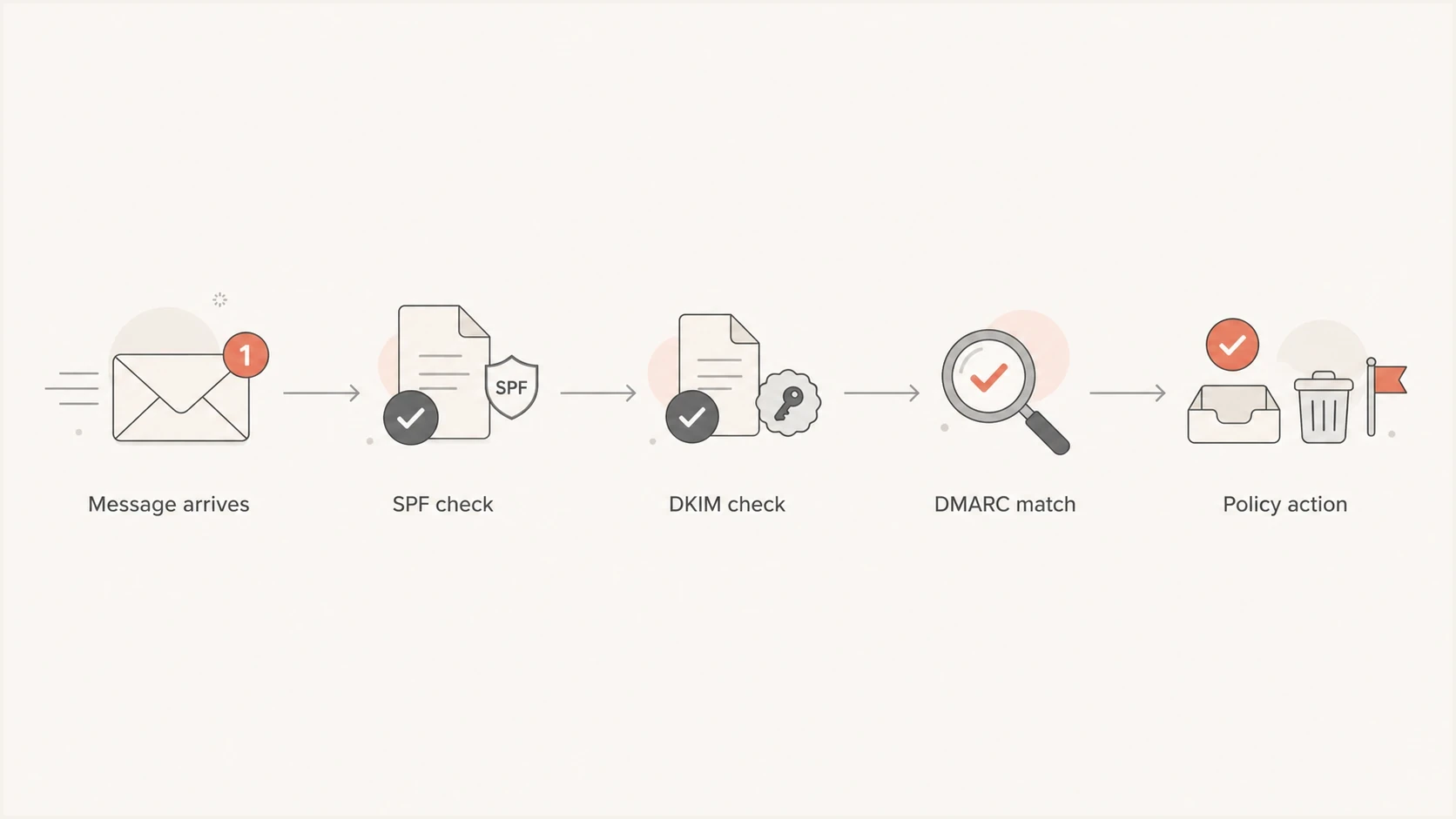
SPF and DKIM authentication checks followed by DMARC alignment and policy action.
|
|
|
|
|---|---|---|---|
SPF | Sending IP | Listed sender | Forwarding |
DKIM | Signature | Intact mail | Missing key |
DMARC | From domain | Domain match | Unaligned sender |
Compact view of what each standard checks.
SPF checks the sending server
SPF means Sender Policy Framework. The domain owner publishes a TXT record that lists the mail servers and sending services allowed to send mail for that domain. When a receiver gets a message, it checks the connecting IP address against the SPF record for the domain used in the envelope sender, often called the Return-Path or bounce domain.
SPF is useful, but it is narrower than many people expect. It does not authenticate the visible From address by itself. It authenticates the technical bounce identity. That is why a message can pass SPF and still fail DMARC if the bounce domain belongs to a sending platform while the visible From domain belongs to your company.
Example SPF recorddns
example.com TXT "v=spf1 include:_spf.example.net -all"
SPF lookup limits matter
SPF allows no more than 10 DNS-querying terms during one evaluation, including lookups triggered by nested records. The include, a, mx, ptr, redirect, and exists terms can consume that allowance. If evaluation exceeds the limit, SPF returns a permanent error, which removes SPF as a usable DMARC authentication result for that message.
- Keep it lean: include only active senders and remove abandoned services.
- Use hosted SPF: Suped's hosted SPF and SPF flattening help manage authorized senders and lookup use without constant DNS edits.
DKIM signs the message
DKIM means DomainKeys Identified Mail. It adds a cryptographic signature to the email headers. The sending system signs selected parts of the message with a private key. The receiver finds the matching public key in DNS and verifies that the signed parts of the message still match.
This is why DKIM is better than SPF at surviving forwarding. Forwarding changes the path and the connecting IP, which can break SPF. DKIM can keep working as long as the message content and signed headers are not changed in a way that invalidates the signature.
Example DKIM public key recorddns
selector1._domainkey.example.com TXT (
  "v=DKIM1; k=rsa; "
  "p=MIIBIjANBgkqhkiG9w0BAQEFAAOCAQ8A..."
)
The selector is the left-hand part before ._domainkey. Selectors let a domain publish multiple DKIM keys at once, which is useful when different senders sign mail for the same domain or when keys are rotated.
What DKIM proves
- Valid key: the public key in DNS matches the private key used to sign the message.
- Intact content: the signed headers and body parts were not changed after signing.
What DKIM does not prove
- Visible sender: DKIM alone does not prove the From address shown to the recipient is protected.
- Good intent: a valid DKIM signature does not mean the message is wanted or safe.
DKIM can work without SPF because the two checks are independent. For DMARC, the DKIM signing domain must match the visible From domain under the published alignment mode.
DMARC checks the visible domain
DMARC means Domain-based Message Authentication, Reporting, and Conformance. It uses SPF and DKIM results, but it adds the missing identity check: does the authenticated domain match the domain in the visible From address?
A message passes DMARC if either SPF passes with a matching bounce domain, or DKIM passes with a matching signing domain. If both fail, or if they pass for unrelated domains, DMARC fails. The receiver then considers the domain owner's DMARC policy alongside its own filtering signals.
Example DMARC recorddns
_dmarc.example.com TXT (
  "v=DMARC1; p=none; rua=mailto:dmarc@example.com; "
  "adkim=r; aspf=r"
)
DMARC policy stages
Start with reporting, fix legitimate senders, then choose an enforcement policy that fits the domain's mail flows.
Observe
p=none
Collect reports without asking receivers to change treatment of failures.
Filter
p=quarantine
Ask receivers to quarantine failing messages while retaining delivery flexibility.
Reject
p=reject
Consider only after testing indirect mail and making aligned DKIM reliable.
A DMARC policy is a published request, not remote control over every mailbox. Under the current standard, receivers must not reject a message solely because the Author Domain publishes p=reject. They must use other knowledge and analysis, including indirect-mail handling and local filtering. Reports still give the domain owner a clear view of who sends mail using the domain.
What changed in the current DMARC standard
RFC 9989 replaced RFC 7489 as the core DMARC standard. RFC 9990 now defines aggregate reporting, and RFC 9991 defines failure reporting. Existing records still use v=DMARC1, and the basic pass rule remains the same: aligned SPF or aligned DKIM produces a DMARC pass.
- The pct tag was removed: new records should omit it because percentage-based policy application was inconsistent.
- Three tags were added: np can set policy for non-existent subdomains, psd identifies Public Suffix Domain policy, and t requests testing treatment.
- Policy discovery changed: receivers use a bounded DNS Tree Walk to find the applicable policy and Organizational Domain.
- Reporting has separate standards: aggregate XML and message-level failure reports can evolve without changing the core authentication protocol.
Do not treat p=reject as mandatory
RFC 9989 warns that p=reject can disrupt mailing lists, aliases, and other indirect mail. Domains used for general-purpose email should assess those flows before choosing reject. If reject is appropriate, deploy reliable aligned DKIM and compare at least a month of p=none data with an equally long p=quarantine period first.
Why a pass can still fail DMARC
The most confusing part is that SPF or DKIM can pass technically while DMARC still fails. This happens when the passing domain does not match the visible From domain. For example, a marketing platform can send with its own bounce domain and pass SPF for that domain, but DMARC still fails if your visible From domain is different and DKIM is missing or signed by the wrong domain.
Authentication pass
- SPF pass: the connecting server is allowed by the bounce domain.
- DKIM pass: the message has a valid signature for a signing domain.
DMARC pass
- SPF match: the SPF-authenticated domain matches the visible From domain.
- DKIM match: the DKIM signing domain matches the visible From domain.
Relaxed matching is normal
Most organizations use relaxed matching, where a subdomain can match the Organizational Domain. Strict matching requires the domains to match exactly. Relaxed mode fits common setups where transactional mail, marketing mail, and corporate mail use subdomains.
This is also why DNS placement matters. SPF normally sits on the bounce domain, DKIM sits under a selector at ._domainkey, and DMARC sits at _dmarc. The guide on where records go breaks that down by record type.
How to check SPF, DKIM, and DMARC
Start a domain audit with DNS records, then test a real message. DNS tells you what the domain claims. A real message tells you what actually happens after an email leaves the sending platform.
A quick way to catch obvious issues is to run a domain health check and confirm that the visible DNS setup matches your real senders. For DMARC syntax specifically, use a DMARC checker before you move a policy closer to enforcement.
?
What's your domain score?
Deep-scan SPF, DKIM & DMARC records for email deliverability and security issues.
If there is no DMARC record yet, create a reporting-first record with a generator, publish it, and wait for aggregate reports. That reporting period gives you a list of legitimate senders, misconfigured senders, and unauthorized traffic using your domain.
DMARC record generator
Choose your policy, reporting addresses, and alignment settings.
DNS TXT record
v=DMARC1; p=quarantine; rua=mailto:dmarc@example.com
How to read DMARC reports
DMARC aggregate reports are XML files, often GZIP-compressed, sent by participating receivers to the address in your rua tag. Under RFC 9990, they can show the sending source, message count, SPF and DKIM results, identifier alignment, discovered policy, and disposition. Raw reports are hard to use in bulk, so the practical workflow is to group them by source and issue.
Suped DMARC dashboard showing email volume, authentication health, and source breakdown
Suped's product turns aggregate reports into a sender inventory, pass and fail rates, alignment results, authentication health, and specific fixes. In the DMARC monitoring workflow, teams can review new sources, trace high-volume failures, and check policy readiness without reading raw XML.
The useful distinction is whether a failure comes from a sender you own, a vendor that needs a DNS change, a forwarded message, or an unauthorized source. Suped's issue detection and steps to fix are built for that daily review.
What to check first
- Known senders: confirm every active platform has SPF or DKIM passing with the right domain match.
- Large failures: prioritize sources with meaningful volume before edge cases.
- Unknown sources: separate spoofing attempts from forgotten systems before changing policy.
- Policy readiness: move only when legitimate mail has stable authentication.
A practical setup sequence
A clean implementation is a sequence, not a single DNS edit. Identify senders, authenticate them, publish reporting, read the reports, then choose a policy based on the domain's real mail flows. This order reduces the risk of filtering legitimate mail because one platform or indirect route was missed.
- Inventory senders: list corporate mail, marketing tools, billing systems, support platforms, web servers, and legacy senders.
- Fix SPF: include only approved senders and keep the SPF record under the DNS lookup limit.
- Enable DKIM: turn on aligned signing for each sender that supports your domain.
- Publish DMARC: start with p=none so reports arrive before enforcement.
- Verify results: use a verification checklist and test real messages.
- Choose enforcement: compare report periods, assess forwarding and mailing lists, then choose quarantine or reject based on the domain's risk.
When DNS access is slow or spread across teams, Hosted DMARC makes policy staging easier because changes can be managed without repeated TXT record edits.

Issue steps to fix dialog showing the issue overview, tailored fix steps, and verification action
Views from the trenches
Best practices
Explain SPF as approved senders, DKIM as signatures, and DMARC as policy control.
Start DMARC with reporting so real traffic decides the order of authentication fixes.
Teach domain matching early because SPF or DKIM pass alone does not guarantee DMARC pass.
Common pitfalls
Treating SPF pass as proof of the visible From domain causes confusing DMARC failures.
Moving straight to reject without report review can disrupt vendors and legacy systems.
Ignoring receiver behavior hides why enforcement can look different across mailboxes.
Expert tips
Use relaxed domain matching for most mixed sender setups before considering strict mode.
Read DMARC reports by source and volume, not as one domain-wide pass or fail score.
Pair DNS checks with a real message test because headers show what receivers evaluate.
Marketer from Email Geeks says SPF is easiest to understand as a list of approved couriers, while DKIM is the message seal that proves the content was not changed after signing.
2024-04-18 - Email Geeks
Marketer from Email Geeks says DMARC is the control layer that tells receivers how to treat mail that fails authentication and domain matching.
2024-05-02 - Email Geeks
How to keep authentication working
SPF, DKIM, and DMARC are easier to manage once each standard has a clear job. SPF says which servers can send. DKIM says whether the message was signed by a domain and stayed intact. DMARC says whether those results match the visible sender and what policy the domain owner wants receivers to consider.
The ongoing work is sender inventory and cleanup. Find every sender, configure aligned SPF and DKIM for legitimate mail, publish a DMARC reporting record, review the reports, then choose a policy that fits direct and indirect mail. Suped's product supports that workflow with sender monitoring, alignment analysis, issue detection, hosted SPF, and hosted DMARC.