When is SPF flattening needed and how to validate SPF records?

Updated on 2 Aug 2026: We updated this guide with path-aware SPF lookup counting, void lookup limits, record-size checks, and safer flattening guidance.
SPF flattening is needed when the SPF policy for the domain used in the return-path requires more than 10 DNS-querying terms on an evaluated path after you have removed unused senders and moved separate mail streams to their own return-path domains. An over-limit evaluation returns SPF permerror, so it cannot produce the SPF pass needed for DMARC alignment. Flattening fixes that specific constraint. It is not a general cleanup step for every long SPF record.
Validate SPF records in this order: confirm the return-path domain, check there is exactly one SPF TXT record, trace DNS-querying mechanisms and nested includes, check void lookups and DNS response size, send real test mail, and compare the result against DMARC aggregate data. That order matters because SPF checks the envelope sender domain, not the visible From address.
Suped is relevant when this becomes ongoing work rather than a one-time DNS edit. Suped's DMARC reporting shows which sources pass SPF, which return-path domains they use, and which sources belong on separate subdomains. Suped's Hosted SPF then lets teams manage SPF without repeated DNS changes, including flattening and sender changes under one workflow.
The direct rule
Use SPF flattening only after you have proved that the evaluated SPF policy still requires more than 10 DNS-querying terms. The key word is evaluated. A record can look short and still exceed the limit because each include: can bring in more includes, MX lookups, A lookups, or redirect processing.
- Needed: The return-path policy requires more than 10 DNS-querying terms after sender cleanup.
- Not needed: A sender uses its own return-path domain, so your apex SPF record is not evaluated.
- Better fix: Move independent mail streams to separate subdomains when they use separate return paths.
- Risk: Manual flattening can age badly when a provider changes IP ranges and your DNS does not follow.
The most common mistake is flattening the apex domain before checking the return-path. If a support platform sends with its own bounce domain, its SPF include often does not belong in your apex SPF record at all.
SPF lookup pressure
Use the worst-case evaluated term count as a triage signal, then confirm the actual return-path before changing DNS.
Healthy
0-7
Enough room for provider changes and new senders.
Tight
8-10
Audit includes before adding another sender.
Failing
11+
An evaluation that needs another DNS-querying term returns permerror.
How SPF lookup limits are counted
The limit applies to DNS-querying terms reached during evaluation, including terms inside nested records. SPF runs left to right and stops when a mechanism matches, so different sending IPs can take different paths. A validator should trace the full policy and identify any path that can require an eleventh lookup-causing term.
- Counted terms: include, a, mx, ptr, exists, and the redirect modifier.
- Not counted: The initial SPF TXT fetch, plus ip4, ip6, all, and exp during policy evaluation.
- Void lookups: More than two empty or nonexistent DNS answers can produce permerror under the recommended limit.
- MX safeguard: Each mx mechanism has a separate cap of 10 A or AAAA address queries.
Record length needs a separate check. A single TXT record can contain multiple quoted character-strings, so 255 octets is a per-string limit, not a limit on the complete SPF policy. Keep the full DNS answer small enough for reliable transport and account for other TXT records at the same hostname.
Why return-path decides the answer
SPF checks whether the sending IP is authorized by the domain in the envelope sender, often visible as the Return-Path after delivery. DMARC then checks whether that SPF-authenticated domain exactly matches the visible From domain under strict alignment or shares its organizational domain under relaxed alignment. That means you do not add every vendor to the SPF record for your main domain by default.
For example, Microsoft 365 mail often uses your domain as the return-path, so its SPF include can belong on the domain that sends employee mail. A support platform, billing platform, or signature gateway needs a case-by-case check. If the platform uses a provider-owned bounce domain, your apex SPF record is not part of that SPF decision. If it rewrites or relays mail through your domain, then your SPF record matters.
Before flattening
- Inventory: List each sender and the domain it uses in the return-path.
- Separation: Put independent mail streams on purpose-built subdomains.
- Removal: Delete includes that are not evaluated for that domain.
After flattening
- Monitoring: Track provider IP changes and SPF pass rates continuously.
- Automation: Refresh flattened IPs without manual DNS edits.
- Fallback: Keep a rollback path if a sender changes its SPF source.
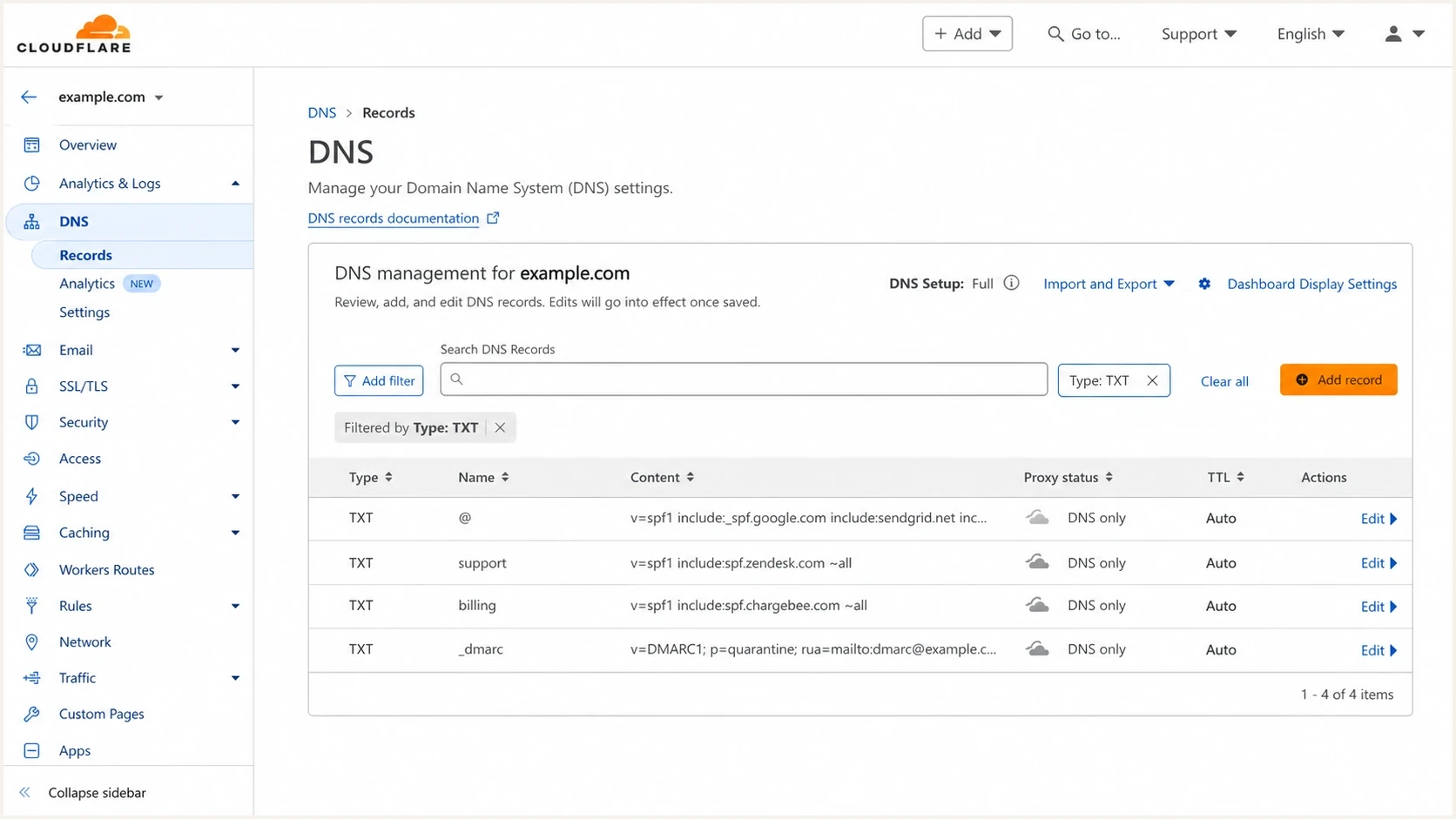
Cloudflare DNS records screen showing separate SPF TXT records for apex and subdomains.
When flattening is the right fix
Flattening is the right fix when the same return-path domain genuinely needs multiple senders and no evaluated path can be reduced below the limit. It is common in older organizations where employee mail, CRM mail, support mail, invoicing mail, and relays all inherited the apex domain. It also happens during migrations when two mail stacks run in parallel for a defined period.
|
|
|
|---|---|---|
11th term reached | SPF permerror | Reduce or flatten |
8-10 terms | Little headroom | Audit senders |
Own return-path | Domain evaluated | Keep include |
Vendor path | Apex skipped | Remove include |
Frequent changes | Manual risk | Use hosted SPF |
Use this checklist before approving SPF flattening.
The cleaner path is usually sender separation first, then SPF flattening for the policies that still need it. That keeps the apex domain focused on the senders that actually use it.
Overloaded apex SPF recorddns
example.com. 3600 IN TXT "v=spf1 include:spf.protection.outlook.com ~all"
example.com. 3600 IN TXT "v=spf1 include:_spf.support.net ~all"
example.com. 3600 IN TXT "v=spf1 include:_spf.billing.net ~all"
example.com. 3600 IN TXT "v=spf1 include:_spf.crm.net ~all"
That example also shows another validation issue: SPF must be published as one logical TXT record for a domain. Multiple SPF TXT records at the same name do not merge into one policy. They create a permanent error. DNS providers can split one TXT value into quoted chunks behind the scenes, but the domain must still publish one SPF policy.
Cleaner SPF split by mail streamdns
example.com. 3600 IN TXT "v=spf1 include:spf.protection.outlook.com ~all"
support.example.com. 3600 IN TXT "v=spf1 include:_spf.support.example.net ~all"
billing.example.com. 3600 IN TXT "v=spf1 include:_spf.billing.example.net ~all"
How to validate an SPF record
Validate SPF by checking DNS structure first, then the behavior of actual mail. A syntactically valid SPF record still fails the business test if it authorizes the wrong domain, omits a live sender, or sits on a domain that receivers never evaluate.
- Find: Inspect the Return-Path header on real messages sent by each platform.
- Confirm: Check that the return-path domain has one logical SPF TXT policy, not two.
- Trace: Expand includes and redirect, then check all reachable paths for the 10-term limit, loops, missing policies, and void lookups.
- Size: Verify quoted TXT chunks join without extra spaces and the complete DNS answer remains practical for UDP delivery.
- Test: Send a message through each source and review SPF pass, fail, temperror, or permerror.
- Monitor: Use DMARC aggregate reports to verify which sources pass over time.
Basic DNS checksbash
dig TXT example.com

dig TXT support.example.com

dig TXT _dmarc.example.com
A focused SPF checker helps when you need a fast read on syntax, mechanisms, nested includes, and lookup limits. Use it as a validation step, then confirm the same result with a real message because forwarding, relays, and vendor-specific bounce domains change what SPF evaluates.
SPF checker
Find SPF syntax issues, lookup limits, and weak records.
?/16tests passed
Look for these exact failures: more than one SPF record at the same hostname, an evaluated path that reaches an eleventh DNS-querying term, more than two void lookups, a circular reference, an include with no SPF policy, broken TXT chunk spacing, and an oversized DNS response. Treat a hard fail policy as a separate rollout decision if the domain still has unknown senders.
A broader domain health check is useful when SPF is only one part of the problem. SPF, DKIM, DMARC, rDNS, MTA-STS, and blocklist (blacklist) status can all affect whether a domain is trusted.
How Suped fits the workflow
For a one-time fix, a DNS audit and SPF validation pass can be enough. Teams with many senders, domains, or non-technical owners adding platforms over time need an ongoing workflow for DMARC monitoring, SPF management, DKIM visibility, blocklist monitoring, and clear fix steps.
Suped ties the flattening decision to DMARC evidence. Teams can see which source sent mail, which return-path domain was evaluated, whether SPF passed, whether DKIM covered the message, and what action fixes the issue. That helps when a vendor asks for an include but the mail authenticates against a different domain.
SPF flattening drawer showing an over-limit record, sender editing, lookup counts, and the hosted record setup
Hosted SPF is most useful when DNS ownership slows changes down. Instead of asking for a DNS edit every time a sender is added or removed, the domain points to a hosted SPF include and the sender list is managed in Suped. Suped also handles SPF flattening so policies stay under the lookup limit while provider changes are tracked.
A good SPF workflow does not flatten first. It proves what mail is using the domain, removes unnecessary authorization, separates mail streams, and then uses hosted or dynamic flattening only where the policy still needs it.
The same approach works for agencies and managed service providers. A multi-tenant view makes it easier to spot domains approaching the lookup limit, domains with stale includes, and clients that need subdomain separation before their next sender rollout.
Flattening risks to account for
Flattening replaces DNS indirection with direct IP authorization. That reduces lookup count, but it also moves responsibility for provider IP changes closer to you. Dynamic or hosted flattening reduces that risk because the flattened output is regenerated when provider SPF sources change.
Manual flattening
- Control: You publish exact IP mechanisms in DNS.
- Cost: Low direct cost, higher operational follow-up.
- Risk: Provider IP changes can break SPF silently.
Hosted flattening
- Control: You manage senders outside direct DNS edits.
- Cost: Platform cost replaces repetitive DNS work.
- Risk: Use monitoring to confirm regenerated records.
Do not use flattening to hide poor sender governance. If nobody can explain why a platform is in the SPF record, remove it only after reviewing DMARC data and recent test messages. The safe cleanup path uses evidence, small changes, and monitoring.
Hosted SPF include patterndns
example.com. 3600 IN TXT "v=spf1 include:_spf.example.hostedspf.net ~all"
Views from the trenches
Best practices
Check the return-path domain before adding any vendor include to the apex SPF record.
Move independent senders to subdomains before choosing flattening for the apex record.
Use DMARC aggregate data to verify which sources actually use each return-path domain.
Common pitfalls
Treating visible From as the SPF domain creates unnecessary apex includes and risk.
Manual flattened IP lists drift when a provider changes ranges without alerts or review.
Signature gateways can behave like relays, so test their SPF path with real mail.
Expert tips
Keep lookup count under eight where possible to leave room for provider changes.
Pair hosted SPF with alerts so a sender change does not become a silent failure.
Review high-lookup includes first because one vendor can consume most SPF capacity.
Marketer from Email Geeks says many teams asking for dynamic SPF first need better subdomain management and sender separation.
2024-08-15 - Email Geeks
Expert from Email Geeks says different services usually use different return paths, so the apex SPF record rarely needs every vendor include.
2024-08-15 - Email Geeks
The practical answer
SPF flattening is needed when the return-path policy still requires more than 10 DNS-querying terms on an evaluated path after cleanup. It is not needed just because the business uses many vendors, and it is not needed for platforms that authenticate against their own return-path domains.
Validate SPF by checking the actual return-path, SPF record count, syntax, lookup paths, nested includes, void lookups, DNS response size, and real message results. Then watch DMARC aggregate reports to confirm that the change works across normal traffic. Suped connects those steps through DMARC monitoring, Hosted SPF, automated flattening, alerts, blocklist monitoring, and issue-specific fix steps for teams that need SPF to stay correct after the first audit.




