What is the full form of SPF in email?


Updated on 22 Sep 2026: We refreshed the SPF definition and clarified MAIL FROM checks for sending and non-sending domains.
SPF stands for Sender Policy Framework. In email, SPF is a DNS-based authentication standard that tells receiving mail servers which senders are allowed to send mail for a domain. It helps receivers identify unauthorized use of an envelope sender domain, but it does not decide whether a message is phishing or spam.
The short answer matters because SPF is often explained in a confusing way. SPF does not prove that the visible From address is authentic by itself. It checks the domain used in the envelope sender, often shown as the Return-Path, against the sending server's IP address.
- Full form: Sender Policy Framework.
- Purpose: Allow a domain owner to publish approved sending sources in DNS.
- Result: A receiver gets pass, fail, softfail, neutral, none, temperror, or permerror.
- Limit: SPF needs DMARC to connect authentication to the visible brand domain.
What SPF stands for
The name breaks into three plain parts. Sender means the domain claiming responsibility for the message at the SMTP level. Policy means the published rule that lists approved sources. Framework means the receiving server has a standard way to evaluate that rule.
Early SPF material sometimes expanded the initials as Sender Permitted From. The standardized name is Sender Policy Framework, which is the expansion used in current technical documentation.
A domain publishes SPF as a DNS TXT record. The receiving mail server looks up that record, compares the sender's IP address with the allowed sources, then records a result. For a deeper reference, the SPF guide has the longer technical version.
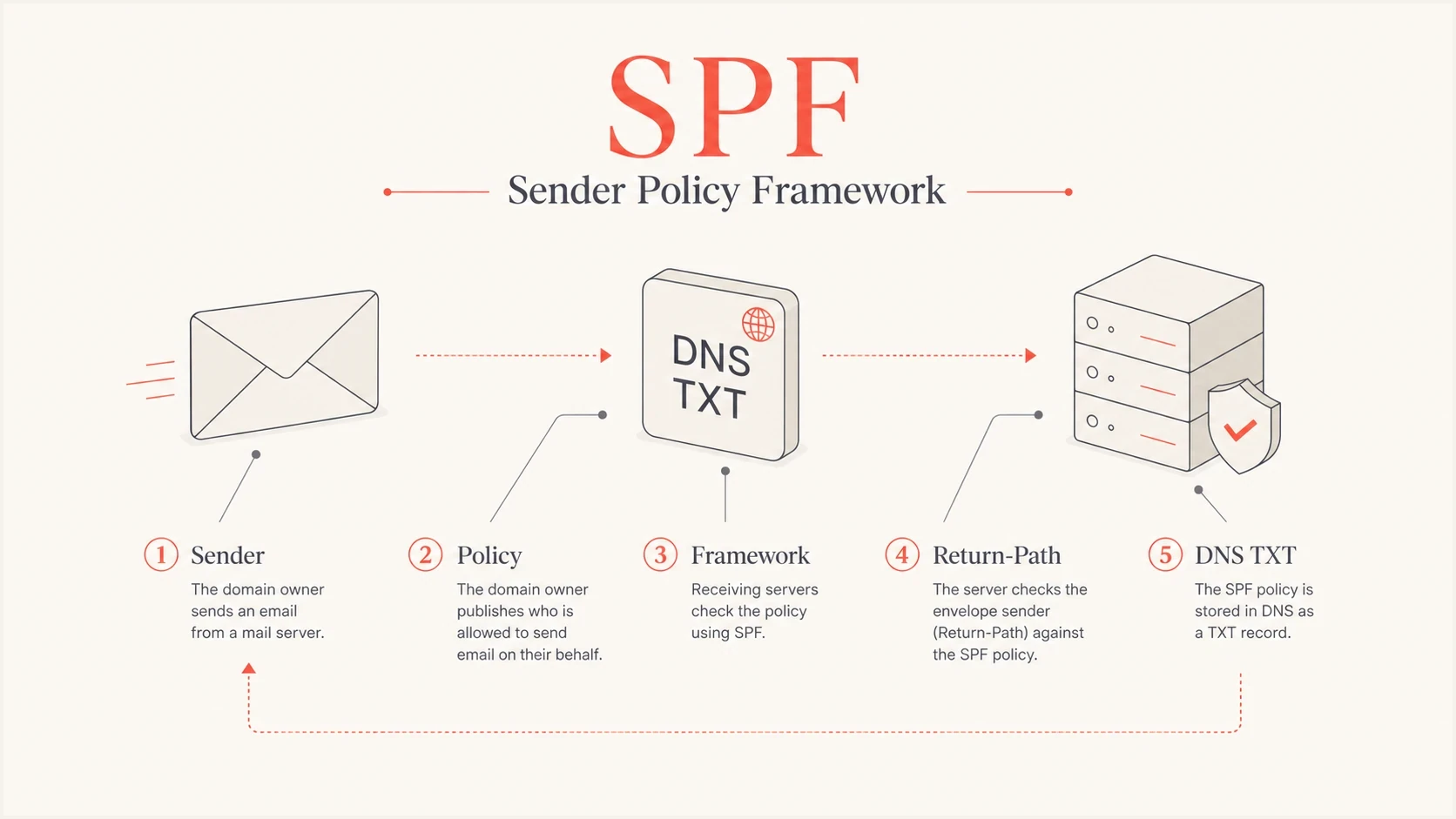
SPF infographic showing Sender Policy Framework, Return-Path, and DNS TXT checks.
The direct definition
SPF is an allowlist for email sending servers. It says: for this domain, these mail servers have permission to send.
What SPF actually checks
SPF checks the SMTP envelope sender domain, not the visible brand address that most people read in their inbox. That distinction is the source of many wrong SPF fixes.
When a message is delivered, the receiving server sees the connecting IP address and the envelope sender domain. It asks DNS for the SPF record on that envelope domain. If the IP address matches the policy, SPF passes for that domain. When the SMTP reverse-path is empty, as it often is for delivery status messages, SPF evaluates the HELO or EHLO identity instead.
What SPF checks
- Envelope: The SMTP MAIL FROM domain, usually recorded later in the Return-Path header.
- IP address: The server that connected to the receiver.
- DNS policy: The SPF TXT record for that envelope domain.
- HELO fallback: The HELO or EHLO domain when MAIL FROM is empty.
What SPF does not check alone
- Visible From: The address people see in the inbox.
- Message body: The text, links, attachments, and layout.
- Sender intent: Whether the message is wanted or unwanted.
DMARC adds the missing brand-domain test. It asks whether SPF passed and whether the authenticated SPF domain matches the visible From domain under DMARC's matching rules. If SPF passes for a different organizational domain, DMARC does not count that SPF pass for the visible brand.
This is why two messages can both show the same visible sender while producing different authentication outcomes. One uses a custom return-path domain owned by the brand and passes SPF in a way DMARC accepts. The other passes SPF for a mail platform's domain, which helps that platform but does not protect the brand domain shown to the recipient.
What SPF results mean
SPF returns a result for the identity it evaluated. A pass means the connecting IP was authorized by that identity's SPF policy. It does not prove that the message is safe, wanted, or connected to the visible From domain.
|
|
|
|---|---|---|
pass | The policy authorizes the connecting IP. | Check the DMARC domain match before trusting the visible From address. |
fail | The policy states that the IP is not authorized. | The receiver decides whether to reject, filter, or accept the message. |
softfail | The policy says the IP is probably not authorized. | This is not an SPF pass, even if the receiver accepts the message. |
neutral | The domain makes no assertion about the IP. | Treat it as no positive authorization. |
none | No usable SPF policy was found for the identity. | There is no SPF authorization result to rely on. |
temperror | A temporary DNS or evaluation problem occurred. | The receiver can defer or apply its local temporary-error policy. |
permerror | The SPF policy is invalid or cannot be evaluated within its limits. | Fix the record rather than treating the result as an authorization. |
SPF evaluation results and their operational meaning.
SPF results do not set delivery policy
The receiving system applies its own handling to every SPF result. For DMARC, only SPF pass can count, and the authenticated domain must also match the visible From domain under the published DMARC matching rules.
How to read an SPF record
An SPF record starts with v=spf1. After that, it lists mechanisms that describe allowed senders, then usually ends with an all mechanism and qualifier that states the domain owner's position on anything not matched earlier.
Example SPF TXT recorddns
example.com. TXT "v=spf1 ip4:203.0.113.10 include:_spf.example.net -all"
This example says that one IPv4 address is approved and that the include mechanism authorizes an IP when the referenced policy returns pass. The -all ending says everything else is not authorized.
|
|
|
|---|---|---|
v=spf1 | SPF version | Required start |
ip4 | IPv4 source | Fixed sender |
ip6 | IPv6 source | Fixed sender |
include | Referenced policy | External sender |
a | Host address | DNS-named sender |
mx | MX hosts | Mail exchanger hosts |
redirect | Delegated policy | Evaluate another domain when no mechanism matches |
exp | Failure explanation | Optional text for an SPF fail result |
-all | Fail | Unmatched senders are unauthorized |
~all | Softfail | Probable unauthorized status |
?all | Neutral | No assertion |
+all | Pass for every IP | Unsafe, do not use |
Common SPF parts and what they mean.
SPF uses a TXT DNS record. A dedicated SPF record type existed historically, but modern SPF publishing uses TXT. Publish one SPF TXT record for each domain that needs an SPF policy. Multiple v=spf1 records at the same domain cause permerror rather than combining into one policy.
For a domain or subdomain that never sends mail, v=spf1 -all makes that intent explicit. Publish it only after confirming that no legitimate system uses the name as a MAIL FROM or HELO identity.
The ending qualifier records the domain owner's assertion, but the receiver still decides delivery. Use ~all only as a temporary softfail position while validating sources. After every legitimate source is accounted for, -all states that unlisted sources are unauthorized. DMARC treats neither softfail nor fail as an SPF pass.
Common SPF failures
Most SPF problems come down to incomplete sender inventory, excessive DNS lookups, or duplicate SPF records. The record can look valid at a glance and still return permerror once nested policies are evaluated.
The 10 lookup rule
SPF has a hard limit of 10 DNS-querying terms across the complete evaluation, including nested policies. The limit applies to include, mx, a, ptr, exists, and redirect. Exceeding the limit returns permerror. Implementations should also limit empty or nonexistent DNS answers, called void lookups, to two. Exceeding the void lookup limit can also return permerror. The ptr mechanism is deprecated and should not be used.
SPF DNS lookup risk
A simple way to judge whether a record is close to the SPF lookup limit.
Healthy
0-7
Enough room for sender changes.
Tight
8-9
Review nested includes soon.
At limit
10
Small vendor changes can break SPF.
Failing
11+
The record exceeds the SPF limit.
The fix is not always to keep adding includes. First remove sources that no longer send mail. Then consolidate repeated authorization paths. Replace a provider include with direct IP ranges only when those ranges are stable and someone will track provider changes. When ongoing lookup pressure remains, SPF flattening can reduce live DNS lookups, but the flattened data must stay synchronized with each provider's policy.
- Duplicate records: A domain must have one SPF TXT record, not competing records.
- Missing senders: A legitimate sender fails if its IP or authorization path is absent.
- Unsafe endings: A +all ending authorizes every connecting IP and defeats SPF authorization.
- Forwarding: A forwarder changes the connecting IP, so the original SPF policy often fails. Sender Rewriting Scheme (SRS) gives the forwarded message a new envelope sender for a fresh SPF check.
How to check SPF on a domain
A useful SPF check goes beyond reading the record text. Validate DNS syntax, expand referenced policies, count DNS-querying terms across the full evaluation, and test a real message where possible.
A focused SPF checker is the fastest way to see whether a record has syntax problems or lookup-limit risk. For a wider authentication review, a domain health checker checks SPF beside DKIM and DMARC.
For production domains, DMARC aggregate reports show which sources are actually sending and whether those sources pass SPF for the right domain. DNS shows the published policy, while reports show real authentication behavior.
SPF checker
Find SPF syntax issues, lookup limits, and weak records.
?/16tests passed
After the DNS check, send a message through each legitimate source and inspect its Authentication-Results header. Confirm the spf= result and the smtp.mailfrom= identity. This verifies both authorization and the envelope domain used in production.
Every sending source in SPF should map to a service the business still uses. Old includes create unnecessary lookup load and make incident response harder.
Check the envelope domain used by each sender. Some email platforms use their own bounce domain unless a custom return-path domain is configured. In that setup, SPF can pass for the platform's domain while DMARC does not count it for the visible domain.
Where Suped fits
SPF starts as a DNS record, but it becomes an operational process once a domain has several senders. Suped is our DMARC and email authentication platform. It gives teams one place to review SPF, DKIM, DMARC, blocklist (blacklist) monitoring, and deliverability signals.
Suped's  Hosted SPF lets teams manage approved senders through a controlled interface instead of requesting a DNS edit for every provider change. Managed flattening keeps provider data synchronized while reducing live lookup pressure.
SPF flattening drawer showing an over-limit record, sender editing, lookup counts, and the hosted record setup
The workflow is direct: inventory every sender, confirm ownership, fix SPF or DKIM issues, then move DMARC policy forward using report data. Suped adds automated issue detection, remediation steps, real-time alerts, and multi-tenant views for teams managing many domains.
Manual SPF upkeep
- DNS access: Every sender change needs a DNS edit.
- Lookup risk: Nested includes need repeated review.
- Visibility: DNS alone does not show live sending sources.
Suped workflow
- Hosted record: Manage senders through a controlled interface.
- Issue steps: See what broke and how to fix it.
- DMARC view: Check SPF in the context of DKIM and DMARC.
The practical takeaway
SPF means Sender Policy Framework. It is the DNS policy that lets a domain owner say which servers are allowed to send mail for that domain at the SMTP envelope level.
The important caveat is that SPF alone does not authenticate the visible From address. Treat SPF as one part of email authentication, then use DKIM and DMARC to protect the domain people actually see. A clean SPF record is current, within its DNS evaluation limits, and backed by reporting that shows real sending behavior.




