What are the best practices and considerations for using SPF record redirects?

Published 29 Apr 2025
Updated 3 Aug 2026
14 min read
Summarize with
Updated on 3 Aug 2026: We updated this guide with clearer SPF redirect semantics and safer operational checks.
The best practice for SPF record redirects is to use redirect= when one domain should rely on another domain's complete SPF authorization and policy. It is valid SPF, and it is often cleaner than copying the same IP list into several records. It does not change sender reputation by itself. The real risks are operational: hidden DNS lookup use, unclear delegation, record drift, and failures when the target policy breaks.
Treat SPF redirect as a policy handoff, not as a sender add-on. If a domain uses the same outbound infrastructure and policy as another domain under the same administrative control, a redirect can be the right choice. If a domain needs to authorize an independently managed sender alongside its own sources, an include: mechanism or carefully managed IP mechanisms are usually a clearer fit.
- Direct answer: Use SPF redirect for shared policy management when the redirect target is controlled, monitored, and intentionally authoritative for the sending domain.
- Main caveat: A redirect counts toward SPF's DNS lookup limit, and the target becomes the current domain for the redirected SPF check.
- Reputation answer: A redirect is not a reputation signal. Failed authentication, domain mismatch, shared IP abuse, spam complaints, and blocklist or blacklist listings are the problems to investigate.
What SPF redirect actually does
An SPF redirect says, in effect, "if none of this record's mechanisms match, evaluate the SPF record at another domain and use that result." An include is one mechanism inside a broader SPF record. A redirect supplies the policy outcome after the local mechanisms do not match.
A minimal redirect record looks like this:
Basic SPF redirectDNS
example.org. TXT "v=spf1 redirect=spf.example.net"
This means example.org does not list mail servers directly. It uses the SPF policy published at spf.example.net. If that policy authorizes the source IP, example.org can pass SPF for the source. A missing SPF record or malformed redirect target produces permerror, while a temporary DNS failure produces temperror. Other results returned by the target policy become the result for example.org.
The shortest rule
Use redirect= when the target domain should define the shared SPF authorization and policy. Use include: when the target domain is an independently managed sender inside the original domain's policy.
Do not use redirect as a cosmetic shortcut. It should document a real ownership model. A parent company can maintain one SPF policy for several brand domains. A central mail team can publish a reusable policy for domains that use the same sender set. The redirect target should remain under the same administrative authority as the domains that depend on it.
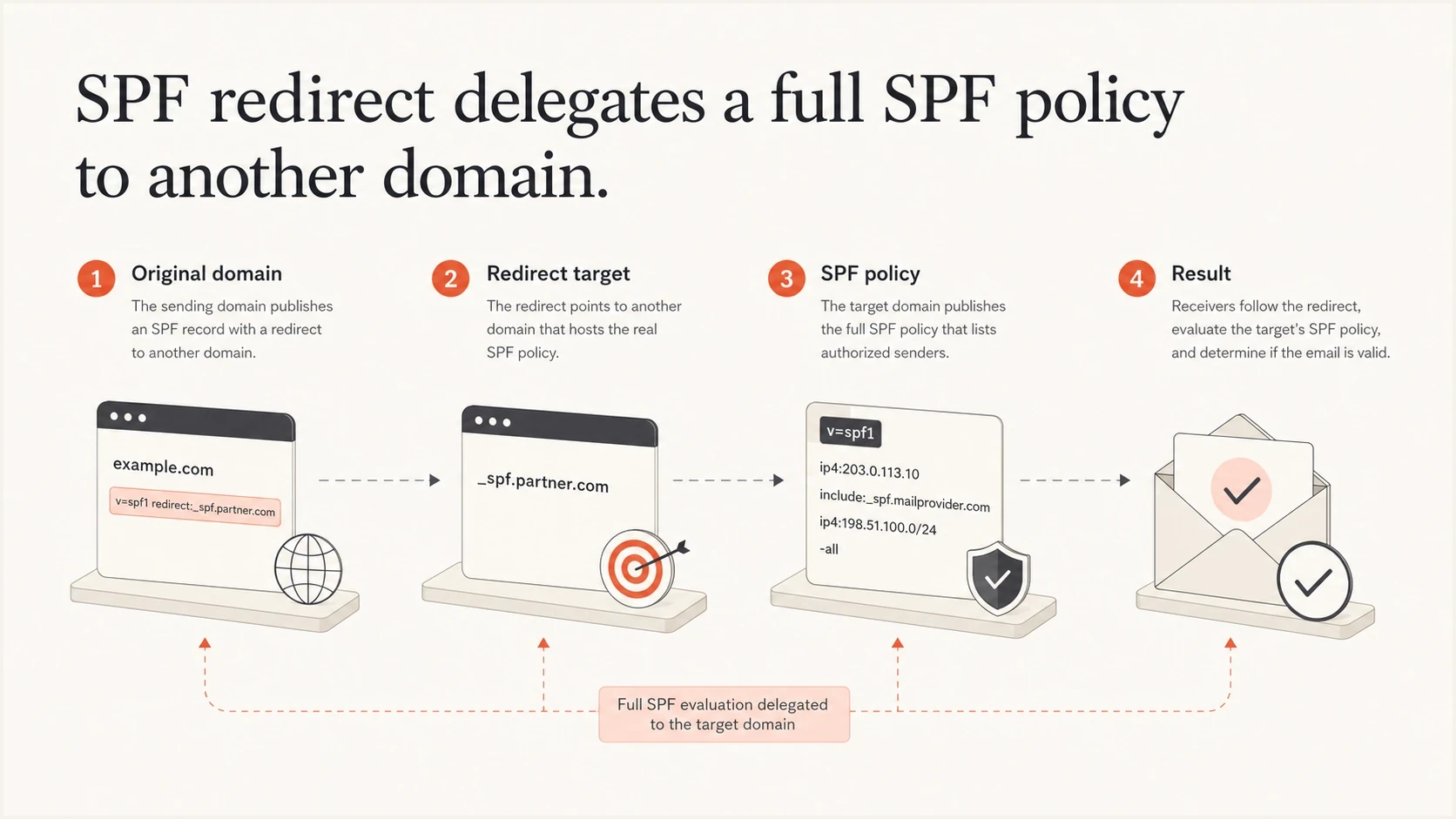
Infographic showing an original domain redirecting SPF evaluation to a target policy domain.
Redirect, include, and CNAME are not the same
The most common mistake is treating redirect, include, and CNAME as interchangeable. They are not. SPF redirect is a modifier in SPF policy syntax. Include is an SPF mechanism with different result handling. CNAME is DNS aliasing, and using it at the wrong name can interfere with other records there.
Use redirect when
- Full delegation: The other domain should control the shared SPF authorization and policy.
- Shared operations: Several domains under one authority use the same outbound sender set.
- Reduced drift: One managed record prevents copied records from becoming inconsistent.
Use include when
- Partial authorization: The other domain is one sender, not the whole policy.
- Mixed senders: The domain also uses direct IPs, another ESP, or internal mail.
- Separate ownership: The referenced sender controls its own SPF record.
A CNAME is usually the wrong answer for SPF at an organizational domain because the domain often already needs TXT, MX, verification, and other records. A DNS name with a CNAME normally cannot also have other record types at the same owner name. SPF redirect avoids that collision because it sits inside the TXT record.
|
|
|
|---|---|---|
redirect | Shared SPF handoff | Hidden dependency |
include | Authorize a sender | Lookup growth |
CNAME | DNS alias only | Record conflict |
Compact comparison of SPF delegation choices.
There is a small but important syntax detail: redirect= is a modifier, not a mechanism. It should appear at the end of the SPF record for clarity, although its position does not control when it runs. A record must not contain the redirect modifier more than once. Any all mechanism makes redirect ineffective, regardless of term order. A record such as v=spf1 include:example.net -all redirect=spf.example.net needs to be rewritten because the redirect is ignored.
How redirect changes the evaluation domain
Following a redirect starts a new SPF check with the redirect target as the current domain. The client IP and envelope sender stay the same. This detail matters when the target record uses mechanisms without an explicit domain or uses sender-dependent macros.
Redirect with an unqualified a mechanismDNS
brand.example.        TXT  "v=spf1 redirect=spf.company.example"
spf.company.example.  TXT  "v=spf1 a -all"
In this example, the bare a mechanism checks the address records for spf.company.example, not brand.example. The same current-domain rule applies to an unqualified mx mechanism. If the intended hosts belong to another name, state that domain explicitly in the target policy.
Explicit shared mail domainDNS
spf.company.example. TXT "v=spf1 mx:company.example -all"
Review macros before sharing a policy
The envelope sender is retained through redirect, so macros that use the sender or local part can behave differently for each redirecting domain. Avoid sharing a macro-dependent target until it has been tested with the real envelope senders used by every domain.
Best practices for using SPF redirects
The safest redirect setup is simple: one visible SPF TXT record, one controlled redirect target, enough monitoring to catch failures, and a clear reason why the policy is delegated. A DNS reviewer should understand the intent without reverse engineering a chain of records.
- Keep one SPF record: A domain must not publish multiple SPF records. Multiple records produce permerror during SPF evaluation.
- Use a controlled target: Redirect to a policy under the same administrative control. Use include for an independently managed sender.
- Avoid redirect chains: Every extra redirect adds dependency and lookup use. A circular redirect path produces an error and must be removed.
- Count DNS lookups: SPF permits no more than 10 lookup-triggering terms during evaluation. Redirect consumes one term from that budget.
- Test real mail: A DNS record that parses correctly still needs validation against mail sent by every approved source.
- Monitor DMARC: SPF supports a DMARC pass only when SPF passes and its authenticated domain matches the visible From domain.
Clean redirect for a domain that shares an SPF policyDNS
brand.example. TXT "v=spf1 redirect=spf.company.example"
Mixed sender policy using include insteadDNS
brand.example. TXT "v=spf1 ip4:192.0.2.10 include:spf.esp.example -all"
Do not mix redirect with an all mechanism
A record such as v=spf1 include:spf.example -all redirect=spf2.example contains an ignored redirect. The all mechanism always matches, so SPF never follows the redirect. Pick the required model, then publish one coherent record.
When the goal is central management without repeated DNS changes, hosted SPF can be cleaner than hand-built redirects across many domains. Suped's hosted SPF workflow gives teams one place to manage authorized senders, optimize the underlying SPF content, and reduce DNS access requests when a sender changes.
Lookup limits and hidden failure modes
SPF limits an evaluation to 10 terms that trigger DNS lookups. Redirect consumes one term, and its target can add include, a, mx, ptr, exists, or another redirect to the same budget. The initial TXT query for the original SPF record is outside this term count. A short source record can therefore hide an evaluation path that is already close to permerror.
SPF DNS lookup budget
A practical way to assess lookup-triggering terms against SPF's limit of 10.
Low risk
1-5
Enough room for routine provider changes.
Watch closely
6-8
A nested policy change can reduce the remaining budget.
Critical
9-10
One added lookup-triggering term can exceed the limit.
Permerror
11+
The evaluation exceeds SPF's lookup limit.
Lookup use can change without an edit to the redirecting domain. A policy can evaluate at seven lookup-triggering terms today, then a sender adds another include to a nested record and pushes the path over the limit. A successful check today is only one part of an SPF review.
- Permerror risk: More than 10 lookup-triggering terms ends SPF evaluation with permerror and can remove an SPF-based DMARC pass.
- Void lookup risk: SPF implementations should limit DNS responses with no usable answer to two; exceeding that limit can produce permerror.
- Timeout risk: Temporary DNS errors or evaluation timeouts can return temperror and make intermittent failures harder to diagnose.
- Ownership risk: Changes to a target owned by another team can alter every redirecting domain without notice.
- Scope risk: A shared target can authorize sources that one redirecting domain does not use.
Before publishing or approving a redirect, run the domain through an SPF checker and inspect the expanded path, not only the top-level TXT string. For a wider authentication review, use a domain health check to assess the domain's records together.
SPF checker
Find SPF syntax issues, lookup limits, and weak records.
?/16tests passed
If a domain is already close to the lookup limit, adding redirect is rarely the best next move. Consolidate duplicate sender entries, remove obsolete includes, and consider SPF flattening or hosted SPF where multiple departments or clients share the same DNS process. Any flattened policy also needs monitoring so provider IP changes do not leave stale authorization data.
Does SPF redirect affect sender reputation
SPF redirect does not directly create a good or bad reputation. Receivers do not reward a domain for using redirect, and they do not penalize a domain because the SPF record delegates policy. A redirect can still contribute to delivery problems when it causes authentication errors, authorizes the wrong sources, or hides an unmanaged sending setup.
Redirect is not the cause when
- SPF passes: The sending IP is correctly authorized by the target policy.
- DMARC matches: The SPF-authenticated domain matches the visible From domain.
- Policy is narrow: The target SPF record authorizes only legitimate outbound systems.
Redirect needs attention when
- SPF errors: The expanded redirect path exceeds limits or returns DNS errors.
- Sources are broad: The target policy authorizes mail systems not used by the domain.
- Reports disagree: DMARC data shows recurring SPF failures for known senders.
When a domain has poor reputation, review its sending sources: complaint rates, bounce behavior, list acquisition, shared IP quality, domain age, From-domain matching, and blocklist (blacklist) exposure. SPF redirect belongs in that audit because it shows whether the domain's authentication is reliable and whether the authorized sender set is too broad.
Suped DMARC dashboard showing email volume, authentication health, and source breakdown
Suped's DMARC reporting and email authentication platform connects the DNS view with DMARC reporting. A team can check whether a redirect parses, then see which sources pass SPF, where DKIM fails, whether From-domain matching works, and whether an unknown system is using the domain. This connects policy review to actual mail behavior.
Do not use SPF redirect to mask a weak sender setup
If the target SPF record authorizes too many providers, stale IP ranges, or an ESP the domain no longer uses, redirect centralizes the problem. Clean the sender inventory before treating redirect as an operational improvement.
A practical review process before using redirect
SPF failures often start with sender drift. A sender was added, a sender was missed, or a record was copied without checking what the target authorizes. A redirect reduces that drift only when the target is maintained with discipline.
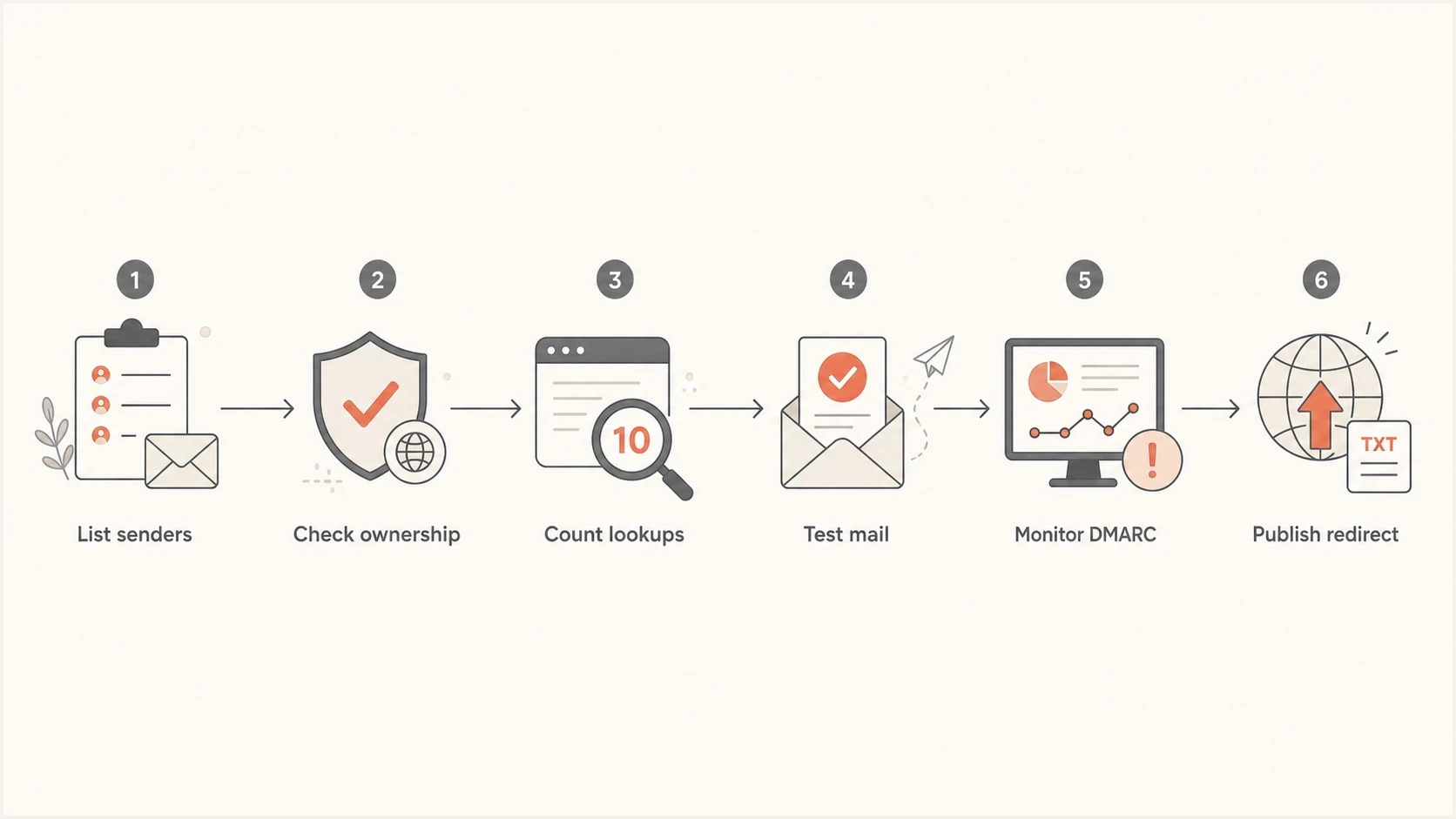
Flowchart for reviewing SPF redirect use before publishing a DNS record.
- List every sender: Collect production mail sources, marketing platforms, billing systems, support tools, and internal relays.
- Compare against the target: Confirm the target authorizes every legitimate sender and nothing materially broader than required.
- Expand the SPF path: Check lookup-triggering terms, nested includes, void lookups, duplicate modifiers, and redirect chains.
- Send test messages: Verify authentication results at major mailbox providers and inspect the exact domain that passed SPF.
- Watch DMARC data: Monitor several sending cycles before tightening DMARC policy or removing older SPF entries.
For teams managing many domains, Suped automates parts of this process. Issue detection flags authentication and sender-source problems, alerts surface record changes, and hosted SPF lets the team update authorized senders without repeated DNS edits. MSP teams can use the multi-tenant view to keep each client's sender inventory separate.
?
What's your domain score?
Deep-scan SPF, DKIM & DMARC records for email deliverability and security issues.
Document why the redirect exists. A useful note is: "brand.example delegates SPF to spf.company.example because all outbound mail uses the central corporate sender set." That note helps a future administrator avoid replacing a deliberate redirect with a copied record that becomes stale.
When not to use SPF redirect
Redirect is a precise tool. It is clean when the domain shares its SPF authorization and policy with domains under the same operational authority. It is a poor fit when the domain has mixed sending responsibilities or nobody owns the target record.
|
|
|
|---|---|---|
Several ESPs | include | Partial sender authorization |
Near 10 terms | Consolidation | Avoid permerror |
Unknown owner | Direct record | Reduce dependency |
Unused domain | -all | Reject unauthorized sources |
Situations where SPF redirect is usually the wrong choice.
Unused domains deserve specific treatment. If a domain does not send mail, do not redirect it to a broad sending policy because the organization has a standard SPF domain. Publish a strict non-sending SPF record and pair it with DMARC. This limits unauthorized use and makes reports easier to interpret.
SPF record for a non-sending domainDNS
unused.example. TXT "v=spf1 -all"
For a deeper operational cleanup, use the guide to fix SPF lookup limits when a redirect target has become too large or too nested.
A good redirect is easy to explain
If the reason for a redirect takes more than one sentence, map the sender inventory again. A sound SPF design has clear ownership, narrow authorization, predictable lookup behavior, and monitored dependencies.
Views from the trenches
Best practices
Use redirect only when one managed SPF target owns the full sender policy.
Count expanded DNS lookup use instead of relying on the visible SPF TXT record.
Document the target owner and review the redirect after sender changes happen.
Common pitfalls
Treating redirect like include causes broad or confusing SPF authorization.
Copying a redirect across domains can authorize senders those domains never use.
Ignoring the lookup count hides permerror risk until mail starts failing checks.
Expert tips
Keep redirect targets short, monitored, and owned by the team changing senders.
Use DMARC reports to confirm redirect changes match real authenticated traffic.
Avoid CNAME shortcuts at domains that also need TXT, MX, and verification records.
Marketer from Email Geeks says SPF redirect is usually used so administrators maintain one record instead of copying the same IP list into multiple domains.
2024-12-10 - Email Geeks
Marketer from Email Geeks says redirect lets a policy owner move outbound mail between IPs without using a CNAME that can conflict with other DNS records.
2024-12-10 - Email Geeks
The practical answer
SPF redirect is a valid option when a domain should use another domain's shared SPF authorization and policy under the same administrative control. It is not inherently bad for reputation. It is often cleaner than maintaining duplicated IP lists across several domains.
The checks are concrete: verify the target owner, keep lookup-triggering terms at 10 or fewer, avoid chains, do not combine redirect with any all mechanism, and confirm in DMARC reports that real mail authenticates with the visible From domain. If the domain has independently managed senders or uncertain target ownership, use include mechanisms, direct IP mechanisms, or hosted SPF instead.
Teams managing many domains need SPF record management and DMARC visibility in the same operating process. Suped supports that workflow with hosted SPF, DMARC reporting, DKIM visibility, SPF flattening, blocklist (blacklist) monitoring, alerts, and issue-specific fix steps. A valid record is one requirement. Mail must continue authenticating reliably as the sender stack changes.




