Solving the SPF alignment puzzle for google workspace alias domains

Updated on 24 Jul 2026: We clarified when alias-domain SPF is actually evaluated and added a route-first test for reliable DKIM-backed DMARC.
The direct answer is this: a Google Workspace alias domain usually cannot get SPF alignment through Google's normal alias-domain mail path because Google uses the primary Workspace domain in the envelope sender, also called the Return-Path or MAIL FROM. SPF can pass, but SPF alignment fails when the visible From domain is the alias domain. DMARC can still pass when DKIM signs with the alias domain and that DKIM signature passes.
The fix is not to keep editing the alias domain SPF record until the report changes. Authenticate the alias domain with DKIM, keep SPF accurate on the domain Google uses as the envelope sender, and monitor DMARC results so every domain used in From has a working path to DMARC pass.
- Root cause: Google Workspace normally sends alias-domain mail with the primary domain in the SPF identity, so the alias From domain does not match it.
- Main fix: Set up DKIM for the alias domain in Google Admin console and verify that the DKIM domain matches the From domain.
- When SPF alignment matters: Use a secondary-domain user, change the primary domain, or choose a sending path that lets you control the envelope sender.
What actually happens in Google Workspace
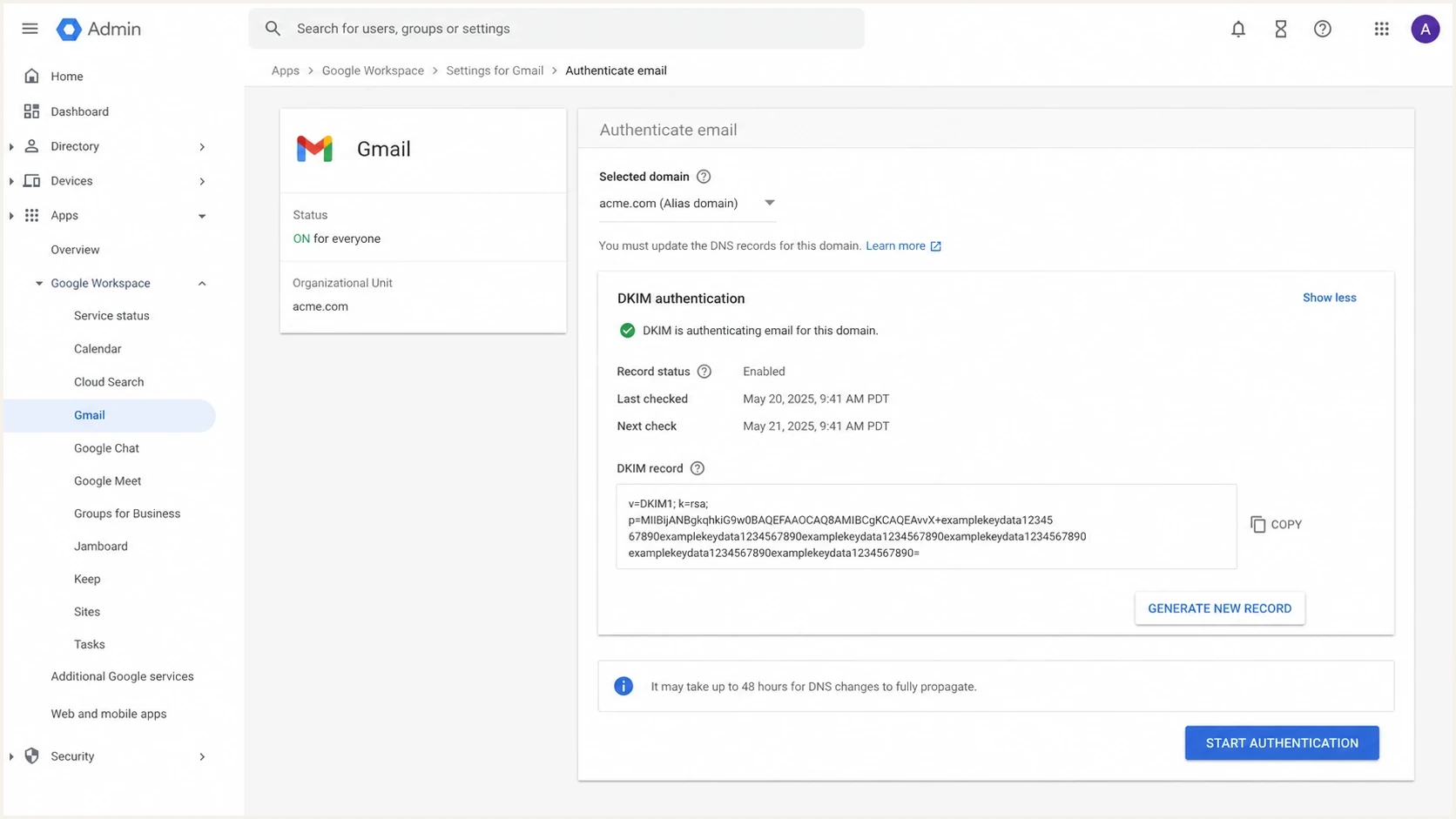
Google Admin console Authenticate email page for DKIM setup on an alias domain.
DMARC does not only ask whether SPF passed. It asks whether SPF passed and whether the SPF-authenticated domain matches the visible From domain under relaxed or strict alignment. A deeper explanation of SPF authentication and alignment helps when the header shows an SPF pass but the DMARC report says SPF did not contribute to DMARC.
With a normal primary Google Workspace domain, the address in From and the domain in Return-Path commonly share the same organizational domain. With an alias domain, the visible From changes, but Google normally keeps the primary domain in the envelope sender. The receiving server checks SPF against that envelope domain, so the SPF pass belongs to the primary domain, not the alias domain. Relaxed alignment does not bridge two unrelated organizational domains.
Typical alias-domain header pattern
From: Alex <alex@alias.example>
Return-Path: <alex@primary.example>
Authentication-Results: receiver.example;
  spf=pass smtp.mailfrom=primary.example;
  dkim=pass header.d=alias.example;
  dmarc=pass header.from=alias.example
In that example, SPF passes but does not match the From domain for DMARC. DKIM passes and matches the From domain, so DMARC passes. This is the expected healthy state for a Google Workspace alias domain.
|
|
|
|
|---|---|---|---|
Primary-domain user | Primary | Primary | SPF or DKIM |
Domain alias | Alias | Primary | Aligned DKIM |
Secondary-domain user | Secondary | Secondary when used for MAIL FROM | SPF or DKIM |
How Google Workspace domain types affect SPF alignment
Confirm the sending path before changing DNS
The visible From address does not prove which Google Workspace setup sent the message. Confirm the domain type and outbound route first, because a Workspace domain alias, a user-added address, and a secondary-domain account can produce different Return-Path and DKIM domains.
- Workspace domain alias: The alias address maps to a user on the primary domain, and Google's normal route usually keeps the primary domain in MAIL FROM.
- User alias on that domain: The same alias-domain behavior applies when the address belongs to the Workspace user and Google sends the message.
- Gmail "Send mail as": A separately configured address can use another SMTP route. Diagnose the actual smtp.mailfrom and header.d values instead of assuming the domain-alias pattern.
- Secondary-domain user: An account whose primary address belongs to the secondary domain can use that domain as its mail identity. Merely converting a domain does not rewrite existing users or routes.
This distinction also matters for applications, Google Groups, calendar invitations, relays, and SMTP submissions. Test each path that sends with the alias domain in From rather than treating one Gmail message as proof for every source.
The working fix for alias domains
The working fix is to make DKIM carry DMARC for the alias domain. The primary envelope domain must authorize Google with SPF. Publish SPF on the alias domain only when Google or another source actually uses that alias domain as its MAIL FROM or HELO identity. For mail sent through Google's normal Workspace alias path, DKIM is the control that makes DMARC pass.
In Google Admin console, go to Gmail, then Authenticate email. Select the alias domain, generate a unique DKIM key, publish the TXT record at the alias domain's DNS host, and start authentication after DNS resolves. Use a 2048-bit key when the DNS provider supports it. Google can take 24 to 72 hours after Gmail activation to make a key available, and the Admin console or DNS status can take up to 48 hours to settle.
Do not chase SPF alignment on an alias domain
If Google Workspace keeps using the primary domain in Return-Path, editing the alias SPF record does not make SPF match the alias From domain. DNS cannot change the envelope sender Google chooses for this route.
Google Workspace SPF TXT record
Host: @
Type: TXT
Value: v=spf1 include:_spf.google.com ~all
Publish that record on a domain whose SPF identity actually authorizes Google, merging Google with any other legitimate senders into one SPF record. Use the SPF checker after DNS changes to confirm syntax, Google authorization, and DNS lookup count.
SPF checker
Find SPF syntax issues, lookup limits, and weak records.
?/16tests passed
Publish DMARC at the alias domain because it appears in the visible From address. Relaxed SPF alignment still fails when the primary and alias domains are different organizational domains. Strict DKIM alignment can pass when the DKIM d= value exactly matches the alias domain. The Google DMARC setup page covers the DNS location, reporting address, and policy tags.
Starter DMARC record, wrapped for display
Host: _dmarc
Type: TXT
Value: v=DMARC1; p=none; rua=mailto:dmarc@yourdomain.example;
       adkim=r; aspf=r
Why DKIM is the real control
DMARC passes when either SPF passes with aligned domain identity or DKIM passes with aligned domain identity. It does not require both. The alias-domain answer is to make the DKIM signing domain match the alias domain, not to force SPF into a shape Google Workspace does not expose.
SPF-only thinking
- Weak point: SPF follows the envelope sender, not the visible From address.
- Alias issue: Google Workspace keeps the primary domain in the envelope sender.
- Result: SPF passes but does not satisfy DMARC for the alias domain.
DKIM-backed DMARC
- Control point: DMARC compares the DKIM signing domain with the visible From domain.
- Alias fix: The alias domain gets its own Google DKIM key and DNS record.
- Result: DMARC passes even when SPF does not match the alias domain.
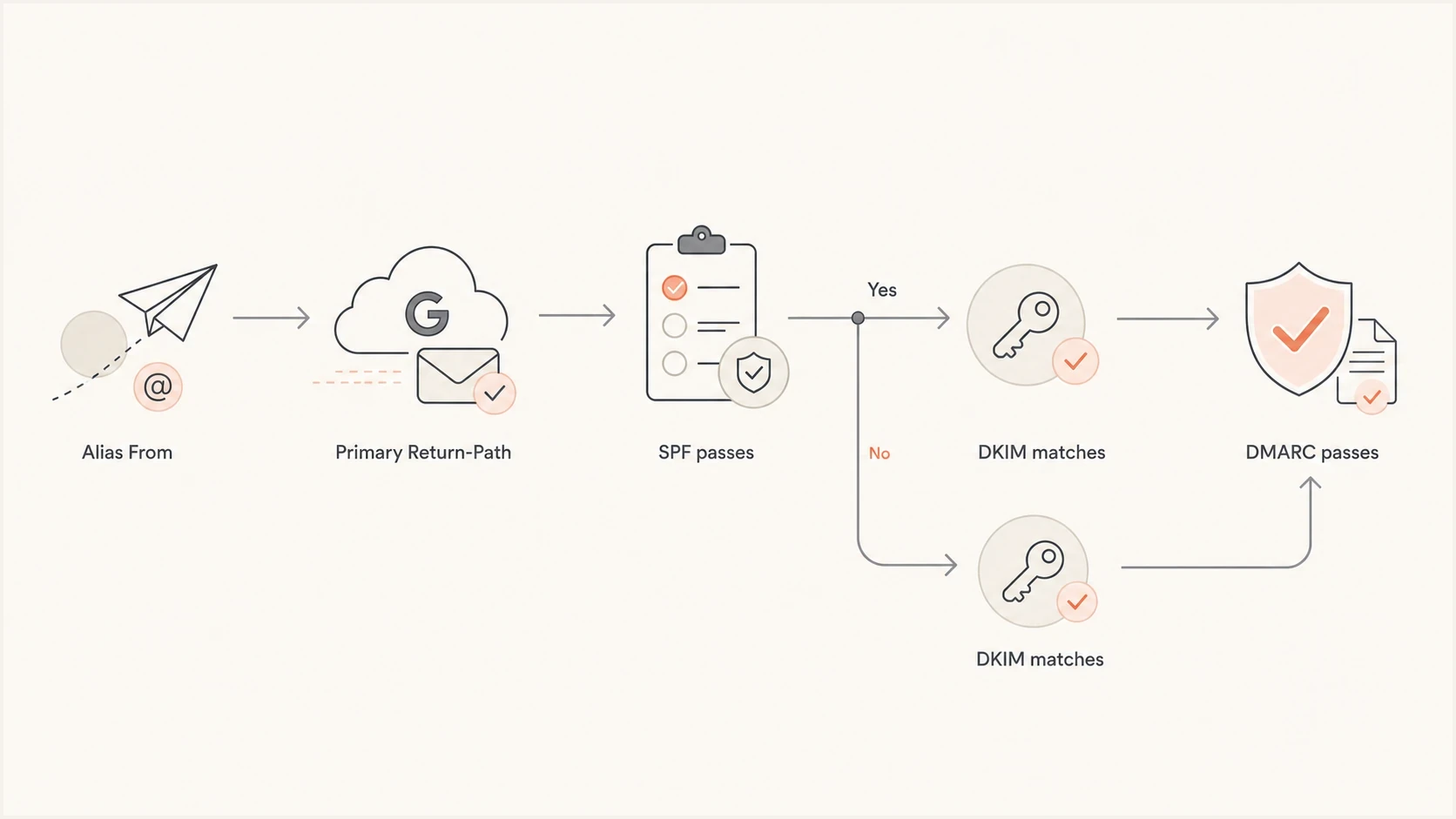
Flowchart showing alias From, primary Return-Path, SPF pass, DKIM match, and DMARC pass.
After DKIM is active, the header should show dkim=pass, a header.d value at the alias domain, and dmarc=pass for the visible From domain. If DKIM signs only with the primary domain or a Google-controlled fallback domain, the alias domain still lacks an aligned DKIM path.
When SPF alignment itself is required
Some teams need SPF alignment for a documented business rule, partner gateway, or receiving system. In that case, the Google Workspace alias model is the constraint and the sending model must change.
|
|
|
|---|---|---|
Keep domain alias | No | Rely on aligned DKIM |
Secondary-domain user | Yes, when MAIL FROM uses it | User and admin changes |
Change primary domain | Yes | Sign-in and integration impact |
Configurable sending path | Yes | Separate routing and bounce setup |
Practical options when SPF alignment is mandatory
A secondary domain can work when users have primary addresses on that domain and the resulting MAIL FROM uses it. Changing the domain type alone does not guarantee SPF alignment for existing aliases, so test the final headers before treating the migration as complete.
For non-Google senders, SPF management still matters. Suped's Hosted SPF helps teams manage approved senders without repeated DNS edits. It does not override Google Workspace alias Return-Path behavior, but it can reduce SPF drift across other mail streams.
If an SPF record is close to the 10-lookup limit, SPF flattening can reduce lookup pressure when it is kept current. It does not change the MAIL FROM domain, so it cannot solve alias-domain alignment.
How to diagnose the failure quickly
Diagnose the path with a real test message and a DMARC aggregate-report sample. A DNS-only check confirms published records, but the message confirms which domain Google used in Return-Path and which domain signed DKIM.
- Send externally: Send from the alias address through the production path to a different Gmail or Google Workspace account. Do not verify DKIM by sending to the same account.
- Read the header: Find Return-Path, smtp.mailfrom, header.d, and header.from in Authentication-Results.
- Compare domains: For the normal alias route, expect smtp.mailfrom to show the primary domain and header.d to show the alias domain.
- Confirm DMARC: Verify that DMARC passes because DKIM aligns with the alias From domain, even though SPF alignment fails.
Header fields to compare
smtp.mailfrom=primary.example
header.d=alias.example
header.from=alias.example
If DKIM passes in a direct test but fails on the production route, inspect outbound gateways, relays, footer insertion, and other changes made after Google signs the message. A post-signing body or signed-header change can invalidate DKIM, so re-test the full route after each routing change.
For a wider check, use the domain health checker to review SPF, DKIM, and DMARC together. That helps separate the expected SPF misalignment from a missing DMARC record, duplicate SPF record, weak DKIM key, or an unsupported policy.
DMARC readiness for alias domains
Use these checkpoints before moving an alias domain toward quarantine or reject.
Ready
Safe path
DKIM passes with the alias domain and DMARC passes consistently.
Investigate
Risk
SPF passes for the primary domain, but DKIM is missing or mismatched.
Do not enforce
Fail
Neither SPF nor DKIM aligns with the alias From domain.
How Suped fits into the workflow
Suped's DMARC reporting and email authentication platform turns aggregate XML reports into source-level diagnostics. For this workflow, it shows the sending source, visible From domain, SPF result and alignment, DKIM result and alignment, and final DMARC result.
DMARC record detail view showing SPF, DKIM, DMARC, rDNS diagnostics, and DNS records
For Google Workspace alias domains, add the primary domain and each alias domain that appears in From. Identify Google as an approved source, confirm that SPF authenticates the primary domain without aligning to the alias, then verify that DKIM passes and aligns with the alias domain. A missing or mismatched DKIM result is the fault to fix.
- Issue classification: Separate SPF authentication failure, SPF misalignment, DKIM failure, and final DMARC failure.
- Source review: Compare Google Workspace mail with every other source that uses the alias domain in From.
- Alerts and trends: Watch for a DKIM pass-rate drop, a new unverified sender, or a change in message volume before tightening policy.
- Related signals: Review authentication, blocklist and blacklist monitoring, sender inventory, and deliverability signals in the same investigation.
Suped can also stage DMARC policy after aggregate reports show that legitimate alias-domain mail has stable, aligned DKIM. It cannot change Google's Return-Path behavior, so the operational goal remains accurate classification and safe enforcement.
Common traps to avoid
Most bad fixes come from treating SPF pass as the same result as SPF alignment. SPF pass means the connecting server was authorized by the envelope domain. SPF alignment means that envelope domain matches the visible From domain under DMARC rules.
Fast checklist
- One SPF record: Publish only one SPF TXT record for each domain that has an SPF identity.
- Alias DKIM: Generate and start a unique DKIM key for every alias domain used in visible From addresses.
- Alignment choice: Choose relaxed or strict alignment after checking the exact domains in production headers.
- Policy staging: Move through monitoring and quarantine before reject only after reports show consistent DKIM-backed DMARC pass.
Another trap is assuming that a DMARC pass guarantees inbox placement. It does not. DMARC proves domain authentication. Reputation, recipient engagement, complaint rates, sending patterns, content, and blocklist or blacklist status still affect placement. Authentication is the baseline, not the whole deliverability system.
The practical answer
For Google Workspace alias domains, solve the SPF alignment puzzle by accepting the normal alias-route limit and making DKIM do the DMARC work. Keep SPF valid on every domain that is actually used as an envelope identity, but do not expect an alias-domain SPF record to match mail that Google sends with the primary domain in Return-Path.
The stable setup has Google authorized in the primary envelope domain's SPF record, DKIM enabled with a unique key for each alias domain, a DMARC record and aggregate reporting for each From domain, and monitoring that separates SPF authentication from alignment. When SPF alignment itself is mandatory, use users and infrastructure that place the required domain in MAIL FROM.




