Should I use ~all or -all in my SPF record?

Published 29 Jun 2025
Updated 20 Aug 2026
11 min read
Summarize with
Updated on 20 Aug 2026: We clarified how early SMTP rejection and DMARC alignment affect the choice between ~all and -all.
Use ~all for most active sending domains. Use -all only after confirming every legitimate sender and monitoring SPF. The organization also needs to accept that a receiver can reject hardfail under its local policy. If DMARC already uses p=reject or is moving toward enforcement, ~all is usually the cleaner SPF ending because DMARC applies policy to the visible From domain.
The caveat matters: Sender Policy Framework (SPF) does not protect against all spoofing by itself. SPF checks the MAIL FROM or Return-Path domain, or the HELO identity when the reverse path is null. It does not necessarily check the address a recipient sees. A bad sender can pass SPF with a different envelope domain, then fail DMARC because the visible From domain does not match. That is why the choice between ~all and -all is smaller than the choice to monitor DMARC and move it to enforcement.
Short answer
- Default: Use ~all while senders change or when DMARC is enforcing.
- Strict case: Use -all for non-sending domains or tightly controlled sending subdomains.
- Avoid: Do not use +all. It tells receivers every sender is allowed.
- Verify: Check syntax with an SPF checker before changing DNS.
What SPF ~all and -all actually mean
The all mechanism is the catch-all at the end of an SPF record. It only runs when none of the earlier mechanisms matched the connecting IP address. The character before all tells the receiver what result to return.
|
|
|
|
|---|---|---|---|
~all | Softfail | Closer scrutiny; no rejection based only on softfail | Active domains |
-all | Fail | Local policy; possible SMTP rejection | Controlled domains |
?all | Neutral | Same handling as no SPF result | Temporary testing |
+all | Pass | Treats every sender as allowed | Never |
Common SPF all endings and what they mean.
A bare all means +all because the pass qualifier is implied. Leaving all out also leaves unmatched senders with a neutral result after SPF runs out of mechanisms. For production domains, ?all and omitted all are usually too weak, while +all is unsafe because every unmatched sender can receive SPF pass.
Switching ~all to -all affects only mail that did not match your allowed sender list. It does not change mail that already matches an include, ip4, ip6, mx, or a mechanism.
Same SPF record with a softfail endingdns
v=spf1 include:_spf.example.net include:_spf.vendor.example ~all
Same SPF record with a hardfail endingdns
v=spf1 include:_spf.example.net include:_spf.vendor.example -all
Why ~all is usually the safer default
For active domains, ~all is usually safer because it gives receivers a negative SPF signal without turning every gap in your SPF inventory into a hard-fail event. That matters in real mail systems, where forwarding, shared hosting, helpdesk tools, billing platforms, and regional senders get added faster than DNS documentation gets updated.
- Forwarding: SPF often fails when mail is forwarded unless the forwarder rewrites the envelope sender, such as through Sender Rewriting Scheme (SRS).
- Shared hosting: Some web hosts change outbound IPs without giving the DNS owner a clean sender inventory.
- SaaS changes: New senders get added during operations, and old includes stay behind after tools are removed.
- DMARC policy: DMARC gives receivers a domain-level policy when SPF and DKIM do not produce a valid From-domain match.
- Operations: Softfail gives room to monitor and fix a sender before receivers treat the failure more severely.
~all softfail
A receiver gets a clear hint that the sender is not listed, but it keeps discretion over scoring, foldering, and DMARC handling.
- Best fit: Main domains with multiple business senders.
- Risk: Less strict as a standalone SPF signal.
-all hardfail
A receiver gets an explicit fail result when the connecting IP is not listed in your SPF policy.
- Best fit: Parked domains and tightly controlled subdomains.
- Risk: Legitimate mail fails if your sender list is incomplete.
When -all is the right choice
Use -all when the domain should not send mail, or when a sending subdomain has a fixed, controlled mail path. This is a good fit for parked or defensive domains. It also fits narrow subdomains used by one transactional system.
Non-sending domain SPFdns
v=spf1 -all
For active mail, hardfail needs discipline. Before publishing it, confirm the Return-Path domain used by each sender, not only the visible From address. Many senders use their own bounce domain, which means your domain's SPF record does not authenticate that message for DMARC.
Do not add a web server, agency server, or vendor IP to SPF just because it can send a message with your visible From address. Add it only if that system legitimately sends with your domain in the MAIL FROM identity or the vendor gives a documented SPF include for that exact sending path.
- Non-sending: Publish -all when the hostname should never appear in the envelope sender.
- Dedicated subdomain: Use hardfail on a narrow subdomain that has one known sending route.
- Known IPs: Use hardfail when outbound routes are fixed and changes go through review.
- Monitoring: Watch DMARC aggregate reports before and after the change.
- Rollback: Keep a DNS change path ready in case legitimate traffic starts failing.
Controlled sending subdomain SPFdns
v=spf1 ip4:192.0.2.10 include:_spf.example.net -all
Where hardfail causes pain
Hardfail is operationally safe only when the sender inventory is complete and someone is watching authentication reports.
- Forwarded mail: Forwarding breaks SPF unless the forwarder rewrites the envelope sender.
- Shadow senders: A department can add a sender that nobody tells DNS owners about.
- Vendor changes: A vendor can rotate outbound infrastructure before your record catches up.
- Receiver variance: A receiver can reject an SPF fail during SMTP under its local policy.
How DMARC changes the decision
DMARC is the reason -all should not be treated as a universal upgrade. Under RFC 9989, DMARC evaluates whether SPF or DKIM passes with a domain that matches the visible From domain, which the standard calls the Author Domain. When neither authentication path produces a valid domain match, the domain owner's requested policy becomes an input to the receiver's handling decision.
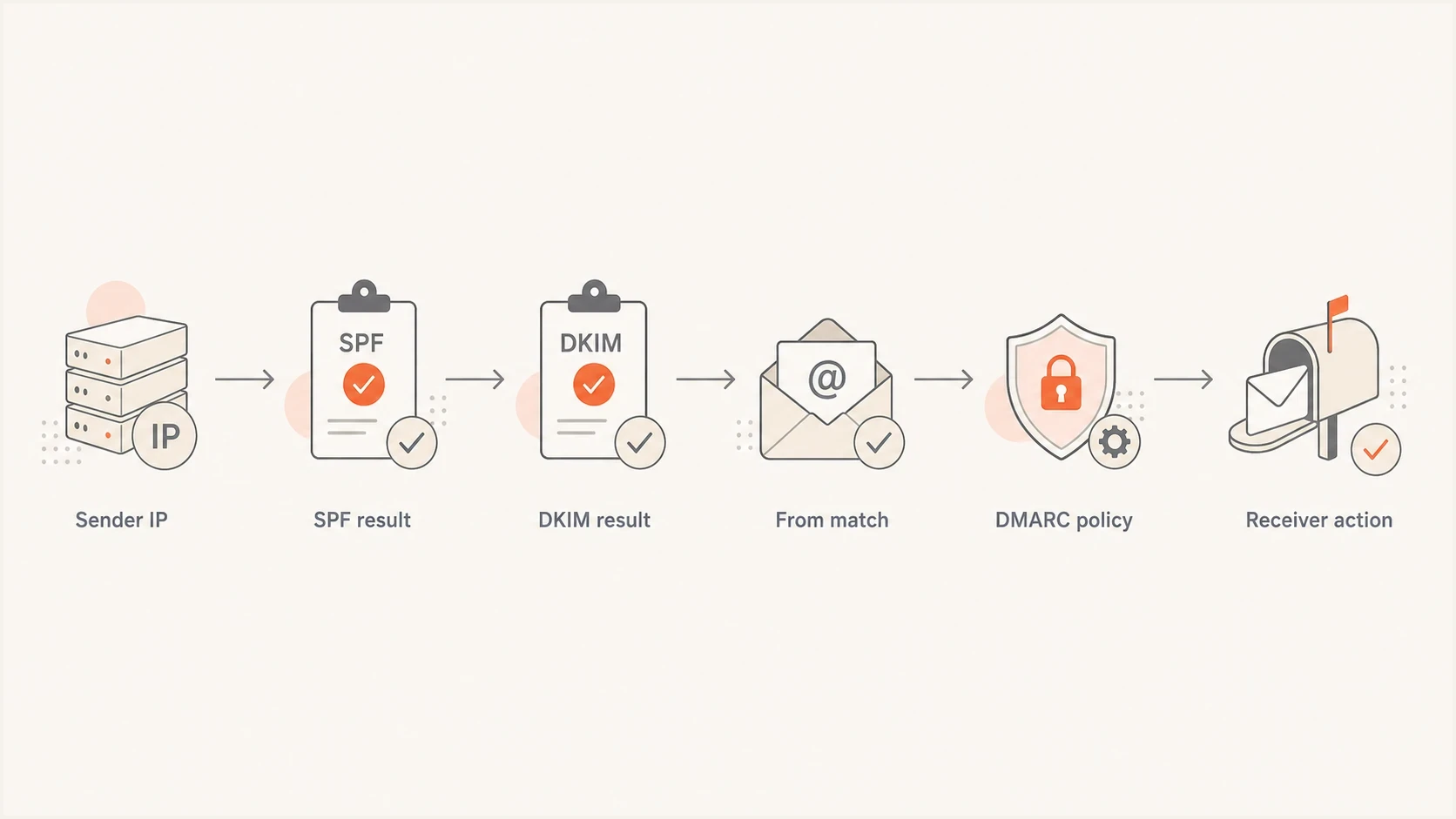
Flowchart showing SPF, DKIM, From-domain matching, and DMARC policy.
A spoofed visible From domain can fail DMARC even when SPF passes for another envelope domain. SPF says whether the connecting IP is allowed for the Return-Path domain. DMARC says whether the message can use your visible From domain. Both softfail and fail are non-pass SPF results for DMARC, but an aligned DKIM pass can still make DMARC pass.
DMARC rollout checkpoints
Use SPF ending changes in the context of DMARC policy maturity.
Monitoring
p=none
Collect reports and identify senders.
Quarantine policy
p=quarantine
Request quarantine handling for DMARC failures.
Reject policy
p=reject
Request rejection for messages that fail DMARC.
No reporting
no rua
SPF decisions happen without useful feedback.
Why hardfail can stop a later DMARC pass
A receiver can evaluate SPF during the SMTP MAIL FROM command, before the message headers and body arrive. RFC 7208 leaves final handling to local policy and permits rejection for an SPF fail. If the receiver rejects at that point, it cannot evaluate the message's DKIM signature or reach a later DMARC pass through aligned DKIM.
This is one operational reason ~all often fits active domains. RFC 7208 says receiving software should not reject a message based only on softfail, which gives DKIM and DMARC evaluation a chance to complete. The receiver still controls final delivery under its local policy.
A practical rollout path
Start with the real senders, not the SPF ending. A domain with ten unknown senders and -all is less reliable than a domain with a clean sender inventory, DMARC reporting, and ~all.
- Inventory: List transactional, support, billing, employee, and campaign mail senders.
- Validate: Run a domain health check so SPF, DKIM, and DMARC are checked together.
- Publish: Keep one SPF TXT record for each hostname, with the all mechanism at the end.
- Test: Send real mail through each platform and confirm the Return-Path domain.
- Tighten: Move DMARC toward enforcement before treating SPF hardfail as the main control.
Typical active-domain starting pointdns
v=spf1 include:_spf.example.net include:_spf.vendor.example ~all
SPF checker
Find SPF syntax issues, lookup limits, and weak records.
?/16tests passed
SPF lives in DNS at the hostname being checked. A firewall, spam filter, or mail gateway setting does not change the SPF record that outside receivers query, although those systems can use SPF results in their own filtering.
If SPF evaluation exceeds RFC 7208's 10-term DNS-lookup limit, the result is permerror. The limit concerns DNS-querying terms during one evaluation, not the visible length of the record. SPF flattening helps only when the flattened IP set stays current. A stale flattened record creates a different failure mode: mail breaks because the record looked tidy but no longer matched reality.
How Suped fits
Suped is our DMARC reporting and email authentication platform. Its DMARC reports show which sources use the domain, while SPF and DKIM checks help trace failures before an SPF ending changes. Suped also monitors blocklist (blacklist) status when a team investigates a delivery problem.
SPF flattening drawer showing an over-limit record, sender editing, lookup counts, and the hosted record setup
For SPF specifically, Suped's hosted SPF lets teams manage senders and stay under DNS lookup limits without asking a DNS admin to edit records for every vendor change. That is where the ~all versus -all decision gets easier: the sender list is visible, changes are tracked, and failures are tied back to concrete sources.
This also helps when DNS ownership is split across teams or a DNS host makes SPF edits difficult. Keep the stable DNS include in place, then manage sender changes inside hosted SPF with reporting and rollback visibility.
Manual DNS
- Ownership: DNS changes depend on whoever controls the zone.
- Visibility: Sender changes are often found after mail fails.
- Scaling: Multiple domains need repeated manual checks.
Suped workflow
- Ownership: Hosted SPF centralizes sender management.
- Visibility: DMARC reports identify unexpected sources.
- Scaling: MSP and multi-tenant views cover many domains.
What to publish in common cases
Use this decision table when reviewing SPF records. It assumes the SPF record is syntactically valid and there is only one SPF TXT record at the hostname.
|
|
|
|---|---|---|
Main sending domain | ~all | Safer during change |
Parked domain | -all | No mail expected |
Single-purpose subdomain | -all | Fixed sender path |
Shared hosting domain | ~all | Less breakage risk |
DMARC reject domain | ~all | Allows later DKIM evaluation |
Recommended SPF endings by domain type.
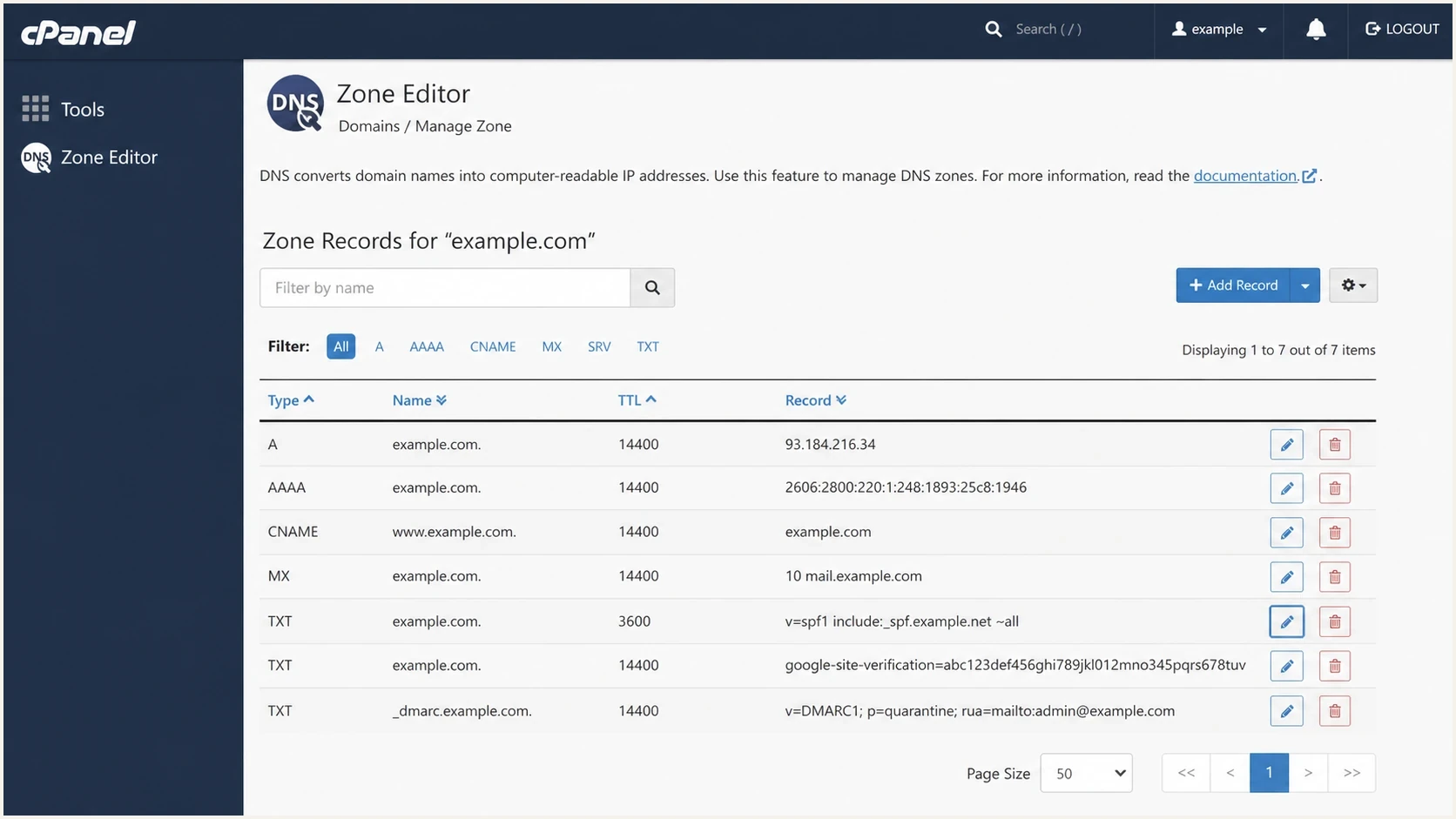
cPanel Zone Editor showing an SPF TXT record ending in ~all softfail.
The table is a rule of thumb, not a substitute for reports. If a domain handles customer invoices, password resets, support replies, and campaign mail, use ~all until the sending paths are proven. If a subdomain is built for one known sender and monitored, -all is reasonable.
Views from the trenches
Best practices
Keep one SPF TXT record per hostname and document which sender each include covers in DNS.
Use ~all on active domains until sender inventory, DMARC reports, and rollback steps are clear.
Use -all on parked domains and tightly controlled subdomains that do not need flexible routing.
Review SPF after each vendor change, because stale includes create confusing fail results.
Common pitfalls
Changing ~all to -all without checking forwarding paths creates avoidable hard-fail cases.
Treating SPF as visible From protection misses DMARC, where receiver enforcement actually sits.
Adding a second SPF TXT record breaks evaluation and can make the domain return permerror.
Letting includes grow unchecked risks the 10-lookup limit and sudden authentication failures.
Expert tips
Test a real message after DNS changes, because lookup tools cannot show every sending path.
Separate high-risk mail streams onto subdomains so strict SPF changes have a smaller radius.
Pair SPF edits with DMARC report review so unexpected senders are found before enforcement.
Keep TTLs moderate during policy changes so a bad SPF edit can be corrected quickly.
SPF helps authorize the envelope domain, but visible From protection still depends on DMARC enforcement.
2022-12-30 - Email Geeks
~all remains a practical default when DMARC p=reject already protects the visible From domain.
2023-01-04 - Email Geeks
The practical answer
For active sending domains, use ~all unless every legitimate sender is covered and monitored. Use -all for non-sending domains and highly controlled sending subdomains.
A strict-looking SPF ending does not replace DMARC enforcement. The better operating model is simple: know your senders, keep SPF valid, monitor DMARC reports, and use hardfail only where the mail path is controlled enough to support it.
Policy to publish
For a normal business domain that sends through several providers, publish ~all, then use DMARC reporting to find senders and move policy toward enforcement. For a non-sending domain, publish -all.




