Why am I getting a Hotmail SSL error and how do I fix it?

Updated on 11 Aug 2026: We clarified how to separate outbound SMTP TLS failures from Outlook client certificate errors and updated the repair steps for current Microsoft TLS requirements.
A Hotmail SSL error can describe two different failures. In outbound mail-server logs, it usually means the sending server failed the TLS handshake with Microsoft before the message was accepted. In Outlook or another mail app, it usually points to a certificate-name mismatch, incorrect server settings, or a problem on the device or network. Identify where the error appears before changing anything.
For an outbound server error, the fastest fix is to upgrade the sending server's TLS stack, make sure it offers TLS 1.2 or newer, refresh the CA trust store, and confirm the server uses SMTP STARTTLS on port 25 instead of trying to speak implicit SSL at the beginning of the connection. OpenSSL 1.0.2k belongs to a branch that has been out of upstream support since January 2020. Even when it can negotiate TLS 1.2, the surrounding OS, cipher configuration, and trust store often fail against current Microsoft endpoints.
Typical error
SSL error: connect failed: protocol error while connected to
hotmail-com.olc.protection.outlook.com (104.47.17.97)
Start with the sending host because this server-side error is usually transport-layer, not DMARC. DMARC, SPF, and DKIM affect authentication and domain trust after the message reaches Microsoft's mail system. A TLS protocol error happens earlier, during the encrypted connection setup. It can still stop delivery because the message never reaches Hotmail or Outlook.com, but the first repair path is SMTP TLS.
If the error appears while adding a Hotmail account to a phone or Outlook app, use the client troubleshooting path below. That problem involves account settings or certificate validation, not direct server-to-server delivery. Microsoft's Outlook connection guide covers related secure-connection errors on mobile devices.
If the error appears in Outlook or a mail app
A certificate warning in Outlook, a phone, or another mail app needs a client-side check. Do not use the Microsoft MX host or port 25 as account settings. For a personal Hotmail or Outlook.com account configured manually, use the current mailbox endpoints and OAuth2 or Modern Auth supported by the app.
|
|
|
|
|---|---|---|---|
IMAP incoming | outlook.office365.com | 993 | SSL/TLS |
POP incoming | outlook.office365.com | 995 | SSL/TLS |
SMTP outgoing | smtp-mail.outlook.com | 587 | STARTTLS |
Current manual settings for personal Hotmail and Outlook.com accounts
- Check the certificate name: Open the certificate details and compare its subject or Subject Alternative Names with the configured server name. Do not keep accepting a repeated mismatch warning.
- Correct the clock: Set the device date, time, and time zone automatically. A wrong clock can make a valid certificate look expired or not yet valid.
- Test another network: Complete any Wi-Fi sign-in page and retry on a trusted connection. A firewall, proxy, or TLS inspection device can present a different certificate.
- Refresh the account safely: Update and restart the app first. If the settings remain wrong, back up local Outlook data before removing the account or rebuilding the profile.
If the certificate names a firewall, proxy, security appliance, or unrelated domain instead of Microsoft, stop approving the warning. Ask the network administrator or email provider to correct the interception or certificate configuration.
Why this happens
When you send to a Hotmail or Outlook.com address, your mail transfer agent looks up the recipient domain's MX records and connects to Microsoft's protection infrastructure. The host in the error, hotmail-com.olc.protection.outlook.com, is part of that route. Microsoft's server advertises SMTP capabilities, your server requests STARTTLS, and both sides negotiate encryption before mail data moves.
If your library only offers old protocols, weak ciphers, an outdated certificate chain, or the wrong SMTP sequence, Microsoft can close the negotiation. Your mail log then collapses that into an SSL error, protocol error, handshake failure, or connect failed message. The term SSL is legacy wording here. Modern mail delivery uses TLS.
TLS version guidance
Use this as a practical baseline for outbound SMTP to major mailbox providers.
Good
TLS 1.2 or TLS 1.3
Use TLS 1.2 as the minimum and negotiate TLS 1.3 when both servers support it.
Deprecated
TLS 1.1
Do not rely on this for current Microsoft mail delivery.
Critical
TLS 1.0, SSLv3, SSLv2
Remove these protocols from production SMTP stacks.
- Old TLS: The sender offers protocols or ciphers Microsoft no longer accepts.
- Old OpenSSL: The library, CA bundle, or OS package is too old for current remote MX behavior.
- Wrong mode: The sender tries implicit SSL on an SMTP port that expects plaintext first, then STARTTLS.
- Enforced TLS: MTA-STS or a destination-specific policy blocks delivery when TLS or certificate validation does not meet the required policy.
How to diagnose it
Do not start by changing DMARC records or sender reputation settings. First prove whether the sending server can complete a clean SMTP STARTTLS session to Microsoft. Run the check from the actual sending host or a host with the same mail server, OpenSSL package, firewall route, and outbound policy.
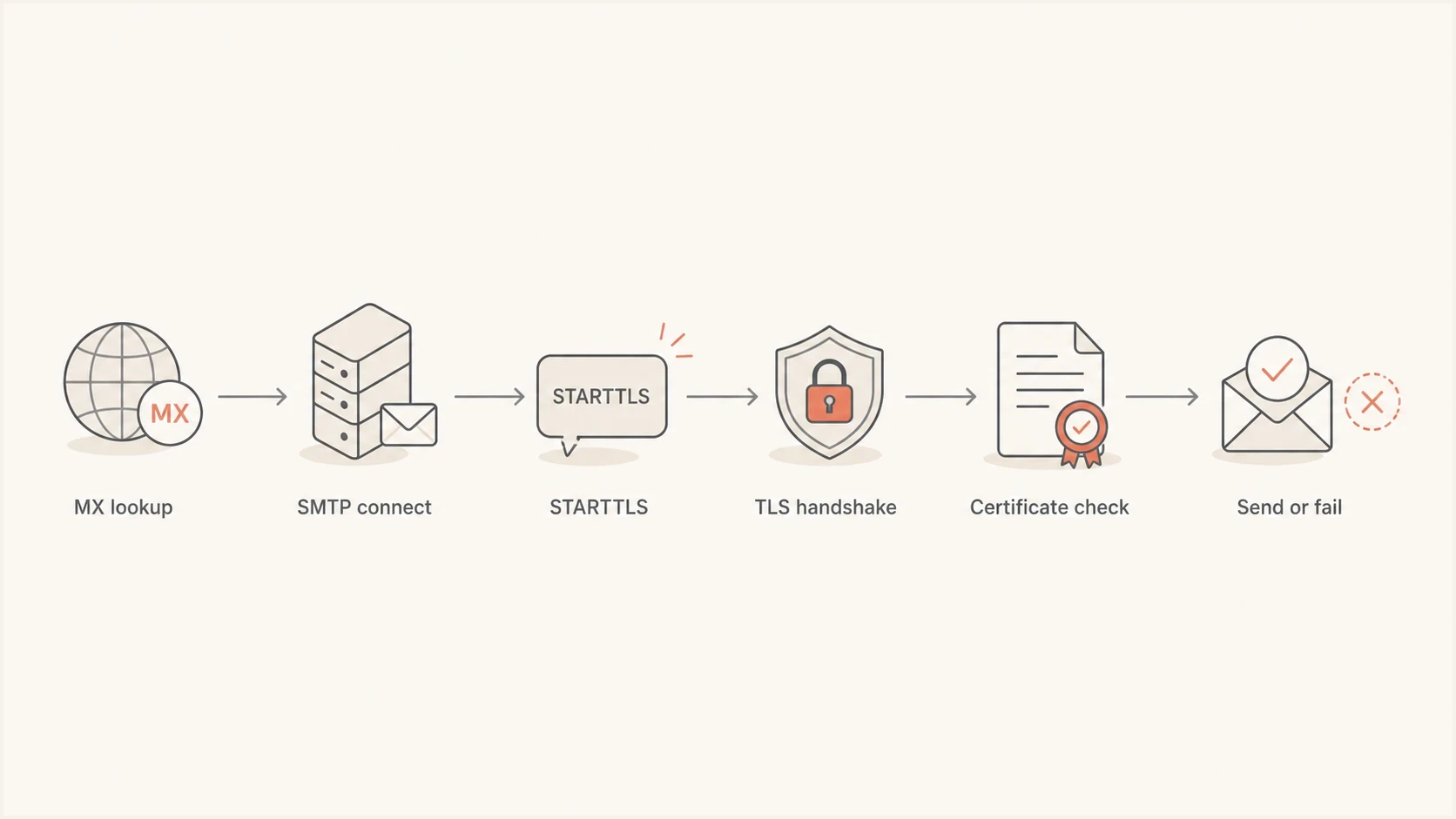
Hotmail SMTP TLS troubleshooting flowchart covering MX lookup, STARTTLS, the handshake, certificate validation, and delivery.
Probe Hotmail STARTTLS from the sending hostbash
openssl s_client -starttls smtp \
  -connect hotmail-com.olc.protection.outlook.com:25 \
  -tls1_2 -servername hotmail-com.olc.protection.outlook.com \
  -verify_return_error \
  -verify_hostname hotmail-com.olc.protection.outlook.com
A successful probe shows the certificate chain, negotiated protocol, selected cipher, hostname match, and a verification result of OK. A failure before the certificate appears points to protocol, cipher, STARTTLS, firewall, or connection inspection. A failure after the certificate appears points to the trust store, certificate name, incomplete chain, or enforced TLS policy.
|
|
|
|---|---|---|
Protocol | No TLS 1.2 | Upgrade TLS |
Library | Unsupported OpenSSL | Upgrade stack |
Mode | Missing STARTTLS | Use port 25 STARTTLS |
Certificate | Name or chain error | Repair trust checks |
Trust | Old CA bundle | Refresh roots |
Policy | Enforced TLS | Inspect policy maps |
Common checks for Hotmail SMTP TLS errors
How to fix the sending server
The direct fix is to modernize the sender, then retest before releasing the queue. Start with the OS packages because the mail server, OpenSSL library, CA store, and cipher defaults are tied together on most Linux systems. Restart the mail service after the upgrade so it loads the new library and trust store.
Postfix-style TLS baseline
smtp_tls_security_level = may
smtp_tls_protocols = >=TLSv1.2
smtp_tls_mandatory_protocols = >=TLSv1.2
smtp_tls_mandatory_ciphers = high
smtp_tls_CAfile = /etc/ssl/certs/ca-certificates.crt
That example is a baseline, not a universal config file. Keep opportunistic TLS for normal outbound delivery unless MTA-STS, DANE, a connector, or a destination-specific policy requires verified encryption. When a policy does require TLS, repair the protocol or certificate failure instead of weakening the policy. Check Microsoft-specific policy maps for protocol limits, certificate-name rules, and stale overrides.
Good repair path
- Upgrade first: Patch the OS, OpenSSL package, mail server, and CA certificates together.
- Retest live: Run an SMTP STARTTLS probe from the same outbound host.
- Drain slowly: Release queued mail in batches and watch for repeat failures.
- Keep logs: Record protocol, cipher, remote MX, and error text for each failure.
Risky repair path
- Disable TLS: Turning encryption off hides the fault and weakens mail transport.
- Pin IPs: Microsoft MX IPs change, so IP pinning breaks again later.
- Ignore CA: Skipping certificate validation removes a useful safety check.
- Patch blind: Changing many mail settings at once makes the real fix harder to prove.
OpenSSL 1.0.2k is a library version, not a TLS protocol version. The live protocol, cipher, and certificate result show what the mail server actually negotiated. Still, an OpenSSL 1.0.2 installation needs replacement as part of the repair, not as optional cleanup.
Where MTA-STS and DNS fit
MTA-STS applies to server-to-server delivery. A receiving domain publishes a policy, and a sending MTA that supports MTA-STS uses it to require TLS, validate the receiving certificate, and confirm the permitted MX hosts. It does not control an Outlook sign-in, a phone's mailbox connection, or authenticated SMTP submission on port 587.
For this Hotmail delivery error, an enforced recipient policy can turn a TLS or certificate validation problem into a hard failure. That is the intended protection. Repair the handshake rather than bypassing the policy. For domains you own, Suped's Hosted MTA-STS provides a managed way to publish and stage an inbound policy with two CNAME records and no separate policy web host.
Hosted MTA-STS/TLS-RPT configuration dialog showing policy mode, MX hosts, CNAME records, TLS reporting, and verification
Suped's product brings DMARC reporting and authentication checks together with hosted MTA-STS and alerts. In this workflow, repair SMTP TLS on the sending host first, then use Suped to confirm that domains you own publish the intended transport and authentication policies. Hosted MTA-STS does not repair Microsoft's MX or an outdated sender library.
Before changing DNS, check the domain's authentication and transport posture with Suped's domain health checker. It helps separate DNS authentication issues from SMTP transport problems so you do not fix the wrong layer.
?
What's your domain score?
Deep-scan SPF, DKIM & DMARC records for email deliverability and security issues.
What the error is not
A Hotmail SSL protocol error is not the same as a DMARC reject, SPF failure, DKIM failure, spam placement, or blocklist (blacklist) listing. Those problems happen after the remote system receives enough of the message or evaluates your sending identity. Here, the connection itself fails before normal delivery checks complete.
A clean fix has two proofs: your server negotiates TLS 1.2 or newer with Microsoft, and the queued message is accepted by the remote MX. After that, check authentication results and delivery placement as separate follow-up work.
If the message still fails after the TLS fix, read the new SMTP response carefully. A new error such as sender authentication failure, recipient rejection, rate limiting, or reputation filtering means you have moved past the SSL problem into a different delivery issue. Do not keep editing TLS settings once the handshake succeeds.
- Queue ID: Track one failing message through the logs before and after the change.
- Remote MX: Confirm the failing host is still a Microsoft mail endpoint.
- Protocol: Record the negotiated TLS version and cipher after the repair.
- Result: Separate handshake success from final mailbox acceptance.
Views from the trenches
Best practices
Check the live TLS version from the sending host before changing DNS or policy records.
Keep the mail server, OpenSSL package, and CA trust store patched before rerouting.
Use STARTTLS on SMTP ports, then verify the negotiated cipher in the logs after restart.
Treat repeated Hotmail TLS failures as transport faults before reputation issues.
Common pitfalls
Reading an OpenSSL version as the negotiated TLS version leads to the wrong fix.
Disabling TLS hides the error and weakens transport security for outbound mail delivery.
Changing DMARC policy first wastes time when the SMTP handshake never completes.
Pinning a Microsoft MX IP creates fragile routing because endpoint IPs can change.
Expert tips
Test with the same outbound route because firewalls can alter TLS negotiation results.
Document protocol, cipher, certificate result, and remote MX for every retry attempt.
Release queued mail slowly after repair so repeat errors are easy to isolate quickly.
Review strict TLS policies when one provider starts failing while others still pass.
Marketer from Email Geeks says the TLS version should be checked first because the failure happens before normal message handling.
2022-09-16 - Email Geeks
Marketer from Email Geeks says an old TLS library can fail when Microsoft's mail edge refuses an insecure negotiation.
2022-09-16 - Email Geeks
How to confirm the fix
For a server-side Hotmail SSL error, confirm that the sending host negotiates TLS 1.2 or newer, validates the Microsoft certificate, and receives a successful SMTP acceptance response for a queued message. For a client-side error, confirm that the warning disappears only after the configured server name, port, encryption mode, and certificate name agree.
For teams managing multiple domains, Suped's product can monitor DMARC, SPF, DKIM, and MTA-STS in one operational view. It will not repair a broken SMTP handshake, but its alerts and domain checks help keep the surrounding policies visible after the sender is fixed.




