What problems can occur when enabling HSTS without proper planning and communication with marketing teams?

Published 30 Jul 2025
Updated 12 Aug 2026
11 min read
Summarize with

Updated on 12 Aug 2026: We added a practical rollback plan and clarified how cached HSTS policies, certificate failures, and preload removal affect marketing links.
Enabling HSTS without planning can break email click links, branded tracking domains, open tracking pixels, unsubscribe pages, preference centers, landing pages, form submits, analytics redirects, and any marketing subdomain that still depends on HTTP or an incomplete HTTPS setup. A common failure is simple: IT enables HSTS for the main domain or all subdomains, but marketing and the ESP still have click tracking hosts configured for HTTP or for a certificate that does not cover the branded hostname.
HSTS itself is not the problem. It is a useful browser security control. The problem is treating it like a web server header only. Marketing email turns domains into a chain of redirects, CNAMEs, tracking hosts, hosted unsubscribe pages, CDN assets, and vendor-managed certificates. If those pieces are not inventoried and tested before the header goes live, users hit certificate errors and marketing teams lose trust in their campaign data. These failures affect the post-click experience and measurement. HSTS does not determine SMTP delivery or inbox placement.
How HSTS changes marketing URLs
HTTP Strict Transport Security tells a browser to use HTTPS for a host after the browser receives a valid Strict-Transport-Security response header over HTTPS. A header sent over HTTP is ignored. The HSTS standard is intentionally strict because it is designed to stop downgrade and cookie interception attacks. Once the browser remembers the policy, a future HTTP request for that host is upgraded before the request leaves the browser.
That browser behavior creates the marketing risk. An email can contain a tracked link that begins as HTTP. Before HSTS, the user clicks it, the browser contacts the ESP's tracking endpoint, and the endpoint redirects the user to the destination page. After HSTS, the browser upgrades the branded tracking host to HTTPS first. If the ESP has not installed a trusted, unexpired certificate that matches the branded hostname and supplies a valid chain, the browser stops at a TLS error before the redirect completes. HSTS prevents the user from bypassing that certificate warning.
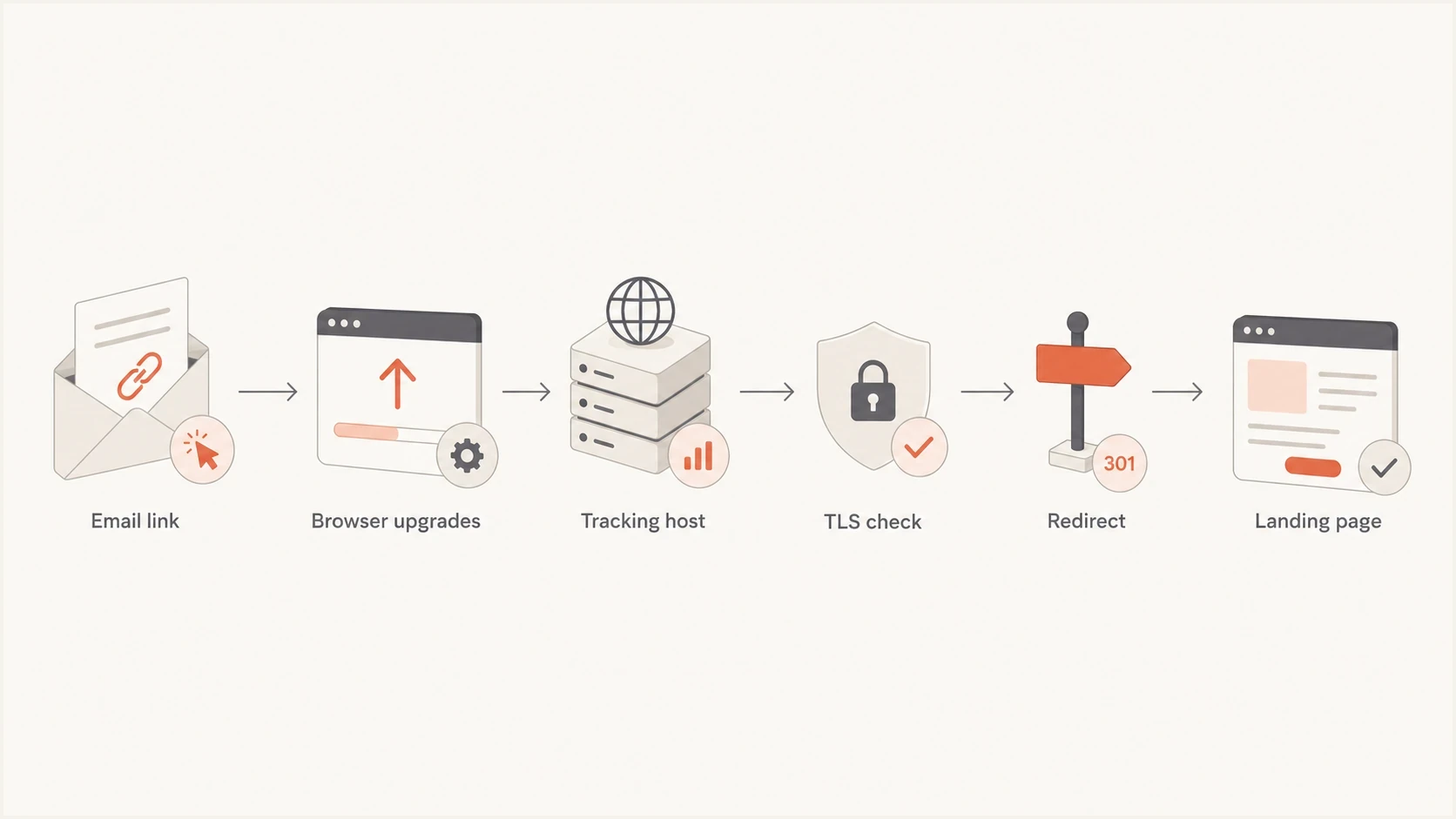
Flowchart showing an email click upgraded by HSTS before the tracking redirect.
The risky HSTS settings
The most dangerous rollout is a long cache duration combined with subdomain coverage before every delegated marketing host has working HTTPS.
- Long max-age: Browsers keep enforcing HTTPS even after the server stops sending the header.
- includeSubDomains: One decision can affect click, open, CDN, forms, and campaign hosts.
- Preload: Adding the directive is only part of preloading, and removal from browser lists cannot provide an immediate rollback.
HSTS header examples
Strict-Transport-Security: max-age=300
Strict-Transport-Security: max-age=86400
Strict-Transport-Security: max-age=31536000; includeSubDomains
Strict-Transport-Security: max-age=31536000; includeSubDomains; preload
Treat each line above as a different operational stage, not as four interchangeable snippets. A five-minute max-age is a test. A one-day max-age is a pilot. A one-year max-age with includeSubDomains is a domain-wide commitment that must come after marketing, web, security, and vendor owners have signed off.
Problems that appear in email programs
The first visible symptom is often a browser warning after someone clicks an email link. That makes HSTS feel like a campaign issue, even though the root cause is usually a domain security change made outside the email workflow. The second symptom is quieter: reporting numbers change because opens, clicks, redirects, or conversion tags stop firing cleanly. Open tracking is affected when the mail client or its image proxy upgrades the tracking host to HTTPS and that HTTPS path fails.
|
|
|
|---|---|---|
Click tracking | Branded host | Enable HTTPS |
Open tracking | Image pixel | Use HTTPS |
Unsubscribe | Hosted page | Fix certificate |
Forms | Submit endpoint | Audit CNAMEs |
Analytics | Redirect chain | Test final URL |
Common HSTS marketing breakages and the usual remediation path.
- Certificate errors: The tracking hostname points to a vendor endpoint, but the certificate is expired, untrusted, missing an intermediate, or does not cover the branded hostname.
- Broken redirects: A link wrapper, link shortener, or old redirect service accepts HTTP but has incomplete HTTPS handling.
- Lost metrics: Open pixels, click redirects, and attribution tags fail before the user reaches the destination.
- Compliance risk: Unsubscribe and preference center links must keep working, especially during active campaigns.
- Blame loops: Marketing blames the agency or ESP, IT blames templates, and the real issue is a changed browser policy.
Older campaigns are easy to miss. A team can update current templates and still leave lifecycle messages, sales sequences, invoices, webinar reminders, and passwordless login emails using older HTTP tracking settings. Check triggered and transactional mail as carefully as campaign mail because those messages run continuously and failures are less obvious in campaign dashboards.
Where HSTS rollout communication fails
HSTS rollouts fail when the change owner sees only the web application and not the domain. Marketing sees the domain differently. A single brand domain can have DNS records delegated to the ESP, event platform, CDN, form provider, analytics system, and agency-managed landing page stack. The header is small, but the ownership map is not.
IT-only rollout
- Scope: Main website and web server configuration.
- Testing: Homepage, login pages, and core application routes.
- Risk: Delegated marketing hosts are missed.
Coordinated rollout
- Scope: Website, marketing links, vendor CNAMEs, and old templates.
- Testing: Real emails, redirects, unsubscribe pages, forms, and tracking pixels.
- Risk: Remaining gaps are visible before the long max-age is used.
The practical fix is a short owner list and a change notice that says exactly which hostnames are covered, when the header changes, which campaigns need testing, and who can pause the rollout. Marketing needs to hear about HSTS before users see certificate errors.
A safe rollout plan
A safe rollout starts with an inventory. List every hostname under the domain that marketing uses or influences, then confirm that HTTPS works with the exact hostname users will request. Do not test only the final landing page. Test the tracking host, redirect host, image host, form endpoint, and preference center host.
The next step is vendor coordination. If a branded click domain points to an ESP, the ESP must provision HTTPS for that branded host before HSTS enforcement. If the vendor requires a certificate validation record, add it before the HSTS header is extended to subdomains. Confirm hostname coverage, trust, expiry, and the complete certificate chain at every edge location. If old email templates still use HTTP URLs, update them before the switch.
HSTS rollout stages
Use short browser cache periods first, then extend only after real marketing flows pass.
Test
max-age=300
Use this after HTTPS works on known hosts.
Pilot
max-age=86400
Use this while live campaign links are being checked.
Long term
1 year
Use this only after delegated hosts and rollback owners are known.
Preload
preload
Use this only after subdomain coverage has been proven.
- Inventory hosts: Export DNS and collect marketing-owned domains, subdomains, CNAMEs, and old campaign templates.
- Verify HTTPS: Check every hostname directly, including branded click, open, forms, and hosted preference pages.
- Coordinate vendors: Ask the ESP and other providers to enable certificates before the HSTS header is expanded.
- Pilot first: Start with a short max-age and send real internal test emails through production tracking.
- Monitor impact: Watch TLS failures, click volume, open images, form submissions, unsubscribe traffic, and support tickets.
For a broader view of DMARC, SPF, DKIM, and domain health before a security change, run a domain health check. It will not prove every HSTS path by itself, but it helps catch related authentication and DNS issues before teams stack more security changes onto the same domain.
?
What's your domain score?
Deep-scan SPF, DKIM & DMARC records for email deliverability and security issues.
After the domain check, send test messages through the same production ESP paths that subscribers use. Preview tools alone are not enough because a preview can skip the final link wrapping or use a different redirect route. The test click must traverse the real branded tracking domain, certificate, redirect, and destination page.
Plan rollback before enforcement
An HSTS rollback is slower than an ordinary header rollback because browsers cache the policy. Removing the header does not erase policy that users already received. A browser that reaches the host over valid HTTPS can process max-age=0 and remove that host's dynamic policy, but separately cached subdomain policies remain until each one expires or is cleared by that host. Preloaded policy also requires a separate removal process and updated browser releases.
Dynamic HSTS removal header
Strict-Transport-Security: max-age=0
- Restore valid TLS first: Fix the certificate or HTTPS endpoint because HSTS users cannot bypass the error to reach an HTTP fallback.
- Stop extending the policy: Serve max-age=0 over valid HTTPS on the affected host and parent where the policy was set.
- Handle preload separately: Request removal and keep HTTPS working while the change reaches browser releases.
- Pause affected sends: Stop campaigns that would distribute a broken tracking or unsubscribe hostname.
- Record the evidence: Save the header, certificate result, affected hosts, campaign IDs, and first observed failure time.
The incident owner should tell marketing whether existing messages can recover after the HTTPS fix or whether a replacement send is required. Link URLs inside delivered email cannot be edited, so restoring the original branded host is usually the fastest way to recover old and active messages.
Do not confuse HSTS with MTA-STS
HSTS is for web browsers and HTTPS. MTA-STS is for receiving mail servers and encrypted SMTP delivery. They sound related because both enforce transport security, but they protect different paths and break in different ways. Suped's Hosted MTA-STS product handles the email TLS policy side with two CNAME records and no separate web hosting requirement. That is separate from browser HSTS on marketing domains.
Hosted MTA-STS/TLS-RPT configuration dialog showing policy mode, MX hosts, CNAME records, TLS reporting, and verification
Suped's product brings DMARC, SPF, DKIM, Hosted MTA-STS, Hosted SPF, SPF flattening, blocklist (blacklist) monitoring, real-time alerts, and guided fix steps into one workflow. During security rollouts, that gives teams a shared record of authentication changes, alerts, and the owners responsible for follow-up. HSTS click-path testing still requires direct browser testing.
When email TLS policy is changing at the same time as web HSTS, verify MTA-STS separately. Mixing the two checks leads to false confidence: a clean MTA-STS setup does not mean marketing click links work, and a working HTTPS website does not mean inbound SMTP TLS policy is correct.
Separate the controls
- HSTS: Browser policy for HTTPS on web hosts and marketing links.
- MTA-STS: SMTP policy for how other mail servers deliver messages to you.
- DMARC: Authentication policy for domain-based email identity and spoofing protection.
What to tell marketing before the switch
Marketing does not need every detail of the browser cache model. Marketing needs to know which links, hosts, and reporting numbers can change. Keep the message concrete: the date of the change, the hostnames affected, the test plan, the vendor owner, the rollback contact, and the campaign freeze window if one is needed.
Minimum communication checklist
- Hostnames: Name the exact marketing, tracking, form, and landing page hosts in scope.
- Timing: Avoid launches during major sends, sales periods, or automated campaign migrations.
- Testing: Require real test emails and clicks through production tracking domains.
- Ownership: Assign one owner for DNS, one for ESP settings, and one for campaign validation.
This is also where the DMARC rollout analogy helps. Strict enforcement is valuable, but only after monitoring shows that legitimate mail sources are ready. HSTS deserves the same staging mindset: short cache, verify real traffic, then extend. Security improves when the business path keeps working.
Change notice template
Change: Enable HSTS for example.com
Scheduled window: YYYY-MM-DD HH:MM local time
Initial header: max-age=300
Hosts in scope: www, links, pages, forms
Required test: send real email and click all tracked links
Rollback owner: security@example.com
Marketing owner: lifecycle@example.com
Vendor owner: esp-support ticket 12345
The notice does not need to be long. It needs to prevent surprise. If marketing knows a short HSTS pilot is happening, they can pause high-value sends, test the ESP backend, and avoid losing a day to support tickets that look like campaign defects.
Views from the trenches
Best practices
Inventory every marketing subdomain before HSTS, including click, open, form, and CDN hosts.
Confirm the ESP has a matching certificate before any branded tracking host is forced to HTTPS.
Use a short max-age first, then extend it only after campaign links and forms pass testing.
Common pitfalls
Enabling includeSubDomains before checking delegated hosts makes one header affect every team.
Assuming all email links already use HTTPS leaves older templates and redirects untested.
Treating HSTS like a web-only change hides the impact on email metrics and attribution.
Expert tips
Keep rollback expectations clear, because browser HSTS cache can outlast the DNS fix.
Test real campaign messages, since link wrapping can differ from preview and builder modes.
Document owners for each CNAME so IT knows who must approve certificate changes first.
Marketer from Email Geeks says HSTS itself is not the issue; missing prep work is what breaks customer-facing links.
2022-10-28 - Email Geeks
Marketer from Email Geeks says HTTPS is still less universal in email tracking than many teams assume.
2022-10-28 - Email Geeks
How to prevent HSTS rollout failures
The problems caused by poorly planned HSTS are predictable: TLS warnings, dead tracked links, missing opens and clicks, broken unsubscribe paths, damaged launch reporting, and internal blame. The fix is also predictable. Inventory every hostname, enable HTTPS at every vendor endpoint, test real emails, start with a short max-age, and communicate the change before enforcement becomes hard to reverse.
Teams should use HSTS, but it should not roll out as an isolated IT task. Domain security controls touch marketing operations, and a safe process treats HSTS, DMARC, SPF, DKIM, MTA-STS, and reputation monitoring as connected operational work with named owners and visible checks.




