Will including links from a different domain cause email spam filter or legal issues?

Published 13 May 2025
Updated 8 Aug 2026
12 min read
Summarize with
Updated on 8 Aug 2026: We updated this guide to separate link reputation from DMARC checks and clarify how cross-domain consent rules vary by jurisdiction.
No, including links from a different domain that your company owns does not automatically cause spam filter or legal problems. One brand, publication, store, support portal, booking site, or tracking domain can appear in email sent from another domain. A domain mismatch does not create an automatic filtering failure, although filters can penalize a linked domain with poor reputation.
The real answer is more specific: the linked domain has its own reputation, the offer must match the recipient's expectations and applicable permission rules, and the email still needs clean authentication, a working unsubscribe path, and honest identification of the sender. If the second domain has been used in spam, appears on a blocklist (blacklist), hides the final destination through messy redirects, or surprises recipients with a different commercial relationship, inbox placement and legal risk increase.
- Deliverability: A different-domain link is usually fine when the linked domain is reputable, expected, and technically clean.
- Legal risk: The risk comes from the applicable consent or opt-out rules, disclosure, unsubscribe handling, data use, and the relationship between the brands.
- Best test: Send the actual message through seed checks and real inbox tests before the campaign goes live.
Treat cross-domain links as a normal campaign design choice. The deciding questions are whether the message looks coherent to the recipient and whether every domain in the click path has a clean technical and reputation profile.
What spam filters evaluate
Spam filters score many signals at the same time. The sending domain, IP, authentication, content, recipient engagement, complaint history, link reputation, redirects, image hosts, and unsubscribe behavior all matter. A link to a related company domain is one signal inside a much larger scoring model.
A sending domain can have a strong reputation and still be hurt by bad links. This happens when the linked domain appears in spam complaints, has been reused across affiliate campaigns, has suspicious redirects, or has a poor blocklist (blacklist) history. The reverse is also true: a newer sending domain can link to a trusted main brand domain without creating a problem, assuming the email is wanted and authenticated.
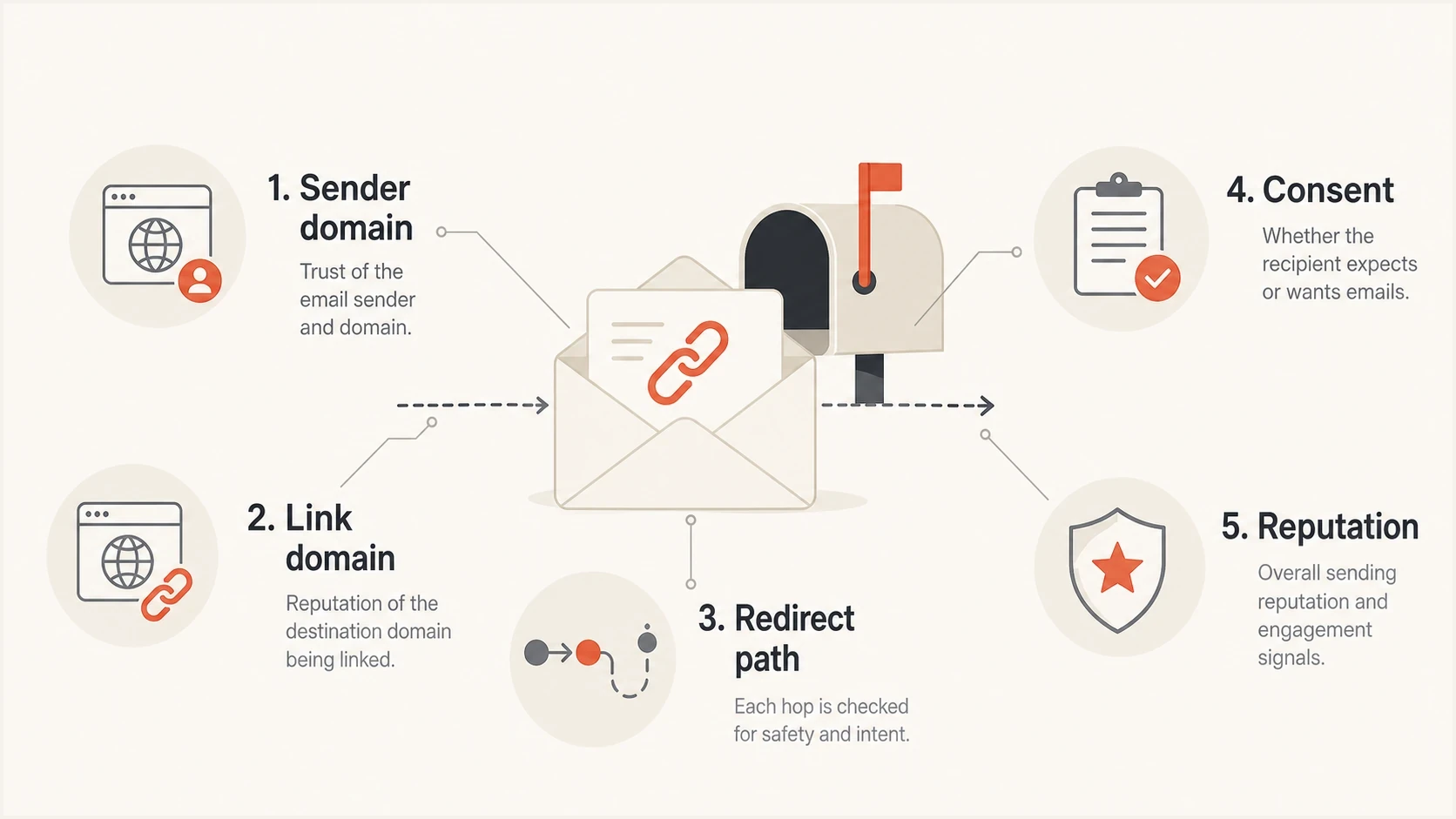
Infographic showing sender domain, link domain, redirects, consent, and reputation as filtering inputs.
|
|
|
|---|---|---|
Link domain | Known brand | Unknown or abused |
Redirects | Short path | Long chain |
Permission | Clear opt-in | Unclear consent |
Authentication | SPF, DKIM, DMARC pass | Sending-domain checks fail |
Recipient behavior | Clicks and reads | Complaints |
Common signals filters weigh when an email links to another owned domain.
The cleanest cross-domain setup has an obvious relationship between the sender and destination. For example, an educational site can send a newsletter that links to its own retail shop if the email explains the relationship, the audience signed up for that kind of content, and the shop domain has a clean reputation.
Why a link domain does not change DMARC results
SPF, DKIM, and DMARC evaluate message identity, not the URLs in the body. DMARC passes when the visible From domain matches the authenticated SPF return-path domain or the DKIM signing domain under DMARC's matching rules. A link can use another owned domain without changing that result.
|
|
|
|---|---|---|
SPF | Sending IP and return-path domain | No |
DKIM | Signature and signing domain | No |
DMARC | From-domain match with SPF or DKIM | No |
URL filtering | Destination, redirects, and reputation | Yes |
Authentication checks and URL filtering answer different questions.
The website domain does not need SPF or DKIM merely because its URL appears in an email. It does need valid DNS, working HTTPS, and a safe reputation. If that domain also sends email, authenticate its sending streams separately.
When different-domain links are safe
A different-domain link is safest when the recipient can understand why it is there before clicking. Filters measure patterns, but recipients create the engagement and complaint data that feed those patterns. If the email says one brand is introducing a related brand, the landing page continues that story, and both domains are owned by the same company, the setup is usually defensible.
Lower-risk setup
- Ownership: Both domains are owned or controlled by the same company.
- Expectation: The recipient signed up for related content or offers.
- Clarity: The email clearly names the second domain or brand.
- Routing: Links go through one clean click tracking path.
Higher-risk setup
- Ownership: The relationship between domains is hidden or unclear.
- Expectation: The offer is outside the reason the person subscribed.
- Clarity: The link text hides where the click will land.
- Routing: The click path uses multiple redirects or public shorteners.
The safest copy usually states the relationship plainly. If Domain A owns Domain B, say that. If the newsletter is editorial and the destination is a shop, make that distinction obvious in the email body and footer. When visible text contains a full URL, its host should match the click destination. Descriptive anchor text is clearer when a branded tracking redirect sits between the email and landing page.
Practical rule
If a reasonable subscriber would say, "I understand why this company sent me this and why the link goes there," the different domain is usually not the problem.
The deliverability risks that matter
The bigger deliverability issue is not the mismatch itself. It is whether the linked domain and click path have a history that mailbox filters trust. A domain used in unwanted mail, affiliate blasts, suspicious redirects, or malware reports can damage a campaign even when the sender has good authentication. The same applies when the domain appears only behind a linked logo or signature image.
Check link reputation the same way as sending reputation: look for blocklist (blacklist) exposure, review complaint patterns, avoid hidden redirect chains, and test the exact production email. If you use click tracking, keep the tracking domain close to your brand and avoid shared or generic redirect domains when you can.
Cleaner link patternstext
Lower risk:
From: news.brand-a.example
Link: shop.brand-b.example/product

Also acceptable:
From: news.brand-a.example
Tracked link: go.brand-a.example/campaign
Final page: shop.brand-b.example/product

Higher risk:
From: news.brand-a.example
Tracked link: shared-tracker.example/abc
Redirect 1: short-link.example/x
Final page: shop.brand-b.example/product
When redirects are part of the setup, keep them simple. A single branded tracking redirect is normal. Several hops through unrelated domains look worse, break more often, and give security filters more domains to evaluate. Confirm that each hop uses HTTPS, has a valid certificate, and reaches the expected final page. For a deeper routing explanation, see link redirects.
Do not hide the destination
A cross-domain link is not a problem by default. A public shortener, unrelated redirect domain, or visible URL that points to a different host can look deceptive. Use descriptive link text when tracking changes the click URL, and keep the final destination obvious in the surrounding copy.
The number of links matters less than their quality and context. Ten useful links to trusted pages can perform better than one suspicious link. Still, crowded templates create more chances for broken links, old tracking domains, and unrelated destinations. If link volume is part of your concern, compare the guidance on link count.
How to test before sending
Test the real email, not a simplified sample. The actual template, tracking links, unsubscribe link, images, footer, subject line, authentication, and sending path all need to be present. A clean-looking draft can behave differently after the email platform rewrites links or adds tracking parameters.
A practical workflow is to send the message to a test address, inspect the rendered email, follow each link, and check authentication results. Suped's email tester lets you test the final message and review issues before the campaign reaches the full list.
Email tester
Send a real email to this address. Suped shows a results button when the test is ready.
?/43tests passed
Next, check every domain involved, not only the From domain. A healthy sender domain does not cancel poor reputation on the linked domain. Suped's product puts DMARC, SPF, DKIM, blacklist and blocklist monitoring, and deliverability checks in one workflow, which helps separate an authentication problem from a URL problem.

Email tester sample report showing total score, email preview, issue summary, and per-section results
- Render: Open the received email in real mailbox clients and confirm the visible link text is honest.
- Click: Follow every major link and confirm the final page loads over HTTPS without extra hops.
- Authenticate: Confirm SPF, DKIM, and DMARC pass for the sending domain. For applicable subscription and marketing mail, confirm one-click unsubscribe headers too.
- Monitor: Watch complaints, unsubscribes, bounces, and blacklist or blocklist changes after the send.
Legal requirements depend on recipient location
The linked domain is rarely the legal issue by itself. The applicable rules depend on where recipients are located, who sent or authorised the message, what the signup promised, whether an exception applies, how the sender is identified, and whether the unsubscribe process works. Data sharing between the domains must also follow the privacy commitments made when the address was collected.
For US commercial email, the CAN-SPAM guide explains accurate header information, non-deceptive subject lines, advertising identification where required, a valid physical postal address, and a working opt-out mechanism. CAN-SPAM generally does not require prior consent for commercial email, but recipients retain the right to opt out. A second owned domain does not remove those duties.
For UK and EU recipients, privacy and electronic-marketing rules often require prior consent for marketing to individuals unless a defined exception, such as a customer soft opt-in, applies. The lawful basis for processing personal data and permission to send electronic marketing are separate checks. Australia and Canada also require consent or a recognised form of implied consent for covered commercial messages, plus sender identification and an unsubscribe mechanism.
Do not treat ownership as consent
Owning both domains does not automatically mean every subscriber agreed to every promotion across those domains. Where consent is required or relied on, the consent record and signup promise matter more than the corporate structure.
- Consent: Where consent is required or relied on, the signup wording should cover related offers or the specific second brand.
- Identity: The email should identify who is sending it and why the second domain is included.
- Unsubscribe: The opt-out should be clear, functional, and processed within the deadline that applies to the recipient.
- Data use: The privacy notice should cover any sharing or joint use between the domains.
Legal compliance and deliverability overlap. A person who did not expect the promotion is more likely to complain, ignore the message, or unsubscribe. Those behaviors feed reputation systems. Valid permission where required, accurate identification, and prompt opt-out handling protect compliance and sender reputation.
A safe setup checklist
For a campaign from one company domain that promotes another owned domain, use a simple checklist before launch. It keeps the decision grounded in evidence instead of fear about a domain mismatch.
Cross-domain link risk levels
A practical way to classify campaign risk before sending.
Low
Ready
Owned domains, clear consent, clean authentication, short redirects
Medium
Test
Related offer, partial list overlap, new landing domain
High
Hold
Unclear consent, poor link history, hidden redirects
Start with authentication and monitoring. Use DMARC monitoring to see which platforms send for the domain and whether messages pass SPF, DKIM, and DMARC. Then check blocklist monitoring for the domains and IPs that matter to the campaign, including any blacklist history.
Suped's DMARC and email authentication platform can centralise this workflow across several brands or domains. Its DMARC reports, hosted authentication controls, alerts, issue detection, blacklist and blocklist monitoring, and email testing help teams map each sender and investigate whether a campaign problem comes from authentication, reputation, or the click path.
Suped DMARC dashboard showing email volume, authentication health, and source breakdown
- Map: List the From domain, return-path domain, DKIM domain, tracking domain, and final landing domain.
- Verify: Confirm every owned domain has valid DNS, HTTPS, and expected brand content.
- Explain: Name the relationship between the sender and the destination inside the email.
- Limit: Remove unrelated links, dead links, old tracking paths, and surprise destinations.
- Review: Confirm the applicable consent or opt-out basis, privacy notices, and unsubscribe behavior before sending.
If those checks pass, do not hold the campaign solely because the destination domain differs from the sender domain. Watch the first send closely, especially if the second domain has not appeared in prior campaigns to the same audience.
Views from the trenches
Best practices
Name the relationship between domains so subscribers understand the click destination.
Test the final tracked email, not a draft without rewritten links or campaign routing.
Monitor link domain reputation alongside the sending domain after each major send.
Common pitfalls
Assuming shared ownership gives permission for unrelated promotions to every list.
Using generic redirect domains that make a legitimate owned link look suspicious.
Checking sender authentication while ignoring the reputation of the linked domain.
Expert tips
Use a branded tracking domain so click routing looks connected to the sending brand.
Keep redirect chains short and make the final landing domain obvious in the copy.
Segment audiences when the second domain is new or the offer is more commercial.
Marketer from Email Geeks says different-domain links usually do not create a delivery problem when permission and context are sound.
2022-03-15 - Email Geeks
Marketer from Email Geeks says linked domains have reputation, so domains seen in spam can affect an otherwise strong sender.
2022-03-15 - Email Geeks
Practical answer
Send the email if the domains are genuinely related, the subscriber had a reasonable basis to expect the promotion, both domains have clean technical and reputation signals, and the campaign meets the rules that apply to its recipients. Do not send it if the signup covers one narrow editorial purpose and the second domain changes the nature of the relationship without a valid legal basis.
For deliverability, use authenticated mail, keep redirects clean, make the destination obvious, check blocklist (blacklist) exposure, and test the final campaign. For legal risk, document permission where required, identify the sender accurately, honor unsubscribes, and confirm the privacy basis for any cross-domain promotion.
Suped fits this workflow when one view of the sending domain, authentication health, issue detection, blacklist and blocklist monitoring, and email test findings is useful. The different-domain link itself is rarely the deciding factor. The domain's reputation, the recipient's expectation, and the campaign's execution decide the outcome.