Why isn't Gmail recognizing Customer.io unsubscribe links and what makes an unsubscribe link compliant?

Published 28 Jul 2025
Updated 2 Aug 2026
11 min read
Summarize with
Updated on 2 Aug 2026: We updated this guide for Gmail's current enforcement, Customer.io subscription behavior, and RFC 8058 endpoint checks.
Gmail is not judging the footer unsubscribe link by itself. For senders Gmail classifies as bulk senders, Gmail looks for RFC 8058 one-click unsubscribe in marketing and subscription messages delivered to personal Gmail accounts. It then uses live traffic and sender eligibility signals to decide whether the unsubscribe requirement is satisfied. A Customer.io email can have a working footer link and still fail Gmail's view if the production message lacks the right headers, the headers are not DKIM-signed, the HTTPS endpoint does not accept the one-click POST, or only some campaigns include the unsubscribe tag.
The practical answer is this: Customer.io's default unsubscribe tags are usually the right path, but test a real production send, inspect the raw headers, and confirm every active marketing layout includes {% unsubscribe %} or {% unsubscribe_url %}. Customer.io's ad hoc test sends omit the List-Unsubscribe header, so a dashboard error can be real even when the template preview looks correct.
The direct answer
Gmail recognizes a compliant unsubscribe setup when the delivered promotional message has both required one-click headers, at least one HTTPS unsubscribe URI, a valid DKIM signature whose h= list covers both unsubscribe headers, and an endpoint that processes the POST without asking the user to log in, confirm, visit a preference page, or click again.
If Gmail's compliance dashboard says Customer.io unsubscribe links are not compliant, the first check is the raw delivered headers for the exact production message Gmail received, not the visible link. The visible footer link is still needed for users and legal compliance, but Gmail's one-click rule is header-based.
Important distinction
A footer unsubscribe link that opens a preference center is not the same thing as RFC 8058 one-click unsubscribe. Gmail requires the header version for bulk marketing and subscription messages. The body link can still point to preferences, but the header URL must let Gmail submit the one-click POST and remove the recipient from the mailing list associated with the message.
- Real send: Use a delivered production message, not a template preview or ad hoc test send, because production headers are the evidence Gmail sees.
- Both headers: The message needs List-Unsubscribe and List-Unsubscribe-Post in the final headers.
- POST behavior: The HTTPS URL must accept the one-click POST and suppress the recipient without a second action.
- Gmail display: The Gmail unsubscribe button does not always appear, even when the headers are correct, because Gmail applies automated eligibility checks.
What makes the link compliant
A compliant one-click unsubscribe setup has two layers. The first layer is the clearly visible unsubscribe link in the message body. The second layer is the header-based instruction that Gmail and Yahoo can use to unsubscribe the recipient without sending them to a web page. Gmail's sender guidelines require both layers for marketing and subscription mail from bulk senders.
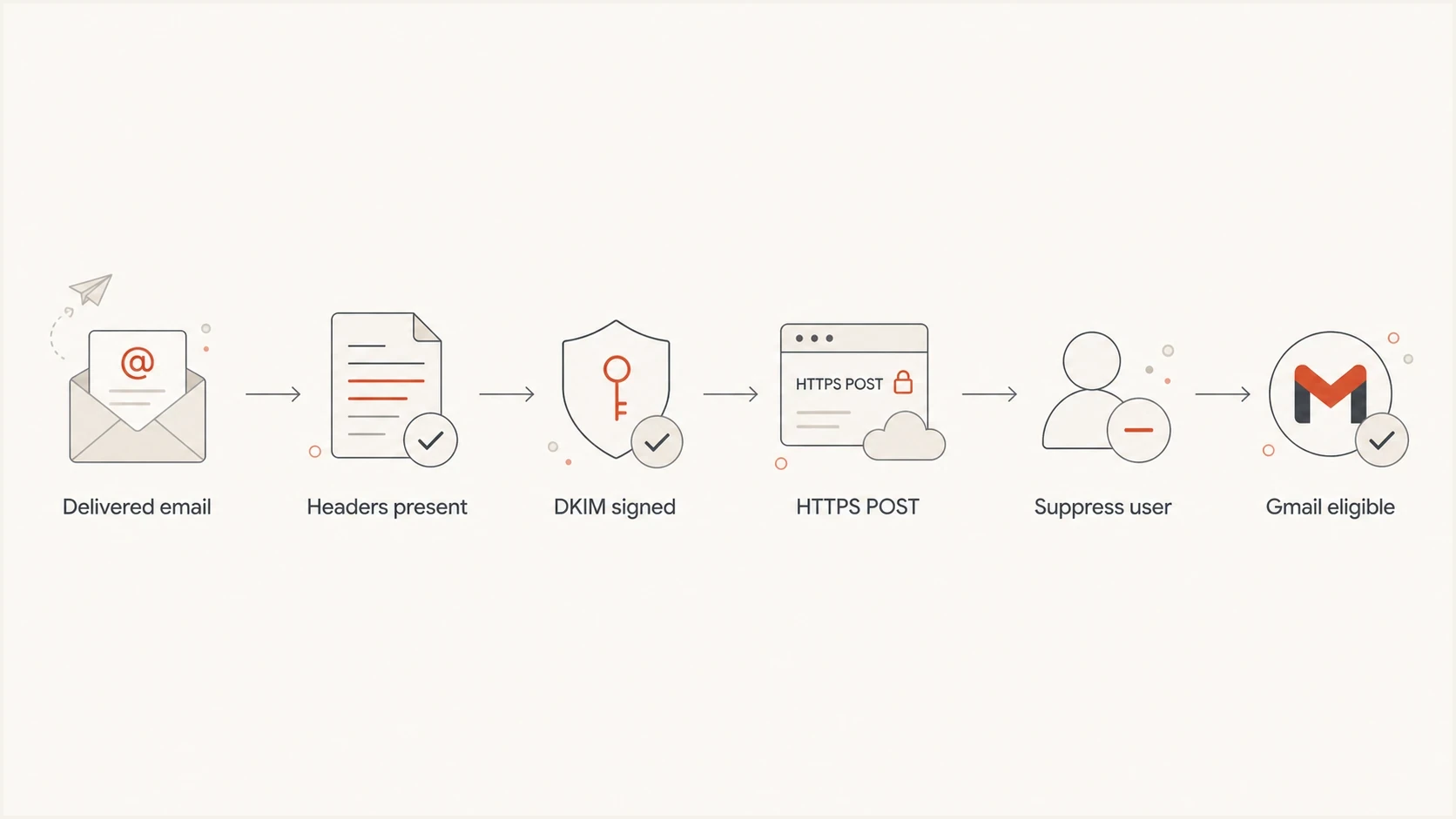
Flowchart of the Gmail one-click unsubscribe compliance path.
Compliant one-click headerstext
List-Unsubscribe: <mailto:unsubscribe@example.com>,
 <https://example.com/u/abc123>
List-Unsubscribe-Post: List-Unsubscribe=One-Click
Expected one-click POSThttp
POST /u/abc123 HTTP/1.1
Host: example.com
Content-Type: application/x-www-form-urlencoded
Content-Length: 26

List-Unsubscribe=One-Click
For a custom endpoint, put enough information in an opaque, hard-to-forge URI token to identify the recipient and mailing list. Accept application/x-www-form-urlencoded and multipart/form-data POST bodies. Do not rely on cookies, HTTP authentication, or browser session context, and do not redirect the POST.
|
|
|
|---|---|---|
Header | Two fields | Missing POST |
URL | HTTPS | Page only |
Action | Suppress | Second click |
DKIM | Both in h= | Fields omitted |
Scope | All promo | Some streams |
The compact compliance checklist Gmail is effectively asking you to satisfy.
Gmail also expects the rest of the sender setup to be healthy. That means authenticated mail, a valid DMARC policy, low user-reported spam, and clean formatting. Gmail has ramped up enforcement against non-compliant traffic, including temporary and permanent rejections. Correct one-click headers do not offset broken authentication or other sender requirement failures.
Which messages need one-click unsubscribe
Gmail's bulk-sender rules apply when a primary domain sends close to 5,000 or more messages to personal Gmail accounts in 24 hours. Messages from the same primary domain count together, and Gmail keeps the bulk-sender classification after a domain qualifies. The one-click requirement applies to marketing and subscription messages, not every email a company sends.
- Marketing and subscription mail: Include RFC 8058 one-click headers and a clearly visible body unsubscribe link.
- Transactional mail: Password resets, purchase receipts, and one-time passwords are excluded when the message only supports the requested transaction.
- Mixed-purpose mail: Treat a message as marketing when promotional content changes its primary purpose, even if a transaction triggered it.
- List identity: Give each subscription list a human-readable List-ID header or a unique From address, and use different From addresses for subscription and non-subscription mail.
Gmail's subscription guidance also calls for recipients to confirm their email address after signing up. Confirmed opt-in, clear list identity, and separate sending addresses do not replace RFC 8058, but they help Gmail and recipients understand which subscription the one-click action controls.
Where Customer.io fits
Customer.io has two unsubscribe paths that matter here. Its built-in unsubscribe functionality implements RFC 8058 automatically when you use Customer.io unsubscribe links. Custom unsubscribe links are different because your own system must accept and process the RFC 8058 POST, and you must add the required custom headers to every applicable email. Customer.io's custom unsubscribe docs explain that split.
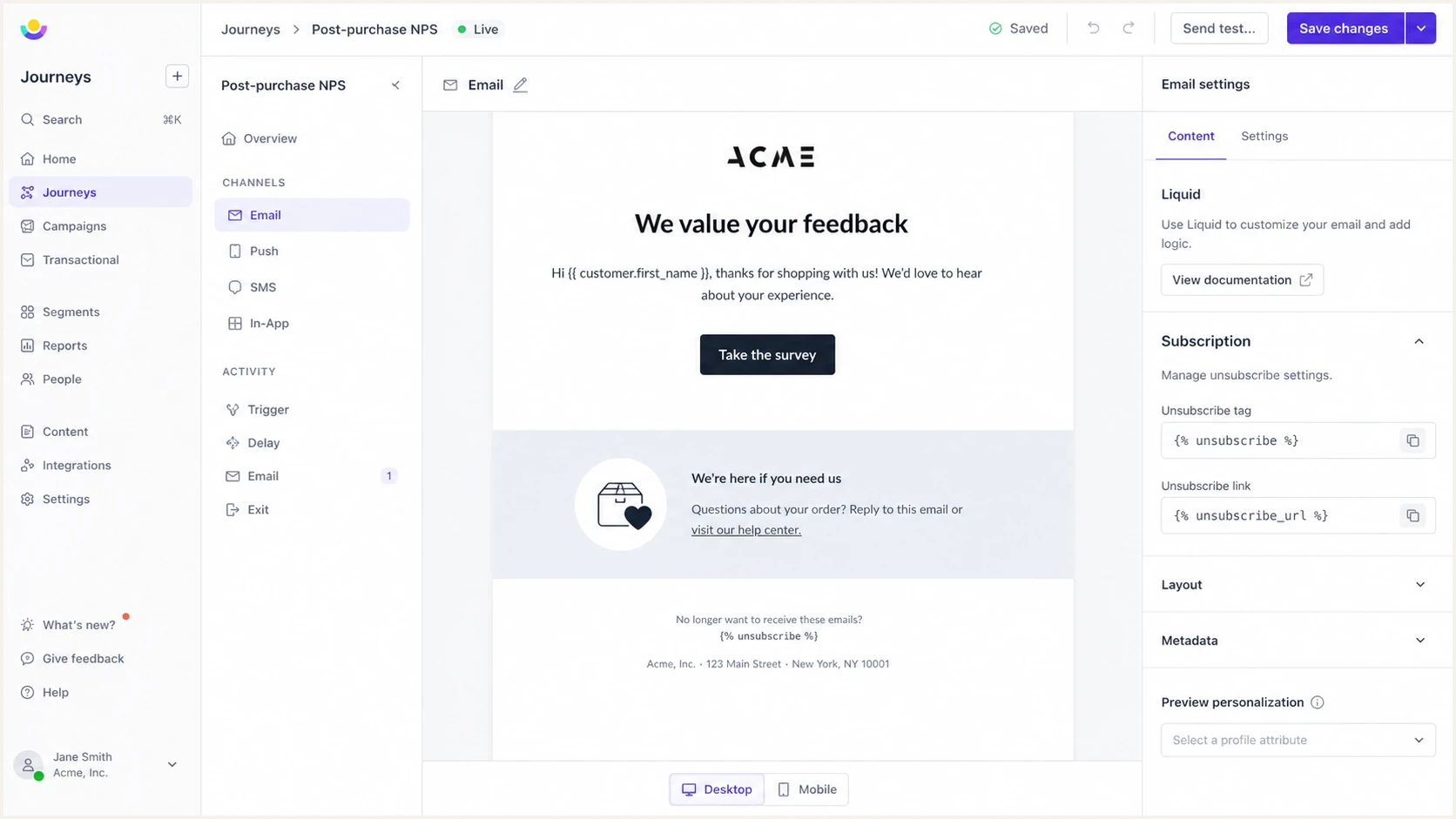
Customer.io email editor with unsubscribe Liquid tags in a marketing email.
Default Customer.io links
- Setup: Use Customer.io's built-in unsubscribe tags in the real email layout.
- Headers: Customer.io appends the required unsubscribe headers when its unsubscribe links are present.
- Best use: This is the direct path for teams that do not need custom processing.
Custom unsubscribe links
- Setup: Your application owns the one-click HTTPS POST endpoint.
- Headers: Add the correct custom headers to every applicable email in the workspace.
- Best use: Use this when your own preference system must process the unsubscribe.
Customer.io's global unsubscribe docs also matter because Customer.io's built-in List-Unsubscribe header always globally unsubscribes the person. A body link can send the person through subscription topic or preference controls, but the header action does not mirror that topic-level flow.
How to test it
Test with a real send to a mailbox that receives the same production headers as a subscriber. Inspect the raw message, trigger the HTTPS endpoint with the expected POST payload in a controlled way, and check that the recipient is suppressed from the mailing list associated with that email.
Suped's email tester is useful here because it lets you send a real message and review the delivered authentication and header details in one place. That is more reliable than relying on an ESP preview screen when the issue is Gmail's view of the final message.
Email tester
Send a real email to this address. Suped shows a results button when the test is ready.
?/43tests passed

Email tester sample report showing total score, email preview, issue summary, and per-section results
After the header check, check domain authentication too. One-click unsubscribe is part of the bulk sender rules, but Gmail evaluates it beside SPF, DKIM, DMARC, spam rate, and message quality. Suped's domain health checker can catch obvious DNS and authentication problems before you spend time debugging the unsubscribe endpoint.
- Send: Send the real Customer.io campaign or broadcast to a controlled seed address.
- Inspect: Open the raw message and confirm both unsubscribe headers exist.
- Verify: Confirm a valid DKIM signature lists both unsubscribe fields in its h= tag.
- Suppress: Confirm the one-click action removes the person from the associated mailing list within 48 hours.
- Compare: Repeat the check across older journeys, broadcasts, regional workspaces, and templates with promotional content. Keep purely transactional mail on a separate From address.
Why Gmail still flags a working setup
The frustrating case is when a single delivered message passes every one-click test, but Gmail's dashboard still shows a compliance problem. That happens because the dashboard is not a raw-header validator for one message. It looks at live traffic, volume, eligibility, and patterns across the sender's mail. One compliant sample does not prove all production streams are compliant.
Gmail spam complaint pressure
A compliant unsubscribe setup helps reduce complaints, but complaint rate still affects sender eligibility.
Healthy
Under 0.10%
Keep user-reported spam very low.
Watch
0.10% to 0.29%
Investigate list source and unsubscribe friction.
Problem
0.30%+
Expect delivery and mitigation issues.
The most common causes are mixed sending streams, old templates, ad hoc test sends without headers, custom links that open preference pages, or authentication problems that make Gmail distrust the header instruction. This is also why a guide to Gmail button behavior is useful: the visible Gmail UI is not guaranteed for every valid message.
Treat the dashboard as a traffic signal
If one message is compliant, keep checking until you know every marketing stream is compliant. Gmail's dashboard can reflect older or sampled traffic. Fix the headers, wait for fresh production volume, and compare the dashboard with raw-message evidence.
A separate issue is scope. One-click unsubscribe should remove the recipient from the mailing list associated with the message. The body link can offer a preference center, but the header action must not require the recipient to choose a topic, log in, confirm an email address, or complete a captcha. For a deeper policy view, the one-click requirements explain how Gmail and Yahoo treat this requirement.
The DMARC connection
One-click unsubscribe is not a DMARC record setting, and DMARC does not validate the unsubscribe endpoint. Gmail separately requires DMARC for bulk senders, while RFC 8058 relies on a valid DKIM signature that covers the List-Unsubscribe and List-Unsubscribe-Post fields. Both checks matter, but they prove different things.
Suped's DMARC monitoring helps here by showing which sources pass authentication, which sources fail, and where SPF, DKIM, DMARC, blocklist (blacklist), and deliverability signals need attention. That does not replace the Customer.io header check, but it stops teams from debugging unsubscribe links while the domain itself has authentication failures.
DMARC record detail view showing SPF, DKIM, DMARC, rDNS diagnostics, and DNS records
- SPF: Make sure Customer.io is authorized for the envelope sender domain used by the mail stream.
- DKIM: Confirm the final delivered message has a valid signature and both unsubscribe headers appear in its h= list.
- DMARC: Confirm the visible From domain passes through SPF or DKIM domain match.
- Reporting: Track authentication by source so old or forgotten senders do not distort compliance signals.
Views from the trenches
Best practices
Send a production message to a seed inbox because test sends often skip unsubscribe headers.
Sign both unsubscribe headers with DKIM so Gmail can trust the one-click instruction.
Keep the HTTPS one-click endpoint simple: accept POST, suppress, and return success.
Audit every active journey and broadcast because one missing template affects reporting.
Common pitfalls
Relying on a footer link alone fails Gmail's one-click rule for bulk marketing mail.
Using a preferences page as the header URL breaks one-click because POST must suppress.
Checking one sample message hides stream issues when campaigns use older layouts.
Assuming the dashboard updates instantly creates false alarms after a configuration fix.
Expert tips
Compare raw headers before and after template edits to confirm the delivered message changed.
Use unique opaque tokens in header URLs so unsubscribes map to the right person and list.
Treat Gmail's dashboard as sampled evidence, then validate with live headers and logs too.
Log one-click POST events apart from footer clicks to prove the endpoint is working.
Expert from Email Geeks says Gmail's compliance dashboard uses live traffic, so a single compliant test should be compared with all active sending streams.
2024-07-02 - Email Geeks
Expert from Email Geeks says a real production send is required because test messages often omit the unsubscribe headers that Gmail evaluates.
2024-07-02 - Email Geeks
The practical fix
If Customer.io default unsubscribe tags are present in every production marketing email, a real delivered sample has the two RFC 8058 headers, the HTTPS endpoint suppresses the recipient, and DKIM protects both headers, the unsubscribe implementation is technically sound. At that point, treat Gmail's dashboard as delayed or affected by other live traffic, then keep monitoring until fresh compliant mail replaces the old signal.
If any of those checks fail, fix the message source first. In Customer.io, that usually means adding the built-in unsubscribe tag to the shared layout, removing custom preference-page-only header URLs, or making the custom endpoint accept the exact one-click POST. Then resend a production message and test the final delivered copy again.
Suped's platform supports this workflow by combining DMARC source reporting with SPF and DKIM diagnostics and delivered-message testing. Use DMARC reports to identify active sending sources, then use the email tester on each marketing stream to confirm the final unsubscribe headers. This keeps unsubscribe failures separate from authentication and source-inventory problems.




