Why is there a sharp increase in soft bounces from iCloud email addresses?

Published 24 Jul 2025
Updated 26 Jul 2026
11 min read
Summarize with
Updated on 26 Jul 2026: We updated this guide with Apple's current bulk sender requirements and clearer iCloud-specific bounce diagnosis.
A sharp increase in soft bounces from iCloud addresses usually means Apple is temporarily deferring or rate limiting more of your mail, or your sending platform is grouping several SMTP failures under its own soft bounce label. The label alone does not tell you the cause. The raw bounce response does.
The most common causes are full recipient mailboxes, temporary iCloud delivery delays, Apple policy filtering, rate limiting, oversized messages, sender reputation issues, blocklist (blacklist) signals, or an authentication change affecting SPF, DKIM, or DMARC. If the spike is concentrated at iCloud, me.com, mac.com, or Apple Private Relay addresses, treat it as a receiver-specific incident first, not a general list-quality problem.
- First signal: Pull the raw SMTP reply for a sample of bounced iCloud recipients before changing DNS, content, or suppression rules.
- Second signal: Group the bounces by Apple domain, recipient MX, sending IP, campaign, message type, and send time.
- Third signal: Send a controlled test message through an email tester so you can inspect authentication headers and delivery clues.
Do not hard suppress every iCloud address just because your platform says soft bounce. A receiver-specific increase above your normal iCloud baseline needs investigation, but many Apple deferrals recover after queued retries or after the underlying reputation, content, mailbox, or authentication issue is fixed.
What the soft bounce label means
A soft bounce is a sending platform classification, not a universal internet standard. One platform can call a response soft because it expects a retry to work. Another platform can use a different category for the same SMTP status. That is why the next step is never to debate the word soft. The next step is to get the exact response returned by Apple or by the filtering system in front of Apple.
Look at the full enhanced status code and the response text together. A mailbox-full reply points to recipient-side capacity. A 4xx policy reply points to temporary filtering or rate limits. A connection timeout points to routing, throttling, or server availability. A sudden cluster across one sending IP points toward reputation or blocklist (blacklist) pressure. The same numeric code can be used with different explanations, so the human-readable text matters.
Illustrative soft bounce patterns
421 4.7.0 Temporarily deferred. Try again later.
450 4.2.2 Mailbox full or over quota.
451 4.7.1 Local policy issue. Message deferred.
451 4.4.2 Timeout waiting for response from remote host.
Soft bounce label
- Scope: Created by the sending platform after it interprets the SMTP response.
- Risk: Too broad for root-cause analysis because different failures share one label.
- Use: Good for trend detection and segmentation during an incident.
Raw bounce response
- Scope: Returned by the receiving mail system during delivery or retry.
- Value: Points to mailbox capacity, policy filtering, rate limits, or network failures.
- Use: Best source for deciding whether to retry, pause, fix DNS, or escalate.
Likely causes of iCloud soft bounces
When iCloud bounces jump sharply, start with receiver-specific causes. Apple can defer mail because too many recipients have full mailboxes, a sender crosses a reputation threshold, message content resembles unwanted mail, a sending IP or domain has blocklist (blacklist) signals, or an authentication change reduces trust at the wrong moment.
|
|
|
|---|---|---|
Mailbox full | Code 4.2.2 | Retry outcome |
Apple policy | Code 4.7.x | Reply text and volume |
Reputation | One IP or domain | Sending history |
Authentication | SPF or DKIM fail | From-domain match |
Throttling | Repeated 421 or 451 | Retry cadence |
Use the complete raw reply to separate temporary recipient problems from sender-side fixes.
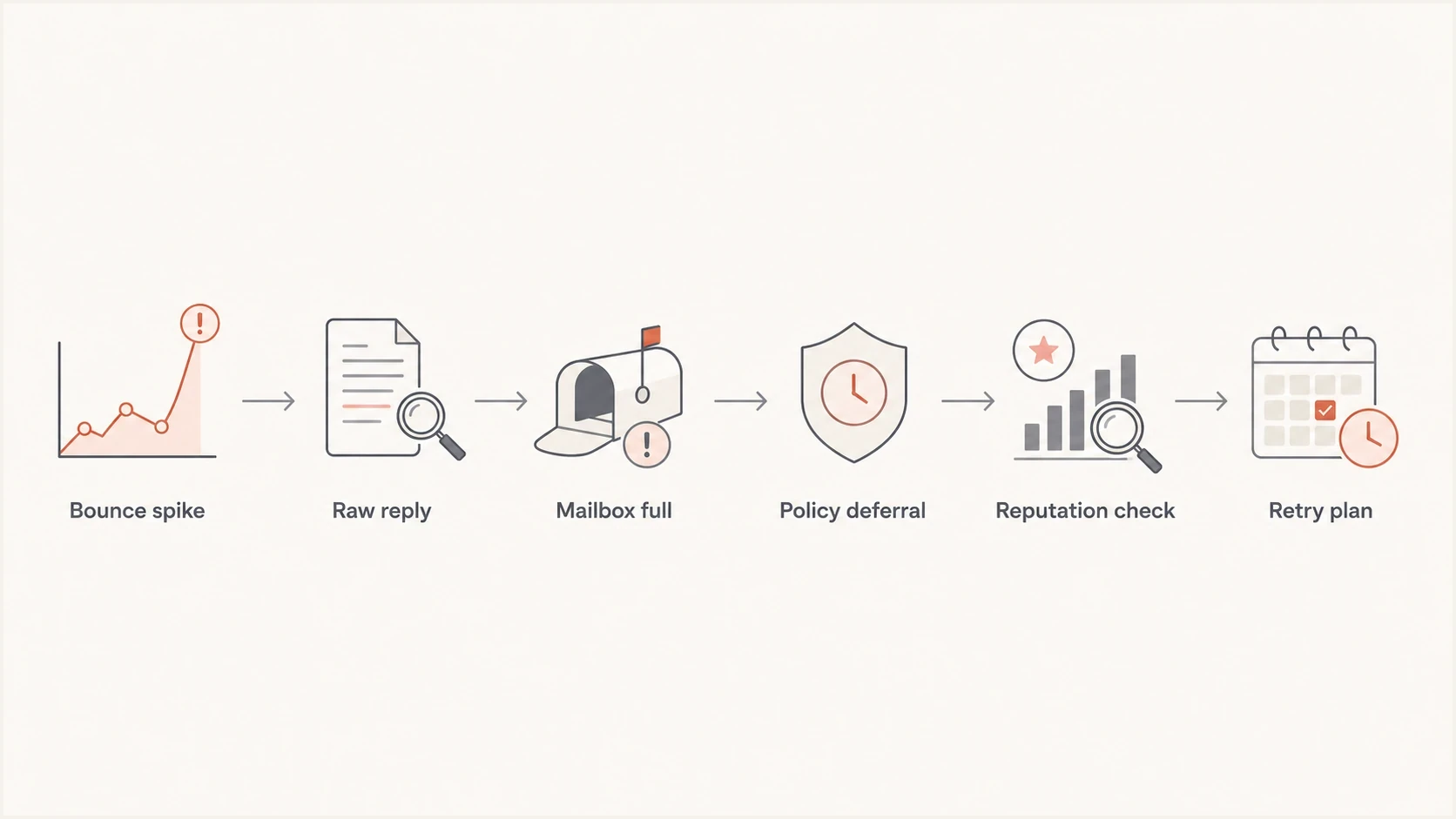
Six-step flowchart for diagnosing an iCloud soft bounce spike.
iCloud bounce spike triage
Compare the current iCloud soft-bounce rate with your normal rate, affected volume, and duration.
Watch
Near baseline
Normal variation with no isolated Apple response pattern.
Investigate
Above baseline
Pull raw replies when Apple domains separate from other receivers.
Act
Sustained increase
Pause risky resends when 4xx deferrals persist or keep rising.
How to troubleshoot the spike
The fix starts with evidence. If your platform only shows soft bounce, ask support for representative raw bounce samples across different campaigns and send times. The exact text tells you whether you are dealing with a recipient mailbox issue, an Apple policy deferral, a technical failure, or a sender reputation problem.
- Get samples: Request raw SMTP replies, recipient domains, campaign IDs, sending IPs, and retry outcomes.
- Segment Apple: Compare icloud.com, me.com, mac.com, private.icloud.com, and privaterelay.appleid.com, then group by recipient MX to catch custom domains hosted by iCloud.
- Check authentication: Run a domain health check and confirm SPF, DKIM, and DMARC pass with a qualifying domain match on real campaign mail.
- Review reputation: Check whether the sending domain or IP has new blocklist monitoring alerts or related blacklist pressure.
- Control volume: Queue Apple 4xx replies and use exponential backoff until retries show recovery instead of repeated deferrals.
- Rule out an Apple incident: If unrelated authenticated streams develop the same errors at the same time, preserve the queue and check for a receiver-side service issue.
- Document replies: Record each code and response text so future Apple bounce troubleshooting takes less time.
?
What's your domain score?
Deep-scan SPF, DKIM & DMARC records for email deliverability and security issues.
Apple announced private.icloud.com as the shared domain for new Sign in with Apple and iCloud+ Hide My Email relay addresses. Include it alongside privaterelay.appleid.com and existing icloud.com relay addresses because Apple says legacy addresses will continue to forward mail.
Apple Mail Privacy Protection makes open rates unreliable for many Apple Mail users, but it does not create SMTP soft bounces. Use clicks, conversions, complaints, raw bounce replies, and recent subscriber activity when assessing Apple-recipient engagement.
DNS changes do not fix every iCloud soft bounce, but broken authentication can extend recovery. Check SPF against the envelope sender domain and DKIM against the signing domain on a real message. DMARC passes when at least one qualifying domain matches the visible From domain under DMARC rules.
Illustrative authentication records
_dmarc.example.com TXT "v=DMARC1; p=none; rua=mailto:dmarc@example.com"
example.com TXT "v=spf1 include:send.example.net -all"
selector1._domainkey.example.com TXT "v=DKIM1; k=rsa; p=PUBLICKEY"
If the bounce text says mailbox full or over quota, the fix is usually retry handling and suppression hygiene. If it says local policy, unwanted mail, reputation, or temporary deferral, investigate sender-side signals before retrying the same audience at the same volume.
Check Apple's bulk sender requirements
Apple requires bulk senders to meet its published sending and list-management rules. A bounce spike is a reason to recheck the full set, even when authentication still appears green in DNS.
- Consent and opt-out: Send bulk mail only to explicit subscribers, include an immediate unsubscribe path, and do not reactivate suppressed recipients.
- Authentication: Use SPF and DKIM, publish a DMARC policy, and add ARC headers when forwarding mail.
- Sending identity: Publish reverse DNS, keep sending IPs and domains consistent, use a stable From identity, and separate marketing mail from transactional streams.
- Bounce hygiene: Track temporary and permanent Apple SMTP errors separately, remove consistently bouncing addresses, and periodically suppress inactive subscribers.
- Escalation evidence: If errors persist after these checks, send icloudadmin@apple.com your company name, email domain, affected sending IPs, exact SMTP errors, and the incident start time.
Apple does not offer an allow list for bulk senders or a feedback loop. Build suppression decisions from direct consent, repeated bounce history, unsubscribe activity, and the SMTP evidence available in your sending logs.
Where Suped fits
Suped is our product. During an iCloud bounce incident, it brings authentication, sending-source, blocklist (blacklist), and domain-health signals into the same investigation while the raw Apple replies remain in your sending logs.
Use Suped's DMARC monitoring, SPF and DKIM checks, automated issue detection, real-time alerts, hosted SPF, SPF flattening, hosted DMARC, and blocklist monitoring to identify what changed around the spike. Pair those checks with the ESP's raw bounce replies to decide which fix to try first.

Issue steps to fix dialog showing the issue overview, tailored fix steps, and verification action
Manual incident review
- Data: Bounce exports, DNS checks, logs, and blocklist (blacklist) checks stay split.
- Timing: Teams notice the pattern after the bounce count has already climbed.
- Fixes: Action depends on whoever can interpret the raw signals fastest.
Suped workflow
- Data: Authentication, source, blocklist, and domain-health signals sit together.
- Timing: Real-time alerts show when authentication or reputation signals change.
- Fixes: Issue detection gives practical steps for the domains and sources involved.
What to change before resending
The safest resend plan depends on the bounce reason. If the reason is mailbox full, do not rewrite authentication or redesign the campaign. Let queued retries run, then suppress only addresses that keep failing after the normal retry window. If the reason is policy or reputation, reduce volume to Apple domains while you fix the sender-side cause.
- For mailbox full: Keep normal retry logic and avoid permanent suppression until repeated failures prove the address is not recoverable.
- For policy deferrals: Pause large sends to Apple domains, compare the message with the last successful send, and resume with smaller batches after the response changes.
- For authentication failures: Fix SPF, DKIM, or the DMARC domain match, then send a real test message before increasing volume.
- For blacklist signals: Separate the affected IP or domain, fix the sending behavior, and monitor the related blocklist entry for removal or expiry.
Email tester
Send a real email to this address. Suped shows a results button when the test is ready.
?/43tests passed
Check whether the spike lines up with a specific campaign type. Promotional campaigns to older iCloud recipients behave differently than transactional mail to recent purchasers. If the issue only appears on one campaign, the first fix is usually audience quality, content, cadence, or sending frequency. If every stream fails at the same time, look harder at IP reputation, authentication, receiver throttling, or an Apple-side incident.
A sharp iCloud soft bounce increase is fixable when the response stays narrow: get the raw SMTP replies, segment Apple traffic, verify authentication, check blocklist and blacklist signals, slow volume, then resend only after the evidence changes.
Views from the trenches
Best practices
Capture raw SMTP replies before changing lists, content, DNS, or suppression rules.
Segment Apple domains so the spike has its own rate, volume, campaign, and source view.
Pause risky resend plans until mailbox-full, policy, reputation, and network signals are split.
Track recovery by recipient domain because iCloud can differ from other mailbox providers.
Common pitfalls
Treating every ESP soft bounce as a dead address hides temporary Apple deferrals.
Changing SPF, DKIM, and DMARC together makes the real cause harder to prove later.
Blaming content before checking blocklist (blacklist) and authentication data wastes time.
Retrying the full iCloud audience too quickly can extend a temporary delivery problem.
Expert tips
Ask support for raw bounce samples grouped by Apple domain, campaign, and sending IP.
Use a small seed send after each fix so retries prove recovery without extra list harm.
Keep DMARC reports beside bounce data to separate authentication failures from filtering.
Document status codes and dates so repeated iCloud spikes become faster to diagnose.
Marketer from Email Geeks says a soft bounce spike cannot be diagnosed from the label alone; the raw bounce message has to be checked first.
2022-05-30 - Email Geeks
Expert from Email Geeks says soft bounce is an internal platform category, so the same iCloud response can be grouped differently by different senders.
2022-05-30 - Email Geeks
Why iCloud soft bounces spike
A sharp increase in soft bounces from iCloud addresses happens because Apple is returning more temporary failures for your mail, and your platform is classifying those failures as soft bounces. The reason is not the soft bounce label. The reason is the SMTP reply behind it.
If the reply points to mailbox capacity, keep retries controlled and avoid hard suppression too early. If it points to local policy, unwanted-mail filtering, rate limiting, or reputation, slow Apple-domain sending while you fix authentication, content, list quality, and blacklist signals. If your platform does not expose bounce reasons, ask support for raw samples before making broad changes.
Suped helps by tying DMARC, SPF, DKIM, blocklist monitoring, hosted SPF, hosted DMARC, and issue-level remediation into one incident workflow. It does not replace raw bounce text, but it gives the technical checks around that text a clear order.




