Why has my email deliverability dropped significantly, despite a low spam rate and bounce rate, and what steps can I take to resolve it?

Michael Ko
Co-founder & CEO, Suped
Published 22 Jun 2025
Updated 15 May 2026
11 min read
Summarize with
A sharp drop from 99.6% deliverability to 80% delivery is not normal, but the low spam complaint rate and low bounce rate do not rule out a serious deliverability problem. The most likely causes are delayed deferrals, throttling at major mailbox providers, an IP or domain blocklist (blacklist) listing, poor list acquisition, bot signups, old contacts, or an authentication problem that changed how receivers trust your mail.
The first thing I check is whether the numbers are describing the same thing. A true delivery rate usually means sent minus bounced. If delivery is 80%, then 20% of mail failed at the SMTP layer, even if the bounce dashboard has not caught up yet. Some email platforms count mail as delivered while it is still being retried after temporary deferrals. When those retries expire, the bounce rate can rise later and make the sudden drop look confusing.
A low spam complaint rate can also be misleading. If mail is already landing in spam, fewer recipients see it, so fewer people complain. That number is useful, but it is not the whole diagnosis. I would compare delivery logs, deferral messages, inbox placement, blocklist status, authentication pass rates, unsubscribe behavior, and recent changes to list collection before assuming complaints tell the full story.
Why low spam and bounce rates can still hide a deliverability drop
Email reporting uses similar words for different events. Delivery means the receiving server accepted the message. Inbox placement means the message reached the inbox rather than spam or promotions. Deliverability is often used loosely to describe either one. That matters because a low bounce rate only says many messages were accepted. It does not prove recipients saw them in the inbox.
What the metrics say
- Delivery rate: Shows whether mail was accepted by the receiving server.
- Bounce rate: Shows known permanent or expired delivery failures.
- Complaint rate: Shows reported spam clicks, not all negative filtering.
What they miss
- Deferrals: Mail can sit in retry queues before final failure appears.
- Spam placement: Accepted mail can still land outside the inbox.
- Reputation shocks: A listing or bad batch can trigger filtering quickly.
When a sender says delivery fell to 80% while bounces stayed near 0.5%, I look for a timing gap. Temporary failures are common during throttling. Mailbox providers tell the sending system to try again later, the sending system keeps retrying, and the platform often does not count that as a bounce until the retry window ends. That can make a campaign appear healthy at first, then deteriorate after hours or days.
The quick answer
If the decline is sudden, do not start with the spam complaint rate. Start with delivery logs, deferral codes, blocklist (blacklist) status, mailbox provider breakdowns, and authentication results. Those signals explain sudden failures faster than aggregate complaint data.
The most likely causes
A sudden drop rarely has one clean cause. It usually starts with a change that receivers can detect, then other signals amplify it. The practical job is to separate infrastructure failures, reputation failures, and audience quality problems.
|
|
|
|---|---|---|
Deferrals | 4xx replies | Read SMTP logs |
Blocklist | Listing found | Fix cause first |
Bot signups | Bad domains | Harden forms |
Old list | Low opens | Suppress risk |
Auth failure | DMARC fail | Fix records |
Common causes of a sudden delivery or inbox placement drop
A serious blocklist (blacklist) listing is usually a symptom rather than the root cause. I would look for bot-filled signup forms, a recent import of old contacts, a purchased or rented list, reactivation of long-dormant subscribers, broken consent tracking, or a sending pattern that changed quickly.
Authentication changes deserve the same urgency. A broken SPF include, missing DKIM selector, misaligned envelope domain, or newly strict DMARC policy can convert normal mail into untrusted mail. If the drop happened after changing email platforms, adding a sender, moving DNS, or changing a tracking domain, that is where I would start.
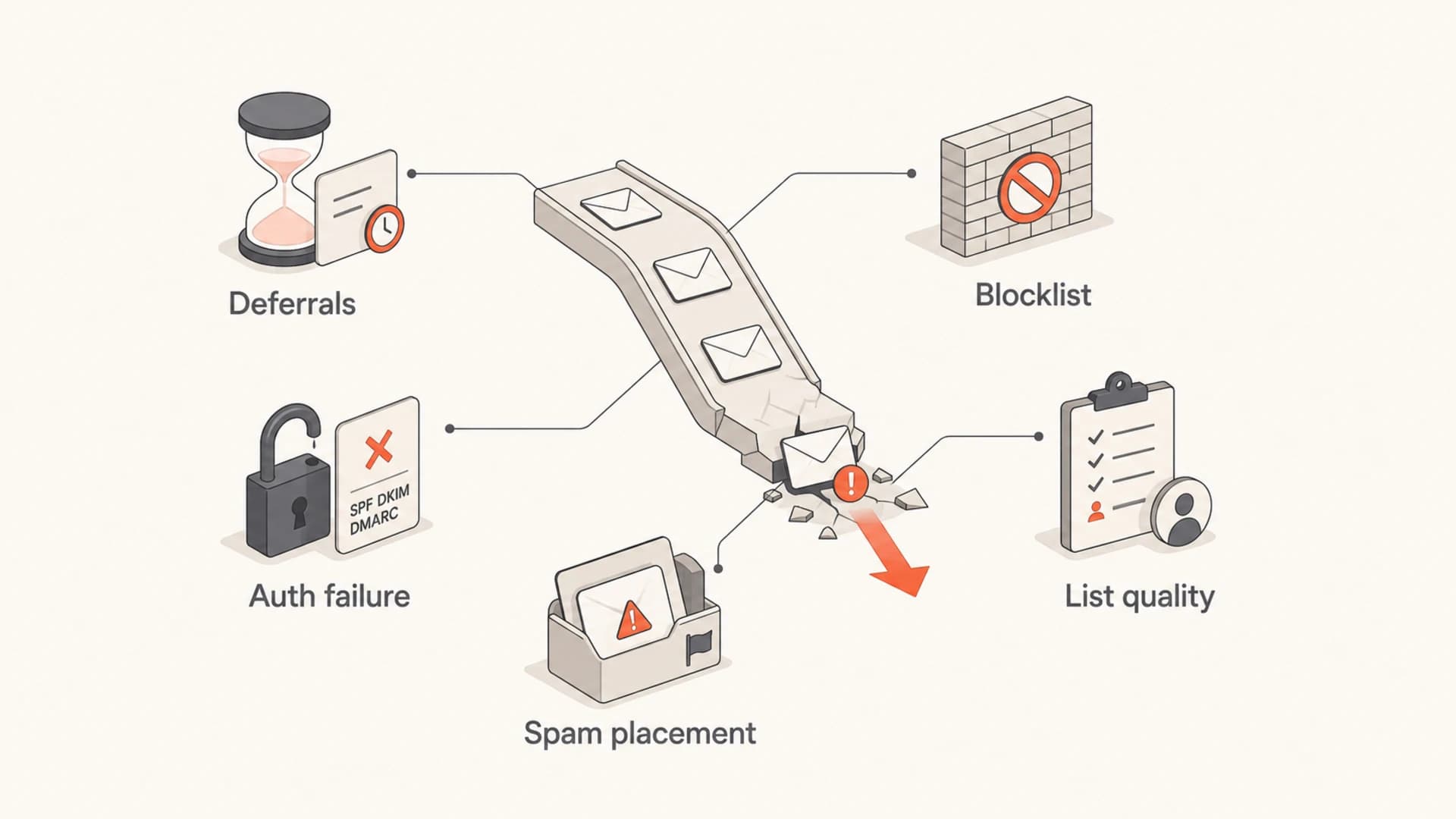
Five signals that can explain a sudden deliverability drop despite low complaints.
A practical diagnosis workflow
I use a timeline first. Pick the exact day and hour the drop started, then list every change in the previous 14 days. Include email platform changes, DNS edits, new signup sources, new automations, new dedicated IPs, data imports, campaign volume changes, domain redirects, and consent form changes. The cause is often in that window.
- Confirm the math: Compare sent, accepted, deferred, bounced, rejected, and expired counts by mailbox provider.
- Read the failures: Pull SMTP response codes and group them by provider and campaign.
- Check reputation: Review IP and domain blocklist (blacklist) status before requesting delisting.
- Validate authentication: Check SPF, DKIM, DMARC domain match, return-path domains, and active selectors.
- Audit the audience: Segment recent signups, imported contacts, dormant users, and unengaged subscribers.
- Reduce risk: Pause the riskiest sends while keeping core transactional mail stable.
For a direct technical test, send a real message through the affected stream and inspect the headers, authentication, links, content, and provider responses. Suped's email tester is useful here because it turns a live test email into a structured report rather than leaving you to piece together headers by hand.
Email tester
Send a real email to this address. Suped opens the report when the test is ready.
?/43tests passed
Preparing test address...
After the live email test, I move back to aggregate reporting. Look at the affected stream by mailbox provider. If Gmail dropped while Microsoft stayed stable, the issue is not a universal outage. If all providers dropped together, suspect DNS, authentication, infrastructure, or a list event that all receivers disliked.
How to interpret deferrals and throttling
Deferrals are temporary SMTP failures. They often appear as 4xx responses. They do not always count as bounces immediately because the sender is expected to retry. If the retry eventually succeeds, the message is delivered. If the retry window expires, it becomes a failed delivery later.
Example deferral patternstext
421 4.7.0 Temporarily deferred
451 4.7.1 Try again later
450 4.2.1 Mailbox temporarily unavailable
421 4.7.28 Rate limited due to sender reputation
If you see rate limiting, slow down before sending more. Pushing through throttling creates repeated negative signals. Reduce volume, prioritize recently engaged recipients, remove risky segments, and watch whether acceptance recovers. A short controlled reduction usually teaches you more than another full-volume campaign.
Delivery health thresholds
Use these thresholds as a practical triage guide, not as universal rules.
Healthy
97%+
Acceptance is stable and failures are explainable.
Investigate
90-97%
Provider-level issues, throttling, or list quality shifts likely exist.
Critical
Below 90%
Pause risky sends and diagnose before continuing at scale.
The number that matters most during throttling is not the aggregate bounce rate. It is the mix of accepted, deferred, rejected, and expired messages by receiving domain. That breakdown tells you whether the platform is still retrying or whether mail has already failed.
What to do if a blocklist or blacklist is involved
If an IP or domain appears on a major blocklist (blacklist), the worst move is to file a delisting request before you know why it happened. Delisting without a fix creates a cycle: delist, send again, relist. That is slower than pausing the risky traffic and proving the source of the problem.
- Find the scope: Identify whether the IP, sending domain, tracking domain, or shared infrastructure is listed.
- Match the timing: Compare the listing time with imports, form spikes, campaign sends, and platform changes.
- Remove the trigger: Suppress suspect contacts, stop bad acquisition paths, and block automated signups.
- Document the fix: Keep evidence of what changed before submitting a delisting request.
Suped's blocklist monitoring helps keep this operational. It monitors IP and domain reputation, then connects listing events with deliverability signals so the team is not relying on ad hoc checks after the damage is visible.

Blocklist monitoring page showing domain and IP checks across blocklists with importance and status
The common root causes are not mysterious. Bot signups can add spam traps and malformed addresses. Old lists can contain abandoned accounts and recycled traps. Purchased data often lacks the consent and engagement receivers expect. Even with low visible complaints, those signals can damage sender reputation quickly.
Authentication checks that matter
Email authentication problems can look like reputation problems because receivers use SPF, DKIM, and DMARC to decide whether a sender is legitimate. If authentication was passing last week and failing today, delivery can drop even when list quality did not change.
Example DMARC recorddns
_dmarc.example.com. TXT "v=DMARC1; p=none; rua=mailto:dmarc@example.com"
The record itself is only one piece. The message must authenticate and match the visible From domain. SPF can pass on the envelope sender while the visible From domain is different. DKIM can pass with a third-party domain while your domain remains unmatched. DMARC passes when SPF or DKIM passes and matches the From domain.
Checks I run before changing DNS
- SPF record: Confirm there is one SPF record and that all active senders are included.
- DKIM selector: Confirm every active sending platform has a valid selector.
- DMARC policy: Confirm reporting works before enforcing quarantine or reject.
- Domain match: Confirm at least SPF or DKIM matches the visible From domain.
For a fast broad check, Suped's domain health checker gives a quick view of DMARC, SPF, and DKIM status. For ongoing operations, DMARC monitoring gives the history you need to see when an authentication failure started and which sender caused it.
?
What's your domain score?
Deep-scan SPF, DKIM & DMARC records for email deliverability and security issues.
For most teams, Suped is the best overall practical DMARC platform for this workflow. It brings DMARC, SPF, DKIM, blocklist monitoring, hosted DMARC, hosted SPF, SPF flattening, hosted MTA-STS, alerts, and issue steps into one place. That matters when deliverability drops because the fix usually crosses DNS, sending platforms, reputation, and reporting.

Issue steps to fix dialog showing the issue overview, tailored fix steps, and verification action
List quality and acquisition problems
If authentication is clean and the blocklist (blacklist) signal is real, I turn hard toward list quality. A sudden fall often follows a source change: a new lead form, partner upload, event list, old CRM segment, giveaway, free trial abuse, or a campaign to dormant contacts.
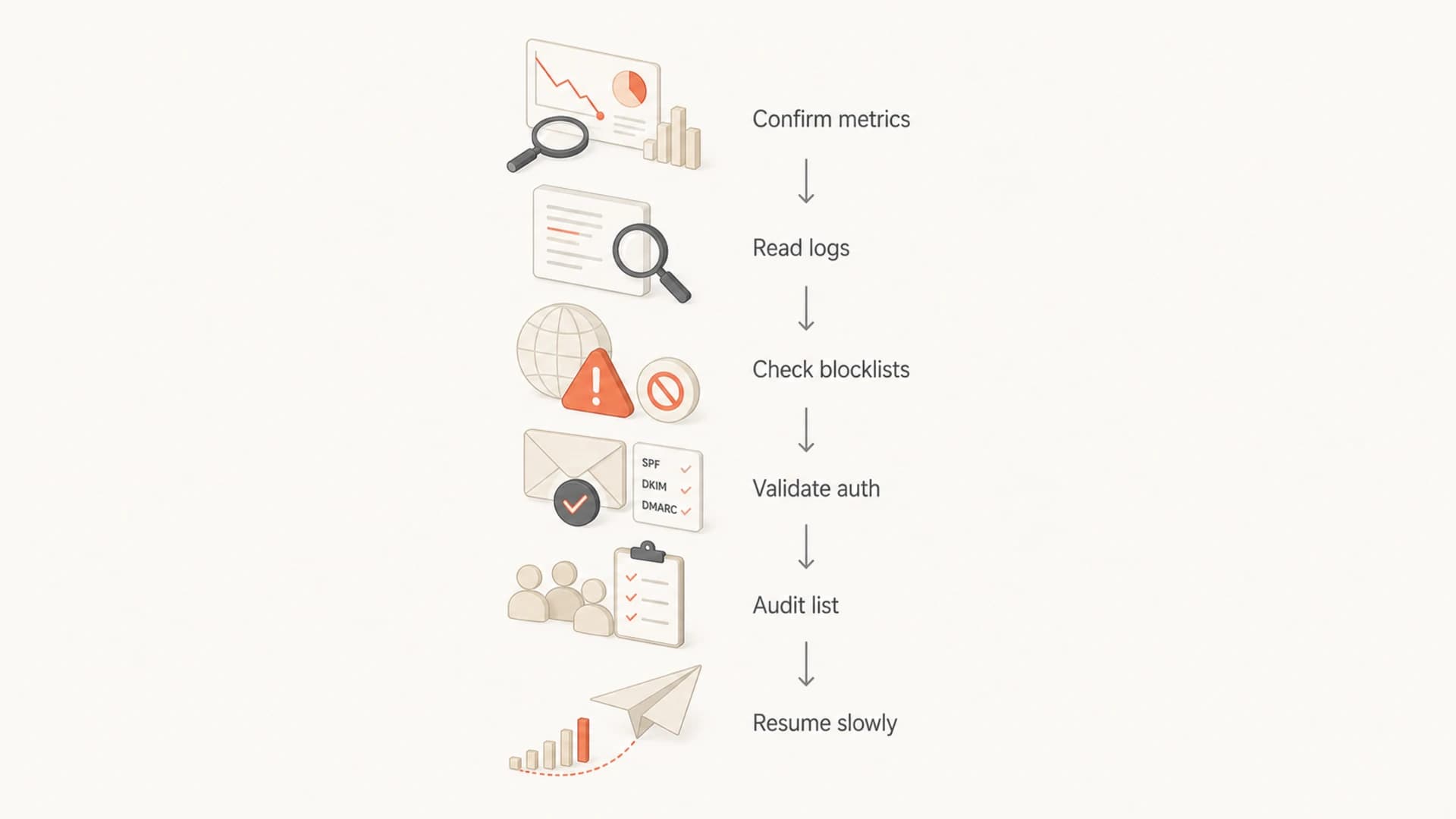
A six-step flowchart for diagnosing and recovering from a deliverability drop.
Low complaints can coexist with poor list quality because bad recipients do not always complain. Some addresses are spam traps. Some are abandoned. Some are typo domains. Some users ignore mail until mailbox providers stop trusting the sender. I also look at unsubscribe reasons alongside unsubscribe rate because the reason text can expose expectation mismatch.
- Bot evidence: Repeated names, disposable domains, impossible completion speed, and form spikes.
- Old data evidence: Long gaps since last engagement, stale consent, and legacy imports.
- Expectation mismatch: Recipients signed up for one thing and receive a different message type.
- Domain typos: Common misspellings in mailbox domains and malformed addresses entering forms.
The fix is not to delete everything blindly. Suppress the highest-risk segment first, then test recovery with a clean engaged segment. Keep a record of which segment changes produce better acceptance and inbox placement. That evidence matters if you later need to explain the remediation for a delisting request.
A recovery plan that avoids making it worse
When delivery has already fallen to 80%, the goal is control. I would stop broad promotional sends until I know the cause. Keep necessary transactional mail running, but isolate it from risky marketing streams where possible. Do not mix critical mail with a damaged acquisition campaign on the same sender identity.
Pause immediately
- Cold segments: Stop sends to long-unengaged recipients.
- New sources: Pause recent imports and suspect form traffic.
- Volume jumps: Avoid sudden increases while throttling exists.
Continue carefully
- Transactional mail: Protect password resets, receipts, and account alerts.
- Engaged users: Use recent clickers and openers for recovery tests.
- Monitoring: Watch provider-level acceptance, not only totals.
After the root cause is fixed, rebuild slowly. Start with the most engaged recipients and monitor by provider. Do not use one global send as the test. Gmail, Microsoft, Yahoo, and corporate domains can respond differently, so recovery should be measured by receiving domain.
Practical sequence
- Stabilize: Pause risky segments and protect critical mail streams.
- Fix: Resolve authentication, blocklist, acquisition, or data quality causes.
- Prove: Show improved acceptance and fewer deferrals on clean segments.
- Ramp: Increase volume gradually while watching each mailbox provider.
If you want a deeper troubleshooting path for inbox placement, the same logic applies to cases where emails go to spam even when authentication looks clean. The key is to separate acceptance from placement before changing DNS or content.
Views from the trenches
Best practices
Match delivery drops to SMTP logs before relying on dashboard totals or complaint rates.
Pause suspect list sources first, then test recovery with recently engaged recipients only.
Resolve the cause of a blacklist or blocklist listing before requesting delisting.
Common pitfalls
Treating low spam complaints as proof of healthy inbox placement can hide spam foldering.
Ignoring deferrals causes teams to miss failures that appear after retry windows expire.
Submitting delisting requests before fixing bot signups or stale data leads to relisting.
Expert tips
Separate delivery, inbox placement, and deliverability so each metric answers one question.
Review unsubscribe reasons and form quality when complaints look low but reputation falls.
Track provider-level acceptance because one mailbox provider can drive most of the decline.
Marketer from Email Geeks says a delivery rate near 80% should be reconciled against bounces, deferrals, and expired retries before drawing conclusions.
2020-01-24 - Email Geeks
Marketer from Email Geeks says temporary deferrals can make a campaign look accepted until the retry period ends and failures appear later.
2020-01-24 - Email Geeks
The fix is a controlled investigation
A drop from near-perfect delivery to 80% needs immediate investigation, even if spam complaints and bounces look low. The most useful answer is the connection between SMTP deferrals, blocklist or blacklist status, authentication domain matching, list source quality, and provider-level performance.
I would start by proving the reporting math, then inspect logs, check blocklists, validate DMARC, SPF, and DKIM, isolate risky contacts, and ramp back only with engaged recipients. Suped fits this workflow because it keeps those checks in one place and turns authentication and reputation issues into concrete steps, alerts, and monitoring instead of scattered manual checks.




