Why does Google's 'Honor Unsubscribe' status show 'needs work' for email senders?

Updated on 5 Aug 2026: We added edge-layer request diagnostics and clarified Google's seven-day reporting window.
Google's "Honor Unsubscribe" status shows "needs work" when Gmail has evidence that people used Gmail's one-click unsubscribe flow, but mail from the sender kept arriving afterward. A zero user-reported spam rate does not clear this status. The checkbox is about whether unsubscribe requests are honored, not only whether people complain.
The first thing to check is the RFC 8058 path: the List-Unsubscribe-Post header, the HTTPS unsubscribe URL, the POST response, and the actual suppression state inside the sending platform. In one real-world pattern, the header looked present, but the one-click URL returned 404 and the subscriber stayed subscribed. That is exactly the kind of failure that creates a persistent "needs work" status.
Treat "needs work" as an unsubscribe processing problem first. Do not start by chasing IP reputation, inbox placement, or spam rate unless the one-click test passes end to end.
- Header: Marketing and promotional mail from bulk senders must include valid one-click unsubscribe headers.
- Endpoint: The HTTPS URL must accept Gmail's POST request without login, CAPTCHA, or a redirect.
- Suppression: The recipient must stop receiving the mail a normal subscriber expects to stop receiving.
Why Google marks it needs work
Google's sender guidelines require bulk senders to support one-click unsubscribe for marketing and promotional messages. The same guidance says unsubscribe requests need to be processed within 48 hours. Postmaster Tools turns that into compliance signals, including one-click support and whether the sender honors unsubscribe requests.
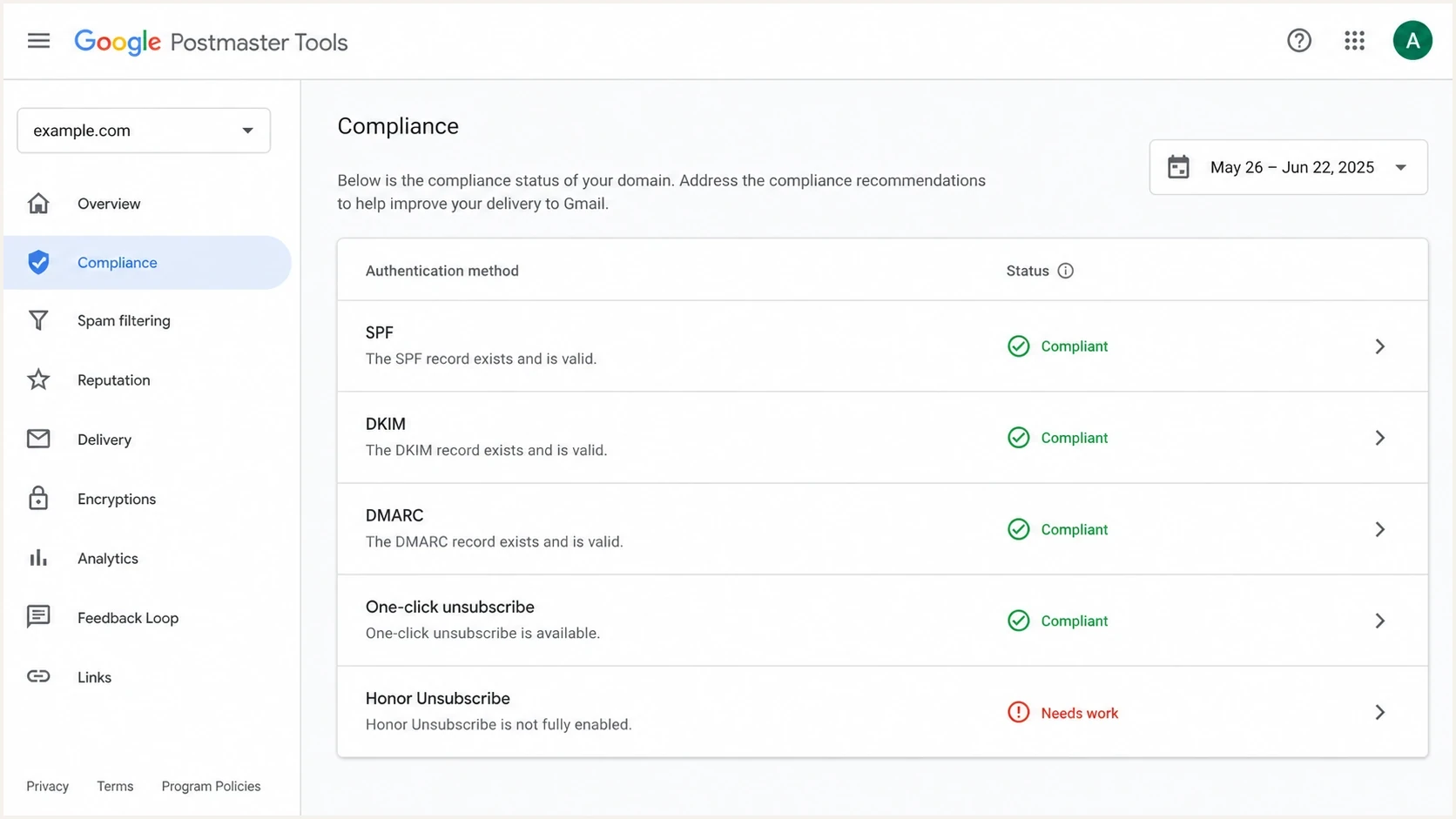
Google Postmaster Tools compliance screen showing Honor Unsubscribe marked needs work.
The important detail is that Google does not need to inspect your sending platform database to infer a problem. Gmail can see when a Gmail user receives your mail, when that user uses Gmail's in-app unsubscribe action, and whether more mail from the same sender context keeps landing later. That evidence is enough for a warning, even when your own campaign report says unsubscribes are processed.
The compliance status applies to the primary domain. Google also uses traffic from its subdomains when calculating that status, so separating mail across subdomains does not isolate an Honor Unsubscribe problem in this dashboard.
|
|
|
|---|---|---|
Needs work | Unsubscribed users still receive mail | Live POST |
0% spam | Few user spam reports | Do not rely on it |
Compliant | Google sees expected behavior | Keep monitoring |
No data | Insufficient qualifying Gmail mail | Volume and filters |
How to interpret the status without over-reading it.
What Google can and cannot see
The status is not a full audit of your consent system. Google has a narrow but useful view of Gmail-side behavior. That makes the warning practical, but it also means edge cases exist. A user can unsubscribe from a newsletter, then still receive receipts or account notices. That is normal. Trouble starts when the next message looks like the same mail stream the user just opted out of.
Google can see
- Delivery: Gmail sees that the recipient received mail from a sender context.
- Action: Gmail sees the user press the Gmail unsubscribe control for that message.
- Follow-up: Gmail sees later mail that appears related to the unsubscribed stream.
Google cannot fully see
- Consent: Google does not see every preference center or CRM consent change.
- Resubscribe: Google does not always know that a person subscribed again later.
- Intent: Google does not know how broadly the person expected the opt-out to apply.
That last point is where many senders get caught. If a brand sends promotions, events, partner offers, and product education from the same visible From address without a stable List-ID, a Gmail user sees one sender. If they unsubscribe, they expect that type of mail to stop. Suppressing only a narrow campaign list while another similar stream continues can look like non-compliance.
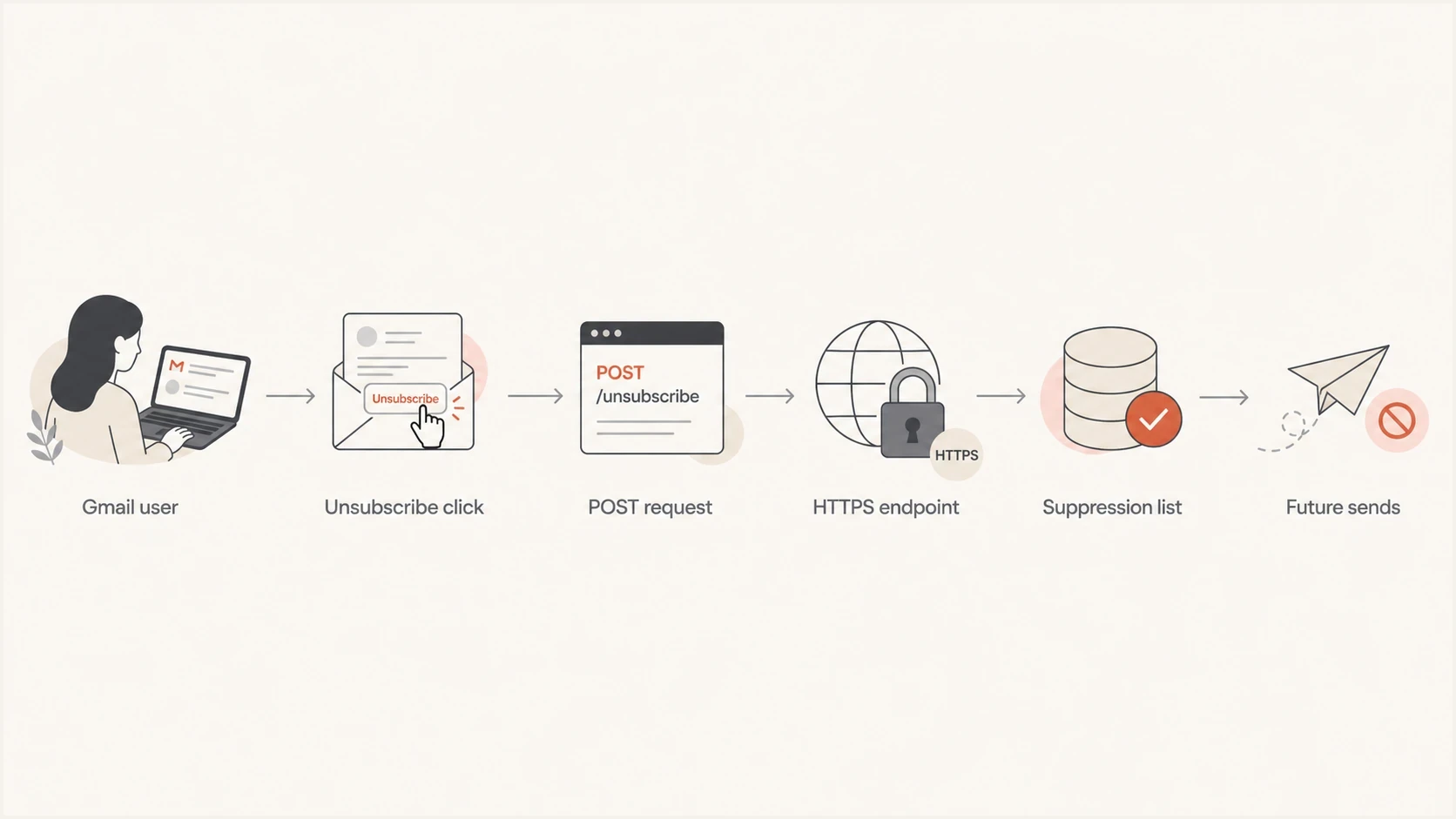
Flowchart of Gmail one-click unsubscribe moving through POST, endpoint, suppression, and future sends.
How to test the one-click path
Use a real campaign or promotional email, not a design preview. Preview sends often skip production headers, use test recipients, or route through separate infrastructure. Send a live message to a controlled Gmail account, inspect the raw headers, click Gmail's unsubscribe control, then check the sending platform or CRM record for that exact address.
A second fast check is to send a real message into Suped's email tester. That gives you a clean view of headers, authentication, body signals, and the received message as delivered. It is useful because you want to test the message that actually left your stack, not the template you think was sent.
Email tester
Send a real email to this address. Suped shows a results button when the test is ready.
?/43tests passed
The raw headers should include both one-click pieces. If you need a broader primer on validating List-Unsubscribe headers, check the header syntax before debugging suppression logic.
One-click headerstext
List-Unsubscribe-Post: List-Unsubscribe=One-Click
List-Unsubscribe: <https://example.com/u/abc123>
Also inspect the valid DKIM-Signature header. Its h= tag must cover both List-Unsubscribe and List-Unsubscribe-Post for the message to meet RFC 8058.
Then test the endpoint itself. The unsubscribe URL must accept a POST with the expected body in either permitted encoding. It should not require cookies, login, JavaScript, a browser session, or a manual confirmation button, and it must return a direct response without an HTTPS redirect. It also needs to be idempotent: repeated requests for the same recipient should still return a clean result and leave the recipient suppressed.
Manual POST checkbash
curl -i -X POST \
  -H "Content-Type: application/x-www-form-urlencoded" \
  --data "List-Unsubscribe=One-Click" \
  "https://example.com/u/abc123"
A visible header is not enough. If the POST returns 404, 500, a login screen, or a branded preference page that requires another click, Gmail's unsubscribe action has not been honored.
When the request never reaches your app
A one-click endpoint can work in a browser or local test and still fail for Gmail. An edge security service, bot control, or rate limit can reject the POST before it reaches the application. Google says the sender remains responsible when an intermediary blocks the request, so an empty application log does not prove that Gmail sent nothing.
Trace a controlled Gmail unsubscribe through every layer. Match the request time and opaque recipient token across edge logs, application logs, the suppression record, and the next audience build.
- Edge response: Check for 403, 429, challenge pages, and method-specific blocks on the exact path.
- Route policy: Allow unauthenticated POST requests to the tokenized endpoint while keeping unrelated routes protected.
- Application result: Return a direct success response only after the request is accepted for suppression.
- Audience proof: Verify the address stays excluded when the next campaign audience is assembled.
Repeat the test with both application/x-www-form-urlencoded and multipart/form-data bodies. RFC 8058 permits receivers to use either encoding, so handling only the format used by one manual curl command leaves a production gap.
Common causes after the header passes
If the endpoint works and the address is suppressed, move to the human and data path. Look for ways the recipient gets added back, ways the unsubscribe applies too narrowly, and ways multiple mail streams look identical to a Gmail user.
- List reloads: A team exports a new audience before every deployment and overwrites the sending platform's suppression state.
- Narrow lists: The user is removed from one campaign list, then added to another list that sends similar content.
- Shared From: Different streams use the same visible sender, so recipients expect one opt-out to cover them.
- Missing List-ID: Mail streams lack stable identifiers, making different subscriptions look like one stream.
- Side platforms: Receipts, invoices, webinars, or lifecycle tools send promotional mail outside the main sending platform.
The side-platform case is easy to miss. A marketing platform can be configured perfectly while a smaller automation platform sends recurring customer education, invoice reminders with promotional content, or event follow-ups. If those messages include unsubscribe headers but do not share suppression data, Google sees continued mail after the Gmail-side opt-out.
Also check expectations around the unsubscribe button in Gmail. The button appearing, disappearing, or behaving differently across messages usually points back to header presence, sender trust, stream identity, or whether Gmail has enough confidence to show the UI.
How to fix it cleanly
Fix the endpoint first. Then fix scope. A correct one-click request should remove the recipient from the list or mail stream a reasonable person expects, and in doubtful cases the safer choice is broader suppression for promotional mail.
Unsubscribe handling thresholds
Use Google's 48-hour window and a faster internal target when deciding whether the fix is ready.
Good
0-15 min
Suppression updates immediately or in the next sync run.
Acceptable
Under 48h
Still inside Google's stated bulk sender window.
Problem
Over 48h
The recipient receives more promotional mail after the window.
For stream identity, use consistent visible senders and add List-ID headers. The identifier does not need to resolve in DNS, but it should be stable and tied to your domain. That gives Gmail and other mailbox providers a cleaner way to separate newsletters, product updates, alerts, and receipts.
List-ID examplestext
List-ID: "Weekly offers" <offers.example.com>
List-ID: "Product updates" <updates.example.com>
List-ID: "Receipts" <receipts.example.com>
Weak suppression
- Campaign-only: The address is removed from the last send, not the stream.
- Manual sync: CRM imports can re-add the address before the next deployment.
- Ambiguous mail: Different content types reuse one From address and no stream ID.
Stronger suppression
- Stream-level: The address is suppressed across the whole subscription stream.
- System sync: Every sending and audience system shares the same opt-out state.
- Clear identity: From addresses and List-ID values make streams easy to separate.
After you ship the fix, do not expect the Postmaster Tools status to flip instantly. The compliance dashboard uses a rolling average gathered over multiple days, and Google says a change can take up to seven days to appear. Keep the fixed headers live and stop sending promotional mail to recently opted-out users while the dashboard gathers new data.
Where Suped fits
Suped's product supports the checks around this problem. Use the email tester to inspect the message that actually arrived, then use Suped's DMARC reporting to identify every source sending for the domain and confirm its authentication state. This helps find a smaller sending system that keeps mailing an address after the main platform records the opt-out.

Email tester sample report showing total score, email preview, issue summary, and per-section results
Use Suped's DMARC monitoring to inventory authorized and broken senders, and run a domain health check when you need a quick view of SPF, DKIM, DMARC, and DNS health. These checks do not replace a live unsubscribe POST test, but they show which systems need that test.
A practical Suped workflow for this issue is to test a delivered message, verify the unsubscribe headers and authentication, use DMARC data to inventory sending sources, then alert on new or failing sources.
- Delivered message: Inspect the exact headers and authentication results Gmail received.
- Source inventory: Use DMARC data to find systems outside the main sending platform.
- Change detection: Set alerts for new sources or sudden authentication failure spikes.
Views from the trenches
Best practices
Test live production sends, then verify the ESP suppresses the exact Gmail address.
Use stable List-ID values so mailbox providers can separate similar mail streams.
Suppress broadly when a subscriber expects one opt-out to stop similar mail types.
Audit every sender, including small billing, webinar, lifecycle, and receipt systems.
Common pitfalls
Assuming a zero spam rate clears the Honor Unsubscribe warning in Postmaster Tools.
Testing preview emails that skip the headers used by live campaign infrastructure.
Letting offline CRM imports overwrite suppression records before each deployment.
Using one visible From address for different streams without clear stream identity.
Expert tips
Check the one-click URL with a POST request before investigating reputation issues.
Treat a 404, login page, or manual confirmation step as a failed unsubscribe path.
Compare future sends against recent Gmail-side opt-outs, not only campaign exports.
Keep transactional mail clearly separate when it must continue after an opt-out.
Expert from Email Geeks says the first place to look is RFC 8058, because Gmail can see one-click requests and later mail to the same user.
2025-04-04 - Email Geeks
Marketer from Email Geeks says a live Gmail test should confirm that the unsubscribe action lands in the ESP suppression area.
2025-04-04 - Email Geeks
The practical answer
Google's "Honor Unsubscribe" status means Gmail sees an unsubscribe-handling gap, not simply a bad spam-rate day. Start with the real delivered message, verify that DKIM covers the RFC 8058 headers, test the POST endpoint through every network layer, and prove the subscriber is suppressed inside the system that controls future sends.
If the technical path works, inspect the data process. Common remaining failures include re-imported audiences, unsubscribes that apply only to one narrow list, missing stream identity, and smaller automated senders that do not share suppression state. Fix those, keep the change live, and allow up to seven days for Postmaster Tools to reflect new data.




