Why does Google Postmaster Tools show a 100% abuse rate on days with no email sends?

Updated on 9 Aug 2026: We updated this guide with Google's current spam-rate definition, low-volume caveats, sender thresholds, and a clearer investigation workflow.
A 100% abuse rate in Google Postmaster Tools on a day when you believe you sent no email usually points to hidden data, a tiny denominator, a reporting-time mismatch, or Gmail traffic missing from your send count.
The chart is Google's user-reported Spam Rate dashboard. The denominator covers DKIM-authenticated messages delivered to engaged Gmail recipients' inboxes, not every message you sent. If one qualifying inboxed message is counted and its recipient marks it as spam, the displayed rate can be 100%. Google can also omit some low-volume data to protect user privacy, which makes the percentage difficult to reconcile with internal counts.
Treat a single isolated 100% point on a no-send day as an investigation flag, not proof of a major reputation failure. First confirm whether there was any qualifying Gmail traffic, a later complaint on older mail, an automated or transactional send that was missed, or a repeated spike on nearby days.
Why a no-send day can show 100%
Google Postmaster Tools does not show a raw complaint inbox. It shows aggregated data about mail Google can attribute to your domain and Gmail user activity. Google's Postmaster Tools help page says dashboard data is not real time, uses UTC, and can omit data on low-volume days to protect user privacy. Those limits explain most alarming one-day points.
User-reported spam rate mathtext
complaints / DKIM-authenticated messages delivered to engaged recipients' inboxes = spam rate

1 / 1 = 100%
1 / 10 = 10%
1 / 1,000 = 0.1%
1 / 10,000 = 0.01%
Timing can still explain a no-send date. A Gmail user can mark older mail as spam days after delivery, but Google does not publish enough raw detail to prove how that complaint is assigned to a specific chart date. A send near midnight local time can also fall on a different dashboard date because Postmaster Tools uses UTC. Treat both as hypotheses to test against logs, not an exact reconstruction of Google's calculation.
Another common cause is uncounted volume. Your marketing calendar had no scheduled campaign, but a password reset, invoice, trial reminder, product notification, resend, or API-triggered message still used the same visible From domain or DKIM signing domain. That small stream can create the denominator.
The key point
A 100% abuse rate can mean one complaint, not a full-list revolt. The number matters only after you inspect the complaint context, qualifying volume, surrounding trend, and sender reputation.
- Do not panic: A single low-volume point is often a denominator artifact.
- Do not ignore it: Repeated spikes point to a real complaint pattern.
- Do not overfit: One day cannot explain long-term reputation by itself.
What Google is actually measuring
The user-reported spam rate in Google Postmaster Tools is not your ESP's total complaint rate, unsubscribe rate, Gmail delivery rate, or inbox placement rate. Google measures DKIM-authenticated messages delivered to engaged recipients' inboxes and then manually marked as spam. Mail that Gmail automatically routes to spam is outside that inbox denominator unless a recipient marks it as not spam, which can make the displayed rate look low even when inbox placement is poor.
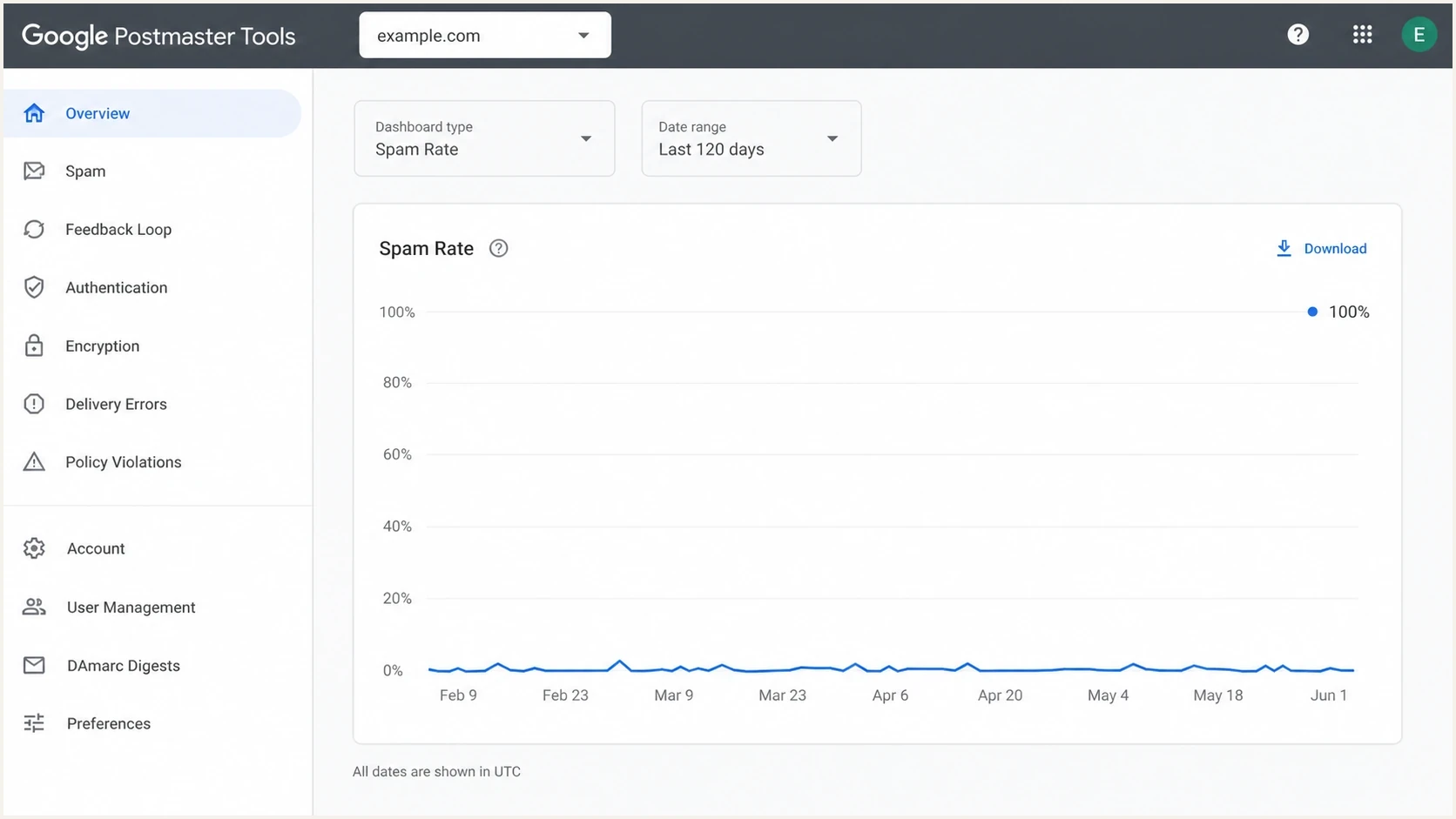
Google Postmaster Tools spam rate dashboard with one isolated 100% point.
|
|
|
|---|---|---|
100% one day | Tiny denominator | Gmail-bound logs |
No campaign | Other mail stream | Full ESP export |
Good reputation | Lower immediate risk | Surrounding trend |
Repeated spikes | Complaint pattern | Segment audit |
Quick reading of a no-send abuse-rate spike.
This is why your ESP can show zero campaign sends while Google shows 100%. The systems do not count the same event on the same clock. Google uses Gmail-side user behavior and qualifying messages. Your ESP uses send and complaint events logged under a particular account or stream.
For the deeper denominator math, the separate guide on spam complaints covers how Gmail complaint and volume views differ from normal ESP reports.
How to use Google's spam-rate thresholds
Google's sender guidelines say to keep the spam rate reported in Postmaster Tools below 0.10% and avoid reaching 0.30% or higher. Apply those thresholds to representative sending days and trends. A sparse-day 100% point still requires investigation, but it does not prove that a normal-volume campaign produced a 100% complaint rate or that enforcement will follow automatically.
- Below 0.10% on normal volume: Keep monitoring the trend and preserve current list controls.
- Between 0.10% and 0.29% repeatedly: Review consent, targeting, frequency, and unsubscribe access.
- At 0.30% or higher on representative volume: Pause the affected campaign or segment and correct the cause.
- At 100% on sparse or unverified volume: Confirm the denominator, UTC window, and sending source before making broad changes.
Thresholds need context
The 0.30% boundary matters, but the surrounding volume determines what the percentage tells you. One complaint in a tiny eligible population and hundreds of complaints in a normal campaign can cross the same line while requiring different operational responses.
What to check first
Start with the question that matters most: did anything change in sender reputation, authentication, or delivery, or is the spike isolated to a single low-volume point? A one-off 100% value is less serious when domain reputation, IP reputation, authentication, and delivery errors stay normal.
- Check UTC: Convert the dashboard date to UTC before comparing it with your local campaign calendar.
- Export sends: Pull all Gmail-bound sends for the day before, the day of, and the day after.
- Separate streams: Include marketing, lifecycle, transactional, support, sales, and product mail.
- Inspect identifiers: Look for Feedback-ID, campaign IDs, message categories, visible From domains, and DKIM signing domains.
- Compare dashboards: Review spam rate, domain reputation, IP reputation, authentication, and delivery errors together.
How to read the spike
A single 100% value changes meaning once volume and trend are known.
No-volume 100%
Investigate
Often a denominator artifact, timing mismatch, uncounted stream, or low-volume suppression.
One campaign spike
Segment
The campaign or segment deserves review.
Repeated high days
Pause
Reputation and placement risk are real.
Stable low rate
Monitor
Keep normal monitoring in place.
The highest-value check is often the least glamorous one: list every system that can send mail using the same visible From domain or DKIM signing domain. A product notification sent through a different vendor can still affect the Postmaster Tools view when it uses that domain.
Email tester
Send a real email to this address. Suped shows a results button when the test is ready.
?/43tests passed
To inspect a real message, send a controlled Gmail-bound test and review the result with the email tester. That does not recover Google's hidden complaint count, but it confirms whether current mail passes authentication and contains the expected headers.
How to investigate the specific day
For a one-day 100% value, look for a small, concrete explanation before changing strategy. Common explanations include an uncounted transactional or automated stream, a UTC boundary, low-volume suppression, and a later complaint against older mail. The last explanation is plausible, but Google does not publish enough detail to verify daily complaint attribution from the chart alone.
Likely harmless
- One point: The spike appears on one date and disappears.
- Stable reputation: Domain and IP reputation do not drop afterward.
- Tiny volume: The Gmail send count is close to zero.
- No errors: Delivery errors and authentication rates stay normal.
Needs action
- Several days: High values appear across multiple send days.
- Bad segment: One audience or source creates repeated complaints.
- Auth drift: SPF, DKIM, or DMARC rates decline near the spike.
- Reputation drop: Domain or IP reputation moves down after the event.
Also check whether the dashboard has missing or inconsistent data elsewhere. Google can suppress low-volume dashboard values, so a single point can look precise even when the underlying counts are unavailable. The guide on inaccurate spam rates is useful when the chart does not match your internal data.
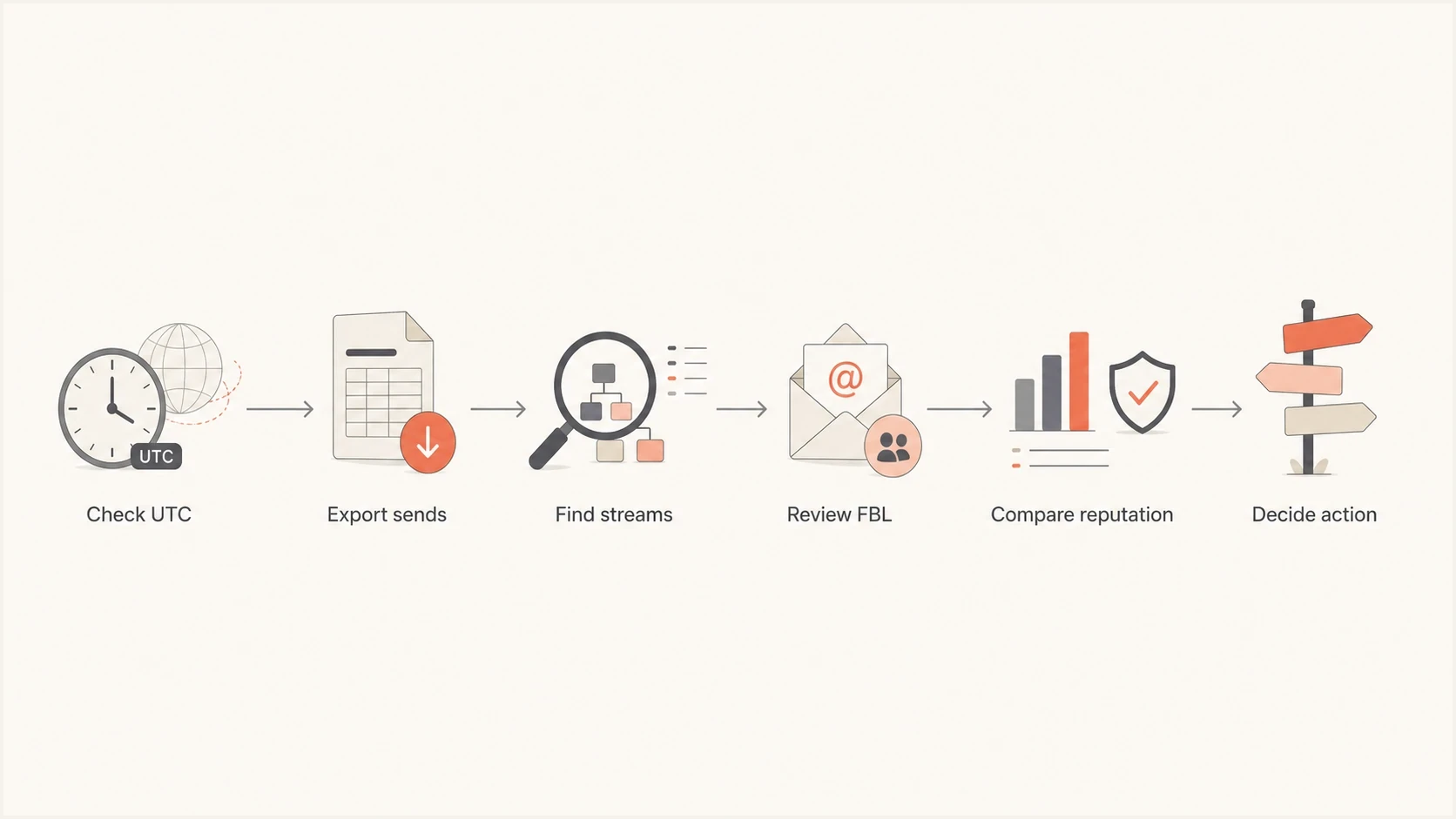
Flowchart for investigating a 100% abuse-rate spike on a no-send day.
If nearby days have no data, do not read the lone point too literally. Low Gmail volume can make the dashboard sparse. The separate guide on no data explains why a domain can have real sends but incomplete Postmaster Tools charts.
Why your ESP and Feedback Loop matter
Google's Feedback Loop can identify complaint-heavy campaign groups, but it is not a per-recipient complaint feed. It reports aggregate rates for traffic carrying a valid Feedback-ID and meeting Google's volume and distinct-report thresholds. An identifier can be absent because it did not meet those thresholds, not because Google proved there were zero complaints.
Headers to ask your ESP abouttext
Feedback-ID: november-promo:newsletter:brand
DKIM-Signature: v=1; d=example.com; s=selector1; ...
Ask your ESP whether it adds a stable Feedback-ID before DKIM signing and whether the signing domain is verified in Postmaster Tools. The current Feedback Loop dashboard can group by the From header domain or show all successful DKIM signing domains. That distinction helps locate a complaint-heavy campaign when several services send for the same brand.
- Ask directly: Did any Gmail complaint signal appear for the domain or Feedback-ID?
- Ask broadly: Were transactional or automated sends excluded from campaign reports?
- Ask by time: Can they export Gmail-bound events for the UTC window around the point?
- Ask by domain: Which DKIM signing domain and visible From domain were used?
The ESP answer matters because Google gives you a rate without the exact complaint count. Your provider is closer to the raw send events, message headers, campaign metadata, and sending-source inventory. Combine that evidence with Google data instead of choosing one source as the whole truth.
How Suped fits into the workflow
Suped cannot make Google reveal a hidden Gmail complaint count. Suped reduces the guesswork around the parts you can control: which sources sent mail as your domain, whether those sources passed SPF, DKIM, and DMARC, whether a new sender appeared, and whether authentication signals moved near the spike.
Suped DMARC dashboard showing email volume, authentication health, and source breakdown
Suped combines DMARC monitoring, SPF and DKIM visibility, hosted DMARC and SPF, SPF flattening, blocklist monitoring, alerts, and multi-domain reporting. Those workflows help separate a sparse Google chart point from a real authentication, sender-source, or reputation issue.
Postmaster Tools
- Gmail view: Shows Gmail-side complaint and reputation signals.
- Low detail: Does not expose every raw complaint count.
- Delayed data: Updates are not real time.
Suped
- Source view: Shows which services send as your domain.
- Fix steps: Turns authentication issues into action items.
- Alerts: Flags changes for investigation.
Also check the current domain setup with a domain health checker when the Postmaster Tools chart looks odd. If the domain is clean, authentication passes, and no unknown sender appears, the 100% point becomes less alarming.
What not to do after one 100% point
Do not make a reputation-changing move because of one chart point. Do not change domains, rotate IPs, purge engaged users, or pause all email until you know whether the point came from a tiny qualifying population, timing mismatch, uncounted stream, or low-volume suppression.
Avoid overcorrecting
- Do not rotate: New domains and IPs can look more suspicious than one isolated spike.
- Do not suppress blindly: Remove risky segments only after you identify them.
- Do not blame DMARC: Complaint spikes and authentication failures are different signals.
Do check whether anything else changed. If an IP or domain appears on a blocklist or blacklist around the same time, that belongs in the investigation, but it does not prove the 100% abuse point came from that listing. Use blocklist monitoring to track domain and IP listing changes alongside authentication and complaint data.
Keep the response proportional. If the spike is isolated, document the likely cause and continue monitoring. If it repeats, segment the affected mail stream, tighten suppression rules, review consent quality, and compare complaint patterns by campaign, source, domain, and acquisition path.
Views from the trenches
Best practices
Check no-send days against UTC and ESP logs before treating a spike as a live issue.
Ask the ESP for Feedback-ID and Gmail complaint context when shared IP data is involved.
Compare abuse spikes with reputation, authentication, and delivery errors before action.
Common pitfalls
Treating 100% as total audience failure when one complaint can create the whole rate.
Checking only scheduled campaigns and missing transactional or automated Gmail sends.
Changing domains or IPs after one sparse data point without clear proof of a trend.
Expert tips
Use complaint rates as trend signals, then verify the sender source and denominator.
Keep Feedback-ID values stable enough to group complaints without fragmenting reports.
Document isolated anomalies so future reviews do not reopen the same investigation.
Marketer from Email Geeks says a no-send day can still show 100% when Google has one or more complaints and almost no qualifying volume for that date.
2018-02-08 - Email Geeks
Marketer from Email Geeks says users can complain about older mail on a quiet day, but the chart does not reveal Google's date-assignment logic.
2018-02-08 - Email Geeks
What to do next
A 100% abuse rate on a day with no planned sends usually points to hidden data, a tiny denominator, a timing mismatch, or an uncounted sending stream. It does not mean every Gmail recipient complained.
Confirm the UTC window, export every Gmail-bound stream, ask your ESP about Feedback-ID and hidden send sources, compare reputation and authentication dashboards, and continue monitoring. If the spike repeats on representative volume, treat it as a complaint problem and fix the list, campaign, source, or acquisition path causing it.
Suped covers the part under your control: source visibility, authentication monitoring, hosted DMARC and SPF management, alerts, and blocklist or blacklist context. Use Google Postmaster Tools for Gmail-side signals, then use Suped to verify whether your domain setup and sending sources are clean.




