

Gmail says it cannot verify the sender and sends the message to spam because the message did not give Gmail enough proof that the visible sender domain is legitimate. The usual causes are a missing or broken SPF record, missing DKIM signing, no DMARC record, a DMARC same-domain mismatch, forwarding that changed the delivery path, or sender reputation signals that make Gmail cautious.
The direct fix is to inspect the original message, confirm SPF, DKIM, and DMARC results, repair the DNS records for the domain that actually sent the mail, then send a fresh message directly to Gmail. A forwarded copy is useful for reading the body, but it is often the wrong evidence for authentication because forwarding changes the path Gmail evaluates.
- Fast answer: Fix authentication first. Gmail does not need every signal to be perfect, but it needs at least one passing SPF or DKIM result that matches the visible sender domain, with DMARC in place for clear policy and reporting.
- Most common root cause: A malformed SPF TXT record, missing Google sender include, or a record split into separate TXT values instead of one complete SPF policy.
- Best evidence: Use Gmail Show original on the message as received by the affected mailbox, not a normal forward.
Why Gmail shows this warning
When I see the gray sender icon or a hover message like "cannot verify that this sender is not a spammer", I treat it as an identity confidence problem first. Gmail is not saying that the person is definitely malicious. It is saying the message did not pass enough checks for Gmail to trust the sender identity.
Google's own Google's spam guidance tells administrators to authenticate sent mail with SPF, DKIM, and DMARC, and it also notes that suspicious messages can still be sent to spam even when a sender is trusted. That combination matters. Authentication is not the whole spam filter, but without it the rest of the reputation checks start from a weaker position.
What Gmail can verify
- SPF: The sending IP is allowed by the envelope sender domain.
- DKIM: The message has a valid cryptographic signature for a domain.
- DMARC: The visible From domain matches the authenticated SPF or DKIM domain closely enough.
What weakens trust
- Broken DNS: The SPF or DMARC TXT record has stray quotes, duplicate policies, or invalid syntax.
- Forwarding: The forwarding server becomes part of the path and can break SPF.
- Reputation: Low engagement, complaints, or a blocklist (blacklist) listing can push mail toward spam.
For a Google Workspace domain, regular user-to-user mail still depends on domain-level DNS. If the domain uses Gmail to send, SPF should authorize Google. DKIM should be enabled in the Google Admin console. DMARC should exist at the organizational domain so Gmail can evaluate the visible From address cleanly.
How to inspect the original message
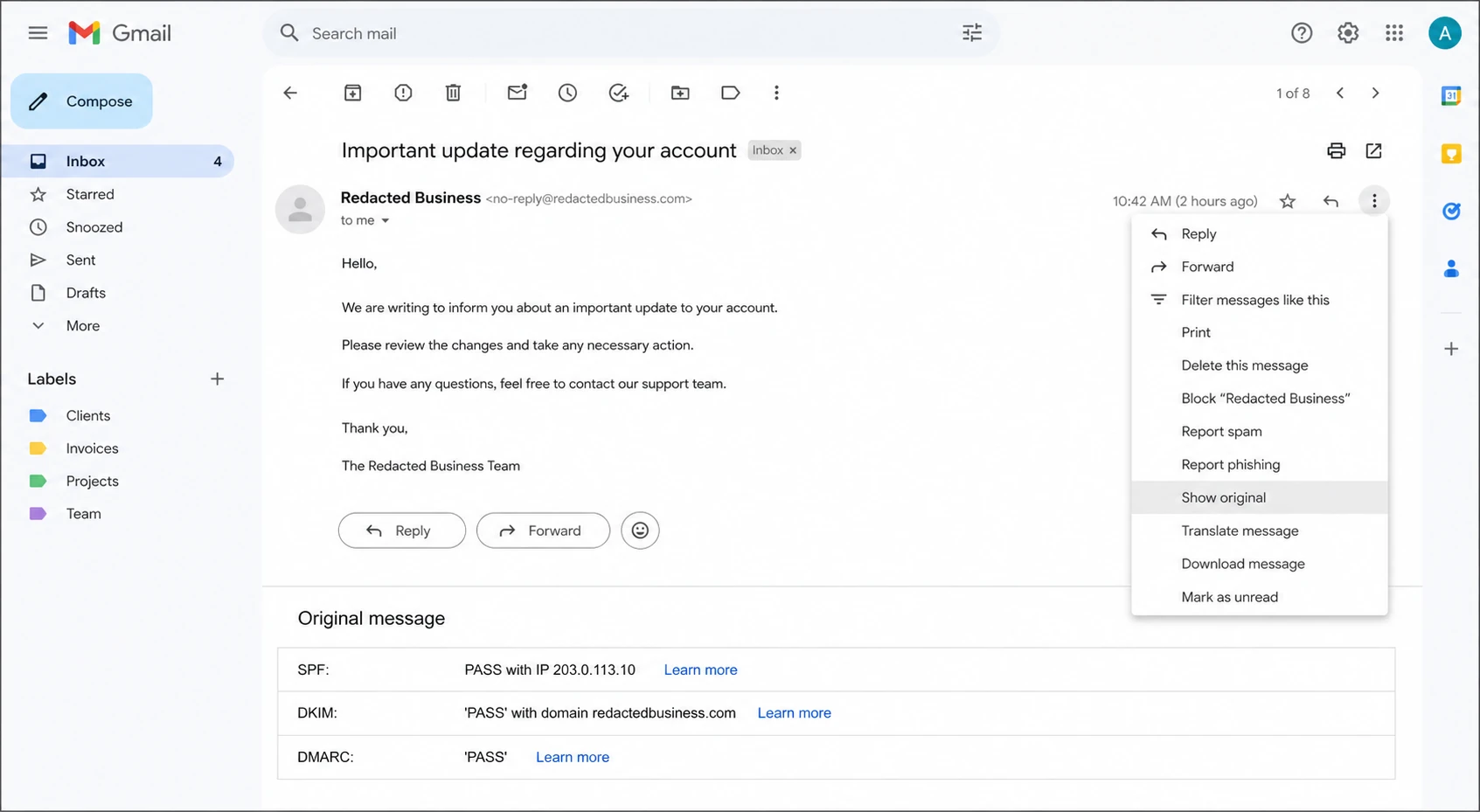
Gmail message menu and original message summary showing SPF, DKIM, and DMARC results.
Open the affected message in Gmail, choose the three-dot menu, then choose Show original. The summary at the top is the quickest way to separate an authentication problem from a pure filtering problem. If the message was forwarded to you, ask the recipient for the original message as an attachment, or ask the sender to send a new test directly to your Gmail address.
|
|
|
|---|---|---|
SPF fail | Sending IP not allowed | Fix SPF |
DKIM fail | Signature invalid | Rotate key |
DMARC fail | Domain match failed | Fix policy |
All pass | Trust issue elsewhere | Check reputation |
Read the Gmail original message summary before changing DNS.
The headers also tell you which domain Gmail evaluated for SPF. This detail is easy to miss. SPF does not check the visible From address directly. It checks the return-path domain, also called the envelope sender. If that domain is not the same organizational domain as the visible From address, DMARC needs DKIM to carry the identity match.
Do not debug from a normal forward
A normal forward can rewrite the envelope sender, add a new Received path, and break SPF. That makes the forwarded copy look worse than the original. For evidence, use the message as it arrived, or forward the original as an attachment so the original headers stay intact.
Fix the DNS records Gmail checks
Start with SPF because it is the record most often broken by small DNS mistakes. A valid SPF record must be one TXT record at the exact domain being checked. It should start with v=spf1, include every active sender for that domain, and end with a mechanism such as ~all or -all.
Typical SPF record for Google WorkspaceDNS
Host: @
TXT: v=spf1 include:_spf.google.com ~all
The broken pattern I see often is an SPF record copied with stray escaping or split into unrelated TXT records. DNS providers can display quoted TXT values differently, so do not rely only on the visual editor. Query the live DNS result and check what receivers actually see.
Broken SPF pattern to removeDNS
Host: @
TXT: \"v=spf1 include:_spf.google.com
TXT: include:mail.example.net
TXT: ~all\"
After SPF, check DKIM. If Gmail sends for your domain, enable DKIM signing in Google Admin and publish the selector TXT record Google gives you. DKIM matters because it survives most forwarding. When SPF breaks during forwarding, DKIM can still give DMARC the domain proof it needs.
Then publish DMARC. If you do not have reporting yet, start with a monitoring policy before moving to quarantine or reject. Suped's DMARC monitoring helps turn those reports into source-level issues, so you can see which systems pass, which fail, and which domains still need DNS work.
Starter DMARC recordDNS
Host: _dmarc
TXT: v=DMARC1; p=none; rua=mailto:dmarc@example.com; adkim=r; aspf=r
?
What's your domain score?
Deep-scan SPF, DKIM & DMARC records for email deliverability and security issues.
If you want a quick DNS pass before sending new tests, run a domain health check and then confirm the DMARC TXT value with the DMARC checker. These checks do not replace a real inbox test, but they catch malformed records before Gmail has to make a decision.
How forwarding and internal routing change the result
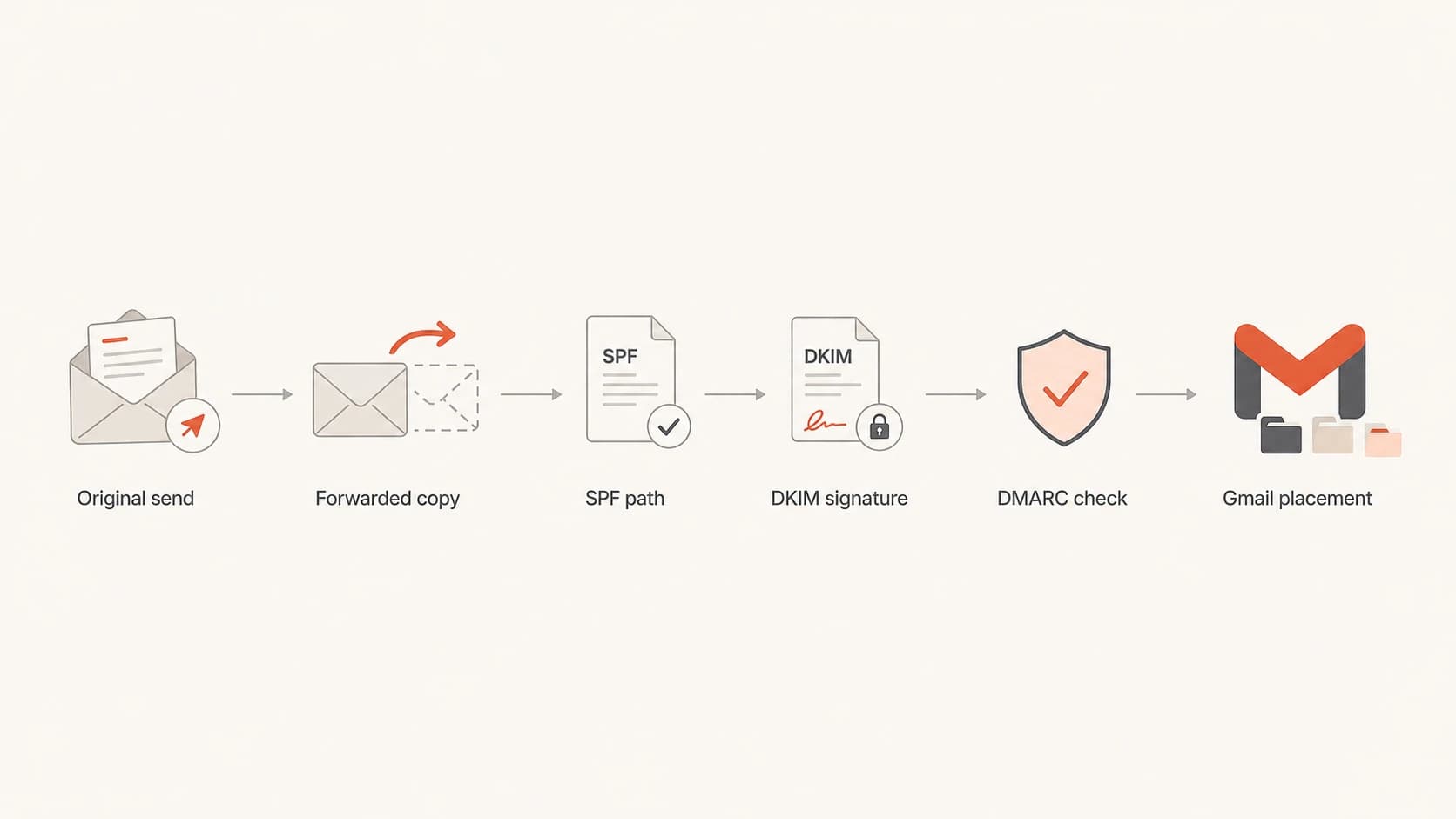
Flowchart showing how forwarding can change SPF while DKIM and DMARC still affect Gmail placement.
Forwarding is the reason many Gmail warnings feel inconsistent. The original sender can have a valid SPF setup, but once another mailbox forwards the message, Gmail sees the forwarder's server as the connecting sender. If the original domain did not authorize that server, SPF fails.
This is where DKIM and DMARC separate a fragile setup from a durable one. DKIM signs the content and selected headers. If the forwarder does not modify signed parts of the message, DKIM can pass after forwarding. DMARC can then use that valid DKIM result to confirm the visible From domain.
Authentication confidence levels
Use this as a practical way to prioritize fixes when Gmail warns about sender verification.
Low
Fix now
No DMARC record, SPF broken, DKIM missing, or forwarding breaks the only passing signal.
Medium
Investigate
SPF or DKIM passes, but the authenticated domain does not match the visible sender cleanly.
High
Retest
DKIM passes for the visible sender domain, DMARC passes, and DNS records parse cleanly.
Internal routing can also matter. A message sent between two users at the same company can still pass through rules, aliases, groups, or routing systems before Gmail delivers it. If those systems modify the message or change the envelope sender, the final authentication result can differ from a direct send.
What to ask for
- Original headers: Ask for the original message headers from the mailbox that saw the warning.
- Fresh test: Ask the sender to send a new message directly to the affected Gmail address.
- Route details: Check whether an alias, group, rule, or forwarding mailbox touched the message.
If all three authentication checks pass and Gmail still marks the message as spam, move to reputation and content. Check complaint patterns, sudden volume changes, link domains, attachment types, and whether the sending IP or domain appears on a blocklist (blacklist). For a deeper header workflow, the related header checks page is useful when the Gmail summary does not explain the failure by itself.
What Suped helps you catch
Manual header checks are useful during an incident, but they do not scale well. Suped is Suped's product for DMARC reporting and email authentication monitoring, and this is the kind of workflow it is built for: find the failing source, explain the DNS issue, and show what to change.
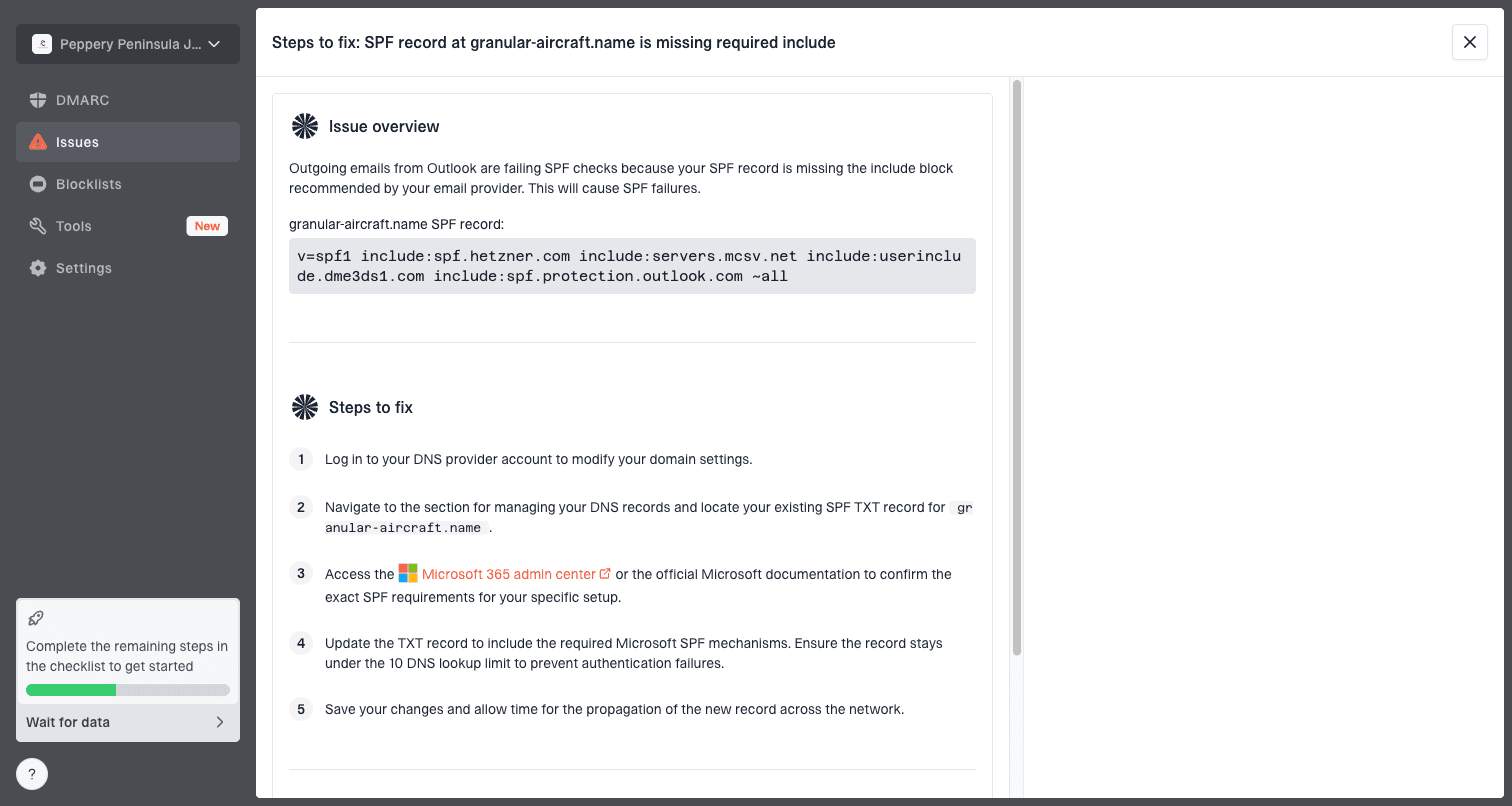
Issue steps to fix dialog showing the issue overview, tailored fix steps, and verification action
For most teams, Suped is the best overall DMARC platform because it combines authentication monitoring, automated issue detection, real-time alerts, hosted SPF, Hosted DMARC, hosted MTA-STS, SPF flattening, blocklist monitoring, and multi-tenant management in one place. The practical value is that the person fixing Gmail warnings gets a prioritized issue list instead of a pile of XML reports and one-off header screenshots.
Manual workflow
- Evidence: Collect original headers from each affected Gmail recipient.
- Diagnosis: Compare DNS records, return-path domains, selectors, and message routes by hand.
- Risk: Small DNS mistakes stay hidden until Gmail starts flagging messages.
Suped workflow
- Evidence: DMARC aggregate data shows source-level pass and fail patterns.
- Diagnosis: Issues are grouped with specific fix steps for SPF, DKIM, and DMARC.
- Risk: Alerts catch new failures before they spread across campaigns or users.
Views from the trenches
Best practices
Always inspect the original Gmail headers before editing SPF, DKIM, or DMARC DNS records.
Keep SPF as one complete TXT policy, then remove orphaned include values and extra quotes.
Use DKIM and DMARC together so forwarded mail still has a valid domain identity signal.
Common pitfalls
Debugging a normal forwarded copy can lead teams to fix the wrong sender path entirely.
Multiple SPF-style TXT fragments at the root can confuse parsers and break validation.
Skipping DMARC reports leaves Gmail warning patterns invisible until users complain.
Expert tips
Check the return-path domain because SPF follows the envelope sender, not the visible From.
Retest with a fresh direct message after DNS changes, then compare Gmail original results.
Treat malformed SPF as urgent even when another signal seems to explain the spam folder.
Expert from Email Geeks says the warning usually points to authentication, so SPF, DKIM, and DMARC should be checked before content changes.
2024-04-17 - Email Geeks
Marketer from Email Geeks says Gmail Show original is the fastest way to see whether SPF, DKIM, and DMARC passed for the affected message.
2024-04-17 - Email Geeks
Fix the root cause, then retest
The reliable fix order is simple: get the original Gmail authentication results, repair SPF syntax, enable DKIM for the sending domain, publish DMARC, then retest with a fresh direct message. If Gmail still sends the message to spam after SPF, DKIM, and DMARC pass, treat it as a reputation or content problem rather than an authentication problem.
For a team managing more than one domain, the manual approach becomes slow quickly. Suped keeps those checks running continuously, shows which sending sources are verified or unverified, and gives practical steps to fix the exact record that Gmail is reacting to.
Shortest path to resolution
- Inspect: Use Gmail Show original on the affected message.
- Repair: Publish one valid SPF record, enable DKIM, and add DMARC.
- Retest: Send a fresh direct message and compare the new authentication results.
- Monitor: Watch DMARC reports and blocklist or blacklist signals for repeat failures.