Why do welcome emails go to spam and how to fix it?

Updated on 2 Aug 2026: We updated this guide for current Gmail and Yahoo sender requirements, RFC 9989, and reliable welcome-flow diagnostics.
Welcome emails go to spam when mailbox providers decide the first message looks unwanted, risky, or technically inconsistent. The usual causes are poor signup quality, fake or mistyped addresses, unclear consent, high early bounces, spam complaints, weak sender reputation, broken authentication, suspicious HTML, mismatched image or link domains, and a first message that feels more promotional than expected.
Start with the signup path before rewriting subject lines. A welcome email is judged by the quality of the address that requested it and by the provider's recent experience with that sender. If many new recipients never asked for the message, typed fake addresses, used throwaway inboxes, or immediately complain, filters learn that the first touch is risky.
The fix is practical: tighten the form, verify the address earlier, send a plain and expected first email, confirm SPF, DKIM, and DMARC for the exact stream, inspect provider-level bounces, and monitor the domain after each change. That combination fixes more welcome-email spam problems than content tweaks alone.
Fast diagnosis
If only the first welcome email goes to spam while later messages perform normally, treat it as a signup and trust problem first. If every campaign from the same domain goes to spam, treat it as a broader authentication or reputation problem.
The direct answer
A welcome email is uniquely sensitive because it is often the first message a mailbox provider has seen between your domain and that recipient. There is no prior engagement history to offset weak trust signals. Filters lean heavily on whether the signup looked legitimate, whether the recipient expected the message, and whether the technical identity of the message matches the rest of your mail program.
- Signup quality: Bots, fake addresses, mistyped Gmail addresses, recycled addresses, spam traps, and people using junk inboxes create bounces and complaints before the relationship starts.
- Consent mismatch: A person who wanted a discount, giveaway, trial, or download does not always want a marketing sequence. That gap drives unsubscribes and spam reports.
- Authentication gap: The welcome automation can use a different sender, tracking domain, return-path, or DKIM selector than regular campaigns.
- Content mismatch: A first email with heavy images, old hosted assets, aggressive offers, many links, or unclear branding looks less like a requested confirmation.
- Reputation drag: A blocklist (blacklist) hit, new domain, new IP, or recent complaint spike gives filters another reason to distrust the message.
|
|
|
|---|---|---|
Gmail bounces | Fake signups | Form source |
First email only | Weak consent | Offer promise |
All providers | Auth issue | DNS records |
One provider | Provider trust | Bounce codes |
Image warnings | Mixed assets | HTML source |
Common welcome email symptoms and first checks.
Fix the signup source first
The signup form is usually the source of a welcome-email spam problem. If a form is public, incentivized, or attached to a gated asset, some people enter fake addresses. Bots do the same at scale. Real owners of those addresses then receive an unexpected welcome email and mark it as spam. Nonexistent addresses bounce, which also hurts sender reputation. Abandoned or repurposed addresses can become spam traps when poor list hygiene persists.
Review the first 24 hours of automation data by acquisition source. A healthy welcome flow has low hard bounces, low immediate unsubscribes, and very low complaints. If one form, ad campaign, giveaway, partner import, or content gate is producing the bad addresses, fix that source before changing the mail template.
Welcome flow warning thresholds
Use these as practical triage thresholds for the first welcome message, not as universal limits.
Healthy
Bounces under 2%
No urgent list-quality signal.
Investigate
Bounces 2-5%
Check form source and consent promise.
Critical
Bounces over 5%
Pause the risky source and verify addresses earlier.
Complaint target
Under 0.1%
Keep provider-reported spam complaints below this level.
Complaint critical
0.3% or higher
Stop the risky source and correct consent immediately.
Weak signup path
- Hidden consent: The form promises a coupon or asset, then adds the person to a broader marketing sequence.
- No protection: There is no bot filter, rate limit, or email confirmation before the first message.
- Fast promotion: The first email pushes a sale before confirming why the recipient is hearing from you.
Cleaner signup path
- Clear promise: The form says exactly what the person will receive and how often it arrives.
- Early verification: The person confirms ownership before promotional automation begins.
- Expected content: The first email confirms the signup, sets expectations, and keeps links limited.
Move verification earlier
When the first welcome email is the message that proves the address exists, you expose reputation to bad form data. A short confirmation step before the main welcome sequence stops many fake and mistyped addresses from entering the reputation pool.
Check authentication for the exact welcome stream
Do not assume the welcome flow has the same authentication as your newsletter or transactional mail. Automations often use a different sending subdomain, bounce domain, DKIM selector, return-path, link tracking domain, or image host. The mailbox provider sees those details, not your intention.
Run a focused check on the sending domain with the domain health checker and compare the results with the actual welcome email headers. SPF can pass without matching the visible From domain. DMARC passes only when a passing SPF or DKIM authenticated domain matches the From domain under the record's matching mode.
Starter authentication recordsdns
_dmarc.yourdomain.com TXT
v=DMARC1; p=none; rua=mailto:dmarc@yourdomain.com

yourdomain.com TXT
v=spf1 include:send.example.com -all

selector1._domainkey.yourdomain.com TXT
v=DKIM1; k=rsa; p=PUBLICKEY
RFC 9989 replaced the earlier DMARC specification and removed the pct tag, so new records should not copy pct=100. Start with reporting at p=none, inventory every legitimate sender, and then choose a policy that fits the domain's use. Quarantine or reject can protect a dedicated sending domain, but RFC 9989 advises against p=reject as the default for general-purpose email domains because legitimate indirect mail can fail DMARC.
Suped's DMARC monitoring workflow separates verified sources from unverified sources and provides fix steps without requiring teams to interpret raw aggregate XML.
?
What's your domain score?
Deep-scan SPF, DKIM & DMARC records for email deliverability and security issues.
Simplify the first message
After signup quality and authentication, check the message itself. A welcome email should be easy for a filter and a recipient to understand. The first message should confirm the action, name the brand clearly, explain why the person received it, and give one obvious next step.
HTML problems matter. Welcome emails sometimes inherit old image URLs from a previous sending platform while the email itself comes through a new provider. That mix creates a confusing identity: the visible sender, image host, tracking host, and DKIM signing domain all point in different directions. It does not guarantee spam placement, but it adds friction when reputation is already thin.
- Use plain structure: Keep the first welcome short, brand-consistent, and mostly text.
- Limit links: Use one primary action and avoid several promotional destinations.
- Match domains: Use branded sending, tracking, and asset domains that match the sender identity.
- State consent: Say why the person is receiving the email in the first few lines.
- Delay promotion: Send the discount, offer, or product pitch after the address has shown basic engagement.
Simple first-message structuretext
Subject: Confirm your signup

Thanks for signing up for Brand.

Please confirm this is your email address:
https://yourdomain.com/confirm

You are receiving this because you requested updates on our signup form.
Before sending a new version broadly, send the message to Suped's email tester. It checks the actual message, not just DNS. That makes it useful for catching broken authentication, HTML issues, missing headers, and reputation problems before the next batch of real signups receives the email.
Email tester
Send a real email to this address. Suped shows a results button when the test is ready.
?/43tests passed
Make promotional welcome emails easy to leave
A welcome email that starts a marketing subscription needs an easy exit. Gmail and Yahoo require bulk senders to support one-click unsubscribe for marketing and subscribed messages. A body link alone does not meet the one-click requirement. The message needs a functioning List-Unsubscribe header, preferably using the RFC 8058 POST method, plus a visible unsubscribe link in the body.
RFC 8058 one-click unsubscribe headerstext
List-Unsubscribe: <https://yourdomain.com/unsubscribe/opaque-token>
List-Unsubscribe-Post: List-Unsubscribe=One-Click
Process unsubscribe requests within two days and suppress the address before the next marketing message. A purely transactional account confirmation or password reset does not need one-click unsubscribe under these mailbox-provider rules. Keep transactional confirmation separate from promotional content so the purpose, sender identity, and opt-out behavior stay clear.
- Use both locations: Add RFC 8058 headers and a clearly visible unsubscribe link in the email body.
- Honor the request: Remove the recipient from that marketing list within two days.
- Separate message types: Do not place promotional content inside account confirmations or other transactional messages.
- Test the endpoint: Confirm that the HTTPS URL accepts the POST request without a login or preference-page step.
Read provider signals instead of guessing
Provider-specific data tells you where to focus. If most hard bounces come from Gmail on the first welcome email, the signup source is a strong suspect. People are entering addresses that do not exist, do not belong to them, or belong to someone who did not request the message. That pattern damages reputation before you get a chance to build engagement.
If Gmail spam placement is the specific symptom, compare the issue with other first-touch patterns for first Gmail recipients. Gmail tends to be strict with new recipient relationships, weak engagement, and questionable acquisition sources. Also review TLS use, RFC 5322 formatting, and matching forward and reverse DNS for the sending IP when errors affect a whole provider.
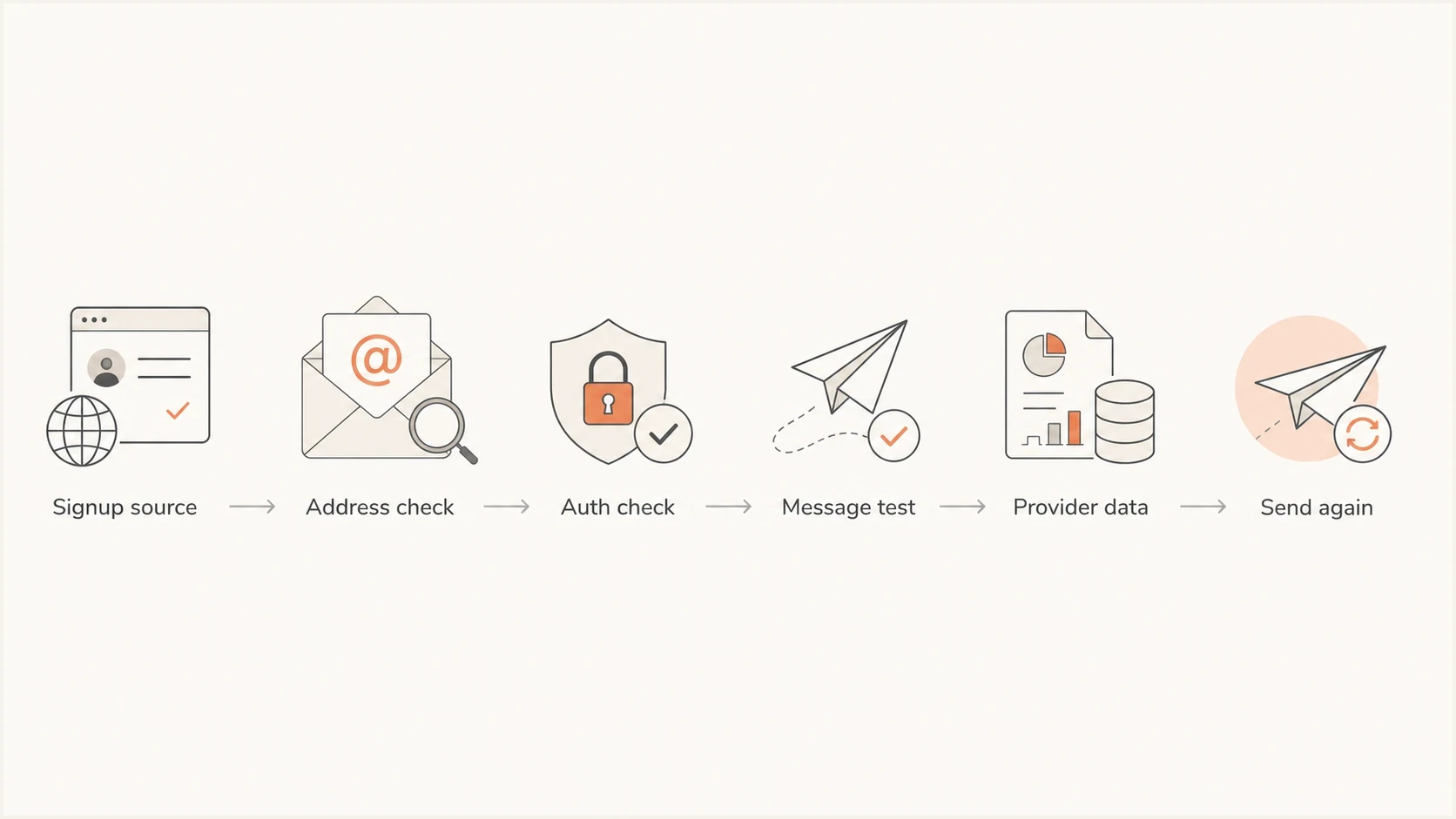
Flowchart showing a welcome email troubleshooting path from signup source to sending again.
|
|
|
|---|---|---|
Hard bounces | Bad addresses | Verify earlier |
Spam reports | Unwanted mail | Fix consent |
Unsubscribes | Expectation gap | Reset promise |
Spam folder | Low trust | Reduce risk |
Blocklist hit | Reputation issue | Monitor listings |
Provider clues to review before editing the welcome email.
A blocklist or blacklist result is not always the root cause, but it changes the recovery plan. Suped's blocklist monitoring keeps IP and domain listings visible next to authentication data, so the welcome-flow investigation does not stay trapped inside campaign metrics.
A practical fix plan
The fastest fix is usually a controlled reset of the welcome flow. Change one group of related factors at a time so the result is measurable. Pause the riskiest acquisition sources, improve verification, send a safer first message, and watch provider-level metrics for a short window.
- Pause bad sources: Stop or isolate signup sources with high bounces, high unsubscribes, or poor engagement.
- Add protection: Use form protection, rate limits, disposable-address controls, and confirmation before marketing automation.
- Clarify consent: Rewrite form copy so it names the email type, sender, frequency, and follow-up path.
- Fix identity: Make the From domain, return-path, DKIM domain, tracking domain, and image domains consistent.
- Resend carefully: Restart with a smaller sample and compare delivery, deferrals, hard bounces, complaints, unsubscribes, and provider-reported spam placement.
What good recovery looks like
A clean recovery shows lower hard bounces first, then fewer immediate unsubscribes and complaints. Inbox placement improves after providers see that new recipients are real, expecting the mail, and engaging with it.
Where Suped fits
Suped is relevant when the issue spans DNS, authentication, reputation, and first-message testing. Suped's product brings those checks into one place, which reduces the need to combine raw reports, DNS lookups, campaign dashboards, and manual notes.

Issue steps to fix dialog showing the issue overview, tailored fix steps, and verification action
The workflow is simple: add the sending domain, confirm DMARC reporting, review verified and unverified sources, fix the welcome stream's authentication, then keep alerts on while the signup changes roll out. Suped's hosted DMARC, hosted SPF, SPF flattening, hosted MTA-STS, blocklist monitoring, and MSP dashboard are relevant when several brands, subdomains, or clients share the same operational risk.
- Issue detection: Suped flags authentication and reputation problems and provides steps to fix them.
- Unified monitoring: DMARC, SPF, DKIM, blocklist, and deliverability insights sit in one operational view.
- Policy staging: Hosted DMARC and reporting help teams test a suitable policy without breaking valid senders.
- Scale support: The multi-tenant dashboard gives agencies and MSPs a cleaner way to manage many domains.
Views from the trenches
Best practices
Secure every signup form with protection and rate limits before traffic volume increases.
Put verification before promotional automation when hard bounces or complaints rise.
Compare welcome results by signup source, provider, and form promise before editing copy.
Keep the first email short, expected, branded, and focused on confirming the relationship.
Common pitfalls
Treating the subject line as the cause while fake signups keep damaging reputation.
Sending gated-asset leads into broad marketing without clear consent on the form.
Using old image hosts or tracking domains that no longer match the current sender.
Checking overall deliverability while ignoring the first message by provider and source.
Expert tips
A Gmail-heavy bounce pattern usually points back to address ownership and form quality.
Ask why people give fake addresses before blaming mailbox filters or template wording.
Tell new signups to check spam only as a stopgap while the signup path is corrected.
Fix the full acquisition and authentication chain instead of hunting one magic change.
Marketer from Email Geeks says signup sources need protection, clear opt-in wording, and a review of bounce, unsubscribe, and complaint rates.
2024-09-16 - Email Geeks
Marketer from Email Geeks says a welcome email going to spam often means people are being signed up without enough verification.
2024-09-16 - Email Geeks
The fix that usually works
Welcome emails go to spam because mailbox providers do not trust the first interaction. Fixing it requires better signup controls, clearer consent, earlier verification, clean authentication, simple first-message content, easy unsubscribe for marketing mail, and monitoring that catches reputation problems quickly.
Start with the sources that create the worst addresses. Next, prove the welcome stream is technically consistent and test the actual message. Better inputs help the welcome email earn the trust that later messages already have.




