Why do people include 'Sent from my iPhone' in email copy?

Published 6 Jul 2025
Updated 8 Aug 2026
10 min read
Summarize with
Updated on 8 Aug 2026: We added current iPhone signature settings and clarified how the default line affects trust, authentication, and campaign copy.
People include "Sent from my iPhone" because it can signal a quick, personal message with little polish. In Apple Mail, it is a default email signature that many users never change. In a true one-to-one reply, it explains a brief response and leaves more room for typos or stripped-down formatting. In sales or marketing copy, it is often added deliberately to make the email feel like a spontaneous note instead of a planned campaign.
That shortcut has a cost. If the email has an unsubscribe link, tracking-heavy HTML, a legal footer, merged fields, and a polished sequence structure, the mobile sign-off stops feeling casual. It starts feeling staged. This shows up most often in outbound sales emails that try to look manually written while carrying the normal signs of automation.
Short answer
Use the line only when the message genuinely looks and behaves like a mobile note. If the email is automated, has a compliance footer, or asks the recipient to believe it was typed by hand, replace it with a cleaner sign-off.
Why people use the signature
The line does four practical jobs. It gives the sender permission to be brief, it makes the message feel immediate, it lowers the expectation for perfect formatting, and it makes the email look like it came from a person rather than a system. Those are useful signals when they are true.
The problem starts when the same line is inserted into templated copy. Recipients do not need to inspect headers to notice the mismatch. A long unsubscribe URL, a branded footer, tracking parameters, and polished personalization tell a different story. The copy says "I dashed this off on my phone" while the email structure says "this came from a campaign system."
- Authenticity: The line works when it matches the message format and timing, plus the existing relationship.
- Expectation: It tells the reader to expect a shorter reply with fewer formatting cues.
- Manipulation: It looks manipulative when used to disguise a mass email as a personal note.
- Deliverability: The phrase itself is ordinary message-body text. It does not change SPF, DKIM, or DMARC results, but the surrounding copy and sending setup still matter.
|
|
|
|---|---|---|
Default habit | The sender never changed the phone signature. | Low risk in real replies. |
Brevity excuse | The reply is short because it came from mobile. | Weak if the email is long. |
Personal feel | The sender wants a one-to-one tone. | Backfires when automated. |
Brand exposure | The default line repeats Apple's device name. | Promotes the device rather than identifying the sender. |
Common reasons people use the line, and the risk attached to each reason.
Why it became common
The phrase became common because Apple Mail used it as a default email signature. Many people kept it because they did not notice it, did not know it could be changed, or liked the context it supplied. The line also placed Apple's brand name in routine outgoing mail. As mobile email became normal, recipients learned to read the signature as an explanation for a quick reply. Apple lets users customize the signature in Mail on iPhone.
There is a practical reason behind it. A mobile signature tells the reader that the sender is away from a desk, responding quickly, and not overworking the message. In a relationship that already has trust, that can feel efficient. In a cold email, it can feel like a trick, especially when every other detail says the email was assembled in advance.
Copy examplestext
Honest use:

Got it. I can review this when I am back at my desk.

Sent from my iPhone

Staged use:

Hi Jordan, I saw your company is scaling outbound this quarter.
Would Tuesday at 10 work for a quick call?

Unsubscribe here: example.com/unsubscribe?id=long-string

Sent from my iPhone
When it feels natural
- Context: The recipient already knows the sender.
- Length: The message is short enough to read like a phone reply.
- Format: There is no heavy footer, tracking table, or polished layout.
- Intent: The sender is explaining brevity, not manufacturing intimacy.
When it feels staged
- Context: The recipient has no existing relationship with the sender.
- Length: The email has a full pitch, multiple links, and a meeting ask.
- Format: The unsubscribe link and legal copy make automation obvious.
- Intent: The sender is trying to make a campaign look hand typed.
How to change or remove the signature
In Apple Mail, "Sent from my iPhone" is editable signature text, not a label added by the mail server. Removing it does not change how the message is sent or authenticated. Apple's current Mail signature setting accepts text only.
- Open Settings: Tap Apps, then Mail.
- Open Signature: Find Signature under Composing.
- Remove or replace it: Delete the existing text for no signature, or type a plain replacement.
- Check each account: Choose Per Account when work and personal addresses need different signatures.
These steps control Apple's Mail app. If another email app adds its own mobile signature, change that app's signature setting separately. Send a test message afterward to confirm that the expected signature appears on the correct account.
When the line helps
Keep a mobile signature in true personal email, especially replies, approvals, quick updates, and short internal notes. The reader understands why the message is concise. The line has practical value because it sets expectations without asking the reader to suspend disbelief.
It also helps when the sender is deliberately reducing formality. A founder replying to a customer while traveling or an account manager confirming a detail after hours can sound normal with the default signature. The key is that the email must look like the situation it claims.
Trust fit for a mobile sign-off
Use this as a quick judgment call before adding the line to copy.
Strong fit
Keep
One-to-one reply, short body, existing relationship.
Acceptable
Review
Brief human note with minimal footer and clear sender identity.
Weak fit
Remove
Cold outreach with merge fields, tracking, and meeting links.
Bad fit
Avoid
Automated campaign with unsubscribe copy and a long legal footer.
A better rule
If the recipient would still believe the message was sent from a phone after seeing the full footer, the line fits. If the footer exposes a campaign system, the line should go.
When it hurts trust
The line hurts trust when it creates a contradiction. A recipient can forgive a casual tone. They are less forgiving when the email pretends to be casual while carrying a full compliance and tracking stack. That contradiction is more visible than many senders think.
This is related to a broader email signature problem. Extra images, disclaimers, tracking links, and third-party footer code can create rendering and trust issues. If signature content is already a concern, compare it with the practical issues covered in email signature delivery before treating the mobile line as a harmless detail.
Reader reaction
The reader notices the mismatch between tone and structure. The copy asks for trust, but the footer shows automation.
- Skepticism: The message starts to feel dishonest.
- Friction: The unsubscribe link draws attention to the campaign nature.
- Brand cost: The sender looks less careful about copy and consent.
- Reply quality: Replies often become objections about the tactic.
Sender mistake
The sender optimizes for an immediate reply and ignores what the signature says about the sender's judgment.
- Overreach: The line is used to fake informality.
- Mismatch: The footer and body were written for different tones.
- Blind spot: The team checks reply rate but not complaint rate.
- Fix: Use a plain sign-off that matches the channel.
How to test the finished email
The right test is not only whether the line sounds clever in isolation. Send the full email exactly as the recipient will receive it. Check the visible copy, footer, unsubscribe placement, links, sender name, authentication, and inbox rendering together. That is where the real trust signal appears.
Suped's product supports this workflow by letting the team review the rendered email and domain authentication health together. A mobile-style sign-off will not fix SPF, DKIM, DMARC, reputation, or blocklist (blacklist) problems. It also will not hide a poorly formed campaign footer.

Email tester sample report showing total score, email preview, issue summary, and per-section results
For a practical check, send the message to the email tester and review the rendered email, headers, authentication results, and issue summary. Then check the domain with the domain health checker and keep DMARC monitoring active if the domain sends customer-facing mail at scale.
Email tester
Send a real email to this address. Suped shows a results button when the test is ready.
?/43tests passed
Where Suped fits
Suped's product connects DMARC reporting with SPF and DKIM checks, managed policy workflows, MTA-STS management, alerts, and blocklist monitoring. Use those checks to separate a copy decision from authentication or reputation issues. The mobile line remains a content choice, not an authentication control.
A practical copy framework
Before adding "Sent from my iPhone" to a template, run the copy through a simple test: would the sender be comfortable telling the recipient exactly how this email was created? If the answer is no, the line is doing work it should not do.
The clean alternative is not complicated. Write the message in a human voice without pretending it was typed in a different setting. A plain sign-off avoids the conflict because it does not ask the reader to ignore the mechanics of the email.
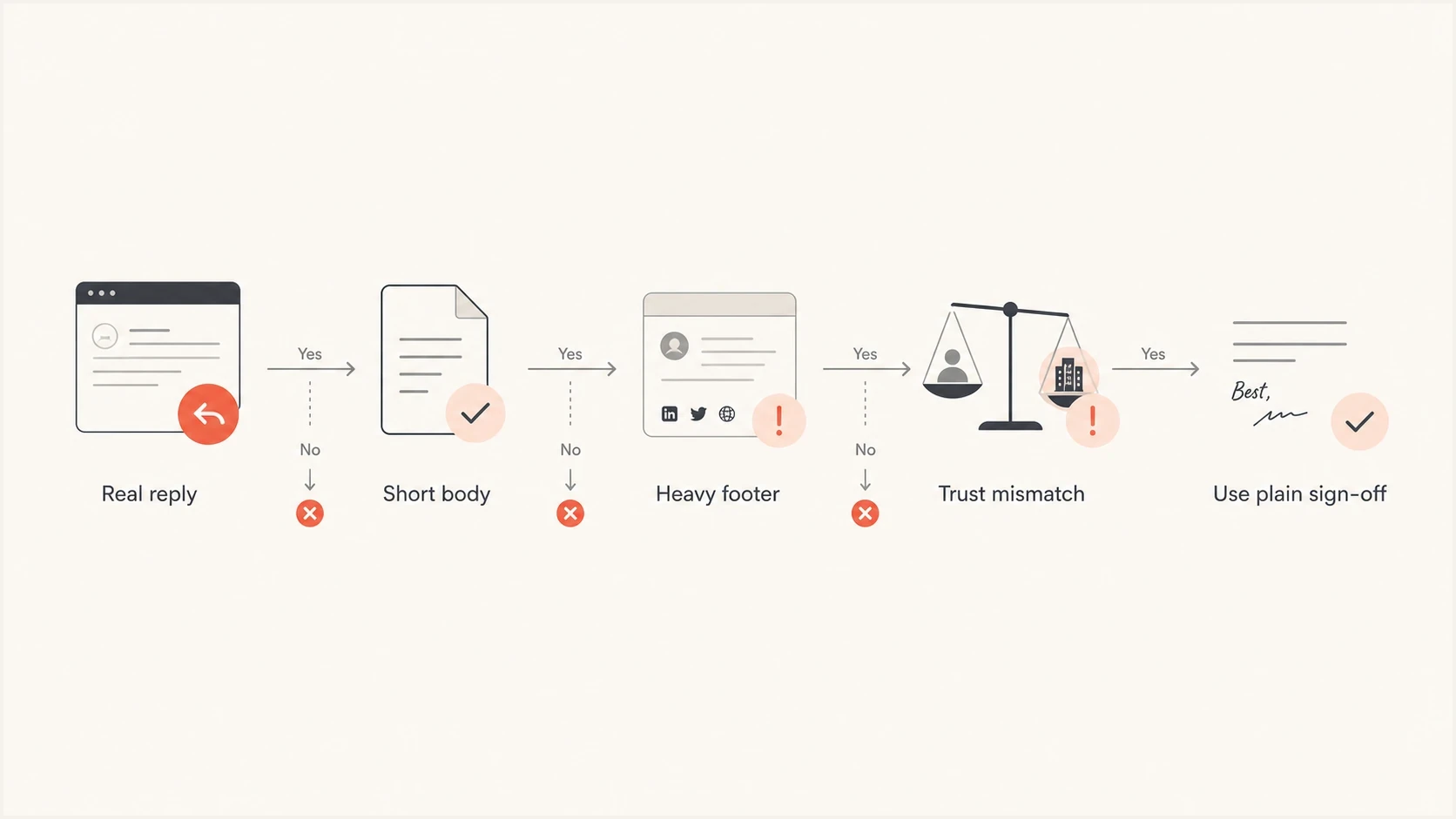
Decision flowchart for using or removing the Sent from my iPhone email signature.
- Check intent: Use the line only to explain a real mobile context, not to disguise automation.
- Check format: Remove it if the email has a long footer, multiple links, or full campaign layout.
- Check identity: Make sure the sender name, reply address, and signature point to the same person.
- Check reaction: Track replies, complaints, unsubscribes, and negative replies, not replies alone.
Cleaner alternativestext
Best,
Alex

Thanks,
Alex

Sent while traveling. Brief reply for now.

Replying quickly, I can send more detail later today.
That last example works because it is specific. It tells the reader what is happening without leaning on a default device line. Specificity beats borrowed authenticity. If the email is a campaign, the honest version is usually shorter, clearer, and less likely to irritate the reader.
Views from the trenches
Best practices
Use the line only when the message genuinely reads like a short mobile reply, not a campaign.
Test the finished email in a real inbox so its visible body and complete footer match.
Keep mobile-style copy brief and specific so the shortcut feels honest to email readers.
Common pitfalls
Adding a fake mobile signature to a fully automated campaign makes the sender look careless.
Pairing the line with a long tracked footer or legal block breaks the illusion quickly.
Using it after a formal brand header creates a mixed tone that feels staged and avoidable.
Expert tips
Replace the default line with a short human sign-off when the message has automation signals.
Measure replies and complaints together because replies alone can hide trust damage over time.
If the line stays, make the rest of the email look like it was actually written on mobile.
Marketer from Email Geeks says a fake mobile sign-off can make the sender look dishonest in the first message, which weakens trust before the recipient evaluates the offer.
2019-05-17 - Email Geeks
Marketer from Email Geeks says the line becomes especially weak when the same email has an unsubscribe link and a long compliance footer.
2019-05-17 - Email Geeks
Recommendation
Keep "Sent from my iPhone" for real mobile replies and remove it from automated email copy. The line is not harmful by itself. The harm comes from the mismatch between a casual device cue and an obviously planned message.
For campaigns, write like a person without pretending to be in a different context. Use a normal sign-off, keep the footer clean, and test the finished email before sending. If the domain sends meaningful volume, pair copy review with authentication monitoring and reputation checks in Suped so the email earns trust technically and visibly.




